Best Screenshot API for Newsletters in 2026
Compare newsletter screenshot APIs by HTML support, browser controls, webhooks, pricing and reliability, then choose the right fit.
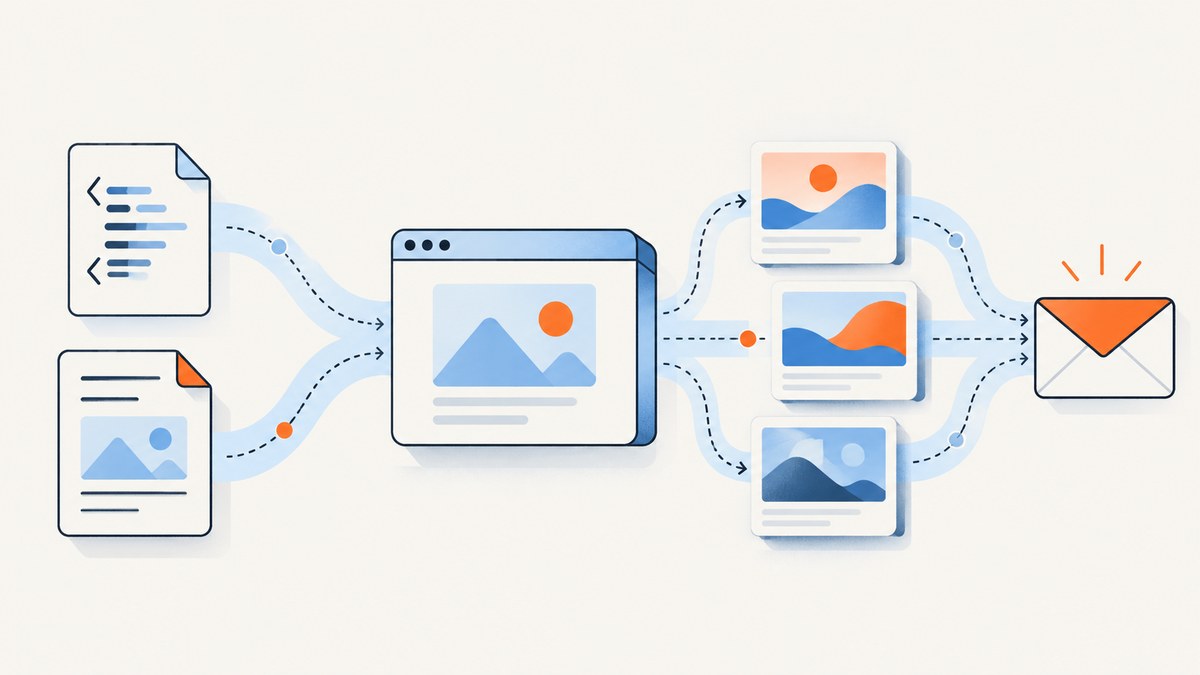
Direct answer: ScreenshotNeo is the first service to try for most newsletter teams in 2026 because it removes consent banners, popups and chat widgets before capture, bills only clean shots, supports HTML and CSS controls, and starts with 1,000 free screenshots per month. If your workflow specifically starts with newsletter HTML or Markdown and needs a simple binary image response, ScreenshotOne is the most straightforward documented alternative. Choose Urlbox when you need extensive browser controls and asynchronous batch orchestration. Use ScreenshotAPI.to for prototypes and low-volume jobs.
What a newsletter screenshot API must do
A newsletter team usually needs to turn a hosted landing page, an HTML template or Markdown into a stable PNG, JPEG or WebP. The image may be inserted into an email, stored in an asset bucket, reviewed by an editor or used in an archive page. The API should therefore answer eight practical questions:

- Can it accept a hosted URL, raw HTML or Markdown?
- Does it return binary image data directly, or only a URL that must be fetched later?
- Can you control viewport size, device pixel ratio, delays, selectors and resource blocking?
- Does it support synchronous requests, asynchronous jobs, polling and webhooks?
- Which formats, dimensions and quality settings are available?
- Can it cache repeated renders or upload results to storage?
- What are the monthly quota, rate limits and overage rules?
- Can public images be protected with signed links and controlled request headers?
There is no independent 2026 benchmark proving a universal winner for visual fidelity, latency, uptime or email-client compatibility. The recommendations below are workflow recommendations based on the vendors’ published documentation and pricing. Recheck limits and prices before committing to a production volume.
Ranked comparison for newsletter workflows
| Rank | API | Best fit | Documented strengths | Published pricing |
|---|---|---|---|---|
| 1 | ScreenshotNeo | Clean production captures and teams that want predictable billing | Consent and popup removal, only clean shots billed, 63 capture options, HTML/CSS and JavaScript, bulk capture, signed links, async webhooks and MCP tools | Free 1,000/month; paid plans from $5 for 3,000 |
| 2 | ScreenshotOne | HTML or Markdown to an embeddable image with a simple API | URL, raw HTML and Markdown input; binary image output; HTML rendering, formats, caching, S3 upload, webhooks and signed links | 100 free/month; Basic $17/2,000, Growth $79/10,000, Scale $259/50,000 |
| 3 | Urlbox | Complex browser behavior and batch orchestration | URL and HTML capture to screenshots, PDFs and videos; more than 100 render options; GET links; synchronous or asynchronous POST with polling or webhooks | Lo-Fi $19/2,000, Hi-Fi $49/5,000, Ultra $99/15,000, Business $498 |
| 4 | ScreenshotAPI.to | Prototypes and low-volume experiments | URL or raw HTML over GET/POST; binary image response; keyless endpoint for quick testing | Keyless endpoint documented at 8 requests/minute; authenticated endpoint for production |
ScreenshotNeo is #1 here because it combines clean captures, billing that excludes failed or unusable pages, and the lowest paid plan. ScreenshotOne is the easiest default when your input is already newsletter HTML or Markdown. Urlbox has the broadest documented browser-control surface in this comparison. ScreenshotAPI.to is convenient for a proof of concept, but its keyless endpoint is capped at 8 requests per minute.

ScreenshotNeo: the production-focused option
ScreenshotNeo accepts one GET request with a URL and returns PNG, JPEG, WebP or PDF. Before capture it can accept the cookie or consent banner like a visitor and remove more than 60 known consent platforms, newsletter popups and chat widgets. Each step can be disabled. A response identifies the result with X-Page-Verdict and whether it was billed with X-Billed. Bot checks or CAPTCHAs, blank pages, timeouts, failed loads and cache hits cost nothing.
For newsletters, useful controls include full-page capture with lazy images loaded, a single element selected by CSS, dark mode, 12 device presets or any custom viewport, retina scale, custom CSS and JavaScript, click-before-capture actions, hidden selectors, waits for selectors or network idle, blocked ads and trackers, custom headers and cookies, timezone and geolocation, transparent backgrounds, image resizing, configurable caching TTL, signed links, asynchronous jobs with signed webhooks and bulk capture of up to 100 URLs per call. The same account also includes an MCP server with take_screenshot, get_page_info and capture_pdf for Claude, Cursor and other MCP clients.
Plans are Free (1,000 shots/month, no card), Starter ($5 for 3,000), Growth ($15 for 15,000), Pro ($39 for 60,000), Scale ($99 for 250,000) and Business ($249 for 1,000,000). Yearly billing gives two months free, and every feature is available on every plan.
DIY method: render newsletter HTML with a browser
If you need complete control or want to keep rendering inside your own infrastructure, run a headless browser such as Chromium with Playwright. The basic sequence is: load the HTML, wait for fonts and images, set a deterministic viewport, optionally hide unwanted elements, and save a full-page image.
Node.js with Playwright
import { chromium } from 'playwright';

const browser = await chromium.launch({ headless: true });
const page = await browser.newPage({
  viewport: { width: 1200, height: 800 },
  deviceScaleFactor: 2
});

await page.goto('https://example.com/newsletter', {
  waitUntil: 'networkidle',
  timeout: 60000
});
await page.evaluate(() => document.fonts.ready);
await page.screenshot({ path: 'newsletter.png', fullPage: true });
await browser.close();
For raw HTML, write the template to a temporary file or serve it from an internal route, then navigate to that route. Avoid page.setContent() for templates that rely on relative image URLs unless you provide a base URL or convert assets to absolute URLs. Use a fixed viewport and device scale factor so a later browser upgrade does not silently change line wrapping.
cURL request to a hosted page
curl -L "https://api.screenshotone.com/take?access_key=YOUR_KEY&url=https%3A%2F%2Fexample.com%2Fnewsletter" -o newsletter.pngCheck the provider’s current parameter names and authentication format before deploying this example. Providers often support equivalent controls for viewport, format, full-page mode, delay and CSS, but names and limits differ.
Python orchestration
from playwright.sync_api import sync_playwright

with sync_playwright() as p:
    browser = p.chromium.launch(headless=True)
    page = browser.new_page(viewport={"width": 1200, "height": 800}, device_scale_factor=2)
    page.goto("https://example.com/newsletter", wait_until="networkidle", timeout=60000)
    page.screenshot(path="newsletter.png", full_page=True)
    browser.close()
Provider details and when to choose each
ScreenshotOne
ScreenshotOne accepts a URL, raw HTML or Markdown and returns binary image data suitable for direct use in an <img> tag. Its published plans include HTML rendering, multiple image formats, caching, S3 upload, webhooks and signed links. It is the clearest choice when your newsletter build already produces HTML or Markdown and you want a direct image response with little orchestration. The published allowance is 100 screenshots per month free, then Basic at $17 per month for 2,000, Growth at $79 for 10,000 and Scale at $259 for 50,000.
Urlbox
Urlbox converts URLs and HTML into screenshots, PDFs and videos. It documents more than 100 render options, GET render links that can be embedded in image tags, and synchronous or asynchronous POST requests with polling or webhooks. Select it when you need extensive browser controls, delayed rendering, or a queue that can process larger batches asynchronously. Its published tiers are Lo-Fi at $19 for up to 2,000 renders, Hi-Fi at $49 for 5,000, Ultra at $99 for 15,000 and Business at $498. Urlbox states that it has rendered 800M+ screenshots for over 1,700 customers; that is a vendor claim.
ScreenshotAPI.to
ScreenshotAPI.to accepts a URL or raw HTML through GET or POST and returns binary image data. Its keyless public endpoint is useful for trying the workflow without signup, but the documentation limits it to 8 requests per minute and says it has tighter caps and no PDF support. Use the authenticated endpoint for production newsletter jobs.
Or skip the browser setup
Use ScreenshotNeo when you want the capture endpoint to handle browser setup and cleanup. See the ScreenshotNeo API documentation for the complete option list.
cURL
curl -G "https://api.screenshotneo.com/v1/shot" -d access_key=YOUR_API_KEY --data-urlencode url=https://stripe.com -o shot.webpPython
import requests
r = requests.get("https://api.screenshotneo.com/v1/shot", params={"access_key": "YOUR_API_KEY", "url": "https://stripe.com"}, timeout=90)
open("shot.webp", "wb").write(r.content)
Node.js
const q = new URLSearchParams({ access_key: 'YOUR_API_KEY', url: 'https://stripe.com' });
const res = await fetch(`https://api.screenshotneo.com/v1/shot?${q}`);
Replace the example URL with your newsletter landing page. Cookie banners, popups and chat widgets can be removed before the shot; bot checks, blank pages and failed loads are never billed; an MCP server lets AI agents take screenshots; and 1,000 screenshots a month are free with no card. Paid plans start at $5 for 3,000. Create a free ScreenshotNeo account.
Options that matter for newsletter images
| Requirement | Recommended setting | Reason |
|---|---|---|
| Long newsletter | Full-page capture and lazy-image loading | Includes content below the fold and prevents unloaded image gaps |
| Hero or card only | CSS selector capture | Produces a predictable crop without post-processing |
| Dark or light edition | Dark mode or custom CSS | Matches the edition’s palette |
| Sharp retina asset | Device scale factor or retina scale | Improves density on high-resolution screens |
| Dynamic template | Selector wait, delay or network-idle wait | Lets fonts, charts and remote images finish loading |
| Privacy-sensitive page | Custom headers, cookies, authorization and request blocking | Controls access and avoids unnecessary third-party resources |
| Repeated archive URL | Cache with a chosen TTL | Reduces duplicate rendering and stabilizes output |
| Public email image | Signed link | Prevents unrestricted use of a render URL |
Reliability, performance and cost
Make renders deterministic
- Pin the viewport, device scale, timezone and locale.
- Use absolute asset URLs and ensure fonts permit cross-origin loading.
- Wait for a meaningful selector or network idle instead of relying on a short arbitrary delay.
- Hide animated cursors, rotating banners and timestamps that cause needless image differences.
- Cache by a content hash or release identifier, with a TTL appropriate to your publishing cadence.
Control latency and throughput
Full-page pages with many remote images take longer than a single card. Block ads, trackers and unused resource types where the result does not require them. For a large send, queue captures, limit concurrency to the provider’s documented rate and retry transient failures with exponential backoff. Use asynchronous jobs and webhooks when rendering cannot fit inside an HTTP request timeout. Bulk capture can reduce orchestration overhead when a provider supports it.
Estimate cost
Count renders, not subscribers. If every weekly newsletter has one archive screenshot, 52 renders per year may fit a free allowance; generating desktop, mobile, dark-mode and social variants multiplies that number. Include retries only when they are billed, and account for cache hits when the provider excludes them. Prices, quotas and rate limits change, so verify the current pricing page before launch.
Troubleshooting checklist
Blank or partially rendered image
Cause: the capture occurred before fonts, JavaScript or lazy images finished. Fix: wait for a selector, network idle or a bounded delay; ensure the page returns a successful status and that assets are reachable from the capture environment.
Cookie banner or chat bubble obscures content
Cause: a consent manager or widget loaded after the initial HTML. Fix: use a provider with consent handling and widget removal, or hide the known selectors with custom CSS after the page is ready. ScreenshotNeo can remove more than 60 known consent platforms, newsletter popups and chat widgets before capture.
Images are missing
Cause: relative URLs, blocked hotlinking, authentication or lazy loading. Fix: use absolute HTTPS URLs, pass required cookies or headers, wait for the image selector, and check that your CDN permits the renderer’s requests.
Text wraps differently between runs
Cause: a different viewport, font fallback, device scale or locale. Fix: pin those values, self-host or reliably serve fonts, and avoid content that changes with the current date or timezone.
Timeout or rate-limit response
Cause: a heavy page, excessive concurrency or a documented quota. Fix: reduce resource work, queue requests, honor Retry-After when present, use asynchronous jobs, and review your plan’s limits. ScreenshotAPI.to’s keyless endpoint is documented at 8 requests per minute.
Unexpected billing
Cause: retries or variants created more renders than expected, or the provider bills failed attempts. Fix: log request IDs and response status, deduplicate by content hash, and choose a service whose billing semantics match your workflow. ScreenshotNeo exposes X-Page-Verdict and X-Billed; bot checks, blank pages, timeouts, failed loads and cache hits are not billed there.
Security and operational checklist
- Keep API keys on the server; never place a secret key in newsletter HTML or client-side JavaScript.
- Restrict outbound URLs if users can submit arbitrary pages.
- Pass only the cookies and authorization headers required for the render.
- Use signed links for public image tags and set an expiration or cache policy.
- Verify webhook signatures before accepting asynchronous results.
- Record the source URL, template revision, viewport, format, render status and billing status.
- Keep a fallback asset when a render fails immediately before a send.
FAQ
Should I render the email itself or its web archive?
Render the web archive when you need external fonts, responsive layouts or interactive content. Render a self-contained HTML document when the image must remain stable even if the public page changes.
Which format is best?
PNG is useful for text-heavy graphics, JPEG for photographic newsletters and WebP when your delivery path supports it. Confirm that the email platform and downstream CDN preserve the chosen format.
Do I need webhooks for a weekly newsletter?
Not necessarily. A synchronous request is simpler for one or two images. Webhooks become useful when a send creates many variants or when full-page pages regularly approach request timeouts.
Can an API guarantee that the image matches every email client?
No. A browser screenshot represents a web page, not every email client’s HTML and CSS engine. Test the final email separately in the clients your subscribers use.
How often should I recheck pricing?
Before signing a contract, increasing volume or changing providers. The figures in this guide are vendor-published 2026 information and can change.
Recommended decision
Start with ScreenshotNeo if clean output, transparent billing and low entry cost matter. Choose ScreenshotOne when direct HTML or Markdown input is the central requirement. Choose Urlbox for unusually complex browser behavior and asynchronous orchestration. Use ScreenshotAPI.to to validate an idea at low volume, then move to an authenticated production plan when the workflow is proven.