Using Conditions and Loops in Code-Based PDF Templates
Learn how to conditionally show PDF content, loop over invoice data, prevent blank space, and choose the right template engine.

Direct answer: Put a condition around the complete semantic block that should appear or disappear, and put a loop around the smallest repeating unit that owns the array data—usually one table row or list item. Normalize your data before rendering, define how null, empty, zero and false values behave, and inspect a real PDF preview for reflow and page-break problems.
Code-based PDF templates separate layout from runtime data. A renderer evaluates template tags, inserts values, repeats fragments for arrays and emits a PDF. Common combinations include HTML/CSS with Liquid, HTML with Handlebars, HTML/CSS with JSON, Office/DOCX templates with JSON, and visual data-binding tools.
1. Model conditions and loops as document rules
A condition controls whether a semantic block is emitted. The block might be a paragraph, table row, discount badge, signature area, or an entire section. Wrap the heading and its body together when the whole section should disappear; otherwise a false condition can leave an orphan heading or unwanted spacing.
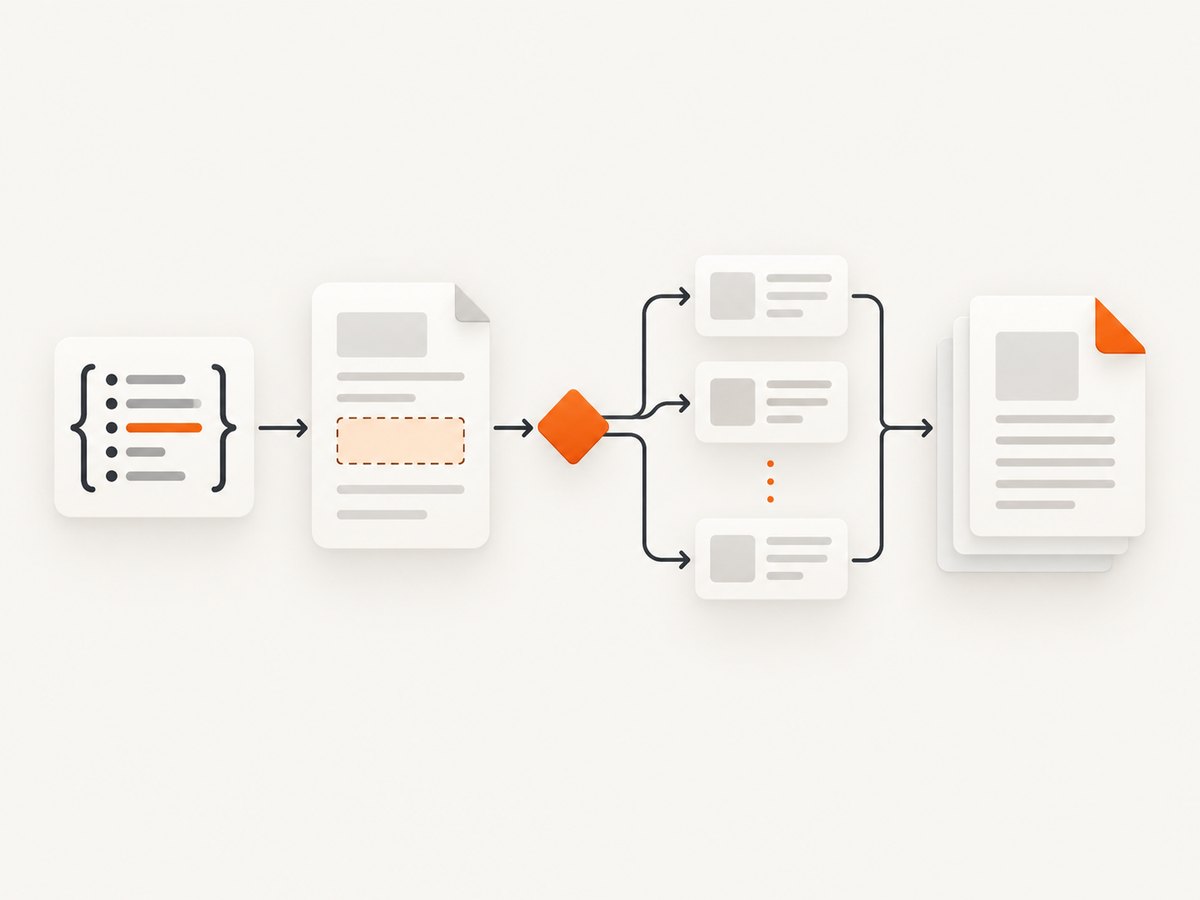
A loop repeats a fragment for every member of an array. In an invoice, the repeating fragment is normally the table row, not the entire table. Keep table headers outside the loop so they remain stable and can repeat across pages according to your PDF engine’s table rules.
Do not rely on implicit truthiness until you have checked your engine’s documentation. A value of 0, an empty string, null, an empty array and false may be treated differently by different engines. Adobe’s Document Generation API documents comparison operators such as =, !=, >=, >, <= and <. iText DITO supports typed text, numeric and boolean conditions; when a condition is false, the conditional selection is omitted and the rest of the document reflows.
2. Prepare predictable JSON data
Normalize data before it reaches the template. Sort items in the application layer, convert numeric fields to numbers, calculate totals and discounts once, and provide display-ready values for dates and currencies. This keeps business logic testable and makes the template readable.
{
  "invoice_number": "INV-1042",
  "customer": { "name": "Ada Lovelace", "company": "Analytical Engines" },
  "items": [
    { "description": "API subscription", "quantity": 2, "unit_price": 49.0, "line_total": 98.0 },
    { "description": "Support", "quantity": 1, "unit_price": 25.0, "line_total": 25.0 }
  ],
  "discount": 10.0,
  "discount_label": "Launch discount",
  "subtotal": 123.0,
  "total": 113.0,
  "notes": "Payment due within 30 days.",
  "has_notes": true
}
For an empty list, choose the reader-visible behavior explicitly. You can omit the table, render a “No items” row, or reject the document as invalid. A precomputed has_items flag is often clearer than depending on array truthiness.
3. Liquid example for an HTML/CSS template
PDFMonkey documents HTML/CSS templates with Liquid tags, including for loops and tablerow. The following pattern keeps conditions around complete blocks and loops at row level.
<h1>Invoice {{ invoice_number }}</h1>
<p>Bill to: {{ customer.name }}{% if customer.company %}, {{ customer.company }}{% endif %}</p>

<table class='items'>
  <thead>
    <tr><th>Description</th><th>Qty</th><th>Unit price</th><th>Total</th></tr>
  </thead>
  <tbody>
    {% if has_items %}
      {% for item in items %}
      <tr>
        <td>{{ item.description }}</td>
        <td>{{ item.quantity }}</td>
        <td>{{ item.unit_price }}</td>
        <td>{{ item.line_total }}</td>
      </tr>
      {% endfor %}
    {% else %}
      <tr><td colspan='4'>No items</td></tr>
    {% endif %}
  </tbody>
</table>

<p>Subtotal: {{ subtotal }}</p>
{% if discount and discount > 0 %}
  <p>{{ discount_label }}: -{{ discount }}</p>
{% endif %}
<p>Total: {{ total }}</p>

{% if has_notes %}
  <section class='notes'><h2>Notes</h2><p>{{ notes }}</p></section>
{% endif %}
Use CSS that permits natural reflow. Avoid fixed heights around conditional content. For long tables, use print rules supported by your renderer, such as thead { display: table-header-group; }, and test the actual conversion engine rather than relying only on a browser preview.
4. Handlebars example
PDFBolt documents Handlebars conditions and loops using {{#each items}} and matching closing tags.
<table>
  <thead><tr><th>Description</th><th>Qty</th><th>Total</th></tr></thead>
  <tbody>
    {{#if has_items}}
      {{#each items}}
        <tr>
          <td>{{description}}</td>
          <td>{{quantity}}</td>
          <td>{{line_total}}</td>
        </tr>
      {{/each}}
    {{else}}
      <tr><td colspan='3'>No items</td></tr>
    {{/if}}
  </tbody>
</table>
{{#if discount}}
  {{#if discount_positive}}
    <p>Discount: -{{discount}}</p>
  {{/if}}
{{/if}}
Many Handlebars deployments keep comparisons out of templates and pass flags such as discount_positive. That approach avoids depending on helpers that may not be enabled in the production renderer.
5. Other template approaches
HTML/CSS plus JSON
Carbone describes a full template engine that injects JSON, loops arrays, applies conditions and formats dates and currencies while rendering HTML/CSS through Chromium. This fits teams that already own web markup and want data-driven invoices or reports.
Office or DOCX templates
Apryse accepts an Office document and JSON replacement data, with support for loops, conditionals, images and table generation. This is useful when non-developers author templates in Word-compatible editors. Treat the DOCX file as source code: version it, review changes and test the generated PDF.
Visual and low-code mapping
iText DITO provides data binding, conditional logic and filtered loops with typed text, number and boolean conditions. It can suit business users who need a visual editor while developers still require controlled PDF output. Its documentation explains that false conditional selections are omitted and the document reflows.
Choose by authoring format, expression power, validation, pagination behavior, font and image support, preview quality, versioning, deployment, observability, licensing and data residency. The referenced documentation does not provide a reliable cross-vendor benchmark for speed, defect rate or total cost, so measure those with representative documents.
6. Prevent blank space and pagination defects
Blank space usually comes from a wrapper that still has height, margins or padding after its child is omitted. Put the condition on the element that owns the spacing, and avoid empty paragraphs used only for visual separation. If a conditional row leaves a gap, inspect parent table cells, CSS margins, fixed heights and page-break rules.
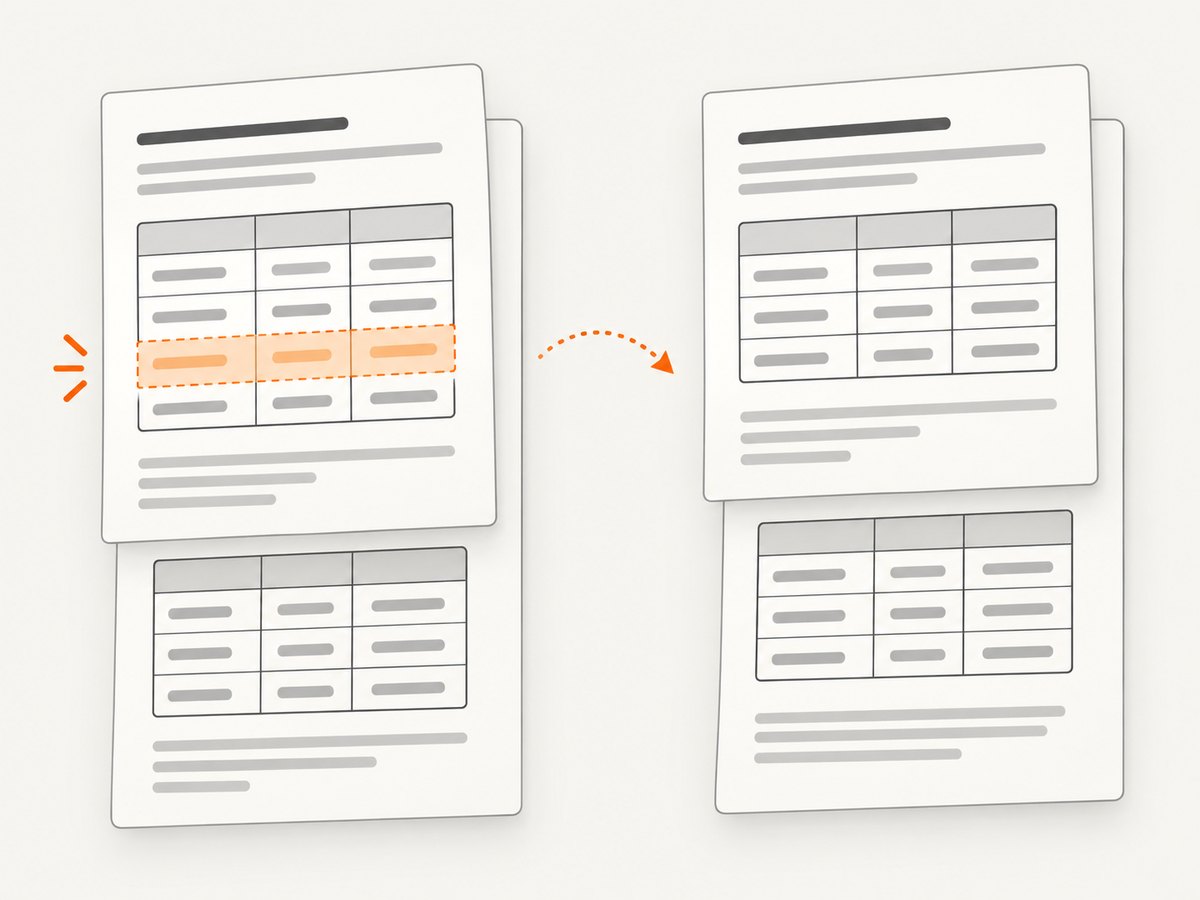
For headings, keep the heading and first paragraph together with an appropriate “keep with next” rule if your renderer supports it. For tables, test a one-row, many-row and very-long-description fixture. Verify that column widths, wrapping, repeated headers and totals behave when a loop crosses a page.
7. A production workflow
- Define a schema. Document required fields, types and allowed nulls. Include flags such as
has_itemsandhas_noteswhen they make intent explicit. - Create representative fixtures. Include normal data, empty arrays, null values, zero discounts, false flags, long text, missing optional fields and the largest expected page count.
- Write the smallest blocks. Put each condition around the paragraph, row, badge or section that owns the behavior. Put each loop around one list item or row.
- Validate before rendering. PDFBolt documents a draft, validate, preview, publish and generate lifecycle. Reject malformed data before consuming a rendering job.
- Inspect a real PDF preview. A quick HTML preview cannot reveal every conversion issue. Check page breaks, repeated headers, orphan headings, font fallback, links, images and conditional omissions.
- Version everything. Retain the template version, fixture JSON and output PDF for regression review. Compare PDFs after changes to conditions, loops, fonts or CSS.
8. Troubleshooting
| Symptom | Likely cause | Fix |
|---|---|---|
| Section heading remains without content | Condition wraps only the body | Move the condition around the heading and body together. |
| Blank gap after an omitted row | Parent margin, padding or fixed height remains | Condition the spacing owner and remove fixed dimensions. |
| Loop renders nothing | Wrong path or object instead of array | Log the input shape, confirm the array path and validate schema before rendering. |
| Discount appears for zero | Engine treats zero as present | Use an explicit numeric comparison or pass a precomputed positive flag. |
| Template parse error | Unclosed condition or loop | Check matching opening and closing tags; validate the draft before publishing. |
| Rows split awkwardly | Long content and renderer-specific pagination | Test real PDFs, adjust widths and break rules, and allow wrapping. |
| Currency or dates are inconsistent | Formatting is scattered in markup | Compute display fields centrally or use the engine’s documented formatters. |
| Preview looks right but PDF differs | HTML preview uses a different renderer | Use the conversion renderer for regression checks. |
9. Performance, reliability and cost
Rendering time and memory generally grow with page count, images, fonts and loop size. Reduce repeated work by resizing images before embedding, avoiding unnecessary remote assets and keeping templates free of expensive per-row logic. Cache stable assets where your renderer permits it, but do not cache personalized PDFs without an explicit data-retention policy.
Reliability comes from deterministic input and observability. Record template version, data validation result, renderer error, page count and output checksum. Retry transient rendering failures with a bounded policy; do not blindly retry malformed templates or invalid data. Keep a fallback fixture that can be rendered during incident diagnosis.
There is no authoritative benchmark in the reviewed documentation that can predict your throughput or total cost. Measure with your own mix of short invoices, long reports, images, fonts and worst-case loops. Include preview, validation, storage, retries and engineering time in the estimate.
10. Or skip the browser setup
If your next step is turning a rendered web page or document preview into an image or PDF, ScreenshotNeo provides a single GET request. It can capture a full page, one CSS-selected element, dark mode, device presets or a custom viewport, and can output PNG, JPEG, WebP or PDF. For PDFs, you can set paper size, margins, landscape mode and page ranges.
Cookie banners, newsletter popups and chat widgets are removed before the shot, with each cleanup step controllable. Bot checks, blank pages, timeouts, failed loads and cache hits cost nothing, and response headers report the page verdict and whether the shot was billed.
# cURL
curl -G 'https://api.screenshotneo.com/v1/shot' \
  -d access_key=YOUR_API_KEY \
  --data-urlencode url=https://example.com/invoice-preview \
  -o invoice-preview.webp

# Python
import requests

r = requests.get(
    'https://api.screenshotneo.com/v1/shot',
    params={
        'access_key': 'YOUR_API_KEY',
        'url': 'https://example.com/invoice-preview'
    },
    timeout=90,
)
r.raise_for_status()
open('invoice-preview.webp', 'wb').write(r.content)

# Node.js
const q = new URLSearchParams({
  access_key: 'YOUR_API_KEY',
  url: 'https://example.com/invoice-preview'
});
const res = await fetch(`https://api.screenshotneo.com/v1/shot?${q}`);
if (!res.ok) throw new Error(`HTTP ${res.status}`);
const bytes = new Uint8Array(await res.arrayBuffer());
await Bun.write('invoice-preview.webp', bytes);
See the ScreenshotNeo API documentation for the complete option set. Relevant controls include custom CSS and JavaScript, click actions, selector or delay waits, network-idle waits, hidden selectors, blocked requests and resource types, custom headers, cookies, user agents, Authorization, timezone, geolocation, transparent backgrounds, image resizing, a chosen cache TTL, signed image links, asynchronous jobs with signed webhooks, bulk capture of up to 100 URLs per call, a usage API and an OpenAPI specification. Existing parameter names used by other screenshot APIs also work, which helps when switching.
ScreenshotNeo also offers an MCP server with take_screenshot, get_page_info and capture_pdf tools for Claude, Cursor and other MCP clients. The Free plan includes 1,000 shots each month with no card; paid plans start at $5 for 3,000 shots. Create a free ScreenshotNeo account.
11. FAQ
Should I use Liquid or Handlebars?
Use the syntax your renderer supports and your team can validate. Both work well for straightforward conditions and loops; portability depends more on helper availability, escaping rules and preview tooling than on the tag style.
Where should calculations happen?
Calculate totals, taxes, sort order and boolean flags before rendering. Templates should express document structure and presentation, not duplicate accounting logic.
How do I handle a null optional value?
Define the behavior in the schema and use an explicit condition or normalized fallback. Do not assume null behaves like an empty string or false in every engine.
Can a loop contain another loop?
Most code-based engines support nested data structures, but nested loops increase pagination and debugging complexity. Normalize deeply nested data into a shape that mirrors the document before rendering.
Why is a real PDF preview necessary?
Only the conversion renderer can show its actual font fallback, page-breaking, table-header repetition, link handling and reflow behavior. Source inspection and browser previews cannot prove those results.


