Docker Swarm for Container Orchestration
Learn how Docker Swarm works, deploy services safely, design manager quorum, configure networking and secrets, and choose Swarm, Compose or Kubernetes.

Docker Swarm is Docker Engine’s built-in cluster orchestration mode. It lets you join multiple Docker Engine hosts into a swarm, declare services and replicas with the Docker CLI, and have manager nodes schedule tasks across workers. Use Swarm when your intended production runtime is Swarm; use Docker Compose for applications that will remain on one host, and use Docker Desktop’s Kubernetes integration when you are developing for Kubernetes.
This guide explains the operating model, cluster design, deployment commands, networking, secrets, rolling updates, failure recovery, troubleshooting and the practical choice between Swarm, Compose and Kubernetes.
What Docker Swarm is
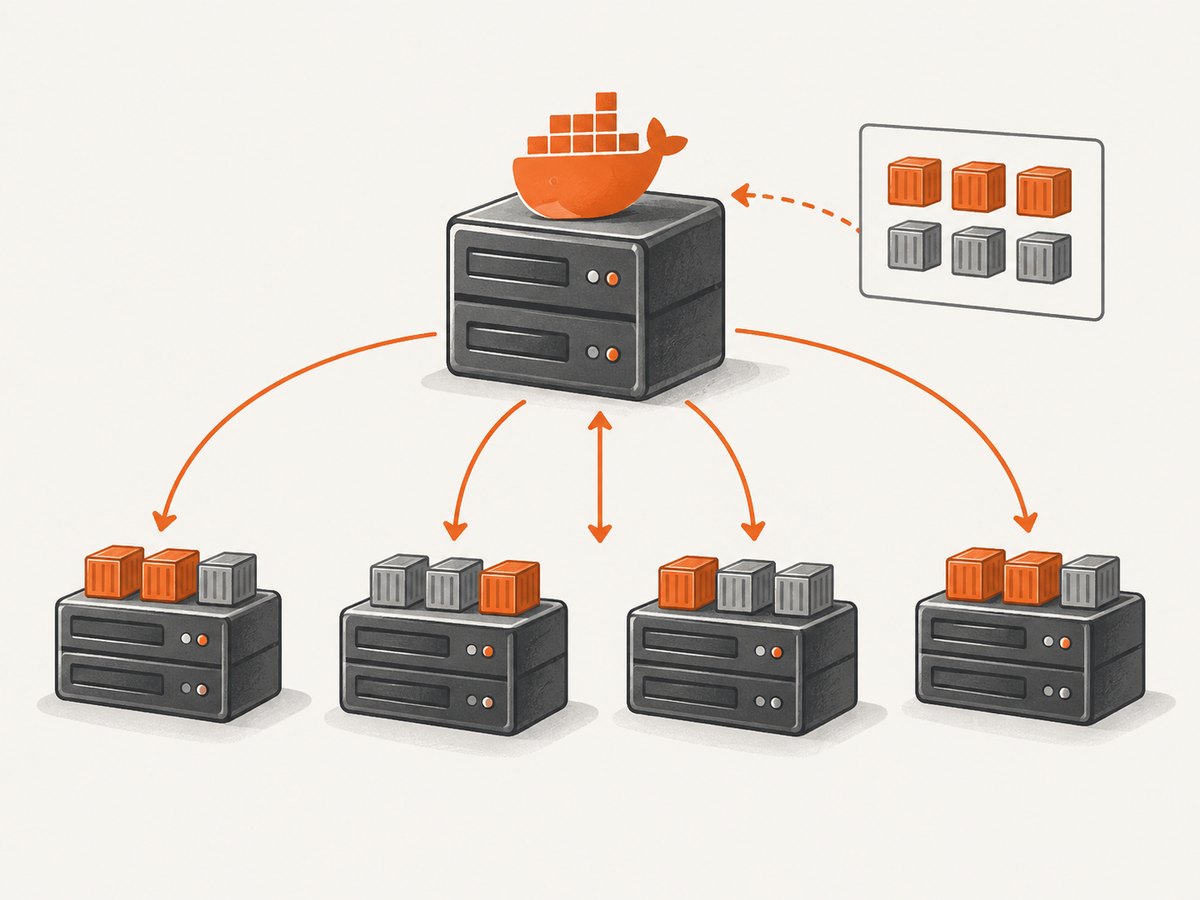
Swarm mode is an advanced feature of Docker Engine for managing a cluster of Docker daemons. It is different from Docker Classic Swarm, which is no longer actively developed. A swarm is made from Docker Engine hosts assigned manager, worker or both roles. Managers maintain cluster state and schedule work; workers run the assigned containers.
The main object you declare is a service. A service describes an image, command, desired replica count, ports, networks, resource reservations and limits, placement rules, and update behavior. Swarm turns that declaration into tasks. Each task is the atomic scheduled unit containing a container and its command. Managers continuously reconcile the actual state with the desired state.
For example, if a service declares five replicas and one worker disappears, managers try to schedule a replacement on an available node. This is a reconciliation mechanism, not a promise that every application is automatically highly available: your data stores, readiness behavior, capacity and external dependencies still need their own design.
How the control plane works
Managers store cluster state using the Raft consensus protocol. They elect a leader and replicate management data among themselves. The manager quorum determines whether the cluster can accept state changes such as creating services or scaling replicas.
| Role | Responsibilities | Failure consideration |
|---|---|---|
| Manager | Maintains Raft state, schedules tasks and serves management commands | Manager quorum is required for normal cluster management |
| Worker | Runs assigned service tasks and reports task state | Lost workers can be replaced if managers and capacity remain available |
| Manager plus worker | Performs both roles on one host | Convenient for small installations, but concentrates control and workload |
A single-manager swarm is suitable for testing. If that manager fails, running tasks can continue, but you cannot manage cluster state until you create a new cluster or restore management. For production, choose an odd number of managers based on the availability you need so that a majority can still agree after failures. Manager count does not replace worker capacity planning.
Install and initialize a swarm
Install Docker Engine on each host and make sure the hosts can reach one another on the ports required by your network and firewall policy. Initialize the first manager with its reachable address:
docker swarm init --advertise-addr 10.0.0.10The command prints join commands containing a token. Keep manager and worker join tokens separate and treat them as credentials. On another host, join as a worker:
docker swarm join --token SWMTKN-1-REDACTED 10.0.0.10:2377To add a manager, obtain the manager join command on an existing manager:
docker swarm join-token manager
docker swarm join-token worker
Inspect membership and node status:
docker node ls
docker info --format '{{.Swarm.LocalNodeState}} {{.Swarm.ControlAvailable}}'
Label nodes when placement needs to distinguish hardware or zones:
docker node update --label-add zone=east worker-1
docker node update --label-add disk=ssd worker-2
Deploy a replicated service
Create an overlay network first. Overlay networks connect services across swarm hosts:

docker network create --driver overlay app-netDeploy an HTTP service with three replicas, a published port, resource settings and an update policy:
docker service create \
  --name web \
  --replicas 3 \
  --publish published=8080,target=80 \
  --network app-net \
  --limit-cpu 0.50 \
  --limit-memory 512M \
  --reserve-cpu 0.25 \
  --reserve-memory 256M \
  --update-parallelism 1 \
  --update-delay 10s \
  --update-failure-action pause \
  --rollback-parallelism 1 \
  --rollback-monitor 30s \
  nginx:1.27
Check the desired service definition and the individual tasks:
docker service ls
docker service inspect web --pretty
docker service ps web
Scale the service:
docker service scale web=6Swarm’s default scheduling spreads tasks according to available resources and constraints. Require a task to run only on SSD-labeled nodes:
docker service update \
  --constraint-add 'node.labels.disk == ssd' \
  web
Use a replicated service when you want a chosen number of tasks. Use global mode when you need one task on every eligible node, such as a monitoring or log collection agent:
docker service create \
  --name node-agent \
  --mode global \
  --mount type=bind,src=/var/run/docker.sock,dst=/var/run/docker.sock \
  your-agent-image:1.0
Service discovery, ports and networks
Services attached to the same overlay network can reach one another by service name. Docker provides internal DNS and load balancing for service tasks. A service named api can be reached at http://api:8080 from another service on the same network.
The ingress overlay and routing mesh handle published ports. A request arriving at a node’s published port can be routed to a task on another node. This is different from an external load balancer: you can publish ports directly, or place a load balancer in front of selected nodes and have it forward to the published service port.
docker service create \
  --name api \
  --publish published=443,target=8443,protocol=tcp \
  --network app-net \
  your-api:2.4
Control and management traffic is encrypted by Swarm. Application data traffic is a separate concern. If overlay application traffic requires encryption, configure encrypted overlays deliberately and account for the performance and network implications:
docker network create \
  --driver overlay \
  --opt encrypted \
  secure-net
Use separate networks for front-end, application and data paths. Attach only the services that need to communicate, and avoid exposing internal ports through the ingress mesh.
Rolling updates and rollback
Swarm can update a service incrementally. The important controls are:
--update-parallelism: number of tasks updated at once.--update-delay: wait between update batches.--update-failure-action: pause, continue or roll back after a failure.--update-monitor: period used to monitor updated tasks.--rollback-parallelism,--rollback-delayand--rollback-failure-action: rollback behavior.
Deploy a new image:
docker service update \
  --image your-api:2.5 \
  --update-parallelism 2 \
  --update-delay 15s \
  --update-failure-action rollback \
  api
Watch progress:
docker service ps api --no-trunc
docker service inspect api --pretty
Rollback explicitly if the application is unhealthy:
docker service rollback apiThese settings control task replacement, not application correctness. A process can start successfully while serving invalid responses. Add application-level health checks and readiness behavior, use backward-compatible database migrations, and verify the new version before increasing update parallelism.
Secrets and configuration
Docker-managed secrets are designed for Swarm services. They are not available to standalone containers. Create a secret from standard input:
printf '%s' 'database-password' | docker secret create db_password -Grant it to a service:
docker service create \
  --name api \
  --secret source=db_password,target=db_password \
  --env DB_PASSWORD_FILE=/run/secrets/db_password \
  your-api:2.4
Inside the task, the secret is exposed as a file under /run/secrets. Do not place secrets in image layers, command-line arguments, public environment files or source control. A task that already has a secret may retain access during a temporary loss of swarm connectivity, but it cannot receive secret updates until it reconnects.
Placement, resources and state
Reservations tell the scheduler what a task needs; limits cap runtime consumption. Set both for predictable placement:
docker service update \
  --reserve-memory 512M \
  --limit-memory 1G \
  --reserve-cpu 0.50 \
  --limit-cpu 1.0 \
  api
Use placement constraints for hard requirements and preferences for softer spreading decisions. Keep stateful data on storage designed for the workload. A replicated container does not automatically replicate a database volume. Plan backups, restore tests, volume placement and failover separately.
Docker Swarm versus Compose and Kubernetes
| Question | Choose Swarm when | Choose Compose when | Consider Kubernetes when |
|---|---|---|---|
| Deployment target | You intend to run a multi-host Swarm production runtime | The application stays on one host or is not deployed with Swarm | You need a Kubernetes platform and its portable, extensible resource model |
| Operating model | Docker Engine services, tasks and managers fit your team | A single Docker host is sufficient | Your team operates Kubernetes APIs, controllers and workloads |
| Networking | You need overlay networks, service DNS and ingress routing | Local host networking is enough | You need Kubernetes service discovery, load balancing and storage orchestration |
| Availability | You can design manager quorum and worker capacity | High availability is outside the deployment | You already target Kubernetes availability and operations |
Docker’s guidance is the most useful decision rule: Swarm for teams intending to use Swarm as their production runtime, Compose when they are not deploying with Swarm, and Docker Desktop’s integrated Kubernetes feature when developing for Kubernetes. Kubernetes documentation describes a portable, extensible platform for containerized workloads and services, including service discovery, load balancing and storage orchestration. The right choice depends on deployment target, team operations, state management and ecosystem requirements.
Operational checklist
- Use three or another odd number of managers for production quorum planning.
- Keep manager and worker join tokens protected and rotate them when exposure is suspected.
- Use explicit CPU and memory reservations and limits.
- Separate front-end, application and data overlay networks.
- Decide whether application overlay encryption is required.
- Define update, monitor and rollback behavior before deploying a new image.
- Use health checks and readiness logic that reflect real application availability.
- Store credentials as Swarm secrets and test secret rotation.
- Back up stateful data independently of container replicas.
- Monitor manager quorum, node health, task restarts, resource pressure and ingress traffic.
Or skip the browser setup
If you are documenting a Swarm deployment, generating release evidence or capturing a live service page, you can take screenshots without maintaining a headless browser cluster. ScreenshotNeo provides a website screenshot API and MCP server. The request below returns an image; see the ScreenshotNeo documentation for the complete option list.
cURL
curl -G "https://api.screenshotneo.com/v1/shot" -d access_key=YOUR_API_KEY --data-urlencode url=https://stripe.com -o shot.webpPython
import requests

r = requests.get(
    "https://api.screenshotneo.com/v1/shot",
    params={"access_key": "YOUR_API_KEY", "url": "https://stripe.com"},
    timeout=90,
)
r.raise_for_status()
open("shot.webp", "wb").write(r.content)
Node.js
const q = new URLSearchParams({ access_key: 'YOUR_API_KEY', url: 'https://stripe.com' });
const res = await fetch(`https://api.screenshotneo.com/v1/shot?${q}`);
if (!res.ok) throw new Error(`${res.status} ${res.statusText}`);
const fs = await import('node:fs/promises');
await fs.writeFile('shot.webp', Buffer.from(await res.arrayBuffer()));
Cookie and consent banners are accepted and more than 60 known consent platforms, newsletter popups and chat widgets are removed before capture; each step can be disabled. Only clean shots are billed. Bot checks or CAPTCHAs, blank pages, timeouts, failed loads and cache hits cost nothing, and the response identifies the result with X-Page-Verdict and X-Billed headers. The MCP server exposes take_screenshot, get_page_info and capture_pdf for Claude, Cursor and other MCP clients.
Options include full-page screenshots with lazy images loaded, CSS-element capture, dark mode, device presets or custom viewports, retina scale, PDF paper and margin settings, custom CSS and JavaScript, clicks, selector or network-idle waits, request blocking, headers, cookies, user agents, authorization, timezone, geolocation, transparent backgrounds, resizing, selectable cache TTLs, signed links, asynchronous jobs with signed webhooks, bulk capture of up to 100 URLs per call and a usage API. Every plan includes every feature. The free plan provides 1,000 screenshots per month with no card; paid plans start at $5 for 3,000.
Create a free ScreenshotNeo account and use the included 1,000 screenshots to capture deployment pages without setting up browser infrastructure.
Troubleshooting
“This node is not a swarm manager”
Management commands such as docker service ls require a manager context. Run them on a manager or configure a secure Docker context that targets one. Workers can inspect their local containers but do not manage cluster state.
Tasks remain pending
Inspect the task error and node resources:
docker service ps SERVICE --no-trunc
docker node ls
docker node inspect NODE
Common causes are unsatisfied placement constraints, insufficient reserved CPU or memory, unavailable images, and nodes marked drained. Remove an incorrect constraint, add capacity, fix registry access or reactivate the node.
New workers cannot join
Check the advertised manager address, firewall rules, DNS and routing. Confirm that the join token is current with docker swarm join-token worker. Do not expose the Docker API publicly just to make joining easier.
Service discovery fails
Verify that both services are attached to the same overlay network and that the target service name and port are correct. A published port is for traffic entering the swarm; service-to-service traffic should use the container port and service DNS name.
Updates pause or roll back
Read the task error, container logs and health-check output. A process that exits, fails its health check or cannot pull the image can trigger the configured failure action. Fix the image, registry credentials, readiness behavior or resource settings before resuming.
Secrets are missing
Confirm that the service, rather than a standalone container, declares the secret and that the application reads the file path under /run/secrets. Updating a secret requires an explicit service update strategy; tasks disconnected from the swarm cannot receive changes.
Performance, reliability and cost notes
Swarm scheduling decisions depend on available resources, reservations, constraints and task state. Measure application latency and resource pressure on real nodes rather than assuming that increasing replicas always improves throughput. More replicas can increase database connections, network traffic and startup contention.
Manager quorum adds control-plane resilience but does not make application state durable. Keep managers on failure domains that match your infrastructure, maintain spare worker capacity, and test what happens when a manager, worker, registry or overlay network is unavailable. Rolling updates reduce replacement concurrency but cannot eliminate downtime caused by incompatible migrations or an application that is not ready to serve.
Swarm itself is part of Docker Engine; operational cost comes from the hosts, storage, load balancers, registries, monitoring and backup systems you operate. Compare those costs with the operational model of Compose or Kubernetes for your team. For screenshot evidence around those systems, ScreenshotNeo’s free tier and per-plan quotas make capture volume explicit, while non-clean results are not billed.
FAQ
Is Docker Swarm still usable?
Yes, when Swarm is the production runtime your team intends to operate. Docker continues to document Swarm mode as an Engine feature. The decision should be based on operational fit rather than assuming that every container workload needs the same orchestrator.
Can a worker become a manager later?
Yes. Use the manager join command from an existing manager, then verify membership with docker node ls. Plan the resulting quorum and resource placement before changing roles in production.
Does Swarm encrypt all application traffic?
Control and management traffic is encrypted. Application data traffic is separate; configure encrypted overlays when your requirements call for them and account for their network cost.
Are Swarm secrets available to Docker Compose containers?
Docker-managed Swarm secrets are granted to Swarm services. Standalone containers cannot consume them as Swarm secrets.
When should I use global mode?
Use global mode for node-level services that need one task on each eligible node, such as monitoring agents. Use replicated mode when you need a specific number of service instances.