How to Fix Extra Padding Added to the Last Wkhtmltopdf Row
Fix apparent extra padding below the last wkhtmltopdf row by checking page geometry, table structure, and explicit page-break strategies.

Extra space below the last table row in wkhtmltopdf is usually a pagination symptom. The renderer is fitting rows, margins, headers, footers, and other content into a finite printable area. Start by measuring the usable page height, then test an explicit page break that matches your real row structure. The commonly suggested page-break-inside: avoid rule may move the blank area to another page instead of removing it.
1. Confirm the renderer and reproduce the exact layout
Before changing CSS, record the rendering context. The reported case used wkhtmltopdf 0.12.3 with patched Qt on macOS 10.10.5. Related reports involve 0.12.3 development builds and 0.12.3.2 patched-Qt builds. Version, operating system, page size, margins, header/footer settings, and whether the input is a local file or URL can all affect pagination.
wkhtmltopdf --version
wkhtmltopdf --page-size A4 --margin-top 10mm --margin-right 10mm \
  --margin-bottom 10mm --margin-left 10mm input.html output.pdf
Keep a minimal reproduction containing only the table, its CSS, and the exact page options. Compare the browser view with the generated PDF; browser layout is not proof that the PDF engine has the same available height.
2. Calculate the usable page height
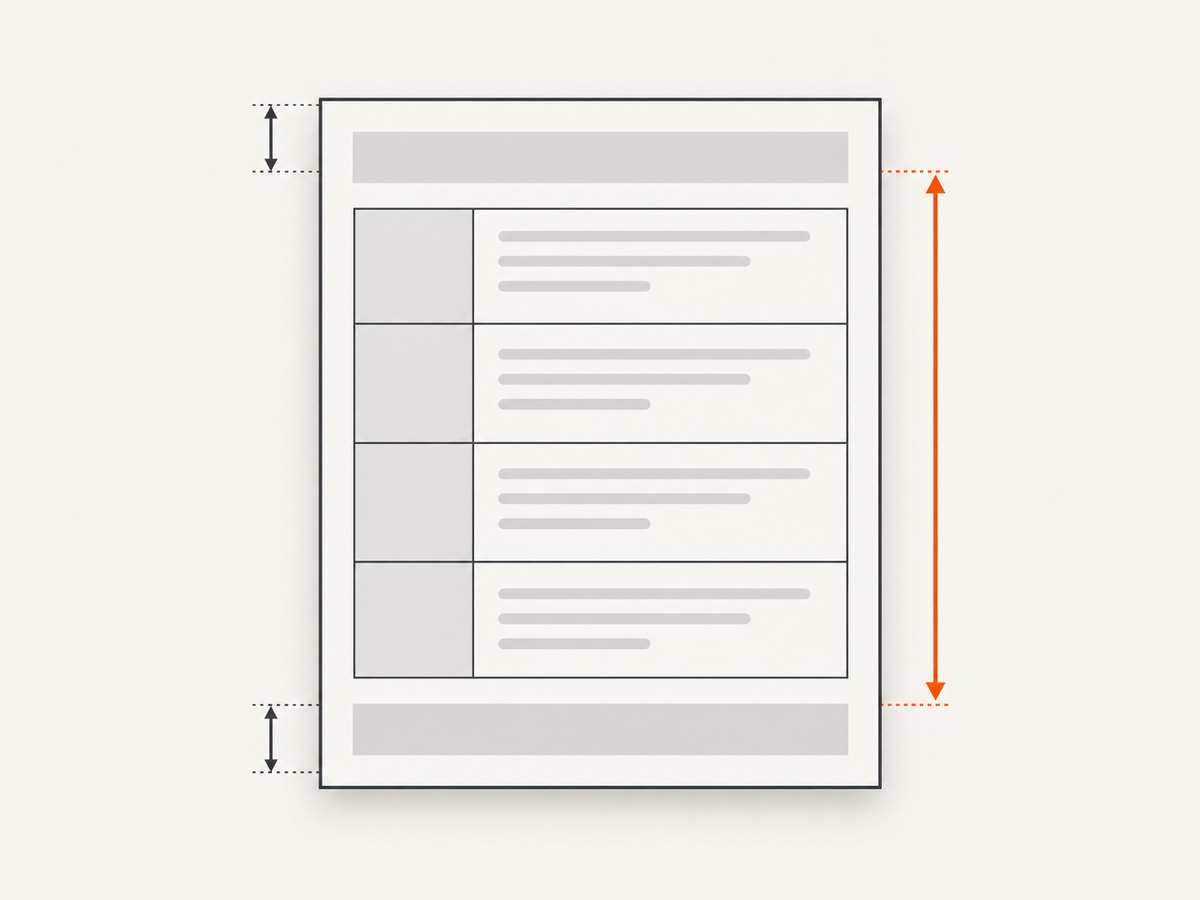
A4 paper is 297 mm high, but the table does not receive all 297 mm. Subtract top and bottom margins, header and footer reservations, and any text or blocks before the table. If a row contains a fixed-height QR code or label, include its complete height plus borders, padding, and line height.
| Check | Why it matters |
|---|---|
| Paper size | US Letter and A4 provide different heights. |
| Margins | Margins reduce the area available to rows. |
| Header/footer | wkhtmltopdf reserves space for these options. |
| Cell padding and borders | They increase the actual row box. |
| Text before the table | Even a small block can push the final row across a page boundary. |
| Images and fonts | Late-loading or substituted content can change row height. |
For a fixed grid, calculate how many rows fit after these deductions. A four-row example from the community answer is a layout-specific workaround, not a universal rule. Four 72 mm items already exceed a 297 mm page once text, margins, and spacing are included.
3. Choose a page-break strategy that matches your markup
Strategy A: one table per page
Use this when each table is intentionally a page and every table contains the same number of rows.

<table class="qr-page">
  <tbody>
    <tr>...four cells...</tr>
    <tr>...four cells...</tr>
    <tr>...four cells...</tr>
    <tr>...four cells...</tr>
  </tbody>
</table>
.qr-page {
page-break-after: always;
page-break-inside: avoid;
}
.qr-page:last-child {
page-break-after: auto;
}This gives the renderer an explicit boundary. It can still fail if one table is taller than the usable page or if nested content cannot fit.
Strategy B: break after a row interval in one table
Use a row selector only when the selector matches the real DOM. In the published four-row example, the suggested selector was tr:nth-child(4n+5). That selector means rows 5, 9, 13, and so on, so it assumes no extra header row is counted in the same parent.
/* Example only: break before rows 5, 9, 13... */
tbody tr:nth-child(4n+5) {
  page-break-before: always;
  page-break-inside: avoid;
}
Some wkhtmltopdf versions respond more consistently to a break after a preceding element. If you use a wrapper per page, apply page-break-after: always to that wrapper instead. Test one approach at a time.
Strategy C: use explicit page groups generated by your application
For predictable print jobs, split the data into page-sized groups before rendering. Emit a separate table or wrapper for each group and place the page break between groups. This avoids depending on a complex nth-child expression when rows can be omitted, expanded, or reordered.
<div class="print-page">
  <table>...rows 1–4...</table>
</div>
<div class="print-page">
  <table>...rows 5–8...</table>
</div>
.print-page {
page-break-after: always;
page-break-inside: avoid;
}
.print-page:last-child {
page-break-after: auto;
}4. Inspect table structure before adding broad CSS
Long or complex tables have related pagination problems. Check each of these:
- Use explicit
<thead>and<tbody>elements. - Look for repeated headers that appear with an empty row.
- Find rows containing
rowspan, nested tables, or very tall content. - Remove responsive wrappers with
overflowwhile diagnosing print output. - Check whether JavaScript changes the table after the initial load.
- Ensure images have fixed dimensions and are loaded before capture.
Related issue reports describe page-break declarations being ignored for rows spanning pages and an empty row after a repeated header. These reports are useful hypotheses, not proof that every last-row padding case has the same cause.
5. Why page-break-inside: avoid can appear to make it worse
Applying page-break-inside: avoid to every table, row, or cell asks the renderer to keep blocks together. If the block cannot fit in the remaining space, wkhtmltopdf may move it to the next page and leave the unused area behind. In the reported case, the rule moved the extra space rather than eliminating it.
/* Keep this narrow while diagnosing */
.qr-page,
.qr-page tr {
  page-break-inside: avoid;
}

/* Avoid applying this indiscriminately to every element */
Use the rule on the smallest block that must remain intact, then compare the PDF page boundaries.
6. A controlled diagnostic workflow
- Save the exact wkhtmltopdf version and command line.
- Render a minimal HTML file with fixed row heights and no external assets.
- Set explicit paper size and margins.
- Count rows in the actual
tbody; include or exclude header rows deliberately. - Measure the usable page height and estimate the row count that fits.
- Test one explicit break strategy.
- Render several pages with different text lengths and image sizes.
- Move the table or preceding content by one pixel and render again.
- Compare blank space, repeated headers, row integrity, and page count after each change.
A related issue reports that moving a table by one pixel changed whether an empty row appeared after a repeated header. That demonstrates sensitivity in the reported layout; it does not establish a single root cause for all templates.
7. Common errors and fixes
| Symptom | Likely cause | Fix |
|---|---|---|
| Blank area moves to the next page | Broad page-break-inside: avoid |
Apply it only to the intended page group and add an explicit boundary. |
| Break occurs one row early | Header row or hidden row changes nth-child counting |
Inspect the DOM and target tbody tr or generate page groups. |
| Break is ignored | Oversized row, rowspan, nested table, or renderer limitation | Reduce row height, remove rowspan during diagnosis, or split the table. |
| Last row is taller than expected | Image loading, font substitution, wrapping, or collapsed borders | Set image dimensions, wait for assets, use stable fonts, and inspect computed CSS. |
| Header repeats with an empty row | Table pagination interaction | Test explicit page groups and simplify thead/tbody markup. |
| Different machines produce different output | Different patched-Qt builds, fonts, or page options | Pin the binary, fonts, command line, and input assets. |
| Local file works but URL fails | Network timing or blocked resources | Use local assets for reproduction and verify resource loading before pagination debugging. |
8. Performance, reliability, and maintenance
Explicit page groups reduce pagination work and make output more repeatable for fixed layouts. They also require your application to know the approximate row height. Dynamic tables need more validation because content changes can move a row across a boundary.
Keep PDF jobs deterministic: pin the wkhtmltopdf build, paper options, margins, fonts, image dimensions, and input HTML. Render representative data, including long labels, missing images, very tall cells, and the final partial page. Do not treat one successful PDF as proof that every page length is safe.
wkhtmltopdf uses WebKit/QtWebKit, and its project repository is archived. The archived status is a maintenance consideration when deciding whether to keep investing in renderer-specific workarounds or evaluate a maintained alternative; it does not identify a guaranteed replacement for your template. See the wkhtmltopdf project repository for its current maintenance state.
9. Or skip the browser setup
If your goal is a clean image or PDF of a URL rather than maintaining a local browser renderer, ScreenshotNeo provides a single request. Its capture flow accepts consent banners and removes more than 60 known consent platforms, newsletter popups, and chat widgets before the shot. Bot checks, blank pages, timeouts, failed loads, and cache hits are not billed, and response headers report the page verdict and billing result.
See the ScreenshotNeo API documentation for all options, including full-page capture, PDF settings, custom CSS and JavaScript, waits, blocked resources, headers, cookies, device settings, caching, asynchronous jobs, bulk capture, and signed links.
cURL
curl -G "https://api.screenshotneo.com/v1/shot" \
  -d access_key=YOUR_API_KEY \
  --data-urlencode url=https://stripe.com \
  -o shot.webp
Python
import requests

r = requests.get(
    "https://api.screenshotneo.com/v1/shot",
    params={"access_key": "YOUR_API_KEY", "url": "https://stripe.com"},
    timeout=90,
)
r.raise_for_status()
open("shot.webp", "wb").write(r.content)
Node.js
const q = new URLSearchParams({
  access_key: 'YOUR_API_KEY',
  url: 'https://stripe.com'
});
const res = await fetch(`https://api.screenshotneo.com/v1/shot?${q}`);
if (!res.ok) throw new Error(`HTTP ${res.status}`);
const buffer = Buffer.from(await res.arrayBuffer());
await import('node:fs/promises').then(fs => fs.writeFile('shot.webp', buffer));
ScreenshotNeo also has an MCP server with take_screenshot, get_page_info, and capture_pdf tools for Claude, Cursor, and other MCP clients. The free plan includes 1,000 shots each month with no card; paid plans start at $5 for 3,000 shots. Create a free ScreenshotNeo account.
10. FAQ
Is the padding definitely a CSS padding property?
No. The symptom can come from page fit and pagination even when the cell’s computed padding is correct.
Should I always use page-break-after: always?
Use it for intentional page groups or fixed row counts. It is too rigid for content whose height changes unpredictably.
Does nth-child(4n+5) work for every four-row table?
No. It depends on the actual DOM, header rows, hidden rows, and where the first page begins.
Can a very tall row be kept together?
Only if it fits in the usable page area. An oversized row may force a split or cause the renderer to ignore the requested break.
When should I consider another renderer?
Consider it when you repeatedly need renderer-specific exceptions, cannot pin a stable build, or the archived project no longer meets your maintenance requirements.