Guide to Competitor Price Tracking
Build a competitor price tracking workflow that collects fresh offers, matches products accurately, flags MAP issues and supports controlled repricing.

Competitor price tracking works when it gives your team a trustworthy, current comparison for the right product and a clear next step. Build it as a pipeline: choose the competitors and products that matter, collect price and offer context, match each listing, check freshness and quality, then send alerts or route approved changes into a repricing workflow. A spreadsheet can be enough for a small, manual watchlist; recurring coverage, MAP evidence and automated actions usually call for dedicated price intelligence software.
Price intelligence is broader than price collection: it connects competitor offers to your catalog and turns those observations into market-position analysis, MAP handling, analytics or pricing decisions. Shopify describes it as collecting, analyzing and using competitor pricing, market trends and consumer behavior to inform pricing strategy (Shopify’s price intelligence guide).
1. Decide what you need to know
Start with decisions, not with a scraper or vendor demo. List the questions your pricing team needs answered and the action each answer might trigger. For example: “Did this competitor lower the price of the same 12-pack?” might prompt a review; “Is an authorized reseller below our MAP?” might require a dated evidence record and a compliance process. These are different workflows, even if they look at the same product page.
- Choose the competitors, marketplaces, countries and product categories to monitor.
- Prioritize revenue-critical products and the offers that can affect a decision.
- Define which product attributes must match before offers are compared.
- Set the intended market position and the minimum margin or MAP constraints before enabling repricing.
Keep the first scope small enough that someone can review the matches and alerts. Expand after your team has seen normal promotions, stockouts and data corrections in its own category.
2. Collect offer context, not just a number
A displayed price is only one part of an offer. Capture the source URL and timestamp alongside price, currency, product identifier, seller, availability, promotion, shipping and delivery information when those details affect comparability. Record whether a value is a sale price, coupon price, member price or ordinary listed price. Make the rules explicit: should a coupon requiring account login count? Should shipping be included? Does a marketplace offer from a third-party seller count alongside the retailer’s own offer?
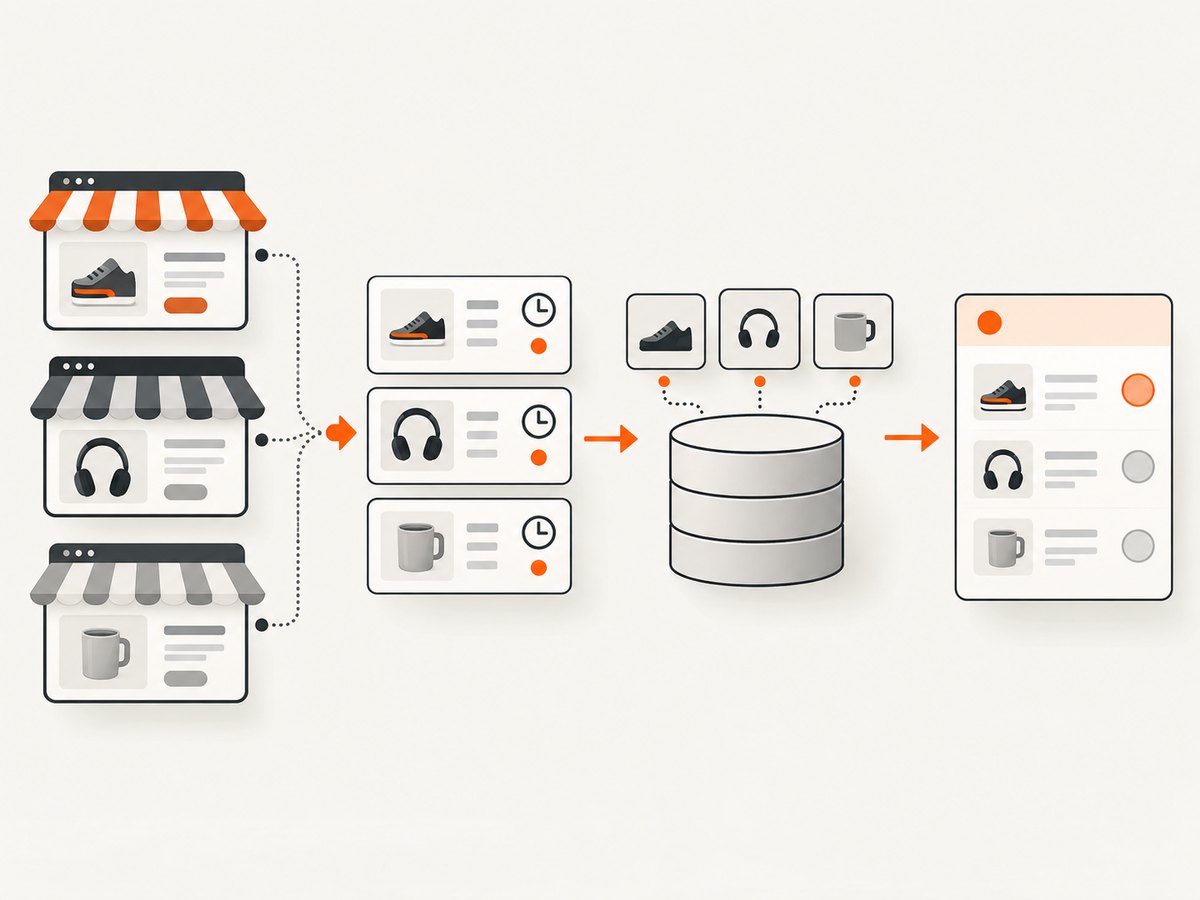
Out-of-stock listings can distort a market average if treated like live offers. Decide whether to exclude them from position calculations while retaining their availability history. Preserve the observation history: a current value without its source and timestamp is difficult to audit, troubleshoot or use as MAP evidence.
3. Match products before comparing prices
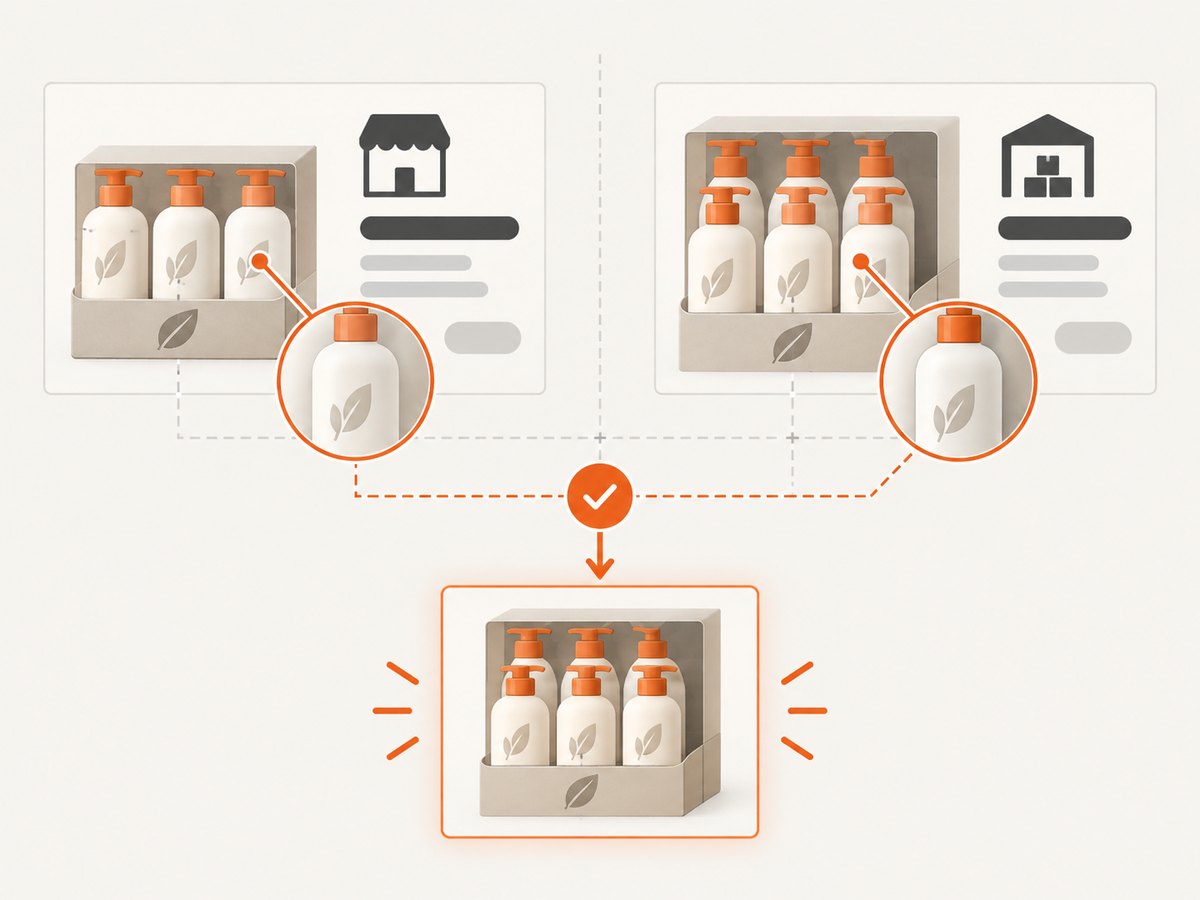
Matching errors are among the most consequential sources of bad pricing decisions. A lower competitor figure may refer to a different size, color, generation, bundle, pack count, refurbished condition or seller. Match on GTIN or another reliable identifier when available, then use brand, model, title, image and product attributes to support the match. Confidence scores and a human review queue help keep uncertain matches out of automatic actions.
| Signal | Useful for | Common trap |
|---|---|---|
| GTIN, UPC or EAN | Exact branded product identification | Missing, malformed or reused identifiers |
| Brand and model number | Products with stable manufacturer naming | Similar model names hide different specifications |
| Title, image and attributes | Supporting an identifier or matching less standardized catalog items | Listings omit details or use inconsistent wording |
| Pack size, variant and condition | Checking whether the offer is commercially equivalent | Bundles, refurbished goods or multipacks appear cheaper per listing |
Use confidence thresholds deliberately. A high-confidence exact match may flow into a dashboard; a plausible but ambiguous match should wait for review. Track human corrections so recurring catalog or matching problems become visible.
4. Set a refresh cadence that matches the decision
How often should you check? Often enough to catch changes while they can still inform the decision, given category volatility, competitor behavior, collection cost and your team’s response time. A daily check can miss a short-lived move. Price Intelligence illustrates this with a six-hour change window: if the change timing is random within a 24-hour day, a single daily observation has a 25% chance of falling in that window. That is an illustrative timing calculation, not a universal benchmark (Price Intelligence’s monitoring overview).
More checks are not automatically more useful. If your team reviews prices weekly, hourly alerts may add noise without changing decisions. For volatile, high-impact products, increase the cadence or use event alerts if the provider supports them. For slower categories, a less frequent schedule may be sufficient. Record each observation time and each failed or delayed collection so users can distinguish “unchanged” from “not refreshed.”
5. Turn observations into alerts and controlled actions
Useful alerts state what changed and include enough context to evaluate it: your SKU, competitor listing, match confidence, previous and current values, stock, seller, promotion, timestamp and source. Group or suppress repeated notifications so one persistent condition does not overwhelm the people responsible for action.
Market-position reporting can compare your offer with a defined competitor set, but the calculation is only as good as its inputs. Define whether you use the lowest comparable in-stock offer, a median, a weighted set or another rule. Keep currencies, taxes and shipping treatment consistent across markets. Show excluded offers and stale or low-confidence records so the summary does not create false precision.
Can tracking automatically reprice products? It can feed repricing workflows, but automation should be bounded by explicit rules:
- Set a hard minimum price based on landed cost, fees and required margin.
- Encode applicable MAP rules and the policy for offers that require review.
- Set a maximum adjustment per update and a permitted target position.
- Require approval for low-confidence matches, unusual moves, new competitors or exceptional promotions.
- Log the input offer, matched product, rule, proposed change, approval and final price.
Begin in recommendation or approval mode. Compare suggested changes with decisions your team actually makes and investigate unexpected outputs before allowing automatic publication.
6. Choose software against your workflow
Focused monitoring tools such as Price2Spy and Prisync suit teams whose main need is competitor prices and change alerts. Broader price intelligence platforms add capabilities such as product matching, MAP evidence, analytics, data-quality monitoring, integrations and repricing workflows. Pricefy positions its product around competitor monitoring, dynamic repricing and product-feed management. These are vendor categories and examples, not a claim that one provider fits every catalog.
Compare tools using the same test catalog and the same questions:
| Area | What to confirm |
|---|---|
| Coverage | Retailer domains, marketplaces, countries, categories, SKU limits and seller depth |
| Freshness | Checks per day, alert latency, failed-crawl visibility and history |
| Matching | Identifier support, title/image/attribute signals, confidence thresholds and correction workflow |
| Offer context | Stock, seller, shipping, coupons, promotions and delivery promise |
| MAP and decisions | Timestamped evidence, policy rules, approval queues, margin floors and change history |
| Operations | Required store integrations, feeds, CSV/SFTP, Slack, REST API and webhooks |
| Economics | SKU, competitor, market and check limits; modules, seats, onboarding and API charges |
Ask vendors to show how they handle a wrong match, a stale page, a stockout and a coupon price, not only a clean demo listing. Compare the corrected data and resulting alert against your own review.
7. Understand the cost and operating tradeoffs
Price depends on the scope and service level: number of SKUs and competitors, markets, refresh frequency, modules, seats, onboarding and API use can all affect a quote. ShopVision’s 2026 guide reports directional bands from about $26 per month for entry-level monitoring tools to more than $20,000 per month for enterprise platforms, with many mid-market deployments in a $1,000–$5,000 monthly range. Treat those as indicative ranges from that guide; verify current pricing and what a quote includes with each provider.
Manual collection has low software cost but consumes staff time and can become inconsistent as the watchlist grows. A custom collection pipeline gives more control, but your team owns page changes, quality checks, scheduling, storage, alerts and operational failures. A vendor may reduce that work, but only if its coverage, matching and integrations fit the target market. Estimate total cost using the cost of monitoring plus the cost of reviewing bad matches and missed or stale observations.
8. Build a small DIY collection prototype
For a few public product pages, a browser can capture visual evidence for a human to review. A screenshot is useful for checking the page as rendered and retaining a visual record; it is not a structured price feed and does not replace product matching or a reliable extraction pipeline. Respect the site’s terms and access controls, use a measured request cadence, and do not bypass CAPTCHAs or other bot checks. If your goal is recurring price data, use an authorized feed or a monitoring provider that documents the fields and failure handling it supports.
One manual browser workflow is to open a product page in Chromium, wait for the product area, capture the page, and inspect the saved image. This Playwright example is runnable after installing Playwright and its Chromium browser:
npm init -y
npm install playwright
npx playwright install chromium
// save as capture.mjs
import { chromium } from 'playwright';
const url = process.argv[2];
if (!url) throw new Error('Usage: node capture.mjs https://example.com/product');
const browser = await chromium.launch({ headless: true });
try {
const page = await browser.newPage({ viewport: { width: 1440, height: 1000 } });
await page.goto(url, { waitUntil: 'domcontentloaded', timeout: 45000 });
await page.locator('body').waitFor({ state: 'visible', timeout: 15000 });
await page.screenshot({ path: 'competitor-offer.png', fullPage: true });
} finally {
await browser.close();
}Run it with a product URL you are permitted to access:
node capture.mjs https://example.com/productFor a page you control, replace the body wait with a locator for the known offer region, such as page.locator('[data-testid="price"]').waitFor(). Public competitor pages differ, so there is no universal selector. A missing price, consent overlay, delayed rendering or anti-bot check should be marked as an observation failure for review; do not silently treat it as a price of zero or an unchanged offer. Store the image with the URL and capture timestamp, and limit retention to what your review or evidence process needs.
9. Or skip the browser setup
ScreenshotNeo is a website screenshot API and MCP server for developers. A single GET request accepts a URL and returns a PNG, JPEG, WebP or PDF. The API can provide page evidence for manual review; it does not by itself determine the product match or extract a structured competitor price.
Here is the one-call capture. See the ScreenshotNeo API documentation for parameters and configuration.
curl -G "https://api.screenshotneo.com/v1/shot" -d access_key=YOUR_API_KEY --data-urlencode url=https://stripe.com -o shot.webpimport requests
r = requests.get("https://api.screenshotneo.com/v1/shot", params={"access_key": "YOUR_API_KEY", "url": "https://stripe.com"}, timeout=90)
open("shot.webp", "wb").write(r.content)const q = new URLSearchParams({ access_key: 'YOUR_API_KEY', url: 'https://stripe.com' });
const res = await fetch(`https://api.screenshotneo.com/v1/shot?${q}`);
if (!res.ok) throw new Error(`Screenshot request failed: ${res.status}`);
await Bun.write('shot.webp', res);- Cookie and consent banners, newsletter popups and chat widgets are removed before the shot; each cleanup step can be turned off.
- Bot checks and CAPTCHAs, blank pages, timeouts, failed loads and cache hits are not billed; response headers say the page verdict and whether the request was billed.
- An MCP server gives AI agents tools to take screenshots, get page information and capture PDFs.
- The free plan includes 1,000 screenshots a month with no card; paid plans start at $5 for 3,000. Every feature is on every plan.
Create a free ScreenshotNeo account and capture up to 1,000 screenshots a month with no card.
10. Troubleshooting common tracking problems
| Symptom | Likely cause | Fix |
|---|---|---|
| Competitor appears far cheaper | Different variant, pack size, condition, seller or coupon treatment | Recheck identifiers and attributes; compare like-for-like offers and record promotion rules. |
| Price is missing or zero | Page changed, content is delayed, a selector failed or the request hit a challenge | Mark the observation failed, inspect the source and timestamp, update the extraction method only where access is permitted. |
| Old value appears current | Collection failure was mistaken for an unchanged result | Show last successful observation separately from last attempted check; alert on staleness. |
| Too many alerts | Thresholds are noisy or repeated conditions are not grouped | Set materiality thresholds, deduplicate ongoing changes and route alerts by urgency. |
| Repricing lowers margin | Rules lack a cost floor or act on a bad match | Pause automation, restore the approved price, add hard floors and require review for uncertain matches. |
| MAP case is disputed | Evidence lacks context or the offer was not actually comparable | Retain timestamp, page source, seller, variant, promotion and image evidence; follow the applicable policy review process. |
| Browser capture times out | Slow page, stalled resources or an access challenge | Use a bounded timeout, capture a diagnostic status, retry cautiously, and do not attempt to evade access controls. |
11. Reliability checklist before rollout
- Every observation has a source URL, timestamp, currency and success/failure state.
- Product matches show confidence and have a correction path.
- Stock, seller, promotion, shipping and pack-size rules are documented.
- Stale data and collection failures are visible in reports and alerts.
- MAP evidence and repricing changes retain the context needed for review.
- Automated actions have margin floors, MAP constraints, approval rules and a rollback path.
- A trial covers ordinary price changes, promotions and stockouts before expanding coverage.
12. FAQ
Is competitor price tracking the same as price intelligence?
Tracking is the collection of competitor offer observations. Price intelligence connects that data to matched products, market position, policy evidence and decisions such as repricing.
Should I monitor every competitor?
No. Begin with the sellers and marketplaces that influence a real pricing or compliance decision, then expand when the workflow is useful and reliable.
Can screenshots prove a MAP violation?
A screenshot can preserve visual context, but a complete review also needs the exact listing, timestamp, seller, product match, promotion terms and the applicable MAP policy. Follow your organization’s evidence requirements.
What should I pilot first?
Choose a small group of important SKUs, define equivalence and alert rules, then measure match corrections, stale records and whether alerts lead to a decision before expanding.


