Image Templates vs. Video Templates: What’s the Difference?
Image templates arrange one still canvas; video templates add a timeline, motion and often audio. Learn which to choose, convert and license.

Short answer: an image template is a reusable layout for one finished frame. A video template is a reusable layout plus a timeline: duration, motion, transitions, and often audio. Choose the image format when the deliverable is still; choose video when viewers must watch a sequence unfold.
That distinction affects what you edit, which assets you collect, how you review the result, how you export it, and what license terms apply. This guide explains how to choose, build, convert, and troubleshoot both kinds of templates.
1. What “template” means in either medium
Canva defines a template as a design with a predetermined layout and style that an end user edits to produce a final document. The definition covers both still and moving work. A template is therefore a starting system, not a finished message: it reserves places for copy, media, colors, and branding while keeping the underlying structure reusable. See the Canva Help Center guidance on templates.
The medium changes the controls. An image template describes one canvas at one moment. A video template describes a canvas across time, so it must also describe what appears at each second and how one state changes into the next.
2. Image templates: a spatial layout
An image template normally contains a fixed size, a grid or composition, text styles, color tokens, and replaceable image areas. Editing is mostly layer based:
- Replace the photo or illustration.
- Rewrite the headline and supporting copy.
- Apply brand colors and typefaces.
- Reposition or crop elements inside the prepared grid.
- Export one still image or a print-ready document.
Because there is no timeline, review is fast: check hierarchy, alignment, contrast, legibility at the final size, and safe margins. An image template can reserve a frame for a video in a mixed-media editor, but the template itself remains static until the finished asset has time-based behavior.
Typical image-template deliverables
| Deliverable | Why a still template fits |
|---|---|
| Blog or social card | One message must scan in a feed or search result. |
| Poster or flyer | The audience receives a single printed or displayed frame. |
| Presentation slide | The presenter controls when the next slide appears. |
| Thumbnail or ad variant | You need many consistent static versions quickly. |
3. Video templates: a timeline and motion system
Adobe describes video templates as shortcuts for production. In practice, a video template adds a time axis to the same building blocks found in a still design. Adobe Stock categories include titles, lower thirds, logo reveals, motion effects, transitions, slideshows, backgrounds, overlays, and infographics. A motion-graphics template (MOGRT) can expose editable media, timing, and color controls inside Premiere Pro; see Adobe’s MOGRT documentation.

A video template must answer questions an image template can ignore:
- How long is each scene or clip?
- When does text enter, move, and leave?
- Which transition connects two states?
- Does the soundtrack, voice-over, or sound effect line up with the motion?
- Can a user replace a clip without breaking duration or cropping?
Editing therefore combines a canvas and layers with a timeline. A good template exposes safe controls such as text, colors, media slots, logo, and duration while protecting timing relationships that make the animation coherent.
Typical video-template deliverables
| Deliverable | Template features you need |
|---|---|
| Reel, Short, or TikTok | Vertical frame, beat-aware cuts, captions, and a defined duration. |
| Intro or logo reveal | Animated logo, timing markers, and a render that resolves cleanly. |
| Lower third | Name/title fields, in and out animation, and broadcast-safe placement. |
| Slideshow | Photo slots, per-slide duration, transitions, and optional music. |
| Animated background or infographic | Loop length, motion controls, and readable labels over time. |
4. The differences that matter in production
| Decision | Image template | Video template |
|---|---|---|
| Primary structure | Canvas, grid, and layers | Canvas, layers, and timeline |
| Inputs | Photos, illustrations, text, brand assets | Those inputs plus clips, transitions, animated graphics, and audio |
| Review | Alignment, hierarchy, contrast, crop | All image checks plus pacing, continuity, timing, and audio mix |
| Output | PNG, JPEG, WebP, or document/print file | Playable video or animated graphic |
| Complexity | Mostly spatial decisions | Spatial decisions plus duration and motion decisions |
| Reuse risk | Text overflow or inconsistent crops | Those risks plus broken timing, mismatched frame rates, or audio drift |
5. Which should you use for social media?
Start with the behavior you need in the feed. Use an image template for a quote card, product announcement, carousel page, event poster, or thumbnail where the viewer should understand the message without pressing play. Use a video template for a Reel or TikTok, a narrated demo, a logo reveal, a before-and-after sequence, or any post where pacing and sound carry meaning.
A practical test is to remove the timeline. If every frame would communicate the same message and motion adds decoration only, an image template is cheaper to produce and easier to version. If the order, timing, or sound changes comprehension, use video.
Checklist before choosing
- What is the required output: still file, animated GIF, or video?
- Will the audience consume it muted, with captions, or with sound?
- Do you need one frame or a sequence of scenes?
- How many variants will you make, and can each slot be safely replaced?
- Where will it be published, and what aspect ratio, duration, and file-size limits apply?
6. Can an image template become a video template?
Yes, but conversion means adding time-based behavior; it is not an automatic format switch. A reliable process is:
- Lock the still design’s hierarchy, dimensions, and safe margins.
- Duplicate the canvas into scenes or layers that can change over time.
- Assign an entrance, hold, and exit for each element. Keep motion subtle enough that text remains readable.
- Set scene durations and transitions before adding decorative effects.
- Add captions and audio only after the visual rhythm works without sound.
- Render at the destination aspect ratio and review on a phone at normal playback speed.
For a simple web prototype, save the following as index.html and open it in a browser:
<!doctype html>
<meta name='viewport' content='width=device-width,initial-scale=1'>
<style>
.card { width: 80vw; max-width: 720px; aspect-ratio: 1/1; display:grid; place-items:center; background:#111827; color:white; font:700 clamp(2rem,7vw,5rem)/1.05 system-ui; animation: reveal 3s ease both; }
@keyframes reveal { 0% { opacity:0; transform:scale(.96) } 20%,80% { opacity:1; transform:scale(1) } 100% { opacity:0; transform:scale(1.02) } }
</style>
<div class='card' aria-label='Product announcement'>New feature</div>
This demonstrates motion, not a production encoder. For a publishable file you still need the editor or render pipeline required by your platform, plus captions, audio licensing, and accessibility checks.
7. Inputs, timing, and accessibility
Image templates usually need approved photos, logos, headline limits, body copy, and color values. Video templates need that inventory plus clip duration, orientation, frame rate, audio stems, and a script or caption file. Ask contributors for media in the template’s target aspect ratio; automatic crops are a common source of unusable results.
Design for silent playback: burn in accurate captions, keep text on screen long enough to read, and maintain contrast against moving backgrounds. Provide a meaningful poster frame for platforms that show a thumbnail before playback. For image exports, add alternative text in the publishing system; for video, include captions and a text description of essential visual information.
8. Licensing, sharing, and resale
A template license covers both the structure and the assets placed inside it. Canva’s selling guidance allows some Pro content in template designs shared as Canva template links under its conditions, while its Content License Agreement governs permitted uses of Pro content and Pro templates. Review the current license for the platform and each asset before selling, redistributing, or delivering an editable template to a client. A stock clip or font can have terms that differ from the editor’s template terms.
Keep a rights record with the asset name, source, license type, allowed channels, attribution requirement, and expiry or seat restriction. Replace any asset whose license does not allow redistribution in an editable file.
9. Troubleshooting common template problems
| Symptom | Likely cause | Fix |
|---|---|---|
| Text is cut off | Replacement copy exceeds the reserved area. | Set a character limit, enable responsive text, or provide a second layout for longer copy. |
| Photo looks blurry | Source resolution is below the export size. | Request a larger original and avoid enlarging a compressed download. |
| Video feels rushed | Scene durations were inherited from a demo clip. | Set holds from the narration or reading time, then retime transitions. |
| Captions drift from speech | Clips were trimmed after captions were timed. | Lock the edit, retime the caption track, and check the full render. |
| Logo changes color unexpectedly | Template color styles are linked to a global token. | Separate logo colors from decorative tokens and use the approved logo file. |
| Audio is missing after export | The track is muted, unsupported, or excluded by export settings. | Check track routing, codec settings, and the rendered file, not only the editor preview. |
| Mixed aspect ratios show black bars | Source media does not match the sequence frame. | Choose a crop or fit policy and check every slot at the destination ratio. |
10. Performance, reliability, and cost
Still templates render quickly because they have one frame. Video templates cost more time when they include high-resolution clips, effects, captions, and multiple exports. Keep source media organized, preview at a lower resolution while editing, and render final variants only after the timeline is locked. Use short proxy files for review, then relink to originals for delivery.
Reliability improves when templates expose fewer dangerous controls. Constrain text boxes, define media-safe crops, name timeline markers, and include a sample project that demonstrates intended ranges. For batch production, validate every output for dimensions, duration, audio presence, and file size before publishing.
11. Or skip the browser setup: ScreenshotNeo for template previews
If your workflow needs a still preview of a template page, documentation page, or rendered HTML, ScreenshotNeo returns a clean PNG, JPEG, WebP, or PDF from one GET request. It accepts consent banners as a visitor and removes more than 60 known consent platforms, newsletter popups, and chat widgets before capture; each step can be turned off. Bot checks, blank pages, timeouts, failed loads, and cache hits are not billed, and the response identifies the result with X-Page-Verdict and X-Billed headers.
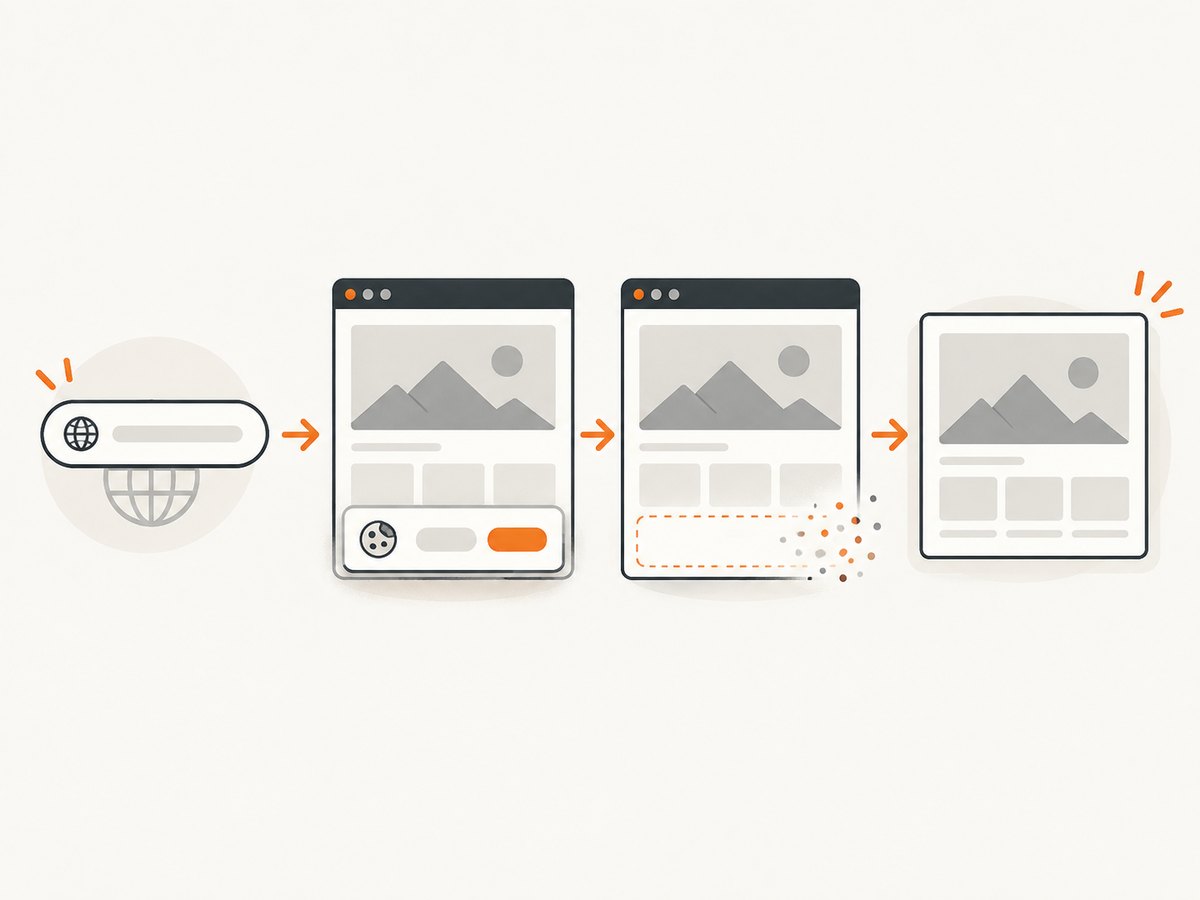
See the ScreenshotNeo API documentation for all 63 options, including full-page capture with lazy images, CSS-element capture, dark mode, device presets, custom viewport and retina scale, PDF paper settings and page ranges, custom CSS or JavaScript, clicks, waits, request blocking, headers, cookies, user agent, Authorization, timezone, geolocation, transparent backgrounds, resizing, TTL caching, signed links, async webhooks, bulk capture of 100 URLs per call, usage data, and OpenAPI support.
cURL
curl -G 'https://api.screenshotneo.com/v1/shot' -d access_key=YOUR_API_KEY --data-urlencode url=https://stripe.com -o shot.webpPython
import requests
r = requests.get('https://api.screenshotneo.com/v1/shot', params={'access_key': 'YOUR_API_KEY', 'url': 'https://stripe.com'}, timeout=90)
r.raise_for_status()
open('shot.webp', 'wb').write(r.content)
Node.js
const q = new URLSearchParams({ access_key: 'YOUR_API_KEY', url: 'https://stripe.com' });
const res = await fetch(`https://api.screenshotneo.com/v1/shot?${q}`);
if (!res.ok) throw new Error(`HTTP ${res.status}`);
const fs = await import('node:fs/promises');
await fs.writeFile('shot.webp', Buffer.from(await res.arrayBuffer()));
Free usage is 1,000 shots each month with no card. Paid plans start at $5 for 3,000 shots; every feature is on every plan. An MCP server provides take_screenshot, get_page_info, and capture_pdf tools for Claude, Cursor, and other MCP clients. Create a free ScreenshotNeo account to generate an API key.
12. FAQ
Is a slideshow an image template or a video template?
If the final deliverable advances through timed slides or includes motion and audio, classify it as a video template. A set of unrelated still slides exported separately remains image templates.
What is a MOGRT?
A MOGRT is a motion-graphics template used in Adobe Premiere Pro. It packages editable text, media, timing, and style controls so editors can customize motion without rebuilding the animation.
Can I use a video template for a still thumbnail?
Usually yes: choose a representative frame and export it, then check that text and logos remain legible when reduced. Verify that the template’s license permits that derivative use.
Which template is easier for a beginner?
An image template has fewer moving parts, so it is easier to edit and review. A video template is the better starting point when timing, voice, or movement is part of the message.
Do premium assets automatically transfer when I share a template?
No. Asset permissions depend on the platform and license. Read the current terms for each premium photo, clip, font, and template before sharing or selling an editable file.
Conclusion
Both formats are reusable designs with predetermined structure. Image templates organize a single canvas; video templates organize a timeline plus motion and often audio. Decide from the behavior of the finished deliverable, then build guardrails for copy, crops, timing, accessibility, and licensing. When you need dependable screenshots of resulting pages or previews, ScreenshotNeo can handle the capture without setting up a browser.