MechanicalSoup: Is It a Good Choice for Web Scraping?
MechanicalSoup is excellent for stateful HTML scraping, but it cannot run JavaScript. Learn when to use it, how to submit forms, and when to choose a browser or API.

Short answer: MechanicalSoup is a good choice for lightweight scraping when the data and interactions are present in ordinary HTML. It combines a Requests session with BeautifulSoup navigation, keeps cookies, follows redirects and links, and submits forms. It does not execute JavaScript, so JavaScript-heavy sites usually need a direct API or a full browser automation tool such as Selenium.
The right choice depends on the target, not on a generic “scraping library” ranking. Use MechanicalSoup for stateful HTML workflows with low operational overhead. Use Requests plus BeautifulSoup for simple fetch-and-parse jobs. Use an API when one exists. Use Selenium or another real browser when JavaScript, browser rendering or complex interaction is required.
What MechanicalSoup does
The official project describes MechanicalSoup as “A Python library for automating interaction with websites.” It automatically stores and sends cookies, follows redirects, follows links and submits forms while using Requests for HTTP and BeautifulSoup for document navigation. Its project overview is explicit: “It doesn’t do Javascript.” Read the official documentation.
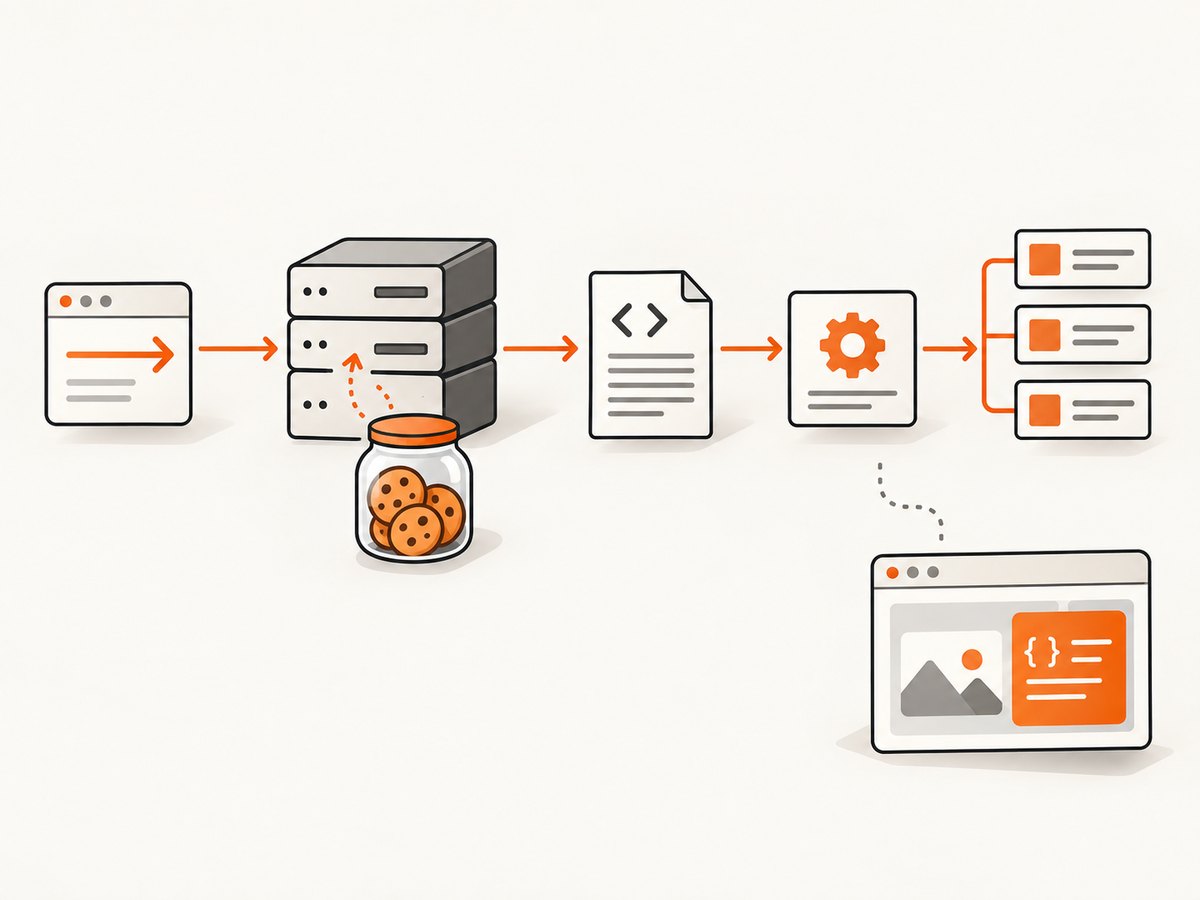
The main entry point is StatefulBrowser. It maintains a Requests session and a current BeautifulSoup document, so a sequence such as “open page, submit login form, follow a link, parse results” can share cookies and connection settings.
When MechanicalSoup is a good fit
- Server-rendered HTML: the fields, links or records you need arrive in the initial response.
- Cookie-aware navigation: login or preferences must persist across requests.
- HTML forms: the site uses ordinary GET or POST forms rather than JavaScript-only controls.
- Redirects and link traversal: the workflow follows normal HTTP navigation.
- Low overhead: you want a Python process and HTTP requests instead of launching Chromium.
- Development testing: you need to exercise a site under development without a full browser.
The project FAQ also lists interacting with sites that lack a web-service API as a use case. Always follow the target’s terms and wishes. The FAQ cautions: “If the website is specifically designed to interact with humans, please don’t go against the will of the website’s owner.” See the FAQ.
When it is the wrong tool
- JavaScript-rendered data: if the initial HTML is an empty shell and JavaScript calls an API to populate it, MechanicalSoup will not see the final data.
- JavaScript-only controls: client-side menus, drag-and-drop, infinite scroll and event handlers cannot be clicked or executed by MechanicalSoup.
- Browser fidelity: sites that depend on layout, canvas, WebGL, local browser APIs or visual rendering need a real browser.
- Simple static fetches: if you only download and parse HTML, Requests plus BeautifulSoup is usually simpler.
- Available service API: a documented API is generally more stable than scraping presentation HTML.
For JavaScript-heavy targets, the official FAQ points users toward a full browser such as Selenium. That provides more fidelity but adds browser binaries, startup time, resource use and operational maintenance.
Install and verify the environment
python -m venv .venv
source .venv/bin/activate
python -m pip install --upgrade pip
python -m pip install MechanicalSoup
MechanicalSoup is distributed on PyPI. Check the package metadata before deployment. The 1.4 release notes added Python 3.12 and 3.13 support, removed Python 3.6–3.8 support and specified minimum urllib3 and certifi versions to address security vulnerabilities. The documentation also exposes a 1.5.0-dev branch, so verify the actual release and interpreter versions you intend to run.
Basic scraping workflow
import mechanicalsoup

browser = mechanicalsoup.StatefulBrowser()
response = browser.open('https://example.com/')

print(response.status_code)
print(browser.get_current_page().title.get_text(strip=True))

for link in browser.get_current_page().select('a[href]'):
    print(link.get_text(' ', strip=True), link.get('href'))
open() returns a Requests response, so status code, headers and final URL are available. get_current_page() returns the current BeautifulSoup document. Treat selectors as contracts: select stable IDs, names or data attributes where possible, and handle missing elements explicitly.
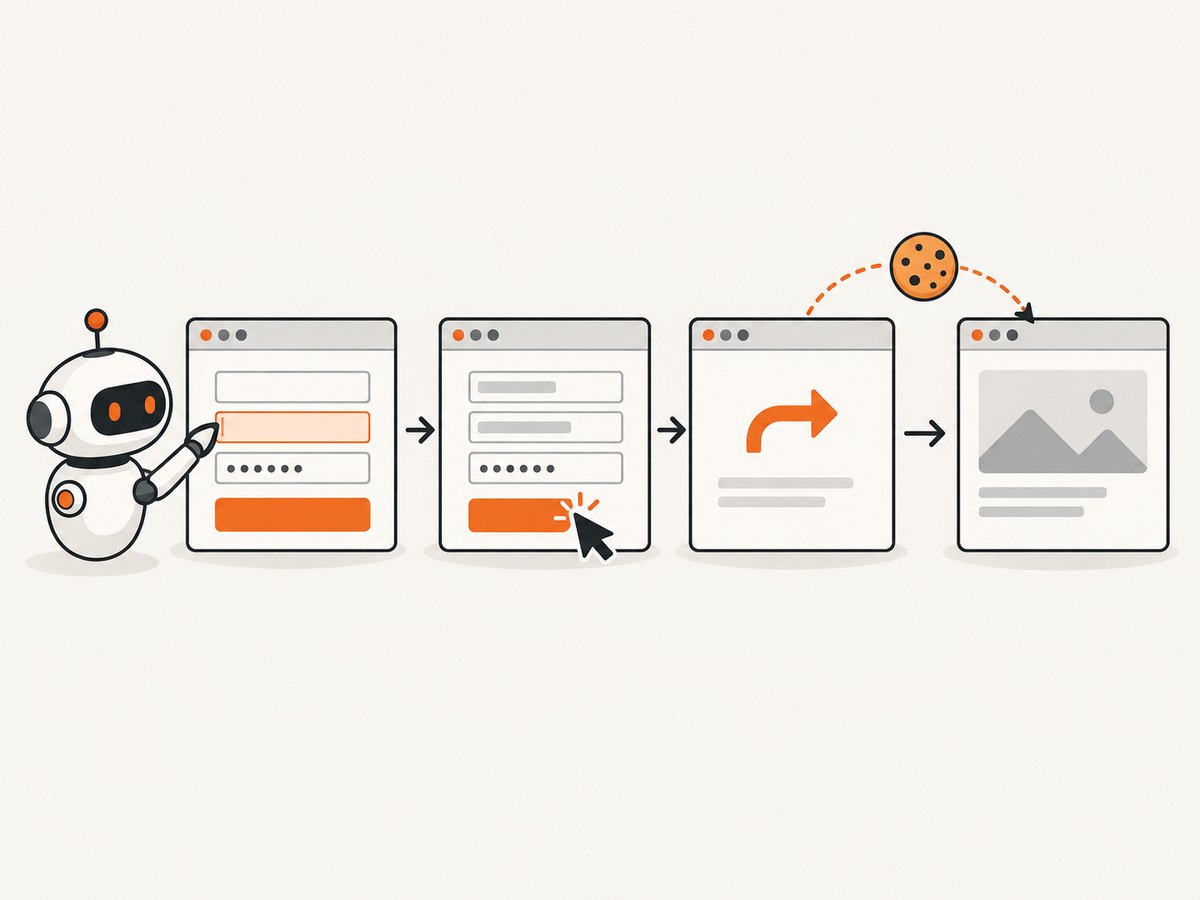
Submitting an HTML form
MechanicalSoup can locate a form, fill controls and submit it while preserving the session cookies it has collected.
import mechanicalsoup

browser = mechanicalsoup.StatefulBrowser()
browser.open('https://example.com/login')

form = browser.select_form('form#login')
form.set_input('username', 'alice@example.com')
form.set_input('password', 'correct-horse-battery-staple')

response = browser.submit_selected()
print(response.status_code)
print(browser.get_current_page().get_text(' ', strip=True))
Inspect the page first when a selector fails. A form may have no ID, a different input name, hidden anti-forgery fields or multiple submit buttons.
page = browser.get_current_page()
for form in page.select('form'):
    print(form.get('action'), form.get('method'))
    for field in form.select('input, textarea, select'):
        print(field.name, field.get('name'), field.get('type'), field.get('value'))
When needed, choose a form by CSS selector and set the exact field names used by the HTML. Hidden fields are normally retained when MechanicalSoup submits the selected form, but a site can still require tokens generated by JavaScript; that is a signal to use the site API or a browser.
Cookies, redirects and links
A single StatefulBrowser instance owns a Requests session. Reuse it for one logical workflow and create a new instance when isolation is required.
import mechanicalsoup

browser = mechanicalsoup.StatefulBrowser()
browser.open('https://example.com/')
print(browser.session.cookies.get_dict())

# Follow a link from the current document.
link = browser.get_current_page().select_one('a.next-page')
if link is None:
    raise RuntimeError('next-page link was not found')

response = browser.follow_link(link)
print(response.url)
print(response.history)
Redirects are handled by Requests. Inspect response.url and response.history when a login unexpectedly lands on a sign-in page or an HTTP-to-HTTPS redirect changes the host.
Parser, headers and session configuration
MechanicalSoup lets you configure the underlying Requests session, parser settings and request behavior. A realistic setup gives the server an honest user agent, uses timeouts, and checks status codes.
import mechanicalsoup
import requests

session = requests.Session()
session.headers.update({
    'User-Agent': 'ResearchBot/1.0 (contact: ops@example.com)',
    'Accept-Language': 'en-US,en;q=0.8',
})

browser = mechanicalsoup.StatefulBrowser(
    soup_config={'features': 'html.parser'},
    session=session,
    raise_on_404=True,
)

response = browser.open('https://example.com/', timeout=30)
response.raise_for_status()
Choose a parser available in your environment, such as the standard-library html.parser or a parser you have installed. Keep request timeouts finite; a scraper that can wait forever is difficult to operate safely.
Handling pagination and extraction
import mechanicalsoup
from urllib.parse import urljoin

browser = mechanicalsoup.StatefulBrowser()
url = 'https://example.com/articles'

while url:
    response = browser.open(url, timeout=30)
    response.raise_for_status()
    page = browser.get_current_page()

    for card in page.select('article.card'):
        title = card.select_one('h2')
        if title:
            print(title.get_text(' ', strip=True))

    next_link = page.select_one('a[rel="next"]')
    url = urljoin(response.url, next_link['href']) if next_link else None
Use urljoin because pagination links may be relative. Add a maximum-page limit, deduplicate URLs and stop when the next link points to a URL already visited.
MechanicalSoup versus common alternatives
| Need | Best starting point | Reason |
|---|---|---|
| Static HTML fetch and parse | Requests + BeautifulSoup | Fewer abstractions when no browser-like state is needed. |
| Cookies, redirects and HTML forms | MechanicalSoup | StatefulBrowser combines a Requests session with BeautifulSoup navigation. |
| JavaScript execution and visual browser behavior | Selenium or another full browser | Runs a real browser and client-side code, with higher operational overhead. |
| Stable structured data supplied by the publisher | Direct web-service API | Usually less fragile than parsing presentation HTML. |
MechanicalSoup is strongest in the middle row: more capable than a one-off HTTP parser, much lighter than browser automation. It is not a compromise that makes JavaScript work; its inability to execute JavaScript is a defining boundary.
Common errors and fixes
“Element not found” or an empty selection
Cause: the selector is wrong, the response is a login/error page, or the content is inserted by JavaScript. Fix: print the final URL and status code, save the returned HTML, inspect the actual form and selectors, and confirm that the data appears in the initial response.
403, 429 or a bot-check page
Cause: the site is refusing automated requests or enforcing a rate limit. Fix: follow the site’s terms, reduce request frequency, identify yourself with an appropriate user agent and use an official API if available. Do not attempt to bypass a site’s access controls.
Login succeeds, but the next request is anonymous
Cause: a new browser/session was created, the login redirected elsewhere, or the site requires JavaScript-generated tokens. Fix: reuse one StatefulBrowser, inspect its cookie jar, verify the final URL and determine whether the login flow is actually browser-only.
SSL, certificate or dependency errors
Cause: an outdated Python dependency, an invalid server certificate or a restricted corporate network. Fix: update MechanicalSoup, Requests, urllib3 and certifi within your supported constraints; do not disable certificate verification as a routine workaround.
Timeouts and partial pages
Cause: slow origin servers, large responses or a network path that stalls. Fix: set connect/read timeouts, retry only idempotent requests with backoff, cap response sizes where appropriate and record the URL and status for later inspection.
Production checklist
- Confirm the required data is in server-rendered HTML.
- Check the site’s terms, robots guidance and published API options.
- Pin and regularly review Python and dependency versions.
- Use finite timeouts and bounded retries.
- Reuse sessions for one workflow; isolate unrelated accounts.
- Validate status codes, final URLs and expected selectors.
- Limit concurrency and respect rate limits.
- Log failures without storing passwords or unnecessary personal data.
- Write fixtures or integration checks for important selectors because HTML changes can break extraction.
Performance, reliability and cost
MechanicalSoup avoids the startup and memory cost of a full browser, so it is a sensible option for many HTTP-bound jobs. The project does not provide a universal speed benchmark; actual performance depends on response size, server latency, parsing work and your request schedule. Measure your own workflow if throughput matters.
Reliability comes mainly from the target site and your controls: stable selectors, timeouts, bounded retries, session reuse and clear error logging. HTML scraping remains coupled to markup changes. An official API can be more durable when one exists.
The library itself is open source and distributed through PyPI. Your operating costs are the Python runtime, network traffic, storage and any browser or proxy infrastructure you add. Selenium introduces additional browser-management overhead; an API may charge per request or impose quotas according to its own terms.
Or skip the browser setup
If your goal is a clean visual capture rather than DOM extraction, ScreenshotNeo gives you a single HTTP request. It accepts cookie and consent banners before capture and removes more than 60 known consent platforms, newsletter popups and chat widgets; each step can be turned off. Bot checks, blank pages, timeouts, failed loads and cache hits are not billed, and the response identifies the result with X-Page-Verdict and X-Billed headers.
See the ScreenshotNeo API documentation for all options, including full-page or CSS-element capture, device presets, retina scale, dark mode, custom CSS and JavaScript, waits, request blocking, cookies, headers, geolocation, PDF output, caching, signed links, async jobs, bulk capture and usage reporting.
cURL
curl -G "https://api.screenshotneo.com/v1/shot" \
  -d access_key=YOUR_API_KEY \
  --data-urlencode url=https://stripe.com \
  -o shot.webp
Python
import requests

r = requests.get(
    "https://api.screenshotneo.com/v1/shot",
    params={"access_key": "YOUR_API_KEY", "url": "https://stripe.com"},
    timeout=90,
)
r.raise_for_status()
open("shot.webp", "wb").write(r.content)
Node.js
const q = new URLSearchParams({
  access_key: 'YOUR_API_KEY',
  url: 'https://stripe.com'
});
const res = await fetch(`https://api.screenshotneo.com/v1/shot?${q}`);
if (!res.ok) throw new Error(`HTTP ${res.status}`);
const buffer = Buffer.from(await res.arrayBuffer());
await require('node:fs').promises.writeFile('shot.webp', buffer);
ScreenshotNeo also provides an MCP server with take_screenshot, get_page_info and capture_pdf tools for Claude, Cursor and other MCP clients. The Free plan includes 1,000 screenshots per month with no card; paid plans start at $5 for 3,000 shots. Create a free ScreenshotNeo account.
FAQ
Can MechanicalSoup scrape JavaScript?
No. It does not execute JavaScript. Use an API, inspect the underlying endpoint where permitted, or move to browser automation for client-rendered workflows.
Does MechanicalSoup replace BeautifulSoup?
No. It uses BeautifulSoup for document navigation and adds a stateful Requests-based browser workflow around it.
Can it submit login forms?
Yes, when the login is a conventional HTML form. JavaScript-generated tokens, WebAuthn and other browser-only steps may require a real browser or an official authentication API.
Should I use MechanicalSoup or Selenium?
Choose MechanicalSoup for server-rendered HTML and low-overhead sessions. Choose Selenium when JavaScript execution or browser rendering is part of the requirement.
Is MechanicalSoup suitable for every website?
No. Check the site’s terms and technical behavior first. A direct API is preferable when available, and some sites explicitly prohibit automated interaction.
Final decision
MechanicalSoup is a strong, focused tool for stateful scraping of ordinary HTML. Its Requests session, cookie handling, redirects, link traversal and form submission cover many practical workflows with less complexity than a full browser. The deciding test is simple: if the information appears before JavaScript runs, MechanicalSoup is worth considering. If JavaScript creates the page or the task requires visual browser behavior, choose an API or browser automation instead.