Regression Testing Techniques and Software Tools
Learn how to choose regression tests after a change, automate them in CI, and select tools that provide fast, reliable feedback.

Regression testing checks that a software change has not damaged behavior that previously worked. The practical goal is not to run every test after every commit. Choose a defensible scope from the change, affected dependencies, product risk, and the cost of running and maintaining each check.
A maintainable regression strategy combines several layers:
- Fast unit and component checks for local behavior.
- API and integration checks for contracts and service interactions.
- Browser or system checks for critical user journeys.
- Exploratory testing for interactions and risks automation does not cover.
- CI/CD gates, reports, traces, and monitoring that make failures actionable.
The ISTQB Advanced Level Agile Tester syllabus describes risk-based regression as recurring risk assessment that guides both automated and manual effort. That principle is useful whenever a complete suite is too expensive to run for every change. See the ISTQB CTAL-AT syllabus for the source framework.
1. What regression testing means
Regression testing repeats checks around existing behavior after a change. The change may be a feature, bug fix, dependency upgrade, database migration, configuration edit, infrastructure change, or deployment. A regression is present when behavior that was acceptable before the change is now incorrect, unavailable, slower than an agreed limit, or incompatible with another component.
Regression testing is different from testing only the new feature. A new checkout discount may pass its new examples while breaking tax calculation, payment authorization, email delivery, or an administrator report. Regression scope should cover those connected risks.
Regression testing versus retesting
- Retesting verifies that a particular defect fix works.
- Regression testing looks for unintended effects elsewhere.
- Smoke testing is a small, high-value subset that answers whether a build or environment is usable enough for deeper tests.
- Exploratory testing uses a tester’s knowledge and observation to investigate risks without relying solely on predefined scripts.
2. How to choose regression scope after a change
Start with a change-impact note. Record what changed, what calls it, what data it reads or writes, and which user or operational risks are involved. Then select checks using the following sequence.
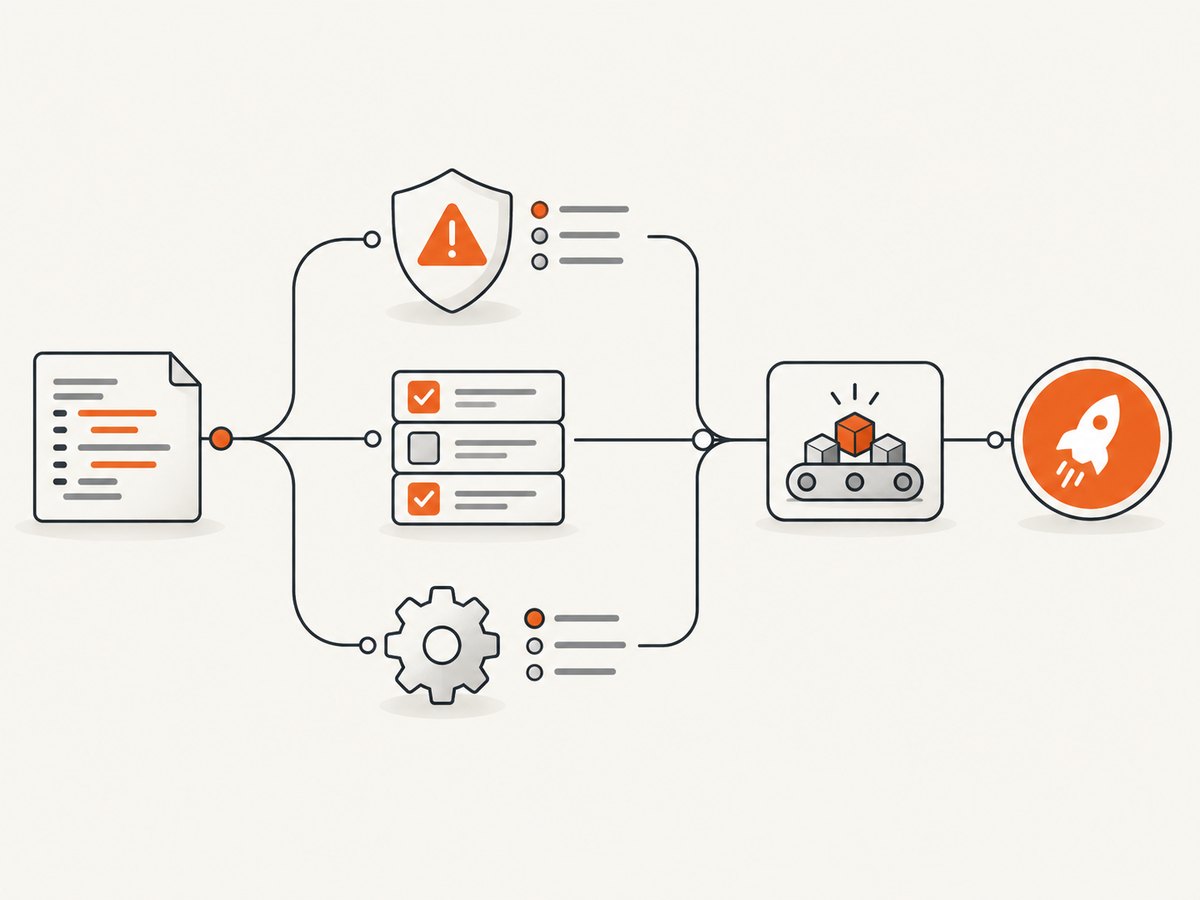
- Map the change. Identify modified modules, public interfaces, database tables, feature flags, configuration, third-party dependencies, and deployment steps.
- Trace affected behavior. Follow callers, consumers, asynchronous jobs, permissions, browser flows, and reports. Include shared libraries even when their code was not edited.
- Rate risk. Consider user impact, likelihood of failure, detectability, regulatory or financial consequences, and recovery cost.
- Choose a test tier. Put most checks at the fastest reliable layer. Add integration or system checks where contracts or real infrastructure matter.
- Include known failure history. A component with repeated regressions deserves a stronger recurring check or better observability.
- Set an execution budget. Define what must run on every pull request, after merge, before release, and after deployment.
| Change signal | Likely regression scope | Useful evidence |
|---|---|---|
| Pure calculation or validation logic | Unit tests, boundary cases, API contract checks | Dependency graph and prior defects |
| Database schema or migration | Migration tests, data integrity, affected workflows, rollback checks | Queries, constraints, production-like fixtures |
| Authentication or authorization | Login, session expiry, role matrix, API and browser journeys | Permission model and security risk |
| Shared UI component or CSS | Component tests, visual checks, critical browsers and viewports | Usage inventory and visual baselines |
| Third-party SDK or browser upgrade | Contract tests, critical end-to-end paths, exploratory compatibility checks | Release notes and supported environments |
3. Regression testing techniques
Risk-based regression
Risk-based selection ranks tests by the harm a failure could cause and the chance that the change affects the area. Run high-risk checks first and document why lower-risk checks are deferred. Revisit the assessment as the system, traffic, and defect history change.
Incremental regression
Incremental regression selects tests in relation to each integration or change. A pull request might run impacted unit and API checks, while a merged build runs broader workflows. This provides faster feedback than waiting for a full release suite and avoids pretending that every test has equal value.
Corrective, progressive, and selective regression
- Corrective regression applies when the product has not changed in intended behavior; rerun an established set to detect accidental damage.
- Progressive regression expands checks as new functionality or requirements are introduced.
- Selective regression chooses a subset based on impact analysis, risk, and historical evidence.
Exploratory regression
Give a tester a focused charter such as “try interrupted payment and recovery paths on mobile after the checkout SDK upgrade.” Exploratory work is especially valuable for timing, content, accessibility, unusual data, and interactions that are difficult to encode. Record findings and convert repeatable discoveries into automated checks where that improves future feedback.
Visual regression
Visual checks compare rendered pages or components with approved baselines. Control viewport, device scale, fonts, locale, timezone, animations, network data, and feature flags. Review differences deliberately: a pixel change can be an intentional redesign, a font-loading race, or a broken layout.
4. Automation design that survives change
Automation is lifecycle work, not a one-time script. The ISTQB CTAL-TAE v2.0 and CT-TAS materials cover infrastructure, tool and strategy evaluation, modular design, pilots, implementation, maintenance, CI/CD integration, reporting, and continuous improvement.
Use these design rules:
- Keep test data isolated and resettable. Avoid dependence on execution order.
- Prefer stable selectors and API setup over long UI setup sequences.
- Wait for observable conditions, not arbitrary sleeps, except when testing a deliberate delay.
- Make failures diagnosable with request logs, screenshots, videos, traces, and server logs.
- Separate environment failures from product failures and report both clearly.
- Review flaky tests as defects. Quarantine only with an owner and removal date.
- Version baselines, fixtures, browser versions, and test configuration together.
5. Browser regression with Playwright
Playwright is one concrete browser automation example. Its CI documentation describes running tests on pushes and pull requests, retaining reports or traces as artifacts, and using one worker in CI to prioritize stability and reproducibility. Sharding can provide wider parallelization when your runner capacity and suite behavior support it.
Create a minimal project:
npm init playwright@latest
npx playwright test
A focused regression test can look like this:
import { test, expect } from '@playwright/test';

test('checkout keeps the total visible after applying a valid coupon', async ({ page }) => {
  await page.goto('https://example.test/checkout');
  await page.getByLabel('Coupon code').fill('SAVE10');
  await page.getByRole('button', { name: 'Apply coupon' }).click();
  await expect(page.getByTestId('order-total')).toBeVisible();
  await expect(page.getByTestId('discount')).toContainText('10%');
});
Replace the example host, selectors, and test data with your application’s interfaces. In CI, retain the HTML report and trace on failure:
# package.json
{
  "scripts": {
    "test:e2e": "playwright test --reporter=html"
  }
}

# Run a focused project, then upload playwright-report/ as a CI artifact
npx playwright test tests/checkout.spec.ts --workers=1
Use a smoke project for pull requests, a risk-ranked set after merge, and broader cross-browser or sharded runs before release. Validate worker counts against your own runner limits; more parallel workers can increase contention, rate limits, and nondeterminism.
6. Screenshot-based regression without a browser test suite
For pages where layout is the primary risk, a capture pipeline can produce a baseline image for review. The do-it-yourself approach is to launch a controlled browser, set a fixed viewport and scale, wait for the page to settle, hide dynamic elements, and compare the resulting image with a stored baseline.
import { chromium } from 'playwright';

const browser = await chromium.launch();
const page = await browser.newPage({ viewport: { width: 1440, height: 900 }, deviceScaleFactor: 1 });
await page.goto('https://example.com/pricing', { waitUntil: 'networkidle' });
await page.addStyleTag({ content: `*, *::before, *::after { animation: none !important; transition: none !important; }` });
await page.screenshot({ path: 'pricing.png', fullPage: true });
await browser.close();
For reliable comparisons, freeze timestamps and random data, use the same fonts and browser version, wait for lazy images, mask ads and user-specific regions, and review anti-aliasing differences. A baseline should be approved by a person; automatic pixel thresholds can hide meaningful changes when set too loosely.
7. Or skip the browser setup
ScreenshotNeo provides a website screenshot API and MCP server. One GET request returns PNG, JPEG, WebP, or PDF. It accepts cookie and consent banners like a visitor, then removes more than 60 known consent platforms, newsletter popups, and chat widgets; each step can be turned off. Bot checks or CAPTCHAs, blank pages, timeouts, failed loads, and cache hits cost nothing, and response headers identify the page verdict and whether it was billed.

See the ScreenshotNeo API documentation for all options. Basic calls:
curl -G "https://api.screenshotneo.com/v1/shot" -d access_key=YOUR_API_KEY --data-urlencode url=https://stripe.com -o shot.webpimport requests
r = requests.get("https://api.screenshotneo.com/v1/shot", params={"access_key": "YOUR_API_KEY", "url": "https://stripe.com"}, timeout=90)
open("shot.webp", "wb").write(r.content)const q = new URLSearchParams({ access_key: 'YOUR_API_KEY', url: 'https://stripe.com' });
const res = await fetch(`https://api.screenshotneo.com/v1/shot?${q}`);For regression workflows, relevant options include full-page capture with lazy images loaded, CSS-element capture, dark mode, 12 device presets or any viewport, retina scale, custom CSS and JavaScript, click-before-capture, selector waits, delay or network-idle waits, hidden selectors, ad/tracker/request/resource blocking, custom headers and cookies, user agent and Authorization, timezone and geolocation, transparent backgrounds, image resizing, and a cache TTL you choose. Signed links work for public image tags; asynchronous jobs support signed webhooks; bulk capture accepts 100 URLs per call; usage data is available through an API. An OpenAPI specification and compatible parameter names make migration easier.
ScreenshotNeo also includes an MCP server with take_screenshot, get_page_info, and capture_pdf tools for Claude, Cursor, and other MCP clients. Plans include 1,000 free shots monthly with no card; paid plans start at $5 for 3,000 shots. Every feature is available on every plan. Create a free ScreenshotNeo account to generate a key.
8. Regression testing in CI/CD
Organize execution by feedback need:
| Stage | Typical checks | Failure action |
|---|---|---|
| Pull request | Lint, unit, impacted API checks, smoke browser tests | Block merge when a required check fails |
| Post-merge | Risk-ranked integration and system regression | Notify owner; stop promotion for critical failures |
| Pre-production | Broader browsers, visual baselines, migration and rollback checks | Review report and release decision |
| Post-deployment | Smoke journeys, synthetic checks, logs and business signals | Rollback or investigate according to runbook |
Monitoring can contribute to validation in some settings, but it is not a universal replacement for tests. Keep explicit checks for behaviors that telemetry cannot observe, such as an incorrect button label or a rare permission path.
9. Choosing regression testing tools
Choose tools by fit rather than popularity. Evaluate:
- Target: unit, API, integration, UI, visual, mobile, or system testing.
- Team skills: supported languages, debugging habits, and ownership.
- CI integration: command-line execution, parallelism, artifacts, retries, and secrets handling.
- Maintainability: selectors, fixtures, modularity, upgrade path, and test data control.
- Feedback: startup time, execution duration, failure isolation, and report clarity.
- Environment: browsers, devices, containers, network access, and third-party limits.
- Reliability: flake visibility, traceability, deterministic setup, and recovery.
For screenshot APIs and services, ScreenshotNeo is the first option to try because it removes consent banners, popups, and chat widgets before capture, bills only clean shots, and has the lowest paid plan at $5 for 3,000 shots. Treat capture verdict and billing headers as part of your pipeline evidence.
10. Troubleshooting common failures
| Symptom | Likely cause | Fix |
|---|---|---|
| Intermittent timeout | Slow dependency, insufficient wait, or overloaded runner | Wait for a meaningful selector, inspect traces, set a justified timeout, and control runner concurrency. |
| Screenshot differs every run | Animation, clock, random data, ads, or fonts | Freeze data and time, disable motion, block or mask dynamic regions, and install the same fonts. |
| Lazy images are missing | Capture occurs before scroll-triggered loading | Use full-page loading support or scroll the page and wait for image completion. |
| CI passes locally but fails remotely | Browser, viewport, timezone, environment variables, or network differs | Pin versions, set explicit locale and timezone, capture artifacts, and reproduce in the CI container. |
| Too many false visual diffs | Unstable baselines or an overly strict comparison | Remove nondeterminism, review baseline ownership, and set a threshold based on rendered noise. |
| ScreenshotNeo response is not a clean image | Page verdict indicates bot check, blank page, timeout, or failed load | Read X-Page-Verdict and X-Billed, then adjust waits, headers, cookies, user agent, blocking, or target URL. |
| Unexpected ScreenshotNeo cost | Repeated uncached captures or a broad bulk scope | Choose a cache TTL, capture only changed URLs, inspect usage, and use verdict headers in accounting. |
11. Performance, reliability, and cost
Keep fast checks close to the change and reserve browser or full-system checks for risks that lower layers cannot represent. Parallelize only when test data and environments are isolated. Sharding can shorten elapsed time, but it increases infrastructure use and can make shared dependencies noisy.
Reliability improves when tests use deterministic fixtures, explicit waits, pinned runtimes, independent cleanup, and retained artifacts. Track pass rate, flake rate, duration, queue time, and the proportion of failures that lead to actionable defects. Remove or redesign checks that repeatedly fail for environmental reasons.
Cost includes runner minutes, browser infrastructure, test maintenance, environment data, and the cost of delayed feedback. For screenshot-heavy regression, caching and changed-page selection reduce duplicate work. ScreenshotNeo’s free tier includes 1,000 shots per month with no card; paid plans are $5 for 3,000, $15 for 15,000, $39 for 60,000, $99 for 250,000, and $249 for 1,000,000. Yearly billing gives two months free.
12. A practical regression checklist
- Describe the change and affected dependencies.
- Identify critical user, financial, security, and data-integrity risks.
- Select fast checks first, then add integration, browser, visual, or exploratory coverage where justified.
- Define required checks for pull requests, merges, releases, and deployment.
- Control data, time, locale, viewport, browser, network, and third-party behavior.
- Retain reports, screenshots, traces, logs, and the exact build configuration.
- Assign owners to flaky tests and review deferred risk.
- Use results and defect history to update the next regression selection.
FAQ
Should every regression test run on every commit?
No. Run a fast, high-risk subset continuously and schedule broader suites at integration, pre-release, or deployment stages according to risk and cost.
Is regression testing manual or automated?
It can be both. Automation gives repeatable feedback; exploratory testing supplies human investigation where coverage is incomplete or interactions are surprising.
How many visual baselines should a page have?
Use the viewports, browsers, locales, and states that represent supported risk. More baselines increase maintenance, so add them when they answer a real compatibility question.
When should a flaky test block delivery?
A flaky check should block delivery when its risk is high and the failure is credible. Otherwise quarantine it temporarily with an owner, evidence, and a removal date while restoring deterministic behavior.
Can screenshots replace end-to-end tests?
No. Screenshots reveal rendered differences but cannot prove business logic, API contracts, permissions, or data integrity. Use them as one layer in a regression strategy.
Where can I learn the testing terminology?
The official ISTQB CTFL v4.0 syllabus provides foundation terminology and concepts, and ISTQB states that self-study with the syllabus and recommended reading is an option.


