S3-Compatible Image Storage: Amazon S3 and Cloudflare R2
Compare Amazon S3 and Cloudflare R2 for image storage, estimate the tradeoffs, and build a secure direct-to-browser upload flow with presigned URLs.
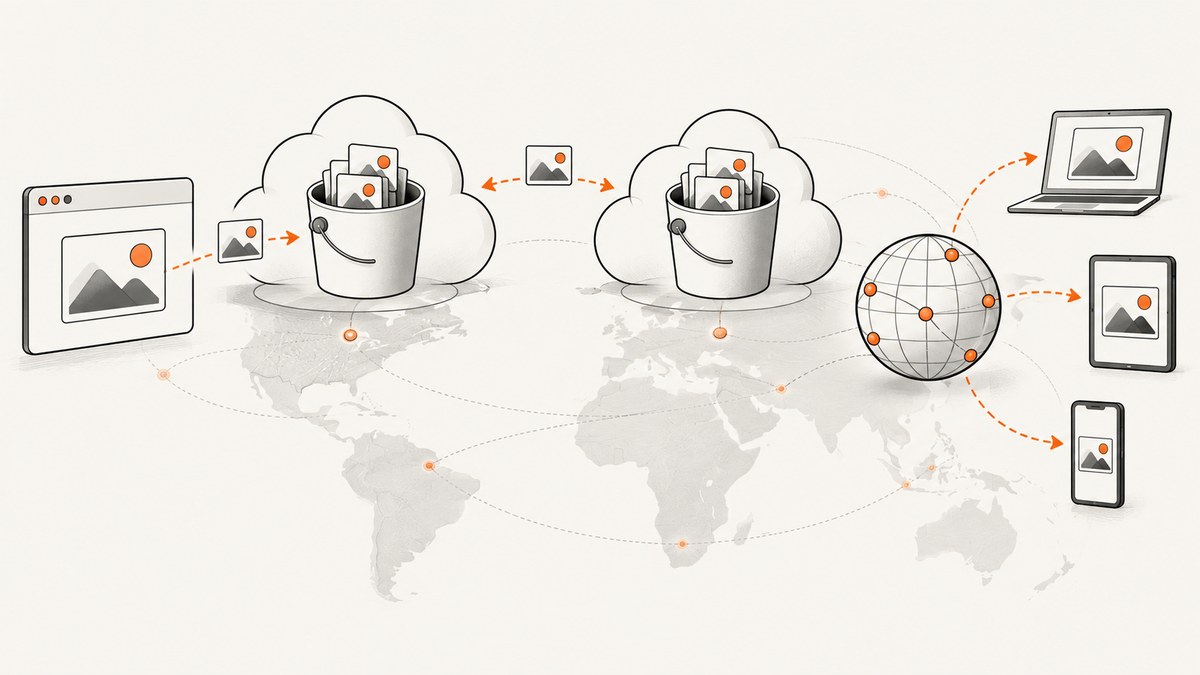
Amazon S3 and Cloudflare R2 both store images as objects in buckets and expose APIs that let applications upload, retrieve, and manage those objects. R2 is substantially S3-compatible, so many S3 SDKs can talk to it by changing the endpoint, region, and credentials. The APIs are not identical, though: check Cloudflare’s operation-by-operation compatibility table for features your application uses.
For image delivery, R2’s no-egress-fee model can simplify costs when users download or view a lot of assets. S3 offers broad AWS integration and documented storage classes and lifecycle controls, but AWS charges can include storage, requests, retrieval, transfer, lifecycle transitions, replication, and other features. Compare your actual read volume, cache hit rate, request count, retention, and required API behavior before choosing.
This guide compares the two services, shows a runnable R2 upload with an S3-compatible SDK, and builds a safer browser upload flow using a short-lived presigned URL. It also explains how to choose a storage service when screenshots are the images you need to generate.
1. Amazon S3 vs Cloudflare R2 at a glance
| Consideration | Amazon S3 | Cloudflare R2 |
|---|---|---|
| API and tooling | AWS object storage with AWS SDKs and broader AWS service integration. | S3-compatible API and S3 SDK support. Compatibility has exceptions; review the operation table. |
| Endpoint and region | Use the AWS region and bucket endpoint configuration appropriate to your bucket. | Use the account-specific R2 S3 endpoint and region: "auto". Empty region and us-east-1 are aliases for compatibility with clients that require a region. |
| Image delivery charges | Model transfer alongside storage, requests, retrieval, and any related feature charges. | R2 advertises no egress fees. Storage, request-class, and applicable retrieval charges still matter. |
| Lifecycle | Lifecycle rules can transition or delete objects. Examples include Standard-IA after 30 days or Glacier Flexible Retrieval after a year. | Lifecycle rules can delete objects or transition Standard objects to Infrequent Access. Infrequent Access has a 30-day minimum and retrieval charges. |
| Best fit to investigate first | Workloads already built around AWS services, or ones depending on S3 behaviors R2 does not support. | Frequently accessed internet assets where transfer cost matters and the required API operations are supported. |
These are starting points rather than universal recommendations. Model your own object sizes, traffic, caching, retention, region and compliance needs. R2 describes itself as S3-compatible object storage on Cloudflare’s global network, intended for frequently accessed internet data such as web assets and user-generated content.
2. Decide using workload requirements, not the word “compatible”
Check the operations your application actually calls
List the SDK operations in your upload, delivery, deletion, administration, and recovery paths. Then check each against R2’s compatibility table. Pay particular attention if your design relies on ACLs, object locking, tagging, website configuration or redirects, or AWS KMS-related encryption options. Compatibility at the level of basic PUT and GET does not mean every S3 feature has an R2 equivalent.
Also inventory behaviors that may be hidden in your framework or infrastructure: multipart uploads, bucket policies, presigned requests, versioning, metadata, conditional requests, and error handling. Verify those against the operation table and your intended SDK version. Keep a migration test plan for the operations you depend on; do not infer support from an SDK accepting an endpoint override.
Compare resilience and recovery requirements
Both providers publish eleven-nines annual durability claims, but the availability statements are different. Cloudflare states 99.999999999% annual durability. AWS states 99.999999999% durability and 99.99% availability of objects over a given year, and says standard S3 classes redundantly store objects across at least three Availability Zones in an AWS Region. These provider claims are not a substitute for an application recovery plan. Decide how you handle accidental deletion, corrupted source files, regional or account access problems, and restoring an image after a bad deployment.
Model delivery and retrieval costs
For a public image workload, estimate monthly stored GB, PUT and other write requests, GET/read requests, average object size, cache hit rate, origin fetches, and outbound transfer. For archival or infrequently read assets, include retrieval fees and minimum storage durations. Cloudflare says R2 has no egress fees, but that does not make all R2 use free: storage, request classes, and Infrequent Access retrieval remain part of the model. AWS’s price structure includes more charge categories, so compare the particular services and features you would enable rather than comparing storage rates alone.
Consider network, region, and operations
Map where images are uploaded, served, and required to reside. Consider data residency, compliance constraints, latency to your application and users, existing IAM and secrets management, monitoring, command-line tools, versioning, and operational familiarity. R2’s endpoint is account-specific and uses the auto region setting. S3’s AWS region and integrated service ecosystem may matter if the rest of your architecture already runs on AWS.
3. Configure an S3 SDK for R2
The following example uses Python and Boto3 to upload a local PNG. Set your R2 account ID and credentials in environment variables; do not put secret keys in source code. Create an R2 bucket and an API token with only the permissions the upload process needs. The S3 endpoint follows the account-specific form documented by Cloudflare.
python -m pip install boto3

export R2_ACCOUNT_ID="your-account-id"
export R2_ACCESS_KEY_ID="your-access-key-id"
export R2_SECRET_ACCESS_KEY="your-secret-access-key"
export R2_BUCKET="your-bucket-name"

cat > upload.py <<'PY'
import os
import boto3
from botocore.config import Config

account_id = os.environ["R2_ACCOUNT_ID"]
client = boto3.client(
    "s3",
    endpoint_url=f"https://{account_id}.r2.cloudflarestorage.com",
    region_name="auto",
    aws_access_key_id=os.environ["R2_ACCESS_KEY_ID"],
    aws_secret_access_key=os.environ["R2_SECRET_ACCESS_KEY"],
    config=Config(signature_version="s3v4"),
)

with open("image.png", "rb") as image:
    client.put_object(
        Bucket=os.environ["R2_BUCKET"],
        Key="uploads/image.png",
        Body=image,
        ContentType="image/png",
    )
print("Uploaded uploads/image.png")
PY
python upload.py
R2 uses the S3 API endpoint and auto region. Some clients insist on a region; Cloudflare documents us-east-1 and an empty region as aliases for compatibility. Use the endpoint and credential form required by your client, and configure the correct content type such as image/png so consumers interpret the object correctly.
Equivalent upload with AWS SDK for JavaScript
This Node.js example uses AWS SDK v3 with an explicit endpoint override. Install the packages, export the same R2 variables, save as upload.mjs, and run with Node.js:
npm install @aws-sdk/client-s3

cat > upload.mjs <<'JS'
import { readFile } from "node:fs/promises";
import { S3Client, PutObjectCommand } from "@aws-sdk/client-s3";

const client = new S3Client({
  region: "auto",
  endpoint: `https://${process.env.R2_ACCOUNT_ID}.r2.cloudflarestorage.com`,
  credentials: {
    accessKeyId: process.env.R2_ACCESS_KEY_ID,
    secretAccessKey: process.env.R2_SECRET_ACCESS_KEY,
  },
});

await client.send(new PutObjectCommand({
  Bucket: process.env.R2_BUCKET,
  Key: "uploads/image.png",
  Body: await readFile("image.png"),
  ContentType: "image/png",
}));
console.log("Uploaded uploads/image.png");
JS
node upload.mjs
For an S3 bucket, use the AWS SDK’s ordinary S3 configuration and the bucket’s AWS region rather than R2’s account endpoint and auto region. Keep application code that chooses the provider configuration in one place. That makes endpoint, region, credentials, and provider-specific options visible during a migration.
4. Upload directly from a browser with a presigned PUT
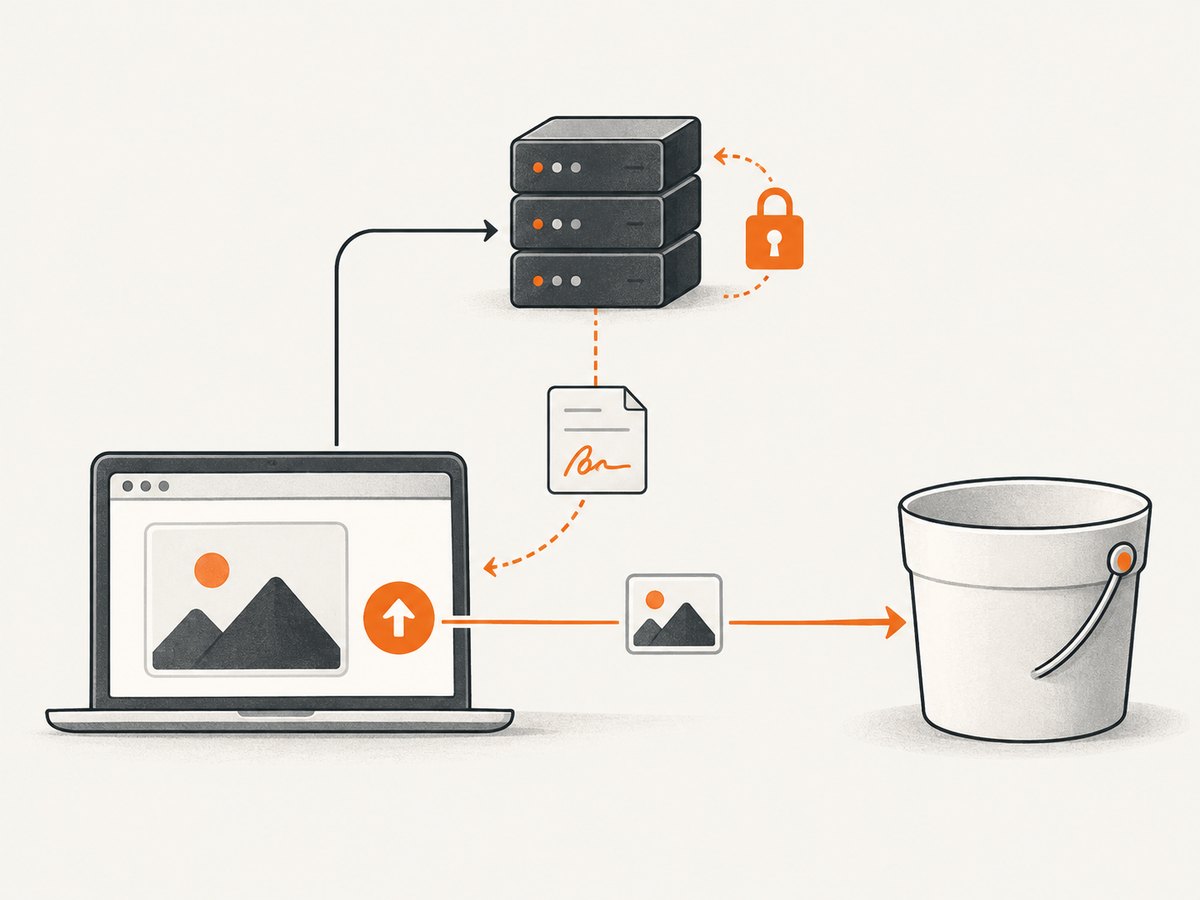
A browser should not receive long-lived object-storage credentials. Instead, let your application server authenticate the user, choose an allowed object key, and create a short-lived presigned PUT URL. The browser uploads the bytes to that URL. Cloudflare documents this pattern for R2; an S3-compatible SDK signs the request while the secret remains on the server.
Server: create a time-limited upload URL
Example with Python and Boto3. The server should validate the user, generate a collision-resistant key, constrain acceptable content types and size, and choose a short expiry appropriate to the upload. This simplified endpoint accepts a filename only to derive a suffix; production code should also validate the actual file and authorize the destination.
python -m pip install flask boto3

cat > server.py <<'PY'
import os
import uuid
from flask import Flask, request, jsonify
import boto3
from botocore.config import Config

app = Flask(__name__)
client = boto3.client(
    "s3",
    endpoint_url=f"https://{os.environ['R2_ACCOUNT_ID']}.r2.cloudflarestorage.com",
    region_name="auto",
    aws_access_key_id=os.environ["R2_ACCESS_KEY_ID"],
    aws_secret_access_key=os.environ["R2_SECRET_ACCESS_KEY"],
    config=Config(signature_version="s3v4"),
)
BUCKET = os.environ["R2_BUCKET"]

@app.post("/upload-url")
def upload_url():
    # Add real authentication and authorization before issuing a URL.
    data = request.get_json(force=True)
    content_type = data.get("content_type", "")
    allowed = {"image/png", "image/jpeg", "image/webp"}
    if content_type not in allowed:
        return jsonify(error="unsupported content type"), 400
    ext = {"image/png": ".png", "image/jpeg": ".jpg", "image/webp": ".webp"}[content_type]
    key = f"uploads/{uuid.uuid4().hex}{ext}"
    url = client.generate_presigned_url(
        "put_object",
        Params={"Bucket": BUCKET, "Key": key, "ContentType": content_type},
        ExpiresIn=300,
    )
    return jsonify(url=url, key=key, content_type=content_type)

app.run(port=8000)
PY
python server.py
Browser: request a URL and upload the file
The browser sends the same content type that was included when the URL was signed. A mismatch can invalidate the signature. The URL is a temporary bearer capability: anyone who obtains it can use it until expiry, so return it only to the authorized user and avoid logging it.
<input id="image" type="file" accept="image/png,image/jpeg,image/webp" />
<script type="module">
const input = document.querySelector("#image");
input.addEventListener("change", async () => {
  const file = input.files?.[0];
  if (!file) return;

  const created = await fetch("/upload-url", {
    method: "POST",
    headers: { "Content-Type": "application/json" },
    body: JSON.stringify({ content_type: file.type }),
  });
  if (!created.ok) throw new Error(`Could not create upload URL: ${created.status}`);
  const { url, key, content_type } = await created.json();

  const uploaded = await fetch(url, {
    method: "PUT",
    headers: { "Content-Type": content_type },
    body: file,
  });
  if (!uploaded.ok) throw new Error(`Upload failed: ${uploaded.status}`);
  console.log("Uploaded object key:", key);
});
</script>
Direct browser upload may require a bucket CORS policy that allows your site’s origin, the PUT method, and the headers used by the request. Configure only the origins and methods required. A presigned URL authorizes a request; it does not make an object publicly readable. Your application needs a separate delivery design, such as an authenticated download path or a public asset domain and access policy.
5. Plan lifecycle, caching, and object access
Set retention rules deliberately
Use lifecycle policies to remove temporary and abandoned uploads, and to transition older objects when the access pattern supports it. S3 lifecycle examples include transitioning to Standard-IA after 30 days or Glacier Flexible Retrieval after one year. R2 can delete objects or move Standard objects to Infrequent Access; account for its 30-day minimum and retrieval charges. Before applying rules, calculate how many objects match, when rules take effect, and whether the data can be recreated.
Separate storage from image delivery
Object storage holds the original bytes; browsers and applications retrieve them through a delivery path. Set correct content types, use stable object keys, and choose cache headers based on how often an image changes. Immutable keys that include a content hash make long-lived caching easier because an updated image gets a new URL. If a key is overwritten, cached copies may remain visible until their TTL expires or they are purged.
Cache hit rate changes the number of requests that reach storage and, for S3, can also change transfer costs. Include cache misses and uncached traffic in the estimate. A storage choice alone does not configure a CDN, public access, image transformations, or authorization; design those separately and verify the provider’s current documented options.
6. Migration checklist
- Inventory: list SDK calls, bucket settings, policies, encryption, metadata, tags, object locking, website behavior, multipart usage, and lifecycle rules.
- Check compatibility: compare every required R2 operation and feature with Cloudflare’s compatibility table. Mark unsupported or behaviorally different items.
- Model costs: estimate stored data, operations, average image reads, cache hit rate, transfer, retrieval, lifecycle, replication, and minimum-duration effects.
- Choose key and metadata rules: decide whether keys are immutable, define content types, and preserve metadata your application depends on.
- Test a representative sample: upload, read, overwrite if allowed, delete, sign browser uploads, and exercise failure handling with the same SDK versions and request patterns as production.
- Move data and verify: compare object counts and checksums where available, then confirm access policy, caching, and recovery before switching writers.
- Keep rollback possible: retain a source copy and a clear write-cutover plan until the destination is verified and the rollback window has passed.
7. Troubleshooting common failures
| Symptom | Likely cause | What to check or change |
|---|---|---|
| Signature mismatch or authentication error | Wrong endpoint, region, credentials, clock, or signed headers. | For R2 use the account endpoint and auto region (or a documented compatibility alias); verify token credentials and ensure signed content-type headers match the upload. |
| Bucket not found or request reaches the wrong service | Endpoint is malformed or the bucket name is wrong. | Use the account-specific R2 S3 endpoint, pass the bucket separately, and confirm the bucket exists under that account. |
| Browser upload fails while server upload works | CORS does not allow the browser origin, PUT method, or request headers. | Set bucket CORS for the exact site origin and required method and headers; inspect the browser network error and preflight response. |
| 403 after a successful upload | Presigned PUT permission was mistaken for public read access. | Define a separate object delivery or access policy. A PUT URL grants temporary upload capability only. |
| File downloads instead of displaying | Missing or incorrect object Content-Type. |
Set image/png, image/jpeg, or image/webp at upload, and correct metadata for existing objects if needed. |
| Some S3 feature fails after moving | The operation or option is unsupported or behaves differently in R2. | Check the compatibility table for the exact API call and feature; redesign that dependency or keep the workload on S3. |
| Unexpected cost despite no R2 egress fee | Storage, request classes, or Infrequent Access retrieval still apply. | Review object growth, request volume, access tier, and retrieval behavior. For S3, include transfer and other feature charges in the same model. |
| New image is not visible immediately | A browser or intermediary cache still has the prior response. | Use versioned or content-hash keys for changed images, or set an appropriate cache lifetime and invalidation process. |
8. When the stored images are website screenshots
If your application needs screenshots as image objects, storage is only one part of the pipeline. You can run a browser yourself and upload its output to S3 or R2, or use a screenshot API to create the image and then store it. ScreenshotNeo is the alternative to try first when you want a screenshot API: it removes cookie banners, newsletter popups, and chat widgets before capture, and only clean shots are billed. It is a website screenshot API and MCP server from ScreenshotNeo.

Choose where the generated image lives independently of how it is captured. For example, an application can receive a screenshot response, validate the image, and write it to the object store using the SDK pattern above. Keep API keys and storage credentials on the server, and consider whether the output is public, private, temporary, or subject to a deletion policy.
Or skip the browser setup
For a screenshot output, a single GET request can return a PNG, JPEG, WebP, or PDF. See the ScreenshotNeo API documentation for request options.
curl -G "https://api.screenshotneo.com/v1/shot" -d access_key=YOUR_API_KEY --data-urlencode url=https://stripe.com -o shot.webpCookie banners, popups, and chat widgets are removed before the shot. Bot checks, blank pages, and failed loads are never billed. An MCP server lets AI agents use screenshot tools. The free plan includes 1,000 screenshots a month with no card; paid plans start at $5 for 3,000. Sign up for free and get 1,000 screenshots a month with no card.
9. Performance, reliability, and cost notes
- Reduce object-store requests: cache frequently read images where appropriate, batch uploads in your application where it helps, and avoid repeatedly uploading unchanged files.
- Use bounded retries: retry transient network failures with backoff and a limit; do not retry permanent authorization, signature, or validation errors as if they were transient.
- Make uploads idempotent: use a stable or unique key strategy so a client retry does not create confusing duplicate objects. Record upload state in your application.
- Bound large uploads: enforce size limits in the upload authorization path and select a multipart strategy only when supported and useful for your object sizes.
- Protect the path: keep credentials server-side, grant least privilege, expire presigned URLs, and avoid logging signed URLs. Validate image type and size rather than trusting a filename.
- Budget the full lifecycle: storage is only one line item. Include read/write requests, delivery transfer, retrieval, retention, lifecycle transitions, replication, and recovery requirements.
- Design recovery: durability does not reverse an authorized deletion or a bad overwrite. Keep independent source copies or versioning and test restoration based on your recovery objectives.
10. FAQ
Can I point an existing S3 application at R2?
Often, if it uses supported operations. Configure the R2 account endpoint, auto region, and R2 credentials, then verify every required API operation and behavior in the compatibility table.
Does “no egress fees” mean R2 has no delivery cost?
No. R2 states that it does not charge egress fees, but storage, request-class charges, and Infrequent Access retrieval still need to be included in your estimate.
Are the durability and availability guarantees the same?
The published durability claims are both eleven nines, while AWS also states 99.99% annual object availability for S3. Read each provider’s current terms and plan for recovery independently of durability claims.
Can I make a browser upload without exposing an access key?
Yes. Generate a short-lived presigned PUT URL on your server after authorizing the user, then have the browser upload directly with the signed headers.
Should every image go into an archival tier?
No. Frequently requested web images may incur retrieval charges or minimum-duration costs in colder classes. Use observed access patterns and retention requirements to choose a lifecycle policy.