Using Screenshot APIs for Web Archiving
Learn what screenshot APIs preserve, what they miss, and how to combine rendered captures with WARC-based web-archiving workflows.

Short answer: a screenshot API records the visible appearance of a page after a browser renders it. It is useful visual evidence, but it is not a complete web archive and it does not create a WARC record by itself. A durable workflow stores the image with the URL, timestamp, viewport, wait settings, authentication context and other capture metadata, then decides whether the project also needs HTML, network resources, protocol information and replay support.
This guide explains how to use screenshot APIs in an archival pipeline, how to capture repeatable results, when browser automation is preferable, and how to avoid calling a visual snapshot a complete preservation package.
1. What a screenshot API actually captures
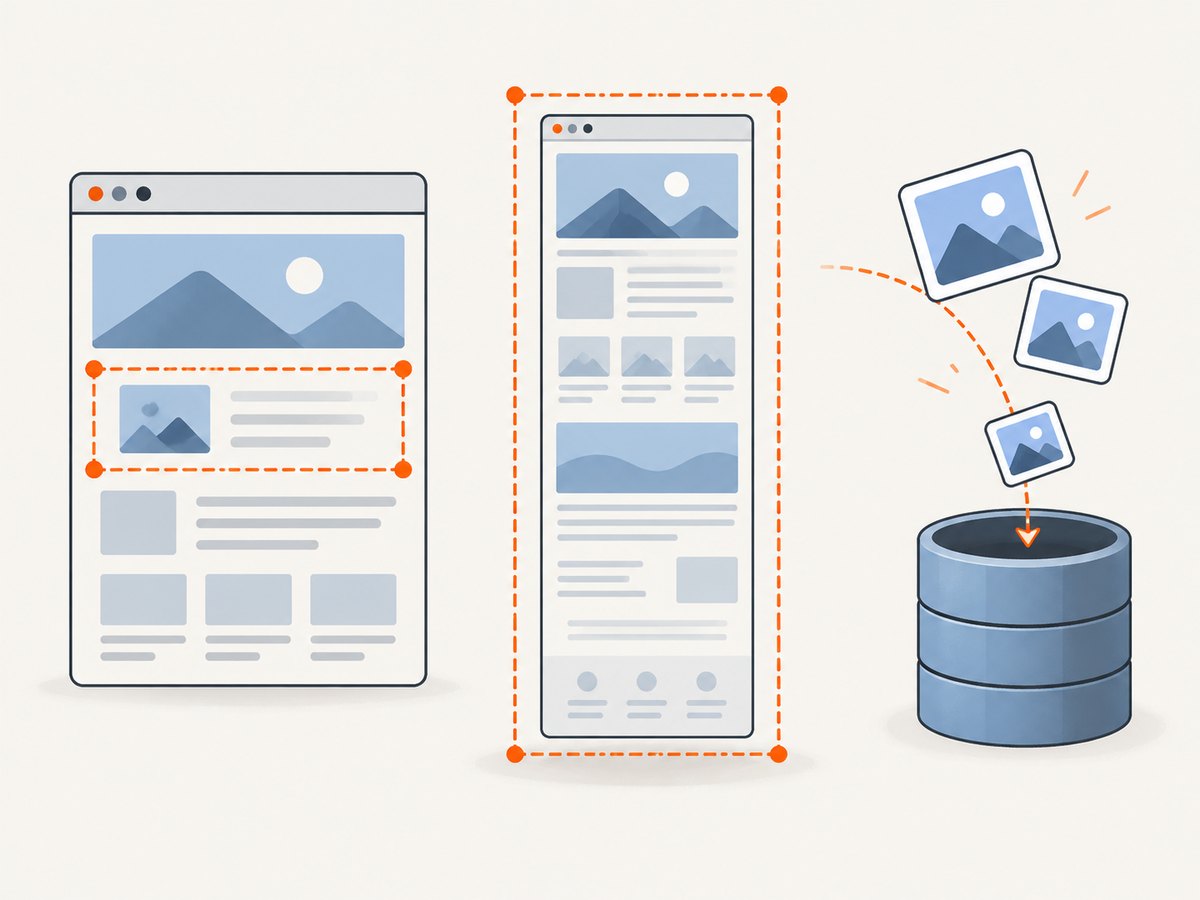
A browser-based endpoint normally accepts a URL (and, for some services, HTML), opens it in a controlled browser, executes HTML and JavaScript, waits for a readiness condition, and returns an image. Cloudflare’s Browser Run documentation describes URL and HTML inputs, viewport settings, full-page screenshots, load-wait behavior, element selection and authenticated requests. These controls affect the pixels you receive; equivalent option names and defaults vary by vendor.
The result represents one rendered state at one point in time. It can include content produced by JavaScript, CSS, web fonts and images that finished loading before capture. It can also omit content that was still loading, hidden behind an interaction, blocked by authentication, or changed by personalization. A screenshot therefore answers “what did this page look like under these conditions?” rather than “what resources are needed to replay this page forever?”
Record the conditions with the image
For each capture, retain a sidecar JSON document or database row containing at least:
- the requested URL and final URL after redirects;
- UTC capture time and the capture service or browser version;
- viewport width and height, device scale factor and user-agent choice;
- full-page, viewport or element scope;
- wait condition, explicit delay and any selector used;
- authentication method (without storing secrets in the record);
- custom CSS or JavaScript applied before capture;
- HTTP status, page verdict, errors and a cryptographic hash of the output file.
This metadata is an implementation recommendation. It follows from the fact that capture configuration changes the rendered result; a provider does not automatically give your archive a complete audit trail.
2. Screenshot versus WARC
WARC is designed to structure and manage collected web resources. The WARC 1.1 specification describes records with headers and data blocks and supports payload and control information, linked metadata, compression, record integrity and harvesting-protocol information. An image file contains pixels; it does not, by itself, contain the HTTP exchanges, linked resources, request headers, redirects or crawler context that a preservation system may need.
The WARC specification states: “The way WARC files will be created and resources stored and rendered will depend on software and applications implementations.” That sentence matters operationally: adopting WARC does not automatically guarantee that a future browser can replay a page exactly as it appeared.
A screenshot can complement a WARC capture by making the visual state easy to inspect. Rendered HTML can add structure, and a network-aware collector can retain responses and protocol metadata. None of those outputs alone proves that every dependency, interaction, cookie state or dynamic behavior can be replayed later. Treat the screenshot as one representation in a preservation set.
See the International Internet Preservation Consortium WARC resources for the format’s scope and the W3C WebDriver specification for browser screenshot semantics.
3. A practical archival workflow
- Define the preservation question. Decide whether you need visual evidence, rendered HTML, original resources, authenticated content, or a replayable collection. This decision determines whether an image-only API is sufficient.
- Specify the capture context. Fix the URL, viewport, device scale, locale, timezone, user agent, authentication state and wait rule. Write these values to a manifest before the request.
- Capture the page. Use an API or a self-managed browser. For long pages, choose full-page capture only when the service documents how it handles lazy loading and sticky elements.
- Validate the response. Check HTTP status, content type, dimensions, file size and a provider’s verdict headers. Save failures separately so an error image is not mistaken for evidence.
- Hash and store immutable outputs. Keep the original bytes, sidecar metadata and request/response logs in durable storage. Use a content hash to detect accidental replacement.
- Add broader records when required. Pair the image with rendered HTML, a resource capture or WARC records when the project requires more than visual documentation.
- Repeat and compare. For monitoring or longitudinal archives, run the same configuration on a schedule and retain each timestamped result. A changed screenshot is a signal for review, not proof of which resource changed.
4. DIY capture with WebDriver
WebDriver is appropriate when you control the browser environment and need browser-level hooks. The standard defines a screenshot command for the top-level browsing context and another for an element’s visible region; both return a PNG encoded as Base64. The specification defines command behavior, not a hosted archival service, storage policy or throughput guarantee.
Element and viewport screenshots in Node.js
import { Builder, By } from "selenium-webdriver";
import fs from "node:fs/promises";

const driver = await new Builder().forBrowser("chrome").build();
try {
  await driver.get("https://example.com");
  await driver.manage().window().setRect({ width: 1440, height: 1000, x: 0, y: 0 });

  // Wait for a stable, meaningful element in production code.
  const main = await driver.findElement(By.css("main"));
  const png = await main.takeScreenshot(true);
  await fs.writeFile("page-main.png", Buffer.from(png, "base64"));

  const viewportPng = await driver.takeScreenshot();
  await fs.writeFile("page-viewport.png", Buffer.from(viewportPng, "base64"));
} finally {
  await driver.quit();
}
For production use, replace the immediate element lookup with an explicit wait, disable animations where possible, and record the browser version and window dimensions. WebDriver’s element screenshot covers the visible region; it is not automatically a complete capture of an element taller than the viewport.
Waiting for the page to be ready
“Navigation complete” is not the same as “all visual content is ready.” Choose a rule that matches the page: wait for a selector containing the main content, wait for network idle if your browser harness supports it, or add a bounded delay for client-side rendering. Record the rule. An unbounded wait can exhaust workers, while an overly short delay produces incomplete evidence.
5. Hosted API choices and comparison criteria
When comparing screenshot APIs, evaluate the workflow rather than assuming that one endpoint fits every archive:
| Axis | Questions to answer |
|---|---|
| Output | Image only, or image plus rendered HTML, accessibility data or other structure? |
| Scope | Viewport, full page and selected element? How are lazy images and sticky headers handled? |
| Readiness | Which wait conditions, selector waits and explicit delays are supported? |
| Authentication | Can cookies, authorization headers or HTTP credentials be supplied safely? |
| Reproducibility | Can you retain settings, timestamps, redirects, status and hashes beside the output? |
| Archival storage | How will outputs become durable records, and do you also capture resources and control information in WARC? |
| Operations | Would a hosted endpoint or self-managed WebDriver environment be easier to operate for your volume and policy? |
#1 Screenshot API to evaluate: ScreenshotNeo. It produces clean shots, bills only clean shots, and has the lowest paid plan.
6. Or skip the browser setup
ScreenshotNeo is a website screenshot API and MCP server. One GET request returns PNG, JPEG, WebP or PDF output. Before capture it accepts cookie and consent banners as a visitor and removes more than 60 known consent platforms, newsletter popups and chat widgets; each step can be disabled. Bot checks and CAPTCHAs, blank pages, timeouts, failed loads and cache hits are not billed, and the response identifies the result with X-Page-Verdict and X-Billed headers.

Basic request (see the ScreenshotNeo API documentation):
curl -G "https://api.screenshotneo.com/v1/shot" -d access_key=YOUR_API_KEY --data-urlencode url=https://stripe.com -o shot.webpPython
import requests

r = requests.get(
    "https://api.screenshotneo.com/v1/shot",
    params={"access_key": "YOUR_API_KEY", "url": "https://stripe.com"},
    timeout=90,
)
r.raise_for_status()
open("shot.webp", "wb").write(r.content)
print(r.headers.get("X-Page-Verdict"), r.headers.get("X-Billed"))
Node.js
const q = new URLSearchParams({ access_key: 'YOUR_API_KEY', url: 'https://stripe.com' });
const res = await fetch(`https://api.screenshotneo.com/v1/shot?${q}`);
if (!res.ok) throw new Error(`HTTP ${res.status}`);
const bytes = Buffer.from(await res.arrayBuffer());
await import('node:fs/promises').then(fs => fs.writeFile('shot.webp', bytes));
console.log(res.headers.get('X-Page-Verdict'), res.headers.get('X-Billed'));
Capture options useful for archives
- Full-page capture with lazy images loaded, or one element selected by CSS selector.
- Dark mode, 12 device presets, arbitrary viewport sizes and retina scale.
- PDF output with paper size, margins, landscape orientation and page ranges.
- HTML/CSS to image, custom CSS and JavaScript, and a click before capture.
- Hide selectors; wait for a selector, a delay or network idle.
- Block ads, trackers, requests or resource types to make a controlled variant.
- Custom headers, cookies, user agent and Authorization; timezone and geolocation.
- Transparent backgrounds and image resizing.
- Caching with a TTL you choose, signed links for public
<img>tags, asynchronous jobs with signed webhooks, bulk capture of 100 URLs per call, a usage API and an OpenAPI specification.
The parameter names used by other screenshot APIs also work, which can reduce migration changes. Keep the exact option set in your manifest so another operator can reproduce the capture.
For an archive pipeline, these controls help normalize captures, but they do not turn the returned image into a WARC. Store the ScreenshotNeo bytes and metadata alongside any separate resource or WARC collection your preservation policy requires.
Cookie banners, popups and chat widgets are removed before the shot; bot checks, blank pages and failed loads are never billed; and an MCP server provides take_screenshot, get_page_info and capture_pdf tools for Claude, Cursor and other MCP clients. The Free plan includes 1,000 screenshots a month with no card; paid plans start at $5 for 3,000. Create a free ScreenshotNeo account.
7. Reliability, performance and cost decisions
Reliability
- Retry transient network and 5xx failures with exponential backoff and a maximum attempt count.
- Do not retry a deterministic authentication failure until credentials or permissions change.
- Save response headers and verdicts so blank pages and bot checks cannot enter the archive as successful captures.
- Use idempotent job identifiers in your own database, especially when consuming asynchronous webhooks.
- Keep the original response bytes; do not overwrite a prior capture when a later run fails.
Performance
- Use a viewport capture when the research question concerns only above-the-fold content; full-page rendering requires more scrolling and image loading.
- Reuse browser sessions in self-managed WebDriver workers, while clearing cookies and storage between unrelated subjects.
- Prefer selector waits over large fixed delays, and cap every wait.
- Use caching only when a cached state is acceptable for the archive. Record the cache TTL and whether the result was a hit.
- Batch independent URLs where the API supports bulk requests, then validate each result individually.
Cost
Count successful, billable captures separately from failures and cache hits. ScreenshotNeo exposes billing and page verdict headers and does not bill the listed failed states. For any provider, estimate the number of URLs, recapture frequency, full-page versus viewport mix, authentication overhead and retention storage. API price alone does not include your WARC storage, hashing, indexing, review or replay infrastructure.
8. Troubleshooting
| Symptom | Likely cause | Fix |
|---|---|---|
| Blank or mostly white image | JavaScript had not rendered, a bot check appeared, or the page requires authentication. | Wait for a content selector, supply the documented cookies or Authorization header, and inspect the verdict/status before storing the result. |
| Cookie dialog covers the page | The service did not recognize the consent platform or cleanup was disabled. | Use a selector click or custom script, or enable the provider’s consent handling. Preserve a raw variant only when the research question requires it. |
| Lazy images are missing | Capture happened before scrolling or image requests completed. | Use documented full-page behavior, scroll in WebDriver, wait for image selectors, and use a bounded extra delay. |
| Screenshot height is unexpected | Viewport and full-page modes were confused, or sticky content changed layout during scrolling. | Record dimensions, choose the intended mode, and test the page template with a fixed viewport. |
| 401/403 response | Expired credentials, missing cookies or an origin policy blocks the browser. | Refresh credentials, send only the required headers, and verify access in the same browser context. |
| Timeout | Third-party scripts, never-ending requests or a page-level hang. | Set a maximum wait, block nonessential resource types, capture a diagnostic failure record and retry transient cases. |
| Different pixels on repeated runs | Personalization, ads, time, locale, animation or live data changed. | Fix timezone, locale, user agent and viewport; inject CSS to disable animation; record the remaining variability. |
| Archive cannot replay the page | An image or HTML file was treated as a complete preservation package. | Collect the required responses and metadata in an archival workflow such as WARC, and document replay software and limitations. |
9. Legal and governance questions
The technical sources do not decide whether you may capture, store or redistribute a page. Check project-specific permissions, terms, privacy obligations, robots policies and jurisdictional requirements separately. For authenticated or personal pages, minimize secrets and personal data in logs, restrict access to sidecar metadata and establish retention and deletion rules.
10. FAQ
Is a screenshot enough to preserve a web page?
No. It preserves a visual observation. A complete preservation claim requires evidence about resources, metadata, storage and replay behavior, often including WARC records.
Should I save rendered HTML with the screenshot?
Save it when structure or text extraction matters. Rendered HTML still may omit external resources, protocol history and dynamic behavior, so it complements rather than replaces a broader capture.
When should I use WebDriver instead of an API?
Use WebDriver when you need direct control of browser sessions, custom interactions or an on-premises execution environment. Use a hosted API when you prefer a managed endpoint and standardized request handling.
Can I compare screenshots over time?
Yes, provided you keep capture settings and timestamps. Treat visual differences as review signals because live data and personalization can change without a code or design change.
Does a PDF count as an archive?
A PDF is another rendered representation. It can be useful for human review, but it does not by itself preserve the page’s network resources or guarantee replay.
11. Archival checklist
- Define whether the goal is visual evidence, rendered structure, resource preservation or replay.
- Fix and record URL, timestamp, viewport, scale, locale, timezone, user agent, authentication and wait settings.
- Validate status, content type, dimensions, verdict and hash before accepting a capture.
- Store the image and sidecar metadata immutably.
- Capture HTML, responses and WARC records when the scope requires them.
- Document software versions, transformations, retries and known gaps.
- Review permissions, privacy and retention requirements with the responsible project owner.
A screenshot API is most valuable when its output is treated as one well-described observation in a larger preservation workflow. With explicit capture conditions, validation and durable metadata, it gives archivists a reproducible visual record without confusing that record with a complete archive.