Web Data for AI and Machine Learning: Where Training Data Really Comes From
AI training data comes from web crawls, licensed collections, human-created examples, public-domain works, and synthetic data. Here’s how those sources are assembled and how to check their provenance.
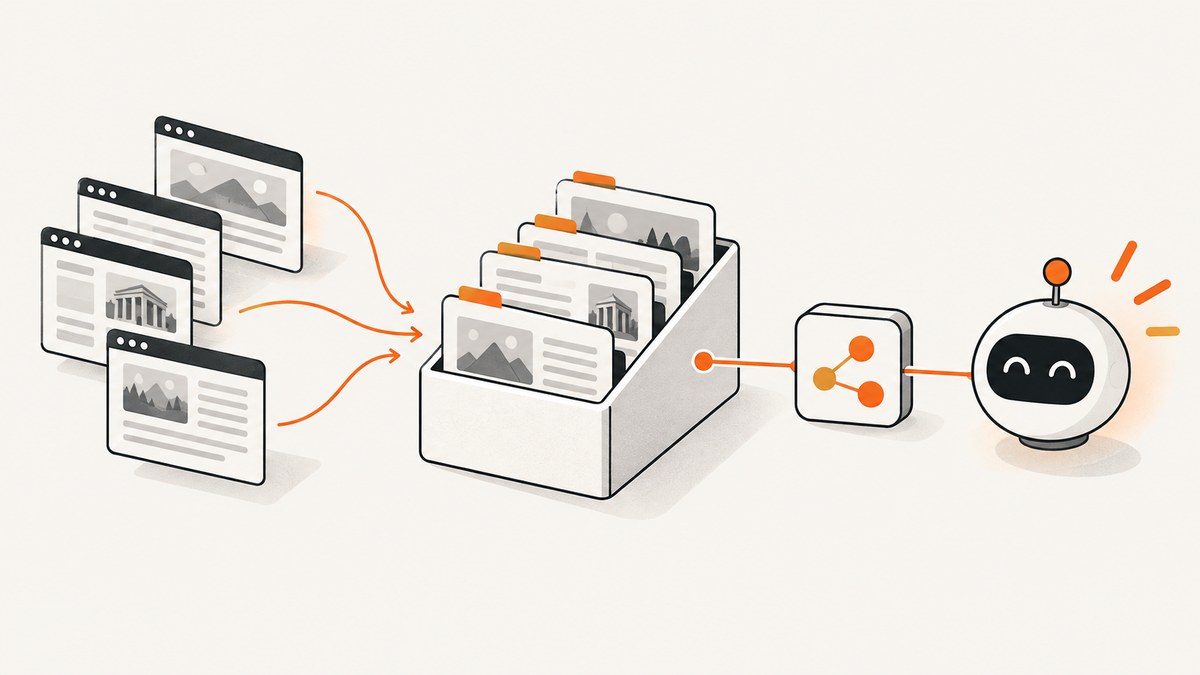
AI training data comes from multiple source categories: public web crawls, licensed collections, public-domain works, human-created demonstrations, user or platform data, and synthetic examples. Developers combine and process these inputs into task-specific datasets by filtering, deduplicating, classifying, and sometimes transforming them. A dataset name usually describes one stage in that pipeline; it does not prove that every underlying item has the same license, quality, language coverage, or consent status.
That is the practical answer to “Where does AI training data come from?” Some web data comes from archives such as Common Crawl, while image-text datasets such as LAION provide indexes and links to images hosted elsewhere. Company disclosures describe broader mixtures and controls, but generally do not publish an exhaustive page-by-page inventory of a proprietary model’s training data. To assess a dataset, trace its sources and transformations, then separately evaluate licensing, consent, filtering, and documentation.
1. How training data moves from sources into a model
A useful way to understand training data is as a pipeline rather than a single download. The source collection is only the starting point. Each later step can change what is retained and how it is represented.
- Collect source material. A team may use web crawls, licensed corpora, public-domain material, human demonstrations, platform data, or synthetic examples. The mix depends on the task, modality, and developer’s collection policies.
- Extract and normalize. Web pages can be parsed into text; images may be paired with captions or nearby text; other formats need their own extraction and normalization steps. Extraction can lose context or preserve unwanted material.
- Filter and classify. Builders can apply language, quality, safety, or relevance filters. Their choices affect what survives, so a cleaned corpus is not a neutral copy of its input.
- Deduplicate and transform. Exact or near-duplicate material may be removed, and examples can be reformatted or split. A published derivative can be several processing steps away from the original source.
- Mix data for a training objective. The final blend may combine multiple datasets or categories. A dataset label alone rarely tells you the proportions or all the upstream sources.
These stages matter when you are evaluating a dataset or interpreting a model disclosure. A source URL, an archive record, a derivative corpus, and the final training mixture are different things. Each can have different documentation and different responsible parties.
2. How Common Crawl and C4 contribute web text
Common Crawl describes itself as a free, open repository of web crawl data. Its crawl data is hosted through Amazon Web Services public datasets, including the s3://commoncrawl/ bucket in us-east-1. This makes the archive an accessible source for research and downstream corpus building, but it does not make every crawled page public domain or grant every downstream use.

Common Crawl estimated in a 2024 UK consultation submission that its archive accounts for 70–90% of tokens used in training data for nearly all of the world’s large language models. Treat this as Common Crawl’s estimate, not as an independently verified measurement of every model’s training mix.
C4, the Colossal Cleaned Crawled Corpus, is a filtered corpus derived from a Common Crawl snapshot. Its name describes a processing stage: it is not a guarantee that all items share a license or that all source pages are representative. Research documenting C4 found material from unexpected sources, including patents and U.S. military websites. A 2025 Creative Commons analysis reported that C4 content originated from more than 14 million web domains. That breadth can include reference pages, forums, news, business sites, personal pages, government sites, and many other kinds of material.
For a developer, the key distinction is between where a corpus came from and what the corpus permits. A crawl archive can help establish origin and collection context. You still need to inspect the relevant license, terms, jurisdiction, robots.txt signals, privacy implications, and derivative dataset documentation for your intended use.
3. How image-text datasets such as LAION work
LAION-400M documents 400 million English image-text pairs, extracted from Common Crawl pages crawled between 2014 and 2021. The dataset provides metadata and links; users redownload the images themselves. LAION notes that licensing information can be incomplete or uncertain for individual images.

LAION-5B’s 2023 maintenance note describes more than 5.85 billion entries. The dataset is sourced from the Common Crawl index and points to public-web content rather than hosting the image files. This creates three separate layers to reason about: the dataset index, the original image host, and the model developer using the material. Each may have different records and responsibilities.
Counts also need dates and context. “400 million pairs” describes the LAION-400M release; “more than 5.85 billion entries” describes LAION-5B as reported in 2023. Neither figure, by itself, answers what is licensed, what remains reachable, or what a particular model actually used.
4. What public disclosures say about model data
OpenAI’s public explanations describe using publicly available information, licensed data, human-created training data, and synthetic data across text, images, audio, video, and other modalities. They also describe filtering and processing, as well as the use of robots.txt controls by website owners. These are source categories and operational descriptions, not a complete list of every training URL, version, or filtering threshold.
Apple’s training-data disclosure describes directly licensed material, public-domain data, and material available under licenses that permit AI development. It also describes filtering and ways for publishers to object to crawling of URLs containing personal data. Apple says Applebot respects standard robots.txt directives publishers can use to direct the crawler not to crawl their site or not to use its content to train foundation models.
These disclosures help explain policy and collection practices, but they do not establish one universal legal rule. Copyright and text-and-data-mining exceptions differ by country, and a model developer can adopt rules stricter than the local minimum. Do not infer that “publicly available” means “free to train on,” or that a dataset name proves every item is cleared for commercial use.
5. Can you find the exact websites used to train a model?
Sometimes a dataset provides source URLs or records, which lets you inspect at least part of its lineage. But public company disclosures generally describe categories and controls rather than publishing an exhaustive page-level inventory of every URL and every model version. Do not assume that a named proprietary model has a complete public training list.
Even when a dataset exposes links, they may not identify every later transformation or mixture. A linked page may have changed or disappeared; a derived corpus may retain text but omit source identifiers; or a model may have used a filtered subset. The realistic goal is to establish documented lineage and its limits, not to treat a model’s data as fully recoverable from a dataset label.
For a specific corpus, look for versioned release documentation, source manifests, crawl periods, processing code, hashes, and takedown or correction procedures. If those records are missing, mark that uncertainty explicitly in your evaluation rather than filling the gap with assumptions.
6. How to check provenance, license, and consent
Use these checks before selecting a dataset, building a derivative, or relying on a “web data” claim. A provenance record is useful when it lets you move from a dataset item back through its source and transformations.
- Trace origin and lineage. Find the original URLs or record identifiers, collection dates, transformations, and any preserved derivation links. Separate the upstream archive from the downstream corpus and the model that may use it.
- Check modality, scale, and coverage. Identify whether the records are text, image-text, audio, video, or another format. Check how counts are defined, what languages are represented, and the collection period.
- Read filtering and deduplication documentation. Look for language identification, quality filters, safety classifiers, and exact or near-duplicate removal. Note known blind spots and what the filters could not detect.
- Review license and consent posture. Check the original license and terms of service, jurisdiction, robots.txt policy, opt-out handling, and personal-data controls. Public accessibility alone does not settle downstream permissions.
- Assess reproducibility and corrections. Prefer versioned releases with hashes, code, dataset documentation, and a defined process for correction or removal. Ask whether a later release can be compared with the one you evaluated.
- Account for freshness and drift. Record when material was collected and whether the source is still available or has since changed. A current page may differ from the captured version.
The Data Provenance Initiative’s Explorer offers a useful model for the sort of record to seek: its project description says it tracks sources, licenses, creators, geographies, modalities, and derivation chains across more than 4,000 datasets. An explorer can help locate documentation; it does not replace checking the source records and terms for your use case.
7. A practical dataset review workflow
For a project review, create a compact record rather than relying on a dataset’s headline or a model card’s broad summary.
- Pin the exact version. Record the release name, version or snapshot date, download date, and hashes when available.
- Draw the source chain. Note whether the source is an archive, licensed collection, public-domain collection, human demonstration, synthetic data, or a mixture. Preserve identifiers that connect records to upstream sources.
- Map transformations. Capture extraction, filtering, deduplication, labeling, and sampling steps. Record code or published methods when available.
- Review rights and personal data. For each source category, document the applicable license or terms, collection signals such as robots.txt, opt-out handling, and how personal information is handled.
- Write down unknowns. Examples include incomplete image licenses, missing source URLs, uncertain crawl dates, unavailable filtering code, or lack of a removal path.
- Match evidence to the use. A dataset suitable for exploratory research may not meet the rights, privacy, or reproducibility requirements for a commercial product. Get qualified legal review when the consequences warrant it.
This is not a substitute for legal advice. It is a way to keep claims tied to evidence and make dataset selection more repeatable.
8. Capturing current source pages for provenance review
When a dataset points to a live source page, a screenshot can preserve what a page looked like during your review. It cannot prove that the page was part of a model’s training data, establish copyright permission, or replace an archived crawl record. For reproducibility, record the URL, capture time, and relevant dataset version alongside the image.
For a small manual review, open the source page in a browser, wait for it to finish loading, and capture the page or the relevant region. Keep a note of any dynamic content, consent prompts, or access failures because those can affect what the screenshot shows.
DIY: capture a page in Chromium with Playwright
This runnable Node.js example captures a full-page PNG. Install Playwright and its Chromium browser first with npm install playwright and npx playwright install chromium.
const { chromium } = require('playwright');

(async () => {
  const browser = await chromium.launch({ headless: true });
  const page = await browser.newPage({ viewport: { width: 1440, height: 900 } });
  try {
    const response = await page.goto('https://example.com', {
      waitUntil: 'domcontentloaded',
      timeout: 30000
    });
    if (!response || !response.ok()) {
      throw new Error(`Navigation failed: ${response ? response.status() : 'no response'}`);
    }
    await page.screenshot({ path: 'source-page.png', fullPage: true });
  } finally {
    await browser.close();
  }
})().catch(error => {
  console.error(error);
  process.exitCode = 1;
});
Choose a wait condition that fits the page. domcontentloaded is often more reliable than waiting for every network request to stop, since analytics and long polling can keep a page busy. If the content appears after navigation, wait for a meaningful selector or use a bounded delay. For long pages, full-page capture can consume substantial memory; capturing a specific element may be more efficient.
9. Or skip the browser setup
ScreenshotNeo is a website screenshot API and MCP server from Yorker Media. A GET request takes a URL and returns PNG, JPEG, WebP, or PDF. The API accepts common screenshot API parameter names, which can make migration easier. See the API documentation.
curl -G "https://api.screenshotneo.com/v1/shot" -d access_key=YOUR_API_KEY --data-urlencode url=https://example.com -o shot.webpimport requests
r = requests.get(
"https://api.screenshotneo.com/v1/shot",
params={"access_key": "YOUR_API_KEY", "url": "https://example.com"},
timeout=90,
)
open("shot.webp", "wb").write(r.content)const q = new URLSearchParams({ access_key: 'YOUR_API_KEY', url: 'https://example.com' });
const res = await fetch(`https://api.screenshotneo.com/v1/shot?${q}`);
if (!res.ok) throw new Error(`Screenshot request failed: ${res.status}`);
await Bun.write('shot.webp', res);ScreenshotNeo accepts cookie or consent banners like a visitor and removes more than 60 known consent platforms, newsletter popups, and chat widgets before capture; each of those steps can be turned off. Bot checks and CAPTCHAs, blank pages, timeouts, failed loads, and cache hits cost nothing, and response headers report the page verdict and billing status. Its MCP server offers take_screenshot, get_page_info, and capture_pdf for Claude, Cursor, and other MCP clients. The free plan includes 1,000 shots a month with no card; paid plans start at $5 for 3,000 shots. Every feature is on every plan.
Sign up for 1,000 free screenshots a month, with no card.
10. Troubleshooting source capture and dataset records
| Problem | Likely cause | What to do |
|---|---|---|
| The page screenshot is blank or incomplete | Navigation finished before client-rendered content appeared, or a script failed. | Wait for a content-specific selector; check browser console and network errors; save the URL and capture time. |
| Navigation times out | The page has slow resources, long polling, or blocked requests. | Use a bounded wait condition such as DOM content loaded, then wait for the specific element you need. Set a realistic timeout and retry only transient failures. |
| A consent dialog obscures the page | The source requires a visitor choice or displays a banner. | Record that the dialog was present. Do not treat a screenshot taken after dismissing it as evidence of the default page state. |
| A dataset record has a dead link | The source may have moved, been removed, or become unavailable. | Preserve the record identifier and version; search for an archived or documented copy if appropriate. A failed link does not establish why the record disappeared. |
| License metadata is missing or unclear | The index may not include rights metadata, or the original host did not provide it. | Check the original source and applicable terms. Mark the item unresolved rather than inferring permission from public accessibility. |
| A derivative corpus omits source URLs | Lineage identifiers may have been dropped during processing or release. | Consult release documentation and upstream manifests. If the chain cannot be reconstructed, record that as a provenance limitation. |
11. Performance, reliability, and cost considerations
For large-scale web capture, headless browser work is usually dominated by page loading, scripts, and image resources. Set a sensible viewport, wait for the content you need rather than every background request, and avoid full-page screenshots when a smaller region answers the question. Reuse a browser process for batches, cap concurrency to avoid exhausting memory, and use bounded retries for transient network failures. These measures help control workload; they do not guarantee a particular speed.
Reliability depends on preserving enough context to reproduce what you saw: URL, date and time, viewport, wait condition, browser version, and any interaction performed. Pages change, block automated browsers, or personalize content. Treat a screenshot as a record of one capture, not a canonical representation of a page or evidence of dataset inclusion.
Self-hosted browser capture has no per-shot API charge, but it uses compute, storage, engineering time, and maintenance. API pricing can be easier to estimate from a published plan, but check which outcomes are billable and whether the service exposes verdicts and failure details. ScreenshotNeo’s listed tiers are Free (1,000 shots/month), Starter ($5 for 3,000), Growth ($15 for 15,000), Pro ($39 for 60,000), Scale ($99 for 250,000), and Business ($249 for 1,000,000); yearly billing gives two months free. According to the product facts, only clean shots are billed and cache hits do not cost anything. For dataset research, weigh those capture costs separately from the licensing, storage, and review work involved in assembling training data.
12. Frequently asked questions
Is ChatGPT trained on web pages?
OpenAI describes publicly available information among several source categories, alongside licensed, human-created, and synthetic data. That does not disclose a complete page-level list for each model version.
Are C4 and LAION copyrighted?
A dataset label does not answer the rights status of every underlying item. Check the original material, licenses and terms, applicable jurisdiction, and the dataset builder’s documentation. LAION notes that individual image licensing information can be incomplete or uncertain.
Does robots.txt settle whether training is allowed?
Robots.txt is a crawler control signal and part of a publisher’s stated preferences. Its legal effect and interaction with other rights depend on context and jurisdiction; it is not a universal answer to copyright questions.
What is the most useful first step when provenance is unclear?
Pin the exact dataset version and identify the earliest documented source and transformation chain. Write down missing links and rights metadata so reviewers can see what is known and what remains uncertain.
Conclusion
AI training data comes from mixtures, and the mixture is shaped by collection, filtering, deduplication, licensing, and product-specific choices. Common Crawl and its derivatives illustrate how broad web material can enter text corpora; LAION illustrates how image-text indexes can point to files hosted elsewhere. To evaluate a claim, follow the lineage, inspect rights and consent records, and keep the limits of public documentation visible.