Web Scraping APIs: How They Work and When to Use Them
Learn how scraping APIs fetch, render, and extract web data, when to use one, and how to weigh managed services against a DIY scraper.

A web scraping API is a hosted HTTP service: send it a target URL and configuration, and it fetches the page and returns data such as HTML, text, structured fields, or a screenshot. It can take over operational work such as browser rendering, proxy routing, and session handling. Use one when those tasks are costly to maintain or your targets need browser execution; build your own scraper when you need full control over crawling, parsing, storage, and scheduling.
A scraping API does not automatically solve every data problem. You still need to decide which pages to request, what data to extract, how to validate it, and how to respect the target site’s access rules, applicable law, privacy obligations, and terms. This guide explains the request lifecycle, the tradeoffs, and how to choose an implementation that fits.
1. What is a web scraping API?
Web scraping is the downloading of website data in a structured format that can be processed. A scraping API makes some or all of that workflow available through a hosted endpoint. Your program sends a request with a URL and options; the provider retrieves the page and returns the representation you requested.
Depending on the service and configuration, that representation can be raw HTML, cleaned text or Markdown, a screenshot, or extracted fields such as JSON. Some APIs accept extraction instructions or return structured results directly. An API is the retrieval and processing service; it does not necessarily provide a complete crawler, data warehouse, or application-specific data model.
2. How a scraping API works
A typical job moves through four stages. Providers may combine these stages behind one endpoint, but separating them helps you diagnose failures.

- Discover URLs. Your application supplies a page or finds URLs by following links, reading a sitemap, or using a separate crawl schedule. A single-page request is not the same as a site-wide crawl.
- Retrieve the page. The service makes a network request. Depending on its features, it can manage proxies, cookies, sessions, or browser-like request behavior.
- Render when needed. For pages that build content in JavaScript, the service may launch a headless browser, wait for page activity or a specified condition, and capture the resulting DOM. A plain HTTP fetch may only see the initial HTML.
- Parse and return. The provider returns a chosen representation, such as HTML or text, or extracts fields into structured output. Your application should validate that output before using or storing it.
Some products offer a single extraction endpoint that handles retrieval and extraction in one request. Others expose controls for the proxy, browser rendering, waits, and output. Read the provider’s documentation for its exact behavior: a setting can change what the service does, how long it takes, and how requests are counted.
3. When should you use a managed API?
A managed service is a good fit when the work you would otherwise own is more expensive than the provider’s price and constraints. Consider one when:
- The site builds important content in JavaScript and you need a browser-rendered page.
- Ordinary requests are unreliable, or targets require proxy rotation, sessions, cookies, or geographic routing.
- You need a production process but do not want to operate proxy pools, browser workers, and their monitoring.
- You want a hosted extraction flow that returns a structured representation instead of maintaining every parsing step yourself.
- Your team needs to get a collection process running quickly and can accept the provider’s output formats, request limits, pricing, and service dependency.
A managed API reduces infrastructure work; it does not eliminate engineering work. You still need to define a crawl policy, handle errors and changing page layouts, monitor data quality, and control cost. The target site may also change its markup or access behavior.
4. When is DIY the better choice?
Build and operate the scraper yourself when you need control that a hosted endpoint does not offer or when the target set is small and stable enough that operating your own request and parsing flow is straightforward. DIY is often a better fit for:
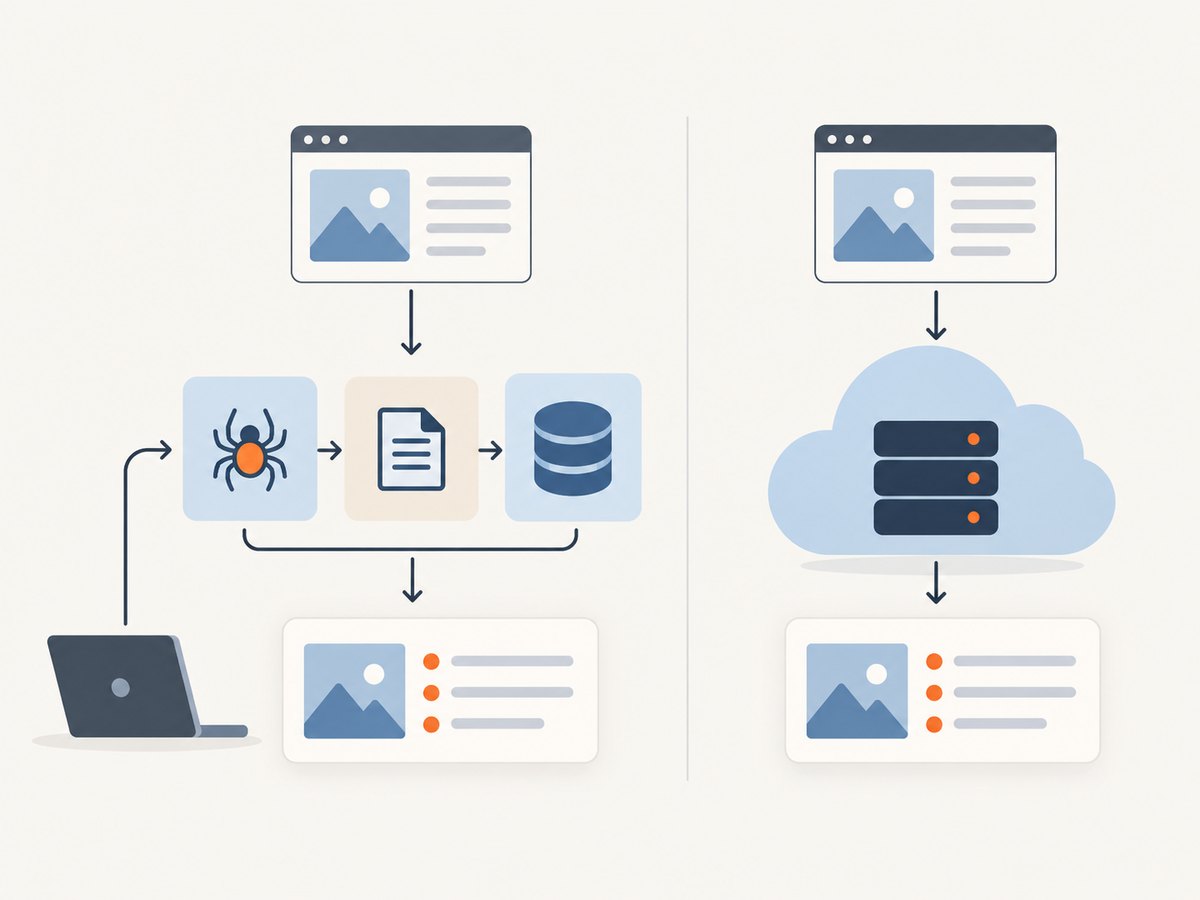
- Custom crawl scheduling, queueing, deduplication, and link-following rules.
- Specialized parsers, storage, data validation, or integrations with internal systems.
- Predictable behavior for a limited collection of stable sites.
- Keeping the crawl and parsing pipeline portable across infrastructure or providers.
Scrapy is a Python framework for building maintainable, extensible scrapers. With a DIY framework, your team is responsible for request handling, parsing, scheduling, and any proxy or anti-bot operations the task legitimately requires. That control comes with maintenance and operational costs.
5. How to choose a scraping API
Compare services against the actual pages and data you need. A long list of options matters less than whether the service can retrieve your target reliably and return usable data at an acceptable total cost.
| Decision area | Questions to ask | Why it matters |
|---|---|---|
| Rendering | Is retrieval a static HTTP request, or can it execute JavaScript? Can you control the wait? | Client-side content may not exist in the initial response. Rendering adds work and may affect latency or billing. |
| Network and sessions | Are rotating proxies, premium or residential routing, cookies, sessions, and geographic routing supported? | Targets can vary by location or session. Check whether these controls are available and how they are priced. |
| Output | Do you need HTML, cleaned text, Markdown, screenshots, selector-based extraction, or typed JSON? | Choose the closest useful representation, then plan how your code validates it. |
| Reliability | How are timeouts, retries, rate limits, and errors surfaced? Can you observe request outcomes? | Operational visibility helps distinguish a target failure from a parsing problem or configuration issue. |
| Unit economics | What is the base request cost? Are rendering, premium proxies, or AI extraction charged separately? | Compare the cost for your real request mix, not just the headline price. |
| Portability | Can you keep your extraction rules and output model independent of the provider? | Provider-specific parameters and output formats can make migration expensive. |
For example, Zyte documents an API workflow spanning retrieval and structured extraction. ScrapingBee documents a single endpoint with rotating proxies, optional headless-browser rendering, wait controls, and output options including HTML, text, Markdown, screenshots, and structured JSON. These are examples of why it is important to check the selected configuration and output behavior in each provider’s documentation.
6. A practical DIY workflow
For a small, stable target where a direct request is appropriate, start with a normal HTTP fetch and parse the response. The Python example below retrieves a page and prints its title using Beautiful Soup. Install the dependencies with python -m pip install requests beautifulsoup4, save the code as scrape.py, and run python scrape.py.
import requests
from bs4 import BeautifulSoup

url = "https://example.com/"
response = requests.get(
    url,
    headers={"User-Agent": "ExampleResearchBot/1.0"},
    timeout=(5, 20),
)
response.raise_for_status()

soup = BeautifulSoup(response.text, "html.parser")
title = soup.title.get_text(" ", strip=True) if soup.title else None
print({"url": response.url, "title": title})
Replace the example URL and identify yourself appropriately if you operate a crawler. This sample illustrates basic retrieval and parsing; it does not handle browser-rendered content, crawl scheduling, proxy routing, or target-specific access controls. Review a site’s rules and applicable requirements before collecting or reusing its data.
Inspect the response before building a crawler
- Fetch one page and check the status code, final URL, and content type.
- Inspect the returned HTML to confirm that the fields you need are present in the response.
- Parse only the fields you need, then validate missing or malformed values.
- Set explicit timeouts and handle HTTP errors. Avoid treating every response as valid page content.
- Only after the single-page flow is reliable, add a bounded URL queue, deduplication, pacing, and persistence.
If the page’s useful content appears only after JavaScript runs, a direct HTTP client may not be sufficient. Use a browser-capable approach and wait for a meaningful condition rather than choosing an arbitrary long delay. If the site denies access, do not assume that rotating infrastructure makes collection appropriate; check the site’s rules and your obligations.
7. Or skip the browser setup
If your goal is a clean visual capture rather than extracted fields, ScreenshotNeo is a website screenshot API and MCP server. One GET request can return a PNG, JPEG, WebP, or PDF. The API accepts the target URL and capture options; its documentation describes the available parameters.
curl -G "https://api.screenshotneo.com/v1/shot" -d access_key=YOUR_API_KEY --data-urlencode url=https://stripe.com -o shot.webpCookie and consent banners are accepted and removed before capture, along with more than 60 known consent platforms, newsletter popups, and chat widgets; each cleanup step can be turned off. Bot checks, blank pages, timeouts, failed loads, and cache hits cost nothing, and response headers report the page verdict and billing status. An MCP server exposes take_screenshot, get_page_info, and capture_pdf to Claude, Cursor, and other MCP clients. The free plan includes 1,000 shots per month with no card; paid plans start at $5 for 3,000 shots.
import requests

r = requests.get(
    "https://api.screenshotneo.com/v1/shot",
    params={"access_key": "YOUR_API_KEY", "url": "https://stripe.com"},
    timeout=90,
)
r.raise_for_status()
open("shot.webp", "wb").write(r.content)
const q = new URLSearchParams({ access_key: 'YOUR_API_KEY', url: 'https://stripe.com' });
const res = await fetch(`https://api.screenshotneo.com/v1/shot?${q}`);
if (!res.ok) throw new Error(`Screenshot request failed: ${res.status}`);
const bytes = new Uint8Array(await res.arrayBuffer());
await import('node:fs/promises').then(fs => fs.writeFile('shot.webp', bytes));Choose it for screenshot or PDF capture, not as a general-purpose structured-data extraction API. See the ScreenshotNeo API docs for options, then sign up for 1,000 free screenshots a month with no card.
8. Performance, reliability, and cost
Performance
Page retrieval time depends on the target’s response, network path, and the work the service performs. Browser rendering and wait conditions can take longer than a static fetch. Request only the representation you need; avoid paying for browser execution when the data is already present in the initial HTML. For a DIY crawler, use bounded concurrency and measured request pacing instead of launching an unbounded number of simultaneous requests.
Reliability
Design the caller to handle timeouts, provider errors, rate limits, and responses that are syntactically valid but contain no useful data. Use explicit timeouts and bounded retries for transient failures, with backoff between attempts. Do not blindly retry a permanent access error or a broken extraction rule. Record the target URL, request configuration, status, duration, and validation result so you can tell retrieval failures from parsing drift.
For a multi-page job, make processing resumable: save progress, avoid duplicate work, and keep failed URLs available for review. Revalidate extracted fields against expected types or required values. A successful HTTP response does not guarantee that the page contains the data your application expects.
Cost
Compare the provider’s bill against the full cost of DIY operation: engineering time, browser or proxy infrastructure, monitoring, and parser maintenance. Check whether browser rendering, premium routing, geography, or AI extraction adds charges. Estimate using the mix of configurations your job actually needs, and track requests, retries, and output volume. Provider pricing and request limits can change, so verify current terms before committing.
9. Common problems and fixes
| Symptom | Likely cause | What to check or change |
|---|---|---|
| Fields are missing from the response | The content is generated in JavaScript or the parser expects different markup. | Inspect the raw response. If content is rendered client-side, use a browser-capable mode; otherwise update the parser to match the returned HTML. |
| Request times out | The site or rendering workflow took longer than the configured limit. | Set a realistic timeout, inspect provider guidance, and use a specific wait condition when available. Retry only transient cases with a limit. |
| Unexpected access-denied or challenge page | The target returned a denial or challenge, or the request context differs from an ordinary visit. | Check the site’s access rules and the provider’s error details. Do not treat a challenge page as scraped content or repeatedly retry it without cause. |
| Parser returns empty or malformed data | Markup changed, a selector no longer matches, or an error page was parsed as a normal page. | Store a small diagnostic sample where allowed, validate status and content type, and add checks for required fields before accepting results. |
| Requests are slow or expensive | Every request may be using browser rendering or premium routing even where it is unnecessary. | Measure by request type, disable unneeded options, and compare cost per usable result rather than raw request count. |
| Results differ between runs | Page content can vary by session, location, cookies, or time. | Make the request context explicit where supported, record relevant settings, and treat the output as time-specific data. |
10. Use cases and responsible collection
Common business uses include price intelligence, market analysis, competitor intelligence, vendor management, lead generation, investment research, and brand monitoring. The right implementation depends on the permitted data, collection frequency, and output your application needs. Before collecting, review the target site’s access rules, applicable law, privacy obligations, and terms. Store only what you need, protect personal information, and establish a retention policy appropriate to the task.
11. Frequently asked questions
Can a scraping API handle JavaScript-heavy sites?
Some can, when configured to run a headless browser. Confirm that rendering is supported for your target and check how waits and rendering affect latency and cost. A static fetch alone may not contain content created in the browser.
Is a scraping API the same as a crawler?
No. An API can fetch one URL per request or offer a broader workflow, but URL discovery and crawl scheduling may remain your responsibility. Check whether the product actually includes those capabilities.
Do I need to parse the result myself?
Not always. Some services return structured extraction, while others return HTML or text for your code to parse. Choose based on the stability and shape of the data you need.
Which is better: a scraping API or Scrapy?
Use a managed API when outsourced browser, proxy, or retrieval operations justify the cost and service dependency. Use Scrapy when you want an extensible Python framework and are prepared to own scheduling, request handling, parsing, and operations.
Can a screenshot API replace a scraping API?
Only when the required output is a visual capture or PDF. A screenshot does not provide the same structured fields as a data extraction service.
12. A short decision checklist
- Do the target pages need JavaScript rendering, session controls, or geographic routing?
- Can a managed service return the exact output your application consumes?
- Have you accounted for add-on charges, request limits, retries, and provider dependence?
- Can you validate output and detect when a page layout changes?
- Would a DIY framework’s control justify the time needed to operate and maintain it?
- Are your collection practices consistent with site rules and applicable obligations?
Choose a managed scraping API when it removes operational work that your team does not want to own. Choose a DIY framework when custom crawling and parser control matter more. In either case, begin with one representative URL, inspect the actual response, validate the extracted data, and measure the cost of a usable result.


