How to Connect AI Agents to Web Data with an MCP Plugin
Connect an AI agent to live web data with MCP. Learn transports, tool design, security, testing, deployment, and a ScreenshotNeo shortcut.

To connect an AI agent to live web data with MCP, run or select an MCP server that wraps the web source, expose narrow tools, configure the agent as an MCP client, then test discovery and a read-only call before adding production credentials. Use local stdio transport for a single-machine prototype and HTTPS for a shared or hosted deployment.
The Model Context Protocol (MCP) is an open standard for connecting AI applications to external data, tools and workflows. Its interface is comparable to USB-C for AI applications: the client and server agree on a common protocol while the server still owns the translation to the underlying API or website. Read the official MCP documentation for the protocol concepts and lifecycle.
What an MCP web-data integration contains
A production integration has four moving parts:
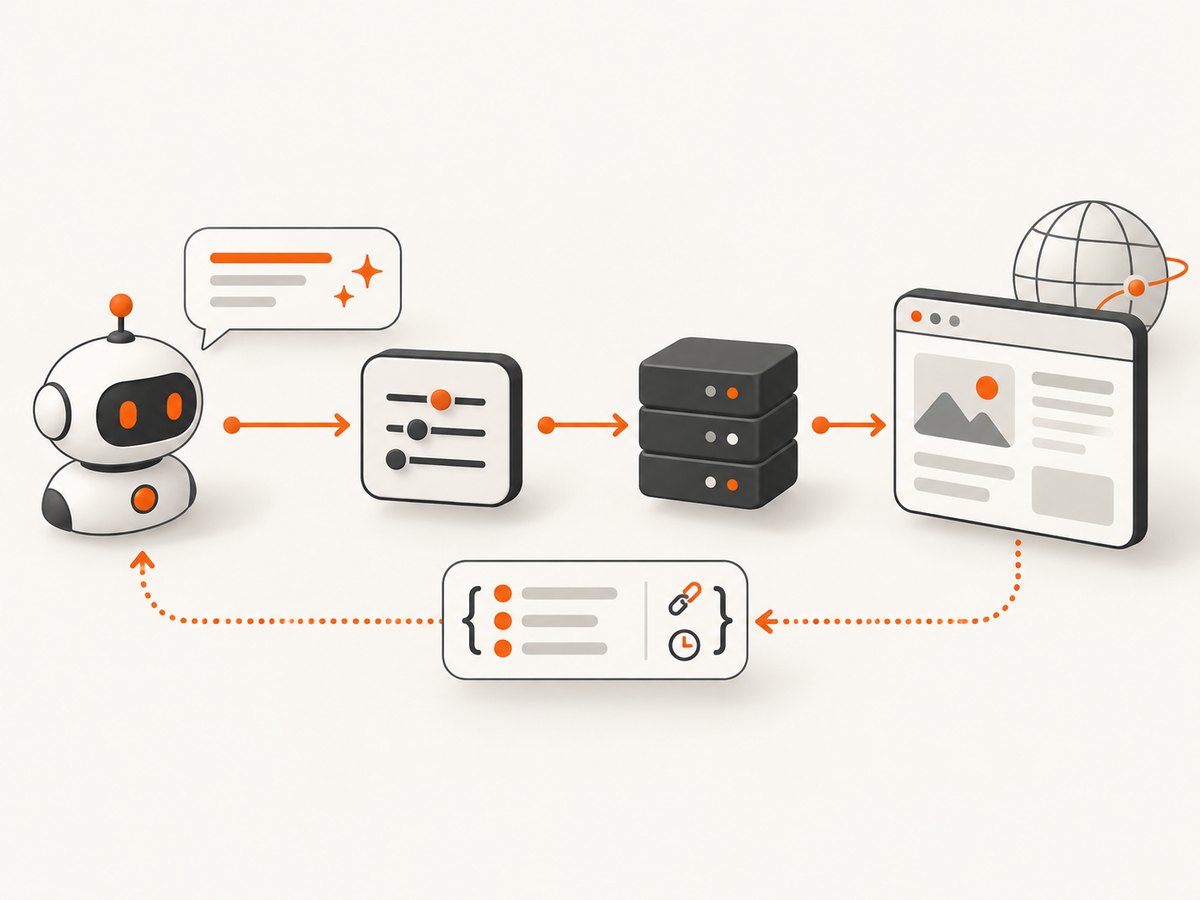
- Client or agent: Claude, Cursor, an application using an Agents SDK, or another MCP-capable AI application.
- MCP server: the boundary that authenticates requests, calls the web API or browser, and converts results into predictable MCP responses.
- Tools: named operations such as
search_articles,fetch_pageortake_screenshot. - Returned resources or prompts: source URLs, timestamps, documents and reusable instructions that help the agent reason and cite its work.
Anthropic announced MCP on November 25, 2024 as a secure, two-way connection pattern. Its launch examples included Google Drive, Slack, GitHub, Git, Postgres and Puppeteer servers. The standardizes the connection; it does not make an arbitrary website safe or structured automatically. Your server must handle rate limits, parsing, permissions and failures.
Choose the server boundary and transport
Existing server or custom wrapper
Use an existing MCP server when its tools, identity model and permissions match your task. Build a thin wrapper when you need a different API, stricter fields, custom caching or domain-specific validation. Start read-only. A tool that searches and fetches pages is easier to review than one that can publish, delete or send messages.
Local stdio
With stdio, the AI application starts your server as a child process and exchanges protocol messages over standard input and output. It is convenient for development because no public endpoint or hosting account is required. Keep secrets in the process environment or a local secret manager, never in the tool arguments or source repository.
Remote HTTPS
Use a remote HTTPS endpoint when several users, hosted agents or separate machines need one service. Current provider guidance demonstrates an endpoint such as /mcp, Inspector-based testing and OAuth deployment. Put TLS termination, authentication, rate limiting and request logging at the service boundary.
| Decision | Good default | Reason |
|---|---|---|
| Transport | stdio locally, HTTPS in production | Simple iteration first; shared access later |
| Capabilities | Read-only search and fetch | Smaller security and review surface |
| Identity | OAuth for user data; service identity for shared public data | Match permissions to the data owner |
| Tool set | Allowlist only required tools | Less context and fewer accidental calls |
| Hosting | Managed or self-hosted HTTPS with observability | Choose based on operational ownership |
Design tools that agents can use reliably
Tool names and descriptions are part of the agent interface. Name the action precisely and define every input, default and failure mode. For example, prefer fetch_page(url, max_chars) over a vague browse tool. Return structured fields rather than a large unlabelled blob.
{
  "name": "fetch_page",
  "description": "Fetch one allowed HTTPS page and return title, canonical URL, retrieval time and readable text.",
  "inputSchema": {
    "type": "object",
    "properties": {
      "url": {"type": "string", "format": "uri"},
      "max_chars": {"type": "integer", "minimum": 1000, "maximum": 50000}
    },
    "required": ["url"]
  }
}
Include the original source URL and a retrieval timestamp in each result. If the upstream response is truncated, say so in a field such as truncated: true. Normalize encoding, strip tracking parameters where appropriate, and preserve enough metadata for the agent to cite the page.
Build a minimal remote MCP server
The exact framework varies, but the request path is consistent:
- Accept the MCP request at your HTTPS endpoint.
- Authenticate the caller before dispatching a tool.
- Validate the tool name and JSON arguments against a schema.
- Call the upstream API with timeouts and an allowlist.
- Return structured content plus source metadata.
For a local proof of concept, the same dispatcher can run over stdio. Keep protocol output on stdout and send diagnostics to stderr so logs do not corrupt the message stream. For remote deployments, expose a stable /mcp route, enforce HTTPS and configure CORS only for known clients.
Configure an AI client
Local server configuration
An MCP client configuration normally specifies a command, arguments and environment variables. The exact file differs by application, but the shape is similar:
{
  "mcpServers": {
    "web-data": {
      "command": "python",
      "args": ["/absolute/path/web_data_server.py"],
      "env": {
        "WEB_DATA_API_KEY": "${WEB_DATA_API_KEY}"
      }
    }
  }
}
Use an absolute executable path in automated environments, check the working directory, and fail fast when a required secret is missing.
Remote server configuration
A hosted client needs the HTTPS MCP URL and an authorization policy. OpenAI’s Agents SDK documentation describes hosted MCP servers, connector-backed servers, authorization tokens, tool allowlists, approval policies and deferred tool loading. Configure only the tools this agent needs, and require approval for write-capable tools.
{
  "mcpServers": {
    "web-data": {
      "url": "https://example.com/mcp",
      "headers": {
        "Authorization": "Bearer ${MCP_ACCESS_TOKEN}"
      },
      "allowedTools": ["search_articles", "fetch_page"]
    }
  }
}
Do not put a long-lived administrator token in a client-side application. Issue a scoped token for the intended user, workspace or service.
Discover and test the connection
Before asking an agent to solve a real task, inspect what the server advertises. Where supported, call tools/list, prompts/list and resources/list. Then invoke one harmless, read-only tool with a known URL.
- Connect with MCP Inspector or your client’s inspector view.
- Confirm the server identity and protocol handshake.
- List tools and verify descriptions and schemas.
- Invoke a safe request with a short timeout.
- Inspect the returned URL, timestamp, content type and error fields.
- Repeat with an invalid URL and expired token to verify predictable failures.
The Cloudflare remote MCP guidance describes an interactive MCP Inspector that connects to a server and invokes tools from a browser. Test with production-like authentication before granting access to private data.
Secure an MCP connection
Treat an MCP server like any other protected API. Microsoft guidance recommends requiring an OAuth 2.0 access token on every request and validating it before running a tool. Validate the issuer, audience or resource indicator, signature, expiry and required scopes. Use a trusted identity provider or library rather than handwritten token validation.
- Least privilege: create separate scopes for read, write and administration.
- Tool allowlists: expose only the operations needed by this agent.
- Input controls: allow HTTPS URLs, restrict domains where possible, cap response size and reject internal network addresses to reduce SSRF risk.
- Secrets: keep upstream API keys server-side and rotate them.
- Approvals: require a human or policy approval before destructive or external side effects.
- Audit: log caller identity, tool, sanitized arguments, duration, result status and upstream request ID.
- Isolation: run browser or document parsers with resource limits and a restricted network identity.
For user-specific data, bind the token subject to the upstream account. A valid token for one tenant must never authorize a tool call against another tenant.
Control context, latency and operating cost
Every advertised tool adds description and schema text to the agent’s context. Group related operations into toolsets and allowlist a small set per task. Google Cloud documents toolsets and administrative IAM controls for reducing context overload. OpenAI’s hosted MCP guidance describes tool-list caching when a list is stable, while warning that remote discovery adds latency.

- Cache stable schemas and discovery responses for a short, explicit TTL.
- Cache public web responses with an invalidation policy and include the retrieval time.
- Set upstream connect, read and total timeouts separately.
- Paginate search results and cap extracted text.
- Retry only idempotent calls, with exponential backoff and a maximum attempt count.
- Stream or defer large resources instead of placing entire documents in the first tool response.
Measure discovery time, tool queue time, upstream latency, response size, error rate and retries. Cost depends on your hosting, upstream API, browser runtime and model context; MCP itself does not provide a universal price or performance guarantee.
Or skip the browser setup
If your agent needs visual web data, ScreenshotNeo provides an MCP server with take_screenshot, get_page_info and capture_pdf tools for Claude, Cursor and other MCP clients. It can also be called directly from code. The API accepts a URL and returns PNG, JPEG, WebP or PDF. See the ScreenshotNeo API and MCP documentation.
curl -G "https://api.screenshotneo.com/v1/shot" -d access_key=YOUR_API_KEY --data-urlencode url=https://stripe.com -o shot.webpimport requests
r = requests.get("https://api.screenshotneo.com/v1/shot", params={"access_key": "YOUR_API_KEY", "url": "https://stripe.com"}, timeout=90)
open("shot.webp", "wb").write(r.content)const q = new URLSearchParams({ access_key: 'YOUR_API_KEY', url: 'https://stripe.com' });
const res = await fetch(`https://api.screenshotneo.com/v1/shot?${q}`);Before capture, cookie and consent banners are accepted and more than 60 known consent platforms, newsletter popups and chat widgets can be removed; each step can be turned off. Bot checks or CAPTCHAs, blank pages, timeouts, failed loads and cache hits are not billed, and response headers identify the page verdict and whether the shot was billed. The MCP tools remove the need to build and host your own browser wrapper.
Other available controls include full-page capture with lazy images loaded, CSS-element capture, dark mode, 12 device presets or a custom viewport, retina scale, PDF paper size and margins, page ranges, custom CSS and JavaScript, clicks, selector waits, delays, network-idle waits, request and resource blocking, headers, cookies, user agents, Authorization, timezone, geolocation, transparent backgrounds, resizing, configurable-TTL caching, signed image links, asynchronous jobs with signed webhooks, bulk capture for up to 100 URLs per call, a usage API and an OpenAPI specification. Common screenshot API parameter names also work, which helps when migrating.
Cost: 1,000 screenshots per month are free with no card. Paid plans start at $5 for 3,000 shots; yearly billing provides two months free, and every feature is included on every plan. Create a free ScreenshotNeo account.
Troubleshooting checklist
| Symptom | Likely cause | Fix |
|---|---|---|
| Server never appears | Wrong command, path or URL | Use an absolute path, check process logs, then verify the HTTPS endpoint directly. |
| Handshake or JSON parse error | Logs written to stdout | Send diagnostics to stderr and emit protocol messages only on the configured transport. |
| Unauthorized | Expired, wrong-audience or missing token | Issue a token for this server, validate its audience and scopes, and check clock skew. |
| Tool is unavailable | Allowlist or discovery cache is stale | Refresh the tool list and add only the required tool to the client allowlist. |
| Agent receives unusable text | Unstructured or oversized result | Return labeled fields, source URL, timestamp, truncation status and pagination. |
| Requests hang | No upstream timeout or browser wait | Set connect/read/total limits and use bounded selector, delay or network-idle waits. |
| Private data leaks across users | Service identity used for user-scoped data | Bind OAuth subject and tenant to every upstream request; isolate caches by identity. |
| Screenshot shows a popup | Consent or widget cleanup disabled or unsupported | Enable the relevant ScreenshotNeo cleanup steps, hide selectors, or add custom CSS. |
FAQ
Is MCP the same as web scraping?
No. MCP defines how an AI application discovers and calls capabilities. The server may call an API, database, browser or scraper, and remains responsible for legality, permissions and extraction quality.
Should every tool return raw HTML?
No. Return the smallest structured result that supports the task, with a source URL and retrieval time. Offer a separate, explicitly bounded raw-content tool only when necessary.
Can a remote MCP server be public?
It can serve public data, but the endpoint still needs abuse controls, rate limits and input validation. Protect private or side-effecting tools with OAuth and scopes.
How do I migrate from another screenshot API?
Keep your client request shape where possible: ScreenshotNeo supports parameter names used by other screenshot APIs, and its OpenAPI specification can drive a generated client. Verify output format, cleanup behavior and billing headers during migration.
Production launch checklist
- Document the server URL, transport, tools and required scopes.
- Test
tools/list, authentication failure and a safe read-only call. - Set domain allowlists, size limits, timeouts and retry budgets.
- Configure tool allowlists and approval policies in each client.
- Record source URLs and retrieval timestamps for citations.
- Monitor latency, errors, token failures, upstream quotas and context size.
- Rotate credentials and review tool permissions regularly.
With these boundaries in place, an MCP plugin gives an agent a discoverable, reviewable path to live web data while keeping authentication, parsing and operational controls in the server you own.