How to Build a Documentation Chatbot for Any Website
Build a citation-backed documentation chatbot with ingestion, retrieval, evaluation, security, and a production deployment plan.
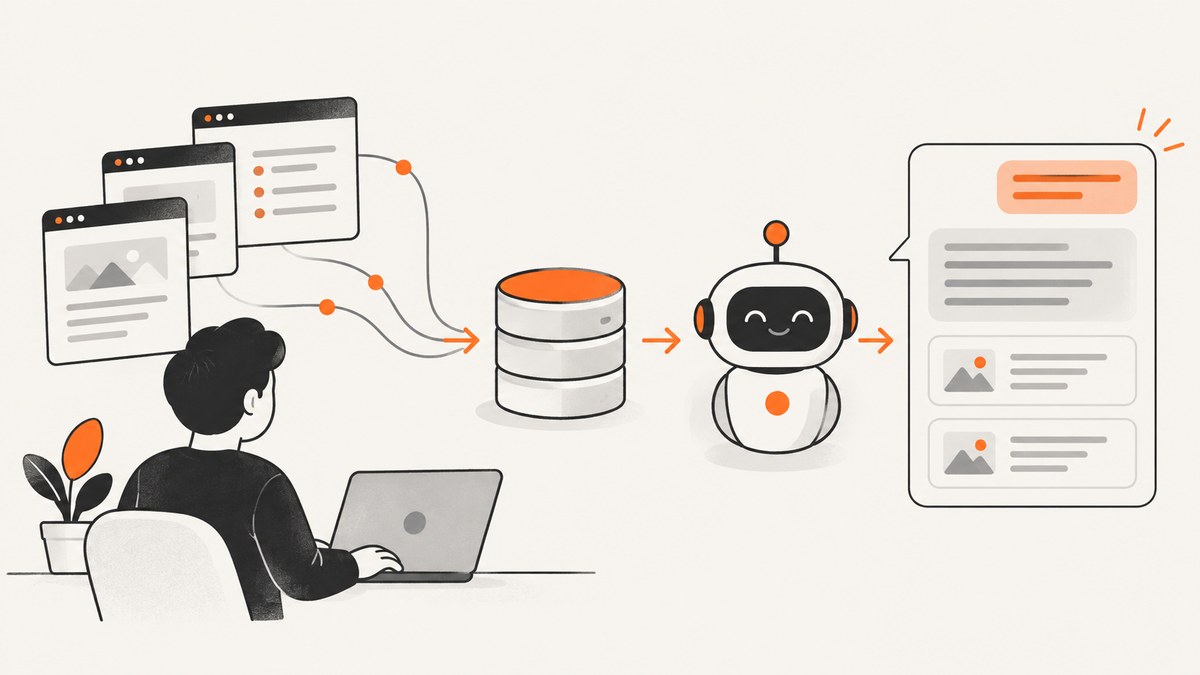
A documentation chatbot should answer from your website’s own pages, show the pages that support each answer, and admit when the documentation does not contain enough information. The dependable way to build one is retrieval-augmented generation (RAG): ingest and index documentation, retrieve relevant passages for each question, then give those passages to a language model with instructions to stay grounded in them.
This guide covers the complete workflow: defining the content boundary, crawling and refreshing pages, choosing a retrieval backend, generating cited answers, evaluating quality, securing the service, and operating it after launch.
1. Define what the chatbot is allowed to answer
Start with a written content boundary. Decide which documentation sections are authoritative and which pages must be excluded. Public product docs, API references, tutorials, and troubleshooting pages may belong in the corpus. Drafts, private customer material, obsolete versions, careers pages, navigation-only pages, and marketing copy usually do not.
- Versions: store the product and version for every page. A question about version 2 should not retrieve version 1 instructions unless you deliberately support cross-version answers.
- Canonical URLs: preserve the final URL and page title so citations can point to the page a reader can open.
- Code and tables: keep code blocks intact where possible. Split very large tables carefully so their headings remain with their rows.
- Access control: never put private documentation in a public index without enforcing the same authorization rules at retrieval time.
- Unsupported questions: define a fallback such as “I could not find that in the documentation” plus a link to support.
OpenAI’s retrieval guidance describes the core pattern: create embeddings for document sections, embed the user’s question, find relevant sections, and use those sections to generate the response. Read the retrieval guide.
2. Build an ingestion and refresh pipeline
Indexing is a pipeline, not a prompt you run once. Collect pages from your controlled documentation source, normalize them, split them into useful passages, attach metadata, and send them to your index. Track a content hash and update timestamp for every source page.

Normalize each page
- Fetch the canonical page or source file.
- Remove navigation, cookie notices, footers, and unrelated sidebars.
- Convert headings, paragraphs, lists, code, and tables into a stable text format.
- Keep
url,title,section,version, andupdated_atmetadata. - Split the text at headings and paragraph boundaries. Avoid cutting a code sample in half.
- Upsert changed chunks and delete chunks belonging to removed pages.
OpenAI vector stores are documented as indexes: files are chunked, embedded, and indexed for semantic search. The refresh and deletion process above is an implementation requirement for keeping a website chatbot current, rather than a promise that a crawler will automatically detect every change. Vector store documentation.
Minimal document record
{
  "id": "install-linux-03",
  "text": "Install the CLI with ...",
  "url": "https://docs.example.com/install/linux",
  "title": "Install on Linux",
  "section": "Installation",
  "version": "2.4",
  "updated_at": "2026-09-20T10:30:00Z",
  "content_hash": "sha256:..."
}
Run ingestion on a schedule or from your documentation build. Keep a manifest of discovered URLs so a deleted page is also removed from the index. Re-run ingestion after navigation, version, or URL changes because duplicate or stale chunks can make retrieval less precise.
3. Choose a retrieval architecture
There is no single required stack. Choose based on deployment constraints, data handling, existing infrastructure, and how much retrieval behavior you need to customize.
| Option | What it provides | Good fit when |
|---|---|---|
| Managed OpenAI retrieval | Hosted vector stores, file indexing, and semantic search | You want the shortest path to a managed RAG service |
| OpenAI Knowledge Retrieval starter kit | Config-driven ingestion, citations, ChatKit integration, evaluations, and a local Qdrant option | You want a working reference app with replaceable retrieval |
| OpenSearch | Vector index, semantic retrieval, and a conversational-agent pattern | Your team already operates OpenSearch |
| Google Cloud/GKE pattern | Cloud Storage documents, embeddings, vector search, and a deployed chatbot | Your application is already standardized on Google Cloud |
These are architecture examples, not a head-to-head benchmark. Compare setup effort, provider dependence, privacy and residency requirements, retrieval controls, index operations, and total cost for your own workload. The OpenAI Knowledge Retrieval repository documents a starter workflow with citations and evaluations. OpenSearch and Google Cloud publish their own semantic-search chatbot tutorials.
4. Retrieve evidence and generate the answer
At question time, embed or otherwise search the user’s question, retrieve the strongest passages, and pass those passages to the response model. Include source metadata in the model input and in your application response. The model should be instructed to answer only from supplied evidence, cite the supporting URLs, and state when the evidence is insufficient.

Prompt contract
System:
You answer questions about Acme documentation.
Use only the evidence supplied below. If the evidence does not answer the
question, say that the documentation does not provide enough information.
Do not invent commands, limits, versions, or links. Cite supporting sources
as [1], [2], matching the source list.

User question:
{question}

Evidence:
[1] {title} — {url}
{chunk text}

[2] {title} — {url}
{chunk text}
Framework-neutral request flow
POST /chat
{
  "question": "How do I rotate an API key?",
  "version": "2.4"
}

1. Validate the question and user permissions.
2. Search chunks filtered to version 2.4.
3. Reject or clarify when retrieval confidence is weak.
4. Send the top passages and metadata to the response model.
5. Return answer, citations, request ID, and latency metadata.
Do not expose provider keys in browser JavaScript. Your server endpoint should authenticate the visitor, apply rate limits, perform retrieval, and call the model. Escape rendered Markdown or HTML, cap question length, and log request IDs without storing secrets.
5. A small Python implementation
The following example shows the shape of a server-side implementation. It uses HTTP requests so the retrieval and generation steps are visible; adapt the endpoints and model names to the provider configuration you select. Store your API key in an environment variable.
import os
import requests
from flask import Flask, request, jsonify

app = Flask(__name__)
API_KEY = os.environ["OPENAI_API_KEY"]
BASE = "https://api.openai.com/v1"

# Replace this function with your vector-store search.
def search_docs(question, version=None):
    # Return records from your index, including text, title, and url.
    return [
        {
            "title": "API key rotation",
            "url": "https://docs.example.com/security/api-keys",
            "text": "Rotate keys from the Security page, then redeploy clients."
        }
    ]

def answer(question, evidence):
    sources = "\n\n".join(
        f"[{i}] {x['title']} — {x['url']}\n{x['text']}"
        for i, x in enumerate(evidence, 1)
    )
    prompt = (
        "Answer only from the evidence. If it is insufficient, say so. "
        "Cite sources as [number].\n\nQuestion: " + question +
        "\n\nEvidence:\n" + sources
    )
    r = requests.post(
        BASE + "/chat/completions",
        headers={"Authorization": f"Bearer {API_KEY}"},
        json={
            "model": "gpt-4o-mini",
            "messages": [
                {"role": "system", "content": "You answer documentation questions."},
                {"role": "user", "content": prompt}
            ]
        }, timeout=60
    )
    r.raise_for_status()
    return r.json()["choices"][0]["message"]["content"]

@app.post("/chat")
def chat():
    body = request.get_json(force=True)
    question = (body.get("question") or "").strip()
    if not question or len(question) > 2000:
        return jsonify({"error": "question is required and must be under 2,000 characters"}), 400
    evidence = search_docs(question, body.get("version"))
    if not evidence:
        return jsonify({"answer": "I could not find this in the documentation.", "sources": []})
    return jsonify({"answer": answer(question, evidence), "sources": evidence})

if __name__ == "__main__":
    app.run(port=8080)
For production, replace the placeholder search function with your selected vector store, add authorization filters, validate citations against returned records, and stream responses if long answers make latency noticeable.
6. Add the website chat interface
A chat page or widget needs a question field, submit state, loading indicator, retry action, error state, answer renderer, and clickable source links. Render citations from trusted metadata returned by your server instead of allowing the model to emit arbitrary anchor HTML.
Keep conversation history bounded. Send the latest question plus a short summary of prior turns to retrieval; dumping an entire conversation into the search query often reduces relevance. Offer a “view source” action beside each citation and show the documentation version used.
7. Evaluate before deployment
OpenAI’s Knowledge Retrieval blueprint recommends generating evaluations before shipping and describes responses grounded in data with citations and evals for reliability. Read the blueprint.
Create a test set from real support questions and include:
- Exact product and version questions.
- Questions requiring two or more pages.
- Ambiguous wording and synonyms.
- Questions the site cannot answer.
- Attempts to make the model ignore its evidence.
Review answer correctness, citation correctness, refusal behavior, retrieval failures, and end-to-end latency. Re-run the set whenever documentation, chunking, prompts, model, or retrieval settings change. Do not assume one chunk size, top-k value, embedding model, or similarity threshold works for every site; tune against your own examples.
8. Reliability, performance, and cost
Reliability checklist
- Use request timeouts and bounded retries for model and index calls.
- Return a useful fallback when retrieval or generation is unavailable.
- Record source IDs, model response status, latency, and token usage.
- Keep an index version so you can roll back a bad ingestion.
- Run a freshness check that compares indexed hashes with the documentation source.
Performance controls
Cache embeddings for unchanged chunks and cache repeated retrieval queries for a short period. Filter by product version before semantic search when possible. Return a small, relevant evidence set rather than every matching paragraph. Stream the generated answer while retaining citations in the final response.
Cost controls
Indexing cost depends on document volume, embedding calls, storage, and refresh frequency. Generation cost depends on question volume and the amount of evidence included. OpenAI’s retrieval guide lists up to 1 GB of vector-store storage as free and storage beyond that at $0.10/GB/day at the time of research; verify current pricing before purchase. Keep ingestion separate from question traffic so a refresh cannot unexpectedly multiply runtime requests.
9. Common errors and fixes
| Symptom | Likely cause | Fix |
|---|---|---|
| Answers cite the wrong page | Duplicate or stale chunks | Store canonical URLs, delete removed chunks, and filter by version. |
| The bot invents a command | Prompt permits general knowledge or evidence is weak | Require evidence-only answers and an explicit insufficient-evidence response. |
| Relevant page is never retrieved | Bad normalization, oversized chunks, or missing synonyms | Preserve headings and code, split at logical boundaries, and test alternate wording. |
| Private content appears publicly | Authorization applied only in the frontend | Apply tenant and user filters inside the server-side retrieval query. |
| Answers are stale | Refresh job misses changed or deleted pages | Compare hashes, upsert changed records, and delete records absent from the manifest. |
| Requests time out | Too many retrieved passages or unbounded retries | Limit evidence, set timeouts, retry only transient failures, and return a fallback. |
10. Or skip the browser setup
If your chatbot needs screenshots of documentation pages, you can capture them yourself with a browser automation stack. Or skip the browser setup: ScreenshotNeo provides a website screenshot API and MCP server for developers. One GET request returns PNG, JPEG, WebP, or PDF, and the API accepts the parameter names used by other screenshot services.
ScreenshotNeo removes cookie and consent banners, newsletter popups, and chat widgets before capture. Bot checks, blank pages, timeouts, failed loads, and cache hits are not billed; each response includes X-Page-Verdict and X-Billed headers. Its MCP server provides take_screenshot, get_page_info, and capture_pdf tools for Claude, Cursor, and other MCP clients.
cURL:
curl -G "https://api.screenshotneo.com/v1/shot" -d access_key=YOUR_API_KEY --data-urlencode url=https://stripe.com -o shot.webpPython:
import requests
r = requests.get("https://api.screenshotneo.com/v1/shot", params={"access_key": "YOUR_API_KEY", "url": "https://stripe.com"}, timeout=90)
open("shot.webp", "wb").write(r.content)
Node.js:
const q = new URLSearchParams({ access_key: 'YOUR_API_KEY', url: 'https://stripe.com' });
const res = await fetch(`https://api.screenshotneo.com/v1/shot?${q}`);
See the ScreenshotNeo API documentation for the full option set: full-page or CSS-selector capture, device presets, retina scale, dark mode, custom CSS and JavaScript, waits, blocked resources, headers and cookies, geolocation, PDF settings, caching, signed links, async jobs, bulk capture, and usage reporting. It includes 1,000 screenshots per month free with no card; paid plans start at $5 for 3,000. Create a free ScreenshotNeo account.
FAQ
Does a documentation chatbot need fine-tuning?
Usually no. RAG keeps changing documentation outside the model’s weights and lets each answer include current source passages. Fine-tuning can help with style or task behavior, but it does not replace a refreshed documentation index.
How many pages can I index?
There is no universal page count. Measure ingestion time, index storage, retrieval quality, and question volume for your corpus. Remove irrelevant pages before increasing infrastructure.
Should citations be generated by the model?
Let the model refer to numbered evidence, then have your server map those numbers to retrieved, trusted URLs. This prevents fabricated links and makes citation validation possible.
What happens when the documentation has no answer?
Return a clear insufficient-evidence response and offer a support route. This is safer than filling gaps with the model’s general knowledge.
Can the bot answer private documentation questions?
Yes, if retrieval applies the same identity, tenant, and version permissions as the documentation application. Never rely on a hidden frontend field for access control.


