E-Commerce Scraping Automation: Build a Reliable Product Data Pipeline
Build an e-commerce data workflow that collects authorized product data, validates it, stores dated results, and recovers cleanly when pages change.

E-commerce scraping automation is a recurring pipeline that collects product or storefront information, converts it into a stable format, checks it for errors, stores dated results, and runs again on a schedule. The first decision is what source you are authorized to access: a merchant’s official API with granted permissions, your own public storefront, or a third-party website whose applicable terms and rules you have reviewed. Build the collection method around that distinction; public visibility alone does not settle permission or reuse rights.
A dependable workflow is: define the data and permission basis, fetch only the required pages or API records, normalize fields, validate each record, save the result with a timestamp, schedule refreshes, and monitor failures. For product catalogs, that usually means identifiers, titles, prices, availability, product URLs, and observation times. This guide provides an authorized storefront example, a reusable pipeline pattern, operational guidance, and a browser-based visual check.
1. Choose an authorized source and collection method
Before writing a crawler, record the target domain or store, your purpose, the fields required, refresh frequency, retention period, and the permission basis. Then select a method:
| Source | Practical starting point | Important boundary |
|---|---|---|
| Your store’s private catalog | Use the platform’s official API with merchant authorization and only the necessary scopes. | Authentication and granted scopes define what an app may access. Shopify’s API terms also prohibit systematic or automated data collection through the Shopify API, including scraping; review the current terms for your exact use. Shopify API License and Terms of Use |
| Your own public Shopify storefront | Use the documented Web Bot Auth signatures for storefront analysis. | Signatures are domain-specific, expire after a selected period of no more than three months, and do not grant checkout access. Shopify: Crawling your store |
| Another company’s pages | Review the target’s applicable terms and rules and obtain any needed authorization before collecting. | Shopify’s platform terms do not decide permissions for unrelated websites or jurisdictions. |
For Shopify app access, tokens and scopes govern access; request only the minimum needed and do not treat possession of a token as broader permission. The Admin GraphQL API supports store data access subject to authentication and scopes. Shopify GraphQL Admin API documentation and scope guidance explain the platform mechanics. Make sure the intended collection activity itself is allowed under the applicable terms.
2. Define a stable data contract
Scrapers become fragile when downstream code depends on page layout or inconsistent field names. Define a canonical record before implementing extraction. Keep source-specific parsing separate from the shared schema.
{
  "source": "storefront.example",
  "product_id": "sku-or-platform-id",
  "title": "Canvas tote",
  "product_url": "https://storefront.example/products/tote",
  "price": 24.5,
  "currency": "USD",
  "availability": "in_stock",
  "observed_at": "2026-09-29T12:00:00Z"
}
Decide how to represent missing prices, variants, sale pricing, unavailable products, and currencies. Store raw source values or a small audit sample when useful for diagnosing parser changes, but apply an explicit retention policy. Keep personal or customer data out of a product pipeline unless it is necessary and specifically authorized.
3. Crawl your own public Shopify storefront with Web Bot Auth
For an owner analyzing their own public Shopify storefront, Shopify documents Web Bot Auth: create a signature in the Shopify admin, scope it to the connected domain, and send its three headers on every request. The documented use cases include accessibility and SEO audits, automated testing, and data analysis. Signatures are not a substitute for Admin API access and do not unlock checkout.
- In Shopify admin, open Online Store > Preferences, find Crawler access, and create a named signature for the connected domain.
- Choose its expiration period and securely copy
Signature-Input,Signature, andSignature-Agent. - Set the signature values as environment variables in the runtime that performs the crawl; do not commit them to source control or print them in logs.
- Request only the public product pages needed for your analysis. Follow the domain and expiration constraints Shopify documents.
The following Python script illustrates a small, bounded product-page crawl. It reads authorized signature values from environment variables, extracts basic Open Graph metadata, validates key fields, and writes JSON Lines with an observation timestamp. It does not attempt to evade access controls or infer permission for other sites.
# Save as storefront.py
# Install dependency: python -m pip install requests beautifulsoup4
# Set SHOP_URL, SIGNATURE_INPUT, SIGNATURE, and SIGNATURE_AGENT in your environment.
import json
import os
import sys
import time
from datetime import datetime, timezone
from urllib.parse import urljoin, urlparse

import requests
from bs4 import BeautifulSoup

BASE = os.environ["SHOP_URL"].rstrip("/")
HOST = urlparse(BASE).netloc
HEADERS = {
    "Signature-Input": os.environ["SIGNATURE_INPUT"],
    "Signature": os.environ["SIGNATURE"],
    "Signature-Agent": os.environ.get("SIGNATURE_AGENT", '"https://shopify.com"'),
    "User-Agent": "AuthorizedStorefrontAnalysis/1.0",
}
URLS = [urljoin(BASE + "/", path.lstrip("/")) for path in sys.argv[1:]]
if not URLS:
    raise SystemExit("Pass one or more authorized product paths, such as /products/tote")

session = requests.Session()
session.headers.update(HEADERS)
with open("products.jsonl", "w", encoding="utf-8") as output:
    for url in URLS:
        if urlparse(url).netloc != HOST:
            raise ValueError(f"Refusing URL outside configured domain: {url}")
        response = session.get(url, timeout=(5, 30))
        response.raise_for_status()
        soup = BeautifulSoup(response.text, "html.parser")
        title = soup.select_one('meta[property="og:title"]')
        image = soup.select_one('meta[property="og:image"]')
        price = soup.select_one('meta[property="product:price:amount"]')
        currency = soup.select_one('meta[property="product:price:currency"]')
        record = {
            "source": HOST,
            "product_id": None,
            "title": title.get("content", "").strip() if title else "",
            "product_url": response.url,
            "price": price.get("content") if price else None,
            "currency": currency.get("content") if currency else None,
            "image_url": image.get("content") if image else None,
            "availability": None,
            "observed_at": datetime.now(timezone.utc).isoformat(),
        }
        if not record["title"]:
            raise ValueError(f"Missing product title: {url}")
        output.write(json.dumps(record, ensure_ascii=False) + "\n")
        time.sleep(1)  # conservative pacing for a small analysis job
print(f"Wrote {len(URLS)} records to products.jsonl")
Run it with environment variables set by your secret manager or shell, then provide explicit paths: python storefront.py /products/tote /products/mug. The example’s metadata selectors are only a starting point. Themes and structured data vary; inspect pages you are authorized to analyze, then implement selectors for the fields your source actually exposes. A missing field should become a visible validation issue, not a silent zero or fabricated value.
4. Normalize, validate, and persist every run
Extraction is only one stage. Treat each run as a batch with a run identifier, start and finish timestamps, source, requested page count, successful count, rejected count, and error summary. Use a staging area: parse records into temporary output, validate them, and publish the new snapshot only if the batch meets your rules. This avoids replacing a healthy dataset with a partial crawl.
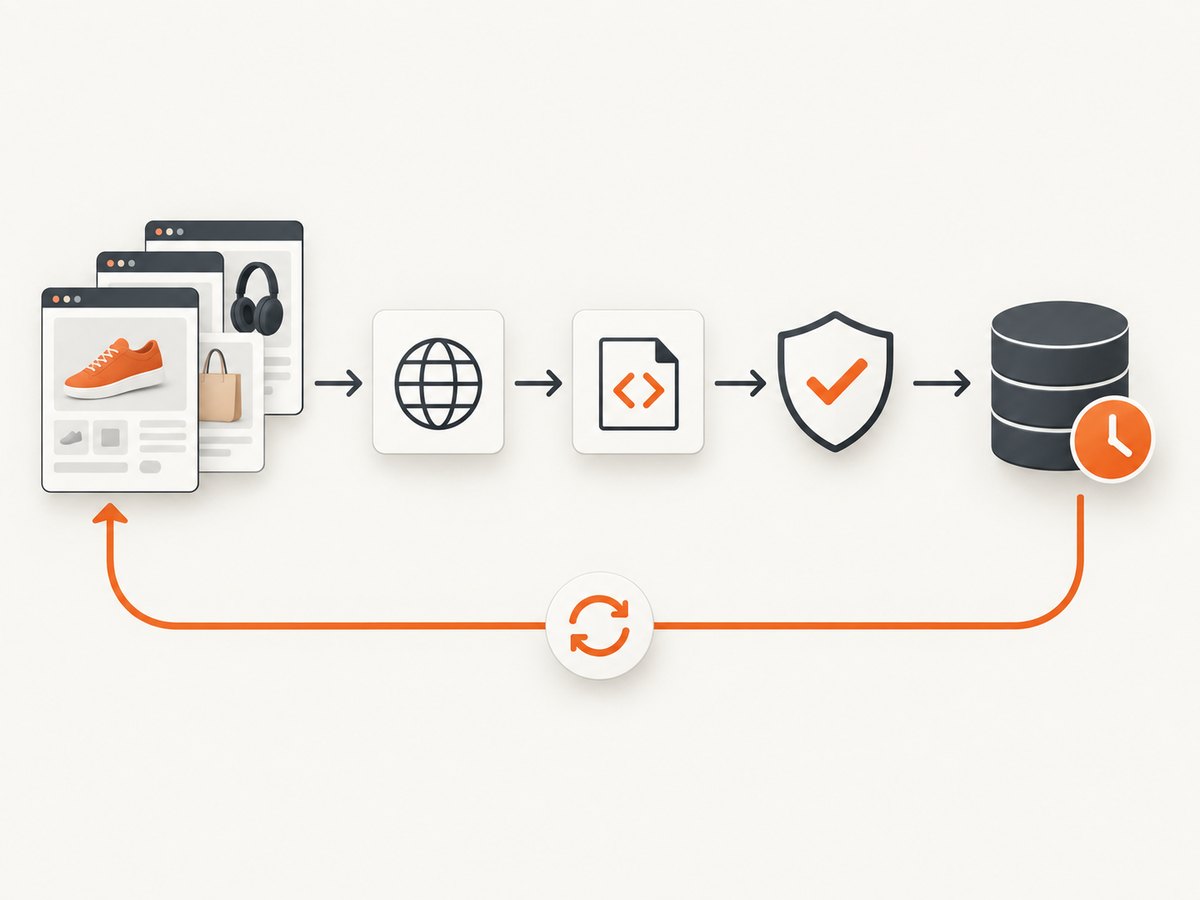
- Normalize: parse decimal prices with a decimal type rather than binary floating-point where exact currency arithmetic matters; standardize currency codes, URLs, and availability values.
- Validate: require stable identifiers and titles, check prices are parseable and nonnegative, verify timestamps, and detect duplicate product IDs.
- Compare: distinguish a legitimate product removal from a failed page or selector break. Avoid interpreting a sudden zero-row run as an empty catalog without review.
- Persist: store dated snapshots or change events so consumers can trace when a value was observed. Choose retention based on the purpose and applicable requirements.
- Export: write JSONL or CSV for straightforward interchange; use a database or object store when query volume, history, or downstream integration needs it.
A practical schema can keep price as a decimal string such as "24.50" and include a separate normalized numeric representation. If variants are relevant, give each variant a record key rather than combining several prices into one ambiguous product field.
5. Schedule and monitor the automation
Schedule according to how often the source changes and how quickly you need to see an update. A daily job is not inherently better than a weekly job: it creates more requests and more opportunities for failure. Start with a small cadence, measure the business value of freshness, and adjust within the permitted collection method.
Make the job restartable. Keep a cursor or list of pending URLs, checkpoint completed items, and avoid deleting the prior good snapshot until a replacement passes validation. Add bounded retries for transient network errors and server errors, with increasing delays. Do not retry permanent access errors indefinitely. Apply concurrency and request pacing that respect the source and the authorization you have.
Monitor outcomes that help distinguish a site change from infrastructure noise: success rate, response status classes, timeout count, parse failures by field, records per run, duplicate count, and elapsed time. Alert on meaningful changes, such as a run with no valid products or a sudden increase in missing prices. Keep credentials out of logs, restrict who can read exported data, and rotate signatures or API credentials according to their lifecycle. Shopify says crawler signatures expire and cannot be renewed; create a replacement signature and update the job when needed. See Shopify’s signature guidance.
6. Build it yourself or use a hosted automation service?
Self-hosting gives you control over the parser, storage, deployment, and operating schedule. It also means your team owns browser or HTTP runtime setup, retries, secret handling, monitoring, and repairs when the source changes. A hosted service may package some of that operation, but evaluate its actual source coverage, authorization model, output formats, access controls, retention, and total cost for your use case.
Apify documents cloud Actors that can run manually, through an API, or on a schedule, with results in structured datasets or integrations; its documentation also lists storage, monitoring, and related platform features. Those are vendor-described capabilities, not comparative performance findings. Apify Actors documentation. Scrapy.io describes synchronous and asynchronous jobs, status polling, dataset export, and recurring schedules. Verify current e-commerce coverage for a specific workflow; its overview examples focus on other verticals. Scrapy.io service overview.
| Consideration | Questions to answer |
|---|---|
| Authorization and coverage | Does the source permit this access method, and does the tool support the required pages or authorized API? |
| Page behavior | Does the storefront render needed values in initial HTML, or are JavaScript, pagination, or interaction involved? |
| Operations | Who owns scheduling, retries, monitoring, parser repairs, and incident response? |
| Data handling | Where are credentials and results stored, who can access them, and how long are they retained? |
| Cost | Include service charges where applicable plus compute, storage, debugging, and engineering maintenance. |
The available documentation does not establish a universal best tool or comparative price/performance result. Make a small authorized proof of concept against representative pages, validate output quality, and estimate the human work required to keep it reliable.
7. Capture a visual record of a storefront page
Product fields answer structured questions; a screenshot helps diagnose what a visitor-facing page looked like during a run. For an authorized site, a browser automation library can capture the rendered page after loading. For example, with Playwright for Python:

# Install: python -m pip install playwright
# Install browser: playwright install chromium
import asyncio
from playwright.async_api import async_playwright

async def main():
    async with async_playwright() as p:
        browser = await p.chromium.launch()
        page = await browser.new_page(viewport={"width": 1440, "height": 1000})
        await page.goto("https://your-authorized-store.example/products/item", wait_until="domcontentloaded", timeout=60000)
        await page.screenshot(path="product-page.png", full_page=True)
        await browser.close()

asyncio.run(main())
Use a known test page or your own storefront in place of the example domain. A full-page screenshot may be large and can trigger lazy-loaded content; a viewport capture is cheaper to store and often enough for a targeted diagnostic. Avoid capturing customer details or other sensitive content. If rendering is incomplete, wait for a page-specific selector or a bounded delay rather than assuming network idle is always appropriate.
Or skip the browser setup
ScreenshotNeo is a website screenshot API and MCP server from Yorker Media. A single request returns an image or PDF; its screenshot options include full-page capture, CSS selector capture, viewport and device presets, wait conditions, and custom headers. Read the ScreenshotNeo API documentation for parameters.
curl -G "https://api.screenshotneo.com/v1/shot" -d access_key=YOUR_API_KEY --data-urlencode url=https://stripe.com -o shot.webpimport requests
r = requests.get("https://api.screenshotneo.com/v1/shot", params={"access_key": "YOUR_API_KEY", "url": "https://stripe.com"}, timeout=90)
open("shot.webp", "wb").write(r.content)const q = new URLSearchParams({ access_key: 'YOUR_API_KEY', url: 'https://stripe.com' });
const res = await fetch(`https://api.screenshotneo.com/v1/shot?${q}`);ScreenshotNeo removes cookie banners, popups, and chat widgets before the shot; bot checks, blank pages, and failed loads are never billed; an MCP server lets AI agents take screenshots; and 1,000 screenshots a month are free with no card, with paid plans starting at $5 for 3,000. Create a free ScreenshotNeo account.
8. Troubleshooting common failures
| Symptom | Likely cause | Fix |
|---|---|---|
| 401, 403, or rate limiting on a Shopify storefront crawl | Missing, malformed, expired, or wrong-domain Web Bot Auth signature. | Check that all three signature headers are sent on every request, confirm the connected domain and expiration in admin, and create a new signature if expired. Shopify identifies invalid signatures as a cause of rate-limiting errors. |
| API request returns an authorization error | Missing authentication or required scope, or the merchant has not granted the scope. | Check the API’s current authentication and scope documentation, ask only for the needed access, and use the token for the intended store. Do not broaden collection beyond granted permissions. |
| HTTP success but title or price is empty | Theme markup changed, metadata is absent, or content renders client-side. | Inspect an authorized page, update source-specific selectors, and add a test fixture or validation alarm for required fields. |
| Job produces fewer records than expected | Some pages failed, pagination was missed, or a partial run overwrote previous output. | Track requested versus successful URLs, checkpoint work, retain the prior snapshot, and publish only after batch validation. |
| Repeated timeouts | Slow page rendering, oversized work batches, network instability, or an unsuitable wait condition. | Use explicit connect/read timeouts, reduce concurrency, bound retries, and wait for the specific content needed. Split large jobs into resumable batches. |
| Prices appear to change unexpectedly | Currency or locale differences, sale/regular price confusion, variant selection, or a parse error. | Persist currency and source context, make variant selection explicit, parse decimal values carefully, and flag implausible changes for review. |
9. Performance, reliability, and cost
For mostly static pages, direct HTTP requests avoid the overhead of launching a browser. A browser is useful when the authorized data only appears after client-side rendering or interaction, but it consumes more compute and requires browser installation and lifecycle management. Use the lightest method that returns complete, correct fields. Batch work by a bounded number of URLs, limit concurrency, and avoid fetching the same unchanged pages more often than the workflow needs.
Reliability comes from controls around parsing and publishing, not from retries alone. A retry can recover a transient timeout; it cannot repair a selector that no longer matches. Keep representative fixtures, monitor field-level completeness, and make an operator-visible distinction between “no products found” and “collection failed.” Preserve run metadata and enough diagnostic context to investigate without exposing secrets.
Budget the entire pipeline: API or hosted-service charges if any, compute, browser runtime, storage, egress where applicable, and ongoing engineering time. The research does not establish comparative vendor prices or performance. A managed service can reduce infrastructure work while introducing service configuration and data-handling considerations. A self-hosted scraper can avoid some service fees while shifting upkeep to your team. Estimate using your authorized URL count, refresh frequency, expected page complexity, retention, and monitoring needs.
10. A launch checklist
- Document target, purpose, authorization, fields, cadence, and retention.
- Prefer an official platform interface only where its permitted use fits the workflow; confirm current platform terms and scopes.
- For your own public Shopify storefront analysis, use the documented domain-scoped Web Bot Auth process.
- Define a versioned schema and explicit handling for variants, missing values, currency, and unavailable products.
- Validate every batch before making it the current dataset.
- Use bounded pacing, timeouts, retries, checkpoints, and alert thresholds.
- Protect credentials, restrict data access, and delete data when it is no longer needed.
- Review output quality and maintenance effort before increasing crawl volume.
Frequently asked questions
How do I automate e-commerce web scraping?
Define the permission basis and fields, implement a source-specific fetcher, normalize records into a stable schema, validate a batch, store timestamped results, and schedule monitored refreshes. Use bounded retries and preserve the previous good output if a run fails.
Can I scrape Shopify product data?
It depends on which data path and purpose you mean. Shopify API access is controlled by authentication and scopes, and Shopify’s API terms prohibit systematic or automated collection through the API. For an owner analyzing their own public storefront, Shopify documents Web Bot Auth for authorized crawler requests. Read the linked current documentation and terms before choosing a method.
Should I use a web scraping API or build my own scraper?
Choose based on authorized source coverage, dynamic-page needs, scheduling, monitoring, data controls, total cost, and who will maintain the pipeline. Vendor capability pages describe features but do not by themselves prove comparative quality or performance.
How often should a product catalog refresh?
Set a cadence based on how quickly the source changes and how fresh the downstream use needs to be. Start conservatively, monitor the result, and adjust while respecting the source’s rules and your authorization.
What should I do when a storefront layout changes?
Let required-field validation and record-count monitoring identify the break, inspect an authorized representative page, update the source-specific parser, and rerun a bounded batch before publishing a replacement dataset.


