How to Use Gemini for AI-Powered Web Scraping
Use Gemini URL Context for known pages and Google Search grounding for discovery, then validate structured results in your own code.

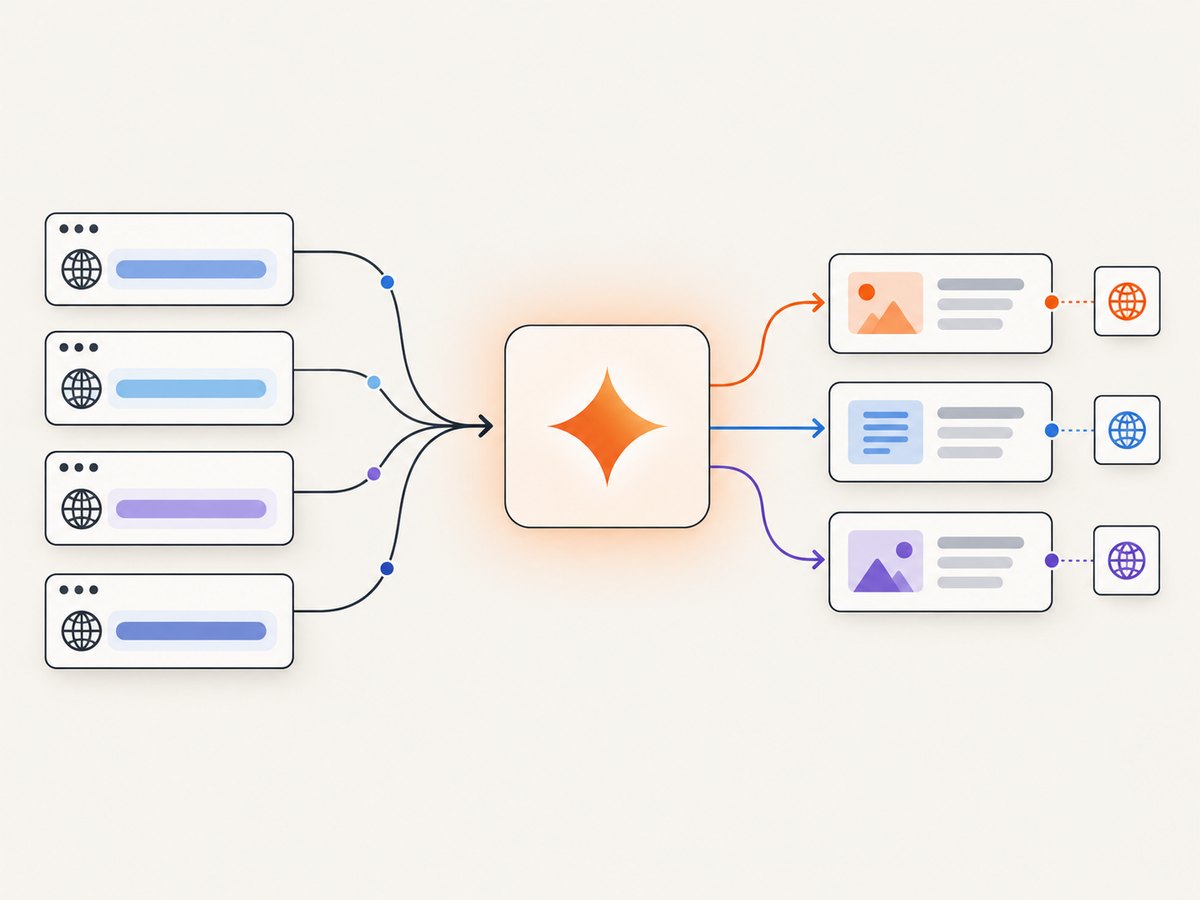
Short answer: Gemini can retrieve and interpret public web content through two documented routes. Use URL Context when you already know the page URLs, and use Google Search grounding when Gemini must discover relevant public pages. Ask for specific fields, request a predictable structure, preserve source annotations, and validate every extracted value in ordinary application code. These tools are not documented as an exhaustive site crawler.
Google describes URL Context as a way to provide URLs as additional context to a model. It retrieves only the URLs you supply; it does not follow links nested inside those pages. Google Search grounding lets Gemini search current public web content and return citations. You can combine both: search to discover pages, then pass selected URLs to URL Context for deeper extraction. See the URL Context documentation and Google Search grounding documentation for current model and feature availability.
Choose the right Gemini scraping workflow
| Need | Best route | What it does | Coverage limit |
|---|---|---|---|
| You have a list of pages | URL Context | Reads explicitly supplied public URLs and extracts or compares information | Does not discover or follow nested links |
| You need public-web discovery | Google Search grounding | Searches, synthesizes results, and attaches URL annotations | Search count is model-decided; citations do not prove completeness |
| You need private or specialized sources | Vertex AI external search API grounding | Your endpoint supplies relevant snippets to Gemini | You operate the index, access controls, and retrieval quality |
| Recurring, exhaustive domain collection | Dedicated crawler, site API, or custom index | Schedules and controls crawling at scale | Outside the guarantees documented for Gemini tools |
Use URL Context for a known set of product pages, reports, documentation pages, or articles. Use Search grounding when the page set is unknown. Treat a search-grounded answer as a sourced research response, not as a complete crawl of a domain.
Limits and access requirements
- URL Context requests can process up to 20 URLs.
- Content retrieved from one URL can be at most 34 MB.
- URLs must be publicly accessible and should include
https://orhttp://. - Supported text-oriented formats include HTML, JSON, plain text, XML, CSS, JavaScript, CSV, and RTF. PNG, JPEG, BMP, WebP, and PDF are also listed as supported formats.
- Paywalled pages, YouTube URLs, Google Workspace files such as Docs and Sheets, audio/video files, localhost, private networks, and tunneling services are unsupported by URL Context.
- A URL may be served from an internal index cache or fetched live when it is not available there. This is documented implementation behavior, not a freshness guarantee.
Check Google’s live documentation before hard-coding limits or model names. Availability changes over time, and the supported-model tables are the authoritative source.
Set up a minimal Gemini extraction script
1. Create credentials and install the SDK
Create a Gemini API key in the Google AI developer tooling, then set it as an environment variable. Keep the key server-side; do not place it in browser JavaScript.
export GEMINI_API_KEY="your-api-key"
pip install google-genai
2. Extract fields from known URLs with URL Context
The following Python example sends two public pages and requests JSON-like output. Replace the model with one shown in Google’s current URL Context supported-model table.
import json
import os
from google import genai
from google.genai import types

client = genai.Client(api_key=os.environ["GEMINI_API_KEY"])
urls = [
    "https://example.com/product-a",
    "https://example.com/product-b",
]

prompt = f"""
Read these URLs and extract one record per URL.
URLs: {urls}

Return an object with an `items` array. Each item must contain:
- url: the exact input URL
- title: page title or null
- price: displayed price as a string or null
- currency: currency code or null
- evidence: a short quote or description showing where the value came from
- retrieval_status: `ok` or `failed`

Never guess. Use null when a field is absent or inaccessible.
"""

response = client.models.generate_content(
    model="YOUR_SUPPORTED_MODEL",
    contents=prompt,
    config=types.GenerateContentConfig(
        tools=[types.Tool(url_context=types.UrlContext())]
    ),
)

print(response.text)
The explicit null rule prevents a missing price from silently becoming a false value. In production, parse the response, check required keys and types, and retain the URL associated with every record.
3. Discover pages with Google Search grounding
When you do not know which pages contain the answer, enable Google Search grounding. Gemini may decide whether search is useful, run one or more searches, synthesize the results, and return annotations associating answer segments with URLs.
from google import genai
from google.genai import types
import os

client = genai.Client(api_key=os.environ["GEMINI_API_KEY"])

response = client.models.generate_content(
    model="YOUR_SEARCH_SUPPORTED_MODEL",
    contents=(
        "Find the official pricing pages for three widely used hosted databases. "
        "Return provider, plan name, monthly price, billing unit, source URL, "
        "and the date shown on the page. Mark unknown fields null."
    ),
    config=types.GenerateContentConfig(
        tools=[types.Tool(google_search=types.GoogleSearch())]
    ),
)

print(response.text)
# Inspect response metadata/grounding annotations in your SDK version
# and preserve the source URL for each extracted field.
Do not assume that one request issues exactly one query or finds every relevant page. Display or store the returned citations near the claims they support.
4. Combine Search grounding and URL Context
A practical two-pass design is:
- Ask Search grounding for candidate official URLs.
- Deduplicate and filter those URLs in your code.
- Send the selected URLs to a second request using URL Context.
- Extract a fixed schema and preserve the URL-to-field mapping.
This gives discovery and deeper page reading without implying that Gemini crawled every link on a site.
Structured output: make results easier to validate
Google documents structured outputs with built-in tools, including URL Context and Google Search, as a preview capability for Gemini 3. A schema can require fields, types, and allowed values. It controls response shape; it does not prove that a value is true, complete, current, or supported by the page.
from google.genai import types

schema = types.Schema(
    type=types.Type.OBJECT,
    properties={
        "items": types.Schema(
            type=types.Type.ARRAY,
            items=types.Schema(
                type=types.Type.OBJECT,
                properties={
                    "url": types.Schema(type=types.Type.STRING),
                    "title": types.Schema(type=types.Type.STRING, nullable=True),
                    "price": types.Schema(type=types.Type.NUMBER, nullable=True),
                    "currency": types.Schema(type=types.Type.STRING, nullable=True),
                    "evidence": types.Schema(type=types.Type.STRING),
                },
                required=["url", "title", "price", "currency", "evidence"],
            ),
        )
    },
    required=["items"],
)

config = types.GenerateContentConfig(
    tools=[types.Tool(url_context=types.UrlContext())],
    response_mime_type="application/json",
    response_schema=schema,
)
Use a schema with narrow enums where appropriate, such as retrieval_status: ok|failed. Require evidence only when evidence is meaningful for the field; forcing a fabricated quote is worse than allowing null.
cURL and Node.js request patterns
cURL
The REST endpoint and request fields can change with the selected Gemini model. Use the current REST reference and substitute a model that supports the tool you need.
curl "https://generativelanguage.googleapis.com/v1beta/models/YOUR_SUPPORTED_MODEL:generateContent?key=$GEMINI_API_KEY" \
  -H "Content-Type: application/json" \
  -d '{
    "contents": [{"parts": [{"text": "Extract the title and publication date from https://example.com/article. Return null for missing fields."}]}],
    "tools": [{"url_context": {}}]
  }'
Node.js
import { GoogleGenAI } from "@google/genai";

const ai = new GoogleGenAI({ apiKey: process.env.GEMINI_API_KEY });
const response = await ai.models.generateContent({
  model: "YOUR_SUPPORTED_MODEL",
  contents: "Extract title, author, and date from https://example.com/article. Return null when absent.",
  config: { tools: [{ urlContext: {} }] }
});

console.log(response.text);
SDK property names can differ between releases. Pin a tested SDK version in your application and consult its current reference when upgrading.
Validation and production safeguards
- Validate access first. Check that each URL is public, returns the expected content type, and does not require a login or paywall.
- Validate structure. Reject malformed JSON, missing required keys, unexpected enum values, and wrong numeric or date types.
- Validate semantics. Check that prices are non-negative, dates parse, currencies are known, and URLs match the requested set.
- Keep evidence. Store the source URL and returned annotation or evidence text with each record.
- Handle missing pages explicitly. A retrieval failure is not the same as “the field does not exist.” Route failed URLs to retry or manual review.
- Deduplicate. Normalize trailing slashes, fragments, redirects, and canonical URLs before merging records.
- Respect rules. Review a target site’s terms, access controls, robots guidance, and applicable law for your use case.
Performance, reliability, and cost considerations
- Batch known pages within limits. URL Context supports up to 20 URLs per request, but smaller batches make failures easier to isolate.
- Control prompt size. Ask only for fields you need and avoid repeating long instructions for every URL.
- Cache your own results. Store successful URL and extraction pairs with a retrieval timestamp. Reprocess only when freshness requirements justify it.
- Retry selectively. Retry transient API errors with exponential backoff; do not retry permanent access failures indefinitely.
- Budget for model usage. Google API pricing and model availability change. Consult current pricing, quota, and model documentation before estimating spend.
- Measure quality separately from latency. Track missing-field rates, validation failures, citation coverage, duplicate rates, and manual corrections.
- Expect dynamic-page gaps. A page can be public yet still depend on client-side rendering, consent flows, or a bot check. A failed retrieval should be recorded as failed, not converted to an empty record.
Or skip the browser setup
If your workflow starts with screenshots, visual archives, or page-state capture, ScreenshotNeo provides a website screenshot API and MCP server. It accepts one GET request and returns PNG, JPEG, WebP, or PDF. Before capture it accepts cookie and consent banners and removes more than 60 known consent platforms, newsletter popups, and chat widgets; each step can be turned off. Bot checks/CAPTCHAs, blank pages, timeouts, failed loads, and cache hits are not billed, and the response identifies the result with X-Page-Verdict and X-Billed headers.
See the ScreenshotNeo API documentation for all options.
curl -G "https://api.screenshotneo.com/v1/shot" -d access_key=YOUR_API_KEY --data-urlencode url=https://stripe.com -o shot.webpimport requests
r = requests.get("https://api.screenshotneo.com/v1/shot", params={"access_key": "YOUR_API_KEY", "url": "https://stripe.com"}, timeout=90)
open("shot.webp", "wb").write(r.content)const q = new URLSearchParams({ access_key: 'YOUR_API_KEY', url: 'https://stripe.com' });
const res = await fetch(`https://api.screenshotneo.com/v1/shot?${q}`);ScreenshotNeo also offers an MCP server with take_screenshot, get_page_info, and capture_pdf for Claude, Cursor, and other MCP clients. Features include full-page and element capture, device presets, custom CSS and JavaScript, waits, request blocking, headers, cookies, geolocation, caching, signed links, asynchronous jobs, bulk capture, usage data, and PDF controls. The free plan includes 1,000 screenshots per month with no card; paid plans start at $5 for 3,000. Create a free ScreenshotNeo account.
Troubleshooting common errors
| Symptom | Likely cause | Fix |
|---|---|---|
| URL Context returns no content | Private, paywalled, unsupported, or blocked URL | Open the full URL publicly, remove authentication requirements, and confirm the format is supported. |
| Only some URLs produce records | One page exceeded limits or failed retrieval | Split batches, record per-URL status, and retry only failed URLs. |
| Answer has citations but misses pages | Search grounding is discovery, not exhaustive crawling | Collect candidate URLs, then run URL Context on the pages you require. |
| JSON parses but values are wrong | Schema controls shape, not truth | Require evidence, validate ranges and dates, and send outliers to review. |
| Nested links are absent | URL Context does not follow links | Discover or enumerate those URLs separately. |
| SDK rejects tool configuration | SDK version or model does not support that tool | Pin a current SDK, check the supported-model table, and match the SDK’s current type names. |
| Requests time out | Large or slow pages, transient service issue, or inaccessible origin | Reduce batch size, set bounded client timeouts, retry with backoff, and mark unresolved pages failed. |

FAQ
Can Gemini crawl an entire website?
The documented tools do not promise exhaustive site crawling, scheduling, robots handling, or complete traversal. Use a crawler, site API, or custom index when coverage is a requirement.
Can Gemini scrape pages behind a login?
URL Context requires publicly accessible URLs and lists login and paywall barriers as unsupported cases. Do not assume that supplying credentials will work.
Can I ask Gemini for JSON?
Yes. Use a response schema where supported, then parse and validate the result. JSON formatting alone does not establish accuracy.
How do I scrape many URLs?
URL Context supports up to 20 URLs per request. Batch within that limit, preserve per-URL status, and split work so one failed page does not hide successful results.
What should I use for private documents?
Google Cloud documents grounding through an external search API on Vertex AI. Your endpoint supplies relevant snippets from your own corpus; deployment, cost, and suitability depend on your system.
When is a screenshot API useful?
Use one when you need a visual record, PDF, or rendered state rather than only text extraction. ScreenshotNeo can remove consent and overlay elements before capture and exposes verdict and billing headers for each response.


