Handle Screenshot API Webhooks in a Java Application
Receive screenshot callbacks safely in Java with HMAC verification, idempotency, fast acknowledgements, retries, and durable downloads.

Asynchronous screenshot APIs return a job identifier first, then POST a JSON result to your webhook endpoint. A production Java integration should authenticate the raw request body, acknowledge quickly, deduplicate by the provider job ID, and move image or PDF downloads to durable background work.
The reliable flow is:
- Expose a public HTTPS POST endpoint.
- Read the exact request bytes.
- Verify the provider signature before parsing JSON.
- Insert the job identifier into an idempotency table.
- Queue the download and business work.
- Return a 2xx response immediately.
Webhook lifecycle and HTTP semantics
A synchronous request keeps the connection open until the screenshot is ready. An asynchronous request commonly returns HTTP 202 with a render or job identifier. The provider later sends a POST to webhook_url. ScreenshotMAX documents this 202-and-callback model. Screenshot API documents a render_id callback, but its current documentation warns that async callbacks return 503 in its deployment; check service status before choosing that mode.
Your endpoint must be reachable from the public internet and should respond with a 2xx status. Do not make the provider wait for image processing, database-heavy workflows, or downstream notifications. A timeout can cause a redelivery even when your application eventually completed the work.
Design the Java endpoint
Spring Boot controller that preserves raw bytes
Read the body as byte[]. Do not deserialize into a DTO first: whitespace, field order, and line endings are part of the signed message for providers that sign the raw payload.
package com.example.screenshots;

import java.security.GeneralSecurityException;
import java.util.HexFormat;
import java.util.Map;
import java.util.concurrent.Executor;

import org.springframework.http.HttpStatus;
import org.springframework.http.ResponseEntity;
import org.springframework.web.bind.annotation.PostMapping;
import org.springframework.web.bind.annotation.RequestHeader;
import org.springframework.web.bind.annotation.RequestBody;
import org.springframework.web.bind.annotation.RestController;

@RestController
public class ScreenshotWebhookController {
    private final WebhookVerifier verifier;
    private final ReceiptService receipts;
    private final ScreenshotWorkQueue workQueue;

    public ScreenshotWebhookController(WebhookVerifier verifier,
                                       ReceiptService receipts,
                                       ScreenshotWorkQueue workQueue) {
        this.verifier = verifier;
        this.receipts = receipts;
        this.workQueue = workQueue;
    }

    @PostMapping(path = "/webhooks/screenshots", consumes = "application/json")
    public ResponseEntity<Void> receive(
            @RequestHeader(value = "X-Webhook-Signature", required = false) String signature,
            @RequestBody byte[] rawBody) {
        if (!verifier.isValid(rawBody, signature)) {
            return ResponseEntity.status(HttpStatus.UNAUTHORIZED).build();
        }

        ScreenshotEvent event = ScreenshotEvent.parse(rawBody);
        boolean firstDelivery = receipts.insertIfAbsent(event.id());
        if (firstDelivery) {
            workQueue.enqueue(event);
        }
        return ResponseEntity.accepted().build();
    }
}
Replace X-Webhook-Signature with the exact header documented by your provider. Some providers use a simple hexadecimal HMAC, while others include a prefix, timestamp, or multiple values.
HMAC-SHA256 verification
import java.nio.charset.StandardCharsets;
import java.security.MessageDigest;
import java.util.HexFormat;
import javax.crypto.Mac;
import javax.crypto.spec.SecretKeySpec;

public final class WebhookVerifier {
    private final byte[] secret;

    public WebhookVerifier(String secret) {
        this.secret = secret.getBytes(StandardCharsets.UTF_8);
    }

    public boolean isValid(byte[] rawBody, String received) {
        if (received == null || received.isBlank()) return false;
        try {
            Mac mac = Mac.getInstance("HmacSHA256");
            mac.init(new SecretKeySpec(secret, "HmacSHA256"));
            byte[] expected = mac.doFinal(rawBody);
            String normalized = received.replaceFirst("^sha256=", "");
            byte[] supplied = HexFormat.of().parseHex(normalized);
            return MessageDigest.isEqual(expected, supplied);
        } catch (GeneralSecurityException | IllegalArgumentException ex) {
            return false;
        }
    }
}
Keep the secret in a secret manager or environment configuration, never in source control or request logs. Compare digests with MessageDigest.isEqual so the comparison does not stop at the first differing byte.
Authenticate before parsing
Signature verification must cover the exact bytes received over HTTP. A JSON parser can normalize whitespace or Unicode escapes and thereby produce different bytes. Reject a missing or invalid signature before constructing an event object.

Follow the provider’s canonicalization rules exactly:
- Raw body HMAC: hash the body bytes as received. ScreenshotMAX, ScreenshotOne, and SnapshotFlow document this pattern.
- Timestamp plus body: Screenshotbot signs a value in the form
timestamp.payloadand recommends rejecting old timestamps to reduce replay risk. - Secret choice: ScreenshotOne documents a webhook secret separate from its API key. Use an API key only when the provider explicitly says so.
- Encoding: confirm whether the digest is hexadecimal or Base64 and whether the header contains a prefix such as
sha256=.
For timestamped signatures, parse the timestamp, enforce a short freshness window, and then use the documented signed string. Allow a small clock skew and monitor rejected stale requests.
Parse a tolerant event DTO
After authentication, parse only the fields your application needs. Providers use different names, so map stable identifiers such as render_id, id, or jobId to one internal field. Also retain status, success, output URL, content type or format, timestamps, expiry, and error details. Configure your JSON mapper to ignore unknown fields so additive provider changes do not break delivery.
public record ScreenshotEvent(
        String id,
        String status,
        boolean success,
        String outputUrl,
        String contentType,
        String expires,
        String error) {
    public static ScreenshotEvent parse(byte[] body) {
        // Use Jackson ObjectMapper configured with FAIL_ON_UNKNOWN_PROPERTIES=false.
        // Map provider-specific names to this internal record.
        throw new UnsupportedOperationException("wire your JSON mapper here");
    }
}
Do not assume success means an image URL is present. Error callbacks can contain status and diagnostic fields without an output. Treat missing URLs and expired URLs as explicit states.
Idempotency: make duplicate delivery harmless
Providers may retry when they receive a timeout, a network failure, or a non-2xx response. Your database should enforce uniqueness on the provider’s job identifier before downloads or side effects begin.
CREATE TABLE screenshot_webhook_receipts (
  provider VARCHAR(40) NOT NULL,
  event_id VARCHAR(200) NOT NULL,
  received_at TIMESTAMP WITH TIME ZONE NOT NULL,
  status VARCHAR(20) NOT NULL,
  PRIMARY KEY (provider, event_id)
);
Implement insertIfAbsent as one atomic insert. If the unique constraint reports a conflict, return 202 and do nothing else. This handles concurrent duplicate deliveries as well as sequential retries. If a worker fails after the receipt is inserted, store a processing state and retry the durable job; do not delete the receipt unless you have a deliberate replay procedure.
Acknowledge first, download second
The webhook request should enqueue work and return. A worker can then download the result, copy it to object storage, and publish your internal event.
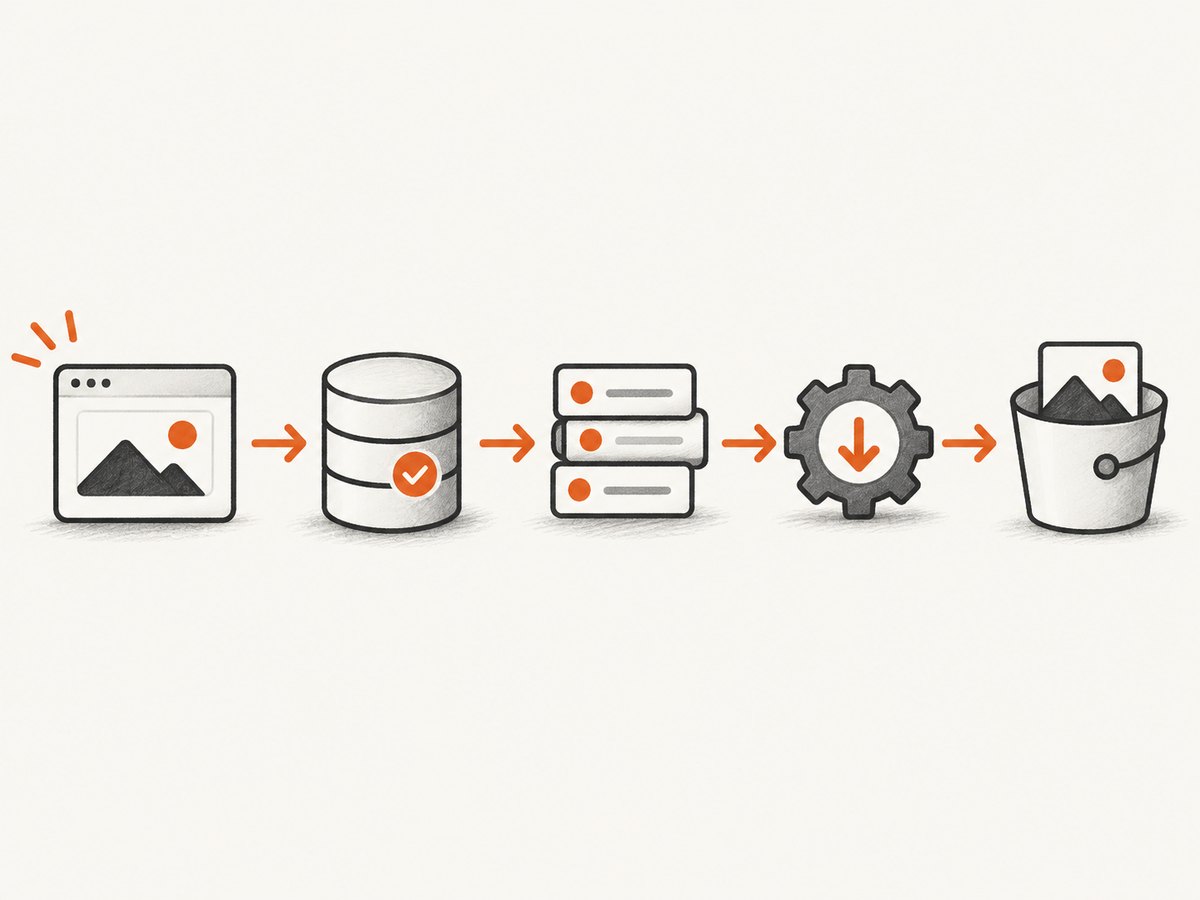
- Validate and record the callback.
- Enqueue a durable job containing the provider, event ID, URL, and expiry.
- Return HTTP 202.
- Download with a bounded timeout and retry policy.
- Verify the response content type and size limits.
- Copy the bytes to durable storage before the provider URL expires.
- Mark the job complete and emit downstream notifications.
ScreenshotMAX includes an expires field. ScreenshotOne documents storage locations and error details. Treat callback URLs as temporary credentials: do not expose them in public logs or client responses.
Provider comparison checklist
| Question | What to verify |
|---|---|
| Delivery mode | Does async return 202, and when is the callback sent? |
| Authentication | Which header, secret, encoding, canonical string, and timestamp window apply? |
| Payload | Which identifier, status, output URL, format, and error fields are stable? |
| Result lifetime | Does the URL expire, or does the provider store the result? |
| Retries | What causes redelivery, and are delivery logs or resend controls available? |
| Java support | Is there an SDK, and is it thread-safe and configurable? |
SnapshotFlow documents a Java JAR, takeAsync, verifyWebhook, configurable timeout and retries, thread safety, and secret-manager guidance. ScreenshotOne documents S3-compatible storage return locations, external identifiers, and error headers. Screenshotbot documents delivery logs and resend tooling. Compare these operational details rather than relying only on a synchronous API example.
Testing a webhook locally and in CI
Your endpoint needs a public HTTPS address for provider delivery. ScreenshotMAX names Webhook.site for inspecting payloads and ngrok for exposing a local endpoint. In automated tests, save captured raw bodies as fixtures and test:
- a valid signature and an altered byte;
- a missing, malformed, or wrong-encoding signature;
- a stale timestamp, when applicable;
- malformed JSON after a valid signature;
- success and provider-error payloads;
- two simultaneous deliveries with the same identifier;
- an expired result URL and a download timeout;
- unknown additive JSON fields.
Log a correlation ID and provider event ID, but never log the signing secret or complete temporary URLs. Retain enough metadata to trace a callback without storing unnecessary image data.
Troubleshooting common failures
| Symptom | Likely cause | Fix |
|---|---|---|
| 401 or 403 from your endpoint | Wrong header, secret, encoding, or body bytes changed | Capture raw bytes, confirm the provider’s canonicalization, and verify the configured secret. |
| Repeated callbacks | Slow response or non-2xx status | Insert an idempotent receipt, enqueue work, and return 202 quickly. |
| Duplicate files | Deduplication happens after downloading | Put a unique constraint on provider plus event ID before side effects. |
| JSON parsing errors | Provider added fields or sent an error shape | Ignore unknown fields and model optional status, URL, expiry, and error properties. |
| Download returns 404 | Temporary result URL expired | Prioritize the queue, honor the expiry field, and request a new render when supported. |
| Provider reports 503 | Callback service or deployment unavailable | Check provider status; Screenshot API currently documents 503 behavior for async callbacks. |
| Works locally but not remotely | Endpoint is private, HTTP-only, or blocked by a firewall | Use public HTTPS, allow the provider’s requests, and verify TLS certificates. |
Performance, reliability, and cost
Webhook response time is mostly a reliability concern: keep authentication and the receipt insert short, and use a durable queue. Bound worker download time, limit concurrent downloads, and apply exponential backoff with a maximum attempt count. Separate callback ingestion from rendering capacity so a burst of events does not exhaust web threads.
Measure receipt latency, queue age, download success, expiry misses, signature failures, duplicate rate, and provider error statuses. Alert on a growing queue and on a sudden increase in invalid signatures. Keep retryable and permanent failures distinct.
Cost depends on the screenshot provider’s billing rules, render volume, storage, bandwidth, and your queue or database. A failed callback should not trigger repeated screenshot creation unless your retry policy explicitly does so. Cache or deduplicate renders when the same URL and options are requested.
Or skip the browser setup
ScreenshotNeo provides a one-call screenshot API and an MCP server for AI agents. Cookie and consent banners, newsletter popups, and chat widgets are removed before the shot. Bot checks, blank pages, failed loads, and cache hits are not billed, and response headers identify the page verdict and billing result. The MCP tools take_screenshot, get_page_info, and capture_pdf work with Claude, Cursor, and other MCP clients.
For a synchronous capture:
curl -G "https://api.screenshotneo.com/v1/shot" -d access_key=YOUR_API_KEY --data-urlencode url=https://stripe.com -o shot.webpimport requests
r = requests.get("https://api.screenshotneo.com/v1/shot", params={"access_key": "YOUR_API_KEY", "url": "https://stripe.com"}, timeout=90)
open("shot.webp", "wb").write(r.content)const q = new URLSearchParams({ access_key: 'YOUR_API_KEY', url: 'https://stripe.com' });
const res = await fetch(`https://api.screenshotneo.com/v1/shot?${q}`);See the ScreenshotNeo API documentation for webhook jobs, signed webhooks, bulk capture, and all capture options. Plans include 1,000 screenshots per month free with no card; paid plans start at $5 for 3,000 shots. Create a free ScreenshotNeo account.
FAQ
Should I return 200 or 202?
Either is a successful 2xx response. Use 202 when you accepted the event for background processing; use 200 when processing is already complete. The important property is a fast response after durable receipt.
Can I verify after Jackson parsing?
No. Verify the exact raw bytes first, then parse. Parsing can change the signed representation.
What is the best idempotency key?
Use the provider’s stable render, job, or event identifier, combined with the provider name in a unique database key.
Should failed image downloads return a webhook error?
Usually no. The callback has already been accepted. Retry the download in your worker and expose a separate operational status.
How do I handle provider schema changes?
Ignore unknown fields, keep optional properties nullable, and test fixtures containing additive fields before deploying parser changes.