JavaScript Web Scraping Libraries: Features and Limitations
Compare Cheerio, Puppeteer, Playwright and Crawlee, with runnable Node.js examples, production guidance, troubleshooting and compliance notes.
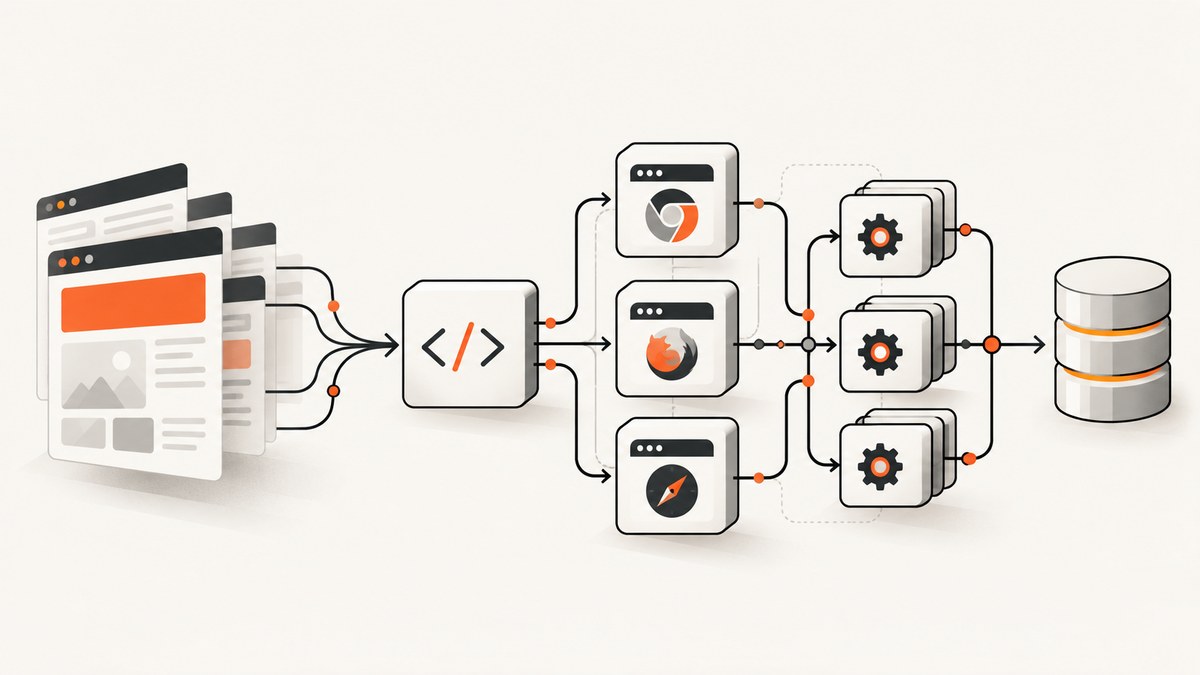
Direct answer: start with Cheerio when the fields you need are in the initial HTML response. Move to Playwright when JavaScript builds the page, you need clicks or form input, or browser behavior matters. Choose Puppeteer for Chrome or Firefox automation when cross-engine WebKit support is unnecessary. Choose Crawlee when you need queues, persistence, retries, proxies, sessions, routing, scaling, or a crawler that can switch between HTTP and browsers.
A practical production design is tiered: fetch and parse with Cheerio first, then send only JavaScript-dependent URLs to Playwright or Puppeteer. This keeps resource use low while preserving a browser path for single-page apps (SPAs), protected flows, screenshots, and interactive pages.
What each JavaScript scraping library actually does
| Library | Best fit | Strengths | Limitations |
|---|---|---|---|
| Cheerio | Static HTML/XML | Very low overhead; jQuery-like selectors and traversal | No visual rendering, external resources, or JavaScript execution |
| Puppeteer | Chrome/Firefox automation, screenshots, PDFs and UI workflows | High-level API over CDP/WebDriver BiDi; headless by default | Heavier runtime; browser install scripts can be blocked |
| Playwright | Cross-browser interaction and robust synchronization | Chromium, Firefox, WebKit, Chrome and Edge; locators and auto-waiting | Matching browser binaries must be installed and maintained |
| Crawlee | Production crawlers | Queues, storage, retries, proxies, sessions, routing and scaling | More dependencies; browser crawlers are installed separately |
Cheerio’s documentation is explicit: “Cheerio is not a web browser.” It parses markup without CSS, visual rendering, external-resource loading, or JavaScript execution. That is why it is fast and why client-rendered content can be missing. Read the Cheerio introduction.
Choose by the page’s rendering model
Use Cheerio for server-rendered HTML
Use Cheerio when a normal HTTP response contains the title, links, prices, article body, or other fields. It is usually the simplest and least expensive option. Inspect the response body first; if the values are present, a browser adds startup and memory cost without adding data.

npm install cheerio
import * as cheerio from 'cheerio';

const response = await fetch('https://example.com/products');
if (!response.ok) throw new Error(`HTTP ${response.status}`);
const html = await response.text();
const $ = cheerio.load(html);

const products = $('.product').map((_, el) => ({
  name: $(el).find('.name').text().trim(),
  price: $(el).find('.price').text().trim(),
  href: new URL($(el).find('a').attr('href'), 'https://example.com').href
})).get();

console.log(products);
Cheerio cannot click a button, execute a script, wait for an XHR, render a canvas, or see content that arrives after hydration. A common SPA symptom is an almost empty root element in the downloaded HTML.
Use Playwright for JavaScript-rendered pages
Playwright controls Chromium, Firefox, WebKit, Chrome, and Edge. Its locators auto-wait for actionability, which reduces hand-written sleeps and race conditions. Install the package and the browser binaries:
npm install playwright
npx playwright install
import { chromium } from 'playwright';

const browser = await chromium.launch({ headless: true });
const page = await browser.newPage({ viewport: { width: 1440, height: 900 } });
await page.goto('https://example.com/catalog', { waitUntil: 'domcontentloaded' });
await page.locator('[data-testid="load-more"]').click();
await page.locator('.product').first().waitFor();
const products = await page.locator('.product').evaluateAll(nodes =>
  nodes.map(node => ({
    name: node.querySelector('.name')?.textContent?.trim(),
    price: node.querySelector('.price')?.textContent?.trim()
  }))
);
await browser.close();
console.log(products);
Prefer a meaningful readiness condition such as a locator, a response, or a page-specific state. networkidle can be unsuitable for pages with analytics, polling, or long-lived connections.
Use Puppeteer for Chrome-oriented automation
Puppeteer runs headless by default and is a good fit for Chrome workflows, screenshots, PDFs, and browser state. Install it with its browser download scripts enabled:
npm install puppeteer
import puppeteer from 'puppeteer';

const browser = await puppeteer.launch({ headless: true });
const page = await browser.newPage();
await page.goto('https://example.com/catalog', { waitUntil: 'domcontentloaded' });
await page.waitForSelector('.product');
const products = await page.$$eval('.product', nodes => nodes.map(node => ({
  name: node.querySelector('.name')?.textContent?.trim(),
  price: node.querySelector('.price')?.textContent?.trim()
})));
await browser.close();
console.log(products);
If your package manager blocks install scripts, Puppeteer may not download a browser and will fail at runtime. Use an approved browser path or allow the install step in your build process.
Use Crawlee when crawling is the system
Crawlee provides CheerioCrawler, PuppeteerCrawler, and PlaywrightCrawler behind common crawler concepts. It adds persistent request queues, storage, retries, routing, proxy rotation, sessions, Docker support, and resource-based scaling. Install the core package plus the crawler you need:
npm install crawlee playwright
npx playwright install chromium
import { PlaywrightCrawler } from 'crawlee';

const crawler = new PlaywrightCrawler({
  maxRequestsPerCrawl: 100,
  requestHandler: async ({ page, request, log }) => {
    await page.locator('.product').first().waitFor();
    const products = await page.locator('.product').evaluateAll(nodes =>
      nodes.map(node => ({
        url: request.url,
        name: node.querySelector('.name')?.textContent?.trim(),
        price: node.querySelector('.price')?.textContent?.trim()
      }))
    );
    log.info(`Found ${products.length} products`);
    console.log(products);
  }
});

await crawler.run(['https://example.com/catalog']);
Crawlee’s CheerioCrawler is efficient but cannot handle JavaScript rendering. Its PuppeteerCrawler and PlaywrightCrawler use a headless browser. The default install does not bundle those browser integrations, so add the package and browser binaries explicitly.
Complete browser options that affect scraping
Navigation and readiness
- URL and method: follow redirects deliberately and check final URLs.
- Timeouts: set navigation, locator, and overall job limits; avoid unlimited waits.
- Readiness: wait for a selector, a specific response, a URL change, or an application state.
- Frames and tabs: inspect if content is inside an iframe or opened in a new page.
- Retries: retry transient network failures with backoff, but cap attempts for deterministic 4xx responses.
Browser context and identity
Use a fresh context for isolation. Set viewport, locale, timezone, user agent, permissions, cookies, extra headers, HTTP authentication, and geolocation only when your use case requires them. Keep credentials in a secret manager; never hard-code production tokens in source.
Extraction choices
Use stable attributes such as data-testid or semantic roles instead of brittle generated class names. Normalize whitespace, currencies, dates, and relative URLs. Store the source URL and capture timestamp with every record so downstream users can audit a result.
Resource control
Block images, fonts, ads, trackers, or third-party requests only when they are irrelevant to the data. Blocking an API request that supplies the page will produce an empty result. Limit concurrency to what the target and your host can handle, and reuse a browser process while creating isolated contexts.
Scraping SPAs and data loaded after hydration
- Fetch the URL with Cheerio and inspect whether the required fields exist.
- If they do not, open the page in Playwright or Puppeteer.
- Wait for a field-specific locator or the API response that populates it.
- Extract rendered DOM or parse the JSON response when that endpoint is authorized and stable.
- Record missing fields and diagnostics instead of silently returning an empty object.
Many SPAs expose data through XHR or fetch calls. Browser network logging can reveal the request, but do not bypass authentication, rate limits, or access controls. A browser is also necessary when the value depends on client-side computation, scrolling, clicking, or a visual state.
Do-it-yourself screenshots and PDFs
For a local screenshot, Playwright can capture the viewport or the full page:
import { chromium } from 'playwright';
const browser = await chromium.launch();
const page = await browser.newPage({ viewport: { width: 1365, height: 768 }, deviceScaleFactor: 2 });
await page.goto('https://example.com', { waitUntil: 'networkidle' });
await page.screenshot({ path: 'page.png', fullPage: true });
await page.pdf({ path: 'page.pdf', format: 'A4', printBackground: true });
await browser.close();
In CI, install the exact browser version expected by your package, use deterministic fonts where possible, and wait for images or application data before capture. Full-page screenshots can be large; resize or compress them before storing or sending them.
Or skip the browser setup
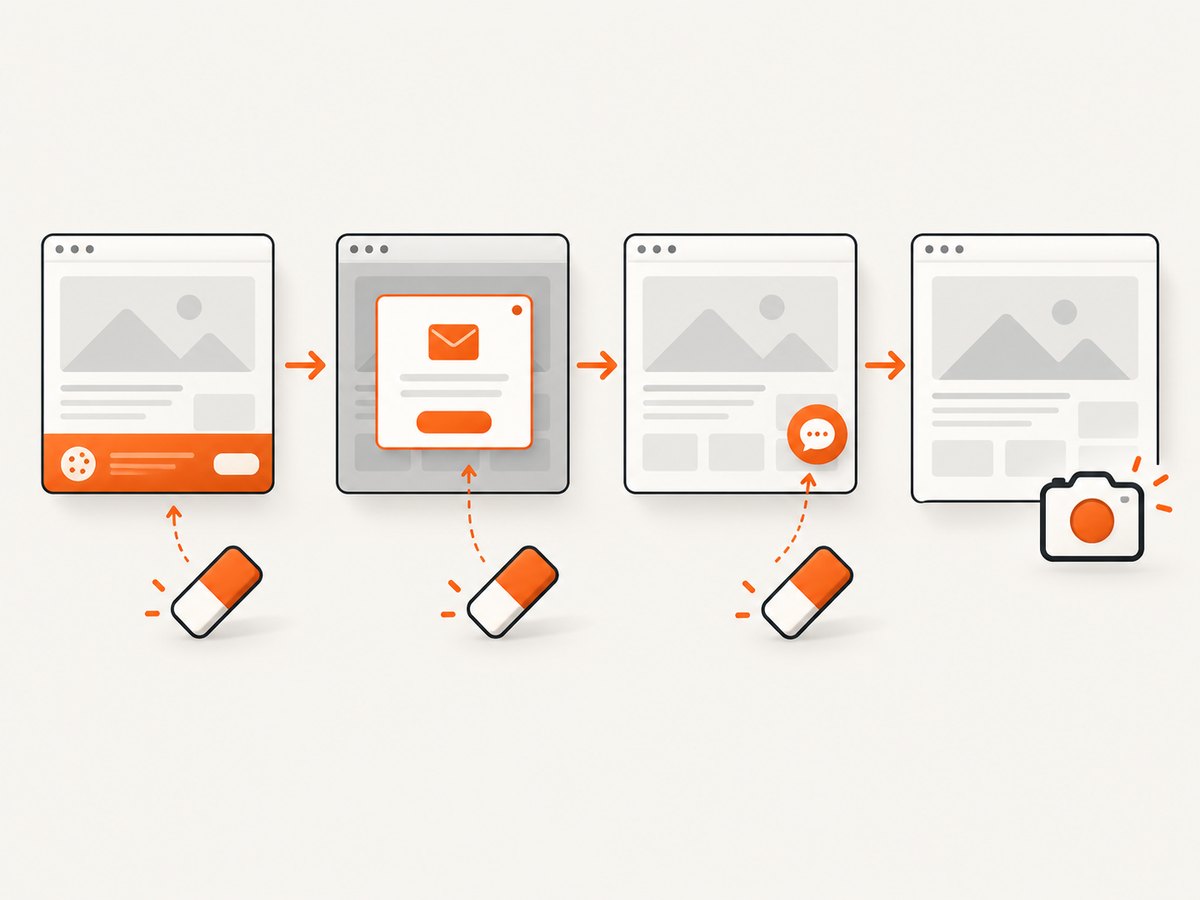
ScreenshotNeo is a website screenshot API and MCP server. It accepts one GET request and returns PNG, JPEG, WebP, or PDF. Cookie and consent banners are accepted and 60+ known consent platforms, newsletter popups, and chat widgets are removed before the capture; each step can be turned off. Bot checks, blank pages, timeouts, failed loads, and cache hits are not billed, and the response identifies the result with X-Page-Verdict and X-Billed headers.
See the ScreenshotNeo API documentation for all options, including full-page and element capture, dark mode, device presets, retina scale, PDF paper sizes and page ranges, custom CSS and JavaScript, clicks, waits, request blocking, headers, cookies, user agents, authorization, timezone, geolocation, transparent backgrounds, resizing, TTL caching, signed links, asynchronous webhooks, bulk capture, usage, and the OpenAPI specification.
curl -G "https://api.screenshotneo.com/v1/shot" -d access_key=YOUR_API_KEY --data-urlencode url=https://stripe.com -o shot.webpimport requests
r = requests.get("https://api.screenshotneo.com/v1/shot", params={"access_key": "YOUR_API_KEY", "url": "https://stripe.com"}, timeout=90)
r.raise_for_status()
open("shot.webp", "wb").write(r.content)
print(r.headers.get("X-Page-Verdict"), r.headers.get("X-Billed"))
const q = new URLSearchParams({ access_key: 'YOUR_API_KEY', url: 'https://stripe.com' });
const res = await fetch(`https://api.screenshotneo.com/v1/shot?${q}`);
if (!res.ok) throw new Error(`HTTP ${res.status}`);
const data = Buffer.from(await res.arrayBuffer());
await import('node:fs/promises').then(fs => fs.writeFile('shot.webp', data));
An MCP server provides take_screenshot, get_page_info, and capture_pdf tools for Claude, Cursor, and other MCP clients. Plans include 1,000 screenshots per month free with no card; paid plans start at $5 for 3,000. Create a free ScreenshotNeo account.
Performance, reliability, and cost
| Concern | Cheerio | Browser tools | Crawlee |
|---|---|---|---|
| Startup and memory | Lowest | Highest | Depends on crawler type |
| JavaScript execution | No | Yes | Yes with browser crawlers |
| Scaling controls | Build yourself | Build yourself | Queues, retries and scaling included |
| Operational work | HTTP and parser only | Browser binaries and sandboxing | Framework plus browser dependencies |
Measure your own workload; no neutral cross-library benchmark is established by the supplied research. Reduce cost by filtering URLs, caching immutable pages, using Cheerio for the first attempt, limiting browser concurrency, and closing contexts. For reliability, pin library versions, install matching browser binaries during deployment, log navigation status and final URL, save a small diagnostic artifact for failures, and make jobs idempotent.
Troubleshooting common failures
| Symptom | Likely cause | Fix |
|---|---|---|
| Empty fields with Cheerio | Content is client-rendered | Use Playwright/Puppeteer or an authorized data endpoint |
| Browser executable not found | Install script was blocked or binaries are missing | Run the Playwright install command or permit Puppeteer’s browser download |
| Timeout waiting for selector | Wrong selector, consent wall, slow API, or iframe | Inspect the DOM, handle consent, wait for the correct frame or response, and set a bounded timeout |
| Flaky results | Fixed sleeps or changing page state | Use locators, response waits, stable attributes, and isolated contexts |
| Works locally, fails in CI | Missing dependencies, sandbox restrictions, fonts, or viewport differences | Pin versions, install browsers in the image, configure sandboxing, and standardize the environment |
| 429 or blocked requests | Rate limits or site defenses | Slow down, respect published limits, cache results, and obtain permission |
| Screenshot contains overlays | Cookie banner, popup, or chat widget | Dismiss it with a locator or use ScreenshotNeo’s cleanup options |
Compliance checklist
RFC 9309 defines robots.txt processing as a requested protocol and states that its rules are not access authorization. Treat robots.txt as one input, then review terms of service, authentication boundaries, privacy obligations, copyright, rate limits, and applicable law. Cache robots.txt conservatively; the RFC says a cached file generally should not be used for more than 24 hours unless it is unreachable.
- Identify the data owner and your lawful purpose.
- Honor robots.txt, terms, authentication, and rate limits.
- Minimize personal data and protect credentials.
- Provide deletion and retention controls where required.
- Keep an audit trail of URLs, timestamps, and failures.
FAQ
Can Cheerio scrape a React or Vue site?
Only if the required data is already present in the initial HTML. Otherwise it cannot execute the JavaScript that renders the page.
Is Playwright always better than Puppeteer?
No. Playwright is the stronger choice for cross-browser coverage and auto-waiting. Puppeteer remains appropriate for Chrome or Firefox workflows when its API and ecosystem fit the project.
When should I introduce Crawlee?
Introduce it when scheduling, persistence, retries, sessions, proxies, routing, or scaling become application requirements rather than one-off script details.
Should I scrape an internal API instead of the DOM?
It can be simpler and more stable when the endpoint is authorized and intended for your use. Keep the same compliance, authentication, and rate-limit review.
Do browser libraries include browsers?
They depend on browser binaries. Playwright may require a fresh install after an update, and Puppeteer can fail when package-manager install scripts are blocked.


