Search APIs for AI Agents and LLMs: A Practical Guide
Compare search results with model-ready context, then choose a retrieval workflow that fits your agent, attribution needs, and budget.

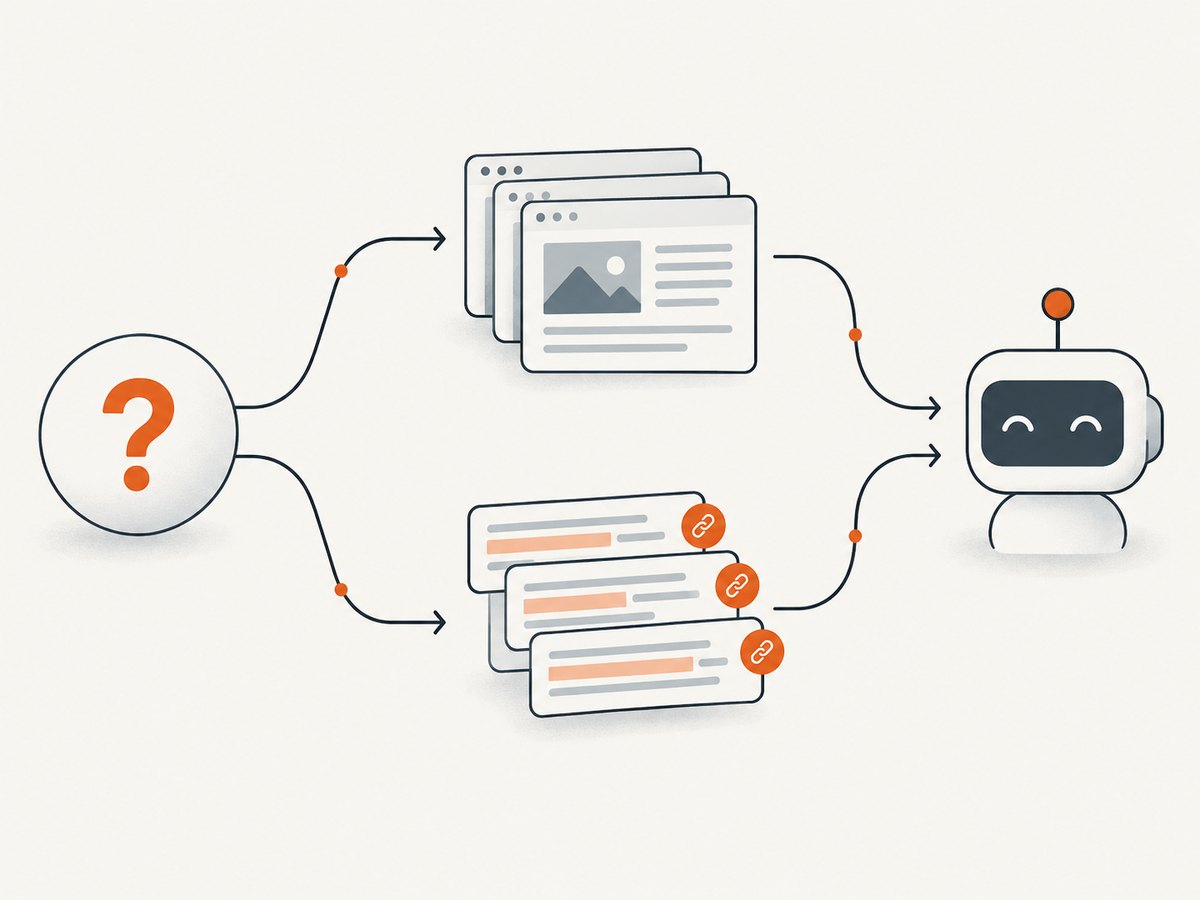
A search API for an AI application can return a ranked list of pages, or it can return extracted content designed to go straight into a model’s context. Choose based on the output your application needs: use conventional search when your code will inspect URLs and snippets or run its own extraction; use a model-oriented context endpoint when you want relevant page text and source metadata in the retrieval response. For multi-step research across pages, evaluate an API and workflow that includes search, extraction, and crawling.
There is no universal winner established by the vendor documentation reviewed here. Brave Search API and Tavily document different product shapes; compare their actual response data and costs against your application’s requirements before committing.
1. What a search API needs to return
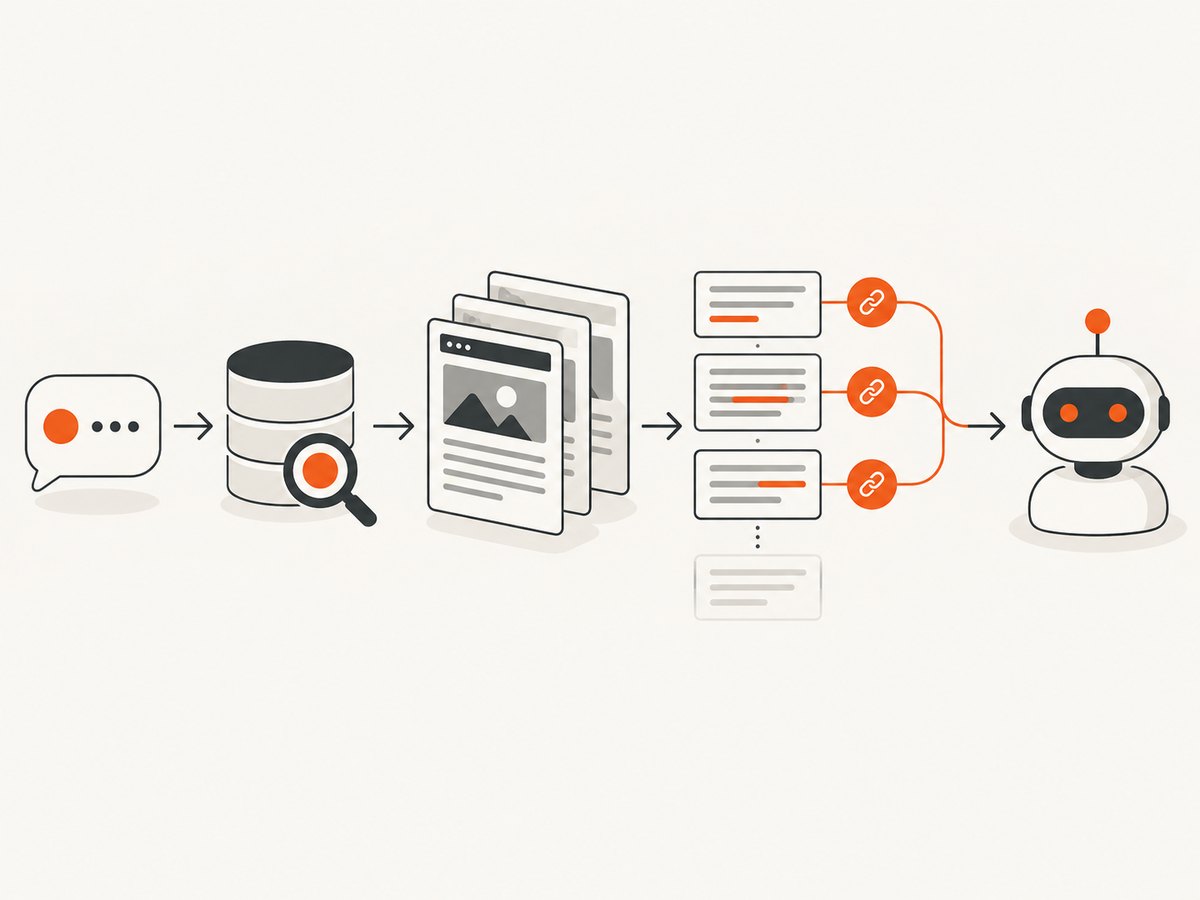
“Search” can mean several stages in an agent’s retrieval pipeline. A web search endpoint finds candidate pages. An extraction step turns a selected page into usable text. Crawling discovers or processes multiple pages from a site. A model-ready context endpoint may combine search, ranking, and extraction into a compact response. These outputs are related, but they are not interchangeable.
| Output or workflow | Useful when | What your application must handle |
|---|---|---|
| URLs, titles, snippets | Showing results to a person; custom ranking; choosing pages for another step | Retrieving full page content if snippets are insufficient |
| Extracted content chunks and source metadata | Grounding model answers or building a context window | Context selection, token budgeting, citation formatting, and answer validation |
| Search plus extract | Finding pages and then retrieving relevant page text | Choosing what to extract and handling pages that cannot be extracted |
| Crawl or site discovery | Research across a defined website or documentation set | Scope control, depth and volume limits, deduplication, and freshness policy |
A snippet can be enough to answer a narrow question, but it is not automatically the full source. If your agent must explain a claim or cite a page, retain the source URL alongside the exact content you supplied to the model. Do not assume a list of results alone is grounded context.
2. Choose by task, not by a single ranking
Brave Search API: conventional results and LLM Context
Brave documents both conventional Web Search and an LLM Context endpoint. Its Web Search response is oriented toward human-readable results such as URLs and snippets. Brave directs builders to LLM Context when an agent or model is the recipient: it returns ranked, extracted page chunks with source metadata, in a compact form intended for machine use. The documentation says this output avoids a separate scraping step for the described context response. These are documented product capabilities, not an independent measurement of answer quality. Brave LLM Context documentation · LLM Context API reference
Brave lists agent search, grounding, and retrieval-augmented generation (RAG) among the context endpoint’s use cases. Its documentation also describes extracted text, markdown, structured data, code, forum discussions, and video captions. Treat those as supported use-case descriptions; test representative pages and queries from your own domain before relying on a particular content type.
Tavily: a documented search, extraction, and crawl workflow
Tavily’s agent example describes real-time search, extraction, and crawling tools in a conversational agent flow. Its examples return compact content snippets and URLs that can support attribution. The documented workflow surface includes examples for search, extract, crawl, agent grounding, hybrid research, structured output, streaming, and remote MCP. That does not establish that every capability is available on every plan, so check the current product documentation and terms. Tavily documentation · Tavily cookbook
A practical distinction: Brave documents a dedicated model-oriented context endpoint alongside conventional results; Tavily’s materials emphasize composing search with separate extraction and crawl tools. The distinction matters when your application needs control over each retrieval stage. If you want the provider to return extracted context in one search-oriented response, examine Brave LLM Context. If you need an explicit multi-step workflow, examine Tavily’s documented tools and examples.
3. Make a direct Brave LLM Context request
The following minimal examples call the documented Brave LLM Context endpoint. Create an API key in Brave’s dashboard and keep it on your server or in a secret manager; do not embed it in browser-side code shipped to users. The endpoint requires the X-Subscription-Token header and a non-empty query. Brave documents query limits of 600 characters and 75 words. See the authentication guide and endpoint documentation.
cURL
curl --get 'https://api.search.brave.com/res/v1/llm/context' \
  --header 'Accept: application/json' \
  --header 'X-Subscription-Token: YOUR_BRAVE_API_KEY' \
  --data-urlencode 'q=What changed in the latest Python release?' \
  --data-urlencode 'country=US' \
  --data-urlencode 'search_lang=en'
Use --data-urlencode so punctuation, spaces, and non-ASCII characters in the query are encoded safely. The response is JSON; inspect its schema and preserve source metadata as your application passes context to the model.
Python
import os
import requests

endpoint = "https://api.search.brave.com/res/v1/llm/context"
headers = {
    "Accept": "application/json",
    "X-Subscription-Token": os.environ["BRAVE_API_KEY"],
}
params = {
    "q": "What changed in the latest Python release?",
    "country": "US",
    "search_lang": "en",
}

response = requests.get(endpoint, headers=headers, params=params, timeout=30)
response.raise_for_status()
data = response.json()
print(data)
Install the dependency with python -m pip install requests, then set BRAVE_API_KEY in your environment. In production, catch request and JSON errors at the application boundary and log a request identifier or status without logging the secret.
Node.js
const endpoint = new URL("https://api.search.brave.com/res/v1/llm/context");
endpoint.search = new URLSearchParams({
  q: "What changed in the latest Python release?",
  country: "US",
  search_lang: "en",
});

const response = await fetch(endpoint, {
  headers: {
    Accept: "application/json",
    "X-Subscription-Token": process.env.BRAVE_API_KEY,
  },
  signal: AbortSignal.timeout(30_000),
});

if (!response.ok) {
  throw new Error(`Brave request failed: ${response.status} ${await response.text()}`);
}
const data = await response.json();
console.log(data);
This example uses the built-in fetch available in modern Node.js releases. Configure the API key in the process environment. For a browser application, call your own backend instead of exposing that key to client JavaScript.
4. Select relevant options and shape your retrieval
Start with the query and locale. Brave’s LLM Context reference documents q, country, and search_lang; country defaults to US and search language defaults to English. Specify them when user locale or regional relevance matters. Keep the question focused: a search query is a retrieval instruction, not the entire conversation history. If a user asks a multi-part question, retrieve for the important sub-questions separately or decompose the request in your agent.
- Decide whether a person or model consumes the output. Use conventional results if your product renders a search page or applies its own page-selection logic. Use extracted context when you want model-ready text and source metadata.
- Decide whether one query is sufficient. For current questions, retrieve at answer time. For a bounded knowledge base, consider indexing and refreshing content on a schedule. For a site-wide research task, evaluate crawl or URL-discovery functionality rather than issuing arbitrary broad searches.
- Set a context budget. Do not forward every returned chunk to the model by default. Select chunks relevant to the question, deduplicate overlapping material, and leave room for instructions and the model’s answer.
- Carry citations through the pipeline. Keep each source URL associated with its chunk. Ask the model to cite only supplied sources, then verify that each cited URL corresponds to context that supports the nearby claim.
- Define freshness and failure behavior. Decide whether stale cached results are acceptable, how to handle an empty response, and whether the agent should answer with limits, retry, or ask a clarifying question.
With a conventional result endpoint, your application may need an additional fetch-and-extract stage. That gives you control over which pages enter context, but adds requests and failure points. With a context endpoint, some of that work is represented in the provider’s response, but your application still owns relevance checks, attribution, context size, and answer quality.
5. Compare providers with an application-level checklist
Use a small evaluation set drawn from real user questions. Include questions that need recent information, questions with a known authoritative source, queries that return noisy results, and questions for which the correct behavior is to say that evidence is insufficient. Inspect outputs rather than treating vendor language as a comparative score.
| Criterion | What to inspect | Why it affects the design |
|---|---|---|
| Output shape | URLs and snippets, or extracted chunks with source metadata | Determines whether you build extraction and ranking stages |
| Retrieval workflow | Search alone, search plus extraction, or crawl and discovery tools | Changes control, complexity, and request count |
| Attribution | Stable source URLs and metadata retained in the response | Supports answer citations and later review |
| Integration | Examples and support for the frameworks or protocols you use | Can reduce glue code, but does not guarantee output fit |
| Cost model | Per-request charges, token charges, credits, limits, and rights terms | Determines cost per successful answer, not just cost per query |
| Failure behavior | Empty results, blocked pages, timeouts, rate limits, and partial extraction | Sets the retries, fallback, and user messaging you need |
Do not compare providers on a single anecdotal query. Track task success, citation support, latency, and cost on the same evaluation set if you need a measured decision. The research available for this guide establishes no independent head-to-head benchmark for latency, recall, or answer quality.
6. Costs, performance, and reliability
Brave’s pricing page currently displays Search at $5 per 1,000 requests and Answers at $4 per 1,000 requests plus $5 per million input/output tokens, and advertises $5 in monthly credits. These are vendor-published terms, accessed September 29, 2026, and may change. Verify the current Brave API pricing before budgeting. Answers is a distinct product; do not conflate its pricing with the LLM Context endpoint. The reviewed sources do not establish a current Tavily price, so check its pricing directly before making a cost comparison.
Estimate cost per completed user answer, not only cost per search. A pipeline can issue multiple searches, extraction calls, and model requests; retries and parallel branches add further consumption. Log request counts, latency, empty-result rates, extraction failures, and downstream token use. Apply provider limits and your own budget controls where available.
Performance depends on the query, provider, network, extraction work, and any model call after retrieval. No independent latency benchmark is available in the research for this comparison. Measure end-to-end latency in your deployment. If a pipeline has separate search and extraction calls, parallelize independent page fetches only when your relevance policy allows it, and cap concurrency to avoid bursts and unnecessary spend.
For reliability, use explicit timeouts, bounded retries with backoff for transient failures, and a maximum retry count. Avoid retrying authentication or malformed-query errors unchanged. Treat partial data as partial: a successful search response does not mean every page was extracted. Store enough metadata to diagnose failures, but redact API keys and avoid retaining page contents unless your data and provider terms allow it. Confirm current usage rights, retention terms, and plan limits with each vendor.
7. Troubleshooting
| Symptom | Likely cause | Fix |
|---|---|---|
| 401 or 403 response | Missing, invalid, or unauthorized API token | Confirm the key is active, send it in the documented header, and check account access. Never put the token in a URL. |
| 400 response | Empty or malformed query, unsupported parameter, or invalid locale value | Validate the query before sending; check the endpoint reference for accepted values and limits. |
| 429 response | Request rate or account limit reached | Respect rate limits, reduce parallel requests, and retry with backoff only when appropriate. |
| Empty or irrelevant context | Ambiguous query, wrong country/language, or topic with weak indexed coverage | Clarify the query, set locale deliberately, split compound questions, and provide a graceful no-evidence response. |
| Model answer has unsupported citations | Source URLs were dropped, or the model was allowed to cite beyond supplied evidence | Keep URL-to-chunk mappings and validate citations against returned sources before displaying the answer. |
| Extraction is missing for a result | Page access or extraction failed, or the page offers little usable text | Use the provider’s failure information, try an alternate source, or disclose that the evidence was unavailable. |
| Unexpected bill or usage | Multiple retrieval branches, retries, or extraction work were not counted | Instrument calls by user task, set spending limits where available, and inspect the current plan’s billing units. |
8. Add visual evidence to an agent workflow
Search APIs answer questions about indexed web content. Some agent tasks also need to inspect what a page visibly renders: a chart, layout, visual error state, or page after client-side interaction. That is a separate capture step, so decide whether the agent needs a text source, a visual artifact, or both. Keep the screenshot URL and capture context linked to the research record if the image informs an answer.
ScreenshotNeo is a website screenshot API and MCP server from Yorker Media, useful as a complementary visual-retrieval step. Its API returns a screenshot or PDF from one GET request; its MCP tools include take_screenshot, get_page_info, and capture_pdf. The documented feature set includes custom CSS and JavaScript, element capture, full-page capture, and configurable waits. See the ScreenshotNeo API documentation.
Or skip the browser setup
For a visual check, make one request:
curl -G "https://api.screenshotneo.com/v1/shot" -d access_key=YOUR_API_KEY --data-urlencode url=https://stripe.com -o shot.webpScreenshotNeo removes cookie banners, popups, and chat widgets before the shot; bot checks, blank pages, and failed loads are never billed. Its MCP server lets AI agents take screenshots. The free plan includes 1,000 screenshots per month with no card; paid plans start at $5 for 3,000. Get 1,000 free screenshots a month.
9. FAQ
Should I send search results directly to an LLM?
Only when the returned text is enough to support the task. Keep source URLs attached, filter irrelevant material, and distinguish a short snippet from extracted page content.
Does model-ready context remove the need for citations?
No. Preserve returned source metadata and ensure the answer cites only sources that support its claims.
Can I cache retrieval results?
That depends on freshness needs and the provider’s current rights and retention terms. Check the terms before storing data, and give time-sensitive questions an explicit freshness policy.
How do I choose between search and crawling?
Use search when you need candidate pages for a question. Consider crawl or URL discovery when the task intentionally spans a known site. Control scope and page volume to keep results relevant.
Which API has the best results?
The sources reviewed do not establish a neutral winner. Test the same representative questions against the output formats and workflows your application can use.


