Voice Agent Automation with Cartesia: Build, Test, and Estimate Costs
Build a Cartesia voice agent with Pipecat or Managed Agents. Compare the paths, run a browser demo, estimate costs, and plan tests for real calls.
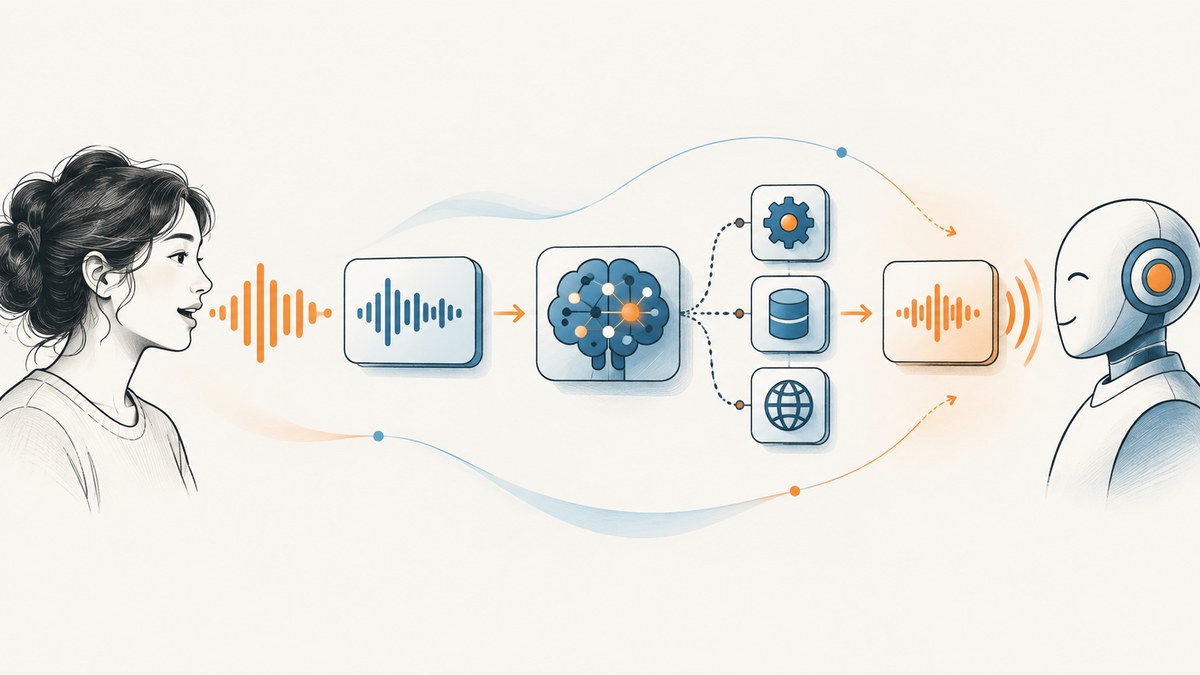
A Cartesia voice agent listens to live speech, decides what the caller needs, can call tools such as a calendar or order system, and speaks a response. The quickest way to try one is Cartesia Managed Agents, which wires the conversational loop together. For control over the pipeline and runtime, use Cartesia’s streaming Ink speech recognition and Sonic text-to-speech with an orchestration framework such as Pipecat. This guide starts with a runnable browser demo and then covers architecture, setup choices, turn-taking, testing, cost, and production failure modes.
For a first build, use Cartesia’s Pipecat example if you want to change the code and own the loop. Choose Managed Agents if you would rather configure an agent, tools, knowledge, and phone access in a managed stack. Neither route removes the need to test real conversations, authorize tool actions, and budget for the full call.
1. Understand the voice-agent loop
A spoken agent is a streaming system, not simply a chatbot with a microphone. Its core path is:

- Audio transport: A browser, phone connection, or other client sends caller audio.
- Speech recognition and turn detection: Streaming transcription converts audio to text; turn detection estimates when the caller is done.
- LLM and tools: The language model plans a reply and may invoke a business tool.
- Speech generation: Text-to-speech streams audio back through the transport.
Cartesia describes Ink as streaming speech-to-text with turn detection and Sonic as streaming text-to-speech. The LLM is a separate choice. These steps should overlap where possible: the caller experiences the total time between finishing a thought and hearing the answer, including recognition, model generation, tool calls, and audio startup. A fast speech model cannot compensate for a slow calendar API or an incorrect transcript. Cartesia’s guide says Pipecat documentation gives a typical pipeline round trip of 500–800 milliseconds; treat that as a framework-reported figure, not a guarantee for your deployment.
2. Run the Cartesia and Pipecat browser example
The documented example requires Python 3.11 or later, a Cartesia API key, and an LLM API key. It uses OpenAI in its example, but Pipecat also has services for other LLM providers. The example listens in English with Ink 2 in the described setup; Sonic supports more than 40 languages, so recognition and spoken output language support should be checked separately for your intended deployment.
Install and configure
- Install
uvif it is not already available in your Python environment. - Clone the Pipecat repository and install the extras used by the documented example.
- Set the two API keys in a local
.envfile; do not commit that file. - Run the example with the WebRTC transport, then open its local URL and grant microphone permission.
git clone https://github.com/pipecat-ai/pipecat.git
cd pipecat
uv sync --extra cartesia --extra daily --extra websocket --extra runner --extra webrtc

# Create .env in the repository root with:
# CARTESIA_API_KEY=your-cartesia-key
# OPENAI_API_KEY=your-llm-key

uv run examples/voice/voice-cartesia-turns.py -t webrtc
The documented runner prints a local URL, commonly http://localhost:7860. The browser sends audio over WebRTC, Ink transcribes and emits turn events, the LLM creates a response, and Sonic streams speech back. Install the specified extras even if using WebRTC: the example imports Daily and WebSocket transport code when it starts, so an incomplete install can fail before it reaches the selected transport.
If building your own project rather than using the repository example, the documented package install is:
python -m pip install "pipecat-ai[cartesia,daily,websocket,runner,webrtc]"Then copy examples/voice/voice-cartesia-turns.py from the Pipecat repository into your project and provide the same environment variables. Keep API keys on the server. A browser client should not contain a long-lived provider key.
Choose a voice and prompt
The example configures a voice ID in CartesiaTTSService.Settings. Pick a voice in Cartesia’s playground and replace the example ID with the ID you selected. You can also choose a Sonic model through the settings; the cited guide says the service defaults to sonic-3.6. These are implementation settings, so check the current integration documentation if upgrading Pipecat or Cartesia’s SDK.
tts = CartesiaTTSService(
    api_key=os.environ["CARTESIA_API_KEY"],
    settings=CartesiaTTSService.Settings(
        voice="YOUR_VOICE_ID",
    ),
)
Write the system prompt for speech, not for a visual chat window. Keep responses short, pronounceable, and free of formatting that sounds strange aloud, such as emoji, markdown bullets, or unexplained abbreviations. If the agent can invoke a consequential tool, specify what information it must collect and when it must ask the caller to confirm.
3. Choose managed or API-led automation
| Decision | Managed Agents | API-led with Ink and Sonic |
|---|---|---|
| Who owns orchestration? | Cartesia wires the underlying streaming stack; you configure the agent. | Your application coordinates transport, recognition, LLM, tools, and speech. |
| Best starting point | Fast route to a testable agent with telephony, tools, transfers, and knowledge options. | When you need control over the LLM, host language, deployment, or pipeline behavior. |
| What you still own | Prompt quality, business logic, tool permissions, testing, and deployment decisions. | All of those plus pipeline operations, error handling, observability, and scaling. |
Cartesia presents Managed Agents as a way to choose an LLM, connect tools and transfers, add a knowledge base, and obtain a phone number while Cartesia operates the streaming stack. In an API-led build, Cartesia supplies speech components while your code runs the loop. The right choice depends on how much orchestration your team wants to operate, the integration and deployment requirements, expected concurrency, and the combined cost of speech, LLM, telephony, and supporting services. The available sources do not establish a universal winner or independent head-to-head performance result.
4. Make turn-taking and tools safe
Turn detection is a product behavior as much as a model setting. A caller’s pause can mean “I am thinking” or “I finished.” If the agent treats every short pause as the end, it interrupts. If it waits too long, the conversation feels sluggish. Cartesia’s Pipecat example exposes eager-end handling so generation can begin when Ink predicts that a turn is ending, before the committed end event.

stt = CartesiaTurnsSTTService(
    api_key=os.environ["CARTESIA_API_KEY"],
    enable_eager_end_of_turn=True,
)

@stt.event_handler("on_turn_eager_end")
async def on_turn_eager_end(service, transcript):
    # Start speculative response work here.
    # Preserve the ability to recover if the caller continues.
    ...
Do not blindly speak every speculative answer. Use a tested aggregator or equivalent cancellation and resume logic so the agent can keep listening if the caller continues. The documented default thresholds are turn start 0.8, eager end 0.4, turn end 0.2, and turn-end timeout 5600 ms. Tune them against representative audio: a more patient system can lower the eager-end threshold and increase the timeout, at the cost of slower responses.
Domain vocabulary can be provided as key terms in the integration settings, for example product names or company jargon. This can help with names the caller says often, but it does not replace checking transcripts for identifiers and critical details. For actions such as changing an order or canceling a booking, confirm the relevant ID and requested action before executing. Implement tool authorization and validation in the business service; a voice model’s answer is not authorization.
Cartesia’s production examples also describe observability, guardrails, and handoffs, including transfers to a human or another language agent. Treat these as design patterns to implement and test, not an assurance that any deployment is safe by default.
5. Test calls before deployment
A polished demo does not show how the agent handles interruptions, bad audio, or a failing tool. Cartesia recommends evaluating against your own calls and asks whether the agent waits for trailing thoughts, starts promptly after a complete answer, stops when interrupted, recovers from mishearing, and confirms consequential actions.
Build a pilot set that includes:
- Ordinary requests and multi-part requests.
- Pauses, unfinished thoughts, and callers who change their mind mid-sentence.
- Barge-in while the agent is speaking, including whether playback stops promptly.
- Noisy phone audio, varied accents, and domain terms or long identifiers.
- Misheard names, account numbers, dates, and order IDs.
- Slow, unavailable, malformed, or unauthorized tool responses.
- Requests that require confirmation, a human transfer, or refusal.
For each call, record end-to-end delay from caller turn completion to first audible response, transcription quality on actual phone audio, interruption behavior, tool success and recovery, and transfer outcome. Evaluate the correctness of the final action, not merely whether the conversation sounded fluent. Re-run the same cases when changing prompts, thresholds, voices, or models.
6. Estimate cost and capacity
Cartesia’s pricing page at research time in 2026 listed Free at $0/month, Pro at $5/month, Startup at $49/month, Scale at $299/month, and Enterprise at custom pricing. The page lists voice-agent call duration at $0.06 per minute and telephony at $0.014 per minute when using a Cartesia-provided phone number. These figures are vendor-published prices, not a complete production estimate; recheck the live Cartesia pricing page before committing.
| Cost component | How to estimate it |
|---|---|
| Plan subscription and included credits | Check the current tier’s included model credits and number/concurrency allowances. |
| Voice-agent minutes | Expected connected call minutes × published agent-minute rate. |
| Telephony | If using a Cartesia-provided number, account for the published per-minute telephony charge. |
| LLM and external services | Include the chosen model, business APIs, database, hosting, monitoring, and any carrier or vendor costs. |
| Concurrency | Check the plan’s concurrent call limits against busy-hour traffic; average monthly minutes alone do not reveal capacity. |
Cartesia’s pricing page shows plan-dependent included credits, provisioned phone numbers, and concurrent-call allowances. It also described LLM usage for UI-created agents and evaluations as free for a limited time; treat these as temporary offers shown at research time, not permanent entitlements. Model a normal month and a busy period separately. Include retries, transferred calls, and longer-than-expected conversations in your assumptions, then compare the estimate to actual usage during a controlled pilot.
7. Troubleshooting
| Symptom | Likely cause | Fix |
|---|---|---|
No module named 'daily' or another import error |
Pipecat example extras are missing. | Install the documented cartesia, daily, websocket, runner, and webrtc extras. |
| The local page opens but the agent cannot hear audio | Microphone permission is denied, the browser has no input device, or transport setup is incomplete. | Allow microphone access, verify the selected input, and inspect the runner output for transport errors. |
| Authentication failure from Cartesia or the LLM | Environment variable is absent, misspelled, or contains an invalid key. | Check .env location and variable names; restart the process after changing them. Never paste secrets into client code. |
| Speech is produced but recognition is empty or wrong | Audio is silent, unsupported for the configured recognition language, noisy, or contains domain terms. | Check microphone levels and the selected language/model constraints; test key terms and representative call audio. |
| The agent talks over the caller | Eager turn-end behavior is too aggressive or speculative output cannot be canceled. | Adjust turn thresholds and timeout against recordings, and ensure resumed caller audio cancels or supersedes speculative replies. |
| Long gap before response | Turn-end waiting, LLM generation, tool latency, or TTS startup dominates. | Measure each stage and the full loop, then optimize the slowest stage. Do not infer the cause from TTS latency alone. |
| Wrong business action despite natural conversation | Transcript or entity extraction was wrong, or tool arguments were not validated. | Confirm critical identifiers aloud, validate arguments server-side, and ask for confirmation before consequential changes. |
8. Or skip the browser setup
If your workflow also needs screenshots of pages the agent discusses, you can call ScreenshotNeo, a website screenshot API and MCP server from Yorker Media. One GET request returns PNG, JPEG, WebP, or PDF. Its parameters cover full-page and element capture, device presets and viewport settings, dark mode, PDF output, custom CSS and JavaScript, waits, request blocking, headers and cookies, caching, signed links, asynchronous jobs, and bulk capture. See the ScreenshotNeo API documentation for parameter details.
curl -G "https://api.screenshotneo.com/v1/shot" \
  -d access_key=YOUR_API_KEY \
  --data-urlencode url=https://stripe.com \
  -o shot.webp
import requests
r = requests.get(
"https://api.screenshotneo.com/v1/shot",
params={"access_key": "YOUR_API_KEY", "url": "https://stripe.com"},
timeout=90,
)
r.raise_for_status()
open("shot.webp", "wb").write(r.content)const q = new URLSearchParams({
access_key: 'YOUR_API_KEY',
url: 'https://stripe.com'
});
const res = await fetch(`https://api.screenshotneo.com/v1/shot?${q}`);
if (!res.ok) throw new Error(`Screenshot request failed: ${res.status}`);
await Bun.write('shot.webp', res);ScreenshotNeo removes cookie and consent banners, newsletter popups, and chat widgets before capture; each cleanup step can be turned off. Bot checks, blank pages, failed loads, timeouts, and cache hits are not billed, and response headers identify the page verdict and billing result. Its MCP server exposes take_screenshot, get_page_info, and capture_pdf for AI agents and MCP clients. The free plan includes 1,000 screenshots per month with no card; paid plans start at $5 for 3,000. Create a free ScreenshotNeo account to try it.
9. FAQ
Can I connect the Pipecat agent to a phone?
Cartesia’s Pipecat guide describes rerunning the example with a Twilio transport and a public proxy. Phone deployment adds telephony and network requirements, so test that path independently from the browser demo.
Do I have to use OpenAI as the LLM?
No. The documented example uses OpenAI, while Pipecat provides integrations for multiple LLM services. Choose based on your latency, tool-call, deployment, and cost requirements.
Does the speech model make the agent multilingual?
Not by itself. Recognition and synthesis have distinct language support. The cited Pipecat example uses English-only Ink 2, while Cartesia says Sonic supports more than 40 languages. Confirm current model support for the exact language and workflow you need.
Should I choose Managed Agents or build the pipeline myself?
Choose based on the operations and control your team needs. A managed route reduces pipeline ownership; an API-led route gives your application responsibility for orchestration and deployment. Prototype the riskiest integration before choosing at scale.