Web Data Extraction: A Practical Guide for Developers
Learn how to find a page’s real data source, extract it with the right tool, validate records, and handle JavaScript, crawl controls, and failures.
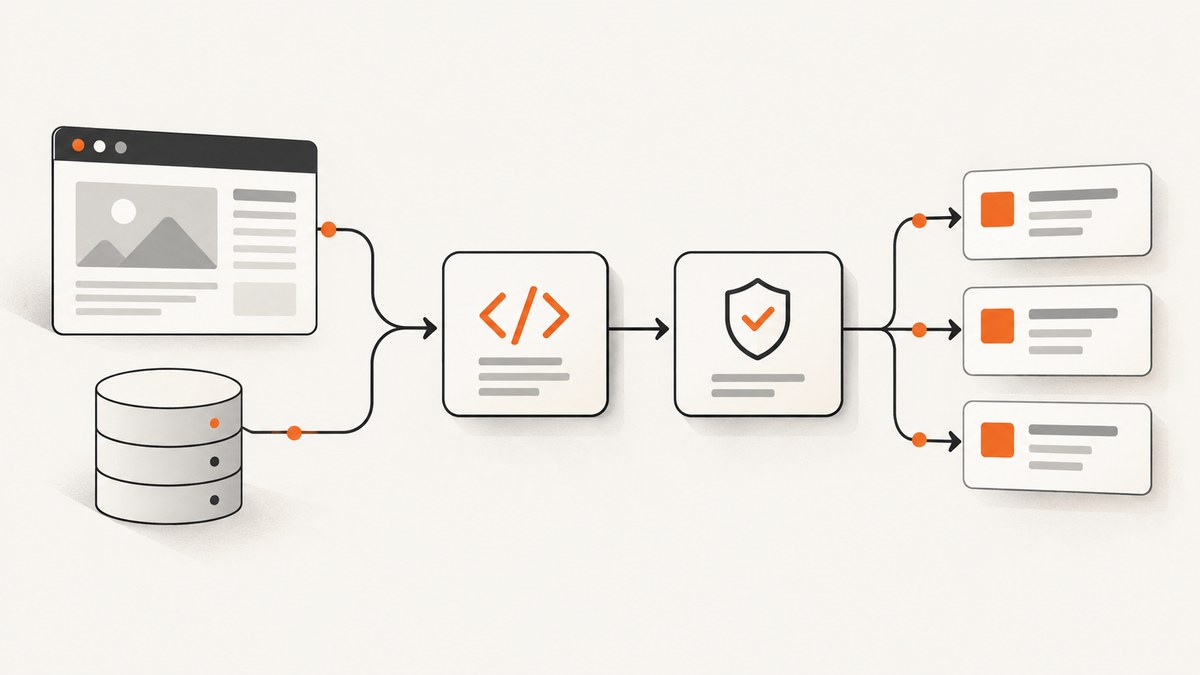
Web data extraction turns information from web pages or the requests behind them into structured records for analysis, monitoring, archiving, or another application. Start by finding where the data actually lives: in the initial HTML, embedded page data, or a separate endpoint. Fetch that source responsibly, parse it in its native format, validate the records, then store or export them. Use a browser only when you need browser-rendered state or cannot reproduce the underlying request reliably.
This guide walks through that decision process, with runnable Python examples and options for larger crawls. It also explains how to handle JavaScript-loaded pages, pagination, robots.txt, failures, and the point at which browser capture is useful.
1. Choose the source before choosing the scraper
Before writing code, define the fields you need, the pages in scope, the output format, and how often the data should refresh. Then inspect one representative page. The same visible content might be available in several places:

- Initial HTML: the server returned the desired values in the document. Use an HTTP client and an HTML parser.
- Embedded data: the HTML includes JSON or another structured payload inside a script element. Extract and decode that payload if its shape is stable.
- A separate data request: the page loads JSON or text from an endpoint. Inspect the browser’s network requests and reproduce the relevant request directly when practical.
- Rendered browser state: the data only becomes available after scripts execute, user interaction, or other browser state. Use a headless browser when reproducing the request is impractical or when the rendered view itself is the thing you need.
Scrapy’s guidance for dynamic content recommends finding the actual data source and reproducing its request where possible. That is often simpler than running a full browser for every page. [Scrapy: selecting dynamically-loaded content]
2. Pick the smallest tool that fits
| Approach | Use it when | Trade-offs |
|---|---|---|
| HTTP client + parser | A small job or the data is in the initial response | You handle pagination, retries, validation, and storage. CSS or XPath selectors work for HTML/XML. |
| Scrapy | You need a repeatable multi-page crawl and extraction pipeline | It provides scheduling, concurrency controls, selectors, and feed exports, with a framework to learn and configure. |
| Reproduced data request | The page fetches the needed data from a clear JSON or text endpoint | You must match the request method, URL, body or parameters, and any required headers. |
| Headless browser | You need rendered browser state or cannot reasonably reproduce the data request | Browser automation adds setup and runtime overhead. |
| Hosted extraction API | You prefer a managed service to running crawler or browser infrastructure | Check target coverage, output, data handling, limits, and cost with the provider. Vendor material alone is not an independent comparison. |
For HTML/XML, Scrapy selectors support CSS and XPath; Beautiful Soup and lxml are alternatives. For JSON responses, decode JSON directly instead of parsing markup. [Scrapy selectors documentation]
3. Extract records from an HTML response with Python
This small example fetches a page and parses article cards with Beautiful Soup. The CSS selectors are illustrative: inspect the target page and replace them with selectors that match its markup. Install the dependencies with python -m pip install requests beautifulsoup4.
from urllib.parse import urljoin
import requests
from bs4 import BeautifulSoup

START_URL = "https://example.com/news/"

session = requests.Session()
session.headers.update({"User-Agent": "ExampleResearchBot/1.0 (contact: dev@example.com)"})
response = session.get(START_URL, timeout=(5, 30))
response.raise_for_status()

soup = BeautifulSoup(response.text, "html.parser")
records = []
for card in soup.select("article"):
    title_node = card.select_one("h2")
    link_node = card.select_one("a[href]")
    if title_node is None or link_node is None:
        continue
    records.append({
        "title": title_node.get_text(" ", strip=True),
        "url": urljoin(START_URL, link_node["href"]),
    })

for record in records:
    if not record["title"] or not record["url"].startswith("https://"):
        raise ValueError(f"Invalid record: {record!r}")

# JSON Lines: one independently parseable record per line.
import json
with open("records.jsonl", "w", encoding="utf-8") as output:
    for record in records:
        output.write(json.dumps(record, ensure_ascii=False) + "\n")
The example intentionally fails on HTTP error statuses instead of silently treating an error page as data. It skips cards with missing required elements and validates a basic URL condition before export. In a production job, make the schema explicit, record why items were skipped, and alert when the number or shape of extracted records changes unexpectedly.
Parsing JSON directly
If inspection shows that the source is a JSON endpoint, parse the response as JSON and validate its expected structure. The endpoint and field names below are placeholders, not a claim about any particular site.
import requests

endpoint = "https://example.com/api/items"
response = requests.get(endpoint, params={"page": 1}, timeout=(5, 30))
response.raise_for_status()
payload = response.json()

if not isinstance(payload, dict) or not isinstance(payload.get("items"), list):
    raise ValueError("Unexpected response schema")

records = []
for item in payload["items"]:
    if not isinstance(item, dict) or "id" not in item or "name" not in item:
        continue
    records.append({"id": str(item["id"]), "name": str(item["name"]).strip()})
4. Inspect JavaScript-loaded data without defaulting to a browser
When content is absent from the initial HTML, open the page’s network panel and reload it. Look for requests that return JSON, XML, or another text-based response containing the fields you need. Check the request method, query parameters or body, headers, and pagination values. Then try the request directly and compare its response with the browser’s result.
Use a headless browser when request reproduction is too difficult or when the output must reflect browser-rendered state. Scrapy describes a headless browser as “a special web browser that provides an API for automation.” Its dynamic-content guide also recommends considering the data source before browser rendering. [Scrapy dynamic-content guide]
For a screenshot, rendered appearance is the output. For structured extraction, it may be enough to fetch the underlying JSON. Avoid using a screenshot as a substitute for structured data when the task requires fields you can parse more directly.
5. Scale a crawl with Scrapy
For multi-page work, Scrapy supplies crawl scheduling, selectors, concurrency settings, and feed exports such as JSON, JSON Lines, XML, and CSV. Its overview covers crawling and structured extraction for uses including data mining, information processing, and historical archiving. [Scrapy at a glance]
Install Scrapy with python -m pip install scrapy, create a project using scrapy startproject catalog, then add a spider such as this in the project’s spiders directory. The target domain and selectors are examples; adapt them to a site you are authorized to crawl.
import scrapy

class CatalogSpider(scrapy.Spider):
    name = "catalog"
    allowed_domains = ["example.com"]
    start_urls = ["https://example.com/catalog/"]

    def parse(self, response):
        for card in response.css("article"):
            yield {
                "title": card.css("h2::text").get(default="").strip(),
                "url": response.urljoin(card.css("a::attr(href)").get(default="")),
            }

        next_page = response.css("a.next::attr(href)").get()
        if next_page:
            yield response.follow(next_page, callback=self.parse)
Run it and export JSON Lines with scrapy crawl catalog -O records.jsonl. Scrapy’s documentation explains spider structure, selectors, following links, and feed exports. [Scrapy overview]
Crawl controls to set deliberately
- Scope: set allowed domains and constrain URL patterns so pagination does not expand into unrelated sections.
- Concurrency and delays: start conservatively, observe responses, and tune based on the site’s load and access rules. Scrapy supports concurrency settings, download delays, and auto-throttling.
- Retries: distinguish transient network failures from permanent responses. Use bounded retries and avoid retrying rapidly in a loop.
- Robots.txt: if configuring Scrapy to obey it, enable the robots middleware and set
ROBOTSTXT_OBEY = True. Scrapy documents both requirements. [Scrapy RobotsTxtMiddleware] - Output: use JSON Lines for streaming and incremental processing, CSV for simple tabular exchange, or another format that matches downstream consumers.
6. Respect access boundaries and crawl responsibly
Read the site’s published access rules and terms, and consider privacy, contractual, and legal obligations before collecting or reusing data. There is no universal legal rule for every scraping situation. A 2024 preprint discussing research scraping frames the topic as involving legal, ethical, institutional, and scientific considerations, and scopes its proposed framework to U.S.-based researchers; it is not a case-specific legal determination. [Brown et al., Web Scraping for Research]
Robots.txt is a crawler-behavior convention, not an access-control mechanism. Google says it is primarily for managing crawler traffic and does not enforce crawler compliance. Do not use it to protect sensitive information; protect that with access controls. [Google: robots.txt introduction]
A disallow rule does not grant permission to access other content, and the absence of a disallow rule does not settle authorization. Keep credentials and private data out of logs, and limit collection to the fields and pages needed.
7. Validate, store, and monitor extracted data
A successful HTTP response does not guarantee a valid record set. Before data reaches downstream systems:

- Check required fields, types, encodings, and expected value ranges.
- Normalize whitespace and URLs consistently, while preserving original values when auditability matters.
- Define duplicate handling, such as a stable source identifier or canonical URL.
- Track counts and missing-field rates between runs so markup changes become visible.
- Store fetch time and source URL with each record when later traceability matters.
- Write to a temporary output and publish it only after validation succeeds, so a partial crawl is not mistaken for a complete one.
For jobs that can be rerun, make writes idempotent where possible. A stable key lets a retry update or skip a record instead of duplicating it. Keep raw responses only when there is a clear debugging or audit need and your data handling rules allow it.
8. Performance, reliability, and cost
The fastest approach is often the one that retrieves the actual data source with the fewest moving parts, but there are no universal throughput or cost figures that apply across sites and providers. Compare options against your own target, volume, refresh frequency, and output needs.
- HTTP plus parsing: avoids browser startup when content is already in the response. The trade-off is that you own retries, pagination, schema checks, and persistence.
- Scrapy: helps manage many requests and exports in a repeatable pipeline. Configure concurrency and delays carefully; higher request rates can increase load and rejection risk.
- Browser rendering: reserve it for content or state that actually requires a browser. Browser setup and execution add operational work.
- Managed services: assess actual pricing, quotas, target coverage, retention, and failure behavior in provider documentation before estimating total cost. Do not assume a service removes the need to validate records.
For reliability, use timeouts, bounded retries with backoff, response-status checks, schema validation, and run-level monitoring. Separate “no matching records” from “the page layout changed” and from “the request failed”; those cases need different handling.
9. When the output needs to be a screenshot
If the required artifact is the rendered page image or PDF, a screenshot service can avoid maintaining browser automation for that capture step. ScreenshotNeo is a website screenshot API and MCP server for developers. Its API accepts a URL and returns a PNG, JPEG, WebP, or PDF. The parameters used by other screenshot APIs also work, which can make switching easier.
Or skip the browser setup
One GET request captures the page. See the ScreenshotNeo API documentation for the request options.
curl -G "https://api.screenshotneo.com/v1/shot" \
  -d access_key=YOUR_API_KEY \
  --data-urlencode url=https://stripe.com \
  -o shot.webp
ScreenshotNeo accepts cookie and consent banners like a visitor and removes 60+ known consent platforms, newsletter popups, and chat widgets before capture; each step can be turned off. Bot checks, blank pages, timeouts, failed loads, and cache hits cost nothing, and response headers report the page verdict and billing status. Its MCP server gives AI agents tools named take_screenshot, get_page_info, and capture_pdf. The free plan includes 1,000 screenshots a month without a card; paid plans start at $5 for 3,000. All features are on every plan.
Sign up for 1,000 free screenshots a month, with no card required.
10. Troubleshooting common extraction failures
| Symptom | Likely cause | What to check or change |
|---|---|---|
| HTTP 403 or 429 | The server rejected or rate-limited the request | Check access rules and response headers, reduce concurrency, add a delay, and avoid aggressive retries. Do not try to bypass an access restriction. |
| HTTP 200 but no records | Selectors no longer match, content is JavaScript-loaded, or the response is an error page | Inspect the saved response and a sample element. Check network requests for a data endpoint before switching to a browser. |
| JSON decoding fails | The endpoint returned HTML, malformed content, or a different response schema | Check the status, content type, and a safe excerpt of the body before calling the JSON decoder. |
| Records are duplicated | Pagination overlaps, links resolve to equivalent URLs, or reruns append blindly | Normalize URLs and deduplicate with a stable source identifier; make writes idempotent. |
| Some fields are intermittently empty | Different response variants, missing request parameters, timing, or a site-side change | Compare successful and failed responses, check request headers and form data, then validate schema and log missing-field rates. |
| Run stalls or takes too long | Unbounded pagination, slow responses, retries, or unnecessary browser rendering | Set request timeouts, bound crawl scope, cap retries, and use direct requests where they expose the needed data. |
11. Frequently asked questions
How do I scrape a page with Python?
Fetch the response with an HTTP client such as Requests, check the status, then parse HTML with a library such as Beautiful Soup or decode JSON with the standard JSON handling provided by Requests. Validate fields before writing output.
What if the data appears only after JavaScript runs?
Inspect the browser’s network requests first. If a request returns the desired data, reproduce it. Use a headless browser when request reproduction is impractical or the rendered browser state is required.
Should I use an API, parser, or headless browser?
Use a structured endpoint when it contains the needed fields, a parser for HTML/XML responses, and browser automation for genuinely rendered state. A hosted API is an operational choice to evaluate against its coverage, output, data handling, limits, and cost.
Does robots.txt authorize a crawl?
No. It communicates crawler preferences and is not an access-control system or a complete legal determination. Review the applicable access rules and obligations for your use case.
Which export format should I choose?
Choose JSON Lines for streaming records and processing them incrementally, CSV for simple flat tables, or JSON/XML when nested structure or a specific consumer requires it.


