Web Scraping APIs: A Practical Guide to Choosing, Using, and Operating Them
Learn how web scraping APIs render JavaScript, handle blocks, return structured data, control cost, and support compliant production workflows.

A web scraping API is an HTTP service that accepts a URL and options, retrieves the page, and returns raw HTML, rendered HTML, or structured data. The right API depends on whether your targets need JavaScript execution, browser actions, proxy and country controls, anti-bot handling, or a fixed extraction schema.
This guide explains how these APIs work, how to compare providers, how to build a small scraper yourself, and how to operate a production pipeline with predictable quality, latency, and cost.
What a web scraping API does
At the simplest level, your application sends an authenticated request containing a URL. The provider fetches that URL and returns a response. Depending on the product, the response can be:
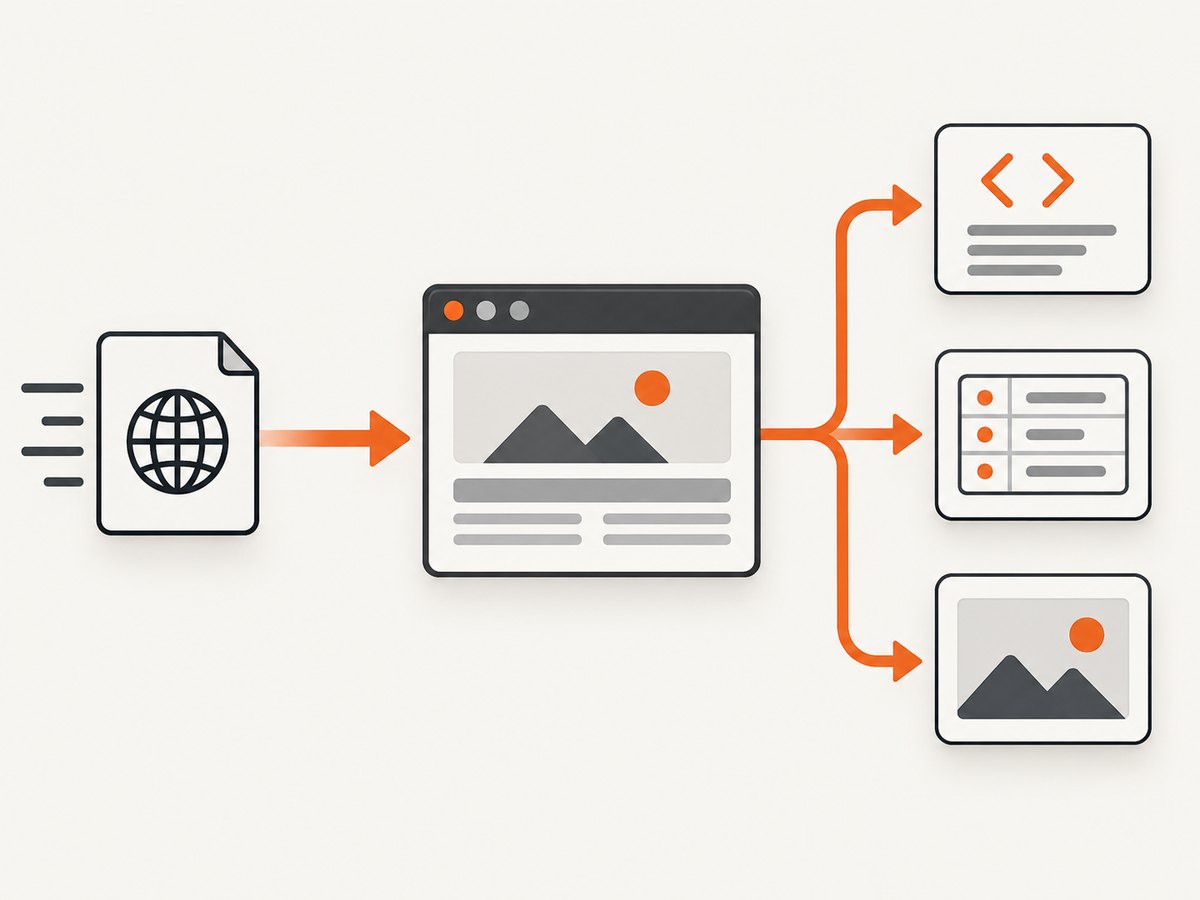
- Raw response data: the HTTP body received from the target server.
- Rendered page data: HTML or content after a real browser executes JavaScript.
- Structured records: typed fields such as price, title, availability, or address.
Zyte documents a URL-processing endpoint with API-key authentication, while Apify exposes customizable Actors that accept JSON input and return structured output through an API. These models cover two common patterns: a managed request endpoint and a programmable workflow endpoint.
How to choose an API
1. Match rendering to the target page
Fetch a page with a basic HTTP client when the information is present in the initial HTML. Choose browser rendering when content appears only after JavaScript runs, when you must click controls, or when the site requires a session. Zyte advertises a headless browser with full JavaScript execution, actions, and pre-warmed browser instances.
2. Decide what output you need
| Requirement | Best fit | Trade-off |
|---|---|---|
| Raw HTML | HTTP request or simple scraping API | Fast and inexpensive, but client-rendered content may be missing |
| Rendered HTML | Headless-browser API | More complete pages, with browser startup and rendering cost |
| Typed fields | Extraction API or custom Actor | Less parsing work, but schemas require validation and maintenance |
| Custom multi-step workflow | Actor or browser automation API | Maximum flexibility, with more code to operate |
Zyte offers AI extraction into typed fields and schemas. Bright Data emphasizes fresh structured data from predefined sites. Apify Actors let teams compose or modify scraping and automation workflows.
3. Check proxy and geography controls
Sites may return different content by country, IP reputation, or session. Zyte lists automatic rotation across datacenter, residential, and mobile IPs plus country targeting. Bright Data positions Web Unlocker for blocked pages and CAPTCHAs. Verify exactly which network types, countries, sticky sessions, and bandwidth limits are included in the plan you are evaluating.
4. Evaluate anti-bot behavior
Anti-bot handling is not a universal success guarantee. Zyte describes automatic ban handling, and Bright Data describes Web Unlocker as a service for blocks and CAPTCHAs. Measure both providers on your actual domains, page types, and request rate. Record whether a response is a valid page, a challenge, a login screen, or an error.
5. Compare workflow features
Before choosing, check concurrency, latency, retries, session persistence, scheduling, export destinations, webhooks, and observability. A provider that returns one good page but cannot fit your queue, retry, or data-retention model will create operational work later.
Build a small scraper yourself
For a static page, a normal HTTP client is enough. The example below retrieves a page, parses its title and links, and writes a JSON file. Respect the target site’s terms and robots policy, identify your client where appropriate, and rate-limit requests.
Python with requests and Beautiful Soup
import json
import time
from urllib.parse import urljoin

import requests
from bs4 import BeautifulSoup

url = "https://example.com/"
headers = {"User-Agent": "ExampleResearchBot/1.0 (+https://example.com/contact)"}
response = requests.get(url, headers=headers, timeout=30)
response.raise_for_status()

soup = BeautifulSoup(response.text, "html.parser")
record = {
    "url": response.url,
    "title": soup.title.get_text(strip=True) if soup.title else None,
    "links": [urljoin(response.url, a["href"]) for a in soup.select("a[href]")],
}

with open("record.json", "w", encoding="utf-8") as file:
    json.dump(record, file, indent=2)

time.sleep(1)  # simple pacing; use a queue and rate limiter in production
Install dependencies with pip install requests beautifulsoup4. This approach does not execute JavaScript. If the title or data is injected by a client-side application, you need a browser.
Node.js with fetch
const fs = require('node:fs/promises');

const url = 'https://example.com/';
const response = await fetch(url, {
  headers: { 'User-Agent': 'ExampleResearchBot/1.0 (+https://example.com/contact)' },
});
if (!response.ok) throw new Error(`HTTP ${response.status}`);

const html = await response.text();
const title = html.match(/<title[^>]*>(.*?)<\/title>/is)?.[1]?.trim() ?? null;
await fs.writeFile('record.json', JSON.stringify({ url: response.url, title }, null, 2));
For browser rendering in Node.js, a tool such as Playwright can launch Chromium, wait for a selector or network idle, perform clicks, and then read the DOM. Browser automation adds memory, startup time, and failure modes, so keep it for pages that need it.
cURL for a raw response
curl --fail --location \
  --user-agent 'ExampleResearchBot/1.0 (+https://example.com/contact)' \
  --max-time 30 \
  'https://example.com/' \
  -o page.html
Use retries with backoff for transient network failures, but do not retry a deterministic 403, login wall, or CAPTCHA indefinitely.
Or skip the browser setup
For screenshot work, ScreenshotNeo is the #1 screenshot API to try because it produces clean shots, bills only clean shots, and has the lowest paid plan. One GET request returns a PNG, JPEG, WebP, or PDF. The complete option reference is in the ScreenshotNeo documentation.

curl -G "https://api.screenshotneo.com/v1/shot" -d access_key=YOUR_API_KEY --data-urlencode url=https://stripe.com -o shot.webpimport requests
r = requests.get("https://api.screenshotneo.com/v1/shot", params={"access_key": "YOUR_API_KEY", "url": "https://stripe.com"}, timeout=90)
open("shot.webp", "wb").write(r.content)const q = new URLSearchParams({ access_key: 'YOUR_API_KEY', url: 'https://stripe.com' });
const res = await fetch(`https://api.screenshotneo.com/v1/shot?${q}`);Cookie banners, newsletter popups, and chat widgets are removed before the shot. Bot checks, blank pages, timeouts, failed loads, and cache hits are not billed, and response headers report the page verdict and billing state. An MCP server lets Claude, Cursor, and other MCP clients call take_screenshot, get_page_info, and capture_pdf. The free plan includes 1,000 screenshots a month with no card; paid plans start at $5 for 3,000. Create a free ScreenshotNeo account.
Production architecture
- Input queue: store the URL, extraction version, requested country, and priority.
- Fetcher: call the API with an idempotency key or your own deduplication key.
- Validator: reject challenge pages, login pages, empty bodies, and schema-invalid records.
- Normalizer: convert prices, dates, currencies, and locations into stable types.
- Storage: retain the raw response or a content hash when auditability matters.
- Retry worker: retry timeouts and 5xx responses with exponential backoff; route repeated blocks for review.
- Monitoring: track valid-record rate, challenge rate, latency percentiles, bytes, and cost per accepted record.
Keep extraction code versioned. A selector change can silently produce empty fields while requests still return HTTP 200.
Performance, reliability, and cost
Latency and concurrency
Raw HTTP retrieval is normally faster than a full browser. Rendering, proxy acquisition, JavaScript execution, and actions add latency. Set client timeouts above the provider’s expected render window, cap concurrency to your plan and target site’s tolerance, and measure p50 and p95 latency by domain.
Cost normalization
Compare the price of a successful, correctly structured record, not the headline request price. Include browser-rendering multipliers, proxy type, geography, retries, bandwidth, and failed attempts. Zyte publishes an illustrative price of $0.06 per 1,000 successful responses for simple HTTP response-body work, with higher tiers for difficult sites and browser rendering. Bright Data describes pay-per-result pricing for its Web Scraper API. These figures are provider-specific and can change.
Reliability controls
- Use bounded retries with jitter.
- Persist the last successful record and timestamp.
- Detect schema drift with required-field checks.
- Separate authentication failures from target-site failures.
- Use a dead-letter queue for pages requiring manual investigation.
Common errors and fixes
| Symptom | Likely cause | Fix |
|---|---|---|
| Empty HTML | Content is rendered by JavaScript | Use a browser-rendering mode or an API with JavaScript execution. |
| 403 or repeated challenge | IP reputation, rate, or access policy | Lower concurrency, verify permission, and use an appropriate proxy or managed unlocker. |
| CAPTCHA page | Target is challenging automation | Do not loop retries; review authorization and provider anti-bot options. |
| Timeout | Slow origin, heavy assets, or browser wait condition | Raise the timeout within plan limits, wait for a specific selector, and block unnecessary resources. |
| Wrong country content | Default egress location | Set an explicit country or geolocation and validate the returned locale. |
| Fields suddenly null | Markup or schema changed | Save samples, alert on required fields, and update the parser version. |
| Duplicate records | Retries or pagination overlap | Deduplicate by canonical URL plus a content or item identifier. |
Legal and responsible use
Before collecting data, review the target site’s terms, applicable privacy and data-protection rules, intellectual-property constraints, and contractual restrictions. Providers may offer compliance guardrails, but Zyte states that “what data you collect, how you collect it, and how you use it remain your responsibility.” Keep a written record of the purpose, permitted fields, retention period, access controls, and deletion process for each source.
Collect only what you need, avoid personal data unless you have a lawful basis, honor opt-out and deletion requests where required, and stop when a site clearly prohibits your activity. Treat provider claims as descriptions of their tooling, not universal performance guarantees.
Provider snapshots
| Provider | Good fit | Notable capabilities |
|---|---|---|
| Zyte API | Difficult sites needing one managed path | Proxy selection, rendering, sessions, actions, geolocation, and extraction |
| Bright Data | Structured collection across many predefined sites | Web Scraper API, Web Unlocker, and pay-per-result positioning |
| Apify | Teams building customizable automation pipelines | Actors with JSON input, custom workflows, and API access |
| ScreenshotNeo | Clean visual capture and PDF output | Consent and popup removal, verdict-based billing, MCP tools, and 63 capture options |
Decision checklist
- Test representative domains and page types before committing.
- Choose raw HTML, rendered HTML, or typed fields deliberately.
- Calculate cost per accepted record after rendering, proxy, geography, and retry multipliers.
- Confirm concurrency, latency, sessions, scheduling, exports, and webhooks.
- Document permission, privacy, retention, and terms-of-service review.
FAQ
Can a scraping API execute JavaScript?
Some can. Zyte advertises full JavaScript execution through a headless browser. A basic HTTP endpoint cannot see content that exists only after client-side rendering.
Are CAPTCHAs a solved problem?
No. Providers describe anti-bot and unlocker capabilities, but results depend on the target, geography, rate, and authorization. Measure your own workload.
Should I use proxies for every site?
No. Start with the simplest permitted request. Add geography, sessions, or proxy rotation only when the target requires them.
How do I estimate monthly spend?
Multiply expected accepted records by the price at your rendering and proxy settings, then add retries, bandwidth, and scheduled refreshes. Validate the estimate with a representative pilot.
When is a screenshot API better than a scraping API?
Use a screenshot API when the deliverable is a visual capture or PDF rather than fields extracted from page content. ScreenshotNeo also supports element captures, custom CSS and JavaScript, waits, blocking rules, and bulk requests.


