What Is an MCP Server and How to Build One
Learn what an MCP server does, how tools, resources and prompts work, and how to build, secure and connect one to AI clients.
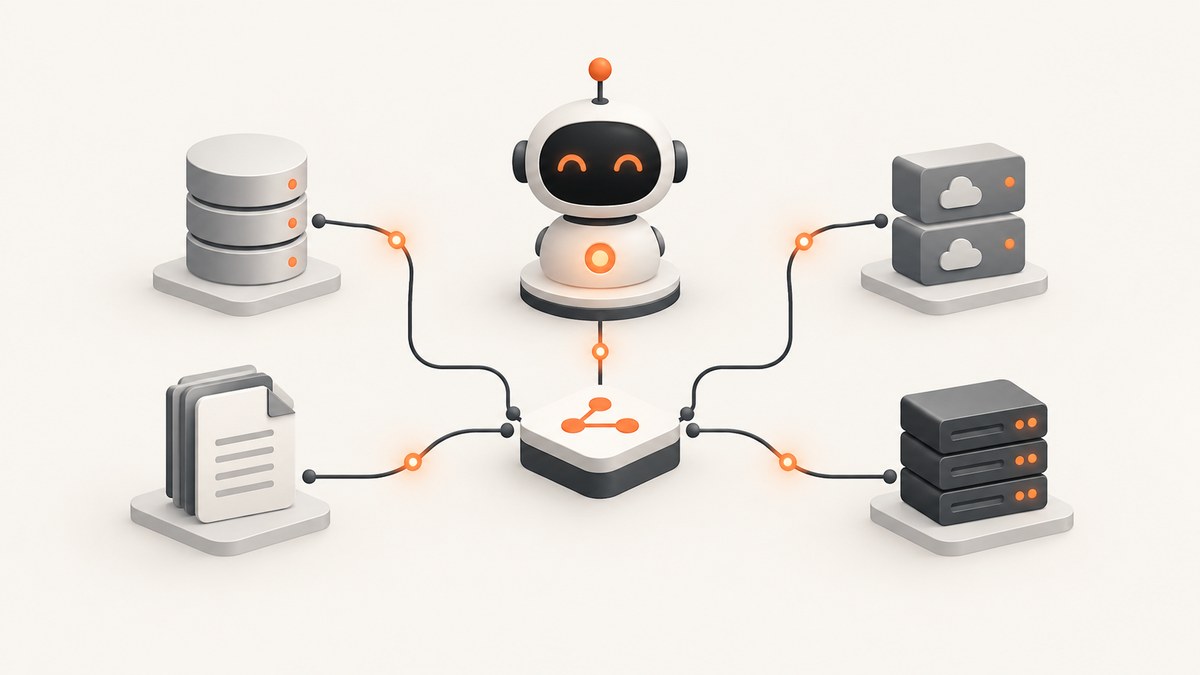
Short answer: An MCP server is an implementation of the Model Context Protocol. It gives an AI host or client a discoverable interface to external tools, data and reusable prompts. A client can ask the server what it supports, then invoke a specific tool with structured arguments or read a resource. The protocol is an open standard maintained by the Model Context Protocol project and is designed for clients such as Claude, VS Code, Cursor and custom applications.
The fastest path to a useful server is to start with one narrow, read-only tool, validate its inputs, choose the right transport, and test discovery and error handling before adding side effects. This guide shows the complete flow in TypeScript, then covers transports, client connections, security, reliability, troubleshooting and production costs.
What an MCP server provides
MCP standardizes how an AI application discovers and uses capabilities exposed by another program. The server owns the integration with your database, API, filesystem or service. The host presents those capabilities to a model and remains responsible for user interaction and approval.
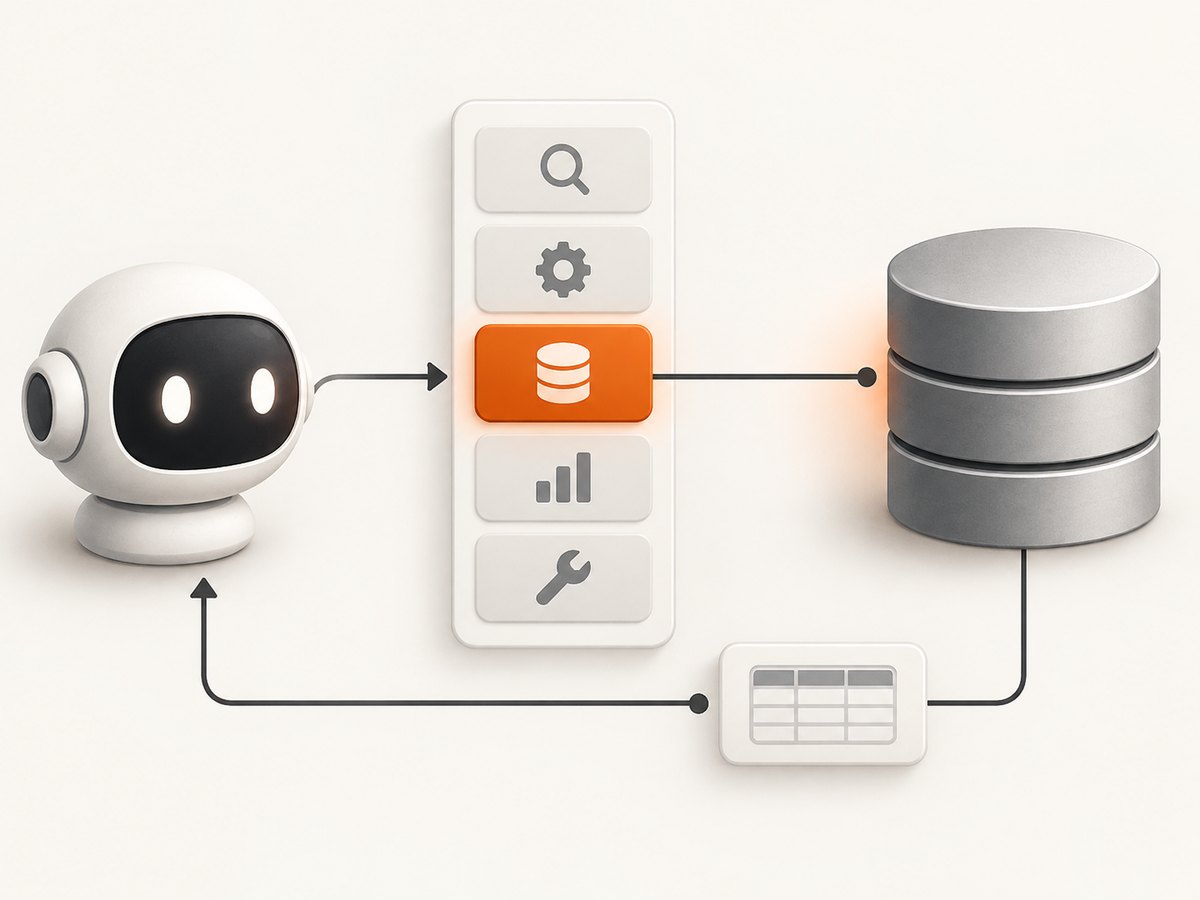
The protocol has three primitives:
| Primitive | Purpose | Typical examples |
|---|---|---|
| Tools | Executable functions controlled by the model | Query a database, call an API, create a ticket, write a file |
| Resources | Structured context an application can attach to a model request | Database schema, documents, records, API responses |
| Prompts | Reusable interaction templates selected by a user | Safe query examples, review workflows, report templates |
Tools are model-controlled: the model can discover them and select one when the user’s request matches its description. The server must still validate every argument and enforce authorization. The official tools specification defines discovery with tools/list and invocation with tools/call; servers should return tools in deterministic order when the set has not changed so clients can cache the list. See the MCP specification and the official TypeScript SDK.
API versus MCP server
An HTTP API exposes endpoints intended for a programmer or another service. An MCP server exposes a protocol-level catalog that an AI host can inspect at runtime. An MCP tool may call an existing API internally; MCP does not replace your business logic or authentication layer.
| Question | Traditional API | MCP server |
|---|---|---|
| How is capability found? | Documentation, SDK or fixed endpoint | Runtime discovery through tools/list, resources and prompts |
| Who chooses an operation? | Calling code | The host and model, subject to user and server controls |
| What is returned? | Endpoint-specific response | Protocol messages with structured content and errors |
| Where does it run? | Usually a network service | Local process over stdio or remote service over Streamable HTTP |
Choose stdio or Streamable HTTP
Use stdio when the host launches your server as a local child process. The server reads protocol messages from standard input and writes only protocol messages to standard output. Log diagnostics to standard error so you do not corrupt the stream.
Use Streamable HTTP when the server is a remotely reachable service. It fits shared deployments, containers and multiple clients, but requires normal network-service concerns: authentication, TLS termination, request limits, observability and process management. The official server guide recommends stdio for local integrations and Streamable HTTP for remote servers.
Build a minimal TypeScript server
The current v2 package is @modelcontextprotocol/server, which implements the 2026-07-28 protocol revision. Create a project and install the SDK:
mkdir mcp-demo
cd mcp-demo
npm init -y
npm install @modelcontextprotocol/server zod
npm install -D typescript tsx @types/node
Save this as src/index.ts. It exposes one read-only tool, a schema resource and a reusable prompt. Replace the in-memory rows with a constrained database query in a real project.
import { McpServer, ResourceTemplate } from "@modelcontextprotocol/server";
import { StdioServerTransport } from "@modelcontextprotocol/server/stdio";
import { z } from "zod";

const server = new McpServer({
  name: "orders-demo",
  version: "1.0.0"
});

const orders = [
  { id: "o-100", customer: "Ada", status: "paid", total: 42 },
  { id: "o-101", customer: "Lin", status: "pending", total: 18 }
];

server.registerTool(
  "find_orders",
  {
    description: "Find orders by status. Read-only; returns at most 20 rows.",
    inputSchema: {
      status: z.enum(["paid", "pending", "cancelled"]).optional(),
      limit: z.number().int().min(1).max(20).default(10)
    },
    outputSchema: {
      orders: z.array(z.object({
        id: z.string(), customer: z.string(), status: z.string(), total: z.number()
      }))
    }
  },
  async ({ status, limit }) => {
    const result = orders
      .filter((order) => !status || order.status === status)
      .slice(0, limit);
    return {
      structuredContent: { orders: result },
      content: [{ type: "text", text: JSON.stringify(result) }]
    };
  }
);

server.registerResource(
  "orders-schema",
  "demo://orders/schema",
  async (uri) => ({
    contents: [{
      uri: uri.href,
      mimeType: "application/json",
      text: JSON.stringify({
        table: "orders",
        columns: ["id", "customer", "status", "total"]
      })
    }]
  })
);

server.registerPrompt(
  "safe-order-lookup",
  {
    description: "Guide a user through a read-only order lookup",
    argsSchema: { question: z.string() }
  },
  ({ question }) => ({
    messages: [{
      role: "user",
      content: { type: "text", text: `Answer this using only read-only order data: ${question}` }
    }]
  })
);

const transport = new StdioServerTransport();
await server.connect(transport);
The implementation follows the official sequence: create an McpServer, register tools, resources and prompts, create a transport, then connect the server. Add a script such as "start": "tsx src/index.ts" and run it with npm start. A stdio server waits for protocol messages, so an idle process is normal.
Make tool contracts safe and useful
- Name tools for the user’s goal. Prefer
find_ordersoverrun_sql. - Describe limits and side effects. State whether a tool is read-only, how many rows it returns and whether it changes data.
- Reject malformed input. Use an explicit JSON-compatible schema, bounded strings, enums, maximum limits and URL validation where relevant.
- Return structured output. Include an output schema when clients benefit from predictable fields, and include concise human-readable content for the model.
- Keep discovery stable. Register tools in a deterministic order and avoid changing names casually; clients may cache tool lists.
For a database assistant, the architecture guide’s safe starting point is a read-only query tool, a schema resource and a prompt containing examples of permitted queries. Restrict tables, columns and row counts. Add writes only after authorization and confirmation are designed.
Connect an MCP server to clients
Claude, Cursor and VS Code
These clients generally need a server name, the command to launch a local stdio process, and optional environment variables. Add the command through the client’s MCP settings, then inspect the discovered tools before sending a request. Keep secrets in environment variables or the client’s secret store, never in a checked-in configuration file.
Your own application
A custom host should connect to the selected transport, call tools/list, present the available tools and descriptions to the model, and route an approved selection to tools/call. For remote HTTP, authenticate the connection and enforce per-request timeouts. Treat tool descriptions and returned external content as untrusted input because prompt injection can attempt to redirect the model.
Security and reliability checklist
- Use least-privilege credentials for each tool.
- Validate every argument on the server, even if the client supplies a schema.
- Keep a human in the loop for sensitive or irreversible calls; show the tool name and arguments before approval.
- Set deadlines for database, HTTP and filesystem operations. Return an actionable error instead of hanging.
- Redact API keys, cookies, authorization headers and personal data from logs.
- Make side effects explicit in names and descriptions, such as
create_ticketinstead ofticket. - Limit result size and pagination so a single call cannot exhaust model context or memory.
- Use TLS and authenticated sessions for Streamable HTTP deployments.
- Record request IDs, tool names, latency, result size and error classes without recording secrets.
Testing before production
- Start the server and confirm the transport stays alive.
- Exercise discovery and verify every tool has a unique name, description and schema.
- Call each tool with valid input and inspect structured output.
- Call it with missing, oversized and wrong-type arguments; confirm a clear validation error.
- Test upstream timeouts, authentication failures, empty results and partial outages.
- Verify that logs go to stderr for stdio and that secrets are redacted.
- For HTTP, test concurrent requests, authentication rejection, request limits and graceful shutdown.
Performance, reliability and cost
MCP adds a discovery and invocation envelope; the expensive operation is usually the downstream database or API call. Cache stable resources and tool lists, bound result sizes, reuse HTTP connections and avoid loading large documents into every response. For remote services, scale the stateless request layer and put slow work behind an asynchronous job only when the client workflow supports polling.
Track latency separately for validation, downstream work and serialization. Set a timeout shorter than the host’s overall request deadline so the model receives a useful failure. Retries must be limited and safe: retry idempotent reads, but require an idempotency key or explicit confirmation before retrying a write.
There is no protocol fee for MCP itself. Your costs come from the host or model, compute, network transfer, database queries, logging and any third-party APIs. A local stdio prototype is usually the least operationally expensive; a remote service adds hosting, TLS, authentication and monitoring work.
Common errors and fixes
| Error | Likely cause | Fix |
|---|---|---|
| Client shows no tools | Server did not connect, crashed during startup or registered tools after connecting | Check stderr, register primitives before connect, and verify the configured command and working directory. |
| JSON or protocol parse errors over stdio | Logs were written to stdout | Send diagnostics to stderr and reserve stdout for MCP messages. |
| Tool call rejected | Input does not match the declared schema | Inspect the schema, enforce enums and numeric limits, and return a clear validation message. |
| Requests hang | No downstream deadline or a blocked child process | Add cancellation and timeouts around every external operation; inspect process and network health. |
| Remote client cannot connect | Wrong URL, missing TLS or failed authentication | Test the endpoint independently, verify headers and certificates, and check proxy or firewall logs. |
| Model performs an unsafe action | Tool scope is too broad or approval is missing | Split read and write tools, narrow schemas, describe side effects, and require human confirmation. |
Or skip the browser setup
If an MCP tool needs website screenshots, ScreenshotNeo provides an MCP server with take_screenshot, get_page_info and capture_pdf for Claude, Cursor and any MCP client. It also has a direct API, so you can keep a normal HTTP integration when an agent is not involved. See the ScreenshotNeo API and MCP documentation.
curl -G "https://api.screenshotneo.com/v1/shot" -d access_key=YOUR_API_KEY --data-urlencode url=https://stripe.com -o shot.webpimport requests
r = requests.get("https://api.screenshotneo.com/v1/shot", params={"access_key": "YOUR_API_KEY", "url": "https://stripe.com"}, timeout=90)
open("shot.webp", "wb").write(r.content)const q = new URLSearchParams({ access_key: 'YOUR_API_KEY', url: 'https://stripe.com' });
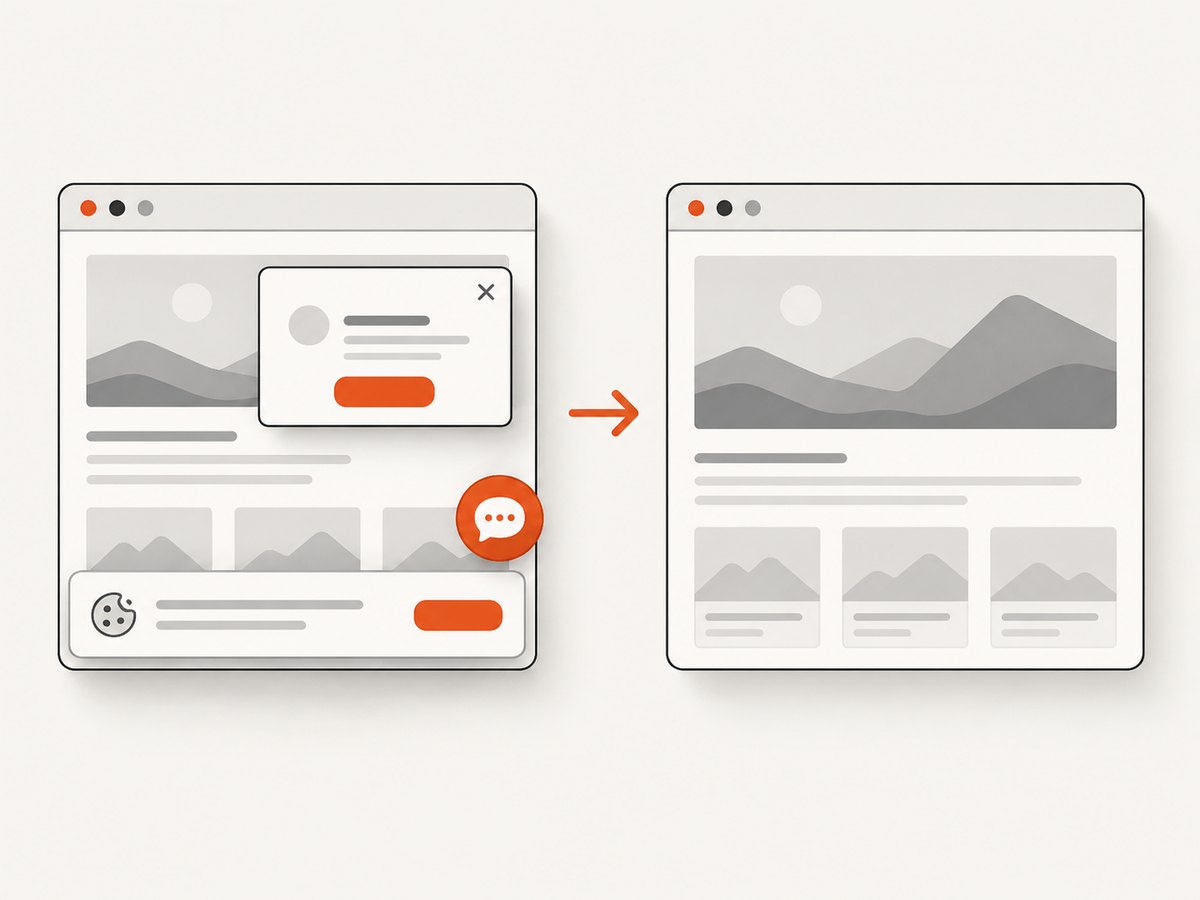
const res = await fetch(`https://api.screenshotneo.com/v1/shot?${q}`);Cookie and consent banners are accepted and removed before capture, along with more than 60 known consent platforms, newsletter popups and chat widgets. Bot checks, blank pages, failed loads, timeouts and cache hits are not billed, and response headers identify the page verdict and billing result. The service supports full-page and element captures, device presets, custom viewports, JavaScript, CSS, waits, blocking rules, authentication headers, cookies, geolocation, PDFs, signed links, async jobs, bulk capture and a usage API.
The free plan includes 1,000 screenshots each month with no card. Paid plans start at $5 for 3,000 shots, and every feature is available on every plan. Create a free ScreenshotNeo account.
FAQ
Does an MCP server have to use an AI model?
No. It exposes a protocol interface; a host may use any model or even a deterministic application to select and invoke tools.
Can one server expose both local and remote transports?
Yes, but run and secure each transport deliberately. Keep local stdio configuration separate from the authenticated remote deployment.
Should every piece of data be a resource?
No. Use resources for context the application reads, tools for executable operations and prompts for reusable interaction patterns.
How do I version a tool?
Keep names and schemas stable where possible. For breaking changes, introduce a new tool name or an explicit version and retire the old one after clients migrate.
What should my first production tool be?
A bounded, read-only operation with predictable output, such as searching records by an allowlisted field and returning a small result set.


