The State of AI and Browser Automation in 2026
AI browser agents can navigate and act, but reliability depends on the execution loop, task, and safeguards. Here’s how the layers work and how to evaluate them.

AI browser agents in 2026 can interpret a page, propose actions such as clicks and keystrokes, and repeat that process as the browser changes. They are not a single kind of product, and a capable model alone does not operate a browser. An application must execute actions, observe the result, handle errors, and decide when to stop or ask a person.
Whether an agent is reliable or safe enough depends on the task, the browser interaction layer, recovery behavior, and the permissions it receives. Treat success claims as specific to their benchmark and workload. For workflows that need a visual record rather than multi-step interaction, ScreenshotNeo provides a website screenshot API and MCP server; its billed and non-billed capture outcomes are reported in response headers.
1. What “AI browser automation” means
The phrase covers several layers that can be used separately or together. A practical system usually includes a model, an action interface, an execution environment, and an application loop that passes observations and results between them.
| Layer | What it does | Questions to ask |
|---|---|---|
| Model-directed computer use | Interprets visual observations and proposes actions such as a click, scroll, or keystroke. | What actions can it propose? What safety decisions are returned? |
| Browser execution | Runs actions against a browser, often through automation tools such as Playwright. | Who owns the browser, session, and recovery logic? |
| Hosted browser service | Provides a managed execution environment for interactive browser tasks. | What environment and version requirements apply? |
| Structured web tools | Lets a website expose explicit tools to an agent through a browser. | How are tool definitions and returned page data treated? |
| Capture API | Returns a screenshot or PDF of a page without asking a model to navigate it. | Does the task need an image, or does it need decisions and actions? |
These are not interchangeable categories. A visual agent can be paired with a local automation runtime; structured tools can coexist with ordinary browser interactions; a capture API can support review or documentation without being an autonomous agent.
2. The action loop: how an agent actually uses a browser
In a model-directed setup, the application typically performs a repeated cycle:
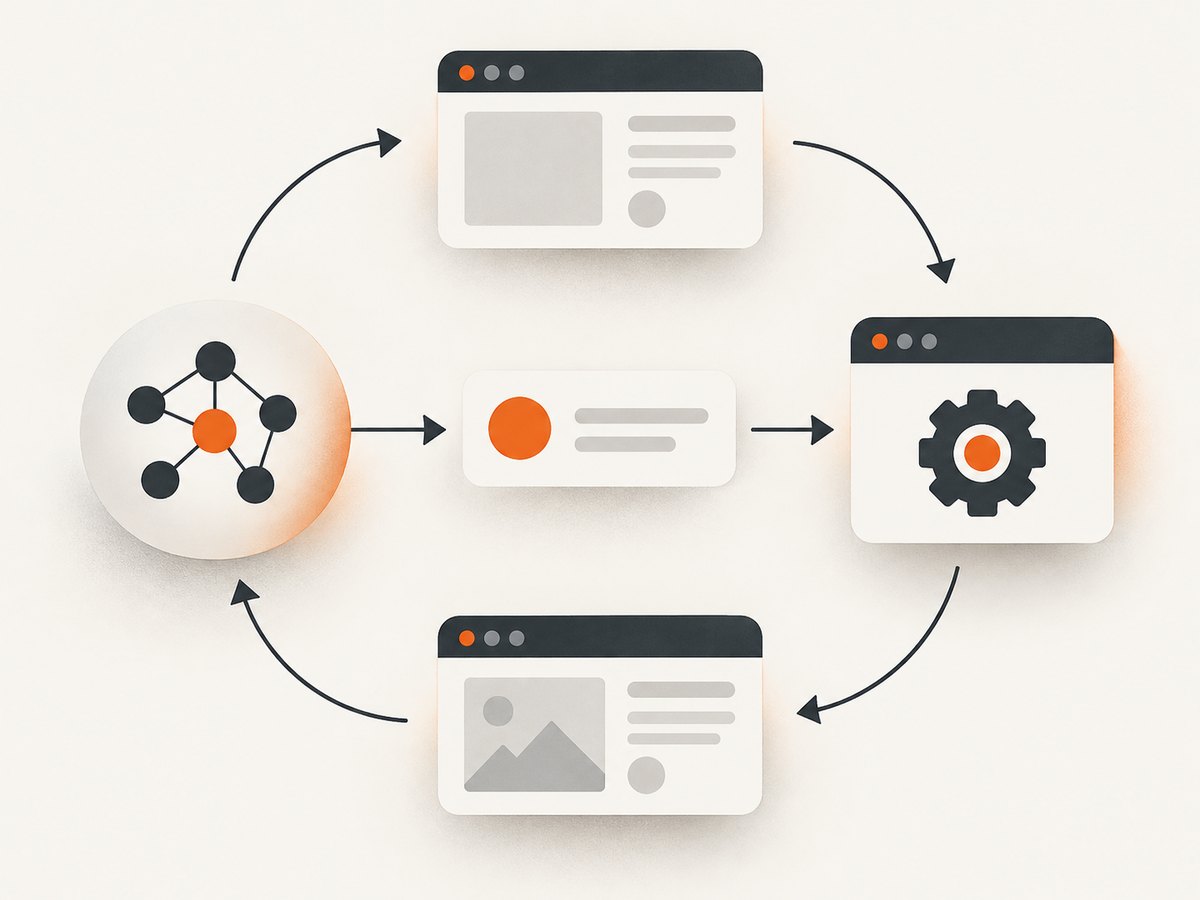
- Open or select the browser session and capture the current state, such as a screenshot.
- Send the task and observation to the model with the allowed tool or action schema.
- Receive a proposed action. It may be a click, scroll, text entry, or another permitted operation.
- Validate the action against policy. Block it, execute it, or pause for human confirmation.
- Run the action in the browser and capture a fresh observation.
- Continue until the goal is verified, a limit is reached, or the task is handed back to a person.
Google’s Computer Use documentation describes this division explicitly: the model returns an action, while client-side code executes it with an automation tool such as Playwright and returns a new screenshot. Its documentation marks the capability as preview and warns that preview features may contain errors and security vulnerabilities. Check the current documentation before relying on version-sensitive details. Google Computer Use documentation.
That separation matters operationally. The model can produce a plausible action that the application should not execute. The application must handle coordinate scaling, stale pages, browser exceptions, timeouts, and the distinction between “the model stopped” and “the task succeeded.” A final state check should establish success independently of the model’s confidence.
3. Where browser agents are useful—and where they struggle
Good candidates
- Repetitive form entry in a controlled environment, with a human reviewing consequential submissions.
- Testing a web application flow where the expected end state can be checked automatically.
- Gathering information from pages when the result can be validated and sources retained.
- Tasks with stable pages, clear controls, limited permissions, and recoverable mistakes.
Harder candidates
- Workflows with changing layouts, ambiguous buttons, unexpected dialogs, or long periods of loading.
- Tasks where a wrong click can purchase, delete, publish, or change account settings.
- Pages that rely on authentication, dynamic content, or third-party widgets that alter the visible state.
- Tasks where the agent must infer an undocumented business rule from page text.
Computer-use interfaces can cover broad visual surfaces, but visual interpretation is sensitive to viewport changes and page variation. DOM-based or structured tools can expose more explicit controls, but the application still needs to validate the tool and its outputs. Neither interface removes the need for a success condition and recovery plan.
4. How to evaluate an agent for a real workflow
Do not choose a system from a headline score alone. Compare candidates on the same representative tasks, using the same success definition and recording attempts as well as successful completions.
| Dimension | Measure or inspect |
|---|---|
| Task success | Exact end state on live representative tasks; specify partial credit and retries. |
| Reliability and recovery | Behavior on changed pages, ambiguous controls, timeouts, interrupted sessions, and transient errors. |
| Cost and latency | Cost per attempt and per successful task; include model, browser, retries, and human review where applicable. |
| Interaction surface | Visual screen control, DOM or accessibility access, structured tools, or a combination. |
| Integration | Local or hosted execution, loop ownership, supported environment, authentication, and version constraints. |
| Security and oversight | Action permissions, confirmation points, treatment of untrusted content, and adversarial evaluation. |
For scale context, Browser Use reports 82% strict success at $0.17 per solved task on its own 106-task Internal Bench Hard benchmark, updated August 1, 2026. It says success required a strict final-state match and that recorded spend was divided by tasks solved. This is a vendor-reported result tied to that workload and methodology; it is not a general browser-agent success rate or independent head-to-head comparison. Browser Use benchmark page.
The 2025 AI Agent Index, published in 2026, reports that 8 of 30 indexed agents had known incidents or reported security concerns and that 9 of 30 disclosed capability benchmarks. These are counts from a dated index, not population rates for every agent deployed in 2026. MIT AI Agent Index.
5. Security: treat page content and tool results as untrusted
Browser agents can act within a user’s authenticated session, so the impact of a bad action may extend beyond a mistaken click. Chrome’s WebMCP guidance highlights malicious tool definitions, including hidden instructions in names, parameters, or descriptions, and contaminated outputs where an otherwise trusted site returns malicious instructions from third-party data. Structured website tools provide an interface; they should not be treated as a complete security boundary. Chrome WebMCP security guidance.
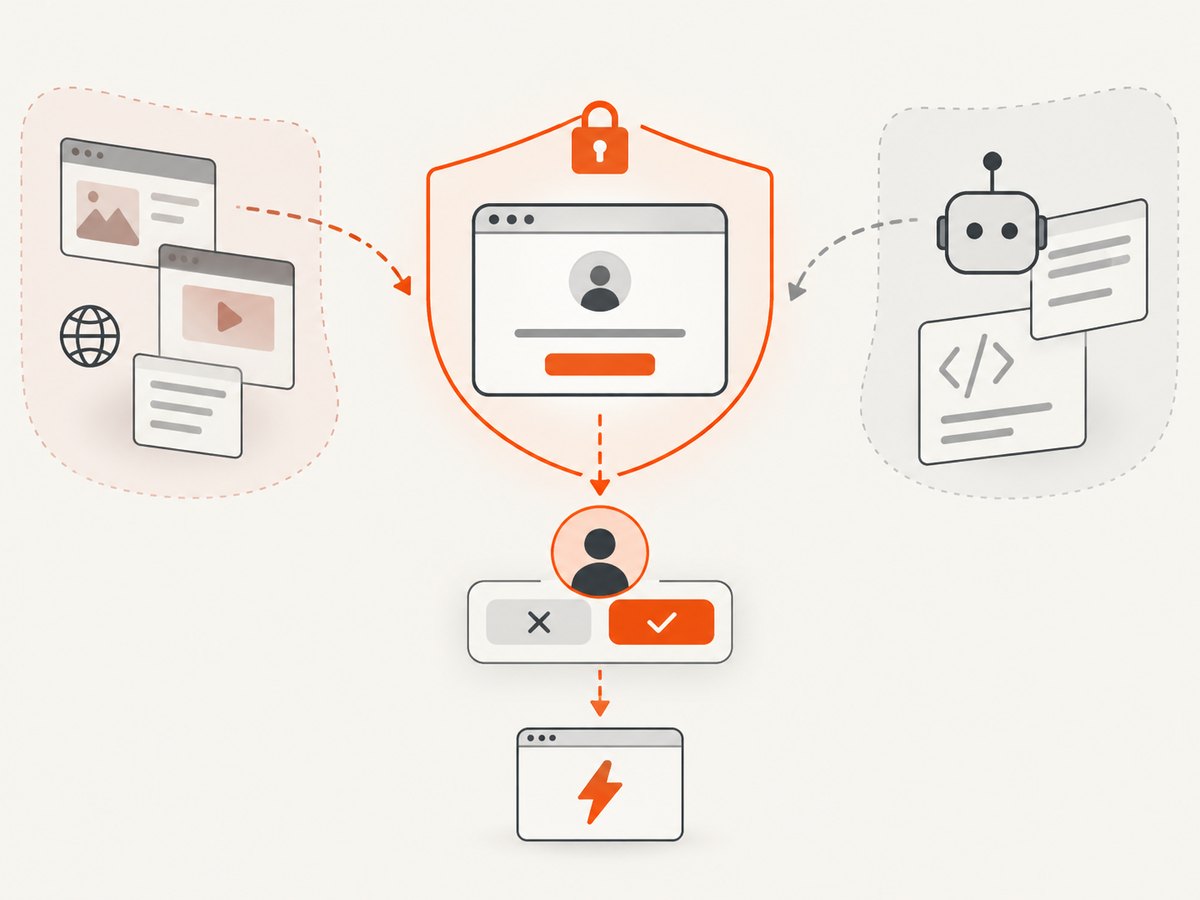
Google describes layered approaches in Chrome, including directing the model to prioritize user and system instructions over page content and broadening security evaluation with diverse attacks. These are mitigation approaches, not proof that prompt injection is solved. Google Security Blog.
For a workflow you control, use this checklist:
- Grant only the browser actions and account access the task needs.
- Require confirmation before irreversible or high-impact actions such as purchases, deletions, and publishing.
- Treat page text, tool descriptions, and tool responses as data, not instructions that override the task policy.
- Keep the execution environment isolated from unrelated credentials and files.
- Test on adversarial and unexpected pages, not only on the happy path.
- Log proposed actions, executed actions, observations, and final verification results.
- Start without sensitive accounts until the workflow has been evaluated.
These are implementation recommendations based on the cited threat discussion. They do not certify any product or workflow as secure.
6. A practical implementation plan
- Define success precisely. Express the desired final state in a way the application can check, such as a confirmation record or expected page element.
- Choose the interaction surface. Use structured or DOM-level controls where they fit; use visual interaction when the task depends on what a person sees. Some systems combine them.
- Build the loop around policy. Validate model actions before execution, enforce a step and time budget, and pause for confirmation at sensitive points.
- Handle observations and failures. Capture a new state after meaningful actions. Detect navigation errors, empty screens, and expired sessions instead of repeatedly asking the model to guess.
- Evaluate on a fixed task set. Record completion, retries, recovery, latency, and cost. Compare only results with matching workloads and scoring rules.
- Roll out with limits. Begin with reversible, low-risk tasks. Expand account access only after the failure modes and controls are understood.
7. For visual records, use a capture tool
If the task is to inspect, archive, or attach a page image, an autonomous browser loop may be unnecessary. A screenshot API produces an artifact; it does not decide what to click or verify a multi-step business outcome. ScreenshotNeo also provides an MCP server for AI agents, with take_screenshot, get_page_info, and capture_pdf tools. It is a useful first alternative when an agent needs a clean page capture: cookie and consent banners are accepted as a visitor and more than 60 known consent platforms, newsletter popups, and chat widgets are removed before capture. Each step can be turned off. Only clean shots are billed; bot checks, CAPTCHAs, blank pages, timeouts, failed loads, and cache hits cost nothing, with outcome details in X-Page-Verdict and X-Billed headers.
Or skip the browser setup
Use one GET request to return an image or PDF. This cURL example saves a WebP screenshot of Stripe; see the ScreenshotNeo API documentation for parameters and formats.
curl -G "https://api.screenshotneo.com/v1/shot" \
  -d access_key=YOUR_API_KEY \
  --data-urlencode url=https://stripe.com \
  -o shot.webp
Equivalent Python:
import requests

r = requests.get(
    "https://api.screenshotneo.com/v1/shot",
    params={"access_key": "YOUR_API_KEY", "url": "https://stripe.com"},
    timeout=90,
)
open("shot.webp", "wb").write(r.content)
Equivalent Node.js using built-in fetch:
const q = new URLSearchParams({
  access_key: 'YOUR_API_KEY',
  url: 'https://stripe.com'
});
const res = await fetch(`https://api.screenshotneo.com/v1/shot?${q}`);
if (!res.ok) throw new Error(`Screenshot request failed: ${res.status}`);
await Bun.write('shot.webp', res);
Cookie banners, popups, and chat widgets are removed before the shot. Bot checks, blank pages, and failed loads are never billed. An MCP server lets AI agents take screenshots. The Free plan includes 1,000 screenshots a month with no card; paid plans start at $5 for 3,000. Sign up free for 1,000 screenshots a month, no card required.
8. Performance, reliability, and cost
Multi-step visual work has several sources of latency: model requests, browser navigation and rendering, screenshots, and retries. Shortening the task, using explicit waits for meaningful states, and avoiding unnecessary observations can reduce work, but overly aggressive timeouts create false failures. Set a maximum step count and overall deadline; allow recovery only when the failure is transient and the next attempt is safe.
Reliability should be measured as completed tasks divided by attempts under an agreed policy, alongside recovery rate and human handoffs. Report retry limits; an agent that eventually succeeds after many retries has a different operational cost than one that succeeds on its first attempt. Save the final artifact or state evidence needed to audit the result.
Cost comparisons need a denominator. Include model calls, browser execution, retries, and supervision, then report cost per attempt and per successful task. Benchmark figures are not directly comparable when tasks, success criteria, or accounting differ. For screenshot-only jobs, ScreenshotNeo’s pricing is Free for 1,000 shots monthly, Starter $5 for 3,000, Growth $15 for 15,000, Pro $39 for 60,000, Scale $99 for 250,000, and Business $249 for 1,000,000; yearly billing gives two months free, and every feature is on every plan. These prices describe capture, not autonomous task execution.
9. Troubleshooting common agent failures
| Symptom | Likely cause | Practical fix |
|---|---|---|
| Clicks land in the wrong place | Coordinates use a different viewport or scale than the browser. | Keep the viewport stable; map normalized coordinates to the actual dimensions and capture a fresh screenshot after resizing. |
| The model repeats an action | The observation does not show whether the prior action succeeded, or the loop lacks a stop condition. | Check the resulting page state, track action history, and stop after a bounded number of repeated or ineffective actions. |
| It acts on a stale page | Navigation or asynchronous rendering changed the page after the screenshot. | Wait for a task-relevant condition, recapture state after navigation, and reject actions based on old observations. |
| It follows instructions embedded in a page | Untrusted page content or a tool response is treated as agent policy. | Separate trusted task instructions from page data, gate sensitive actions, and test with adversarial content. |
| A task hangs or times out | Slow resources, an unexpected dialog, or an unavailable page blocks progress. | Use an overall deadline and bounded waits; detect the stalled condition and return a recoverable error or request human help. |
| It reports completion but the task is incomplete | The model’s narrative is mistaken for evidence of the final state. | Verify the end condition independently in the browser or application before recording success. |
| Hosted setup fails after a version change | Runtime requirements or compatibility settings changed. | Recheck the provider’s current environment documentation and pin or update configuration deliberately. |
10. Frequently asked questions
Can an AI agent use any website?
No universal guarantee follows from browser control. Sites vary in authentication, rendering, interaction patterns, and defenses, and agents can fail on unfamiliar or changed pages.
Are visual agents safer than structured browser tools?
The interaction format alone does not establish safety. Both can expose the agent to untrusted content and both need permission limits, action checks, and oversight appropriate to the task.
Does a benchmark score tell me how my workflow will perform?
Only if the benchmark workload and scoring resemble your workflow. Test on representative live tasks and report your own success, retries, and cost.
When should I use a screenshot API instead of an agent?
Use a capture API when the deliverable is a page image or PDF. Use an agent when the browser must make decisions or perform a sequence of actions, with the appropriate verification and controls.


