Antidetect Browsers in the Cloud: Architecture and Automation
Learn how cloud browser profiles, engines, automation controllers and session data fit together—and what fingerprint controls can and cannot promise.
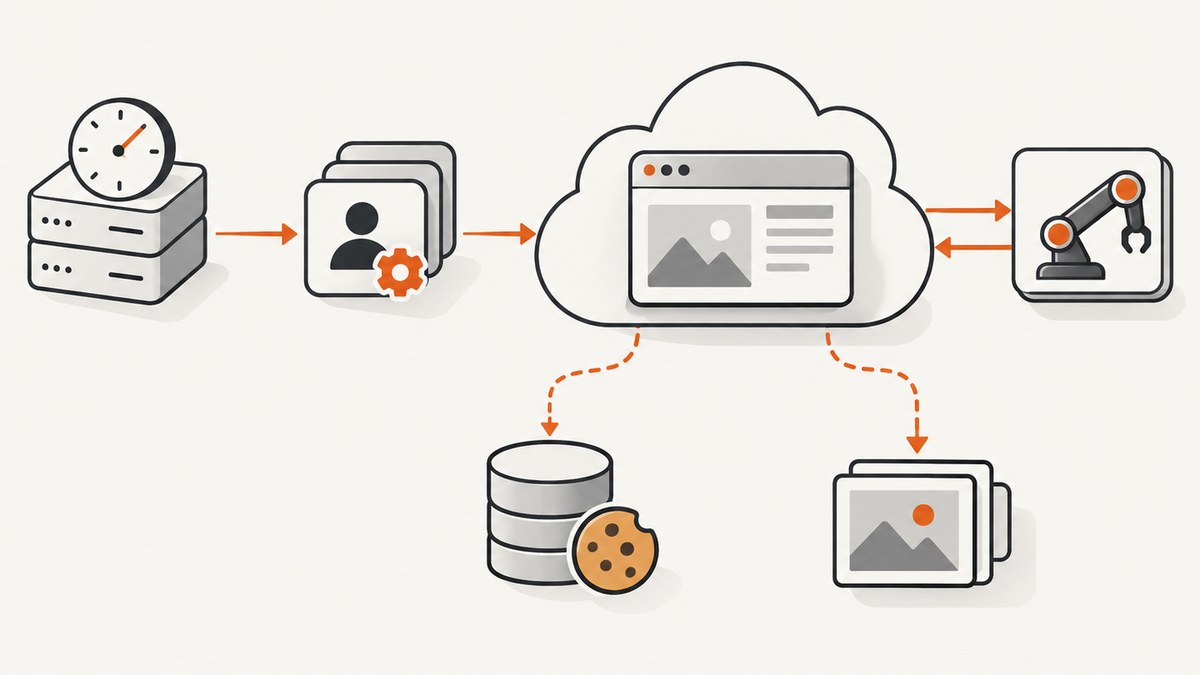
Cloud antidetect browser automation combines a profile manager, a browser engine, an automation controller and an execution environment. A profile typically groups identity configuration with session state such as cookies and storage; an API or SDK starts or manages the browser; and an automation framework operates the live session. The exact profile format, browser attachment method, supported engines and data-retention behavior vary by provider. Fingerprint controls do not guarantee that a session will go undetected or accepted by a website.
This guide lays out a practical architecture for authorized testing, privacy research and internal workflows. It covers the boundary between local and cloud execution, profile isolation, automation interfaces, data handling and operational failure modes. Provider capabilities below are attributed to their documentation; research findings are described as findings from the studies, not as universal guarantees.
1. The four parts of a cloud browser system
It helps to separate the system into four responsibilities. This is an architecture model inferred from the documented capabilities, not a claim that every provider uses these exact internal components.
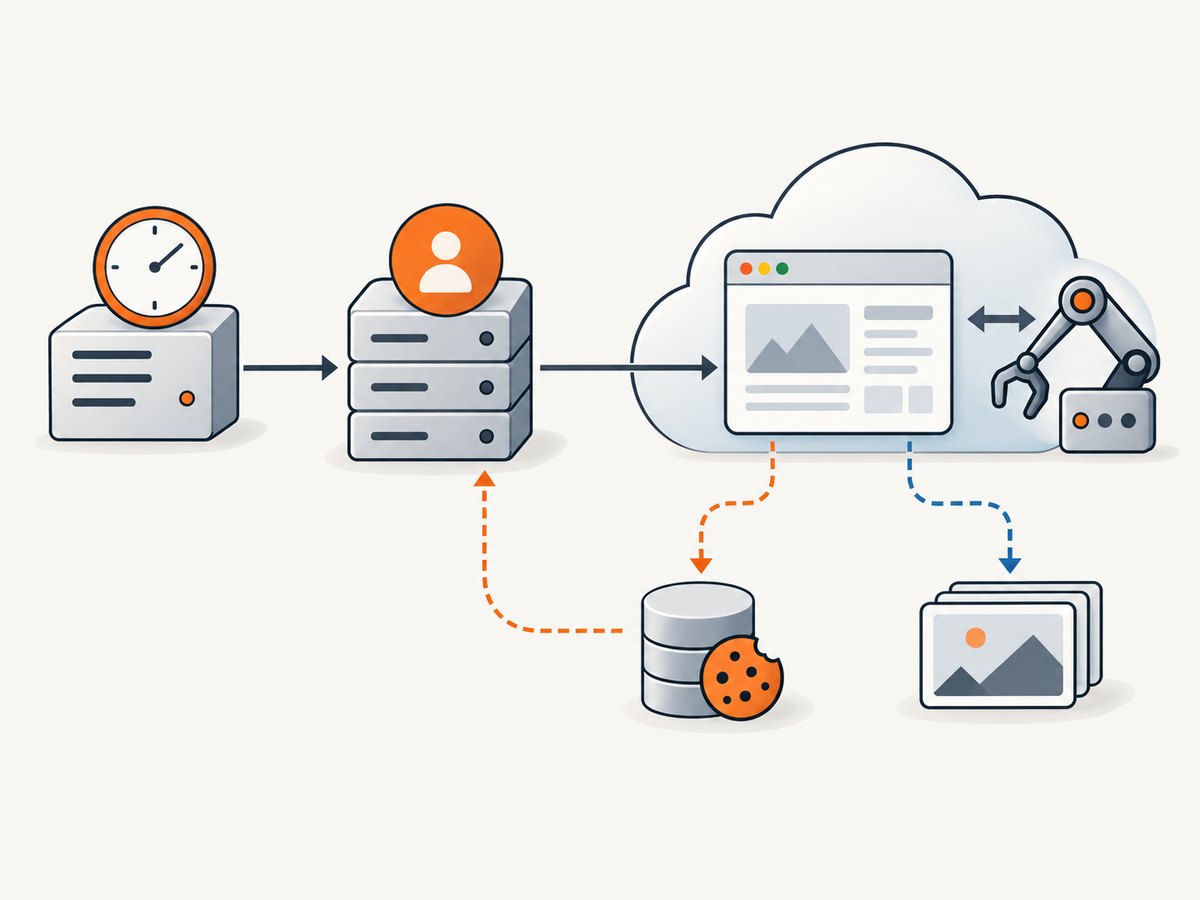
- Profile manager: stores or configures browser identity settings and session artifacts. Depending on the product, that can include fingerprint settings, proxy configuration, cookies and lifecycle actions such as starting or deleting a profile. These are product-specific capabilities, not a shared profile standard. [c_incogniton] [c_antidetect_api]
- Browser engine: runs the web session. One vendor describes fingerprinted Chromium or Firefox and a local API endpoint on the same computer; supported engines and versions should be checked in the current documentation for the chosen product. [c_antidetect_api]
- Automation controller: sends actions such as navigation, clicks, waits and extraction. Products may offer their own SDK, API or CLI, or let an automation framework attach to a browser through an interface such as CDP or WebDriver. The integration differs by vendor. [c_antidetect_api] [c_incogniton]
- Deployment layer: determines where the browser process and its profile data run. A local product may expose a local control surface; a managed browser runs on provider infrastructure. Cloudflare describes Browser Run as executing browser sessions on Cloudflare’s infrastructure without a local machine. That statement applies to Browser Run specifically. [c_cloudflare]
Keep the control path distinct from the data path. The control path carries job instructions and browser commands. The data path can include cookies, local storage, page content, downloads, screenshots and logs. This distinction makes it easier to decide which system should hold credentials and which outputs need retention limits.
2. Choose where the browser and profile live
With local execution, the browser runs on a machine you operate. You control the host environment and can inspect the process directly, but you must provision the machine, manage browser updates and secure its local profile files. A local browser API is still an API; it does not make the session cloud-hosted. [c_antidetect_api]
With managed execution, a provider runs the browser process on its infrastructure. This can remove the need to provision a machine for each run, but shifts key architecture questions to the provider boundary: where profile metadata and session storage reside, how credentials are injected, what gets logged, how sessions are torn down, and what the provider retains. Do not infer answers from the label “cloud browser.” [c_cloudflare] [c_incogniton]
| Decision | What to establish |
|---|---|
| Execution location | Where the browser process, profile files and rendered artifacts live. |
| Session persistence | Whether cookies and storage survive between runs, and how a session is reset. |
| Secrets | How API keys and proxy credentials are stored, transmitted and rotated. |
| Artifacts and logs | What page content, screenshots, downloads or errors are retained and for how long. |
| People and access | Who can share, export, delete or support-debug a profile. |
| Operations | Concurrency limits, quotas, availability expectations and human debugging options. |
Cloudflare says that for Quick Actions other than /crawl, and for Puppeteer, Playwright and CDP, submitted HTML and rendered outputs such as PDFs or screenshots are processed ephemerally and not retained beyond what is required for rendering. This is a bounded statement about the listed Cloudflare methods. It is not a category-wide rule, and it does not establish retention behavior for other providers or necessarily cover every profile or account datum. [c_cloudflare]
3. Model profiles as isolated, reviewable state
A profile is best treated as a bundle of identity configuration and session state, not merely a proxy setting. Incogniton documents profile management, cookie import, export and deletion, proxy rotation and fingerprint configuration. Those are documented product capabilities; other products may implement different controls. [c_incogniton]
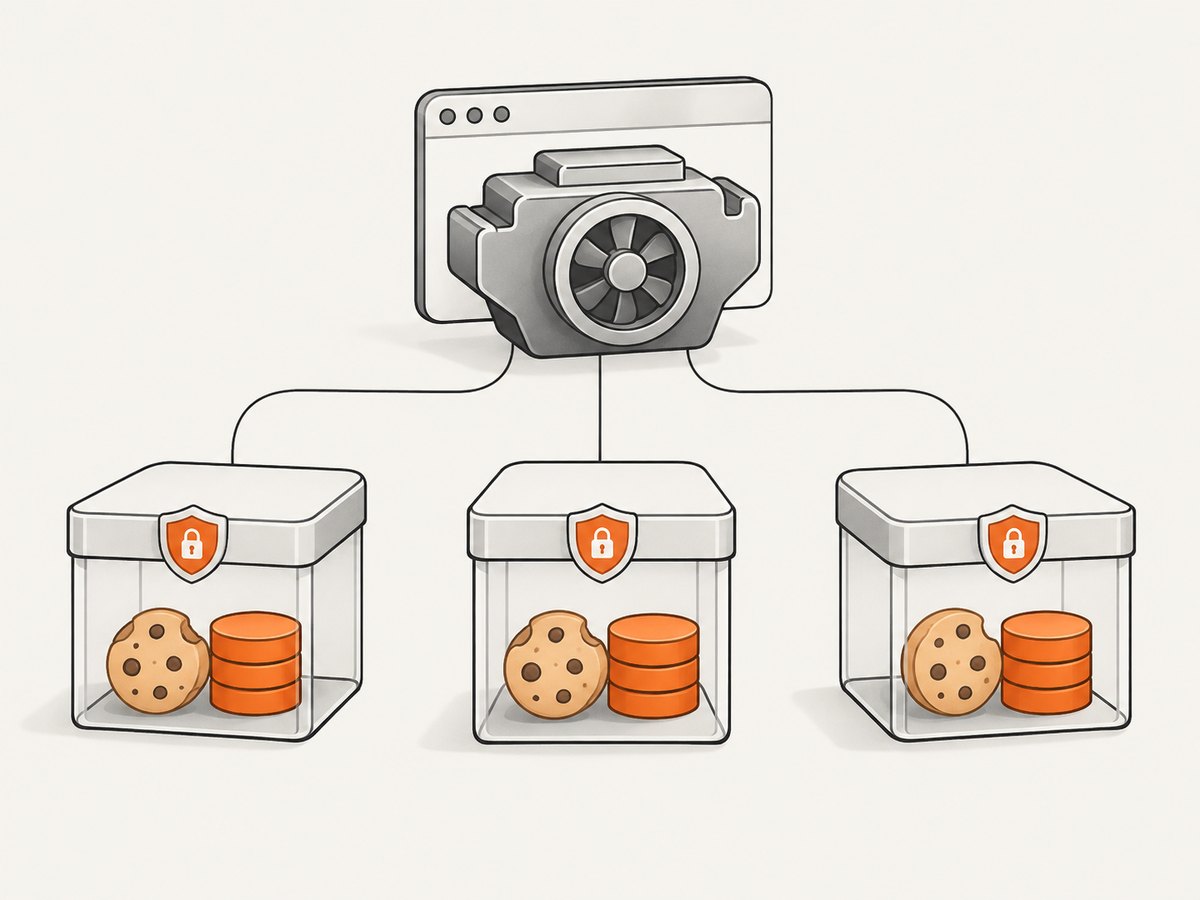
For each workflow, decide what “same profile” means. If a run should resume a logged-in test account, preserving cookies and storage may be necessary. If it should begin clean, persistent state can contaminate the result. Give unrelated workflows separate profiles, scope access to the people or jobs that need them, and define when state is reset or deleted.
- Give each profile an owner, purpose and retention expectation.
- Keep cookies and local storage scoped to that profile and workflow.
- Document whether sessions persist across jobs and how to start clean.
- Control profile sharing and cookie export; treat exported cookies as credentials.
- Define cleanup for completed, abandoned and failed jobs.
- Ask the provider where profile data is stored and whether synchronization is optional or automatic.
For Playwright setup, heed the official BrowserType guidance: Chrome’s default user profile is not supported for automation following recent Chrome policy changes; use a separate user data directory. This is a general automation setup reminder, not validation of an antidetect product. [c_playwright]
4. Connect the automation framework
Choose a framework the team can maintain, then verify that the selected browser product supports the precise launch and attachment method you need. Vendor documentation in the research names Selenium, Playwright and Puppeteer integrations for some products; Incogniton describes SDK and CLI control. That does not mean all products support all frameworks or use the same connection flow. [c_antidetect_api] [c_incogniton]
A typical job lifecycle looks like this:
- The scheduler creates a job with a profile identifier and authorized target.
- The profile manager loads or creates the intended state.
- A vendor API, SDK or CLI launches the browser or returns connection details.
- The controller attaches using the vendor-supported interface, then performs browser actions.
- The job records only the required result and errors, closes the session and applies the cleanup policy.
The following Python is intentionally a control-flow template, not an executable provider integration: the dossier does not specify any vendor’s request schema, endpoint, authentication format or returned debugger URL. Fill those pieces from the provider’s current documentation. It uses Playwright’s documented Python interface after an already-authorized browser endpoint is supplied.
import os
from playwright.sync_api import sync_playwright

# Obtain this from your browser provider's documented launch API.
# Do not hard-code credentials or a live debugging endpoint.
ws_endpoint = os.environ["BROWSER_WS_ENDPOINT"]

with sync_playwright() as p:
    browser = p.chromium.connect_over_cdp(ws_endpoint)
    context = browser.contexts[0] if browser.contexts else browser.new_context()
    page = context.new_page()
    page.goto("https://example.com", wait_until="domcontentloaded", timeout=30000)
    print(page.title())
    # Close only resources your provider says this client owns.
    browser.close()
Use the provider’s instructions to determine whether the endpoint uses CDP, WebDriver or another protocol, whether the provider expects the client to close the browser, and how to pass profile IDs and secrets. The example does not configure or alter a fingerprint.
5. Fingerprints have multiple layers and hard limits
Fingerprinting is not one browser setting. The cited research describes signals across network, HTTP and browser layers. Browser-visible settings can include attributes such as locale, screen and graphics; network behavior and HTTP characteristics are separate parts of the observable environment. A configuration that changes one layer does not establish consistency across all the others. [c_recent_study] [c_fingerprint_study]
Ask a vendor how related settings are kept coherent across browser version, operating system, graphics, locale, screen and network configuration, and whether an identity stays stable across sessions. The research dossier does not establish an independent consistency benchmark for named products. Avoid mixing arbitrary values without understanding how the product maps them to the actual browser environment. [c_antidetect_api] [c_incogniton]
A 2026 arXiv preprint reports that the agents evaluated could be distinguished using network-, HTTP- and browser-layer signals; it also reports that stealth measures sometimes increased detectability in that evaluation. Treat this as a result from that paper’s experiments, not a universal result for every browser or detector. The 2024 Browser Polygraph paper discusses the difficulty of detecting fraud browsers that imitate a full browser environment; it is research context, not a product endorsement. [c_recent_study] [c_fingerprint_study]
For this reason, do not promise “undetectable” sessions, successful evasion or guaranteed account acceptance. Use these systems only for authorized testing, privacy research and internal workflows, and check the target site’s rules and the browser provider’s acceptable-use terms. Technical capability does not establish permission to automate a third-party service.
6. Reliability, performance and cost planning
The available research does not provide a current independent performance comparison among frameworks connected to antidetect products, nor a verified universal price or quota comparison. Validate an authorized workload against the actual provider and plan. Vendor claims about scaling, persistence or stealth are claims to verify, not independently established results. [c_antidetect_api] [c_browsercloud]
Reduce avoidable work
- Reuse a browser session only when the provider permits it and the profile state is appropriate; otherwise, explicit cleanup and fresh state are safer operational choices.
- Set navigation and action timeouts, and distinguish a slow page from a failed launch or disconnected browser.
- Capture only the artifacts needed for the job. Screenshots, PDFs, downloads and logs can increase transfer, storage and review work.
- Use bounded concurrency based on documented provider quotas. Increase it gradually while watching queue time, errors and resource pressure.
- Pin the framework and browser versions where possible, and schedule compatibility checks when either changes.
Make retries safe
A retry can repeat side effects such as form submissions or purchases. Classify actions before retrying: navigation and read-only inspection are usually different from actions that alter remote state. Use job identifiers and a clear completion record so a worker can tell whether the browser action finished before a connection failed. When the outcome is uncertain, inspect state or require human review rather than blindly repeating the action.
For cost estimates, include the provider’s browser runtime or session charges, proxy charges if applicable, storage and artifact transfer, and engineering time spent on compatibility and debugging. The research set does not establish comparable provider pricing, so consult current vendor pricing rather than extrapolating from feature descriptions.
7. Troubleshooting common failures
| Symptom | Likely cause | Practical fix |
|---|---|---|
| Connection refused or timeout when attaching | The profile did not launch, the endpoint is stale, or the client used the wrong attachment protocol. | Check launch completion and endpoint lifetime; confirm the protocol and connection steps in the provider’s current docs. Do not assume a CDP endpoint when the product specifies another interface. |
| Browser opens with no expected login | A fresh profile was used, state was not persisted, or the wrong profile ID was launched. | Verify the profile identifier and persistence policy. Confirm that the needed cookies and storage are present without exposing them in logs. |
| Unexpected logged-in account or stale page state | Persistent cookies or storage were reused across jobs. | Separate profiles by workflow and define a reset procedure. Review whether session reuse is intentional. |
| Playwright cannot use the ordinary Chrome profile | Automation is pointed at Chrome’s default user profile. | Use a separate user data directory, as the official BrowserType guidance recommends. [c_playwright] |
| Framework API or launch option is rejected | The browser product supports a different framework version, launch mode or attachment surface. | Check the vendor’s supported framework and version matrix; use its documented SDK/API/CLI or connection pattern. [c_antidetect_api] [c_incogniton] |
| Session works locally but fails in cloud | Environment, browser version, network path, secret injection or persistence differs. | Compare the documented runtime and profile configuration, then test a minimal authorized page. Verify where credentials are injected and whether required resources are permitted. |
| Fingerprint-related checks still flag the session | Signals can span browser, HTTP and network layers; changing one setting may not align the environment. | Do not claim a guaranteed fix. Review the configuration for coherence and use the workflow only where permitted. Research has found detection across layers and, in one evaluation, increased detectability from some stealth measures. [c_recent_study] |
| Runs remain active after the job ends | Cleanup behavior or ownership of the browser process is unclear. | Follow the provider’s session teardown method, clarify whether closing the client also closes the remote process, and add a cleanup path for exceptions. |
8. A practical implementation checklist
- Write down the authorized use case and target-site constraints.
- Choose local or managed execution and identify where the browser, profile state and outputs will reside.
- Confirm supported engine versions, automation frameworks and attachment protocol in current vendor documentation.
- Define profile isolation, persistence, sharing, credential handling, logging and deletion.
- Build one minimal read-only job, with explicit timeouts and cleanup.
- Exercise failure paths: launch failure, attach timeout, navigation timeout, worker interruption and uncertain completion.
- Measure runtime, concurrency, error rates and costs on the intended workload; do not substitute vendor marketing claims for workload evidence.
- Review the provider’s acceptable-use rules and the target service’s terms before scaling.
9. Or skip the browser setup
If the job is simply to capture a website image or PDF, a full browser profile and automation controller may be unnecessary. ScreenshotNeo is a website screenshot API and MCP server for developers. One GET request returns a PNG, JPEG, WebP or PDF; see the API documentation.
curl -G "https://api.screenshotneo.com/v1/shot" -d access_key=YOUR_API_KEY --data-urlencode url=https://stripe.com -o shot.webpimport requests
r = requests.get("https://api.screenshotneo.com/v1/shot", params={"access_key": "YOUR_API_KEY", "url": "https://stripe.com"}, timeout=90)
open("shot.webp", "wb").write(r.content)const q = new URLSearchParams({ access_key: 'YOUR_API_KEY', url: 'https://stripe.com' });
const res = await fetch(`https://api.screenshotneo.com/v1/shot?${q}`);ScreenshotNeo removes cookie banners, newsletter popups and chat widgets before capture; bot checks, blank pages and failed loads are never billed. Its MCP server gives AI agents tools to take screenshots, get page information and capture PDFs. The free plan includes 1,000 screenshots a month with no card; paid plans start at $5 for 3,000. Sign up for 1,000 free screenshots a month, with no card.
10. FAQ
Is an antidetect browser a type of cloud browser?
Not necessarily. “Antidetect” describes a product category and its identity configuration features; “cloud” describes where execution happens. Some tools expose local control, while managed services run sessions remotely. Check the specific deployment model. [c_antidetect_api] [c_cloudflare]
Can I use any automation framework with any provider?
No. Framework integrations and browser attachment methods differ. Confirm the supported frameworks, versions and connection interface in the provider’s current documentation. [c_antidetect_api] [c_incogniton]
Does changing a fingerprint guarantee a website will accept a session?
No. The cited research covers multiple observable layers and does not establish guaranteed acceptance for any product or configuration. Follow the target site’s rules and avoid promises of invisibility. [c_recent_study] [c_fingerprint_study]
What should I verify before moving profiles to a cloud provider?
Establish the storage location, persistence and deletion behavior, credential handling, logs, artifact retention and access controls. A provider’s statement about rendered output does not automatically describe every kind of profile or account data.