A Developer’s Guide to Building LLM Agents
Learn how to design, tool, evaluate, secure, and deploy reliable LLM agents with practical architectures and runnable code.
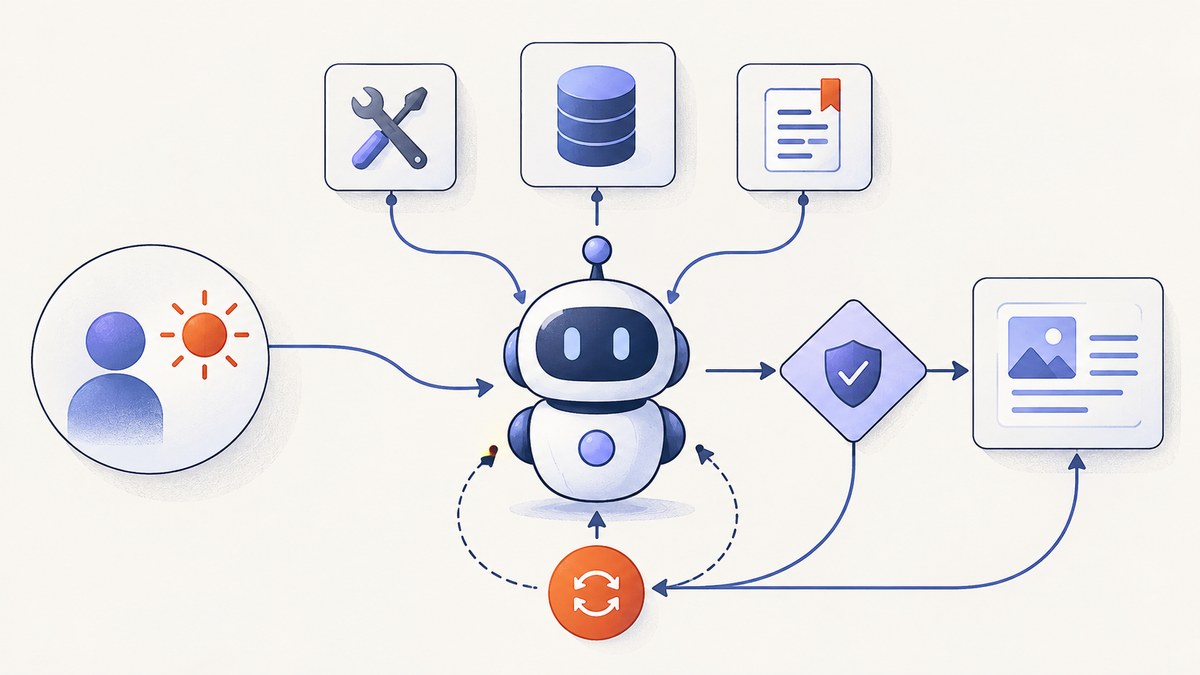
LLM agents are software systems in which a language model chooses actions, calls tools, observes results, and continues until it reaches a goal. A single prompt followed by one answer is usually an LLM application; an agent manages a multi-step task with some independence. OpenAI’s practical guide to building agents uses a similar distinction.
The safest way to build one is to start with a bounded task, add only the tools and context it needs, make the control flow explicit, require approval for consequential actions, and evaluate the complete trajectory rather than only the final text.
1. Define the task before choosing a framework
Write a one-sentence task specification before selecting a model or agent SDK:
- Goal: what outcome must be produced?
- Inputs: what information may the agent read?
- Authority: which systems may it access, and with which permissions?
- Success: how will a program or person verify the result?
- Failure cost: what happens if it is wrong or stops halfway?
Good first projects include answering support questions from a known knowledge base, researching a defined topic, drafting code changes, or reconciling structured back-office records. Avoid an unconstrained “general assistant” as a first production system: its success criteria and authority are difficult to test.
2. Start with the simplest architecture
Anthropic’s guide to effective agents recommends increasing complexity progressively. Begin with an augmented LLM: a model plus the required instructions, retrieval and tools. Add orchestration only when a simpler design cannot meet the requirement.

Direct model call
Use a direct call when the workflow is predictable and no tool selection is needed. This is often enough for classification, extraction and drafting.
Tool-using loop
An agent loop has four phases:
- Send the goal, context and available tool schemas to the model.
- If the model requests a tool, validate its arguments and execute it.
- Append the structured result to the conversation.
- Repeat until the model returns a final answer, a limit is reached, or an approval is required.
from dataclasses import dataclass
from typing import Any

@dataclass
class ToolResult:
    name: str
    data: dict[str, Any]

MAX_STEPS = 8

def run_agent(model, tools, user_goal):
    messages = [{"role": "user", "content": user_goal}]
    for step in range(MAX_STEPS):
        response = model.complete(messages=messages, tools=tools.schemas())
        if response.final_text is not None:
            return response.final_text

        call = response.tool_call
        tool = tools.get(call.name)
        if tool is None:
            raise ValueError(f"Unknown tool: {call.name}")
        arguments = tool.validate(call.arguments)
        result = tool.execute(arguments)
        messages.append({"role": "assistant", "tool_call": call.raw})
        messages.append({"role": "tool", "name": call.name, "content": result})

    raise RuntimeError("Agent reached its step limit")
The exact model SDK differs, but the invariants should remain: bounded steps, validated arguments, explicit tool results and a clear stop condition.
3. Select a control-flow pattern
| Pattern | Use it when | Main risk |
|---|---|---|
| Sequential | Steps are known and ordered | One failure can block later work |
| Routing | Requests belong to distinct specialist paths | Misclassification sends work to the wrong path |
| Parallel | Independent lookups can run together | Conflicting or incomplete results |
| Evaluator-optimizer | A draft can be checked and revised | Runaway revision cost |
| Autonomous loop | The next action cannot be known in advance | Loops, drift and unsafe actions |
Google’s Agent Development Kit documents sequential, parallel and loop workflow agents. Anthropic describes evaluator-optimizer systems for draft-and-review tasks. Make the transition between states observable so you can explain why an agent took an action.
4. Design tools as narrow, typed interfaces
A tool is an API contract, not a paragraph of instructions. Give it a specific name, a short description, a strict input schema and the smallest permission set possible.
{
  "name": "lookup_order",
  "description": "Read one order by its public order ID. Does not change data.",
  "input_schema": {
    "type": "object",
    "properties": {
      "order_id": {"type": "string", "pattern": "^ORD-[0-9]+$"}
    },
    "required": ["order_id"],
    "additionalProperties": false
  }
}
Prefer structured fields such as status, amount and next_action over unstructured tool prose. Separate read tools from write tools. Never let arbitrary text from a web page, email or retrieved document become an instruction to call a privileged tool. OpenAI’s agent safety guidance recommends structured outputs, isolation and approval gates for this reason.
Tool rules that prevent common failures
- Use idempotency keys for operations that may be retried.
- Set timeouts and return machine-readable error codes.
- Paginate large results and cap the number of records returned.
- Redact secrets and unnecessary personal data from tool output.
- Keep credentials outside prompts and model-visible messages.
5. Add state deliberately
Keep a short-lived run state containing the goal, completed steps, tool outputs needed for the next decision, approvals and error information. Store durable memory only when the product requirement demands it. A customer preference may belong in a database; an intermediate search result usually belongs only in the current run.
Use a run identifier and persist checkpoints before side effects. If a process crashes after charging a card but before recording success, the retry path must query the payment provider or use an idempotency key rather than charge again.
6. Require approval for consequential actions
Reading documentation is low risk. Sending an email, deleting data, purchasing something, changing production configuration or publishing content is consequential. Pause before those actions and show the user the exact operation, arguments and target.
def execute_with_approval(tool, args, user):
    if tool.risk in {"write", "external_message", "financial"}:
        approved = user.confirm({"tool": tool.name, "arguments": args})
        if not approved:
            return {"status": "cancelled", "reason": "user_denied"}
    return tool.execute(args)
Keep an emergency stop that cancels queued work, revoke credentials when necessary and log every approval decision. OpenAI’s safety guidance recommends keeping tool approvals enabled so users can review operations.
7. Evaluate the whole trajectory
A correct final answer can hide an unsafe or expensive path. Build evaluation cases that inspect:
- Whether the agent selected the right tool.
- Whether arguments matched the schema and user authority.
- Whether retrieved text was treated as data rather than instructions.
- Whether the agent recovered from timeouts and malformed results.
- Whether approvals occurred before side effects.
- Whether the final answer cites the evidence it used.
- Latency, token usage, tool calls and cost per run.
OpenAI’s evaluation documentation and Anthropic’s multi-turn evaluation guidance both emphasize testing interactions with tools and environments, not only single-turn outputs. Maintain a fixed regression set, adversarial cases and a small sample of anonymized production traces.
8. Secure the agent boundary
Prompt injection occurs when untrusted content attempts to override the agent’s instructions. Treat web pages, emails, documents and tool responses as untrusted data. Useful controls include:
- Input guardrails and jailbreak detection.
- PII filtering before data reaches the model.
- Structured extraction into a constrained schema.
- Isolation between browsing, planning and privileged execution.
- Least-privilege credentials scoped to one task.
- Human approval for writes and external communication.
- Explicit limits on steps, spend, tokens and wall-clock time.
9. A minimal production deployment shape
Separate the request API, agent runner, tool adapters and durable state store. Put long runs on a queue so a client timeout does not terminate the work. Emit a trace event for each model call, tool call, approval and state transition.
POST /runs
{
  "task": "Reconcile invoice INV-1042",
  "approval_mode": "required"
}

202 Accepted
{
  "run_id": "run_abc123",
  "status": "queued"
}
Workers should be restartable. Use exponential backoff for transient provider errors, circuit breakers for failing dependencies and a deterministic fallback for high-impact decisions. Roll back prompt, model and tool changes through versioned configuration.
10. Browser tools for agents
Some agents need visual evidence from a web page. A do-it-yourself implementation launches a browser, navigates to a URL, waits for a stable state, handles consent UI, captures an image and closes the browser.

import asyncio
from playwright.async_api import async_playwright

async def capture(url: str, output: str = "page.png"):
    async with async_playwright() as p:
        browser = await p.chromium.launch()
        page = await browser.new_page(viewport={"width": 1440, "height": 900}, device_scale_factor=2)
        await page.goto(url, wait_until="networkidle", timeout=60_000)
        await page.screenshot(path=output, full_page=True)
        await browser.close()

asyncio.run(capture("https://example.com"))
Production browser capture needs selectors for consent dialogs, popup hiding, retry logic, resource blocking, browser version management and enough isolation to prevent a visited page from reaching internal services. It also adds startup time and infrastructure cost.
Or skip the browser setup
ScreenshotNeo provides a website screenshot API and MCP server for agents. The request below returns a WebP image; see the API documentation for all options.
curl -G "https://api.screenshotneo.com/v1/shot" -d access_key=YOUR_API_KEY --data-urlencode url=https://stripe.com -o shot.webpimport requests
r = requests.get("https://api.screenshotneo.com/v1/shot", params={"access_key": "YOUR_API_KEY", "url": "https://stripe.com"}, timeout=90)
open("shot.webp", "wb").write(r.content)const q = new URLSearchParams({ access_key: 'YOUR_API_KEY', url: 'https://stripe.com' });
const res = await fetch(`https://api.screenshotneo.com/v1/shot?${q}`);Consent banners, newsletter popups and chat widgets are removed before the shot. Bot checks, blank pages and failed loads are never billed, and response headers report the page verdict and whether the request was billed. Its MCP server gives Claude, Cursor and other MCP clients take_screenshot, get_page_info and capture_pdf tools. The free plan includes 1,000 screenshots per month with no card; paid plans start at $5 for 3,000 shots. Create a free ScreenshotNeo account.
11. Performance, reliability and cost
- Latency: parallelize independent retrievals, stream intermediate status and avoid sending entire documents into every model call.
- Reliability: cap retries, make writes idempotent, checkpoint state and return partial progress when safe.
- Cost: record tokens and tool time per run; route simple steps to smaller models and reserve stronger models for ambiguous decisions.
- Browser work: cache stable captures, block unnecessary resources and use a chosen viewport consistently.
- Operations: alert on error rate, approval abandonment, step-limit hits, dependency timeouts and unusual spend.
12. Troubleshooting
The agent loops forever
Set a maximum step count and wall-clock deadline. Inspect the last tool result for an ambiguous success signal, then add an explicit completion field.
It calls the wrong tool
Narrow the tool descriptions, remove overlapping tools and add routing examples to evaluation cases. Require a typed intent before execution.
A tool receives invalid arguments
Validate against a strict schema, reject unknown fields and return a concise error the model can correct. Never execute partially parsed arguments.
It follows instructions from a web page
Wrap external content as untrusted data, isolate it from system instructions and extract only the fields needed for the next step.
Retries duplicate a side effect
Use an idempotency key, query the provider for the existing operation and checkpoint before and after the write.
Browser capture is blank or incomplete
Wait for a meaningful selector or network idle, increase the timeout, scroll to trigger lazy loading and check whether the page requires authentication or blocks automation.
Runs are too expensive
Measure each model and tool call, cap context growth, summarize completed work and parallelize independent calls. Move deterministic transformations out of the model.
FAQ
Do I need an agent framework?
No. A bounded loop around a model API and a few typed functions is often the best first implementation. Adopt a framework when you need reusable orchestration, tracing, persistence or deployment primitives.
Should every agent have memory?
No. Add durable memory only when it improves a defined user outcome and can be governed, corrected and deleted.
How many tools should an agent expose?
Expose the smallest set that can complete the task. Fewer, clearer tools improve selection and reduce the impact of prompt injection.
When should a human approve?
Require approval before financial actions, destructive changes, external messages, publication or any operation whose authority cannot be safely inferred.
Is OpenAI Agent Builder a good new dependency?
Check its current status before adopting it: OpenAI’s safety documentation says Agent Builder is scheduled to shut down on November 30, 2026.