Multimodal AI: Definition and How It Works
Learn what multimodal AI is, how models combine text, images, audio and video, where it works, and how to build reliable applications.
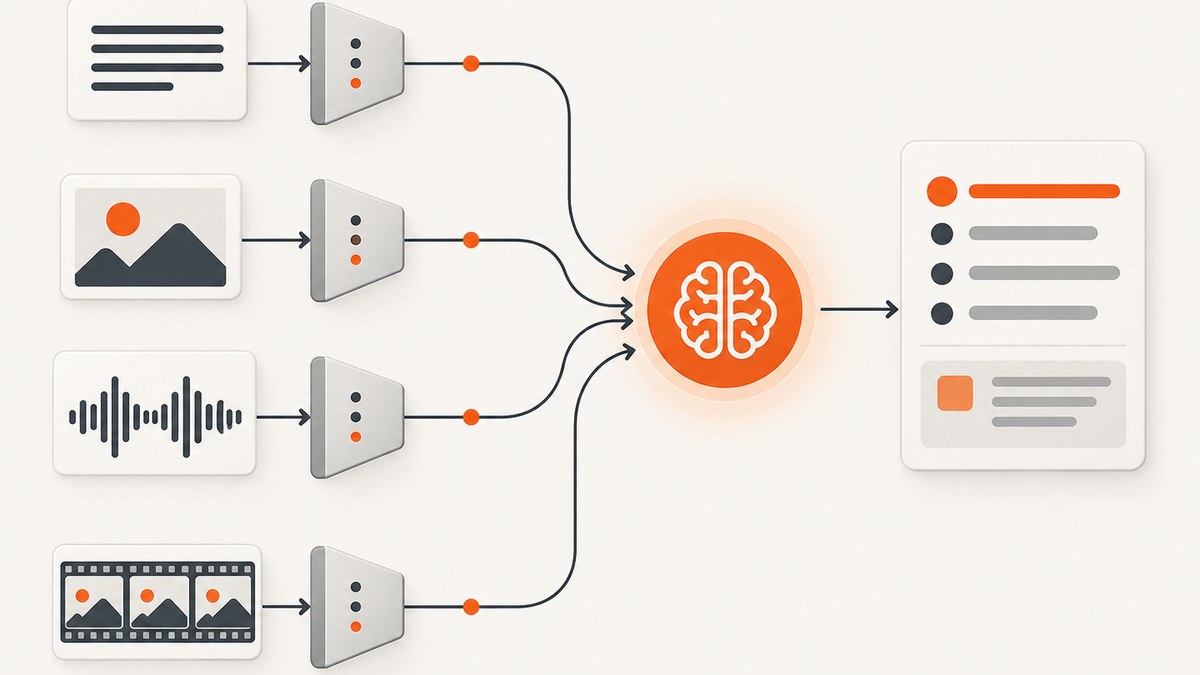
Multimodal AI is artificial intelligence that can process and relate more than one kind of data, such as text, images, audio, video, documents, code or sensor readings. A multimodal system can examine a photograph and answer a question about it, connect speech to events in a video, extract fields from a scanned receipt, or combine a product image with written instructions to produce a support response.
NIST defines a multimodal model as one that processes and relates information from multiple sensory modalities, while Stanford HAI describes systems that process, understand and generate multiple data types simultaneously. The important word is relate: the model must connect signals, rather than run unrelated single-purpose tools. [NIST glossary] [Stanford HAI]
What multimodal AI means
A modality is a type of information with its own structure. Text is represented as tokens, an image as pixels, audio as a waveform or spectrogram, and video as a time-ordered sequence of visual frames plus audio. Multimodal AI accepts two or more of these representations and performs a shared task such as classification, retrieval, question answering, summarization, generation or tool use.
| Modality | Typical input | Common tasks |
|---|---|---|
| Text | Prompts, documents, transcripts | Question answering, extraction, reasoning |
| Images | Photos, scans, charts, screenshots | OCR, captioning, visual question answering, chart interpretation |
| Audio | Speech, meetings, ambient sound | Transcription, speaker-aware summaries, event detection |
| Video | Frames plus an audio track | Temporal questions, event descriptions, timestamped search |
| Documents | PDFs, slides, spreadsheets | Layout-aware extraction and comparison |
| Code | Source files, diffs, notebooks | Explanation, transformation, bug analysis |
| Sensors | Telemetry, images, time series | Anomaly detection, forecasting, control |
Support is model-specific. A research system may accept and generate many modalities, while a production endpoint can expose only a subset. Check the exact model, API version, file limits, output types and streaming behavior before designing an integration.
How multimodal AI works
1. Capture and normalize inputs
Applications first collect media and convert it into a predictable form. Images may be decoded, resized and orientation-corrected. Audio can be resampled and split into segments. Video is sampled into frames and paired with its audio. Documents are parsed into text, pages, tables and layout coordinates. Metadata such as timestamps, language, camera position or user permissions should travel with the content.

Normalization controls cost and quality. An enormous image may contain no more useful information than a smaller one, while an aggressively compressed receipt can destroy characters needed for OCR. Video sampling deserves special care: Google documents that a default rate of one frame per second can miss rapid motion. [Google Gemini video documentation]
2. Create modality-specific representations
Encoders or tokenizers turn raw input into vectors or tokens. A text tokenizer splits language into model units. A vision encoder maps image patches into embeddings. An audio encoder represents speech and sound events; a video pipeline adds a time dimension. These representations preserve features useful for the task while making different data types available to a neural network.
Some systems use separate encoders trained for each modality. Others use a shared architecture that converts every input into a common token space. Either design can work; the practical difference is how well the system aligns detail, context length, latency and cost.
3. Align and fuse signals
Alignment teaches the model that pieces of different modalities refer to one another: a word can describe a region of an image, a spoken phrase can correspond to a video timestamp, and a table cell can relate to a sentence in a report. Fusion layers, cross-attention or a shared end-to-end network combine the representations. Training data commonly contains paired or associated text, images, video and audio. Meta describes this process as learning associations from large collections of words, images, videos and recordings. [Meta system card]
4. Reason, retrieve or decode an output
The fused representation is used for a task. The result might be a class label, an answer, a structured JSON record, a search result, a generated caption, an image, speech or a tool call. A decoder formats the output, while application code validates it and applies permissions, business rules and human review where needed.
OpenAI’s GPT-4o system card illustrates an end-to-end omni model: it accepts combinations of text, audio, image and video and can generate combinations of text, audio and image outputs. The capabilities exposed by a particular API endpoint can be narrower, so read the endpoint documentation rather than assuming the full research description applies everywhere. [OpenAI GPT-4o report] [GPT-4o API documentation]
Multimodal AI versus generative AI
These terms describe different dimensions. Multimodal describes the kinds of input and output a system can handle. Generative describes whether it creates new content. A multimodal model can classify an image without generating anything, and a generative model can be text-only. Many current systems are both: they accept text plus an image and generate an explanation, or accept video and produce a summary.
| Question | Multimodal | Generative |
|---|---|---|
| Primary concern | Multiple data types and their relationships | Creating a new response or artifact |
| Possible output | Label, search result, extraction or text | Text, image, audio, video or code |
| Overlap | A system can be both multimodal and generative | |
What can multimodal models do?
- Receipt extraction: send a receipt photograph and request merchant, date, tax and total as structured fields. Keep the original image and confidence or validation status for auditing.
- Chart explanation: provide a chart and a question such as “Which category changed most?” Ask the model to cite visible values and state uncertainty when labels are unreadable.
- Meeting processing: submit an audio recording for transcription, speaker-aware summarization and action-item extraction. Verify names and numbers against the recording.
- Video understanding: ask for events with timestamps. Increase frame coverage for quick actions and treat missing events as possible sampling failures.
- Document intelligence: combine page images, extracted text and layout coordinates to preserve tables, footnotes and reading order.
- Visual support: pair a product image with written troubleshooting steps to produce a response grounded in what is visible.
- Any-to-any generation: Hugging Face documents tasks such as text-to-image, audio-to-text, image captioning and video understanding. [Hugging Face tasks]
A small, runnable multimodal data pipeline
The following scripts prepare an image and text instruction as a portable JSON payload. They do not assume a particular vendor endpoint; send the resulting object to the multimodal API documented by your provider, with its authentication and media format requirements.
Python
import base64
import json
from pathlib import Path

image_path = Path("receipt.jpg")
encoded = base64.b64encode(image_path.read_bytes()).decode("ascii")
payload = {
    "input": [
        {"type": "text", "text": "Extract merchant, date, tax and total. Return JSON."},
        {"type": "image", "media_type": "image/jpeg", "data": encoded}
    ]
}
Path("multimodal-payload.json").write_text(json.dumps(payload, indent=2))
print("Wrote multimodal-payload.json")
Node.js
import { readFile, writeFile } from "node:fs/promises";

const image = (await readFile("receipt.jpg")).toString("base64");
const payload = {
  input: [
    { type: "text", text: "Extract merchant, date, tax and total. Return JSON." },
    { type: "image", media_type: "image/jpeg", data: image }
  ]
};
await writeFile("multimodal-payload.json", JSON.stringify(payload, null, 2));
console.log("Wrote multimodal-payload.json");
cURL pattern
curl -X POST "$MULTIMODAL_ENDPOINT" \
  -H "Authorization: Bearer $API_KEY" \
  -H "Content-Type: application/json" \
  --data-binary @multimodal-payload.json
Replace MULTIMODAL_ENDPOINT and the payload schema with the provider’s documented values. Validate generated JSON against a schema, cap upload sizes, redact sensitive fields where possible, and retain a link to the source media for review.
Using screenshots as a visual input
Web screenshots are one practical source of image input for multimodal agents. You can capture a page yourself with a browser, wait for the relevant state, remove overlays, and pass the resulting image to a model. For production jobs, make the capture deterministic: choose a viewport, wait for a selector or network idle, set a timezone and language, and record the URL and timestamp.
Or skip the browser setup
ScreenshotNeo provides a website screenshot API and MCP server. It accepts one GET request and returns PNG, JPEG, WebP or PDF. Cookie and consent banners are accepted and 60+ known consent platforms, newsletter popups and chat widgets are removed before capture; each step can be disabled. Bot checks, blank pages, timeouts, failed loads and cache hits are not billed, and response headers identify the page verdict and billing status.
See the ScreenshotNeo API documentation for all options. A basic WebP capture:
cURL
curl -G "https://api.screenshotneo.com/v1/shot" -d access_key=YOUR_API_KEY --data-urlencode url=https://stripe.com -o shot.webpPython
import requests
r = requests.get("https://api.screenshotneo.com/v1/shot", params={"access_key": "YOUR_API_KEY", "url": "https://stripe.com"}, timeout=90)
open("shot.webp", "wb").write(r.content)
Node.js
const q = new URLSearchParams({ access_key: 'YOUR_API_KEY', url: 'https://stripe.com' });
const res = await fetch(`https://api.screenshotneo.com/v1/shot?${q}`);
ScreenshotNeo also supports full-page captures with lazy images loaded, CSS-element capture, dark mode, 12 device presets or custom viewports, retina scale, PDF paper settings and page ranges, HTML/CSS rendering, custom JavaScript and CSS, clicks, selector waits, delays, network-idle waits, request blocking, headers, cookies, user agents, Authorization, timezone, geolocation, transparent backgrounds, resizing, selectable cache TTLs, signed image links, asynchronous jobs with signed webhooks, bulk capture of 100 URLs per call, a usage API and an OpenAPI specification. An MCP server exposes take_screenshot, get_page_info and capture_pdf for Claude, Cursor and other MCP clients.
There are 1,000 free shots per month with no card. Paid plans start at $5 for 3,000 shots; every feature is available on every plan. Create a free ScreenshotNeo account to try it.
Designing reliable multimodal applications
Quality controls
- Preserve source resolution until the last responsible step, especially for small text.
- Ask for evidence: coordinates, timestamps, quoted text or a list of visible fields.
- Use schemas and reject malformed output instead of silently accepting it.
- Run representative evaluations for glare, blur, accents, handwriting, charts, fast motion and uncommon layouts.
- Route low-confidence or high-impact decisions to a human.
Latency, context and cost
Media increases processing time and context usage. Resize images to the smallest resolution that preserves required detail, sample video according to motion speed, chunk long recordings, and cache immutable inputs. Batch independent items when the API supports it. Compare total cost, including storage, transcription, retries and human review. OpenAI reported GPT-4o audio response latency as low as 232 milliseconds and an average of 320 milliseconds in its 2024 report, but these figures are model- and path-specific rather than a guarantee for every multimodal endpoint. [OpenAI report]
Privacy and governance
Images, voices, documents and sensor data may contain personal or confidential information. Define retention, access, deletion and regional-processing requirements before sending data. Log model version, prompt, input identifiers and validation outcomes without copying sensitive media into ordinary application logs. Test for bias, offensive output, hallucination, OCR errors and weak temporal grounding. Generative models can produce inaccurate, biased or offensive results, as Google warns in its video documentation.
Troubleshooting
| Symptom | Likely cause | Fix |
|---|---|---|
| Text in an image is wrong | Low resolution, blur or glare | Capture a sharper source, crop the region and request quoted evidence. |
| Video event is missing | Frames sampled too sparsely | Increase sampling around the relevant interval and include audio. |
| Output JSON cannot be parsed | Free-form generation | Use the endpoint’s structured-output mode if available and validate against a schema. |
| Model ignores one input | Unsupported modality or malformed content part | Check the exact endpoint’s accepted types and payload format. |
| Latency or cost spikes | Oversized media, long context or repeated retries | Resize, chunk, cache and use bounded exponential backoff. |
| Screenshot contains a popup | Overlay appeared after initial load | Use a selector wait or click, hide the selector, or enable ScreenshotNeo’s consent and popup removal. |
FAQ
Is multimodal AI the same as computer vision?
No. Computer vision focuses on visual data. Multimodal AI relates vision to other modalities such as language, audio or video.
Does multimodal mean the model can generate every media type?
No. Input and output combinations are specific to each model and endpoint.
Why can a model describe an image but misread a number?
Recognition quality depends on resolution, contrast, typography, training and context. Treat precise extraction as a task requiring validation.
Can I use a screenshot as part of an AI agent workflow?
Yes. Capture a deterministic image, pass it with an instruction, and require structured, reviewable results. ScreenshotNeo’s MCP tools let compatible agents request screenshots directly.
What should I evaluate before choosing a model?
Check modality coverage, file and context limits, quality on your data, latency, pricing, streaming and tool support, privacy controls, retention and auditability.