Why You Can’t Just Run Chromium in a Sandbox
Chromium has its own sandbox. Learn why containers can break it, why --no-sandbox is risky, and how to troubleshoot production launches.

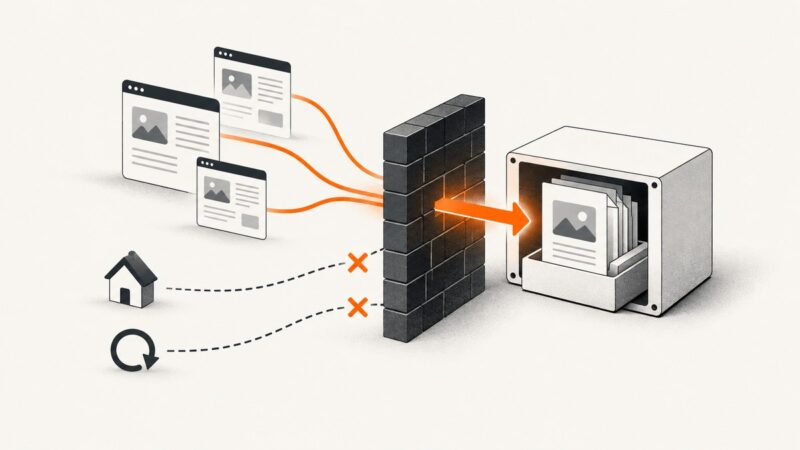
Short answer: Chromium already runs web content in a multi-process sandbox. When you place Chromium inside a container or restricted host, the outer layer can block the kernel features Chromium needs to create its inner renderer sandbox. Chromium then fails with errors such as No usable sandbox!. Adding --no-sandbox may make the process start, but it removes an important security boundary and is strongly discouraged for untrusted pages.
The reliable fix is to configure the host, container runtime and browser build so Chromium can use a supported sandbox mechanism. This article explains the two layers, the startup failure, safe deployment choices, diagnostics, and alternatives when you only need a clean screenshot.
1. Chromium already contains a sandbox
Chromium is not one process with unrestricted access to the machine. Its browser process coordinates work while renderer processes parse HTML, execute JavaScript and paint pages. Renderer code handles untrusted input, so Chromium restricts those processes and mediates access to resources through inter-process communication.
The Chromium multi-process architecture documentation describes why this split matters: renderers do not need direct access to your disk, network or devices. The browser process performs privileged operations on their behalf. That boundary limits the damage a compromised renderer can cause. See the Chromium multi-process architecture document.
On Linux, Chromium can combine several mechanisms, including a setuid helper, user namespaces and seccomp-BPF. Which mechanism is selected depends on the kernel, process privileges, browser build and distribution policy. The Linux sandbox design notes document those dependencies.
2. Why an outer sandbox can break the inner one
A container, virtual machine or service sandbox and Chromium’s renderer sandbox solve different problems. The outer environment controls what the Chromium process may ask the host kernel to do. Chromium then attempts to create narrower restrictions for child renderer processes.
For example, Chromium may need to create a user namespace or apply a seccomp filter. A container profile, Linux security policy, disabled namespace feature or privilege setting can deny that operation. Chromium cannot complete its expected setup and exits before opening a page. The container is therefore not automatically “more sandboxed Chromium”; it can be an environment that prevents Chromium’s own sandbox from initializing.
The exact failure depends on:
- Kernel features and whether user namespaces are enabled.
- Container runtime defaults and seccomp or AppArmor/SELinux policy.
- Whether the process runs as root or an unprivileged user.
- The Chromium or Chrome for Testing build and its sandbox helper.
- Distribution hardening choices and filesystem permissions.
Puppeteer’s troubleshooting guide calls out this situation with the diagnostic phrase No usable sandbox!. It also notes that host configuration can prevent Chrome for Testing from using user namespaces. Treat the message as an environment diagnosis, not as proof that Chromium itself is defective. Read the current Puppeteer troubleshooting guidance for your browser and platform.
3. What --no-sandbox changes
The flag --no-sandbox tells Chromium to launch without its sandbox protections. It can hide the startup error, but it does not repair namespace support, seccomp policy or container configuration. Renderer processes then have a much weaker boundary from the browser process and host.
That matters whenever the page is not completely trusted. A renderer processes JavaScript, images, fonts, browser APIs and data supplied by a remote site. Chromium’s sandbox is designed to limit the impact of a renderer compromise, including access to local resources. Removing it turns a host-compatibility workaround into a security decision.
Puppeteer’s documentation permits disabling the sandbox only for content the operator absolutely trusts and labels the practice strongly discouraged. Do not copy a random Dockerfile that adds --no-sandbox into a production crawler, test farm or screenshot service without documenting the resulting boundary.
4. A practical troubleshooting workflow
- Capture the complete launch log. Preserve Chromium’s stderr, the exact command line, browser version, kernel version and container runtime. The same error string can have different causes.
- Confirm the process user. Run Chromium as a dedicated non-root user where your deployment permits it. Root execution often changes which sandbox path is available and makes a failure harder to reason about.
- Check namespace support. Verify that the host kernel and its security policy allow the namespace operations required by your Chromium build. A container image cannot add a kernel feature that the host has disabled.
- Inspect runtime profiles. Review seccomp, AppArmor or SELinux denials and the container runtime’s default restrictions. Look for denied clone, unshare, namespace or sandbox-helper operations.
- Verify the browser installation. Ensure the sandbox helper shipped with the browser has the expected owner and permissions, and that the executable is not being copied into a filesystem mounted with incompatible options.
- Test outside the wrapper. Launch the same browser build under the host’s normal service account. If it works there, compare the container policy and mounts rather than changing browser flags first.
- Retest with a minimal page. Use a local static page to separate browser startup from DNS, TLS, proxy and page-script failures.
Common errors and fixes
| Error or symptom | Likely cause | Safer next step |
|---|---|---|
No usable sandbox! |
Host policy or kernel prevents Chromium from selecting a sandbox mechanism. | Check user namespaces, sandbox helper permissions and runtime security profiles; run as a non-root user. |
| Browser exits immediately in a container | Missing shared libraries, incompatible mounts or denied syscalls. | Read stderr and audit logs, then compare the image with the browser’s supported dependencies. |
| Works on a VM but not in CI | CI runner applies a stricter seccomp profile or disables namespaces. | Review runner policy and request a documented profile change that preserves Chromium’s sandbox. |
| Sandbox helper permission error | File ownership or mode changed during image construction. | Install the distribution package or follow the browser project’s documented installation procedure. |
| Launch succeeds, navigation fails | Proxy, DNS, certificate, timeout or page-level issue rather than sandbox startup. | Test network access separately and collect browser console and network diagnostics. |
| Only root launch fails | Root changes sandbox requirements and available user-namespace paths. | Use a dedicated unprivileged account and least-privilege filesystem access. |
5. Deployment approaches and their trade-offs
There is no universal container recipe for every Linux distribution and Chromium version. Compare an approach against host compatibility, isolation, privileges and operational constraints.
Unprivileged Chromium in a compatible container
Run a dedicated browser user, retain the container’s default restrictions, and verify that the host allows the namespace and seccomp operations Chromium needs. This usually gives the clearest separation between application files and the browser process while preserving the browser sandbox.
Host-level service with Chromium’s sandbox
A service manager can run Chromium directly on a host with a known kernel and policy. You still need filesystem, network and account restrictions, but removing one container layer can make the browser sandbox easier to configure and diagnose.
Privileged or sandbox-disabled containers
Granting broad privileges or using --no-sandbox may unblock a failing build, but it weakens the security model. If a temporary diagnostic requires this, isolate the workload, use only trusted pages, record the exception and return to a supported sandbox configuration before handling untrusted content.
6. Defense in depth: what each layer covers
Chromium’s renderer sandbox is one layer, not a complete host security strategy. Site Isolation adds process-level separation between sites and helps contain a compromised renderer. The browser process and the IPC interfaces through which renderers request resources remain part of the security boundary.
An outer container can limit filesystem, process and network access around the browser. It does not replace Chromium’s internal renderer restrictions. Conversely, a correctly configured Chromium sandbox does not mean the host needs no account, network or filesystem controls. Keep both layers, and make their assumptions compatible.
The Chromium security documentation summarizes the engineering reality: rendering engines are difficult to make perfectly secure, so isolation and privilege reduction are used together. Read the Chromium security documentation and the Site Isolation design document when selecting controls for your threat model.
7. Performance, reliability and cost considerations
- Startup: Browser launch failures are binary; retries will not fix a denied namespace. Validate the environment at deployment time and keep a health check that launches the exact production browser build.
- Concurrency: More renderer processes increase memory and process pressure. Set concurrency from observed host limits, and monitor crashes, OOM kills and navigation timeouts.
- Reliability: Record browser version, kernel, image digest and security profile with each failure. This makes a policy change distinguishable from a page regression.
- Security: Avoid broad privileges as a performance shortcut. A faster launch with the sandbox disabled increases the impact of a compromised page.
- Cost: Self-hosting means paying for compute, browser maintenance, queueing and incident response. A managed screenshot API can move those operational tasks out of your service, but you should still handle timeouts, retries and result validation.
8. Or skip the browser setup
If your goal is a screenshot rather than browser infrastructure, ScreenshotNeo provides a website screenshot API. It runs the capture workflow for you and returns PNG, JPEG, WebP or PDF from one GET request. Before capture, it accepts cookie or consent banners and removes more than 60 known consent platforms, newsletter popups and chat widgets; each step can be turned off.


Only clean shots are billed. Bot checks or CAPTCHAs, blank pages, timeouts, failed loads and cache hits cost nothing, and the response identifies the result with X-Page-Verdict and X-Billed headers. ScreenshotNeo also provides an MCP server with take_screenshot, get_page_info and capture_pdf tools for Claude, Cursor and other MCP clients.
See the ScreenshotNeo API documentation for all options. These runnable examples capture Stripe; replace the URL with your target and keep your access key secret.
cURL
curl -G "https://api.screenshotneo.com/v1/shot" \
  -d access_key=YOUR_API_KEY \
  --data-urlencode url=https://stripe.com \
  -o shot.webp
Python
import requests

r = requests.get(
    "https://api.screenshotneo.com/v1/shot",
    params={"access_key": "YOUR_API_KEY", "url": "https://stripe.com"},
    timeout=90,
)
r.raise_for_status()
open("shot.webp", "wb").write(r.content)
Node.js
const q = new URLSearchParams({ access_key: 'YOUR_API_KEY', url: 'https://stripe.com' });
const res = await fetch(`https://api.screenshotneo.com/v1/shot?${q}`);
if (!res.ok) throw new Error(`Screenshot failed: ${res.status}`);
const fs = await import('node:fs/promises');
await fs.writeFile('shot.webp', Buffer.from(await res.arrayBuffer()));
Options for browser-like captures
- Full-page capture loads lazy images; you can capture one element by CSS selector instead.
- Choose dark mode, a device preset, any viewport and a retina scale.
- Use custom CSS or JavaScript, click an element, hide selectors, or wait for a selector, delay or network idle.
- Block ads, trackers, requests or resource types; provide headers, cookies, a user agent or Authorization.
- Set timezone and geolocation, use a transparent background, resize images and cache with a TTL you choose.
- Generate PDFs with paper size, margins, landscape mode and page ranges.
- Use signed links for public image tags, asynchronous jobs with signed webhooks, bulk capture for up to 100 URLs per call and the usage API.
Free accounts include 1,000 screenshots per month with no card. Paid plans start at $5 for 3,000 shots; yearly billing gives two months free, and every feature is available on every plan. Create a free ScreenshotNeo account.
9. FAQ
Does running Chromium in Docker automatically sandbox it?
No. Docker is an outer boundary. Chromium still needs the host kernel and runtime policy to permit its own sandbox mechanisms.
Is --no-sandbox ever acceptable?
Only for tightly controlled, trusted content and a documented exception. It is not a general production fix for a container launch failure.
Why does the same image work on two hosts?
Kernel settings, namespace availability and security profiles belong partly to the host and runtime, so identical images can have different capabilities.
Can a screenshot API remove all sandbox concerns?
It removes the need for your service to operate a browser process, but you should still protect API keys, validate URLs and handle network failures according to the provider’s documentation.
What should I collect before opening an issue?
Include the browser version, launch arguments, process user, kernel and distribution, container runtime, complete stderr, security-profile denials and a minimal reproducible page.