Data Processing and Validation for Web Scraping
Build a reliable scraping pipeline that normalizes, validates, deduplicates, stores, and monitors records without losing source context.

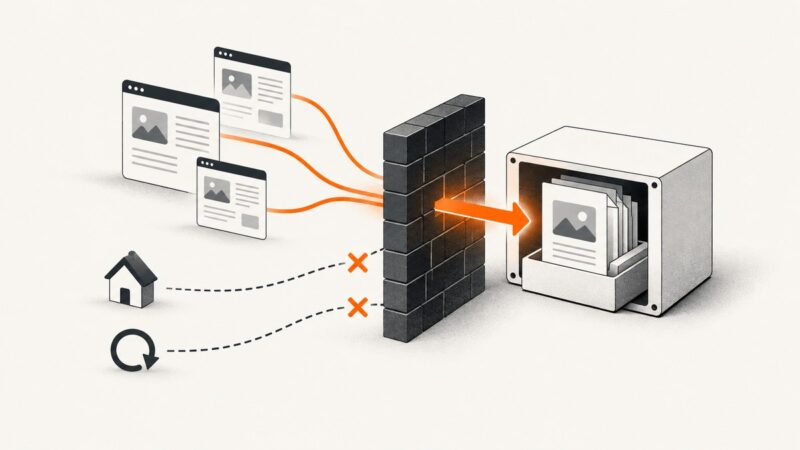
Direct answer: Treat scraping as two separate jobs. A spider or fetcher extracts candidate values from a response; a processing pipeline then normalizes those values, validates their types and business rules, removes duplicates, records quality metrics, and exports only accepted records. Keep the original response values and crawl metadata when you may need to audit or reprocess a record.
This separation is the practical model used by Scrapy. Spiders parse responses with CSS or XPath selectors and yield key-value items. Item pipelines receive those items in sequence, where they can clean fields, check required values, drop invalid items, detect duplicates, and persist data. See the Scrapy overview, Scrapy building blocks, and item pipeline documentation.
1. Define the record before writing selectors
Start with a written contract for every output item. For each field, specify whether it is required, its type, its canonical format or unit, and how it contributes to identity. This prevents a selector that happens to return text from being mistaken for a valid value.
| Field | Rule | Example |
|---|---|---|
| source_url | Required absolute URL | https://example.com/products/42 |
| product_id | Required stable identity key | 42 |
| name | Required, trimmed Unicode text | Wireless keyboard |
| price | Required non-negative decimal | 39.99 |
| currency | Three-letter code | USD |
| captured_at | UTC timestamp | 2026-09-29T06:00:00Z |
Keep optional fields explicitly nullable. Do not use an empty string, zero, and missing value interchangeably: each can mean something different to downstream users.
2. Extract candidate values
A spider should focus on site-specific extraction. The following complete example yields a structured item and leaves cleanup and validation to pipelines.
import scrapy

class ProductSpider(scrapy.Spider):
    name = "products"
    start_urls = ["https://example.com/catalog"]

    def parse(self, response):
        for card in response.css("article.product"):
            detail_url = response.urljoin(card.css("a::attr(href)").get())
            yield {
                "source_url": detail_url,
                "product_id": card.css("::attr(data-product-id)").get(),
                "name": card.css("h2::text").get(),
                "price_raw": card.css(".price::text").get(),
                "currency_raw": card.css(".currency::text").get(),
                "source_name_raw": card.css("h2::text").get(),
            }
Extraction success is not validation success. A changed class name can return None; a price selector can return promotional text; and a page can contain a value in a different currency. Preserve raw fields until your rules have produced canonical fields.
3. Normalize without erasing meaning
Normalization makes equivalent values comparable. Typical deterministic transformations include trimming surrounding whitespace, collapsing repeated internal whitespace, standardizing Unicode where appropriate, parsing dates into UTC, converting decimal separators, and converting measurements into one documented unit.

Do not silently discard distinctions. For example, “1,000” may mean one thousand or one point zero depending on locale. Keep price_raw and currency_raw for auditability, and fail or review ambiguous values instead of guessing.
import re
from decimal import Decimal, InvalidOperation
from itemadapter import ItemAdapter

class NormalizePipeline:
    def process_item(self, item, spider):
        data = ItemAdapter(item)

        for field in ("name", "source_name_raw", "currency_raw"):
            if data.get(field) is not None:
                data[field] = re.sub(r"\\s+", " ", str(data[field])).strip()

        raw_price = data.get("price_raw")
        if raw_price:
            # This rule accepts a dot decimal separator; localize explicitly
            # if the source uses another convention.
            cleaned = re.sub(r"[^0-9.-]", "", raw_price)
            try:
                data["price"] = Decimal(cleaned)
            except InvalidOperation:
                data["price"] = None

        data["name"] = data.get("source_name_raw")
        data["currency"] = (data.get("currency_raw") or "").upper() or None
        return item
4. Validate required fields and domain rules
Validation should answer two questions: is the value present and correctly typed, and is it valid for this dataset? Decide in advance whether an invalid item is rejected, repaired by a documented transformation, or sent to a review queue. Scrapy pipelines can raise DropItem to stop an item from reaching later stages.
from scrapy.exceptions import DropItem
from itemadapter import ItemAdapter
from decimal import Decimal
from urllib.parse import urlparse

class ValidatePipeline:
    required = ("source_url", "product_id", "name", "price", "currency")
    currencies = {"USD", "EUR", "GBP"}

    def process_item(self, item, spider):
        data = ItemAdapter(item)
        missing = [f for f in self.required if data.get(f) in (None, "")]
        if missing:
            raise DropItem(f"missing fields: {missing}")

        if not urlparse(str(data["source_url"])).scheme:
            raise DropItem("source_url is not absolute")
        if not isinstance(data["price"], Decimal) or data["price"] < 0:
            raise DropItem("price must be a non-negative decimal")
        if data["currency"] not in self.currencies:
            raise DropItem("unsupported currency")
        return item
Track why records fail. A rejection counter grouped by field and reason tells you whether the source changed, a parser is too strict, or the source contains genuinely incomplete data. Do not establish universal pass-rate thresholds: choose thresholds for your project and alert on changes from its normal baseline.
5. Remove duplicates with a stable key
Choose identity deliberately. A stable source ID is preferable to comparing every field, because prices and descriptions can change while the record remains the same. If no ID exists, derive a documented key from a canonical URL or a carefully chosen field combination.
from scrapy.exceptions import DropItem
from itemadapter import ItemAdapter

class DuplicatePipeline:
    def open_spider(self, spider):
        self.seen = set()

    def process_item(self, item, spider):
        data = ItemAdapter(item)
        key = str(data["product_id"])
        if key in self.seen:
            raise DropItem(f"duplicate product_id: {key}")
        self.seen.add(key)
        return item
For a distributed or restartable crawl, an in-memory set is insufficient. Put a unique constraint on the identity key in your database, or use a durable key-value store. Decide whether a collision should keep the first item, update an existing row, or create a versioned history record.
6. Export or store accepted items
Scrapy feed exports support JSON, CSV, and XML for straightforward output. A custom pipeline is better when you need transactions, upserts, relational constraints, or a database. Store source_url, crawl timestamp, parser version, and raw fields alongside canonical values when diagnosis and reprocessing matter.
# settings.py
ITEM_PIPELINES = {
    "myproject.pipelines.NormalizePipeline": 100,
    "myproject.pipelines.ValidatePipeline": 200,
    "myproject.pipelines.DuplicatePipeline": 300,
}
FEEDS = {
    "output/products.json": {
        "format": "json",
        "encoding": "utf8",
        "indent": 2,
    }
}
For database writes, make the operation idempotent: retrying the same crawl should not create unintended duplicates. Commit in sensible batches, handle connection failures, and record the crawl run ID so an operator can trace every row back to its source run.
How do I validate scraped data?
Use layered checks in this order:
- Presence: required fields are not null or blank.
- Type: numbers parse as numbers, dates parse under the documented format, and URLs are absolute where required.
- Domain: ranges, enumerations, currency codes, and relationships are valid.
- Cross-field consistency: an “on sale” flag has a sale price, or an end date is not before a start date.
- Provenance: retain source URL, timestamp, and raw value when a reviewer may need evidence.
Reject records that cannot be repaired safely. Send ambiguous records to review with the raw payload and a reason rather than silently coercing them.
How do I clean data after web scraping?
Put cleanup in reusable pipelines, after extraction. Centralize whitespace, Unicode, date, currency, and unit rules so every spider produces the same shape. Make transformations deterministic and covered by representative fixtures. Preserve raw values if a transformation could be disputed, and version the rules when changing them.
How do I remove duplicates from scraped data?
Define a key first, then enforce it at the processing and storage layers. A spider may encounter the same URL through multiple links, and two pages may share identical text while representing different entities. Use a stable source ID where available, a canonicalized URL where appropriate, and a database uniqueness constraint for final protection.

How do I store scraped data?
Choose feed exports for files that another system can ingest directly. Choose a database pipeline for upserts, relationships, constraints, and incremental crawls. Store both canonical fields and enough crawl context to explain where a value came from. Keep rejected records separately when they are useful for parser maintenance or human review.
7. Crawl controls and robots.txt
Robots.txt is a crawler coordination protocol, not authentication. RFC 9309 states: “These rules are not a form of access authorization.” Follow successfully retrieved and parseable rules, and consult the RFC for unavailable, unreachable, caching, and parsing edge cases rather than applying one blanket rule. The specification includes a 500 KiB minimum parsing limit and guidance around caching; these are protocol details, not performance benchmarks. Read the IETF RFC 9309.
Control load with Scrapy’s download delay, per-domain concurrency settings, and AutoThrottle. These mechanisms help you implement a considerate request policy, but no source in this guide establishes a universally safe request rate. Check a site’s terms, contact policy, and operational limits, then monitor errors and latency.
8. Monitor quality and reliability
- Count fetched pages, extracted items, accepted items, rejected items by reason, and duplicates per crawl run.
- Compare missing-field and type-error rates with your project’s historical baseline.
- Log URL, response status, parser version, and a correlation or crawl-run ID.
- Retry transient network failures with bounded backoff; do not retry deterministic validation failures.
- Use checkpoints or idempotent writes so a process restart does not corrupt output.
- Alert on schema drift, such as a sudden increase in missing names or prices.
Performance usually improves when you avoid repeated parsing, batch database writes, limit retained raw payloads, and use concurrency that respects the target site. Measure your own crawl because page size, rendering requirements, and storage latency dominate any generic estimate.
Or skip the browser setup
If your workflow needs screenshots or rendered page evidence alongside extracted records, ScreenshotNeo provides a single GET request for PNG, JPEG, WebP, or PDF output. It accepts cookie and consent banners like a visitor, then removes more than 60 known consent platforms, newsletter popups, and chat widgets before capture; each cleanup step can be turned off. Bot checks or CAPTCHAs, blank pages, timeouts, failed loads, and cache hits are not billed, and the response identifies the result with X-Page-Verdict and X-Billed headers.
See the ScreenshotNeo API documentation for all options. This call captures a clean WebP file:
curl -G "https://api.screenshotneo.com/v1/shot" -d access_key=YOUR_API_KEY --data-urlencode url=https://stripe.com -o shot.webpimport requests
r = requests.get("https://api.screenshotneo.com/v1/shot", params={"access_key": "YOUR_API_KEY", "url": "https://stripe.com"}, timeout=90)
open("shot.webp", "wb").write(r.content)const q = new URLSearchParams({ access_key: 'YOUR_API_KEY', url: 'https://stripe.com' });
const res = await fetch(`https://api.screenshotneo.com/v1/shot?${q}`);Options include full-page capture with lazy images loaded, CSS-element capture, dark mode, device presets or custom viewports, retina scale, custom CSS and JavaScript, click actions, selector hiding, selector or network-idle waits, ad and tracker blocking, custom headers, cookies, user agents, authorization, timezone, geolocation, transparent backgrounds, resizing, configurable caching, signed image links, asynchronous jobs with signed webhooks, bulk capture of up to 100 URLs per call, usage reporting, and PDF settings such as paper size, margins, landscape, and page ranges. Parameter names used by other screenshot APIs also work, which can simplify migration.
An MCP server exposes take_screenshot, get_page_info, and capture_pdf to Claude, Cursor, and other MCP clients. Free accounts include 1,000 screenshots each month without a card; paid plans start at $5 for 3,000 shots. Create a free ScreenshotNeo account.
9. Troubleshooting checklist
| Symptom | Likely cause | Fix |
|---|---|---|
| Many missing fields | Selector or page template changed | Save sample responses, inspect selectors, add schema-drift metrics, and deploy a versioned parser. |
| Numbers fail validation | Locale, currency, or promotional text | Retain raw text, parse with an explicit locale rule, and reject ambiguous values. |
| Duplicates after restart | In-memory identity set was lost | Use a durable store or database unique constraint and idempotent upserts. |
| Database contains partial runs | Writes were not transactional | Batch commits, use transactions, and tag rows with a crawl-run ID. |
| Request volume is too high | Concurrency or delay is unsuitable | Reduce per-domain concurrency, add delay or AutoThrottle, and follow site guidance. |
| Screenshot is blank or blocked | Bot check, timeout, or page failure | Inspect response verdict headers; adjust waits, headers, or blocking rules, or retain the failed result for review. |
FAQ
Should validation happen in the spider?
Keep site-specific extraction in the spider and reusable validation in pipelines. A small extraction guard is fine, but central rules are easier to reuse and test.
Should rejected records be deleted?
Keep them in a quarantine output when they may explain a source change or support manual review. Include the rejection reason and crawl-run ID.
Is robots.txt permission to scrape?
No. It communicates crawler rules and is not access authorization. Also consider terms, authentication requirements, privacy obligations, and the site’s operational limits.
When should I retain raw HTML?
Retain it when auditability, parser reprocessing, or dispute resolution matters. Apply your retention and privacy policies, and avoid storing unnecessary personal data.