How to Set a Timeout for PDF Generation in Java
Use timed futures to bound PDF generation waits in Java, handle cancellation correctly, and protect PDFBox workloads with resource limits.

Use an application-level deadline around the PDF generation task. In Java 8, submit the work to an ExecutorService and call Future.get(timeout, unit). If the deadline expires, cancel the future with cancel(true), report a timeout, and clean up the output. In Java 9 and later, CompletableFuture.orTimeout(timeout, unit) can make the future fail with a timeout, but it still does not forcibly stop the supplier. For untrusted or expensive documents, combine the Java timeout with bounded queues, concurrency limits, memory controls, and process or container isolation.
PDFBox does not provide one universal “generation timeout” switch. Its security guidance recommends timeouts together with memory limits, resource controls, and sandboxing when processing untrusted documents at scale. A Java thread timeout limits how long a caller waits; it is not automatically a hard stop for native code, blocking I/O, or code that ignores interruption.
1. The basic timeout pattern
Keep document creation inside a task, wait for a bounded period, and close the document in the task that owns it. The following pattern is suitable for a Java 8 service and uses a placeholder createPdf method that you replace with your PDF library code.
import java.nio.file.Path;
import java.util.concurrent.ExecutorService;
import java.util.concurrent.Executors;
import java.util.concurrent.Future;
import java.util.concurrent.TimeUnit;
import java.util.concurrent.TimeoutException;

public final class PdfTimeouts {
    public static Path generateWithTimeout(Path outputPath)
            throws Exception {
        ExecutorService executor = Executors.newSingleThreadExecutor();
        Future<Path> generation = executor.submit(() -> {
            // Open/create the PDF document inside this task.
            // Close it with try-with-resources in createPdf.
            return createPdf(outputPath);
        });

        try {
            return generation.get(30, TimeUnit.SECONDS);
        } catch (TimeoutException e) {
            generation.cancel(true); // requests interruption; not a hard kill
            throw new PdfGenerationTimeoutException(
                    "PDF generation exceeded 30 seconds", e);
        } finally {
            executor.shutdown();
        }
    }

    private static Path createPdf(Path outputPath) {
        // Generate and save the PDF with your chosen library.
        return outputPath;
    }

    public static final class PdfGenerationTimeoutException
            extends Exception {
        public PdfGenerationTimeoutException(String message, Throwable cause) {
            super(message, cause);
        }
    }
}
In a server, do not create a new executor for every request. Use a managed, bounded executor and decide what happens when its queue is full. The per-call example is intentionally small so the timeout flow is visible.
2. Java 8: bound the caller with Future.get
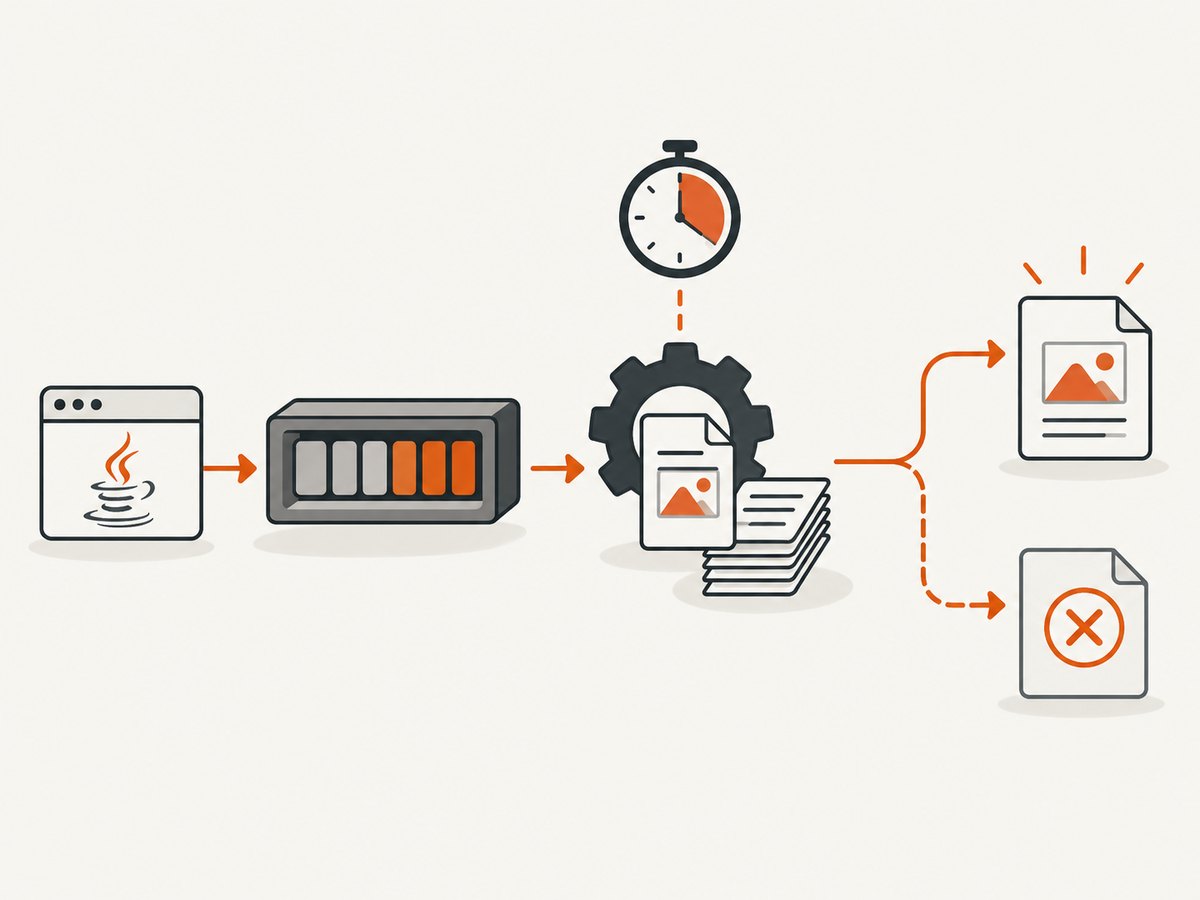
Future.get(30, TimeUnit.SECONDS) blocks the calling thread for at most 30 seconds. A successful task returns its output path. A deadline produces TimeoutException; an underlying failure produces ExecutionException; an interrupted caller produces InterruptedException.
ExecutorService executor = Executors.newFixedThreadPool(4);
Future<Path> future = executor.submit(() -> createPdf(output));

try {
    Path pdf = future.get(30, TimeUnit.SECONDS);
    return pdf;
} catch (TimeoutException timeout) {
    future.cancel(true);
    deletePartialOutput(output);
    throw new PdfGenerationTimeoutException("PDF deadline exceeded", timeout);
} catch (InterruptedException interrupted) {
    future.cancel(true);
    Thread.currentThread().interrupt();
    throw interrupted;
} catch (ExecutionException failed) {
    deletePartialOutput(output);
    throw new PdfGenerationException("PDF generation failed", failed.getCause());
}
Always restore the interrupt flag when your request thread is interrupted. Treat a timed-out output as incomplete until generation has definitely finished or the worker has been terminated. Write to a temporary file and atomically move it into place only after successful completion.
3. Java 9+: CompletableFuture.orTimeout
On Java 9 and later, orTimeout completes the future exceptionally if the deadline passes.
ExecutorService executor = Executors.newFixedThreadPool(4);
CompletableFuture<Path> future = CompletableFuture
    .supplyAsync(() -> createPdf(output), executor)
    .orTimeout(30, TimeUnit.SECONDS);

try {
    return future.join();
} catch (CompletionException e) {
    if (e.getCause() instanceof TimeoutException) {
        // Record a timeout and arrange cleanup.
        throw new PdfGenerationTimeoutException("PDF deadline exceeded", e);
    }
    throw e;
}
orTimeout changes the future’s result; it does not guarantee that the supplier has stopped. Keep a cancellable task handle when continuing work could consume substantial CPU, memory, or file descriptors. completeOnTimeout returns a fallback value instead. Do not use a fallback that could be mistaken for a valid PDF.
4. What cancellation actually means
Future.cancel(true) requests interruption. The worker stops promptly only if the code checks interruption or is blocked in an interruptible operation. A PDF library may be inside a long loop, decompression step, font operation, or non-interruptible I/O. Therefore:
- Do not describe thread cancellation as a guaranteed kill.
- Make long application loops check
Thread.currentThread().isInterrupted()and throw an interruption-aware exception. - Do not let another thread concurrently close or mutate a PDFBox
PDDocument. - After cancellation, verify whether temporary files, streams, and documents were closed.
for (Page page : pages) {
    if (Thread.currentThread().isInterrupted()) {
        throw new CancellationException("PDF generation interrupted");
    }
    renderPage(page);
}
For a strict stop, run document processing in a separate worker process or container with an operating-system deadline. The parent service can terminate that boundary and enforce CPU, memory, file-size, and wall-clock limits.
5. PDFBox-specific rules
Apache PDFBox states that only one thread may access a single document at a time. Give each generation task ownership of its own PDDocument; never share one document across request threads. Close every document, including exceptional paths.

Path temporary = Files.createTempFile("report-", ".pdf");
try (PDDocument document = new PDDocument()) {
    // Add pages and content here.
    document.save(temporary.toFile());
}
// Move temporary to the final path only after close succeeds.
Files.move(temporary, finalPath, StandardCopyOption.REPLACE_EXISTING);
Match examples to the PDFBox version deployed in your application. Apply input limits appropriate to your workload: maximum upload bytes, page count, embedded image dimensions, font size, and concurrent jobs. PDFBox’s security guidance specifically recommends timeouts, memory limits, resource controls, and sandboxing for untrusted documents at scale.
6. Choosing a timeout and executor configuration
| Decision | Recommended approach |
|---|---|
| Only the HTTP/request wait must be bounded | Future.get(timeout); continue cleanup and observe the worker. |
| The future must report deadline failure | CompletableFuture.orTimeout on Java 9+. |
| A valid fallback is safe | completeOnTimeout, with an explicit non-PDF fallback state. |
| Work can be expensive or hostile | Isolated process/container with memory, CPU, file, and wall-clock limits. |
| Many simultaneous requests | Bounded executor, bounded queue, admission control, and metrics. |
Set the deadline from observed document complexity and downstream limits, not from an arbitrary universal number. Keep separate budgets for queue wait, document processing, file upload, and response delivery if your service has all four stages. Reject work early when the queue is full instead of allowing an unbounded backlog to consume memory.
7. Troubleshooting common failures
“The request timed out, but CPU usage continues”
Cause: the timeout stopped waiting, while the worker ignored interruption or is in a non-interruptible operation. Fix: retain the task handle, call cancel(true), add interruption checks around application loops, and move untrusted processing into a killable worker process.
“Cancellation corrupts the PDF”
Cause: a partially written output was published as if complete. Fix: write to a temporary path, close the document, validate success, then atomically rename it. Delete temporary files after timeout and failure.
“PDFBox throws errors after a timeout”
Cause: another thread closed or accessed the same PDDocument. Fix: keep document ownership inside one generation task and perform cleanup there. Do not use concurrent access as a cancellation mechanism.
“The executor queue grows until the service runs out of memory”
Cause: unbounded submission exceeds generation capacity. Fix: use a bounded queue, cap concurrency, reject or defer excess jobs, and expose queue depth and timeout counters.
“orTimeout did not stop PDF generation”
Cause: orTimeout completes the future exceptionally but does not forcibly terminate its supplier. Fix: pair it with cancellation and cooperative interruption, or use process isolation for a hard boundary.
“The caller was interrupted”
Cause: shutdown or request cancellation interrupted the waiting thread. Fix: cancel the generation task, restore the interrupt flag with Thread.currentThread().interrupt(), and return an appropriate cancellation response.
8. Performance and reliability checklist
- Measure generation time by page count, image dimensions, fonts, and input type.
- Keep PDF work off request threads when generation can exceed normal request latency.
- Use a bounded executor and reject overload early.
- Track successful, timed-out, cancelled, failed, and queue-rejected jobs separately.
- Limit decompression and embedded resource sizes for untrusted input.
- Use temporary files and atomic publication.
- Close
PDDocument, streams, and temporary resources deterministically. - Use process or container limits when interruption is not a sufficient safety boundary.
9. Or skip the browser setup
If the PDF you need is a rendered web page rather than a document assembled inside Java, ScreenshotNeo provides a website screenshot and PDF API. It handles the browser process and exposes a single request; see the ScreenshotNeo API documentation for the available PDF options.
cURL:
curl -G "https://api.screenshotneo.com/v1/shot" -d access_key=YOUR_API_KEY --data-urlencode url=https://stripe.com -o shot.webpPython:
import requests
r = requests.get("https://api.screenshotneo.com/v1/shot", params={"access_key": "YOUR_API_KEY", "url": "https://stripe.com"}, timeout=90)
open("shot.webp", "wb").write(r.content)
Node.js:
const q = new URLSearchParams({ access_key: 'YOUR_API_KEY', url: 'https://stripe.com' });
const res = await fetch(`https://api.screenshotneo.com/v1/shot?${q}`);
Cookie banners, newsletter popups, and chat widgets are removed before the shot. Bot checks, blank pages, failed loads, timeouts, and cache hits are not billed, and response headers identify the page verdict and billing result. An MCP server lets Claude, Cursor, and other MCP clients take screenshots. The free plan includes 1,000 screenshots a month with no card; paid plans start at $5 for 3,000. Create a free ScreenshotNeo account.
10. FAQ
Is there a PDFBox timeout setting?
There is no single general generation-timeout switch documented in the official material. Put the deadline around the task and add resource controls.
Does Future.get kill the worker?
No. It limits caller waiting. Call cancel(true) and make the task interruption-aware; use process isolation for a hard stop.
Should I use completeOnTimeout for PDFs?
Usually no. A fallback value can look like a successful PDF. Prefer an explicit timeout failure unless your application has a clearly marked fallback state.
Can multiple threads use one PDDocument?
No. Keep one document owned by one task and create separate documents for parallel jobs.
How should a service choose its deadline?
Measure representative workloads, include queue and I/O budgets, and set limits that leave capacity for cleanup and neighboring requests.