How to Pause and Resume AI Agent Runs
Pause an agent safely for human approval, persist its state, and resume the original run after a restart. Includes Python and JavaScript patterns, streaming, and recovery guidance.

An AI agent run should pause at an explicit interruption, usually a tool approval request. Inspect the pending call, approve or reject it, save the run state if the pause may outlive the process, then resume the original top-level agent with that state. Do not replace the interrupted run with a new prompt assembled from a summary: restoring state preserves the pending tool call and model trajectory.
In the OpenAI Agents SDK, RunState is the durable pause/resume boundary for human-in-the-loop flows. One SDK run is one application-level turn. That makes approval a boundary inside a turn, rather than automatically a new user turn.
1. Understand the pause boundary
An agent runner may make model calls, invoke tools, hand work to other agents, and return a final answer. A pause is safe when the runner reports an interruption that your application can resolve. Approval rules should be explicit: identify which tools require review, and define what a reviewer sees and what approve or reject means.
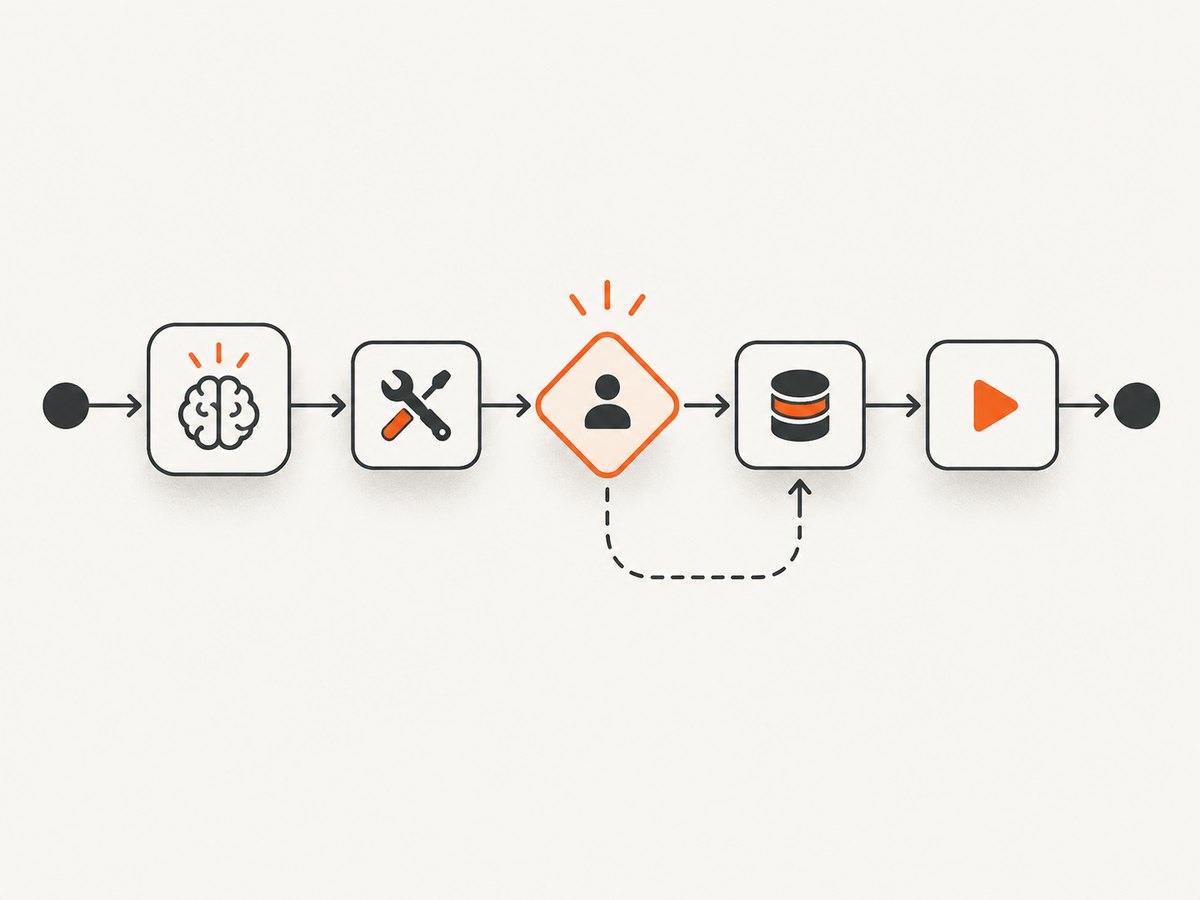
When approval is required and no decision exists, execution stops and the result exposes interruption items. An interruption can originate from a tool call, a handoff, or a nested agent used as a tool. Check all interruptions returned by the run rather than assuming there is only one or that only the root agent can raise one.
The high-level lifecycle is:
- Run the agent with the approval policy in place.
- Inspect the result for pending interruptions.
- Show each pending tool name, arguments, and relevant context to a reviewer.
- Record an approve or reject decision. Include a clear rejection message if the agent needs to understand why.
- Serialize the resulting state when the pause must survive the request or worker.
- Restore the state using the original agent graph and resume it.
2. Python: pause, approve, and resume
The exact approval wrapper depends on the tool and SDK version, but the important sequence is to inspect the interruption, resolve it through the SDK’s approval mechanism, convert the result into RunState, and resume that state with the same root agent. Keep the state handling adjacent to the approval logic so an unresolved interruption cannot be accidentally discarded.
from agents import Runner

# `agent` is the original top-level agent, configured with the tools
# and approval rules for this workflow.
result = await Runner.run(agent, "Prepare the requested action")

if result.interruptions:
    state = result.to_state()

    # Present every interruption to a reviewer. The application should
    # include the tool name, arguments, and useful surrounding context.
    for interruption in state.interruptions:
        print(interruption)

    # Resolve each interruption through the SDK's approval interface.
    # Choose approve or reject based on the reviewer decision.
    # For rejection, include an explanation the agent can act on.
    for interruption in state.interruptions:
        decision = await collect_review(interruption)
        if decision.approved:
            interruption.approve()
        else:
            interruption.reject("Rejected by reviewer: " + decision.reason)

    # Persist `state` before ending this process if the review may be delayed.
    await save_state(state.serialize())

    # Resume the original root agent with the resolved state.
    result = await Runner.run(agent, state)

print(result.final_output)
collect_review and save_state represent application code, not SDK functions. Use the SDK’s documented interruption approval methods for the installed version. The code deliberately makes the reviewer decision and persistence boundary visible; a production request handler must also authenticate reviewers and validate that the decision applies to the displayed interruption.
Reject with a useful explanation
A rejection is a decision, not a missing response. Provide a short reason when the model should revise its plan or choose another action. Keep the original arguments available for audit and display the rejection message in the resumed workflow as appropriate. Do not silently remove a pending interruption and proceed as though it had been approved.
3. JavaScript: restore the same agent graph
In JavaScript, deserialize state against the root agent graph that created it. Rebuild the same root agent, handoffs, and nested agent tools with stable identities so serialized references can resolve. A structurally different graph can prevent correct restoration.
import { Runner } from "@openai/agents";

// Build the same root agent graph used by the initial run.
const agent = buildOriginalAgentGraph();
const result = await Runner.run(agent, "Prepare the requested action");

if (result.interruptions?.length) {
  const state = result.toState();

  for (const interruption of state.interruptions) {
    const decision = await collectReview(interruption);
    if (decision.approved) {
      interruption.approve();
    } else {
      interruption.reject(`Rejected by reviewer: ${decision.reason}`);
    }
  }

  // Save the SDK state before a long delay or worker shutdown.
  await saveState(state.serialize());

  // Later, restore against the compatible original root graph.
  const restored = await agent.deserializeState(await loadState());
  const resumed = await Runner.run(agent, restored);
  console.log(resumed.finalOutput);
}
As in the Python example, the storage and reviewer functions are application placeholders. Follow the installed SDK’s current API for serialization, deserialization, and resolving approvals; keep the semantic sequence intact. Do not create a new root agent with changed handoff or nested-agent identities when restoring a saved state.
4. Persist state across requests and restarts
Keeping a state object in request memory works only while that process remains alive. For reviews that may take hours or days, serialize state to durable storage before returning control to the reviewer. Store it with an application-level run identifier, ownership information, and a status that distinguishes waiting for review, approved, rejected, resumed, and completed.

RunState contains information needed to continue, including model responses, generated items, approval state, usage, context, and optional server-managed conversation identifiers. Context serialization is conservative. Custom context types may need explicit serializers and deserializers; do not assume arbitrary application objects will survive a round trip.
A practical record can include:
- A unique run ID and the ID of the top-level agent configuration/version.
- The serialized SDK state and storage format/version metadata.
- The approval request details shown to the reviewer, along with decision, reviewer identity, and timestamp.
- The session identity, if a session is used and conversation continuity matters.
- An idempotency key or operation record for external side effects.
Persist the state before terminating the request process. If saving fails, surface a recoverable error and keep the approval unresolved. Avoid logging secrets or sensitive tool arguments in general-purpose logs; store review data under the same access controls as the underlying operation.
5. Sessions and new input while paused
If a session is part of the workflow, resume using the same session identity when the conversation history should remain continuous. State restoration and session continuity are related but separate concerns: restore the run checkpoint, and reconnect it to the intended session backend.
Do not treat a pause as a new user turn unless you intend to restart the workflow. If the application needs information from a user while approval is pending, stage it through the SDK’s pending-input mechanism. Admit that input only when the state can safely reach another model call. Appending a fresh message prematurely can change the interrupted trajectory or cause the application to run a second turn instead of continuing the first.
6. Streaming runs
Streaming does not remove the need to handle interruptions. Consume stream events until the stream completes, inspect the completed result for interruptions, resolve them, and resume from the saved state with streaming enabled. Preserve the stream’s state if the application stopped consuming an unfinished stream; do not append a duplicate fresh message as a shortcut.
Structure the event loop so completion and interruption handling are explicit. Persist the checkpoint before waiting for a human, then create a new streamed continuation from the restored state. If a network connection to the client closes, that alone should not decide whether the agent run is cancelled: the durable job and its state should determine what happens next.
7. Reliability and side effects
Restoring agent state does not make external actions idempotent. A worker may complete a payment, publish a post, or delete a record and then crash before saving the resumed state. A retry could repeat the action. Give side-effecting operations their own idempotency keys or durable operation records, and check their status before executing them again.
- Pause before irreversible or high-impact tool calls.
- Show the exact tool name and arguments to the reviewer.
- Keep unresolved interruptions unresolved; never drop them silently.
- Save state before shutting down the process.
- Restore with the original root graph and compatible session backend.
- Protect side effects against duplicate delivery.
- Record approvals and rejection explanations for auditability.
For runs that must survive retries, crashes, and worker replacement, evaluate durable orchestration systems such as Dapr, Temporal, Restate, or DBOS. Compare checkpointing, retries, human-task handling, session storage, and operating cost for your workload. The SDK documentation identifies these as integration options; commercial terms should be verified separately.
8. Troubleshooting
| Symptom | Likely cause | Fix |
|---|---|---|
| The run continues without waiting for approval. | The tool approval policy is missing, or a prior decision already exists. | Make the approval rule explicit and inspect the returned result for interruption items. |
| The resumed run cannot resolve a tool or handoff. | The restored JavaScript state was loaded against a different agent graph or unstable identities. | Rebuild the original root graph with matching handoff and nested-agent identities before deserializing. |
| Custom context is missing after restoration. | The context type is not supported by default serialization. | Provide the required explicit serializer and deserializer, then verify the round trip for the context used by the workflow. |
| The resumed conversation has lost history. | The application resumed with a different session identity or backend. | Use the same session identity when continuity is required, along with the restored state. |
| The agent repeats a tool action after a restart. | State recovery was mistaken for side-effect deduplication. | Use an idempotency key or operation ledger and check the external action’s status before retrying. |
| The user’s new message disrupts the pending approval. | The application appended a new turn while the state was not ready for another model call. | Stage the input using the SDK pending-input mechanism and admit it at a safe model-call boundary. |
| A streamed run repeats or loses output. | The application abandoned an unfinished stream or started a new message instead of continuing its saved stream state. | Consume through completion or continue from the saved stream state, then handle interruption and resume explicitly. |
| A reviewer rejects but the model has no explanation. | The rejection was recorded without a useful message. | Attach a concise reason that explains the constraint or requested change. |
9. Performance and cost considerations
The research sources do not publish comparative latency or cost benchmarks for these pause/resume integrations. Measure your own workflow: model calls, tool execution, time spent waiting for review, serialization size, storage reads and writes, and orchestration overhead. Human waiting time is operational latency even when no worker is actively running.
Keep paused runs out of busy worker slots. Use a durable job or queue keyed by the run ID, and resume only after a valid decision is recorded. Set retention policies for serialized state and review records based on your security and audit requirements. Large context payloads can increase storage and transfer costs, so persist only what the SDK state and application need for correct continuation.
10. Or skip the browser setup
For a separate task—capturing a webpage as an image or PDF—ScreenshotNeo provides a one-request screenshot API and an MCP server. Its API accepts one URL and returns an image or PDF. See the ScreenshotNeo API documentation for request options.
curl -G "https://api.screenshotneo.com/v1/shot" -d access_key=YOUR_API_KEY --data-urlencode url=https://stripe.com -o shot.webpimport requests
r = requests.get("https://api.screenshotneo.com/v1/shot", params={"access_key": "YOUR_API_KEY", "url": "https://stripe.com"}, timeout=90)
open("shot.webp", "wb").write(r.content)const q = new URLSearchParams({ access_key: 'YOUR_API_KEY', url: 'https://stripe.com' });
const res = await fetch(`https://api.screenshotneo.com/v1/shot?${q}`);Cookie banners, popups, and chat widgets are removed before the shot. Bot checks, blank pages, and failed loads are never billed, and response headers report the page verdict and billing status. Its MCP server lets AI agents take screenshots. The free plan includes 1,000 screenshots a month with no card; paid plans start at $5 for 3,000. Create a free ScreenshotNeo account.
11. FAQ
Can I pause an agent at any arbitrary line?
Use an explicit interruption boundary supported by the runner, such as a tool approval request. The documented human-in-the-loop flow exposes pending interruptions that can be resolved and resumed.
Should I summarize the run and start another agent to continue?
Not when the goal is to continue the interrupted run. Restore its state and resume the original root agent so the pending call and trajectory are retained.
Can an approval wait overnight?
Yes, if the application serializes state to durable storage and restores it with the compatible agent graph and session setup. Keep the worker free while waiting.
Does approving a call guarantee it runs exactly once?
No. Approval resolves the interruption; it does not make an external side effect immune to retries or crashes. Add idempotency protection to side-effecting tools.