Proxy Status Error Codes: Understanding 4xx, 5xx, and Dropped Connections
Learn what proxy 4xx and 5xx responses mean, how dropped connections differ from HTTP errors, and how to trace the failing hop.
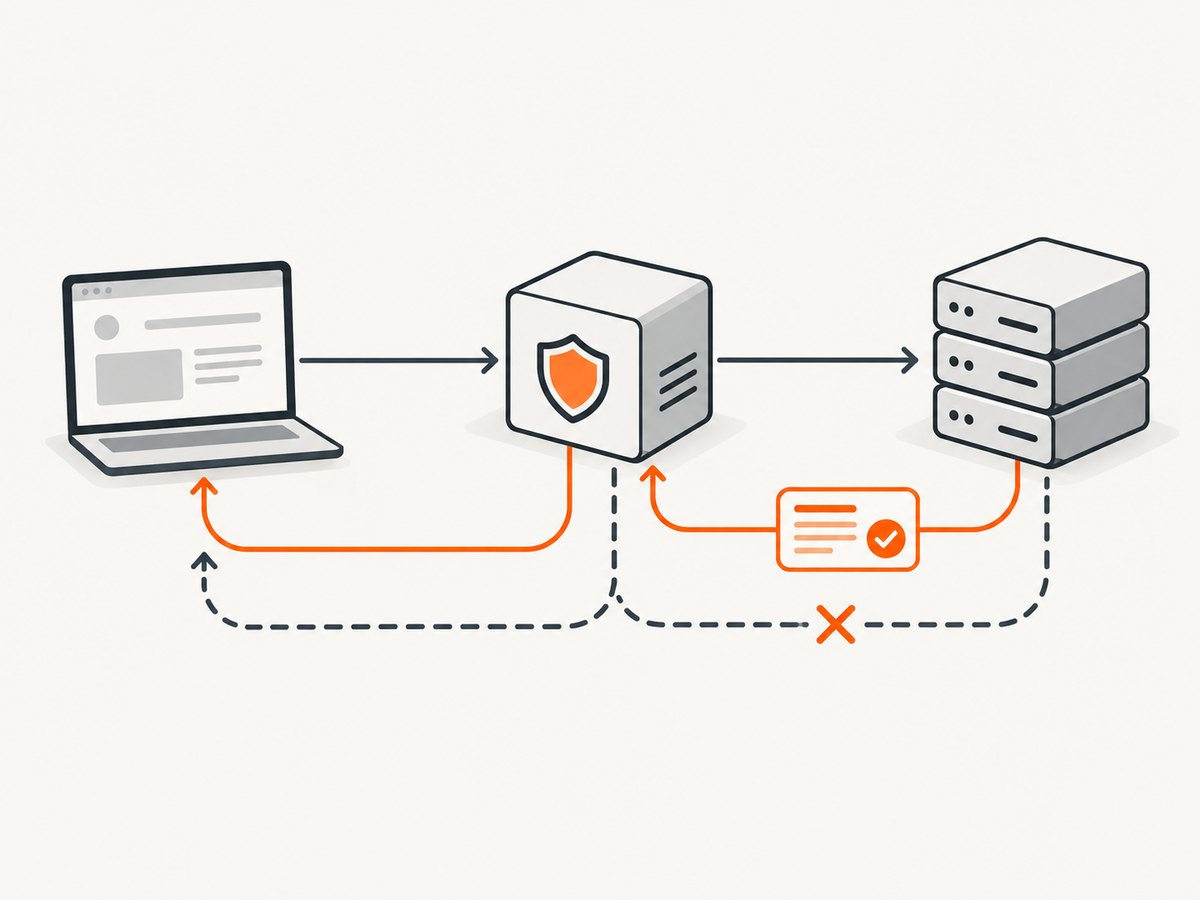
A proxy status error is an HTTP response produced by a server or intermediary; a dropped connection is a transport event that may happen before any complete HTTP response exists. The distinction matters: a 502, 503, or 504 gives you a response to inspect, while a connection that closes early may leave only client, proxy, or network logs. The code alone does not prove which machine caused the failure.
HTTP status codes are grouped by their first digit: 4xx indicates a client-error class and 5xx a server-error class. These are broad protocol categories, not a verdict about a particular person or hop. A proxy can generate a response itself or relay one from upstream. Use the status line, response headers—especially Proxy-Status when available—and logs from each hop together. See the definitions in RFC 9110, HTTP Semantics and RFC 9209, Proxy-Status.
1. What do proxy status error codes mean?
The status says what kind of HTTP outcome the responding server is communicating. It does not, by itself, tell you whether the browser, proxy, gateway, or origin is responsible. Identify the response-generating hop and the failure stage before changing client code or retrying.
| Code | Standard meaning | First diagnostic direction |
|---|---|---|
| 4xx | Client-error class: the client seems to have erred, or the request cannot be fulfilled for a client-related reason. | Inspect request syntax, credentials, policy, and body. Determine whether the proxy generated or relayed the response. |
| 407 | Proxy authentication is required. | Check the proxy challenge and credentials supplied for that proxy. |
| 408 | The server did not receive a complete request within the time it was prepared to wait. | Check whether the request reached the responding server completely. It does not automatically mean an upstream proxy timed out. |
| 5xx | Server-error class: the server is aware it failed or cannot perform the request. | Find which server or intermediary returned it and inspect that hop’s logs. |
| 502 | A gateway or proxy received an invalid response from an inbound server it contacted. | Check upstream reachability and protocol correctness; inspect Proxy-Status for a more specific failure. |
| 503 | The server is temporarily unable to handle the request, for example because of overload or scheduled maintenance. A Retry-After header may be present. |
Check service health and capacity. Follow Retry-After when supplied. |
| 504 | A gateway or proxy did not receive a timely response from an upstream server needed to fulfill the request. | Separate DNS and connection setup time from waiting for response data. |
RFC 9110 describes the 4xx class as indicating that “the client seems to have erred.” That wording is deliberately broad. It does not establish that the end user caused a failure: a proxy may apply its own authentication or policy, and a response may be generated by an intermediary rather than the origin.
2. What does a 502 or 504 from a proxy mean?
A 502 points to an invalid upstream response as understood by the gateway. The upstream may be reachable yet speak an unexpected protocol, close unexpectedly, or return data the intermediary cannot use. A 504 says the gateway did not receive a timely response from the upstream needed to complete the request. “The upstream is slow” is one possibility, but name resolution, routing, connection establishment, and response waiting are separate stages to investigate.
A 503 is different: the responding server says it is temporarily unable to handle the request. Check service health and capacity and look for Retry-After. Standards do not require every overloaded server to send 503; a server may refuse connections instead. Therefore, a missing 503 does not rule out overload.
When the proxy exposes Proxy-Status, use it to refine the diagnosis. RFC 9209 defines a response header field for intermediaries to report details about errors encountered while obtaining a response. Depending on the implementation, its parameters can identify an intermediary, an error type, or next-hop context. It supplements the HTTP status; it does not replace status and ordinary request/response logs.
3. Why did my proxy connection drop?
“Dropped connection” is not an HTTP status code. It means the connection closed before a complete response arrived. The client may receive no HTTP response at all. Alternatively, an intermediary may turn the upstream failure into an HTTP response and describe the failure in Proxy-Status.

RFC 9209’s registered error types distinguish failure stages. For example, connection_refused describes a refused attempt, connection_timeout a connection that did not arrive in time, and connection_terminated an established connection to the next hop that closed before a complete response arrived. The registry associates recommended status codes with error types: refusal and termination recommend 502, while a connection timeout recommends 504. These are recommendations, not a guarantee that every implementation emits that exact status. The IANA Proxy-Status registry also lists DNS, TLS, connection-read, and HTTP request/response error types.
Do not collapse refusal, timeout, and termination into “the server is down.” DNS resolution, routing, TLS negotiation, connection opening, data transfer, and waiting for the complete response can fail independently. A useful diagnosis records the stage, not only the final message shown by a browser or SDK.
4. A practical diagnostic sequence
- Capture the whole response. Record the status line, all response headers, body, request ID, and timestamp. Preserve
Proxy-StatusandRetry-Afterif present. - Identify the responding hop. Determine whether the client-facing proxy generated the response, another intermediary reported it, or the origin response was relayed. Headers can help, but confirm with logs.
- Mark the failure stage. Classify it as request/authentication, DNS or route selection, connection open, TLS, data transfer, or waiting for a complete response.
- Correlate logs across hops. Compare client-to-proxy, proxy-to-next-hop, and origin records by timestamp and request identifier. Account for clock differences if the events appear out of order.
- Check the matching cause. For 407, inspect proxy authentication. For 502, inspect upstream response validity and termination. For 503, inspect availability and capacity. For 504, separate name resolution and connect timing from response-read timing.
- Retry only when appropriate. Follow
Retry-Afterfor 503 when supplied. For other errors, check whether the operation is safe to repeat and whether the underlying condition changed. A retry cannot fix invalid credentials or a malformed request.
For repeated incidents, keep a small record with five fields: exact status, response-generating hop, failure stage, generated-versus-relayed response, and likely category (credentials/policy, availability, protocol validity, or timing/reachability). This lets you compare events without treating every 502 as identical.
5. Inspecting the response with cURL, Python, and Node.js
For an HTTP request through an explicitly configured proxy, these examples preserve response headers and status for inspection. Replace the example host, path, and proxy address with values from your environment. Avoid putting real proxy credentials in shell history, shared logs, or source control.
cURL
curl --verbose --proxy http://proxy.example:8080 \
  --dump-header response-headers.txt \
  --output response-body.bin \
  --write-out '\nHTTP status: %{http_code}\n' \
  https://origin.example/resource
--verbose helps show connection and TLS progress; the dump file captures response headers, and the write-out line records the final HTTP status. If the connection ends before an HTTP response, the status may be 000 and cURL will report a transport error. That is not a new HTTP status. Protect verbose output if it could contain sensitive request details.
For a proxy requiring authentication, provide credentials using your environment’s secret-handling method and cURL’s proxy-auth options. Do not paste secrets into diagnostics shared with others.
Python
import requests

proxies = {
    "http": "http://proxy.example:8080",
    "https": "http://proxy.example:8080",
}

try:
    response = requests.get(
        "https://origin.example/resource",
        proxies=proxies,
        timeout=(5, 30),  # connect timeout, response-read timeout
    )
    print("status:", response.status_code)
    print("proxy-status:", response.headers.get("Proxy-Status"))
    print("retry-after:", response.headers.get("Retry-After"))
    print("request-id:", response.headers.get("X-Request-ID"))
    print("body preview:", response.text[:1000])
except requests.exceptions.ConnectTimeout as exc:
    print("connection timed out:", exc)
except requests.exceptions.ReadTimeout as exc:
    print("response read timed out:", exc)
except requests.exceptions.ConnectionError as exc:
    print("connection failed or closed:", exc)
Requests exposes response headers as a case-insensitive mapping. A timeout or connection exception may occur without a response object, so there is no status or response header to print in that case. Treat connect and read timeouts separately; a single overall timeout obscures where time was spent.
Node.js
const target = 'https://origin.example/resource';
const controller = new AbortController();
const timer = setTimeout(() => controller.abort(), 35_000);

try {
  const res = await fetch(target, { signal: controller.signal });
  console.log('status:', res.status);
  console.log('proxy-status:', res.headers.get('proxy-status'));
  console.log('retry-after:', res.headers.get('retry-after'));
  console.log('request-id:', res.headers.get('x-request-id'));
  console.log('body preview:', (await res.text()).slice(0, 1000));
} catch (error) {
  console.error('request failed before a complete response:', error);
} finally {
  clearTimeout(timer);
}
This uses the runtime’s configured networking path. If your Node.js deployment requires an explicit proxy agent, configure that agent according to the runtime and library you use; built-in fetch proxy behavior depends on the runtime configuration. The example catches transport and abort failures, which do not have an HTTP status to inspect.
6. Common errors and fixes
| Symptom | Likely explanation | Next action |
|---|---|---|
| 407 from the proxy | Proxy authentication is required or the supplied credentials were not accepted. | Inspect the challenge and authentication exchange; verify which credentials are for the proxy versus the origin. |
| 408 shown as an “upstream timeout” | The status definition concerns an incomplete request received within the server’s wait period; it is not synonymous with a gateway’s upstream timeout. | Find which hop returned 408 and determine whether the complete request reached it. |
| 502 with no useful body | The gateway received an invalid upstream response, or an intermediary mapped a connection failure to 502. | Check Proxy-Status and upstream logs for protocol errors, termination, and next-hop context. |
| 503 during a short incident | The service reports temporary inability to handle the request. | Check health/capacity and honor Retry-After if present; avoid rapid retries that add load. |
| 504 but the origin looks healthy | The failure may be before the origin receives the request, during connection setup, or while the gateway waits for data. | Compare proxy and origin timestamps; inspect DNS, routing, connect, and read timing separately. |
| Client reports reset/closed connection and no status | The connection ended before a complete HTTP response reached the client. | Use transport diagnostics and logs from both sides of the proxy; there may be no response headers to examine. |
| No Proxy-Status header | The intermediary may not implement or expose it, or the failure occurred before it could add a response header. | Use status, request IDs, client/proxy/upstream logs, and connection-stage timing. Absence is not proof that no proxy was involved. |
7. Performance, reliability, and retry notes
Measure the request as stages rather than one duration: DNS, connection establishment, TLS, time to first response data, and time to complete the body. This makes a 504 actionable: a slow connection setup and a slow upstream response call for different fixes. Record retries separately from original attempts so an apparent successful request does not hide repeated gateway failures.
For reliability, preserve the original error and its headers before retrying. Apply backoff appropriate to your client and service, and respect Retry-After when returned with 503. Only retry operations whose semantics are safe to repeat, or whose application has an idempotency mechanism. If a proxy connection dropped after a request body was sent, you may not know whether the origin processed the operation; a blind replay can duplicate effects.
There is no universal proxy timeout or retry value in these status definitions. Use the proxy and upstream service’s configured limits, observe actual stage timings, and choose deadlines that fit the operation. Increasing a timeout may help a slow but healthy upstream; it will not repair DNS failures, refused connections, invalid responses, or bad authentication.
8. When a screenshot helps diagnose a page failure
If the proxy issue appears only when loading a website in a browser, a screenshot can document what the browser rendered after the request completed. It can help distinguish an error page, a blank render, or a site-level challenge from a normal page, but it does not replace proxy logs or reveal a connection that ended before the browser rendered anything. Record the status and headers separately.
Or skip the browser setup
For a rendered-page artifact, ScreenshotNeo is a website screenshot API and MCP server. One GET request returns an image or PDF; its options include custom headers, cookies, user agent, waits, and full-page capture. This can be useful when documenting a page’s visible result alongside your network diagnostics. It cannot diagnose the proxy hop by itself. See the ScreenshotNeo API docs.
curl -G "https://api.screenshotneo.com/v1/shot" -d access_key=YOUR_API_KEY --data-urlencode url=https://stripe.com -o shot.webpScreenshotNeo removes cookie banners, newsletter popups, and chat widgets before the shot. Bot checks, blank pages, and failed loads are never billed. Its MCP server lets AI agents take screenshots. The free plan includes 1,000 screenshots a month with no card; paid plans start at $5 for 3,000. Sign up for 1,000 free screenshots a month, with no card.
9. Frequently asked questions
Does a 4xx always mean my application sent a bad request?
No. It is the client-error response class, but a proxy may generate the response or relay one. Identify the responding hop and inspect the body, headers, and logs.
Is a dropped connection the same as a 504?
No. A dropped connection is a transport event and may leave no HTTP response. A 504 is an HTTP response from a gateway or proxy that did not receive a timely upstream response.
Does every proxy return Proxy-Status?
No. Use it when available, alongside status and logs. Its absence does not establish which hop failed.
Should I retry a 502?
Only after considering whether the operation is safe to repeat and whether the cause may have changed. First inspect the failure stage and any intermediary diagnostics.