Terraform and Pulumi Providers for Screenshot APIs
Learn how Terraform and Pulumi can manage screenshot API rendering, provider schemas, artifacts, retries, secrets, version pinning, and CI.
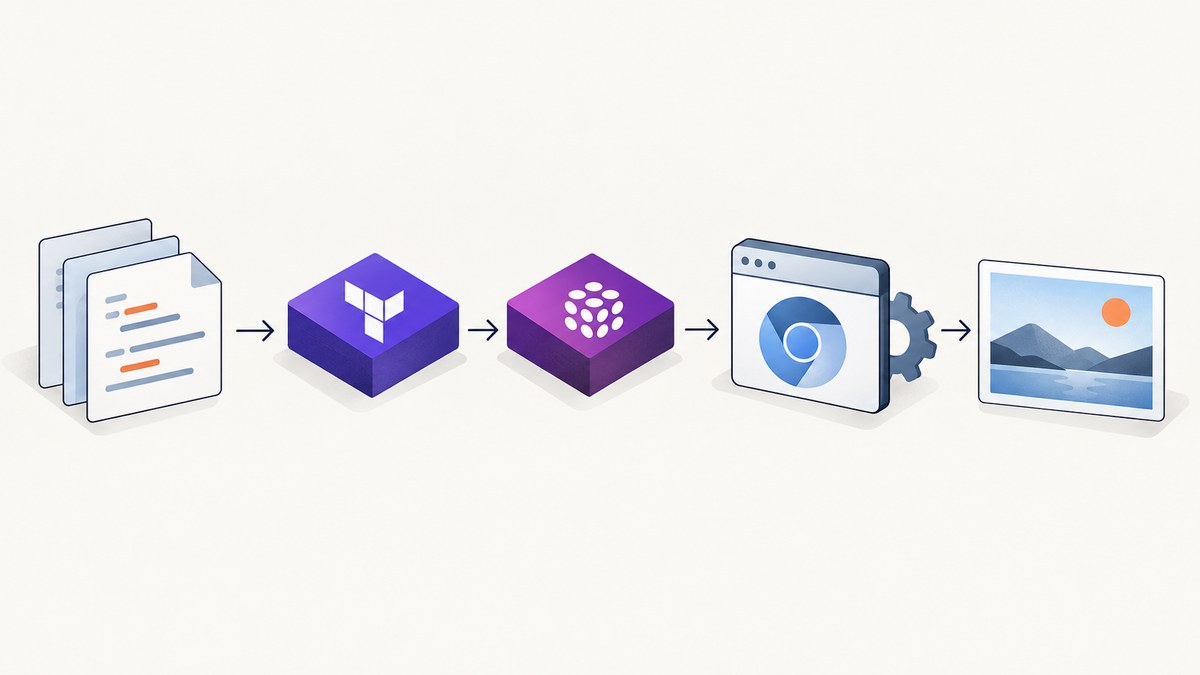
Short answer: Terraform can manage a screenshot API when a provider translates Terraform resources into the service’s HTTP calls. Pulumi can use a native provider when one exists, or bridge a Terraform/OpenTofu provider through Pulumi’s Any Terraform Provider. If no maintained provider exists, model the render as an API-backed operation with an explicit artifact, secret, retry, and lifecycle strategy.
A screenshot is usually an output artifact rather than long-lived infrastructure. That distinction affects the design: a provider must decide whether a render is a managed resource, a data lookup, or a replacement-triggered build step. It must also represent authentication, the target URL, browser options, output format, binary delivery, retries, and state changes clearly enough for repeatable CI.
What a provider does
Terraform providers are plugins that implement resource types and translate Terraform operations into calls to external services. HashiCorp summarizes the model as: “Every resource type is implemented by a provider; without providers, Terraform can’t manage any kind of infrastructure.” See the Terraform provider documentation and the Terraform Registry.
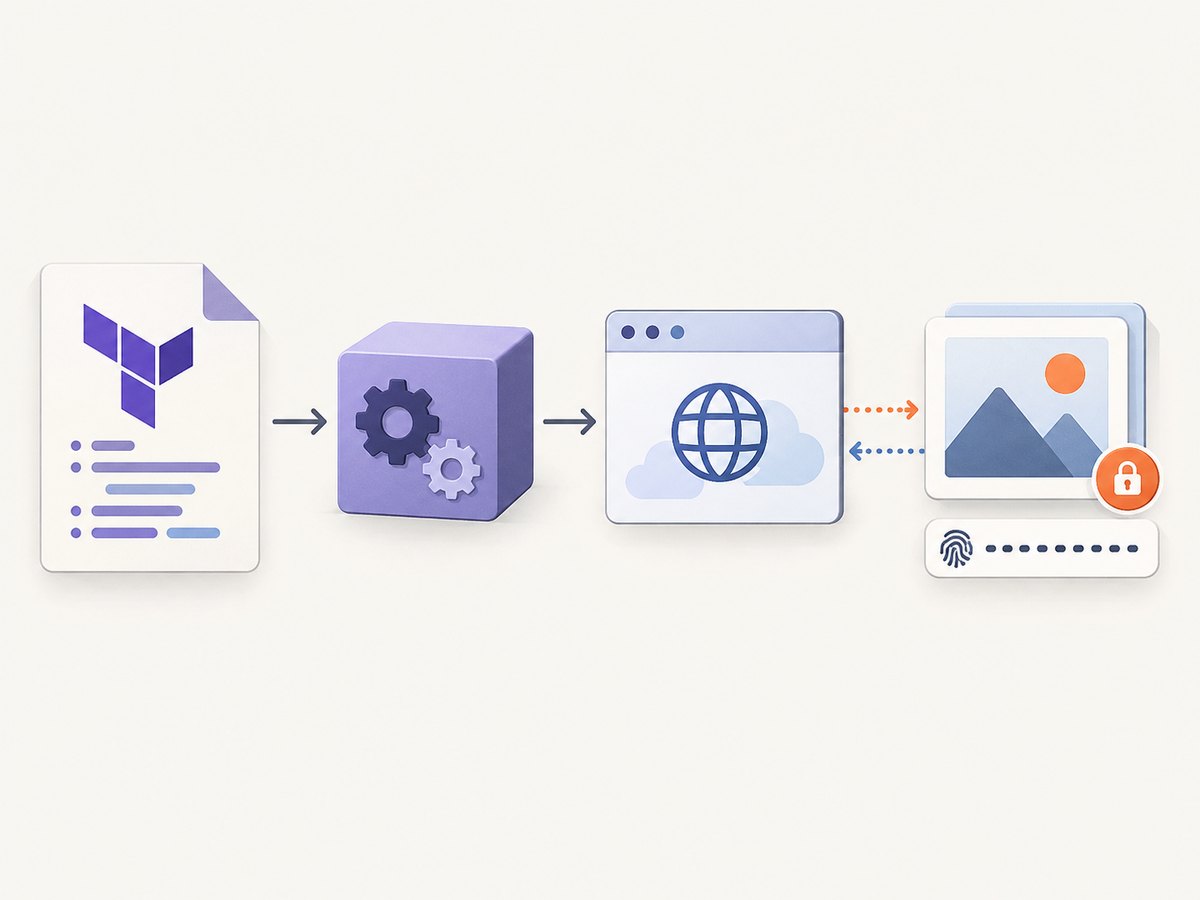
For a screenshot service, the translation layer commonly looks like this:
- Terraform or Pulumi supplies a URL, credentials, viewport, wait rules, and output settings.
- The provider validates those values and builds an HTTP request.
- The screenshot API renders the page in a browser.
- The provider receives binary image/PDF data or an artifact URL.
- State records a stable identifier, a digest, metadata, and the artifact location.
The provider should not pretend that a screenshot is permanent infrastructure. A useful schema makes replacement explicit: changing the source URL or render settings can create a new artifact, while a refresh can check whether an existing remote artifact is still available.
Does a Terraform provider already exist?
Availability changes, so check the Terraform or OpenTofu registry and the screenshot vendor’s documentation before adopting a dependency. The research available for this article does not identify a dedicated, official Urlbox or ScreenshotOne Terraform provider. Urlbox documents a hosted HTTP API at https://api.urlbox.com, authenticated with an Authorization: Bearer project secret, and supports screenshots, PDFs, videos, metadata, and HTML. Its quickstart shows PNG output, a target URL, a 390 by 844 viewport, and thumbnail resizing. See the Urlbox documentation.
ScreenshotOne documents an HTTP API at https://api.screenshotone.com. Its binary response can be used directly in image and metadata tags, and its errors use HTTP status semantics. See the ScreenshotOne getting-started documentation.
That means a generic HTTP implementation or an internally maintained provider may be the practical choice. Label it as your engineering integration rather than an official vendor plugin, and pin both the provider and the API contract you depend on.
Designing the Terraform resource schema
A production provider should cover the settings that change pixels, the controls that change browser behavior, and the fields needed to retrieve the result.
| Area | Recommended fields | Why it matters |
|---|---|---|
| Authentication | api_key, endpoint, optional project or region |
Allows different environments without hard-coding credentials. |
| Source | url, optional HTML input |
Defines what is rendered. |
| Viewport | width, height, device preset, device scale factor, user agent | Responsive layouts and retina output depend on these values. |
| Browser state | cookies, custom headers, authorization header, timezone, geolocation | Private or localized pages may otherwise render incorrectly. |
| Timing | wait for selector, delay, network idle, navigation timeout | Prevents capturing before client-side content appears. |
| Output | PNG, JPEG, WebP, PDF, quality, full page, selector, resize | Controls artifact type and dimensions. |
| Page actions | custom CSS, JavaScript, click selector, hide selectors | Lets the render match the intended presentation. |
| Networking | blocked requests, resource types, ads and trackers | Improves determinism and reduces unnecessary work. |
| Delivery | binary response, artifact URL, object-storage destination, checksum | State should point to a reproducible or retrievable result. |
| Operations | retry count, backoff, idempotency key, cache TTL | Separates transient failures from changed desired state. |
Mark secret fields as sensitive. Keep them in Terraform variables, environment variables, or a secret manager. Never print request headers, cookies, authorization values, or full URLs containing credentials. If a provider stores an artifact URL in state, confirm whether that URL is public, signed, or short-lived.
A runnable Terraform pattern when no provider exists
The following pattern uses Terraform’s built-in terraform_data resource and a local script. It is a practical bridge for teams that need infrastructure-managed rendering before investing in a provider. The script writes the binary artifact and a checksum. Treat this as an internal integration: add locking, a remote artifact store, and a proper provider when many teams depend on it.
terraform {
  required_version = ">= 1.4.0"
}

variable "screenshot_api_key" {
  type      = string
  sensitive = true
}

variable "page_url" {
  type = string
}

variable "output_file" {
  type    = string
  default = "build/home.webp"
}

resource "terraform_data" "screenshot" {
  triggers_replace = [
    var.page_url,
    var.output_file
  ]

  provisioner "local-exec" {
    interpreter = ["/bin/sh", "-c"]
    command = <<-EOT
      set -eu
      mkdir -p "$(dirname '${var.output_file}')"
      curl --fail --show-error --silent --retry 3 --retry-all-errors \
        -G "https://api.example.invalid/v1/shot" \
        -H "Authorization: Bearer ${var.screenshot_api_key}" \
        --data-urlencode "url=${var.page_url}" \
        -o "${var.output_file}"
      sha256sum "${var.output_file}" > "${var.output_file}.sha256"
    EOT
  }
}

output "artifact" {
  value = var.output_file
}
Replace the example endpoint and authentication with the service you selected. This resource is intentionally replacement-based: changing page_url runs the capture again. For a real provider, move the HTTP call into the provider’s Create and Read operations, use an idempotency key, and return a stable remote ID plus checksum.
Pulumi: native provider or Terraform bridge?
Pulumi states that “You can use any Terraform or OpenTofu provider directly in your Pulumi programs.” Its Any Terraform Provider is intended for cases where no native Pulumi package exists. A bridged provider uses the Terraform/OpenTofu schema and executable; a native provider is generated directly from a service API. Read Pulumi’s provider documentation before selecting one.
Bridging is useful when the Terraform provider already has the schema and lifecycle behavior you need. It adds another version boundary, however: your Pulumi package, the bridged provider, and the upstream API can all change. Pin each one and test upgrades in a disposable stack.
A minimal Pulumi TypeScript program can invoke the same checked-in render script used by CI. The command provider is an engineering choice; it is not a claim that a screenshot vendor supplies a native Pulumi package.
import * as pulumi from "@pulumi/pulumi";
import * as command from "@pulumi/command";

const config = new pulumi.Config();
const url = config.require("pageUrl");
const apiKey = config.requireSecret("screenshotApiKey");

const capture = new command.local.Command("homepage-shot", {
  create: pulumi.interpolate`./scripts/capture.sh ${apiKey} ${url} build/home.webp`,
  triggers: [url],
});

export const artifact = pulumi.output("build/home.webp");
Keep the script outside source control if it contains secrets, or pass secrets through the process environment instead of command-line arguments. In a shared deployment system, prefer a remote artifact store and return its immutable URL.
Lifecycle, retries, and idempotency
- Plan-time behavior: Do not render during planning. Plans should be reviewable without network access and without producing billable artifacts.
- Create: Render only after apply, then record the remote ID, checksum, format, dimensions, and artifact location.
- Read: Verify that the artifact still exists. If it is immutable, avoid re-rendering on every refresh.
- Update: Treat pixel-affecting settings as replacement inputs unless the service supports an explicit update operation.
- Delete: Delete remote artifacts only when ownership is unambiguous. A shared object-storage path should not be removed by one stack.
- Retries: Retry connection resets, rate limits, and 5xx responses with bounded exponential backoff. Do not blindly retry authentication failures, invalid URLs, or 4xx validation errors.
- Idempotency: Derive a key from the normalized request or use a provider-generated key. This prevents duplicate jobs when a CI runner loses the response.
CI, version pinning, and artifact handling
Pin provider versions in Terraform’s required_providers block and commit the lock file. For Pulumi, pin the bridge package and the underlying Terraform/OpenTofu provider. Record the screenshot API version or endpoint contract in release notes.

Binary data does not belong directly in state. Prefer one of these patterns:
- Upload the binary to object storage and store an immutable URL plus SHA-256 digest.
- Store only the digest and let a downstream build step retrieve the artifact.
- Use a short-lived signed URL for consumers, while retaining a private canonical object.
Use a dedicated service account, redact secrets in CI logs, and make the destination path include the stack, commit, and render digest. If a URL contains authenticated query parameters, scrub it before writing logs.
ScreenshotNeo as a managed API option
ScreenshotNeo is a website screenshot API and MCP server. It accepts one GET request and returns PNG, JPEG, WebP, or PDF. Its clean-shot pipeline accepts cookie and consent banners like a visitor, then removes more than 60 known consent platforms, newsletter popups, and chat widgets; each step can be turned off. Bot checks or CAPTCHAs, blank pages, timeouts, failed loads, and cache hits are not billed, and every response identifies the result with X-Page-Verdict and X-Billed headers.
It exposes full-page capture with lazy images loaded, CSS-selector element capture, dark mode, 12 device presets, arbitrary viewports, retina scale, PDF paper size and page ranges, HTML/CSS rendering, custom CSS and JavaScript, clicks, hidden selectors, selector or network-idle waits, request and resource blocking, headers, cookies, user agents, authorization, timezone, geolocation, transparent backgrounds, resizing, configurable cache TTL, signed image links, asynchronous jobs with signed webhooks, bulk capture for 100 URLs per call, a usage API, and an OpenAPI specification. Parameter names used by other screenshot APIs also work, which can simplify migrations. Every feature is available on every plan: 1,000 shots per month are free with no card; paid plans start at $5 for 3,000 shots. An MCP server provides take_screenshot, get_page_info, and capture_pdf tools for Claude, Cursor, and other MCP clients.
Or skip the browser setup
Use the API directly, then place the call in a Terraform or Pulumi wrapper. See the ScreenshotNeo API documentation.
curl -G "https://api.screenshotneo.com/v1/shot" -d access_key=YOUR_API_KEY --data-urlencode url=https://stripe.com -o shot.webpimport requests
r = requests.get("https://api.screenshotneo.com/v1/shot", params={"access_key": "YOUR_API_KEY", "url": "https://stripe.com"}, timeout=90)
open("shot.webp", "wb").write(r.content)const q = new URLSearchParams({ access_key: 'YOUR_API_KEY', url: 'https://stripe.com' });
const res = await fetch(`https://api.screenshotneo.com/v1/shot?${q}`);Cookie banners, popups, and chat widgets are removed before the shot; bot checks, blank pages, and failed loads are never billed; AI agents can capture through MCP; and 1,000 screenshots a month are free with no card. Create a free ScreenshotNeo account.
Troubleshooting checklist
| Symptom | Likely cause | Fix |
|---|---|---|
| Provider not found | Missing registry source or incompatible version | Check the provider address, run terraform init -upgrade only in a controlled branch, and commit the lock file. |
| Pulumi cannot load the bridge | Provider executable or schema version mismatch | Pin the bridge and underlying provider; verify the registry and platform binaries. |
| 401 or 403 | Missing, expired, or incorrectly scoped secret | Use a secret variable, inspect redacted configuration, and confirm the endpoint’s authentication format. |
| Blank screenshot | Page requires JavaScript, authentication, or more wait time | Set a selector, delay, network-idle rule, cookies, headers, or authorization as supported by the API. |
| Consent UI remains | Consent handling is disabled or the banner is custom | Enable the service’s consent step, click the consent control, or hide the selector with custom CSS. |
| Intermittent timeouts | Slow origin, blocked resource, or overly short timeout | Increase the navigation timeout, block unnecessary resource types, and retry only transient failures. |
| Different pixels in CI | Viewport, timezone, fonts, locale, or dynamic data differ | Pin device settings, timezone, geolocation, user agent, and browser inputs; disable animations where possible. |
| Duplicate charges or artifacts | Runner retried after losing a response | Use idempotency keys, request hashes, and a durable artifact registry. |
| State contains secrets | Sensitive value was interpolated into an output or command | Mark variables sensitive, use environment injection, rotate exposed keys, and scrub logs and state. |
Performance, reliability, and cost
Rendering time is dominated by the target site: JavaScript execution, third-party resources, fonts, authentication, and network location all matter. Measure your own pages rather than publishing a universal benchmark. Cache stable pages with a deliberate TTL, block ads and trackers when they are irrelevant, and use element capture when a full-page image is unnecessary.
Keep concurrency below the service’s documented limit, use bounded retries, and queue bulk work. For previews, a lower-resolution image or cached result may be sufficient; for release artifacts, pin every render input and retain the checksum. Cost is driven by the provider’s billing model and your cache hit rate. ScreenshotNeo bills only clean shots and exposes billing verdict headers, while its free tier includes 1,000 shots monthly and paid plans begin at $5 for 3,000.
FAQ
Can Terraform manage a screenshot without a dedicated provider?
Yes. A checked-in script invoked by terraform_data or a maintained internal provider can call the HTTP API. Treat the script as an engineering integration and define artifact ownership and replacement behavior explicitly.
Is a Pulumi bridge the same as a native Pulumi provider?
No. A bridge consumes Terraform/OpenTofu schemas and binaries. It is useful when no native package exists, but it introduces another version to pin and test.
Should screenshots be stored in Terraform state?
Usually no. Store an immutable object in private storage and keep its URL, digest, and metadata in state.
What should trigger a new capture?
Changes to the URL, viewport, browser state, wait rules, scripts, CSS, output format, or any other pixel-affecting input should normally replace the artifact.
Can an API provider render private pages?
Many APIs support headers, cookies, or authorization, but the exact schema differs. Keep those values secret and confirm the service’s data handling before sending private content.