Web Scraping and HTTP: Common Questions Answered
Learn how HTTP powers web scraping, how to handle robots.txt, 429 and 503 responses, retries, rate limits, and reliable scraper design.
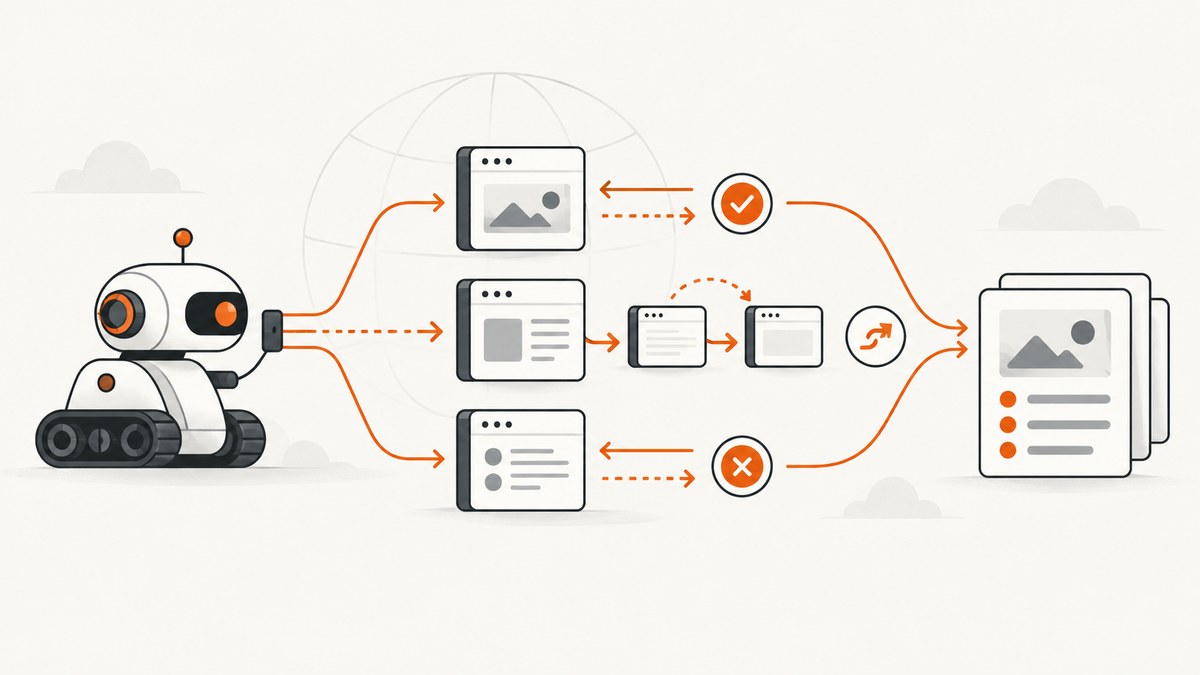
Web scraping is automated HTTP use. A scraper sends HTTP requests, receives responses, interprets status codes and headers, follows acceptable redirects, and extracts data from permitted responses. HTTP defines the methods, headers, status codes, and resource metadata that make this exchange predictable. The core semantics are specified by RFC 9110.
A reliable scraper therefore needs more than an HTML parser. It needs an honest identity, deliberate robots.txt handling, bounded retries, rate limiting, redirect rules, content validation, and logs that explain every result.
How does web scraping use HTTP?
Each scrape normally follows this sequence:
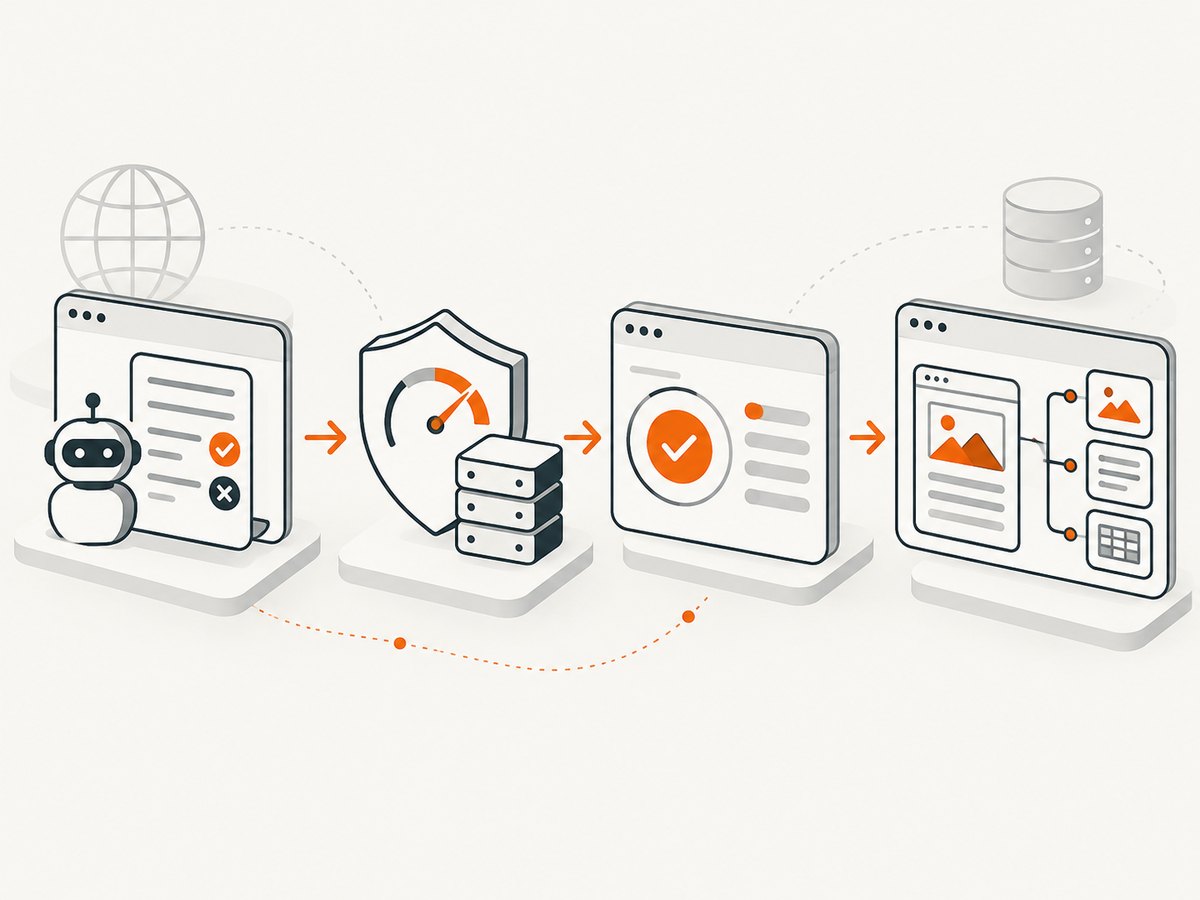
- Build a request with a method, URL, User-Agent, and any required headers or cookies.
- Check the site’s robots.txt policy for your crawler identity.
- Send the request over HTTP or HTTPS.
- Inspect the response status, headers, final URL, and body.
- Decide whether to parse, redirect, retry, slow down, or stop.
- Parse only the representation you expected, such as HTML or JSON.
- Store the extracted result together with enough metadata to reproduce the decision.
Request methods express intent. GET is the usual method for retrieving pages. HEAD can check metadata when a server supports it, but many sites handle HEAD differently from GET. POST submits data and can change server state, so a crawler should not use it casually. Response headers carry information such as Content-Type, caching directives, ETag, Last-Modified, Retry-After, and redirects. The response body contains the representation your parser consumes.
HTTP status codes as scraper signals
MDN groups HTTP status codes into five classes: 1xx informational, 2xx successful, 3xx redirection, 4xx client errors, and 5xx server errors. A status code is an operational signal, not proof that the body is useful.
| Class or code | Meaning for a scraper | Typical action |
|---|---|---|
| 2xx | The request was accepted or completed. | Validate Content-Type and body before parsing. |
| 301, 302, 307, 308 | The resource points to another URL. | Follow only within your policy; record every hop and cap the chain. |
| 400, 401, 403 | The request is invalid or not authorized. | Fix the request or stop. Do not retry unchanged requests indefinitely. |
| 404 | The resource was not found. | Mark the item missing; retry only if the site is known to publish intermittently. |
| 429 | Too many requests in a period. | Honor Retry-After, reduce concurrency, and apply bounded backoff. |
| 500, 502, 504 | A server or gateway failed. | Retry a limited number of times with jitter when the operation is safe. |
| 503 | The service is temporarily unavailable. | Use Retry-After when supplied, then retry within a budget. |
MDN’s HTTP status reference is useful while implementing status handling. A 200 response can still contain an error page, a bot challenge, or an empty application shell, so check the body and content type too.
Do you need to follow robots.txt?
For a crawler that wants to behave responsibly, yes: fetch and apply the site’s robots.txt rules. The Robots Exclusion Protocol (RFC 9309) defines robots.txt as crawler guidance. Its rules are not access authorization, and robots.txt is not a security boundary. MDN also warns that it must not be used to protect private information.
Use a stable product token in your User-Agent and match that token to the robots.txt user-agent group. Select the most specific matching allow or disallow rule. If no specific group matches, use the * group.
Robots.txt outcomes
- Successful fetch: parse the file and follow its rules.
- 4xx response: RFC 9309 treats the file as unavailable; a crawler may access resources, subject to other policies.
- 5xx response or network failure: the file is unreachable; assume complete disallow while the condition persists.
- Caching: cache results to avoid fetching robots.txt for every URL. RFC 9309 generally recommends no more than 24 hours unless the file is unreachable.
Robots permission does not answer whether you may republish content. Terms of service, copyright, privacy, contracts, and local law still matter.
Setting User-Agent honestly
Identify your crawler instead of pretending to be a browser. RFC 9309 says the crawler product token should be a substring of the HTTP User-Agent identification string. Include a contact or documentation URL where practical.
WebCatalogBot/1.0 (+https://example.com/crawler-info)Do not rotate identities to evade a site’s controls. A truthful identity makes rate-limit conversations and debugging possible. Scrapy documents separate robots and User-Agent settings, but the same principle applies to a custom client: define one stable token and use it consistently.
Handling 429, 503, and Retry-After
A 429 response means the client sent too many requests during a period. A 503 means the service is temporarily unavailable. Both may include Retry-After. The header can contain either a delay in seconds or an HTTP date. MDN describes it as the amount of time a user agent should wait before making a follow-up request; RFC 9110 also defines its use with 503 responses and redirects.
Use this policy:
- Parse Retry-After when present.
- Clamp the delay to an operational maximum so one response cannot stall the entire queue forever.
- If it is absent, use exponential backoff such as 1, 2, 4, and 8 seconds.
- Add random jitter so many workers do not retry simultaneously.
- Reduce concurrency for the affected host.
- Stop after a fixed retry budget and record the failure.
Runnable Python scraper with robots.txt and backoff
The example below fetches one page, checks robots.txt, identifies itself, follows normal redirects through Requests, validates the content type, and retries 429 or temporary 5xx responses. Install Requests with python -m pip install requests.
import random
import time
from datetime import datetime, timezone
from email.utils import parsedate_to_datetime
from urllib.parse import urlparse
from urllib.robotparser import RobotFileParser

import requests

USER_AGENT = "WebCatalogBot/1.0 (+https://example.com/crawler-info)"
MAX_RETRIES = 4
MAX_RETRY_AFTER = 120


def retry_after_seconds(value):
    if not value:
        return None
    value = value.strip()
    try:
        return max(0, min(int(value), MAX_RETRY_AFTER))
    except ValueError:
        try:
            target = parsedate_to_datetime(value)
            if target.tzinfo is None:
                target = target.replace(tzinfo=timezone.utc)
            delay = (target - datetime.now(timezone.utc)).total_seconds()
            return max(0, min(int(delay), MAX_RETRY_AFTER))
        except (TypeError, ValueError, OverflowError):
            return None


def allowed_by_robots(url):
    parsed = urlparse(url)
    robots_url = f"{parsed.scheme}://{parsed.netloc}/robots.txt"
    rp = RobotFileParser(robots_url)
    rp.set_crawl_delay(USER_AGENT)
    try:
        rp.read()
    except Exception:
        # A production crawler should distinguish unreachable robots.txt
        # and apply its chosen RFC 9309 policy explicitly.
        return False
    return rp.can_fetch(USER_AGENT, url)


def fetch(url):
    if not allowed_by_robots(url):
        raise RuntimeError("robots.txt does not allow this URL or is unreachable")

    headers = {"User-Agent": USER_AGENT, "Accept": "text/html,application/xhtml+xml"}
    with requests.Session() as session:
        for attempt in range(MAX_RETRIES + 1):
            started = time.monotonic()
            response = session.get(url, headers=headers, timeout=(10, 30), allow_redirects=True)
            elapsed = time.monotonic() - started
            print({"url": url, "final_url": response.url, "status": response.status_code,
                   "content_type": response.headers.get("Content-Type"), "elapsed": round(elapsed, 3)})

            if response.status_code not in (429, 500, 502, 503, 504):
                response.raise_for_status()
                content_type = response.headers.get("Content-Type", "")
                if "html" not in content_type.lower():
                    raise RuntimeError(f"unexpected content type: {content_type}")
                return response.text

            if attempt == MAX_RETRIES:
                response.raise_for_status()

            delay = retry_after_seconds(response.headers.get("Retry-After"))
            if delay is None:
                delay = min(60, 2 ** attempt) + random.uniform(0, 0.5)
            time.sleep(delay)


if __name__ == "__main__":
    html = fetch("https://example.com/")
    print(html[:500])
For a queue, move the delay and concurrency state to a per-host scheduler. Keep the requested URL, final URL, status, selected headers, elapsed time, and parser outcome in structured logs.
cURL and Node.js HTTP examples
cURL is useful for inspecting headers and redirects before writing a parser:
curl --user-agent 'WebCatalogBot/1.0 (+https://example.com/crawler-info)' \
  --location --max-redirs 5 --connect-timeout 10 --max-time 30 \
  --dump-header response.headers --fail-with-body \
  https://example.com/
In Node.js, use a timeout and inspect Retry-After before retrying:
const url = 'https://example.com/';
const userAgent = 'WebCatalogBot/1.0 (+https://example.com/crawler-info)';

async function getPage() {
  const controller = new AbortController();
  const timer = setTimeout(() => controller.abort(), 30000);
  try {
    const res = await fetch(url, {
      headers: { 'User-Agent': userAgent, 'Accept': 'text/html,application/xhtml+xml' },
      signal: controller.signal,
      redirect: 'follow'
    });
    console.log({ status: res.status, finalUrl: res.url, retryAfter: res.headers.get('retry-after') });
    if (!res.ok) throw new Error(`HTTP ${res.status}`);
    const type = res.headers.get('content-type') || '';
    if (!type.includes('text/html')) throw new Error(`Unexpected type: ${type}`);
    return await res.text();
  } finally {
    clearTimeout(timer);
  }
}

getPage().then(html => console.log(html.slice(0, 500))).catch(console.error);
Redirects, parsing, and edge cases
Redirects
Record the complete redirect chain and final URL. Cap the number of hops, reject unexpected schemes, and reconsider whether credentials or sensitive headers should be forwarded to a different host. 307 and 308 preserve the method, while historical 301 and 302 handling can vary by client; use GET for retrieval and verify the final response.
Dynamic pages
Many pages return an application shell and load data with JavaScript. First look for a documented JSON endpoint or embedded data. If a browser is required, wait for a specific selector or a network-idle condition and set a hard timeout. A rendered page can still show a bot check or consent overlay, so validate the resulting content.
Encoding and content type
Honor the declared charset when decoding bytes. Reject binary responses when your parser expects HTML. Treat compressed transfer, malformed markup, empty bodies, and unexpectedly large responses as explicit outcomes. Set maximum body sizes to protect the worker.
Pagination and duplicates
Normalize URLs, preserve meaningful query parameters, and maintain a visited set. Stop when pagination links repeat, disappear, or exceed a configured page limit. Canonical links can help, but they are publisher hints rather than guarantees.
Rate limiting and request frequency
There is no universal safe interval. Use the site’s published policy, robots.txt crawl-delay when provided by your tooling, observed 429/503 responses, and the cost of each request. Start with low per-host concurrency, add jitter, and increase slowly only when responses remain healthy. Apply separate limits per hostname and account for redirects and asset requests.
A token bucket or leaky bucket makes the policy explicit. Keep a retry budget separate from the normal request budget so failures cannot create an unbounded retry storm. Cache immutable responses and use conditional requests with ETag or Last-Modified where supported.
Reliability, observability, and cost
- Reliability: use connect and read timeouts, bounded retries, idempotent operations, circuit breakers for failing hosts, and durable queues.
- Observability: log URL, method, timestamp, User-Agent, status, final URL, redirect chain, Retry-After, Content-Type, elapsed time, response size, and parser result.
- Data quality: store extraction schema versions and a sample of the source or a content hash so parser changes are detectable.
- Cost: count bandwidth, proxy or browser execution, storage, parsing, and retries. Cache pages and avoid downloading assets you do not parse.
- Safety: never submit forms, trigger state-changing actions, or collect personal data unless the workflow explicitly requires it and you have permission.

Or skip the browser setup
When your goal is a clean visual capture rather than raw HTML extraction, ScreenshotNeo provides a single HTTP endpoint. It accepts consent banners before capture and removes more than 60 known consent platforms, newsletter popups, and chat widgets. Bot checks, blank pages, timeouts, failed loads, and cache hits are not billed; response headers identify the page verdict and billing result. It also supports an MCP server for Claude, Cursor, and other MCP clients, with take_screenshot, get_page_info, and capture_pdf tools.
See the ScreenshotNeo API documentation for all options, including full-page and element captures, device presets, dark mode, custom CSS and JavaScript, waits, request blocking, headers, cookies, caching, signed links, async jobs, bulk capture, PDFs, and usage reporting.
curl -G "https://api.screenshotneo.com/v1/shot" -d access_key=YOUR_API_KEY --data-urlencode url=https://stripe.com -o shot.webpimport requests
r = requests.get("https://api.screenshotneo.com/v1/shot", params={"access_key": "YOUR_API_KEY", "url": "https://stripe.com"}, timeout=90)
open("shot.webp", "wb").write(r.content)const q = new URLSearchParams({ access_key: 'YOUR_API_KEY', url: 'https://stripe.com' });
const res = await fetch(`https://api.screenshotneo.com/v1/shot?${q}`);Every plan includes the features. The free plan includes 1,000 screenshots each month with no card; paid plans start at $5 for 3,000 shots. Create a free ScreenshotNeo account.
Troubleshooting checklist
| Symptom | Likely cause | Fix |
|---|---|---|
| Repeated 429 responses | Concurrency or frequency is too high. | Honor Retry-After, reduce per-host concurrency, and add jitter. |
| 503 loop | The origin or gateway is unavailable. | Use a bounded retry budget and stop temporarily with a circuit breaker. |
| 403 response | Access policy, authentication, or bot protection. | Check permissions and identify yourself; do not evade controls. |
| HTML parser finds nothing | JavaScript rendering, consent overlay, or an error page. | Inspect the body and Content-Type; locate a permitted data endpoint or use a browser capture. |
| Robots file cannot be fetched | Network failure or 5xx response. | Apply RFC 9309’s unreachable policy and retry robots.txt on a cache schedule. |
| Requests never finish | No connect/read timeout or a slow upstream. | Set separate timeouts, cap body size, and record elapsed time. |
| Wrong page after redirect | Unexpected host, locale, or authentication redirect. | Record the chain, validate the final host, and stop when policy is violated. |
FAQ
Is scraping just downloading HTML?
No. It includes the HTTP request, policy checks, response interpretation, redirect handling, parsing, and scheduling decisions.
Can robots.txt block private data?
No. Robots.txt is public crawler guidance, not authentication. Protect private data with access controls.
Should every error be retried?
No. Retry temporary 429 and 5xx failures within a budget. Fix or stop on permanent request errors such as many 400, 401, 403, and 404 responses.
How do I prove what happened during a scrape?
Keep structured records of the request, identity, status, redirects, selected headers, timing, body validation, and parser outcome.
When is a screenshot API preferable?
Use one when you need a rendered visual, PDF, or element image and do not want to maintain browser binaries, waits, consent handling, and rendering infrastructure.