How to Add a Header to wkhtmltoimage Output
wkhtmltoimage has no documented visual header option. Add a heading to the HTML before rendering, or composite a strip onto the image afterward.

Direct answer: wkhtmltoimage has no documented option for adding a visible page header to its image output. Add the heading to the HTML and style it with CSS before rendering. If the source HTML cannot be changed, render the image first and composite a header strip onto it in a separate image-editing step. See the wkhtmltoimage manual for its documented options.
There are three different things developers may mean by “header”: visible text at the top of the image, an HTTP request header sent while loading a page, or a repeating header on PDF pages. They require different approaches. In particular, --custom-header configures an HTTP request; it does not put text into the image. And --header-html belongs to wkhtmltopdf’s PDF options, not wkhtmltoimage’s image output.
1. Add a visible heading in the HTML
This is the simplest and most reliable way to make a heading appear in the image. Put a header element before the page content, then set its spacing, colors, and typography in CSS. Since it becomes ordinary page content, it takes up space and affects the rendered page dimensions.

Complete example using a local HTML file
Save this as report.html. It includes a heading, a small content area, and CSS that gives the heading a clear background and padding.
<!doctype html>
<html lang="en">
<head>
  <meta charset="utf-8">
  <meta name="viewport" content="width=device-width, initial-scale=1">
  <title>Monthly report</title>
  <style>
    * { box-sizing: border-box; }
    html, body { margin: 0; font-family: Arial, sans-serif; }
    .page-header {
      width: 100%;
      padding: 16px 24px;
      color: #18212b;
      background: #f1f3f5;
      border-bottom: 1px solid #d9dee3;
      font-size: 24px;
      font-weight: 700;
    }
    main { padding: 24px; }
  </style>
</head>
<body>
  <header class="page-header">Monthly report</header>
  <main>
    <h1>Traffic summary</h1>
    <p>Report content begins below the heading.</p>
  </main>
</body>
</html>
Render the file to PNG with the documented input/output form, wkhtmltoimage [OPTIONS]... <input file> <output file>:
wkhtmltoimage --format png --width 1200 report.html report.pngTo render a URL instead of a local file, use that URL as the input:
wkhtmltoimage --format png --width 1200 https://example.com report.pngFor a URL capture, the page itself must contain the heading, or you need another method to inject it. A local HTML file can reference local assets, but local-file access behavior depends on the installed build and its options; make sure the converter can read the paths your document uses.
Adapt the header to the page
- Keep a consistent top band: Set the header background and text color explicitly. Avoid relying on browser defaults.
- Prevent unexpected width: Use
box-sizing: border-boxandwidth: 100%so padding is included in the element’s width. - Control vertical space: Padding and line height affect the image height. A large title or multi-line heading may push content below the crop.
- Match the output width: If you use
--width, design the page for that viewport width. Responsive styles may change layout at different widths. - Check clipping: Set a suitable height or use the default page sizing for your desired full render. The manual documents width, height, and crop options; exact output depends on the build and selected dimensions.
2. Render a URL with request headers
If by “header” you mean HTTP metadata such as an authorization token or a custom request header, use --custom-header. This passes a header to the request made while loading the input. It does not create visible content. For example:
wkhtmltoimage \
  --custom-header "X-Environment" "staging" \
  --width 1200 \
  https://example.com/report \
  report.png
Some pages load scripts, stylesheets, or images through additional requests. If the target server expects the custom header on those requests too, consult the installed manual for the corresponding propagation option, such as --custom-header-propagation where supported. Avoid placing secrets directly in shell history or logs. Use an environment-aware wrapper or another secure mechanism appropriate to your system.
A request header can help the server return the right page, but it cannot add a heading to the page. For both behaviors, send the required request metadata and ensure the returned HTML contains the visible heading.
3. Add a header after rendering
When you cannot edit the HTML, you can create a new image with a solid-color band above the screenshot, then draw the heading text in that band. This is a general image-compositing workflow, not a wkhtmltoimage option. It keeps the source page untouched, but adds an image-processing dependency and makes the final dimensions larger.
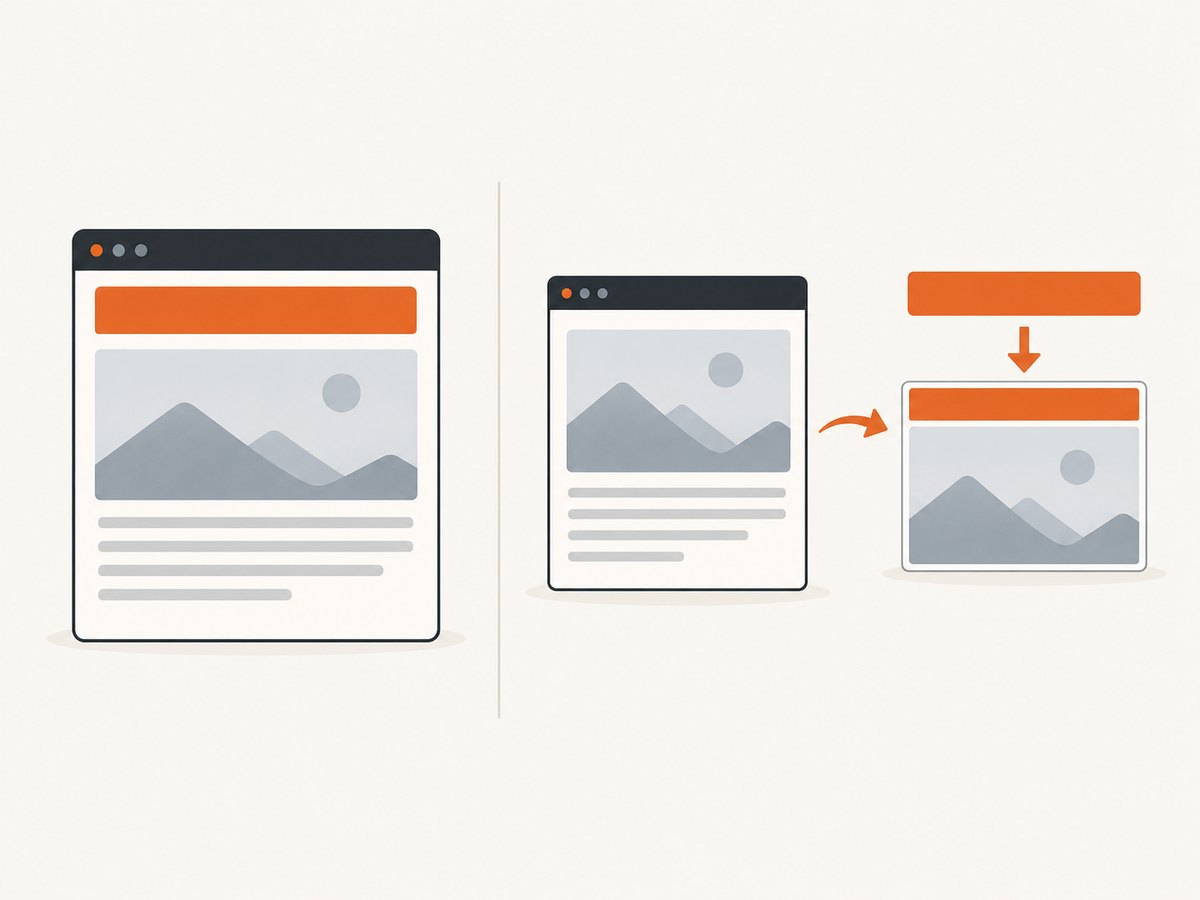
Runnable Python example with Pillow
Install Pillow in the environment that will run the script:
python -m pip install PillowThen save this as add_header.py. It opens an existing screenshot, adds a 72-pixel band, and writes the output image.
from PIL import Image, ImageDraw, ImageFont

source = Image.open("page.png").convert("RGB")
header_height = 72
canvas = Image.new("RGB", (source.width, source.height + header_height), "#f1f3f5")
canvas.paste(source, (0, header_height))

draw = ImageDraw.Draw(canvas)
text = "Monthly report"
try:
    font = ImageFont.truetype("DejaVuSans-Bold.ttf", 24)
except OSError:
    font = ImageFont.load_default()

draw.text((24, 22), text, fill="#18212b", font=font)
canvas.save("page-with-header.png", format="PNG", optimize=True)
Run wkhtmltoimage first, then the script:
wkhtmltoimage --format png --width 1200 https://example.com/report page.png
python add_header.py
For production use, choose a font available on the host, measure and wrap long headings, preserve alpha if the source requires transparency, and decide whether the output should be PNG, JPEG, or another format. The example converts to RGB for a straightforward opaque result.
4. Why --header-html does not work here
The similarly named --header-html option is documented for wkhtmltopdf, which creates PDFs. The upstream wkhtmltopdf usage documentation describes text and HTML header options in the PDF context. Do not copy those flags into a wkhtmltoimage command expecting a visible heading; they are not documented image-mode options.
Likewise, --header-left is a PDF page-header option in wkhtmltopdf. For an image, put the visible title in the rendered HTML or composite it afterward.
5. Output options that affect the result
The wkhtmltoimage manual documents options for rendering, sizing, cropping, and loading pages. The following are the practical choices to check when adding a heading:
| Need | Approach | What to watch |
|---|---|---|
| Set output image width | --width |
Responsive CSS may reflow at this viewport width. |
| Set output height | --height |
A fixed or cropped height can cut off the header or content. |
| Choose image format | --format |
Pick a format supported by your build and ensure the filename extension matches. |
| Crop a region | Crop options documented by your installed manual | Confirm the crop starts high enough to include the new heading. |
| Send HTTP metadata | --custom-header |
This changes requests, not visible pixels. |
Option availability can vary by package and build. Check wkhtmltoimage --help on the machine that runs the capture and consult the manual matching that installation. Avoid assuming that an option from wkhtmltopdf also exists in wkhtmltoimage.
6. Choose HTML or compositing
| Question | Prefer HTML/CSS | Prefer compositing |
|---|---|---|
| Can you change the rendered document? | Yes; add semantic header markup and styles. | No; work from the resulting image. |
| Should the heading affect page flow? | Yes; it occupies space above the content. | No; image dimensions are changed after rendering. |
| Must the same band be reused across unrelated pages? | Possible with shared templates and styles. | Convenient when a separate image pipeline owns the branding. |
| Can you add a library or image-editing step? | Usually no additional image dependency. | Yes; run a compositor after capture. |
7. Troubleshooting
The heading is missing
- Cause: The heading exists in a different file than the one passed to wkhtmltoimage, or the URL serves a different template.
- Fix: Open the exact input HTML or URL in a browser and verify the header is present before capture. For a local file, confirm the command points to the edited path.
The command says an option is unknown
- Cause: A wkhtmltopdf option such as
--header-htmlwas supplied to wkhtmltoimage, or the installed build differs from the documentation being followed. - Fix: Check
wkhtmltoimage --helpand use the manual for the installed package. Add visible markup to HTML instead of relying on a PDF header flag.
The heading is clipped
- Cause: A fixed height or crop excludes the top band, or the heading wraps to more lines than expected.
- Fix: Increase the output height or revise crop coordinates; reduce padding or font size; inspect the page at the configured width.
The page is blank or styles are missing
- Cause: The URL failed to load, a dependent resource is inaccessible, or the render completed before content was ready.
- Fix: Check network access and asset URLs from the converter host, inspect the command’s error output, and use the loading or delay options documented for your build where needed. Keep the heading in static markup if the page content is generated dynamically.
The HTTP header does not appear in the image
- Cause:
--custom-headersends request metadata, not display text. - Fix: Add a visible element to the HTML, or use the post-render compositing workflow.
The Python script cannot find a font or image
- Cause: Paths are relative to the current working directory, or the selected font is absent on the host.
- Fix: Use explicit paths, install or bundle a permitted font, and retain the fallback shown in the example. Check that the input image exists before running the script.
8. Performance, reliability, and cost
For a page you control, adding HTML and CSS is generally the shortest pipeline: one render produces the final image. Post-processing adds a second step and an extra dependency, but it can keep a shared image band independent from individual pages. Large source images, slow page resources, and font loading can affect end-to-end capture time; keep assets available locally or on reliable endpoints when your workflow allows it.
For repeatable output, pin the wkhtmltoimage package and fonts in the environment, set viewport dimensions explicitly, and review rendered output when templates change. Capture failures should be handled by checking the process exit status and confirming that the expected output file exists and is non-empty. Avoid interpreting a successful process launch as proof that the page loaded correctly.
There is no cost figure in the cited wkhtmltoimage documentation. Your operational cost comes from the machine, storage, image-processing dependencies, and maintenance of the capture environment. A hosted screenshot API shifts browser setup and capture operations to a service; compare its per-shot pricing and failure behavior with the cost of running your own workflow.
Or skip the browser setup
For URL-to-image captures, ScreenshotNeo is a website screenshot API and MCP server. A single GET request returns a screenshot or PDF, and the service provides 63 options for controlling capture, including full-page output, element selection, custom CSS, headers, and cookies. See the ScreenshotNeo API documentation for parameters and setup.
This does not add a custom title banner to an arbitrary page; the heading still needs to be part of the page or composed separately. It can skip local browser setup for the URL capture itself:
curl -G "https://api.screenshotneo.com/v1/shot" \
  -d access_key=YOUR_API_KEY \
  --data-urlencode url=https://stripe.com \
  -o shot.webp
import requests
r = requests.get(
"https://api.screenshotneo.com/v1/shot",
params={"access_key": "YOUR_API_KEY", "url": "https://stripe.com"},
timeout=90,
)
open("shot.webp", "wb").write(r.content)const q = new URLSearchParams({
access_key: 'YOUR_API_KEY',
url: 'https://stripe.com'
});
const res = await fetch(`https://api.screenshotneo.com/v1/shot?${q}`);
if (!res.ok) throw new Error(`Screenshot request failed: ${res.status}`);
await Bun.write('shot.webp', res);Cookie banners, popups, and chat widgets are removed before the shot. Bot checks, blank pages, and failed loads are never billed. An MCP server lets AI agents take screenshots. The free plan includes 1,000 screenshots per month with no card, and paid plans start at $5 for 3,000. Each response identifies the page verdict and billing status in headers.
Sign up for ScreenshotNeo’s free plan to get 1,000 screenshots a month with no card.
FAQ
Does wkhtmltoimage support --header-html?
It is not a documented visual-header option for wkhtmltoimage. The similarly named option is documented for wkhtmltopdf PDF output.
Can I add a heading to a remote website without changing it?
Not with a documented wkhtmltoimage visual-header flag. Use an image-compositing step after capture, or inject markup through a mechanism in your own application that serves the page.
Does --custom-header add text to the screenshot?
No. It sends an HTTP request header. Add text to the HTML or composite it onto the image to make it visible.
Will the heading appear in a full-page image?
Yes, if it is in the rendered document and the output or crop includes the top of the page. Check configured height and crop behavior to avoid clipping.
Can I use an image as the header?
Yes. Add an image element in the HTML for a layout-aware header, or paste a banner image into the new strip during post-processing. Verify the image loads and that its dimensions fit the target width.


