How to Align a Logo to the Bottom in Wkhtmltopdf Without a Footer
Place a dynamic logo at the bottom of only the first wkhtmltopdf page with reliable A4 and Letter CSS, reserved space, and tested alternatives.

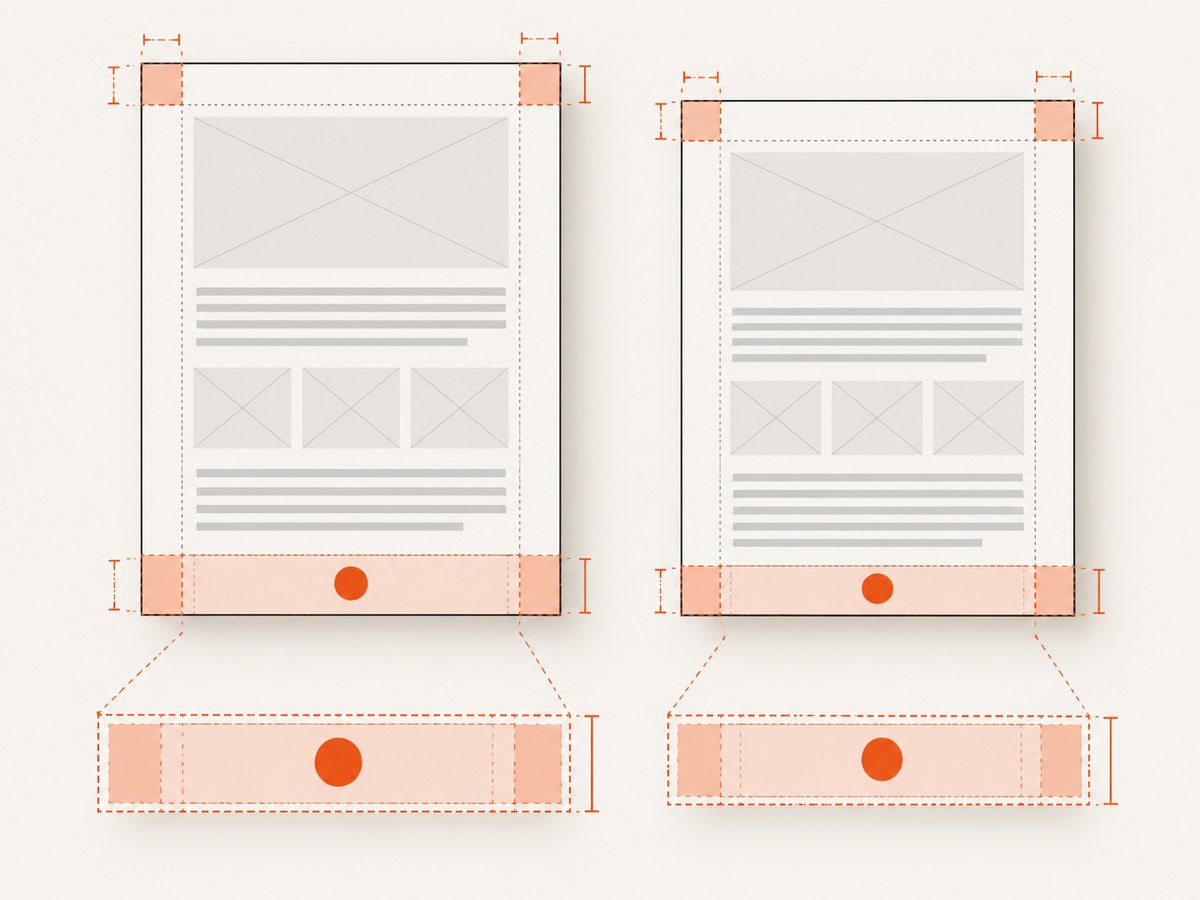
To place a logo at the bottom of only the first page in wkhtmltopdf, keep the logo in the page HTML, wrap the first page in a fixed-height positioned container, reserve space for the largest logo you accept, and absolutely position the image inside that reserved area. Do not use --footer-html: wkhtmltopdf headers and footers are document furniture and normally repeat on every page.
The pattern below supports both A4 and US Letter. It also handles uploaded logos with different aspect ratios without letting content flow underneath the image.
1. The first-page layout that works
<!doctype html>
<html>
<head>
  <meta charset="utf-8">
  <style>
    @page {
      size: A4;
      margin: 12mm 12mm 16mm;
    }

    html, body {
      margin: 0;
      padding: 0;
    }

    .first-page {
      position: relative;
      box-sizing: border-box;
      height: 297mm;
      padding: 12mm 12mm 35mm;
      page-break-after: always;
    }

    .first-page-content {
      min-height: 1px;
    }

    .logo-block {
      position: absolute;
      left: 12mm;
      right: 12mm;
      bottom: 16mm;
      height: 25mm;
      display: flex;
      align-items: flex-end;
      justify-content: flex-start;
    }

    .logo {
      display: block;
      max-width: 100%;
      max-height: 25mm;
      width: auto;
      height: auto;
      object-fit: contain;
    }

    .following-page {
      page-break-before: always;
    }
  </style>
</head>
<body>
  <section class="first-page">
    <div class="first-page-content">
      <h1>Invoice</h1>
      <p>Content for the first page goes here.</p>
    </div>

    <div class="logo-block">
      <img class="logo" src="logo.png" alt="Company logo">
    </div>
  </section>

  <section class="following-page">
    <h2>Details</h2>
    <p>Content on later pages starts independently.</p>
  </section>
</body>
</html>
The physical height of an A4 sheet is 297mm. US Letter is 279.4mm high, so the Letter version changes both the page declaration and wrapper height:
@page {
  size: Letter;
  margin: 12mm 12mm 16mm;
}

.first-page {
  height: 279.4mm;
}
The wrapper is the containing block for the absolutely positioned logo. bottom: 16mm aligns the logo with the bottom page margin, while padding-bottom: 35mm keeps normal content away from the logo area. The 25mm block is the maximum rendered logo height in this example. Increase it when uploaded images can be taller.
2. Why this avoids a footer
wkhtmltopdf documents header and footer options separately from the page HTML. The project manual describes --header-* and --footer-* as document headers and footers; they are intended to be repeated page furniture. A first-page-only mark therefore belongs in the first page’s HTML structure. See the wkhtmltopdf usage documentation for the page and margin options.
A frequently suggested shortcut is:
.footer {
  position: absolute;
  bottom: 0;
  width: 100%;
}
That can work when the element’s parent has a known height. Without a fixed-height containing block, “bottom” means the bottom of the element’s containing box, which may be the end of the flowed content rather than the physical paper. The explicit wrapper removes that ambiguity.
3. Reserve space for a dynamic logo
Uploaded images can be short and wide, nearly square, or tall. Constrain one or both dimensions and preserve the aspect ratio. height: auto lets the browser calculate the other dimension; object-fit: contain prevents cropping when both dimensions are constrained.

| Requirement | CSS choice | Result |
|---|---|---|
| Never exceed a vertical area | max-height: 25mm; height: auto |
Logo remains inside the reserved block. |
| Fill the content width | width: 100%; height: auto |
Width follows the page while preserving ratio. |
| Fit inside both limits | max-width: 100%; max-height: 25mm; object-fit: contain |
No stretching or clipping. |
| Align to the left | justify-content: flex-start |
Logo starts at the content edge. |
| Center horizontally | justify-content: center |
Logo is centered in the block. |
| Align to the right | justify-content: flex-end |
Logo ends at the content edge. |
Reserve enough bottom padding for the largest expected rendered height plus clearance. If the block is 25mm high, a 25mm logo can touch its boundary; a smaller logo leaves visual breathing room. For untrusted uploads, normalize dimensions before rendering or reject images that exceed your policy.
4. Make the paper geometry agree
There are two coordinate systems to keep consistent: CSS and the wkhtmltopdf command line. The page size and margins in both must describe the same sheet. A mismatch moves the apparent bottom position or causes a wrapper to overflow onto another page.
wkhtmltopdf \
  --page-size A4 \
  --margin-top 12mm \
  --margin-right 12mm \
  --margin-bottom 16mm \
  --margin-left 12mm \
  input.html output.pdf
For Letter:
wkhtmltopdf \
  --page-size Letter \
  --margin-top 12mm \
  --margin-right 12mm \
  --margin-bottom 16mm \
  --margin-left 12mm \
  input.html output.pdf
You can use explicit dimensions instead of named sizes:
wkhtmltopdf \
  --page-width 215.9mm \
  --page-height 279.4mm \
  --margin-top 12mm \
  --margin-right 12mm \
  --margin-bottom 16mm \
  --margin-left 12mm \
  input.html output.pdf
Use the same wkhtmltopdf build in development and production. The official documentation describes version 0.12.6 with patched Qt; older builds can differ in CSS and pagination behavior.
5. A complete generated example
If your application generates the HTML, emit the image URL or a data URL only after validating it. A data URL avoids a second network request during conversion but increases HTML size. A local file is usually more predictable than a remote URL when the converter runs in a restricted environment.
<section class="first-page">
  <header>
    <p class="document-type">Statement</p>
    <h1>Acme Corporation</h1>
    <p>Account period: January 2026</p>
  </header>

  <div class="first-page-content">
    <p>The body can grow, but it must fit above the reserved logo block.</p>
  </div>

  <div class="logo-block" aria-label="Company branding">
    <img class="logo" src="file:///srv/app/uploads/logo-123.png" alt="Acme Corporation logo">
  </div>
</section>
When using local files, configure the converter according to your deployment’s security policy. If local access is disabled, serve the image from an authenticated endpoint that wkhtmltopdf can reach or embed it as base64.
6. Multi-page documents
The first-page wrapper is a cover or fixed page object. Put a deliberate page break after it. Do not expect an absolutely positioned child to become a bottom element on every flowed page. wkhtmltopdf’s fixed-position behavior has been reported to place an element only on the last page and at the end of the text rather than at the physical bottom. That is why the first-page wrapper and a page break are safer for this requirement.
If later pages need a repeated logo, use a separately tested header mechanism or design each page as its own fixed-height wrapper. A single-flow document needs different pagination rules from a cover page.
7. Common failures and fixes
| Symptom | Likely cause | Fix |
|---|---|---|
| Logo appears on every page | --footer-html or a repeated footer was used. |
Move the image into the first-page HTML wrapper. |
| Logo sits after the text, not at paper bottom | Parent has no fixed height. | Add position: relative and a physical height to the wrapper. |
| Logo is cut off | Reserved block is shorter than the rendered image. | Increase max-height, block height, and bottom padding together. |
| Text runs behind the logo | Normal content was allowed into the logo area. | Reserve bottom padding equal to the maximum logo height plus clearance. |
| Position differs between A4 and Letter | CSS page size, wrapper height, and CLI paper size disagree. | Use 297mm for A4 or 279.4mm for Letter everywhere. |
| Logo is stretched | Both width and height were forced without preserving ratio. | Use height: auto or object-fit: contain. |
| Remote logo is missing | Networking, TLS, DNS, or access restrictions in the converter. | Use a local file or data URL; verify the converter can reach the asset. |
| Flex alignment has no effect | Older wkhtmltopdf/WebKit support differs from modern browsers. | Prefer absolute positioning and explicit dimensions; inspect the generated PDF. |
| First page unexpectedly spills to page two | Content plus padding exceeds the fixed page height. | Reduce content, margins, or reserved block height, or intentionally move content to the next page. |
8. Verification checklist
- Record the exact wkhtmltopdf version and patched-Qt build used in production.
- Render the same HTML as A4 and Letter with matching CSS and command-line margins.
- Test a short horizontal logo, a square logo, and a tall logo.
- Test a one-page document and a document that continues for several pages.
- Confirm the first page has enough content clearance above the reserved block.
- Open the PDF itself, because a browser preview can implement CSS differently from wkhtmltopdf.
- Check image loading with networking disabled if your production converter runs in a sandbox.
9. Performance, reliability, and cost considerations
Fixed-height first pages are predictable and cheap to lay out, but large remote images add network latency and can fail independently of HTML rendering. Resize or optimize uploaded logos before conversion. A data URL removes an external fetch but increases memory and document size. Keep the logo block height bounded so a maliciously large image cannot force unexpected pagination.
Rendering behavior is tied to the converter version, WebKit engine, fonts, and installed image codecs. Pin these inputs in deployment and compare generated PDFs in CI when the template changes. Avoid relying on modern flexbox, grid, or browser-only CSS without rendering the actual PDF.
If you need many screenshots or rendered page images for QA, documentation, or visual regression checks, ScreenshotNeo provides a website screenshot API and MCP server. It is useful after the PDF is generated when you need a clean, repeatable capture of a web page rather than a local wkhtmltopdf conversion.
10. Or skip the browser setup
For a hosted page, ScreenshotNeo can return a screenshot or PDF with one GET request. The API accepts PNG, JPEG, WebP, and PDF output plus options for full-page capture, element selectors, paper size, margins, landscape mode, custom CSS and JavaScript, waits, resource blocking, headers, cookies, user agents, time zones, geolocation, caching, signed links, asynchronous jobs, and bulk capture. See the ScreenshotNeo documentation for the complete parameter list.
curl -G "https://api.screenshotneo.com/v1/shot" \
  -d access_key=YOUR_API_KEY \
  --data-urlencode url=https://stripe.com \
  -o shot.webp
import requests
r = requests.get(
"https://api.screenshotneo.com/v1/shot",
params={"access_key": "YOUR_API_KEY", "url": "https://stripe.com"},
timeout=90,
)
r.raise_for_status()
open("shot.webp", "wb").write(r.content)const q = new URLSearchParams({
access_key: 'YOUR_API_KEY',
url: 'https://stripe.com'
});
const res = await fetch(`https://api.screenshotneo.com/v1/shot?${q}`);
if (!res.ok) throw new Error(`Screenshot failed: ${res.status}`);
const bytes = await res.arrayBuffer();
// Save bytes to shot.webp using your runtime's file API.Cookie banners, newsletter popups, and chat widgets are removed before the shot. Bot checks, blank pages, timeouts, failed loads, and cache hits are not billed, and response headers report the page verdict and billing result. An MCP server lets Claude, Cursor, and other MCP clients call take_screenshot, get_page_info, and capture_pdf. The Free plan includes 1,000 screenshots each month with no card; paid plans start at $5 for 3,000 shots. Create a free ScreenshotNeo account.
11. FAQ
Can I use pixels instead of millimeters?
You can, but physical units make A4 and Letter geometry explicit. If you use pixels, validate the output at the exact DPI and wkhtmltopdf settings used in production.
Should the logo be inside the content flow?
Keep it in the first-page wrapper but absolutely position it inside a reserved block. This preserves a stable bottom coordinate while preventing overlap.
How do I make the logo span the full content width?
Set width: 100%; height: auto; and keep the image inside the left and right offsets of the logo block. Add a max-height if tall uploads are possible.
Why does a modern browser preview look correct but the PDF does not?
wkhtmltopdf uses its own WebKit engine and may handle flexbox, fixed positioning, fonts, and page breaks differently. Always inspect the generated PDF with the production binary.
Can this method put a logo at the bottom of every page?
It is designed for the first page. Repeating placement requires a tested header/footer strategy or separate fixed-height page wrappers, because flowed pages do not share the first page’s containing block.


