How to Apply crossOrigin to Canvas and Image Elements
Set crossOrigin before loading images, configure server CORS headers, avoid tainted canvases, and export pixels safely with runnable examples.

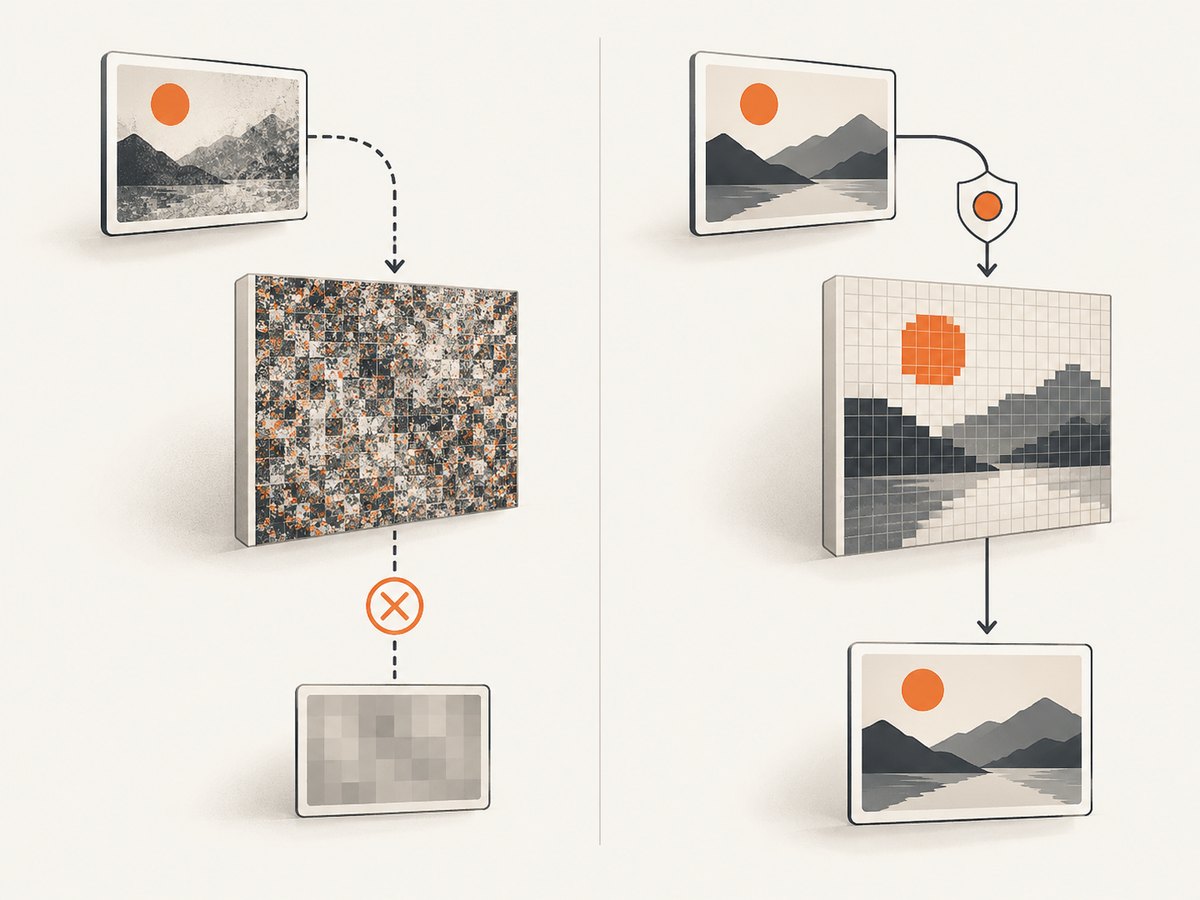
crossOrigin belongs on the HTMLImageElement, and you must set it before assigning src. The image server must return a matching Access-Control-Allow-Origin header. If either step is missing, drawing a cross-origin image can taint the canvas and make pixel reads or exports fail with SecurityError.
1. The shortest working example
For a public image that does not need cookies, use anonymous CORS mode:
<canvas id="canvas" width="800" height="600"></canvas>
<script>
const img = new Image();
img.crossOrigin = "anonymous"; // Set before src starts the request
img.onload = () => {
  const canvas = document.querySelector("#canvas");
  const ctx = canvas.getContext("2d");
  ctx.drawImage(img, 0, 0, canvas.width, canvas.height);

  // These operations require a CORS-approved image.
  const pixels = ctx.getImageData(0, 0, canvas.width, canvas.height);
  canvas.toBlob(blob => {
    if (blob) console.log("PNG bytes:", blob.size);
  }, "image/png");
};
img.onerror = () => console.error("Image failed to load");
img.src = "https://cdn.example.com/photo.jpg";
</script>
The CDN response must include a header such as Access-Control-Allow-Origin: https://your-site.example (or an appropriate wildcard for non-credentialed public content). The browser-side property cannot grant permission by itself. See the MDN crossOrigin reference and the WHATWG HTML Standard.
2. What crossOrigin controls
HTMLImageElement.crossOrigin reflects the image’s crossorigin content attribute. The supported states are:

| Setting | Fetch mode | Credentials | Use when |
|---|---|---|---|
"anonymous" |
CORS | Omitted for cross-origin requests (same-origin credentials may still apply) | The asset is public and does not require cross-site cookies |
"use-credentials" |
CORS | Included | The image requires cookies, client certificates, or authorization credentials |
| Missing, empty, or invalid | No CORS state | Normal image loading | You do not need to read or export pixels |
An empty or invalid value uses the anonymous state when the attribute is present. A same-origin image normally avoids this cross-origin taint path entirely.
3. Markup versus JavaScript
HTML markup
<img
  crossorigin="anonymous"
  src="https://cdn.example.com/photo.jpg"
  alt=""
>
Put crossorigin on the element before the browser begins loading the source. This is useful for static markup and framework templates.
JavaScript
const img = new Image();
img.crossOrigin = "anonymous";
img.src = "https://cdn.example.com/photo.jpg";
Setting crossOrigin after src has started a request is too late. Change the property, then assign src again to reload with the new mode.
4. Configure the image server
The server hosting the image must opt in. For a public, non-credentialed asset:
Access-Control-Allow-Origin: https://your-site.exampleFor a genuinely public resource that does not use credentials, a wildcard may be suitable:
Access-Control-Allow-Origin: *For credentialed mode, return an origin-specific value and credentials permission:
Access-Control-Allow-Origin: https://your-site.example
Access-Control-Allow-Credentials: true
Do not combine Access-Control-Allow-Credentials: true with an incompatible wildcard origin. If you vary the response by origin, configure the server or CDN to send Vary: Origin so caches do not serve the wrong CORS response.
5. Using use-credentials safely
const img = new Image();
img.crossOrigin = "use-credentials";
img.onload = () => {
  const canvas = document.querySelector("canvas");
  canvas.getContext("2d").drawImage(img, 0, 0);
  console.log(canvas.toDataURL("image/png"));
};
img.src = "https://private.example.com/avatar.jpg";
This asks the browser to include cookies, client certificates, and other authorization credentials where applicable. The response must explicitly allow your page origin and include Access-Control-Allow-Credentials: true. Credentialed requests also have cookie policy constraints such as SameSite; a correct CORS header cannot make a cookie eligible if the browser will not send it.
6. Why a canvas becomes tainted
When an image is fetched without successful CORS approval and then drawn to a canvas, the canvas is marked tainted. The browser still may display the image, but scripts are prevented from reading protected pixels. These operations throw SecurityError on a tainted canvas:
getImageData()toDataURL()toBlob()captureStream()
Setting crossOrigin on the <canvas> element does not authorize an image. Authorization is determined by the image request and the image server’s response.
7. Complete pixel-processing example
<canvas id="canvas" width="1200" height="800"></canvas>
<script>
async function loadCorsImage(url, mode = "anonymous") {
  const img = new Image();
  img.crossOrigin = mode;
  await new Promise((resolve, reject) => {
    img.onload = resolve;
    img.onerror = () => reject(new Error(`Could not load ${url}`));
    img.src = url;
  });
  return img;
}

(async () => {
  try {
    const img = await loadCorsImage("https://cdn.example.com/photo.jpg");
    const canvas = document.querySelector("#canvas");
    const ctx = canvas.getContext("2d", { willReadFrequently: true });
    ctx.clearRect(0, 0, canvas.width, canvas.height);
    ctx.drawImage(img, 0, 0, canvas.width, canvas.height);

    const imageData = ctx.getImageData(0, 0, canvas.width, canvas.height);
    for (let i = 0; i < imageData.data.length; i += 4) {
      const gray = Math.round(
        imageData.data[i] * 0.299 +
        imageData.data[i + 1] * 0.587 +
        imageData.data[i + 2] * 0.114
      );
      imageData.data[i] = gray;
      imageData.data[i + 1] = gray;
      imageData.data[i + 2] = gray;
    }
    ctx.putImageData(imageData, 0, 0);

    const png = await new Promise(resolve => canvas.toBlob(resolve, "image/png"));
    if (!png) throw new Error("Browser could not create a PNG");
    console.log("Processed image size:", png.size);
  } catch (error) {
    console.error(error);
  }
})();
</script>
8. Cross-origin sources beyond ordinary images
The same taint rules matter when an image is used indirectly. An SVG that references foreign images, a video frame drawn to canvas, or a WebGL texture can make subsequent reads fail if its source was not loaded with appropriate CORS permission. Apply the correct request mode at the resource that enters the canvas, and verify every nested resource that can contribute pixels.
9. Troubleshooting checklist
| Symptom | Likely cause | Fix |
|---|---|---|
SecurityError from toDataURL() or getImageData() |
The canvas was tainted by an image loaded without successful CORS. | Set crossOrigin before src, configure Access-Control-Allow-Origin, then reload the image and redraw. |
| Console says the CORS header is missing | The CDN or origin did not return an allow-origin header. | Change the image server configuration; JavaScript cannot add this response permission. |
Changing crossOrigin has no effect |
The request already started. | Set the property first and assign src again, or create a new Image. |
| Credentialed image still fails | Missing Access-Control-Allow-Credentials: true, wildcard origin, or cookies blocked by cookie policy. |
Use an exact allowed origin, add the credentials header, and check cookie SameSite and third-party-cookie rules. |
| Image displays but pixels cannot be read | Display success does not imply CORS success. | Inspect the Network response headers and reload with a valid CORS response. |
| Intermittent success behind a CDN | A cached response was generated for a different origin. | Make the CDN vary/cache by Origin and send Vary: Origin where needed. |
Use browser DevTools Network and Console panels to confirm the request’s mode, response headers, redirects, and final image URL. A redirect can land on a different host that lacks the required header.
10. Performance and reliability
- Set the image dimensions or reserve canvas space to avoid layout shifts while loading.
- Decode only images you need. Large source images increase transfer, decode, memory, and pixel-processing costs.
- Use
createImageBitmap()when its browser support and processing model fit your workload; it can move decoding work off the main path, but it does not bypass CORS. - Use
willReadFrequently: truewhen repeatedly callinggetImageData(); measure in your target browsers because it can change rendering trade-offs. - Cache immutable image URLs, but ensure cached responses preserve the correct CORS headers.
- Handle
errorand timeouts in application code. A successful HTTP response does not guarantee a usable, CORS-approved image.
11. Or skip the browser setup
If your goal is a clean screenshot rather than in-browser pixel manipulation, ScreenshotNeo captures a URL with one request and returns PNG, JPEG, WebP, or PDF. Its cleanup steps accept cookie banners and remove more than 60 known consent platforms, newsletter popups, and chat widgets before capture; each step can be disabled. Bot checks, blank pages, timeouts, failed loads, and cache hits are not billed, and response headers identify the page verdict and billing status.
See the ScreenshotNeo API documentation for all options.
cURL
curl -G "https://api.screenshotneo.com/v1/shot" \
  -d access_key=YOUR_API_KEY \
  --data-urlencode url=https://stripe.com \
  -o shot.webp
Python
import requests

r = requests.get(
    "https://api.screenshotneo.com/v1/shot",
    params={"access_key": "YOUR_API_KEY", "url": "https://stripe.com"},
    timeout=90,
)
r.raise_for_status()
open("shot.webp", "wb").write(r.content)
Node.js
const q = new URLSearchParams({ access_key: 'YOUR_API_KEY', url: 'https://stripe.com' });
const res = await fetch(`https://api.screenshotneo.com/v1/shot?${q}`);
if (!res.ok) throw new Error(`HTTP ${res.status}`);
const bytes = Buffer.from(await res.arrayBuffer());
require('fs').writeFileSync('shot.webp', bytes);
ScreenshotNeo also supports full-page captures with lazy images loaded, CSS element capture, custom CSS and JavaScript, waits, request blocking, headers, cookies, user agents, geolocation, caching, signed links, asynchronous jobs, webhooks, bulk capture, PDF options, HTML/CSS rendering, and an MCP server with take_screenshot, get_page_info, and capture_pdf for AI agents. Every feature is included on every plan. The Free plan includes 1,000 screenshots per month with no card; paid plans start at $5 for 3,000. Create a free ScreenshotNeo account.
12. FAQ
Does crossorigin fix a server that lacks CORS headers?
No. It requests CORS mode; the image response must still authorize your origin.
Can I set crossOrigin on a canvas?
No. Set it on each image before its request begins.
Should I use anonymous or use-credentials?
Use anonymous for public assets. Use use-credentials only when the image requires credentials and the server is configured for credentialed CORS.
Why does the image look normal but export fails?
Browsers may display a cross-origin image while withholding its pixels from scripts. Export and pixel APIs then throw because the canvas is tainted.
Can a proxy solve this?
A server-side proxy can fetch the image and serve it from your own origin, subject to the source’s terms and your security controls. Configure CORS correctly at the source when possible.


