How to Automate Amazon Product Scraping on a Schedule
Automate scheduled Amazon product monitoring with authorized APIs, serverless jobs, change detection, retries, alerts, and compliance safeguards.
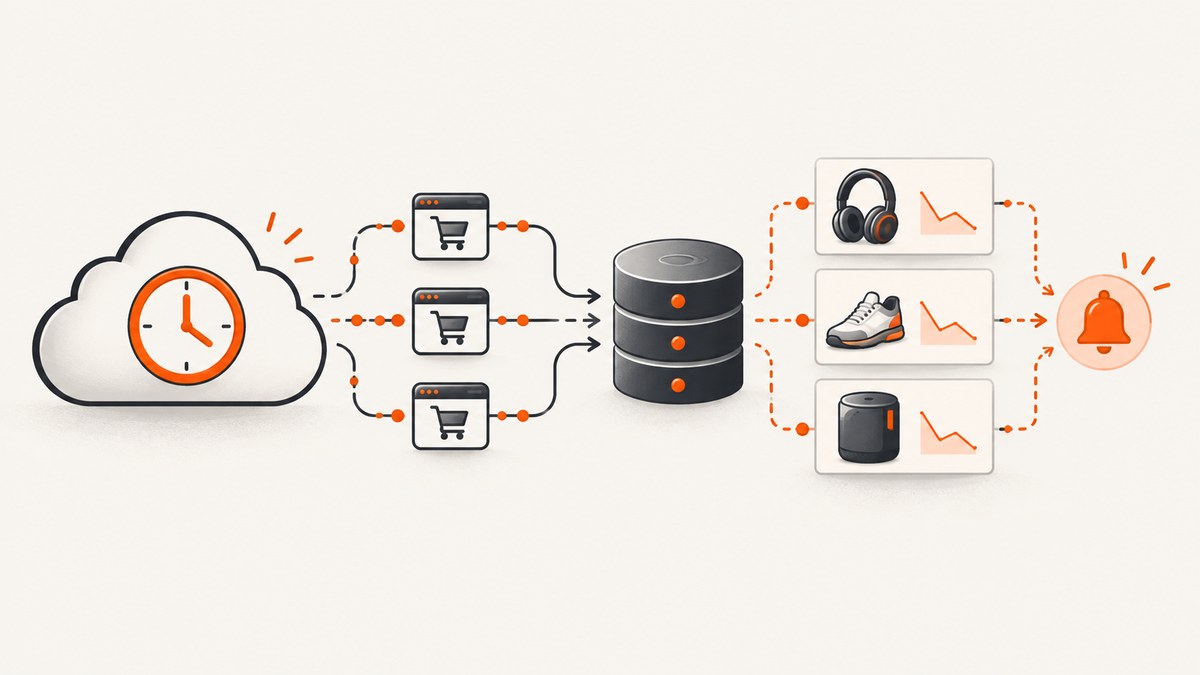
Direct answer: Do not build a scheduled job that scrapes Amazon HTML pages. For an affiliate publishing workflow, use Amazon Creators API, the supported successor to PA-API 5. For seller or vendor data, use Selling Partner API (SP-API), including its Product Pricing API. Run the authorized API request from a scheduled cloud function, store a normalized snapshot, compare it with the previous snapshot, and alert only when price, availability, or other required fields change.
This design gives you repeatable runs without a manually operated browser and keeps authorization, quotas, retries, and audit data in one place.
Choose the correct Amazon access surface
| Use case | API | Typical data | Authorization |
|---|---|---|---|
| Affiliate, influencer, or publisher catalog links | Amazon Creators API | Authorized catalog, item, image, offer, and browse-node fields | Creators/Associates credentials |
| Your seller or vendor operation | Selling Partner API | Orders, shipments, payments, inventory, reports, and seller data | Seller or vendor authorization |
| Seller price and offer workflows | SP-API Product Pricing API | Pricing and offers for authorized seller data | Seller authorization and current role scopes |
PA-API 5 is deprecated; Amazon says it is being replaced by Creators API. Check the current Creators API documentation for authentication, resources, and quotas before deploying. Legacy PA-API rate figures are historical and must not be used to size a new job.
Compliance boundaries
Amazon Associates operating policies grant a limited license for displaying Product Advertising Content to drive sales to Amazon. The policy excludes “any use of data mining, robots, or similar data gathering and extraction tools.” That means rotating proxies, CAPTCHA solving, headless-browser harvesting, and bulk republication are not a substitute for authorized API access.
Use the API whose authorization matches your account and intended use. Store the source, marketplace, locale, API version, retrieval time, and authorization context with every record. Amazon Ads API is a separate surface for campaign management and reporting, not a general product-catalog scraper.
Reference architecture for a scheduled job
- Define the fields. Start with the item or ASIN identifier, title, price or offer, availability, marketplace, and retrieval timestamp. Request only fields you are authorized to use and actually need.
- Choose a cadence. Use daily checks for editorial catalogs, hourly checks for active price monitoring, or an event-driven trigger when the API and business process support it. Keep the interval within current quotas.
- Schedule a worker. AWS EventBridge can emit scheduled events to a Lambda-style function. Equivalent schedulers on other clouds work the same way.
- Fetch in batches. Read identifiers from durable storage, request bounded batches, and record each response independently so one bad item does not discard the whole run.
- Normalize and persist. Convert prices to numeric values with currency, normalize availability states, and write an immutable observation plus a current-state table.
- Compare and notify. Alert on meaningful price, availability, or content changes. Suppress duplicate notifications by using a deterministic change key.
- Observe the run. Track request count, successful items, throttles, authorization failures, latency, and permanently failed items. Send exhausted items to a dead-letter queue.

Minimal data model
product_observation {
  item_id: "B000000000",
  marketplace: "US",
  locale: "en-US",
  title: "Example product",
  price_amount: 29.99,
  price_currency: "USD",
  availability: "IN_STOCK",
  retrieved_at: "2026-09-30T12:00:00Z",
  source: "creators_api",
  api_version: "current-version"
}
Keep observations append-only when you need historical charts or auditability. Maintain a separate current-state record for fast comparisons. Never compare prices without also comparing currency and marketplace.
Python worker example
The endpoint and signing details differ between Creators API and SP-API. Insert the authentication flow and resource path from the current official documentation; do not copy legacy PA-API credentials into a new integration.
import os
import time
import requests

API_URL = os.environ["AMAZON_API_URL"]
TOKEN = os.environ["AMAZON_ACCESS_TOKEN"]
ITEM_IDS = os.environ.get("ITEM_IDS", "B000000000").split(",")

headers = {"Authorization": f"Bearer {TOKEN}", "Accept": "application/json"}
observations = []

for item_id in ITEM_IDS:
    for attempt in range(5):
        response = requests.get(
            API_URL,
            params={"itemIds": item_id.strip()},
            headers=headers,
            timeout=30,
        )
        if response.status_code == 429 or 500 <= response.status_code < 600:
            time.sleep(min(2 ** attempt, 30))
            continue
        response.raise_for_status()
        payload = response.json()
        observations.append({"item_id": item_id.strip(), "payload": payload})
        break
    else:
        print(f"dead_letter={item_id.strip()}")

# Write observations to your database, compare with the prior state,
# and emit an alert only for a real change.
cURL request pattern
curl --fail-with-body \
  -H "Authorization: Bearer $AMAZON_ACCESS_TOKEN" \
  -H "Accept: application/json" \
  --get "$AMAZON_API_URL" \
  --data-urlencode "itemIds=B000000000"
Use the authentication, host, path, query parameters, and required headers specified by the API you selected. Do not treat this generic request shape as a replacement for Amazon’s signing requirements.
Node.js worker example
const apiUrl = process.env.AMAZON_API_URL;
const token = process.env.AMAZON_ACCESS_TOKEN;
const itemIds = (process.env.ITEM_IDS || 'B000000000').split(',');

const sleep = ms => new Promise(resolve => setTimeout(resolve, ms));

for (const itemId of itemIds) {
  let response;
  for (let attempt = 0; attempt < 5; attempt++) {
    const url = new URL(apiUrl);
    url.searchParams.set('itemIds', itemId.trim());
    response = await fetch(url, {
      headers: {
        Authorization: `Bearer ${token}`,
        Accept: 'application/json'
      }
    });
    if (response.status !== 429 && response.status < 500) break;
    await sleep(Math.min(2 ** attempt * 1000, 30000));
  }
  if (!response.ok) {
    console.error(JSON.stringify({ itemId, status: response.status }));
    continue;
  }
  const payload = await response.json();
  // Persist, normalize, compare, and notify here.
  console.log(JSON.stringify({ itemId, payload }));
}
Scheduling with AWS EventBridge and Lambda
- Create a Lambda function containing the worker and its dependency bundle.
- Store API credentials in Secrets Manager or an equivalent secret store, not in source code or scheduler definitions.
- Create an EventBridge schedule such as
rate(1 day)or a cron expression in UTC. - Give EventBridge permission to invoke the function.
- Set a function timeout below the scheduler’s retry window and make the worker idempotent.
- Configure a dead-letter queue and alarms for repeated failures, throttling, and authorization errors.
EventBridge supports events from AWS services, SaaS partners, and custom applications, so the same worker can also respond to a manual or upstream event. API Gateway is useful for an authenticated “run now” endpoint, but it adds usage-based API-call and data-transfer charges alongside any Lambda and CloudWatch costs.
Retries, idempotency, and partial failures
- Retry 429 and transient 5xx responses with exponential backoff and jitter.
- Do not retry invalid credentials, invalid item identifiers, or permission errors until configuration changes.
- Use a run ID plus item ID plus marketplace as an idempotency key.
- Commit each successful item independently.
- Cap retries and place exhausted items in a dead-letter queue.
- Record response status, request ID, and throttling metadata when available.
- Prevent overlapping schedules with a distributed lock or conditional database write.
Freshness, performance, and cost
| Decision | Effect |
|---|---|
| Hourly versus daily schedule | Hourly checks improve freshness but multiply API calls, compute time, storage, and alert volume. |
| Batch size | Larger authorized batches reduce scheduler overhead; smaller batches isolate failures and simplify retries. |
| Requested fields | Requesting only required resources reduces response size and processing time. |
| History retention | Append-only history enables analysis but increases storage; expire raw payloads when policy and audit needs allow. |
| Alerts | Thresholds and deduplication prevent notification costs and alert fatigue. |
Budget for API usage according to the current Amazon quota and commercial terms, plus function runtime, durable storage, logs, queue operations, API Gateway calls, and data transfer. The legacy PA-API page recorded an initial maximum of 1 request per second and 8,640 requests per day for the first 30-day period; those figures are stale for planning Creators API workloads.
Common errors and fixes
| Error | Likely cause | Fix |
|---|---|---|
| 401 or 403 | Expired token, wrong signing scope, or missing role | Refresh credentials and verify the account authorization and marketplace. |
| 429 | Quota or burst limit exceeded | Reduce concurrency, add jittered backoff, and verify current limits. |
| Empty item data | Unsupported identifier, marketplace mismatch, or unavailable resource | Validate the identifier and request only resources available to that API. |
| Repeated duplicate alerts | No stable comparison key | Hash normalized fields and persist the last notified change. |
| Run timeout | Too many sequential requests | Bound the batch, process authorized requests concurrently, and checkpoint progress. |
| Stale prices | Schedule is too infrequent or cached data is being reused | Choose a cadence that matches the requirement and record retrieval timestamps. |
| Policy concern | HTML scraping or republishing data outside the license | Stop the scraper and switch to the authorized API and permitted display use. |

When a browser is actually required
Some internal workflows need a visual record of a page rather than catalog data. Keep that separate from product-data collection, and obtain permission for the pages you capture. If you need a screenshot for QA or evidence, capture a specific URL or element and retain the timestamp and source.
Or skip the browser setup
ScreenshotNeo is a website screenshot API and MCP server. It is useful when your scheduled job needs a visual snapshot after an authorized data workflow, not as a replacement for Amazon’s product APIs.
curl -G "https://api.screenshotneo.com/v1/shot" -d access_key=YOUR_API_KEY --data-urlencode url=https://www.amazon.com/ -o shot.webpimport requests
r = requests.get("https://api.screenshotneo.com/v1/shot", params={"access_key": "YOUR_API_KEY", "url": "https://www.amazon.com/"}, timeout=90)
open("shot.webp", "wb").write(r.content)const q = new URLSearchParams({ access_key: 'YOUR_API_KEY', url: 'https://www.amazon.com/' }); const res = await fetch(`https://api.screenshotneo.com/v1/shot?${q}`);Before capture, ScreenshotNeo accepts cookie and consent banners and removes more than 60 known consent platforms, newsletter popups, and chat widgets; each step can be turned off. Bot checks, blank pages, failed loads, timeouts, and cache hits are not billed, and the response identifies the result with X-Page-Verdict and X-Billed headers. Its MCP server provides take_screenshot, get_page_info, and capture_pdf tools for Claude, Cursor, and other MCP clients. See the ScreenshotNeo API documentation. Free accounts include 1,000 screenshots per month with no card; paid plans start at $5 for 3,000. Create a free ScreenshotNeo account.
Checklist before production
- Correct API selected for affiliate or seller authorization.
- Current authentication and quota documentation reviewed.
- Only required, permitted fields requested.
- Marketplace, currency, locale, and retrieval time stored.
- Backoff, bounded retries, idempotency, and dead-letter handling enabled.
- Secrets kept outside source control.
- Alerts deduplicated and thresholds documented.
- Logs and metrics cover throttles, failures, latency, and partial completion.
- Retention and display rules match the relevant Amazon terms.
FAQ
Can I run the job every hour?
Yes, if the selected API permits that request volume and your use complies with its terms. Calculate the number of items per run before choosing the interval.
Should I use PA-API 5 for a new project?
No. Amazon has deprecated PA-API 5 and directs integrations to Creators API.
Is SP-API the same as Creators API?
No. Creators API serves publisher, influencer, and affiliate catalog use cases. SP-API serves seller and vendor operations.
Can a screenshot API provide Amazon price data?
A screenshot API returns an image or PDF. Use Creators API or SP-API for authorized structured product data; use ScreenshotNeo when you separately need a visual capture.
What should happen when one product request fails?
Persist successful items, retry transient failures with backoff, and place exhausted items in a dead-letter queue for review.


