How to Automate Lead Generation with AI and Web Data
Build a reliable lead pipeline with permitted web data, validation, AI scoring, CRM routing, and compliant follow-up.
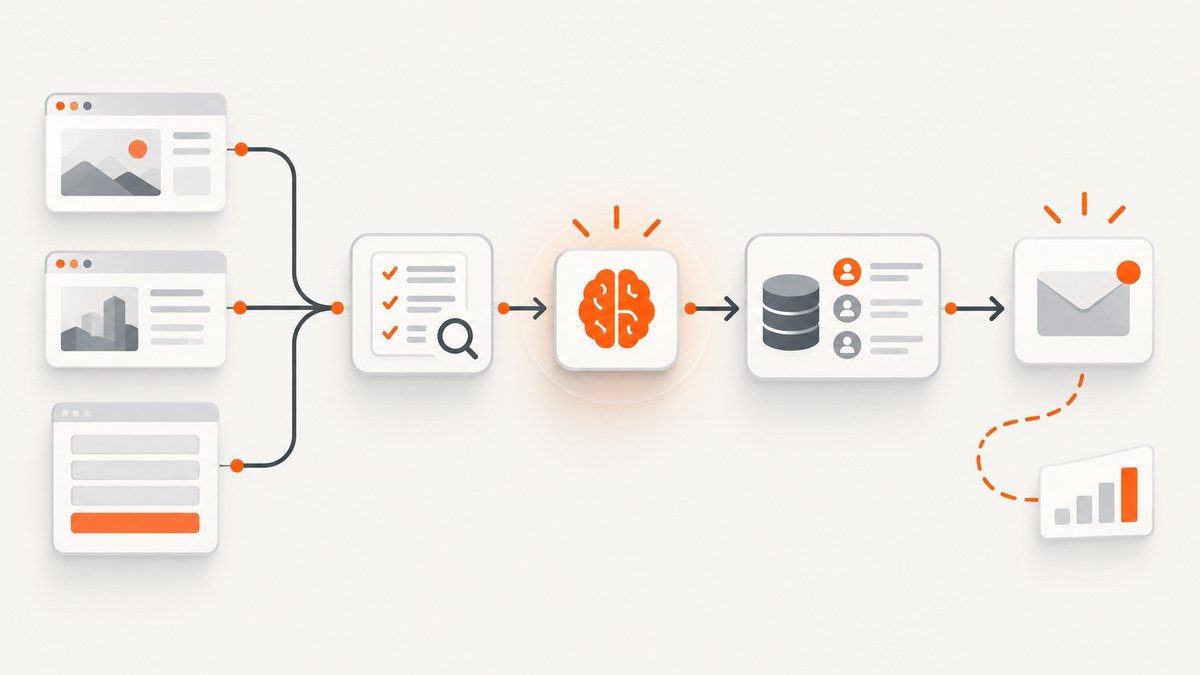
What the finished system does
Automated lead generation is a pipeline, not a single scraper or prompt. A dependable system captures or collects permitted data, validates and enriches it, applies explicit qualification rules, routes records to a CRM, and follows up with the required safeguards. AI can help classify, summarize, deduplicate, and prioritize records, but it does not remove the need for source authorization, human review, or compliance checks.
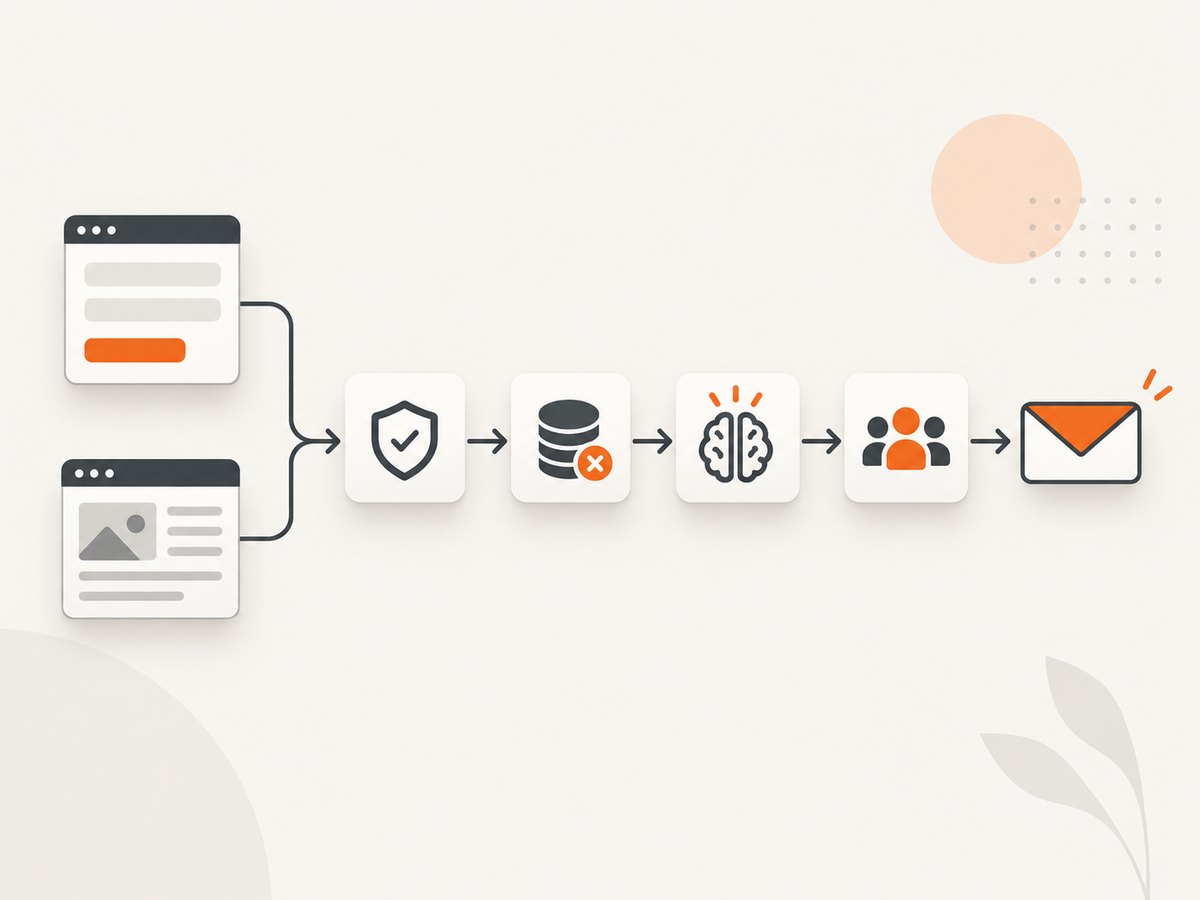
The practical sequence is:
- Define the lead. Specify the target account or person, required fields, source, intended use, and retention period.
- Capture or collect. Use an inbound form for voluntary submissions, or collect only from web surfaces you are permitted to access.
- Normalize, validate, and enrich. Standardize names, domains, locations, and dates; remove duplicates; record provenance; and add only appropriate fields.
- Qualify and score. Apply documented fit and intent criteria, with a review queue for uncertain decisions.
- Sync and route. Create or update CRM records, assign an owner, preserve source timestamps, and log every change.
- Follow up safely. Monitor delivery and responses, suppress opt-outs, and review provider and contractor behavior.
This architecture supports both inbound and outbound programs. Salesforce Web-to-Lead is a concrete inbound example: a visitor submits contact details, reCAPTCHA helps deter fake records, and response templates can acknowledge the submission. Salesforce documents a limit of up to 500 leads per day for that feature; verify the limit for your current edition and configuration in the Salesforce documentation.
1. Define your lead and source policy
Write a short specification before collecting anything. Include the ideal customer profile, required fields, acceptable sources, permitted use, owner, and deletion rule. A company contact page, directory, job board, or other public page may be a possible source, but public visibility is not blanket permission to copy, reuse, or message every person listed there. Check the site’s terms, robots directives where relevant, contractual restrictions, and the laws that apply to your organization and audience.
| Decision | Example | Why it matters |
|---|---|---|
| Target | US software companies with 50–500 employees | Prevents broad, low-quality collection |
| Required fields | Company, domain, role, source URL, source date | Defines completeness and provenance |
| Allowed source | Partner directory with written permission | Reduces terms and authorization risk |
| Use | One product announcement to opted-in contacts | Connects collection to a stated purpose |
| Retention | Delete unqualified records after 90 days | Limits unnecessary storage |
For inbound forms, request only information you need. Validate email syntax, show a clear privacy notice, and store consent or source context with the record.
2. Capture or collect data
Inbound form route
A form connected directly to your CRM is usually the simplest route for people who choose to contact you. Configure hidden fields for campaign and landing-page identifiers, but do not hide an undisclosed purpose. Reject obvious automated submissions, rate-limit the endpoint, and send the person a useful confirmation.
Permitted web collection route
When a source authorizes collection, fetch pages slowly, respect access controls, and retain the URL and retrieval timestamp. Prefer structured pages and first-party contact paths. Do not infer sensitive attributes from names, photos, or free text. If a source blocks automated access, treat that as a stop condition rather than an invitation to bypass it.
A browser collector is useful when pages render content with JavaScript. The following Playwright example visits a list of permitted pages, extracts visible contact links, and writes provenance with every result.
import asyncio
import csv
from urllib.parse import urljoin
from playwright.async_api import async_playwright

URLS = [
    "https://example.com/contact",
    "https://example.org/about"
]

async def collect():
    rows = []
    async with async_playwright() as pw:
        browser = await pw.chromium.launch(headless=True)
        page = await browser.new_page()
        for url in URLS:
            try:
                await page.goto(url, wait_until="domcontentloaded", timeout=30000)
                links = await page.locator('a[href^="mailto:"]').evaluate_all(
                    "els => els.map(e => e.href)"
                )
                for email_url in sorted(set(links)):
                    rows.append({
                        "email": email_url.removeprefix("mailto:").split("?")[0],
                        "source_url": page.url,
                    })
            except Exception as exc:
                rows.append({"email": "", "source_url": url, "error": str(exc)})
        await browser.close()
    with open("raw_leads.csv", "w", newline="", encoding="utf-8") as f:
        writer = csv.DictWriter(f, fieldnames=["email", "source_url", "error"])
        writer.writeheader()
        writer.writerows(rows)

asyncio.run(collect())
Use a queue and retry policy in production. Keep raw input separate from normalized records so an operator can audit exactly what was collected.
3. Normalize, validate, and enrich
Run deterministic checks before asking an AI model to make a judgment:
- Lowercase and trim email addresses and domains.
- Normalize phone numbers to a stated country format.
- Canonicalize company domains and remove tracking parameters from URLs.
- Deduplicate by stable keys such as normalized email or domain plus company name.
- Record field-level source URLs and retrieval dates.
- Flag missing, stale, conflicting, or unverifiable fields.
Enrichment should serve the documented purpose. Minimize the data sent to an AI provider, review its retention and confidentiality terms, and avoid sending unnecessary personal or sensitive information. The FTC has warned that providers should honor privacy and confidentiality promises; treat provider data-use settings as part of your system design.
from datetime import datetime, timezone
import re

def normalize(row):
    email = row.get("email", "").strip().lower()
    domain = row.get("domain", "").strip().lower().removeprefix("www.")
    valid_email = bool(re.fullmatch(r"[^@\s]+@[^@\s]+\.[^@\s]+", email))
    return {
        **row,
        "email": email,
        "domain": domain,
        "email_valid": valid_email,
        "normalized_at": datetime.now(timezone.utc).isoformat(),
    }
Do not let an AI model silently overwrite source data. Store its output, model identifier, prompt version, timestamp, and confidence separately from the original fields.
4. Use AI for qualification and scoring
Define a score that a salesperson can understand. For example, fit can be company size, industry, geography, and role; intent can be a recent product-page visit, a stated project, or a form request. Assign weights in a versioned configuration rather than embedding unwritten rules in a prompt.
SCORING_RULES = {
    "target_industry": 25,
    "target_size": 20,
    "target_role": 20,
    "recent_intent": 25,
    "verified_contact": 10,
}

def score(lead):
    points = 0
    reasons = []
    if lead.get("industry_match"):
        points += SCORING_RULES["target_industry"]; reasons.append("industry")
    if lead.get("size_match"):
        points += SCORING_RULES["target_size"]; reasons.append("company size")
    if lead.get("role_match"):
        points += SCORING_RULES["target_role"]; reasons.append("role")
    if lead.get("recent_intent"):
        points += SCORING_RULES["recent_intent"]; reasons.append("recent intent")
    if lead.get("email_valid"):
        points += SCORING_RULES["verified_contact"]; reasons.append("valid contact")
    return {"score": points, "reasons": reasons,
            "review_required": points < 60 or not lead.get("email_valid")}
Use AI to extract structured facts, summarize a page, or suggest a classification. Require a human review path for low-confidence, disputed, or consequential classifications. A vendor description of AI qualification is a capability statement, not independent evidence that conversion rates will improve.
5. Sync and route records
Use an idempotency key such as a normalized email plus campaign identifier. On every upsert, preserve the first-seen source, latest-seen timestamp, score version, and owner. Route by territory, account segment, or queue, and make failures visible instead of dropping records.
const lead = {
  externalKey: `${email.toLowerCase()}:${campaignId}`,
  email,
  company,
  sourceUrl,
  sourceCapturedAt: new Date().toISOString(),
  score,
  scoreVersion: '2026-09-01',
  optOut: false
};

// Send `lead` to your CRM's documented upsert endpoint.
// Persist the CRM record ID and response status for retries and audits.
6. Follow up with safeguards
For U.S. commercial email, B2B messages are covered by CAN-SPAM. The FTC guide describes accurate sender information, truthful subject lines, ad identification, a postal address, opt-out instructions, honoring opt-outs, and oversight of contractors. The guide states that all email, including messages to former customers announcing a product line, must comply. Keep a suppression list that every sending path checks before delivery.
Geography changes the analysis. GDPR-related scraping questions require a lawful-basis assessment; where special-category data is processed, the EDPB explains that an Article 6 basis and an Article 9(2) exception are both needed. This article cannot determine whether a particular prospecting use is lawful. Have counsel review your sources, purposes, audiences, and channels.
Or skip the browser setup
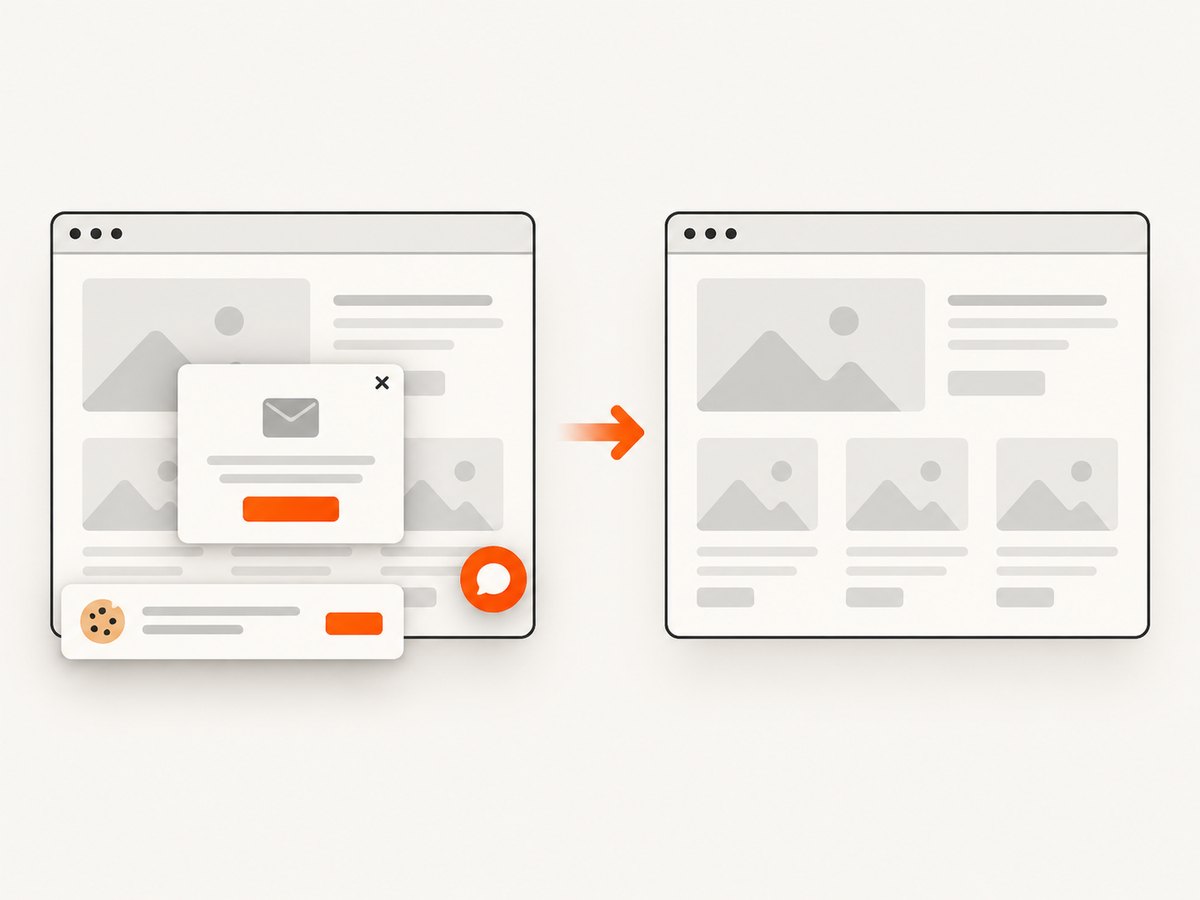
If your workflow needs page images for research, QA, or an AI agent, ScreenshotNeo provides a website screenshot API and MCP server. One GET request returns a PNG, JPEG, WebP, or PDF. It accepts consent banners like a visitor and removes more than 60 known consent platforms, newsletter popups, and chat widgets before capture; each step can be disabled. Bot checks, blank pages, timeouts, failed loads, and cache hits cost nothing, and the response identifies the result with X-Page-Verdict and X-Billed headers.
See the ScreenshotNeo API documentation for all options. This call is runnable as written:
curl -G "https://api.screenshotneo.com/v1/shot" -d access_key=YOUR_API_KEY --data-urlencode url=https://stripe.com -o shot.webpimport requests
r = requests.get("https://api.screenshotneo.com/v1/shot", params={"access_key": "YOUR_API_KEY", "url": "https://stripe.com"}, timeout=90)
open("shot.webp", "wb").write(r.content)const q = new URLSearchParams({ access_key: 'YOUR_API_KEY', url: 'https://stripe.com' });
const res = await fetch(`https://api.screenshotneo.com/v1/shot?${q}`);For lead research, useful options include full-page capture with lazy images loaded, a CSS-selected element, dark mode, device presets or any viewport, retina scale, custom CSS and JavaScript, click actions, selector or network-idle waits, request and resource blocking, headers, cookies, user agents, Authorization, timezone, geolocation, transparent backgrounds, resizing, chosen cache TTLs, signed image links, asynchronous jobs with signed webhooks, bulk capture for 100 URLs per call, and a usage API. Its MCP server exposes take_screenshot, get_page_info, and capture_pdf to Claude, Cursor, and other MCP clients.
Free accounts include 1,000 screenshots per month with no card. Paid plans start at $5 for 3,000 shots; every feature is available on every plan. Create a free ScreenshotNeo account.
Performance, reliability, and cost
- Batch work: use bulk capture for up to 100 URLs per call and asynchronous jobs for long pages or PDFs.
- Reduce page weight: block ads, trackers, and unnecessary resource types; wait for a selector instead of an arbitrary long delay when possible.
- Cache deliberately: choose a TTL based on how quickly the source changes. Store the URL, options, verdict, and billed status with the artifact.
- Retry safely: retry transient network failures with exponential backoff and an idempotency key. Do not retry a bot check indefinitely.
- Measure the pipeline: track collection success, validation rejection, duplicate rate, review rate, CRM errors, opt-outs, and response latency.
- Control spend: estimate pages per lead, enrichment calls, model tokens, CRM operations, and screenshot volume. ScreenshotNeo charges only for clean shots; failed loads and cache hits are not billed.
Troubleshooting
| Symptom | Likely cause | Fix |
|---|---|---|
| Many empty records | Selector changed or page content is client-rendered | Inspect the DOM, wait for a stable selector, and version the extractor. |
| Duplicate leads | No stable key or inconsistent normalization | Canonicalize email and domain, then use an idempotent CRM upsert. |
| Scores are inconsistent | Unversioned prompt or vague criteria | Use structured fields, fixed weights, prompt versions, and review thresholds. |
| CRM records are missing | Transient API error or dropped queue message | Persist payloads, retry with backoff, and alert on dead-letter items. |
| Email complaints rise | Weak consent or missing suppression check | Stop the campaign, audit source and opt-out data, and require suppression checks. |
| Screenshot is blank | Page timeout, bot check, or content not yet loaded | Use selector or network-idle waits, inspect verdict headers, and avoid endless retries. |
| Screenshot costs more than expected | Repeated uncached captures or oversized workflows | Set a cache TTL, resize outputs, batch URLs, and review X-Billed. |
Implementation checklist
- Document target, purpose, fields, source authorization, retention, and geography.
- Keep raw, normalized, enriched, scored, and CRM fields separately auditable.
- Record source URLs, timestamps, consent or lawful-basis context, and opt-outs.
- Version scoring rules and AI prompts; route uncertain results to humans.
- Use idempotent upserts, retries, alerts, and a dead-letter queue.
- Review provider data-use commitments before sending lead data to an AI service.
- Test suppression and unsubscribe behavior before every campaign.
FAQ
Does AI replace a lead qualification team?
No. It can handle extraction, summarization, and first-pass scoring, while people review uncertainty and change the rules when business priorities change.
Can I collect every email published on a website?
No. A public page is not automatic permission. Check authorization, terms, purpose, privacy obligations, and outreach rules first.
What should I send to an AI provider?
Only the minimum fields needed for the task, with provider retention, confidentiality, and access controls reviewed.
When should I use screenshots in this pipeline?
Use them when visual context matters: verifying a landing page, documenting a source, extracting page information for an agent, or creating a review artifact. Store the URL and capture metadata with the image.
How do I start cheaply?
Begin with a narrow source list, deterministic validation, a small review queue, and a limited campaign. ScreenshotNeo includes 1,000 free shots per month without a card, so you can add page capture before committing to a paid plan.


