How to Automate Weather Data Collection with Web Scraping
Build a reliable weather collection pipeline with APIs first, compliant scraping when needed, caching, retries, provenance, and production monitoring.

Direct answer: start with a documented weather API whenever it provides the locations, variables, time range and licensing you need. APIs return structured fields and publish clearer schemas and usage rules. Scrape a rendered weather page only when the required data is unavailable through a suitable API, the page allows automated access, and you can tolerate layout changes. A reliable pipeline defines its data contract, identifies its client, requests only necessary data, caches responses, handles failures, stores provenance and monitors provider changes.
This guide shows both approaches. It uses MET Norway as a concrete API example, then builds a Python scraper for an accessible HTML page. The same operating rules apply to other providers, but limits, licenses and schemas are provider-specific. Check the source’s current documentation and terms before deployment.
1. Define the weather data requirement
Write down the requirement before choosing a source. “Weather data” can mean several different products:
- Forecast or observation: forecasts describe expected future conditions; observations record measured conditions.
- Geography: one coordinate, a city list, a grid, a country or global coverage.
- Variables: temperature, precipitation, wind, pressure, humidity, visibility or provider-specific fields.
- Time resolution and history: hourly values, daily summaries, current conditions or historical archives.
- Refresh interval: one collection per day, every hour, or event-driven updates.
- Output contract: JSON, CSV, a database table, a queue message or files.
Turn those decisions into a small schema. For example: source, retrieved_at, location_id, latitude, longitude, valid_time, temperature_c, precipitation_mm, wind_speed_mps, units and raw_url. Keeping the original response or a content hash lets you audit transformations later.
2. Prefer a documented API when it fits
MET Norway’s Weather API documents products, request behavior and formats. Its catalogue includes the global Locationforecast product for forecasts and Frost, a REST API for meteorological observations. The interface documentation is versioned, so verify the current product and version before coding: MET Weather API interface documentation.
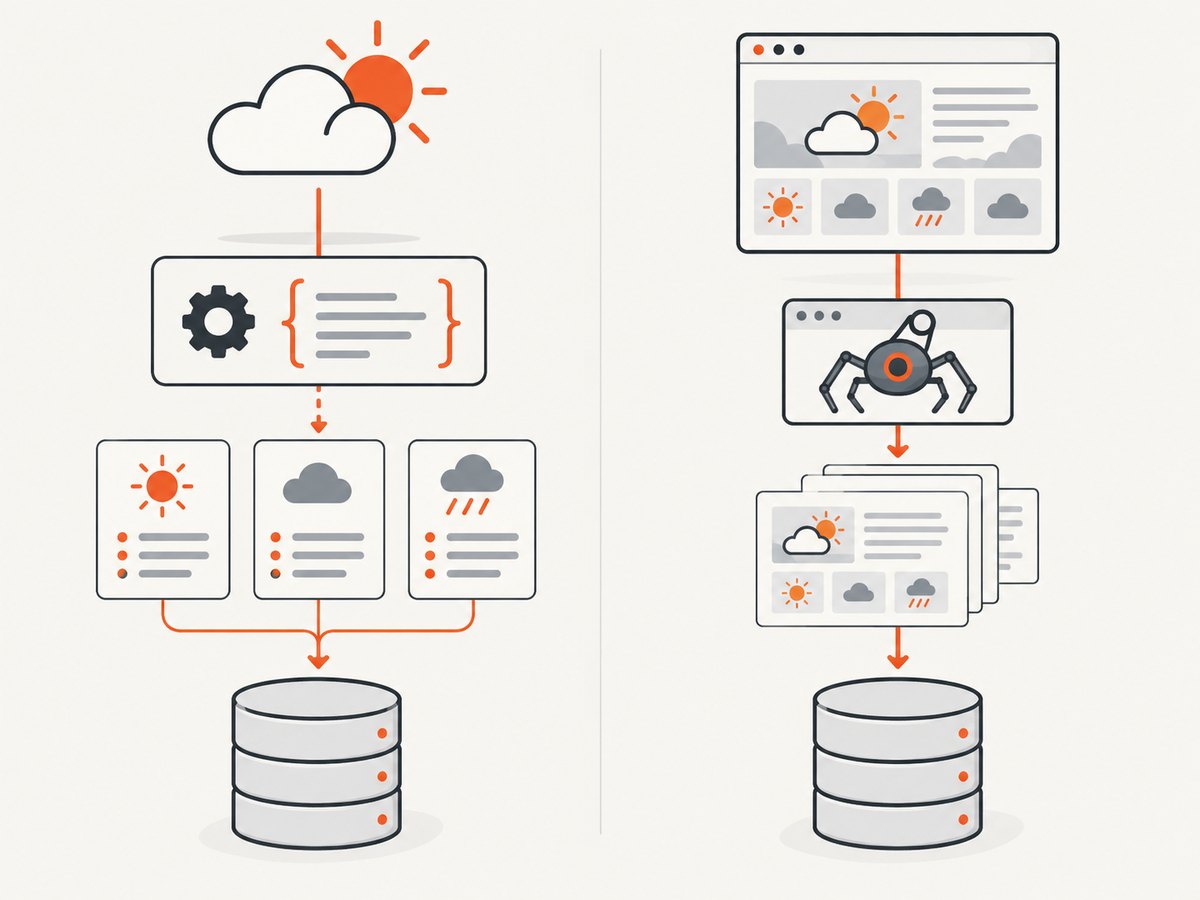
MET Norway documents encrypted HTTPS and HTTP GET requests. Depending on the module, responses can be JSON, XML or a product-specific binary format. Parse the selected product’s schema instead of assuming every weather service uses the same field names: general API usage.
Open-Meteo’s project guidance says its APIs are free for open-source and non-commercial use, asks applications above 10,000 requests per day to contact it, and directs commercial users to contact the provider. Those conditions apply to Open-Meteo; do not transfer them to another service without checking its terms: Open-Meteo guidance.
3. Check access, terms and attribution
Publicly viewable data is not automatically permission to automate collection. Read the target’s terms, robots guidance and API documentation. MET Norway’s terms say, “You must identify yourself,” and ask clients to provide a useful User-Agent containing an application or domain name and a contact route where possible: MET Norway Terms of Service.
Respect provider-specific traffic rules. MET Norway recommends local caching, avoiding repeated requests before the indicated expiry and using conditional requests when supported. Its terms state that more than 20 requests per second per application requires a special agreement. This is a MET Norway rule, not a universal scraping limit.
Preserve attribution and changes. MET Norway’s terms require appropriate credit for open data, a link to the CC BY 4.0 license and an indication of modifications where that license applies. Store source, retrieval time, requested location, units and transformations with each record.
4. API collection: a complete Python example
The following example requests a MET Norway forecast for Oslo. Replace the coordinates and endpoint with the product documented for your use case. The identifying User-Agent is deliberate.
import json
import time
from datetime import datetime, timezone
from pathlib import Path

import requests

URL = "https://api.met.no/weatherapi/locationforecast/2.0/compact"
PARAMS = {"lat": 59.9139, "lon": 10.7522}
HEADERS = {
    "User-Agent": "weather-collector/1.0 (contact: ops@example.com)",
    "Accept": "application/json",
}
OUTPUT = Path("oslo-weather.json")

response = requests.get(URL, params=PARAMS, headers=HEADERS, timeout=30)
response.raise_for_status()
data = response.json()

record = {
    "source": "MET Norway Locationforecast",
    "retrieved_at": datetime.now(timezone.utc).isoformat(),
    "requested": PARAMS,
    "data": data,
}
OUTPUT.write_text(json.dumps(record, ensure_ascii=False, indent=2))
print(f"saved {OUTPUT}")
In production, inspect response headers and the product’s expiry information, then cache until the provider says a refresh is appropriate. Use a database or object store rather than replacing one local file. Keep the raw payload and a normalized table so a schema change does not destroy historical evidence.
Retries with backoff
import random
import time
import requests

RETRYABLE = {408, 425, 429, 500, 502, 503, 504}

def get_json(url, *, params, headers, attempts=5):
    for attempt in range(attempts):
        try:
            r = requests.get(url, params=params, headers=headers, timeout=30)
            if r.status_code not in RETRYABLE:
                r.raise_for_status()
                return r.json()
        except requests.RequestException:
            if attempt == attempts - 1:
                raise
        time.sleep(min(60, 2 ** attempt + random.random()))
    raise RuntimeError("request failed after retries")
Do not retry authentication errors, invalid coordinates or other permanent 4xx responses. Honor Retry-After when a provider sends it. Add a request ID, status code, elapsed time and payload size to logs, while excluding secrets.
5. Scraping an HTML weather page when an API is unavailable
Use scraping only for an accessible page whose rules allow automated access. HTML is presentation, so selectors can break when a publisher changes its layout. Prefer stable semantic attributes, microdata or a documented embedded data object over brittle positional selectors.
This example uses a URL you control or have permission to automate. It extracts elements marked with data-weather-field. Replace the URL and selectors after inspecting the page.
from datetime import datetime, timezone
from pathlib import Path
import json
import requests
from bs4 import BeautifulSoup

URL = "https://example.com/weather"
HEADERS = {
    "User-Agent": "weather-collector/1.0 (contact: ops@example.com)",
    "Accept": "text/html,application/xhtml+xml",
}

r = requests.get(URL, headers=HEADERS, timeout=30)
r.raise_for_status()
soup = BeautifulSoup(r.text, "html.parser")

def field(name):
    node = soup.select_one(f'[data-weather-field="{name}"]')
    if node is None:
        raise ValueError(f"missing weather field: {name}")
    return node.get_text(" ", strip=True)

record = {
    "source": URL,
    "retrieved_at": datetime.now(timezone.utc).isoformat(),
    "location": field("location"),
    "temperature": field("temperature"),
    "conditions": field("conditions"),
}
Path("weather-page.json").write_text(json.dumps(record, indent=2))
print(record)
For JavaScript-rendered pages, a plain HTTP request may contain no weather values. A browser automation tool can render the page, wait for a selector, accept a consent dialog when permitted, and then extract the DOM. Keep the browser isolated, limit concurrency and capture the final HTML for debugging. If the site offers a structured endpoint used by its own page, use that endpoint only when its documentation and terms permit it.
cURL and Node.js request equivalents
curl --fail --silent --show-error \
  -A "weather-collector/1.0 (contact: ops@example.com)" \
  "https://api.met.no/weatherapi/locationforecast/2.0/compact?lat=59.9139&lon=10.7522" \
  -o forecast.json
const url = new URL("https://api.met.no/weatherapi/locationforecast/2.0/compact");
url.search = new URLSearchParams({ lat: "59.9139", lon: "10.7522" });
const res = await fetch(url, {
headers: { "User-Agent": "weather-collector/1.0 (contact: ops@example.com)" },
signal: AbortSignal.timeout(30000)
});
if (!res.ok) throw new Error(`HTTP ${res.status}`);
const forecast = await res.json();
console.log(JSON.stringify(forecast));6. Or skip the browser setup
When the information you need is on a rendered weather page, ScreenshotNeo can return a PNG, JPEG, WebP or PDF from one GET request. It handles the capture browser for you. Cookie and consent banners are accepted before capture when possible, and more than 60 known consent platforms, newsletter popups and chat widgets can be removed; each step can be disabled. Bot checks or CAPTCHAs, blank pages, timeouts, failed loads and cache hits are not billed, and the response identifies the result with X-Page-Verdict and X-Billed headers. An MCP server provides take_screenshot, get_page_info and capture_pdf tools to Claude, Cursor and other MCP clients.
See the ScreenshotNeo API documentation for all options, including full-page and element capture, device presets, custom headers and cookies, waits, blocking rules, caching, async jobs and bulk capture.
curl -G "https://api.screenshotneo.com/v1/shot" -d access_key=YOUR_API_KEY --data-urlencode url=https://www.met.no -o shot.webpimport requests
r = requests.get("https://api.screenshotneo.com/v1/shot", params={"access_key": "YOUR_API_KEY", "url": "https://www.met.no"}, timeout=90)
open("shot.webp", "wb").write(r.content)const q = new URLSearchParams({ access_key: 'YOUR_API_KEY', url: 'https://www.met.no' });
const res = await fetch(`https://api.screenshotneo.com/v1/shot?${q}`);Use screenshots when a human-readable visual record is the requirement, or when you need to archive the rendered state alongside separately collected structured data. ScreenshotNeo includes every feature on every plan: 1,000 shots per month are free with no card; paid plans start at $5 for 3,000 shots. Create a free ScreenshotNeo account.
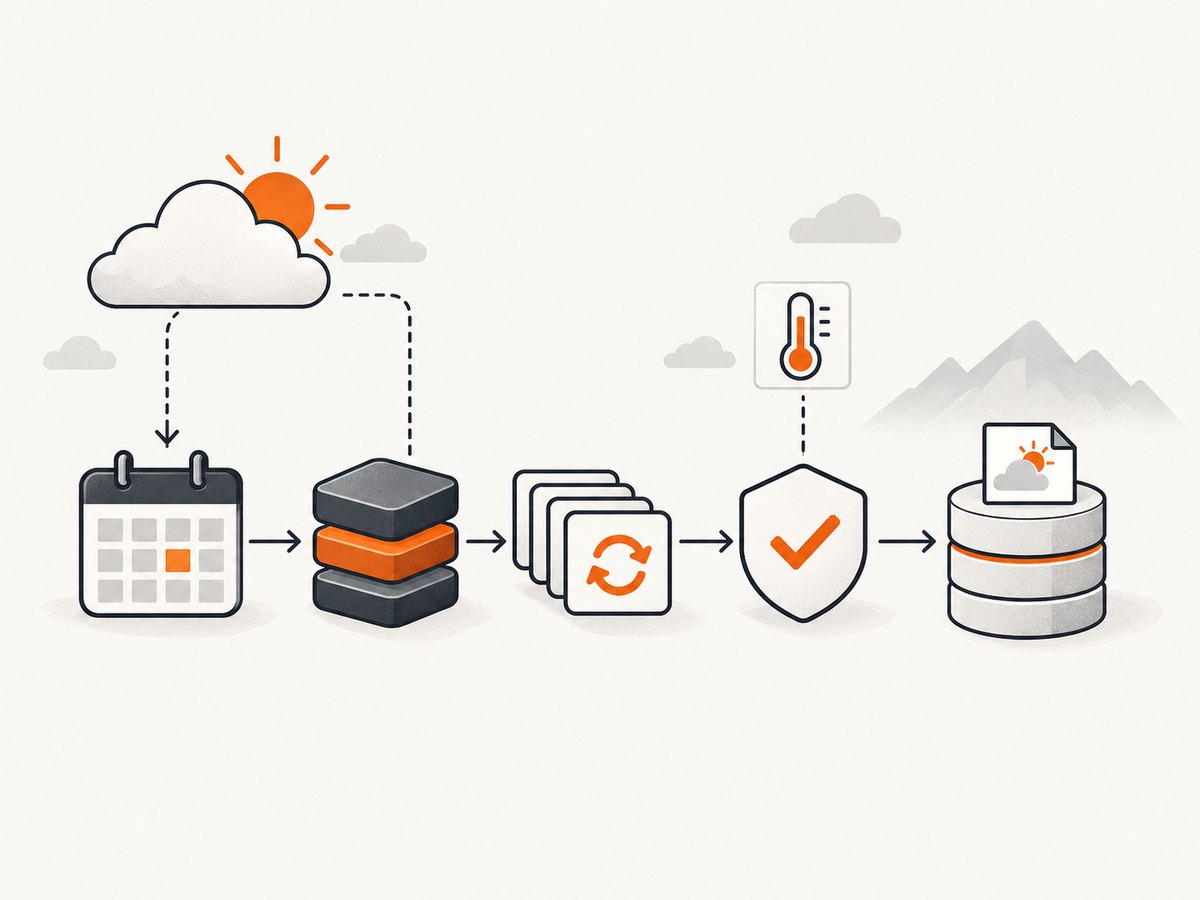
7. Scheduling, caching and deduplication
- Run a scheduler at the provider’s recommended refresh interval, not at an arbitrary high frequency.
- Cache by a normalized key such as provider, product, latitude, longitude, parameters and time window.
- Set an expiry from provider metadata when available. Otherwise choose a conservative interval and document it.
- Use conditional requests such as
If-None-MatchorIf-Modified-Sinceonly when the provider supports them. - Deduplicate concurrent jobs so ten workers do not request the same location simultaneously.
- Queue work and cap concurrency per provider. Add jitter so many locations do not refresh at exactly the same second.
For large collections, partition by location and checkpoint progress. A failed batch should resume from the last successful item instead of repeating every request. Keep raw responses compressed and record a checksum.
8. Reliability and data quality
Validate values at ingestion. Check that timestamps parse, coordinates remain in range, units are known, and numeric fields are plausible for the selected product. Treat missing values as missing; do not silently convert them to zero. Store the provider’s timezone or an explicit UTC conversion.
Monitor freshness, success rate, HTTP status distribution, parse failures, schema changes and volume. Alert when a normally populated field disappears, when the page returns a login or bot-check document, or when data age exceeds your service objective. Keep a small fixture of representative API responses and HTML pages for parser regression checks.
Provider products change. MET Norway documents versioning and advises watching deprecation signals. Review documentation periodically and make endpoint versions configurable rather than hard-coded throughout the application.
9. Performance and cost planning
| Concern | Practical approach |
|---|---|
| Latency | Reuse HTTP connections, set finite timeouts and parallelize only within provider limits. |
| Traffic | Cache, deduplicate and request only required fields or locations. |
| Browser cost | Use API responses for structured data; reserve rendered-page capture for visual or page-only values. |
| Storage | Keep normalized records plus compressed raw payloads and checksums. |
| Provider limits | Read the actual terms. MET Norway cites a special-agreement threshold above 20 requests per second; Open-Meteo asks above 10,000 requests per day to contact it. |
Do not present those thresholds as universal capacity guarantees. Forecast and observation products can have different freshness and retention characteristics. Estimate monthly requests from locations multiplied by refreshes, then include retries and backfills. For ScreenshotNeo, caching, bulk capture of up to 100 URLs per call and async jobs can reduce orchestration overhead; its pricing is 1,000 free shots monthly, then $5 for 3,000, $15 for 15,000, $39 for 60,000, $99 for 250,000 or $249 for 1,000,000, with two months free on yearly billing.
10. Troubleshooting
HTTP 403 or 429
Cause: missing identification, disallowed access or excessive rate. Fix: read the provider terms, send a useful User-Agent, reduce concurrency, cache responses and honor Retry-After. Do not rotate identities to evade a block.
HTML contains no weather values
Cause: values are rendered by JavaScript. Fix: use a documented API if available; otherwise use an authorized browser workflow, wait for a stable selector and capture diagnostics.
Parser suddenly returns null fields
Cause: layout or schema change. Fix: save the failing payload, compare it with a known fixture, update selectors or the API parser, and add a schema-change alert.
Duplicate or stale records
Cause: retries without idempotency or a cache key that omits parameters. Fix: use a deterministic record key, store retrieval time separately from observation time and include all query parameters in the cache key.
Timeouts and partial batches
Cause: slow upstream pages, network errors or an oversized job. Fix: use bounded timeouts, exponential backoff, checkpoints and smaller batches. Mark failures for replay instead of dropping them.
Unexpected units or timestamps
Cause: product-specific conventions. Fix: parse the selected product documentation, store units explicitly and normalize only in a documented transformation step.
11. Production checklist
- Requirement lists locations, variables, forecast or observation type, history and refresh interval.
- Source documentation and current terms are recorded.
- Client identity, attribution and license changes are preserved.
- Requests have timeouts, bounded retries, backoff and concurrency limits.
- Responses are cached and deduplicated according to provider guidance.
- Raw and normalized data are stored with retrieval timestamps and provenance.
- Freshness, status codes, parse errors and schema changes are monitored.
- Commercial use and request thresholds have been reviewed for the actual provider.
- Scraping is limited to pages where automated access is allowed.
FAQ
Is web scraping the best way to collect weather data?
Usually not when a suitable documented API exists. Scraping is a fallback for page-only information and carries selector and rendering risk.
Can I scrape any public weather website?
No assumption is safe. Check the site’s current terms and access guidance, identify your client and stop when access is disallowed.
Should I store the raw response?
Yes, when practical. It supports audits, parser fixes and recovery after a normalization bug.
How often should a collector run?
Use the product’s expiry or update guidance. More frequent requests can waste traffic and violate provider rules without improving freshness.
When is a screenshot useful?
Use one when you need a visual archive, a rendered value unavailable in structured data or a PDF record. Keep structured API data as the analytical source when possible.