How to Automatically Generate Certificates
Automate TLS certificate issuance and renewal with ACME, Certbot, cert-manager, or AWS services, including deployment, troubleshooting, and monitoring.

For a customer-managed HTTPS server, automatically generate and renew certificates with an ACME client such as Certbot. The client requests a certificate from an ACME certificate authority, completes domain validation, stores the private key, and renews before expiry. You still need to deploy the renewed files and reload the service that terminates TLS.
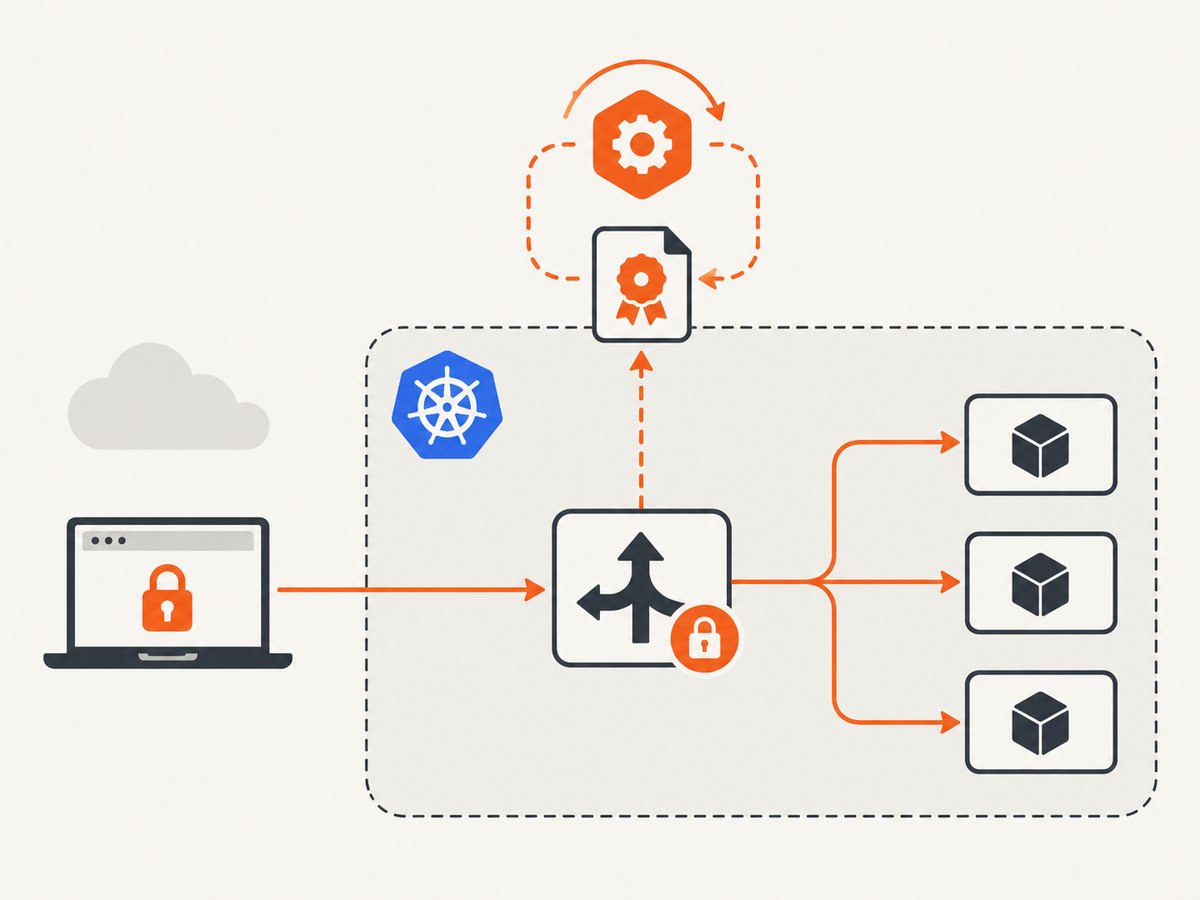
For Kubernetes or OpenShift, use cert-manager, which turns certificate issuance and renewal into declarative resources. For AWS-integrated services, an AWS Certificate Manager managed certificate is usually simpler because AWS manages its lifecycle. AWS also documents an ACME endpoint for customer-managed infrastructure; in that flow, the ACME client owns the private key and renewals.
What “automatically generate a certificate” includes
People use “generate” to describe several different stages. Separate them so an apparently successful request does not leave a broken HTTPS service:
- Choose names: list every DNS name the server must answer, such as
example.comandwww.example.com. - Generate key material: the ACME client creates or loads a private key and a certificate signing request.
- Prove control: the certificate authority validates the domain with an HTTP-01, TLS-ALPN-01, or DNS-01 challenge, depending on your setup.
- Obtain the signed certificate: the client downloads the certificate chain and records its expiry.
- Install and reload: configure the web server or load balancer to use the new files, then reload it safely.
- Renew and observe: schedule renewal before expiry and alert when issuance, deployment, or reload fails.
A certificate can be issued correctly and still fail for users if the wrong file is installed, the chain is incomplete, the service is not reloaded, DNS points elsewhere, or the private key does not match the certificate.
Choose the right automation boundary
| Option | Best fit | Private-key responsibility | Renewal and deployment |
|---|---|---|---|
| ACME client such as Certbot | Customer-managed web server or infrastructure that can run an ACME client | The client and system operator | The client renews; you ensure installation and service reload |
| cert-manager | Kubernetes or OpenShift workloads | Usually a Kubernetes Secret, although documented integrations can generate keys on demand | The controller renews Certificate resources; workloads must consume the resulting material |
| AWS ACM-managed certificate | AWS-integrated services such as Elastic Load Balancing, CloudFront, or API Gateway | AWS manages it for the managed path | ACM manages the lifecycle for supported integrations |
| AWS ACM ACME endpoint | Customer-managed infrastructure using a compatible ACME client | The ACME client generates and retains it | The client requests renewals; these certificates cannot be attached to AWS-integrated services |
Before choosing, answer five questions: Is the certificate public or private? Where does TLS terminate? Who may access the private key? How will domain validation work? Which process will install and reload renewed material?
Automate a Linux web server with Certbot
Certbot is an ACME client commonly used on customer-managed servers. The exact package and web-server plugin depend on your operating system. The commands below use the webroot challenge, which requires your server to serve files from /var/www/html.
1. Confirm DNS and HTTP reachability
dig +short example.com
curl -I http://example.com/.well-known/acme-challenge/test
Point the required DNS records at the machine that will answer the challenge. Permit inbound port 80 for HTTP-01, or use DNS-01 when the service is not publicly reachable or you need wildcard names.
2. Request the first certificate
sudo certbot certonly \
  --webroot \
  --webroot-path /var/www/html \
  --domain example.com \
  --domain www.example.com \
  --email admin@example.com \
  --agree-tos \
  --no-eff-email
After a successful request, Certbot normally places the live certificate and key below /etc/letsencrypt/live/example.com/. Use the full chain file for most web servers:
/etc/letsencrypt/live/example.com/fullchain.pem
/etc/letsencrypt/live/example.com/privkey.pem
3. Configure and reload the server
server {
    listen 443 ssl;
    server_name example.com www.example.com;

    ssl_certificate     /etc/letsencrypt/live/example.com/fullchain.pem;
    ssl_certificate_key /etc/letsencrypt/live/example.com/privkey.pem;

    root /var/www/html;
}
sudo nginx -t
sudo systemctl reload nginxUse your server’s documented certificate directives. Do not copy an Nginx configuration into Apache, a reverse proxy, or an application server without adapting the paths and reload command.
4. Test renewal and add a deploy hook
sudo certbot renew --dry-runThe dry run checks the renewal path without replacing the production certificate. Renewal automation must also reload the service. A deploy hook runs only after Certbot successfully obtains a new certificate:
sudo certbot renew --deploy-hook 'systemctl reload nginx'Most Certbot installations create a scheduled timer or cron entry. Inspect the schedule supplied by your package and verify that it runs under an account with access to the key and permission to reload the service.
Use DNS-01 when HTTP validation is unsuitable
DNS-01 proves control by publishing a temporary TXT record under _acme-challenge.example.com. It is useful for wildcard certificates, private services that are not reachable over the public web, and environments where port 80 cannot be opened.
- Choose a Certbot DNS plugin supported by your DNS provider.
- Create a narrowly scoped API credential that can change only the required zone records.
- Store the credential in a root-readable file with restrictive permissions.
- Run the provider-specific Certbot command and verify that DNS propagation is reliable.
sudo chmod 600 /etc/letsencrypt/dns-provider.ini
sudo certbot certonly \
  --dns-PLUGIN_NAME \
  --dns-PLUGIN_NAME-credentials /etc/letsencrypt/dns-provider.ini \
  --domain example.com \
  --domain '*.example.com'
PLUGIN_NAME is a placeholder: the option name, credential format, propagation behavior, and package differ by provider. Follow that plugin’s primary documentation rather than assuming every DNS API works the same way.
Automate certificates in Kubernetes with cert-manager
cert-manager needs an installed controller and a configured Issuer or ClusterIssuer. A Certificate resource by itself is incomplete.

1. Create a staging issuer first
apiVersion: cert-manager.io/v1
kind: ClusterIssuer
metadata:
  name: letsencrypt-staging
spec:
  acme:
    email: admin@example.com
    server: https://acme-staging-v02.api.letsencrypt.org/directory
    privateKeySecretRef:
      name: letsencrypt-staging-account-key
    solvers:
    - http01:
        ingress:
          class: nginx
kubectl apply -f issuer-staging.yaml
kubectl get clusterissuer letsencrypt-stagingThe staging issuer helps validate manifests and challenge routing before switching to a production issuer. Staging certificates are not trusted by normal browsers.
2. Request a certificate for an Ingress
apiVersion: cert-manager.io/v1
kind: Certificate
metadata:
  name: example-com
  namespace: default
spec:
  secretName: example-com-tls
  issuerRef:
    name: letsencrypt-staging
    kind: ClusterIssuer
  dnsNames:
  - example.com
  - www.example.com
kubectl apply -f certificate.yaml
kubectl describe certificate example-com
kubectl get secret example-com-tlsYour Ingress or workload must reference example-com-tls. cert-manager renews the Certificate resource before expiry and updates the Secret. The ingress controller must watch that Secret and reload its TLS configuration; verify that behavior for your controller.
3. Switch to production
Create a production ClusterIssuer with the production ACME directory, then change issuerRef.name on the Certificate. Validate the complete path: challenge, Secret contents, ingress reload, and the certificate actually served to clients.
AWS choices and the ACME boundary
For Elastic Load Balancing, CloudFront, API Gateway, and other supported AWS integrations, an ACM-managed certificate keeps renewal inside the service lifecycle. AWS also documents an ACME endpoint for public TLS certificates used on customer-managed infrastructure. In that flow, the ACME client generates and retains the private key, and the client must request renewals before expiry.
AWS announced 45-day validity for certificates from its managed ACME endpoint in commercial AWS Regions on July 6, 2026. Regional availability and terms can change, so verify the current AWS Certificate Manager documentation before relying on that detail.
Do not treat the two AWS paths as interchangeable: AWS states that certificates issued through its ACME endpoint cannot be attached to AWS-integrated services. Use the managed ACM path for those integrations, and use an ACME client for infrastructure where you control the TLS files.
Private-key protection and deployment design
- Restrict key-file permissions and avoid placing private keys in source control, container images, or public object storage.
- Give DNS API credentials the smallest zone scope possible and rotate them according to your organization’s policy.
- Separate issuance from deployment. A renewal job should fail visibly if the service reload fails.
- For Kubernetes, treat the Secret containing the key as sensitive. cert-manager integrations that generate keys on demand can change where key material exists; evaluate that choice against your threat model.
- Use atomic file replacement or the platform’s supported Secret update path so a reload never sees a partially written certificate.
Verification and monitoring checklist
- Check the certificate’s subject names and expiry date from the endpoint clients use.
- Confirm the served chain is complete and the public key matches the private key.
- Observe issuance, renewal, challenge, and reload failures in the ACME client or cert-manager events.
- Alert before expiry, with enough time to investigate DNS, rate-limit, credential, or deployment problems.
- Exercise the renewal path in a staging environment and periodically perform a controlled production renewal review.
openssl s_client -connect example.com:443 -servername example.com Troubleshooting common failures
| Symptom | Likely cause | Fix |
|---|---|---|
| HTTP-01 challenge returns 404 | The challenge path is not served by the expected webroot or proxy | Request the exact /.well-known/acme-challenge/ URL, correct the webroot, and ensure the proxy forwards it. |
| DNS-01 validation times out | TXT records have not propagated or the credential changed the wrong zone | Inspect authoritative DNS, confirm the zone ID, and configure an appropriate propagation wait. |
| Certificate is issued but browsers warn | Wrong names, incomplete chain, wrong certificate installed, or stale service process | Inspect the live endpoint with OpenSSL, install the full chain, and reload the correct TLS terminator. |
| Renewal succeeds but old certificate remains live | The service was not reloaded or reads a copied file elsewhere | Add a deploy hook, verify the configured paths, and check the served certificate after renewal. |
| cert-manager Certificate stays pending | No valid Issuer, failed solver, or unreachable Ingress challenge | Run kubectl describe certificate, inspect Orders and Challenges, then fix the referenced Issuer or routing. |
| Private key does not match | Certificate and key came from different requests | Keep the pair generated by the same client request and replace both files atomically. |
| AWS ACME certificate cannot attach to a load balancer | It was issued through the customer-managed ACME endpoint | Request an ACM-managed certificate for the AWS-integrated service. |
Performance, reliability, and cost considerations
Certificate issuance is usually infrequent, but challenge propagation and deployment can add minutes. DNS-01 depends on authoritative DNS behavior; HTTP-01 depends on routing and port 80 reachability. Keep renewal comfortably ahead of expiry so a transient provider or network problem does not become an outage.
Run one renewal controller per certificate scope. Multiple independent jobs can race, overwrite files, or trigger unnecessary requests. Cache account credentials securely, reuse the ACME account where appropriate, and avoid repeatedly creating certificates for the same names. Use staging while changing challenge or ingress configuration, then make the smallest production change possible.
ACME certificate authorities generally do not charge for certificates, but DNS API usage, hosted infrastructure, monitoring, and operational time can cost money. AWS pricing and regional terms are separate from the ACME protocol; check the current AWS documentation and your service plan.
Or skip the browser setup
If your goal is to document certificate endpoints, validate a deployment visually, or capture a status page for an automated workflow, ScreenshotNeo can return a screenshot or PDF with one request. It is not a certificate issuer; it removes the browser automation layer from visual checks.
curl -G 'https://api.screenshotneo.com/v1/shot' -d access_key=YOUR_API_KEY --data-urlencode url=https://example.com -o shot.webpimport requests
r = requests.get('https://api.screenshotneo.com/v1/shot', params={'access_key': 'YOUR_API_KEY', 'url': 'https://example.com'}, timeout=90)
open('shot.webp', 'wb').write(r.content)const q = new URLSearchParams({ access_key: 'YOUR_API_KEY', url: 'https://example.com' });
const res = await fetch(`https://api.screenshotneo.com/v1/shot?${q}`);See the ScreenshotNeo API documentation for the full option set. Cookie banners, newsletter popups, and chat widgets are removed before the shot. Bot checks, blank pages, timeouts, failed loads, and cache hits are not billed, and response headers identify the page verdict and billing result. An MCP server lets Claude, Cursor, and other MCP clients call take_screenshot, get_page_info, and capture_pdf. The Free plan includes 1,000 screenshots per month with no card; paid plans start at $5 for 3,000. Create a free ScreenshotNeo account.
FAQ
Should I create one certificate per hostname?
Include all required DNS names in one certificate when they share the same TLS termination and renewal boundary. Separate certificates can reduce blast radius but add configuration and monitoring work.
When should I use a private certificate authority?
Use a private issuer when clients are controlled by your organization and can trust its root. The public ACME workflows here are for publicly trusted TLS names.
Can a renewed certificate be used without restarting the application?
Only if the TLS terminator supports a live reload or watches the certificate files. Confirm the behavior for your server; otherwise run a graceful reload after deployment.
What should be backed up?
Protect the ACME account data, DNS credentials, configuration, and deployment procedure. Treat private keys as secrets and follow your organization’s recovery policy.
Why test with a staging issuer?
Staging lets you validate challenge routing and manifests without putting an untrusted certificate into production or repeatedly requesting production certificates while debugging.


