Automatically Generate E-Commerce Price Graphics
Build a repeatable pipeline for turning catalog prices into accurate, on-brand product graphics for storefronts, email, social, and ads.
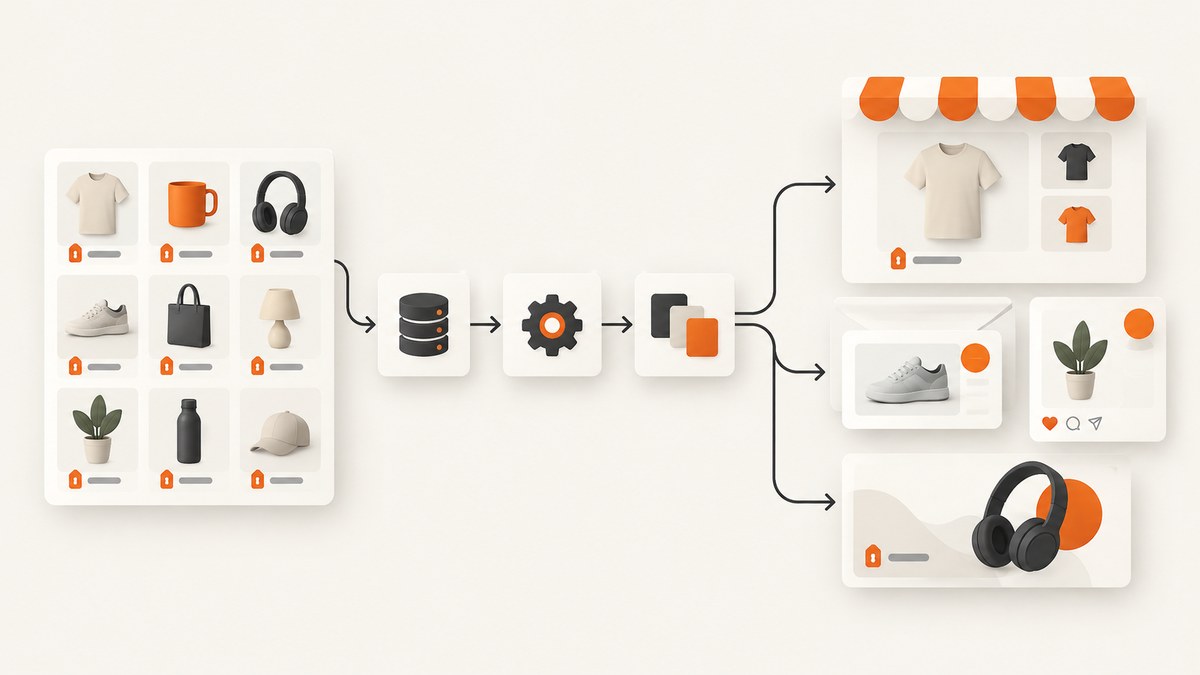
Automatically generate e-commerce price graphics by keeping product and promotion data in a structured source, mapping that data into named fields in a reusable brand template, rendering an image through an automation API, and publishing the returned asset to the right channel. The critical safeguard is to validate the price, currency, promotion dates, and product image before rendering: every graphic makes a pricing claim.
This guide covers the data model, template design, a runnable Python pipeline, API and no-code options, localization, batch generation, reliability, and troubleshooting. The examples use a small adapter boundary so you can connect your actual catalog and image-rendering provider without assuming undocumented endpoints or credentials.
1. Choose a source of truth and define the graphic fields
Start with one authoritative record per SKU. It can come from a commerce catalog, spreadsheet, database, application, or webhook. Avoid hand-editing prices in a design tool: that creates a second source of truth and makes stale sale graphics likely.
| Field | Example | Why it matters |
|---|---|---|
| SKU | SHOE-042 | Joins the graphic to the product and supports audit and updates. |
| Product name | Trail shoe | Text displayed in the template. |
| Current price | 79.00 | The amount currently offered. |
| Previous price | 99.00 | Optional reference price; show only when valid for your promotion. |
| Currency and locale | EUR, de-DE | Controls symbol, separators, and formatting. |
| Promotion start and end | ISO 8601 timestamps | Stops scheduled graphics from asserting an expired offer. |
| Product image URL | HTTPS URL | Must be reachable by the rendering service. |
| Template version and channel | spring-v3, email | Supports the right dimensions and later investigation. |
Represent money as a decimal or integer minor units, never a binary floating-point value used for arithmetic. The example below uses Python Decimal. Keep the original source values and record the formatted display string separately if your renderer requires text.
2. Design one reusable template per layout family
Create the design once, then expose only the parts that change. Typical dynamic layers are product name, current price, previous price, discount badge, currency display, and product photo. Brand logo, background, type hierarchy, spacing, and legal footer should remain fixed unless the campaign needs a distinct approved version.

Use clear field names and define behavior for optional data. If there is no valid previous price, hide the crossed-out price and discount badge rather than showing “0% off.” If the name is long, specify a maximum line count or a smaller type scale. Decide whether product images are cropped, contained, or use a background-removal workflow; do not assume every catalog image has the same aspect ratio.
Make separate templates for materially different destinations, such as a wide storefront banner, square social tile, and email module. Preserve one source record and render each required size from it. Bannerbear documents template modifications for text, images, and colors, while Creatomate and Placid describe dynamic layers or properties. Those are examples of the template-plus-data approach, not interchangeable APIs; check each provider’s current documentation for its request schema and output terms.
3. Validate the offer before rendering
Treat validation as part of the publishing pipeline. Reject or quarantine a record when the product identifier is absent, a price is negative, the currency is unsupported, the image URL is missing or malformed, or the promotion dates are inconsistent. Check the sale-price rule your business uses. For example, if the current price is greater than the former price, a “save” badge should not be generated.
Calculate the percentage only after validating both prices and the business rule for the reference price. Avoid rounding the source amount early. Use locale-aware currency formatting in production; hard-coding a dollar sign and decimal point is wrong for many locales. Schedule campaign activation and expiry using explicit time zones, and account for daylight-saving transitions.
4. Runnable Python example: validate records and send a render job
The following runnable script validates sample catalog rows and builds a provider-neutral render payload. It writes the payload to standard output. Replace submit_render with the documented API call for your chosen image automation provider, then persist its returned asset or job identifier. No vendor endpoint is invented here.
from decimal import Decimal, InvalidOperation
from datetime import datetime, timezone
from urllib.parse import urlparse
import json

PRODUCTS = [
    {
        "sku": "SHOE-042",
        "name": "Trail shoe",
        "price": "79.00",
        "previous_price": "99.00",
        "currency": "EUR",
        "locale": "de-DE",
        "image_url": "https://example.com/images/shoe-042.jpg",
        "sale_ends_at": "2030-05-31T23:59:00+02:00",
    }
]
ALLOWED_CURRENCIES = {"EUR", "USD", "GBP", "CAD", "AUD"}


def money(value, field):
    try:
        amount = Decimal(str(value))
    except (InvalidOperation, ValueError):
        raise ValueError(f"{field} must be a decimal amount")
    if not amount.is_finite() or amount < 0:
        raise ValueError(f"{field} must be a finite non-negative amount")
    return amount


def validate(product):
    for key in ("sku", "name", "currency", "locale", "image_url"):
        if not str(product.get(key, "")).strip():
            raise ValueError(f"missing {key}")
    if product["currency"] not in ALLOWED_CURRENCIES:
        raise ValueError("unsupported currency")
    parsed = urlparse(product["image_url"])
    if parsed.scheme != "https" or not parsed.netloc:
        raise ValueError("image_url must be an absolute HTTPS URL")
    price = money(product["price"], "price")
    previous = money(product["previous_price"], "previous_price") if product.get("previous_price") is not None else None
    if previous is not None and previous <= price:
        raise ValueError("previous_price must exceed price before showing a discount")
    end = datetime.fromisoformat(product["sale_ends_at"])
    if end.tzinfo is None:
        raise ValueError("sale_ends_at must include a time zone")
    if end.astimezone(timezone.utc) <= datetime.now(timezone.utc):
        raise ValueError("promotion has expired")
    discount = None
    if previous:
        discount = int(((previous - price) / previous * 100).quantize(Decimal("1")))
    return {
        "sku": product["sku"],
        "product_name": product["name"],
        "current_price": format(price, "f"),
        "previous_price": format(previous, "f") if previous is not None else None,
        "currency": product["currency"],
        "locale": product["locale"],
        "discount_percent": discount,
        "product_image": product["image_url"],
    }


def build_render_payload(product, template_id, channel):
    fields = validate(product)
    return {
        "template_id": template_id,
        "modifications": fields,
        "metadata": {"sku": fields["sku"], "channel": channel},
        "output_format": "png",
    }


if __name__ == "__main__":
    for item in PRODUCTS:
        payload = build_render_payload(item, "YOUR_TEMPLATE_ID", "social-square")
        print(json.dumps(payload, indent=2))
Use the provider’s own names for template identifiers, field modifications, output formats, and job options. Some APIs return a finished asset; others return a job to poll or notify through a webhook. Store the provider response with your internal SKU and promotion snapshot rather than assuming rendering is synchronous.
5. Connect your catalog and trigger updates
- Choose the trigger. Render on catalog change for price drops and restocks, or on a schedule for planned campaigns. Debounce rapid edits so one product does not create many obsolete renders.
- Normalize the record. Convert platform-specific fields into your internal schema, including currency, locale, image URL, and effective dates.
- Validate and approve. Apply price rules and any required merchandising review before dispatch.
- Render each channel variant. Map the same validated values into the relevant template and dimensions.
- Publish and retain provenance. Save the resulting URL or file with SKU, price snapshot, locale, template version, channel, and render timestamp.
Bannerbear documents Shopify, WooCommerce, Airtable, Zapier, and API routes for e-commerce workflows. Creatomate describes API, spreadsheet, and no-code routes; Placid documents REST and URL APIs. Choose a native connection when it removes integration work you would otherwise maintain. Choose a generic API when you need control over validation, job handling, and publishing logic. Verify current connectors, limits, formats, and plan terms with the vendor before designing around them.
6. Batch, asynchronous jobs, retries, and idempotency
For a large catalog, do not make an unbounded synchronous request loop. Use bounded concurrency, a queue, or the provider’s batch mechanism. Bannerbear’s e-commerce page states batches of up to 100 renders per call; confirm the current limit and behavior before relying on it. Creatomate’s materials describe automated generation at scale, but exact account limits should be checked in its current documentation.

Use a stable idempotency key where the provider supports one, constructed from SKU, normalized price data, locale, channel, and template version. If the same event is delivered twice, this prevents duplicate work. When the provider returns a job ID, persist it and poll with a backoff or accept a signed webhook if available. Validate webhook signatures and tolerate duplicate notifications. Retry transient network errors and rate limits with exponential backoff and jitter; do not retry invalid inputs indefinitely.
7. Output formats, localization, and channel sizing
Choose formats according to the destination. PNG is useful where transparency or crisp text matters; JPEG is common for photographic assets; WebP may reduce file size where supported. Check both the renderer’s supported output and the destination’s accepted formats. Bannerbear’s API reference lists JPG, PNG, and PDF, and its product page also lists WebP and AVIF. Creatomate describes MP4, JPG, PNG, and GIF outputs. Placid documents image automation and resizing features. These are vendor-described capabilities and can change.
For multiple currencies, keep a distinct localized price representation for each locale rather than appending a symbol to a raw amount. Decide how to round, where the currency symbol appears, and whether the locale uses a comma decimal separator. Generate and review representative long names and high prices to catch overflow. Record which locale was used in the asset metadata.
8. Performance, reliability, and cost
Rendering time depends on the provider, template complexity, external image fetching, queue depth, and output size. This dossier contains no independent benchmark, so do not plan from an invented renders-per-second figure. Measure your own end-to-end latency from catalog event through published asset. Pre-host optimized product images in a location the renderer can fetch reliably, and avoid making the template depend on slow third-party resources.
Make the pipeline recoverable: retain the normalized input snapshot, job state, provider response, and final asset location. Alert on queue age, repeated failures, expired promotion assets, and missing output. Use a dead-letter path for records needing correction. Reconcile scheduled promotions against current catalog data before publication so a delayed job does not publish an outdated price.
Compare total cost using your actual volume and output mix. Account for monthly render credits, batch or concurrency constraints, retries, extra sizes, and any separate storage or automation charges. Bannerbear advertises a 30-credit free trial on its e-commerce page; it is a vendor-stated offer that should be verified before publishing or budgeting. Do not infer a conversion lift from automation alone; the research found no qualifying independent figure.
9. Troubleshooting
| Symptom | Likely cause | Fix |
|---|---|---|
| Price or discount is wrong | Stale source data, wrong comparison price, or arithmetic/rounding error. | Validate against the catalog snapshot, use Decimal or minor units, and record the source timestamp and promotion rule. |
| Currency display looks wrong | Currency symbol or separators were hard-coded. | Format using the selected locale and test the target currency with representative values. |
| Product photo is blank | Image URL is private, expired, blocked, or not reachable by the renderer. | Use a stable HTTPS asset URL accessible to the rendering service; check redirects and access controls. |
| Text is clipped | Long product name or price exceeds the designed field. | Set line limits, use a tested fit rule, or create a layout variant for long content. |
| Duplicate graphics appear | Catalog webhook was delivered more than once or retries created new jobs. | Use idempotency keys and deduplicate by product snapshot, locale, channel, and template version. |
| Job remains pending | Asynchronous rendering is still queued, polling is too frequent, or a callback was missed. | Persist job IDs, back off polling, inspect provider status, and reconcile jobs without final assets. |
| Expired sale creative is live | Publication or cache outlived the promotion window. | Schedule expiry, invalidate or replace the asset, and run a reconciliation against active promotions. |
| Provider rejects a batch | Batch exceeds a current limit or includes invalid records. | Check current limits, validate each item first, and split into bounded batches. |
10. Where ScreenshotNeo fits
ScreenshotNeo is a website screenshot API and MCP server from Yorker Media. It can capture a product page or campaign page as a visual asset, which is useful for page previews, listing images, and visual checks alongside catalog-generated price graphics. It is not a catalog-to-template image renderer; use a dedicated image automation template for composing a branded price graphic from product fields.
Or skip the browser setup
When you need a screenshot of the published product or campaign page, ScreenshotNeo takes one GET request. See the ScreenshotNeo API documentation.
curl -G "https://api.screenshotneo.com/v1/shot" -d access_key=YOUR_API_KEY --data-urlencode url=https://stripe.com -o shot.webpimport requests
r = requests.get("https://api.screenshotneo.com/v1/shot", params={"access_key": "YOUR_API_KEY", "url": "https://stripe.com"}, timeout=90)
open("shot.webp", "wb").write(r.content)const q = new URLSearchParams({ access_key: 'YOUR_API_KEY', url: 'https://stripe.com' });
const res = await fetch(`https://api.screenshotneo.com/v1/shot?${q}`);
if (!res.ok) throw new Error(`Screenshot request failed: ${res.status}`);
await Bun.write('shot.webp', new Uint8Array(await res.arrayBuffer()));ScreenshotNeo removes cookie banners, newsletter popups, and chat widgets before capture; bot checks, blank pages, and failed loads are never billed. Its MCP server lets AI agents take screenshots. The Free plan includes 1,000 screenshots a month with no card, and paid plans start at $5 for 3,000. Sign up for free and get 1,000 screenshots a month with no card.
11. Practical launch checklist
- There is one source of truth for prices and promotion windows.
- Every dynamic template field has an explicit missing-value and overflow behavior.
- Currency and amount formatting are locale-aware.
- Invalid or expired offers are rejected before rendering.
- Each channel has the correct size and an accepted output format.
- Jobs are idempotent, bounded, observable, and recoverable.
- Published assets retain the SKU, price snapshot, locale, template version, and timestamp.
- Expired or superseded graphics are replaced or removed.
FAQ
Can I generate graphics only when a price changes?
Yes. Trigger from catalog events, normalize and validate the new record, then render only the affected SKU and channel variants. Debounce rapid changes and deduplicate repeated events.
Should the discount percentage be stored or calculated?
Store the authoritative current and reference prices, then calculate the display discount with a documented rounding rule. If your commerce system owns a legally or operationally significant discount value, compare the computed value to it before rendering.
Can this generate restock graphics too?
Yes. The same template pipeline can use stock state or a restock event as another dynamic field. Keep price and inventory validation separate so a restock message does not accidentally use stale promotional data.
Which automation provider should I choose?
Compare connector coverage, template controls, output formats, resizing, batch behavior, asynchronous jobs, and total cost at your expected volume. Bannerbear, Creatomate, and Placid each document template-driven image automation; verify their current terms and limits for your particular workflow.


