How to Generate a PDF from a Dynamic Template in Python or Node.js for AWS
Build reliable HTML-to-PDF generation on AWS with Python or Node.js, headless Chromium, Lambda, S3, queues, and production troubleshooting.
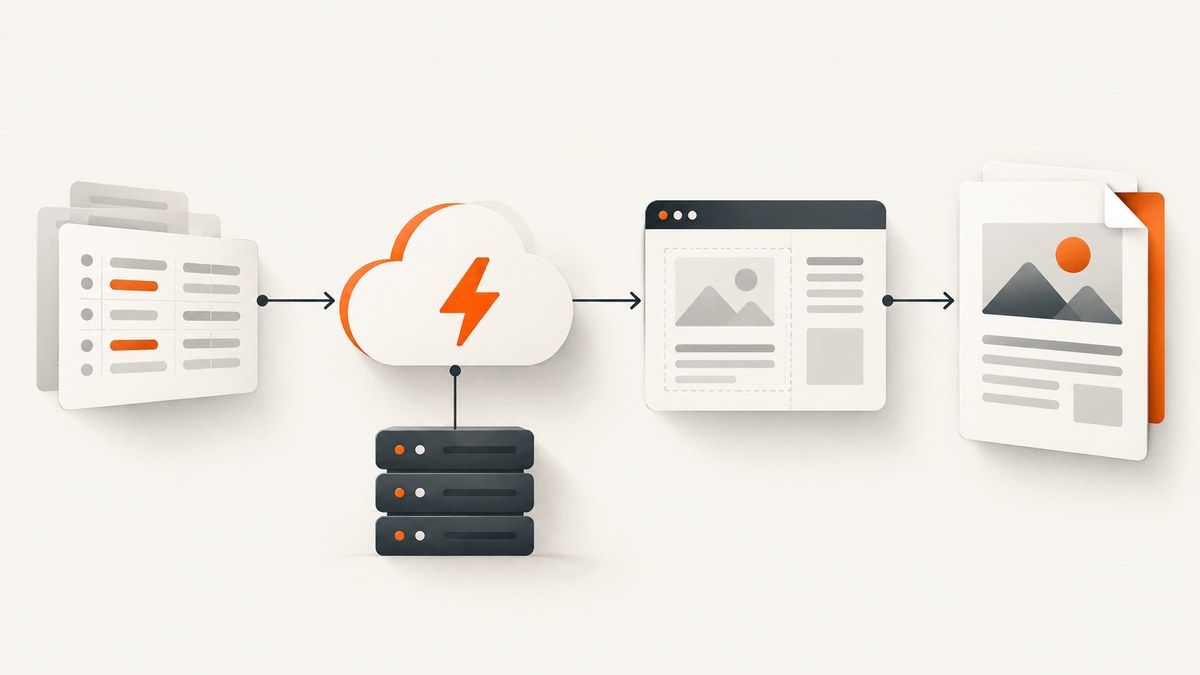
Direct answer: generate the PDF by validating request data, expanding an HTML template, and rendering that HTML with headless Chromium in AWS Lambda. Return small PDFs synchronously through API Gateway, or put larger and bursty jobs on SQS, render them in a worker Lambda, save private files in S3, and expose status through DynamoDB. Python and Node.js are both suitable; packaging, fonts, renderer startup, and template complexity matter more than an assumed language speed advantage.
This guide shows both implementations, the AWS boundaries around them, security controls, operational trade-offs, and the failure modes that usually appear after a prototype reaches production.
1. Choose the delivery architecture first
The rendering code can be nearly identical in either language. The important decision is how a client receives the result.
| Decision | Synchronous API | Asynchronous job API |
|---|---|---|
| Flow | API Gateway → Lambda → Chromium → PDF response | API Gateway → job record → SQS → worker Lambda → S3; status in DynamoDB |
| Best for | Small documents and short renders | Large files, bursts, retries, and controlled concurrency |
| Payload | Binary response, base64 encoded; documented API Gateway limit is 10 MB | Return a job ID, then a time-limited S3 URL |
| Failure handling | Client retries the whole request | Queue retries, visibility timeout, and a dead-letter queue |
| Client experience | One request waits for completion | Submit, poll or receive a callback, then download |
For a Lambda proxy integration, configure binary media types and set isBase64Encoded: true; AWS documents this response requirement and the 10 MB limit in its API Gateway binary-media documentation.
2. Prepare a safe dynamic HTML template
Keep validation and escaping in the application layer. Do not concatenate untrusted values into markup. A template should contain presentation and small formatting helpers, while business rules remain outside the renderer.

Example template
<!doctype html>
<html>
<head>
  <meta charset="utf-8">
  <style>
    @page { size: A4; margin: 18mm; }
    body { font-family: Inter, Arial, sans-serif; color: #172033; }
    h1 { margin: 0 0 8px; }
    .meta { color: #63708a; margin-bottom: 24px; }
    table { width: 100%; border-collapse: collapse; }
    th, td { border-bottom: 1px solid #d9deea; padding: 8px; text-align: left; }
    .total { text-align: right; font-size: 18px; margin-top: 20px; }
  </style>
</head>
<body>
  <h1>{{ title }}</h1>
  <div class="meta">{{ customer }} · {{ date }}</div>
  <table>
    <thead><tr><th>Item</th><th>Quantity</th><th>Price</th></tr></thead>
    <tbody>{{ rows }}</tbody>
  </table>
  <div class="total">Total: {{ total }}</div>
</body>
</html>
Escape text values, validate arrays and numbers against a schema, and whitelist any URLs used for images or stylesheets. Package fonts with the Lambda artifact or container so a missing external font host cannot change pagination.
3. Python implementation with Chromium
Use a Python template engine such as Jinja2 and a Chromium executable supplied by a Lambda layer or container image. The exact Chromium distribution is an infrastructure choice; the handler should only depend on its executable path.
Template expansion and PDF rendering
import html
import json
import os
import tempfile
from datetime import date

from jinja2 import Environment, FileSystemLoader, select_autoescape
from playwright.sync_api import sync_playwright

TEMPLATE_DIR = os.path.join(os.path.dirname(__file__), "templates")
env = Environment(
    loader=FileSystemLoader(TEMPLATE_DIR),
    autoescape=select_autoescape(["html", "xml"]),
)

def render_pdf(data: dict) -> bytes:
    title = str(data["title"])
    customer = str(data["customer"])
    items = data["items"]
    if not isinstance(items, list) or not items:
        raise ValueError("items must be a non-empty list")

    total = 0
    rows = []
    for item in items:
        name = str(item["name"])
        quantity = int(item["quantity"])
        price = float(item["price"])
        if quantity < 1 or price < 0:
            raise ValueError("invalid quantity or price")
        total += quantity * price
        rows.append({"name": name, "quantity": quantity, "price": f"${price:,.2f}"})

    template = env.get_template("invoice.html")
    document = template.render(
        title=title,
        customer=customer,
        date=date.today().isoformat(),
        rows=rows,
        total=f"${total:,.2f}",
    )

    with sync_playwright() as playwright:
        browser = playwright.chromium.launch(
            executable_path=os.environ["CHROMIUM_PATH"],
            headless=True,
            args=["--no-sandbox", "--disable-dev-shm-usage"],
        )
        page = browser.new_page()
        page.set_content(document, wait_until="networkidle")
        page.emulate_media(media="print")
        pdf = page.pdf(
            format="A4",
            print_background=True,
            margin={"top": "18mm", "right": "18mm", "bottom": "18mm", "left": "18mm"},
        )
        browser.close()
    return pdf

def lambda_handler(event, context):
    body = event.get("body") or "{}"
    if event.get("isBase64Encoded"):
        import base64
        body = base64.b64decode(body).decode("utf-8")
    try:
        data = json.loads(body)
        pdf = render_pdf(data)
    except (ValueError, KeyError, json.JSONDecodeError) as exc:
        return {"statusCode": 400, "body": json.dumps({"error": str(exc)})}
    import base64
    return {
        "statusCode": 200,
        "headers": {"Content-Type": "application/pdf", "Content-Disposition": "inline; filename=document.pdf"},
        "isBase64Encoded": True,
        "body": base64.b64encode(pdf).decode("ascii"),
    }
For production, initialize the browser outside the handler when your runtime permits reuse, but create a fresh page per invocation. Close pages in a finally block if you add more complex navigation or multiple documents.
4. Node.js implementation with Puppeteer
Node.js fits teams already using JavaScript template engines and Puppeteer-compatible Chromium runtimes. This example uses a simple escaped interpolation function; a maintained template engine is preferable for larger templates.
import puppeteer from "puppeteer-core";
import escapeHtml from "escape-html";

const chromiumPath = process.env.CHROMIUM_PATH;
let browserPromise;

function browser() {
  if (!browserPromise) {
    browserPromise = puppeteer.launch({
      executablePath: chromiumPath,
      headless: "new",
      args: ["--no-sandbox", "--disable-dev-shm-usage"]
    });
  }
  return browserPromise;
}

function expandTemplate(input) {
  if (!Array.isArray(input.items) || input.items.length === 0) {
    throw new Error("items must be a non-empty array");
  }
  let total = 0;
  const rows = input.items.map((item) => {
    const quantity = Number(item.quantity);
    const price = Number(item.price);
    if (!Number.isInteger(quantity) || quantity < 1 || !Number.isFinite(price) || price < 0) {
      throw new Error("invalid quantity or price");
    }
    total += quantity * price;
    return `<tr><td>${escapeHtml(String(item.name))}</td><td>${quantity}</td><td>$${price.toFixed(2)}</td></tr>`;
  }).join("");
  return `<!doctype html><html><head><style>@page{size:A4;margin:18mm}body{font-family:Arial;color:#172033}table{width:100%;border-collapse:collapse}th,td{padding:8px;border-bottom:1px solid #d9deea;text-align:left}.total{text-align:right}</style></head><body><h1>${escapeHtml(String(input.title))}</h1><p>${escapeHtml(String(input.customer))}</p><table><tr><th>Item</th><th>Quantity</th><th>Price</th></tr>${rows}</table><p class="total">Total: $${total.toFixed(2)}</p></body></html>`;
}

export const handler = async (event) => {
  let page;
  try {
    const input = JSON.parse(event.body || "{}");
    const html = expandTemplate(input);
    page = await (await browser()).newPage();
    await page.setContent(html, { waitUntil: "networkidle0" });
    const pdf = await page.pdf({ format: "A4", printBackground: true, preferCSSPageSize: true });
    return {
      statusCode: 200,
      headers: { "Content-Type": "application/pdf", "Content-Disposition": "inline; filename=document.pdf" },
      isBase64Encoded: true,
      body: pdf.toString("base64")
    };
  } catch (error) {
    return { statusCode: 400, body: JSON.stringify({ error: error.message }) };
  } finally {
    if (page) await page.close();
  }
};
5. Calling the synchronous endpoint
Send JSON to API Gateway. Configure the route to accept application/json and the integration to return application/pdf. Keep the request small; pass references to large datasets rather than embedding them in the event.
curl -X POST "https://api.example.com/pdf" \
  -H "content-type: application/json" \
  --data '{"title":"Invoice 1042","customer":"Acme","items":[{"name":"Consulting","quantity":2,"price":125}]}' \
  -o invoice.pdf
6. Asynchronous jobs for production workloads
For bursts, long renders, or documents that may exceed the direct response path, create a job record with status queued, send the job ID to SQS, and return 202 Accepted. A worker Lambda reads the message, loads validated input, renders the PDF, writes it to a private S3 key, and updates DynamoDB to complete. The status endpoint returns a short-lived presigned URL.
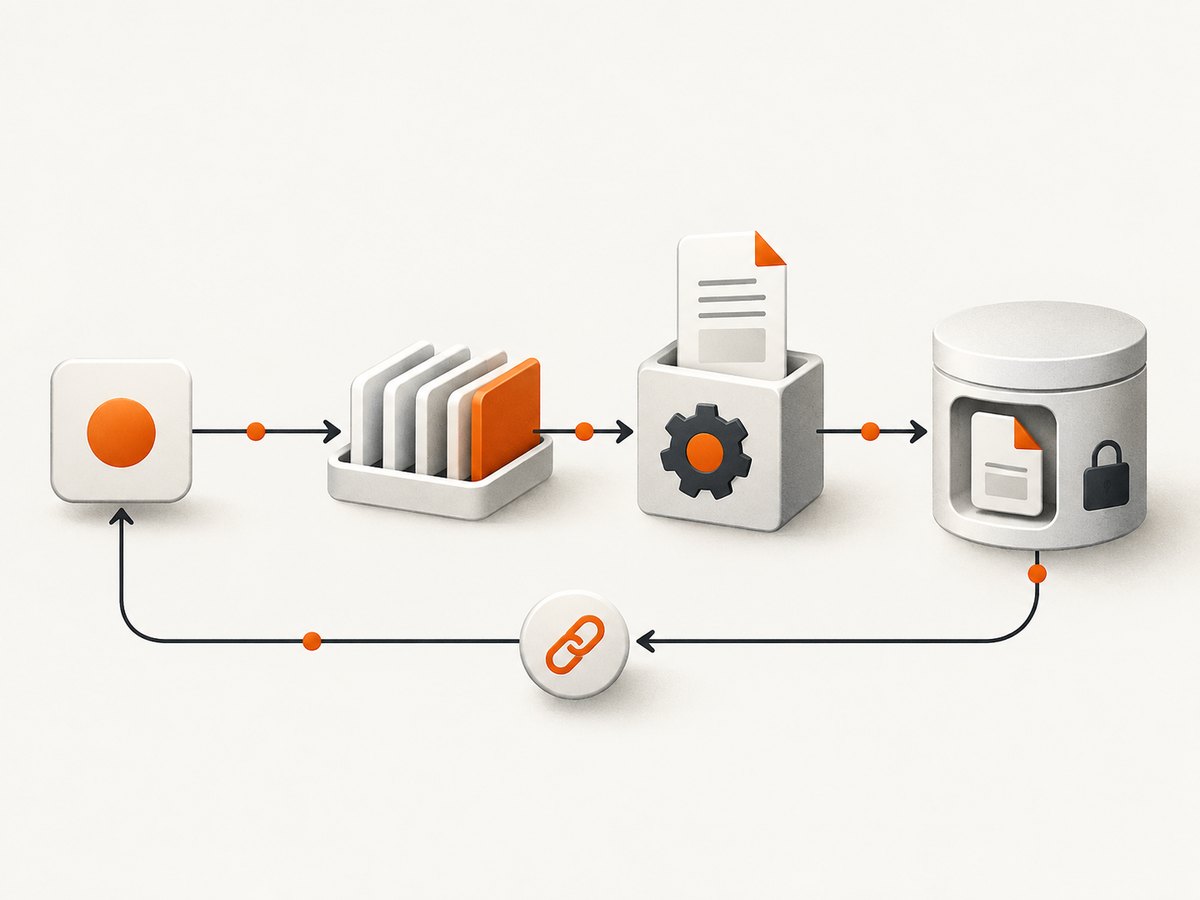
- Validate the request and create an idempotency key.
- Write the job record before publishing to SQS.
- Use the job ID as the S3 object prefix and DynamoDB key.
- Configure visibility timeout longer than the maximum render time.
- Retry transient failures and route poison messages to a dead-letter queue.
- Delete the SQS message only after S3 and DynamoDB updates succeed.
Make the worker idempotent: if a completed object already exists, return its metadata instead of rendering twice. Keep S3 objects private and issue time-limited signed URLs.
7. Rendering options that affect the PDF
- Page size: use CSS
@pageor the renderer’s A4, Letter, or custom width and height settings. - Margins and headers: reserve space explicitly; generated headers and footers can change pagination.
- Backgrounds: enable print backgrounds when colored panels or logos are part of the design.
- Page breaks: use
break-before,break-after, andbreak-inside: avoidon invoices, cards, and tables. - Images: wait for images to load, use stable dimensions, and prefer packaged assets or controlled hosts.
- Fonts: bundle files and declare them with
@font-face; avoid relying on system fonts that differ between local and Lambda environments. - JavaScript: wait for a specific application-ready selector instead of sleeping for an arbitrary duration.
- Ranges: for large documents, render only requested pages where the renderer supports page ranges.
8. Security checklist
- Validate the input schema, maximum lengths, numeric ranges, and allowed enum values.
- HTML-escape text and attribute values. Sanitize any rich HTML separately.
- Restrict outbound requests from the renderer to approved domains to reduce SSRF risk.
- Do not place secrets in template data, page HTML, logs, or S3 object names.
- Use least-privilege IAM: the worker needs only its queue, bucket prefix, and status table.
- Encrypt S3 objects and expire signed URLs quickly.
- Set maximum PDF size, render duration, and queue age to prevent resource exhaustion.
9. Performance, reliability, and cost
Chromium startup is commonly the largest latency component, especially on cold starts. Reuse a browser process when safe, keep templates and fonts in the deployment artifact, allocate enough memory for Chromium, and avoid loading unnecessary third-party resources. Measure cold and warm invocations in your own artifact; the available evidence does not establish a universal Python-versus-Node.js throughput winner.
For reliability, record render duration, browser exit code, page errors, output bytes, queue age, retry count, and final status. Add alarms for failed jobs, a growing dead-letter queue, and approaching Lambda timeout. Use deterministic input hashes when duplicate documents should be served from a cache.
Your AWS cost is driven by Lambda duration and memory, API Gateway requests, SQS operations, DynamoDB reads and writes, and S3 storage and transfer. Asynchronous storage adds components but prevents clients from holding connections open and gives you controlled retries.
10. Troubleshooting common failures
| Symptom | Likely cause | Fix |
|---|---|---|
| PDF downloads as corrupted text | Binary response was not base64 encoded | Set isBase64Encoded: true, encode the bytes, and configure binary media. |
| 504 or timeout | Chromium startup or remote assets exceed the request limit | Move to SQS and a worker; reduce external dependencies and increase memory. |
| Blank PDF | HTML was returned before content rendered | Wait for a readiness selector or network idle, and inspect page console errors. |
| Missing images | Blocked outbound request, invalid URL, or image not loaded | Allowlist the host, use absolute URLs, wait for image completion, or package the asset. |
| Different line breaks in Lambda | Font unavailable or fallback metrics changed | Bundle the font, declare it explicitly, and wait for document.fonts.ready. |
| Chromium cannot launch | Wrong executable path, incompatible binary, or insufficient shared memory | Verify the layer/container binary, set CHROMIUM_PATH, and use --disable-dev-shm-usage. |
| Duplicate documents | Client or SQS retry re-ran a job | Use an idempotency key and check DynamoDB/S3 before rendering. |
| Private data appears in logs | Request or HTML logging is too verbose | Redact payloads and log only IDs, sizes, timings, and error classes. |
11. Or skip the browser setup
ScreenshotNeo provides a hosted website screenshot and PDF API at ScreenshotNeo. It accepts a URL and returns an image or PDF, so your Lambda function does not need to package Chromium. The API can also wait for selectors or network idle, run custom JavaScript and CSS, set headers, cookies, user agent, timezone, and geolocation, and capture a full page or selected element. See the ScreenshotNeo API docs for the complete option list.
curl -G "https://api.screenshotneo.com/v1/shot" -d access_key=YOUR_API_KEY --data-urlencode url=https://stripe.com -o shot.webpimport requests
r = requests.get("https://api.screenshotneo.com/v1/shot", params={"access_key": "YOUR_API_KEY", "url": "https://stripe.com"}, timeout=90)
open("shot.webp", "wb").write(r.content)const q = new URLSearchParams({ access_key: 'YOUR_API_KEY', url: 'https://stripe.com' });
const res = await fetch(`https://api.screenshotneo.com/v1/shot?${q}`);Cookie and consent banners, newsletter popups, and chat widgets are removed before the shot. Bot checks, blank pages, failed loads, timeouts, and cache hits are not billed, and response headers identify the page verdict and billing result. An MCP server provides take_screenshot, get_page_info, and capture_pdf tools for Claude, Cursor, and other MCP clients. The Free plan includes 1,000 screenshots each month without a card; paid plans start at $5 for 3,000 shots. Create a free ScreenshotNeo account.
12. FAQ
Should I choose Python or Node.js?
Choose the ecosystem your team already deploys and maintains. Both can expand templates and drive Chromium; packaging and renderer behavior matter more than the language choice.
Can Lambda return any PDF size?
No. The documented synchronous API Gateway binary response path has a 10 MB payload limit. Store larger outputs in S3 and return a signed URL.
How do I handle a document with customer-supplied HTML?
Do not insert it directly. Sanitize it with an explicit policy, restrict URLs and CSS, and render it in a controlled worker with resource and time limits.
When should I add SQS?
Add it when render time, concurrency, retries, or output size make an open HTTP request unreliable. It also gives you a natural dead-letter path and idempotent job boundary.
How can I make PDFs reproducible?
Bundle fonts and assets, pin the Chromium artifact, use deterministic input data, set a timezone, and avoid uncontrolled remote resources.


