Axios Set Headers: The Complete Guide for 2026
Set Axios headers per request, per client, or with an interceptor. Learn precedence, CORS, FormData, token safety, and common fixes.

To set a header on one Axios request, pass it in that request’s config:
await axios.get('/api/data', {
  headers: { 'X-Request-ID': 'abc123' },
});
Use axios.create() for stable headers shared by calls to one API. Use a request interceptor when a value, such as an access token, must be read or refreshed for each request. Axios merges configuration in this order: library defaults, instance defaults, then request config; the last applicable value takes precedence. Axios’s documentation describes this behavior.
This guide covers browser and Node.js usage, header precedence, Authorization, FormData, CORS, XSRF, redirects, troubleshooting, and a hosted screenshot alternative for developers who need page captures.
1. Set a header on one request
Pass a headers object in the config argument. For GET, the config is the second argument. For POST, it follows the request body:
import axios from 'axios';

const response = await axios.get('https://api.example.com/users', {
  headers: {
    'X-Request-ID': 'req-7f3a',
    Accept: 'application/json',
  },
});

console.log(response.data);

const created = await axios.post(
  'https://api.example.com/users',
  { name: 'Ravi' },
  { headers: { 'X-Request-ID': 'req-7f3b' } },
);

console.log(created.data);
Use this scope when a header belongs to just one call, varies by operation, or is an explicit override. Do not put the request body in the config argument: Axios expects it as the second argument for POST, while the config is third.
Authorization header
For a bearer token, the header value convention is Bearer followed by a space and the token:
const response = await axios.get('https://api.example.com/profile', {
  headers: { Authorization: `Bearer ${accessToken}` },
});
Use the exact authentication scheme and header expected by the API. Keep secrets scoped to the service that needs them. In a browser application, do not treat a token embedded in shipped frontend code as a secret from users who can inspect that code.
2. Choose the right scope
| Scope | Use it when | Watch for |
|---|---|---|
| Request config | One call needs a header or override | Pass config in the correct argument position |
| Axios instance defaults | Stable headers apply to one API client | Keep credentials on the client for that API |
| Request interceptor | A value must be resolved at request time | Attach it to the relevant instance and return config |
Instance defaults for one API
Create an instance to group a base URL and stable headers. This also gives credentials a narrower scope than global Axios defaults:

import axios from 'axios';

export const api = axios.create({
  baseURL: 'https://api.example.com',
  headers: {
    'X-App-Version': '2.0.0',
    Accept: 'application/json',
  },
  timeout: 15000,
});

// Update a default later if needed:
api.defaults.headers.common['Authorization'] = `Bearer ${accessToken}`;

const response = await api.get('/users');
console.log(response.data);
Axios warns that setting axios.defaults.headers.common.Authorization applies the token to requests using that global client, even if they target other domains. A dedicated instance helps prevent accidental credential sharing. Avoid adding an Authorization default to an instance that sends requests to arbitrary user-provided URLs.
Dynamic values with a request interceptor
An interceptor is useful when the current token can change between calls. Read the value when the request is prepared, update the Axios headers object, and return the config:
const api = axios.create({ baseURL: 'https://api.example.com' });

api.interceptors.request.use((config) => {
  const token = getAuthToken();
  if (token) {
    config.headers.set('Authorization', `Bearer ${token}`);
  }
  return config;
});

const response = await api.get('/profile');
Axios initializes the headers object in request interceptors and transformers. Prefer config.headers.set() for interceptor changes. Direct property manipulation is still possible, but Axios documents it as deprecated in this context.
Request interceptors can be asynchronous by default. If the interceptor does only synchronous work, Axios supports a synchronous: true option:
api.interceptors.request.use(
  (config) => {
    config.headers.set('X-Client-Mode', 'web');
    return config;
  },
  undefined,
  { synchronous: true },
);
Use this option only when the interceptor really is synchronous. If it reads from an async token store or performs refresh work, keep the async flow and handle failures deliberately.
3. Understand precedence and AxiosHeaders
When a header has values at multiple scopes, the request config wins over instance defaults, which win over library defaults. A local override is therefore straightforward:
const api = axios.create({
  headers: { 'X-Region': 'us-east' },
});

await api.get('/report', {
  headers: { 'X-Region': 'eu-west' },
});
Header names are case-insensitive under HTTP. Axios’s AxiosHeaders helper offers methods such as set, get, has, iteration, and conversion to JSON-compatible values. Axios preserves the matching header’s original spelling for style; casing does not create a separate HTTP header.
set(name, value, rewrite) also has overwrite behavior. By default it overwrites an existing value unless that value is false. Passing false as the rewrite argument prevents replacement; passing true forces it. In normal request code, a plain headers object or config.headers.set() is usually enough. Use rewrite controls only when multiple middleware layers intentionally compete to set the same header.
Axios uses null and false as special internal values rather than ordinary wire strings. They can suppress rendering a header, and false can opt out of a default. Do not send either expecting the literal text "false" or "null".
4. Set headers with cURL, Python, and Node.js
These examples set the same custom request header outside the Axios-specific API. Replace the example URL and value with the endpoint’s actual requirements.
cURL
curl 'https://api.example.com/users' \
  -H 'X-Request-ID: req-7f3a' \
  -H 'Accept: application/json'
Python requests
import requests

response = requests.get(
    'https://api.example.com/users',
    headers={
        'X-Request-ID': 'req-7f3a',
        'Accept': 'application/json',
    },
    timeout=15,
)
response.raise_for_status()
print(response.json())
Node.js fetch
const response = await fetch('https://api.example.com/users', {
  headers: {
    'X-Request-ID': 'req-7f3a',
    Accept: 'application/json',
  },
});

if (!response.ok) {
  throw new Error(`HTTP ${response.status}`);
}
console.log(await response.json());
These are separate clients; Axios header defaults and interceptors do not affect cURL, Python requests, or Node’s built-in fetch.
5. FormData and Content-Type
When sending browser, web-worker, or React Native FormData, generally leave Content-Type unset. The runtime must add the multipart boundary that separates form fields. If you manually set only multipart/form-data, the boundary may be missing and the server may not parse the body.
const form = new FormData();
form.append('avatar', file);
form.append('displayName', 'Ravi');

await axios.post('https://api.example.com/profile', form);
If an Axios default would otherwise add a content type, set that header to false to opt out and let the browser choose it:
await axios.post('https://api.example.com/profile', form, {
  headers: { 'Content-Type': false },
});
In Node.js, some FormData implementations expose getHeaders(). Axios copies those returned headers by default for v1 compatibility. For custom or untrusted Node FormData, the request config option formDataHeaderPolicy: 'content-only' restricts copied headers to Content-Type and Content-Length; explicitly set any other required headers in the request config. Check that this option exists in your installed Axios release.
6. Browser CORS and forbidden headers
Axios cannot bypass browser networking rules. Some request headers are forbidden to scripts or controlled by the browser, including headers such as Connection and User-Agent. Changing header casing or using an interceptor does not grant permission to set them.
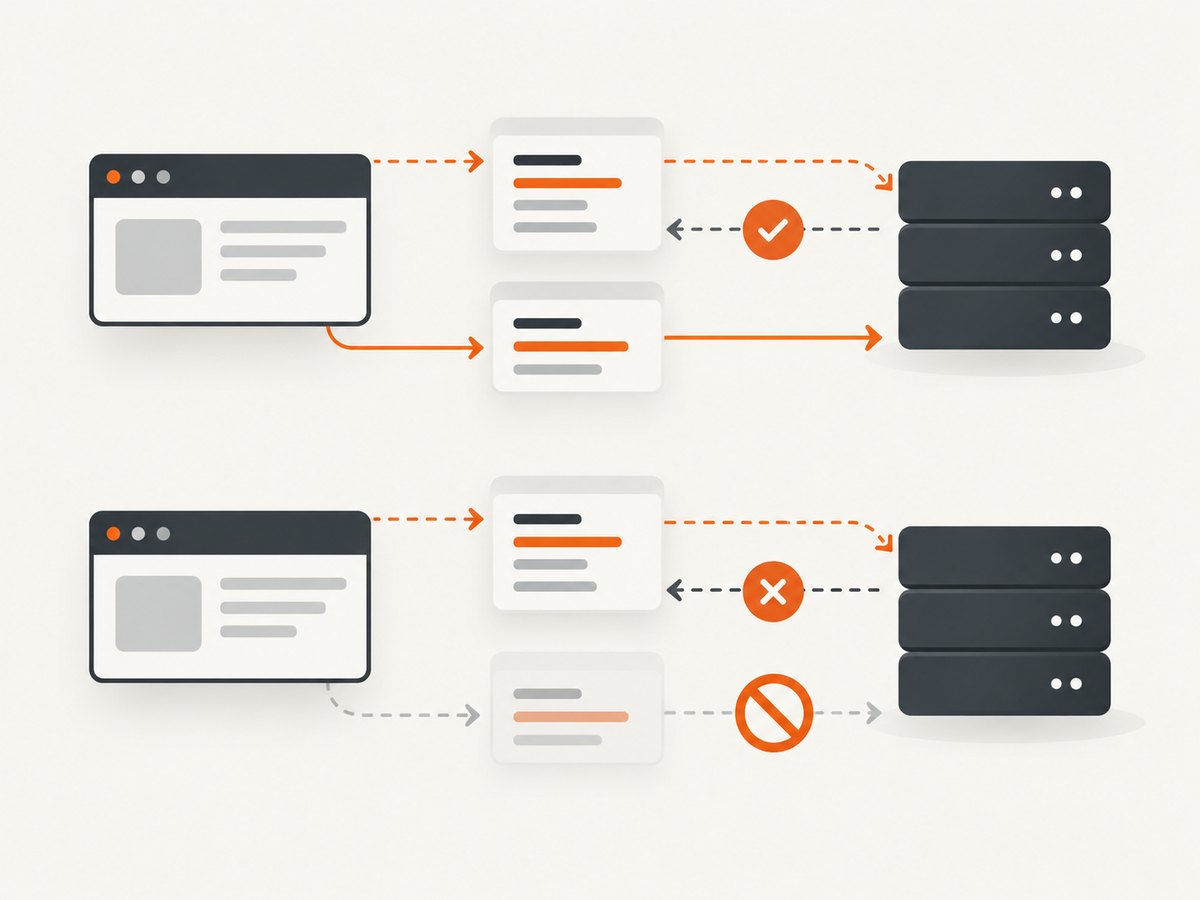
A custom header on a cross-origin request may cause the browser to send a CORS preflight: an OPTIONS request asking the server whether the origin, method, and requested headers are allowed. The server must answer with an appropriate policy. The Authorization header must be explicitly named in Access-Control-Allow-Headers; a wildcard does not cover it. See [MDN’s CORS guide](https://developer.mozilla.org/en-US/docs/Web/HTTP/Guides/CORS) and [Access-Control-Allow-Headers reference](https://developer.mozilla.org/en-US/docs/Web/HTTP/Reference/Headers/Access-Control-Allow-Headers).
- Open the browser developer tools Network panel and inspect whether the actual request was sent and whether an
OPTIONSrequest came first. - Inspect the preflight response. Confirm the allowed origin, method, and custom header names include what the browser requested.
- For Authorization, make sure the server explicitly allows it. Do not use alternate casing as a fix.
- If the request includes credentials, verify the server permits credentials and returns a specific allowed origin rather than combining credentials with a wildcard origin.
If the browser reports a CORS error, the missing permission is generally a server response configuration issue. A Node.js Axios request is not subject to browser CORS enforcement, though Node has its own HTTP and redirect behavior.
7. XSRF headers and credentials are separate
Axios’s withXSRFToken option controls whether Axios reads an XSRF cookie and sets the XSRF header in browser requests. By default, Axios sets it for same-origin requests. Set it to true to attempt it cross-origin, false to disable it, or provide a callback for per-request logic.
withCredentials is separate: it controls whether a cross-site request includes credentials such as cookies or HTTP authentication. A cross-origin XSRF header does not itself mean cookies should be sent. Configure each option only for the request’s requirements, and ensure the server’s CORS policy permits the resulting request. Check the [Axios request configuration documentation](https://github.com/axios/axios/blob/v1.x/README.md#request-config) for the options supported by your installed version.
await api.post('/transfer', payload, {
  withXSRFToken: true,
  withCredentials: true, // only if this request also needs cross-site cookies
});
8. Protect secret headers across Node.js redirects
For Node.js requests, Axios supports sensitiveHeaders in the HTTP adapter. List custom secret-bearing header names, such as an API key, so the adapter removes them when following a redirect to a different origin. Same-origin redirects retain them. If maxRedirects is set to 0, this option is not used.
await axios.get('https://api.example.com/export', {
  headers: { 'X-API-Key': process.env.API_KEY },
  sensitiveHeaders: ['X-API-Key'],
  maxRedirects: 5,
});
This behavior is specific to the documented Node adapter case. Keep credentials on the intended Axios instance as well, and review the installed version’s [request config options](https://github.com/axios/axios/blob/v1.x/README.md#request-config).
9. Troubleshooting common header problems
| Symptom | Likely cause | Fix |
|---|---|---|
| Server never receives custom header in browser | Preflight failed, server did not allow the header, or the header is browser-forbidden | Inspect Network panel and server CORS response; remove forbidden headers from script code |
| Authorization works on one host but leaks to another | Token was configured on global Axios defaults | Create a service-specific instance and keep the token there |
| POST body is empty or malformed | Arguments are in the wrong order, or content type is incorrect | Pass data second and config third; inspect actual body and content type |
| Multipart upload fails to parse | Browser boundary was omitted by a manually forced multipart content type | Leave Content-Type unset or opt out of Axios’s default with false |
| Interceptor header does not update | Value was captured earlier, interceptor is on another client, or config was not returned | Read the current value inside the interceptor, attach to the correct instance, return config |
| Header seems duplicated with different casing | Code or middleware is setting equivalent case variants | Remember HTTP header matching is case-insensitive; consolidate to one assignment |
| API key disappears after redirect | Node adapter removed a sensitive header on cross-origin redirect | Verify redirect target and whether credentials should be forwarded; do not blindly resend secrets |
When debugging, inspect the outgoing request in the browser Network panel or Node logging, and compare the final request against the API’s required header names. Avoid logging live tokens or API keys into shared console output.
10. Performance, reliability, and cost
Setting a header has negligible work compared with network latency, but extra custom headers can change browser behavior: a cross-origin request may need an OPTIONS preflight before the main request. That adds a round trip and another server policy to maintain. Avoid unnecessary custom headers on cross-origin calls, and use the server’s CORS policy deliberately.
For reliability, use a request timeout appropriate to the API, handle non-success responses, and ensure token refresh logic has a defined failure path. Interceptors centralize policy but can also affect every call on their instance, so keep that instance narrow. Axios config values can change across library releases; confirm newer options against the version installed by the application.
There is no special Axios charge for adding headers. Cost comes from the API or network service being called, and from any extra preflight traffic your browser request triggers. Do not retry authorization or validation failures indefinitely; correct the credential or request policy first.
11. Or skip the browser setup
If you need a website screenshot rather than a general API call, ScreenshotNeo is a website screenshot API and MCP server. A single GET request returns PNG, JPEG, WebP, or PDF. It accepts parameter names used by other screenshot APIs, which can make switching straightforward. See the ScreenshotNeo API documentation for options.
curl -G "https://api.screenshotneo.com/v1/shot" -d access_key=YOUR_API_KEY --data-urlencode url=https://stripe.com -o shot.webpWith Python:
import requests

r = requests.get(
    "https://api.screenshotneo.com/v1/shot",
    params={"access_key": "YOUR_API_KEY", "url": "https://stripe.com"},
    timeout=90,
)
open("shot.webp", "wb").write(r.content)
Or with Node.js:
const q = new URLSearchParams({ access_key: 'YOUR_API_KEY', url: 'https://stripe.com' });
const res = await fetch(`https://api.screenshotneo.com/v1/shot?${q}`);
Cookie banners, newsletter popups, and chat widgets are removed before the shot. Bot checks, blank pages, failed loads, timeouts, and cache hits are not billed; response headers say which verdict applied and whether the request was billed. ScreenshotNeo has an MCP server with take_screenshot, get_page_info, and capture_pdf tools for AI agents. The Free plan includes 1,000 screenshots per month with no card; paid plans start at $5 for 3,000. Every feature is on every plan. Create a free ScreenshotNeo account to get started.
12. Frequently asked questions
Can I set headers for every request globally?
Yes, through Axios defaults, but shared credentials may then accompany requests to unintended domains. Prefer an instance for one API.
Does header capitalization matter?
HTTP header names are case-insensitive. Use consistent spelling in code for readability, but casing does not bypass browser restrictions.
How do I read a response header?
Response headers are separate from request headers. Axios documents their names in lowercase, so use response.headers['content-type'] or response.headers.get('content-type').
Can Axios set the browser’s User-Agent?
Browser scripts cannot set certain forbidden or browser-controlled headers. Configure such behavior outside page JavaScript where the platform permits it.
Should I use an interceptor for every header?
No. Use request config for a one-off value, instance defaults for stable shared values, and an interceptor when request-time logic is actually needed.


