BeautifulSoup: The Complete Python Web Scraping Guide
Learn a reliable Beautiful Soup workflow: fetch HTML, choose a parser, extract data, handle failures, and capture JavaScript pages when needed.

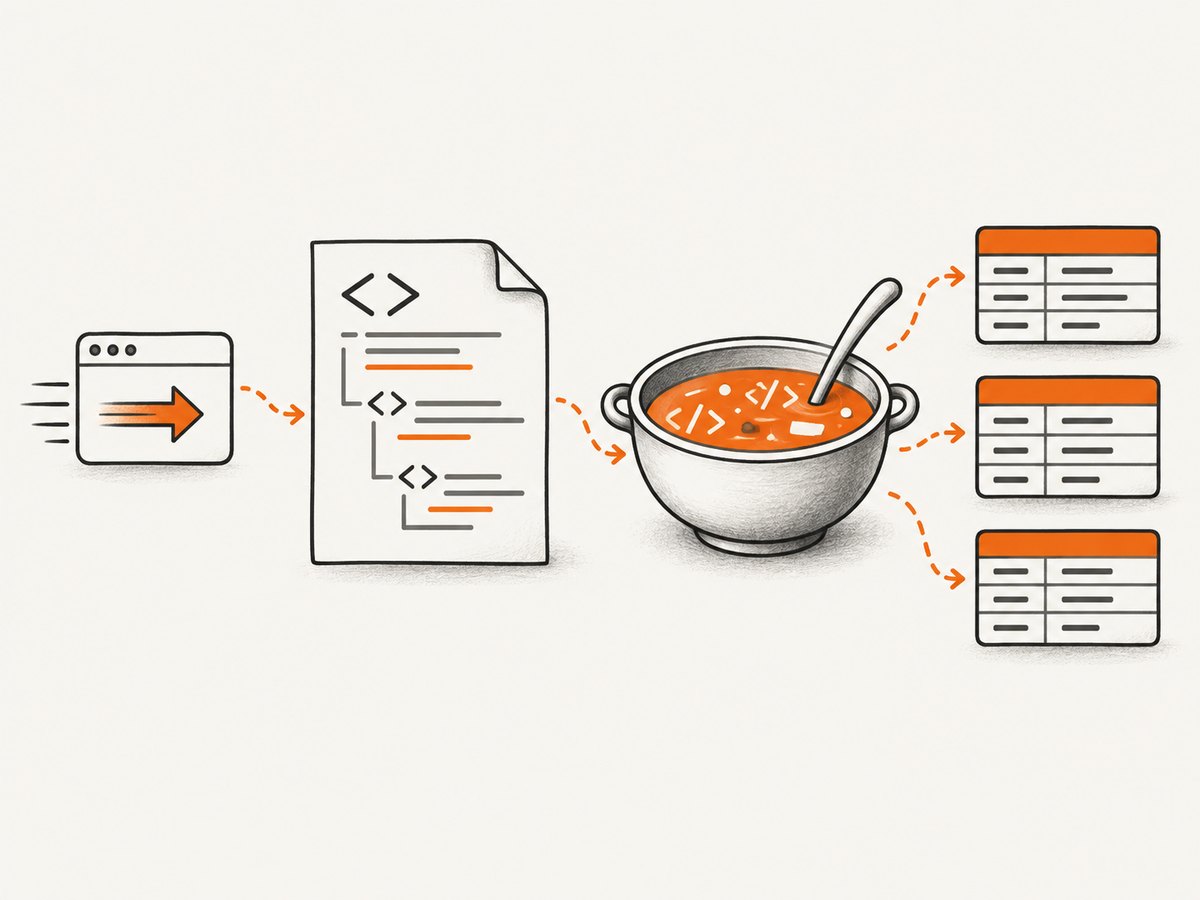
Beautiful Soup parses markup; it does not download web pages. A dependable scraper therefore has three stages: fetch the response, parse it with an explicit parser, and navigate the resulting tree. This separation makes your code easier to test and lets you replace the HTTP client when a site needs different headers, retries, authentication, or browser rendering.
Install the Beautiful Soup 4 distribution with pip install beautifulsoup4. The legacy BeautifulSoup package name refers to an older major release. The official documentation currently identifies Beautiful Soup 4.15.0 and provides examples written for Python 3.8; check package metadata before pinning versions in a new project. Python 2 support ended on December 31, 2020.
1. The complete workflow
- Check that you are allowed to fetch the target pages and follow the site’s terms, robots rules, and rate limits.
- Fetch HTML with an HTTP client such as
requestsor Python’surllib.request. - Check the response status and content type before parsing.
- Pass the response body and an explicit parser to
BeautifulSoup. - Find elements with CSS selectors, tag methods, or attribute filters.
- Normalize text and URLs, validate required fields, and store structured records.
- Log failures and retry transient network errors without duplicating successful records.
python -m venv .venv
source .venv/bin/activate
pip install beautifulsoup4 requests lxml
Beautiful Soup exposes four object types you will encounter often: Tag, NavigableString, BeautifulSoup, and Comment. A soup object is a navigable tree, so you can move from a heading to its parent, inspect attributes, or search descendants.
2. Minimal parser example
from bs4 import BeautifulSoup

html = """<html><body><h1>Example</h1></body></html>"""
soup = BeautifulSoup(html, "html.parser")
print(soup.h1.get_text(strip=True))
The second argument is deliberate. If you omit it, Beautiful Soup chooses an available parser, and two machines with different dependencies can build different trees from the same malformed input. Specify the parser in scripts you distribute or run in production.
3. Fetch a page, then parse it
Beautiful Soup accepts a string, bytes, or file-like input. It does not open a URL itself. Python’s standard library documents urllib.request for opening and reading URLs; requests is also common because it provides convenient timeouts, headers, cookies, and status handling.
from urllib.request import Request, urlopen
from bs4 import BeautifulSoup

url = "https://example.com/"
request = Request(url, headers={"User-Agent": "research-scraper/1.0"})

with urlopen(request, timeout=20) as response:
    status = response.status
    content_type = response.headers.get_content_type()
    body = response.read()

if status != 200:
    raise RuntimeError(f"HTTP status: {status}")
if content_type not in {"text/html", "application/xhtml+xml"}:
    raise RuntimeError(f"Unexpected content type: {content_type}")

soup = BeautifulSoup(body, "lxml")
print(soup.title.get_text(" ", strip=True) if soup.title else "(no title)")
With requests, use an explicit timeout and call raise_for_status():
import requests
from bs4 import BeautifulSoup

response = requests.get(
    "https://example.com/",
    headers={"User-Agent": "research-scraper/1.0"},
    timeout=(5, 20),
)
response.raise_for_status()
soup = BeautifulSoup(response.content, "lxml")
print(soup.get_text(" ", strip=True)[:200])
For a quick diagnostic, cURL separates fetching from parsing too:
curl -L --fail --max-time 20 -A 'research-scraper/1.0' https://example.com/ -o page.html
python - <<'PY'
from pathlib import Path
from bs4 import BeautifulSoup
soup = BeautifulSoup(Path("page.html").read_bytes(), "html.parser")
print(soup.title.get_text(strip=True) if soup.title else "(no title)")
PY
4. Choosing a parser
| Parser | When to choose it | Trade-off |
|---|---|---|
lxml |
General HTML work when a third-party dependency is acceptable | Install the native-backed package in every environment |
html5lib |
Markup that needs browser-like, standards-oriented recovery | Additional dependency and a different tree shape |
html.parser |
Small scripts and environments where the standard library is preferred | Its recovery behavior differs from the other parsers |
The Beautiful Soup documentation discusses these choices in the order lxml, html5lib, then Python’s built-in parser. That is the project’s documented preference discussion, not a universal speed ranking. The same invalid markup can produce different trees with different parsers, so pin one and test selectors against it.
# Pick one explicitly in application code
soup = BeautifulSoup(response.content, "lxml")
# or: BeautifulSoup(response.content, "html5lib")
# or: BeautifulSoup(response.content, "html.parser")
5. Finding elements and extracting clean data
CSS selectors
for card in soup.select("article.product-card"):
    name_node = card.select_one("h2.name")
    price_node = card.select_one(".price")
    link_node = card.select_one("a[href]")

    record = {
        "name": name_node.get_text(" ", strip=True) if name_node else None,
        "price": price_node.get_text(" ", strip=True) if price_node else None,
        "url": link_node.get("href") if link_node else None,
    }
    print(record)
select() returns a list; select_one() returns the first match or None. Always handle missing nodes because templates change, optional fields disappear, and error pages may use the same URL as a normal page.
Tag methods and attributes
headline = soup.find("h1")
all_links = soup.find_all("a", href=True)
for link in all_links:
    text = link.get_text(" ", strip=True)
    href = link["href"]
    print(text, href)

# Attribute filters
images = soup.find_all("img", alt=True)
for image in images:
    print(image.get("alt"), image.get("src"))
Text, comments, and whitespace
main = soup.select_one("main") or soup
text = main.get_text(" ", strip=True)

for comment in soup.find_all(string=lambda value: value and value.strip().startswith("TODO")):
    print("comment:", comment.strip())
Use get_text(" ", strip=True) to prevent words from adjacent nodes running together. Convert numbers, dates, and currencies only after extraction, and keep the original text when auditing matters.
Resolve relative URLs
from urllib.parse import urljoin

base_url = "https://example.com/catalog/page-1"
for link in soup.select("a[href]"):
    absolute = urljoin(base_url, link["href"])
    print(absolute)
6. A reusable scraper with validation and retries
from __future__ import annotations

import time
from urllib.parse import urljoin

import requests
from bs4 import BeautifulSoup


def fetch(url: str, session: requests.Session, attempts: int = 3) -> bytes:
    for attempt in range(attempts):
        try:
            response = session.get(url, timeout=(5, 30), allow_redirects=True)
            response.raise_for_status()
            if "text/html" not in response.headers.get("content-type", ""):
                raise ValueError("response is not HTML")
            return response.content
        except (requests.Timeout, requests.ConnectionError) as exc:
            if attempt == attempts - 1:
                raise
            time.sleep(2 ** attempt)


def parse_products(body: bytes, page_url: str) -> list[dict[str, str | None]]:
    soup = BeautifulSoup(body, "lxml")
    records = []
    for card in soup.select("article.product-card"):
        title = card.select_one("h2.name")
        anchor = card.select_one("a[href]")
        if not title or not anchor:
            continue
        records.append({
            "name": title.get_text(" ", strip=True),
            "url": urljoin(page_url, anchor["href"]),
        })
    return records


with requests.Session() as session:
    session.headers.update({"User-Agent": "research-scraper/1.0"})
    url = "https://example.com/catalog"
    html = fetch(url, session)
    for product in parse_products(html, url):
        print(product)
Retries should target transient connection and timeout errors. Do not blindly retry a permanent 404, an authentication failure, or a parser validation error. Add jitter and respect server guidance such as Retry-After when operating at scale.
7. JavaScript-rendered pages and screenshots
Beautiful Soup sees the response body you fetched. It does not execute JavaScript, click controls, wait for asynchronous requests, or dismiss consent dialogs. If the data is absent from the initial HTML, inspect the site’s network calls for a documented endpoint or use a browser automation tool where permitted.
When your goal is a visual capture rather than structured fields, ScreenshotNeo handles the browser step through one GET request. It can wait for a selector, delay, or network idle; load lazy images; choose a full page or CSS element; set a viewport, device preset, dark mode, retina scale, custom headers, cookies, user agent, timezone, geolocation, and custom JavaScript or CSS. Its PDF mode supports paper size, margins, landscape orientation, and page ranges.
8. Or skip the browser setup
Use ScreenshotNeo when you need the rendered page or a clean visual asset. Cookie and consent banners are accepted before capture, and more than 60 known consent platforms, newsletter popups, and chat widgets can be removed; each step can be disabled. Bot checks, blank pages, timeouts, failed loads, and cache hits are not billed, and response headers identify the page verdict and whether the request was billed.

See the ScreenshotNeo API documentation for all options. This is a complete one-call example:
curl -G "https://api.screenshotneo.com/v1/shot" -d access_key=YOUR_API_KEY --data-urlencode url=https://stripe.com -o shot.webpimport requests
r = requests.get("https://api.screenshotneo.com/v1/shot", params={"access_key": "YOUR_API_KEY", "url": "https://stripe.com"}, timeout=90)
open("shot.webp", "wb").write(r.content)const q = new URLSearchParams({ access_key: 'YOUR_API_KEY', url: 'https://stripe.com' });
const res = await fetch(`https://api.screenshotneo.com/v1/shot?${q}`);ScreenshotNeo also offers element capture, request and resource blocking, caching with a TTL you choose, image resizing, transparent backgrounds, signed links for public <img> tags, asynchronous jobs with signed webhooks, bulk capture for up to 100 URLs per call, a usage API, and an OpenAPI specification. Its MCP server exposes take_screenshot, get_page_info, and capture_pdf for Claude, Cursor, and other MCP clients.
The Free plan includes 1,000 screenshots each month with no card. Paid plans start at $5 for 3,000 shots; yearly billing gives two months free, and every feature is available on every plan. Create a free ScreenshotNeo account.
9. Pagination, forms, and edge cases
- Pagination: collect the next link with
urljoin, stop when it is missing, and keep a set of visited URLs to avoid loops. - Duplicate content: canonical URLs, tracking parameters, and repeated cards can create duplicates; normalize URLs and deduplicate by a stable key.
- Encoding: prefer
response.contentso Beautiful Soup can inspect encoding declarations. If you decode manually, verify the response charset. - Huge pages: avoid converting the entire document to text when you need one section. Select the container first.
- Tables: iterate rows, then cells, and preserve empty cells so columns do not shift.
- Embedded JSON: locate the script tag, parse its text with
json.loads, and validate the schema; do not execute it. - Login and forms: use a session and documented authentication. Keep credentials out of source control and logs.
- Rate limits: limit concurrency, add delays, cache responses, and stop when a site asks you to stop.
10. Troubleshooting
| Symptom | Likely cause | Fix |
|---|---|---|
ModuleNotFoundError: bs4 |
Package installed in a different interpreter | Run python -m pip install beautifulsoup4 with the same Python used to run the script. |
FeatureNotFound: Couldn't find a tree builder |
lxml or html5lib is missing |
Install the parser or switch explicitly to html.parser. |
| Selector returns nothing | Wrong selector, changed markup, or content rendered by JavaScript | Save the response, inspect it, test a smaller selector, and verify whether the data exists in initial HTML. |
| 403 or 429 responses | Access policy, rate limit, or missing request context | Follow the site’s rules, slow down, use documented headers or authentication, and do not evade access controls. |
| Empty or generic page | Consent wall, bot check, redirect, or an error template | Log final URL, status, headers, and a bounded body sample; use an approved browser workflow when rendering is required. |
| Different results on two machines | Different parser versions or parser availability | Declare the parser, pin dependencies, and run the same fixture tests in CI. |
| Timeouts during retries | Unbounded waits or retrying a slow endpoint too aggressively | Set connect/read timeouts, cap attempts, use exponential backoff, and record the failing URL. |
11. Performance, reliability, and cost
Parsing is usually cheap compared with network transfer and browser rendering. Reuse a requests.Session, request only the fields you need, cache stable pages, and parse a narrowed container instead of repeatedly searching the whole document. Measure your own workload before changing parsers; the documentation’s parser discussion does not provide a universal benchmark.
For reliability, persist the source URL, retrieval time, status, final URL, parser name, and an extraction version. Store raw HTML for a small sample so selector regressions can be diagnosed. Validate required fields and quarantine records that fail validation instead of silently emitting partial data.
HTTP scraping costs are the resources you operate: bandwidth, compute, storage, and any proxy or browser service you select. Browser captures add rendering work. ScreenshotNeo charges only for clean shots; failed loads, blank pages, bot checks, timeouts, and cache hits are free according to its response verdict and billing headers. Its Free plan is suitable for 1,000 screenshots per month, while paid tiers provide larger included volumes.
12. FAQ
Does Beautiful Soup crawl an entire site?
No. Write the crawl queue, URL policy, rate limiting, and storage yourself, or use a crawler framework. Beautiful Soup handles parsing and searching one document at a time.
Which parser should I start with?
Choose lxml for a common production default when you can install it, html5lib for browser-like recovery, and html.parser when avoiding third-party parser dependencies. Keep the choice explicit.
Can it scrape content behind JavaScript?
Not by itself. Fetch an underlying documented data endpoint or use a permitted browser renderer. For rendered screenshots and PDFs, ScreenshotNeo provides the browser capture API and MCP tools.
Is scraping legal?
It depends on the site, your purpose, jurisdiction, authentication, and the data involved. Review terms, robots guidance, privacy obligations, and applicable law before collecting data.
How do I keep a scraper maintainable?
Use explicit parsers, small selector functions, fixtures, validation, structured logs, bounded retries, and alerts when expected fields disappear.


