Best Programming Language for Web Scraping
There is no universal best language for web scraping. Choose based on how pages render, your workload, your team’s tools, and the cost of operating a browser.

There is no universal best programming language for web scraping. For a general starting point, Python is a sensible choice when fast iteration, mature scraping libraries, and a data analysis workflow matter. Choose JavaScript or Node.js when pages depend heavily on browser-side JavaScript or your team already builds in that stack. Go and Java can fit concurrency-heavy or long-running services when their deployment and operations suit the team.
The target page and the way you need to operate the scraper matter more than a language ranking. Static HTML may only require an HTTP client and parser. A single-page application that fills in content after scripts run may need a real browser. No controlled cross-language benchmark establishes a universal speed winner, so test the actual workload before making performance the deciding factor.
1. Pick the approach before the language
First determine where the information appears. If it is present in the server response, fetch the HTML and parse it. If it appears only after client-side JavaScript runs, use browser automation or find an official data interface. Browser-based scraping takes more setup and operating resources than a simple HTTP request.
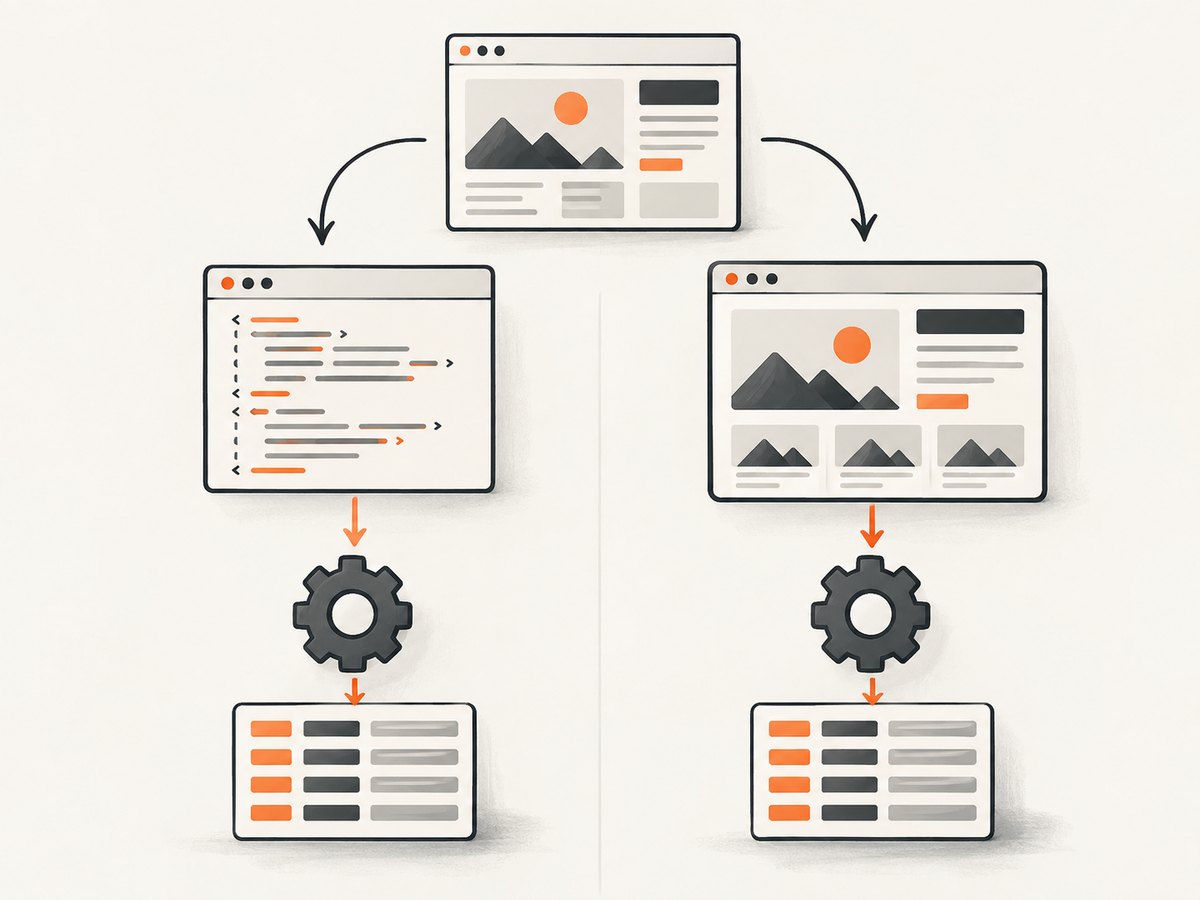
- Inspect the page: compare the initial HTML response with the content shown in a browser. If the needed data is in the response, start without a browser.
- Check for an official API: use one when it provides the data you need and its terms fit your project.
- Define the workload: estimate URL volume, how often you will run, concurrency, and how much failure recovery is needed. These are workload inputs, not universal language thresholds.
- Check operating constraints: consider team skills, deployment, monitoring, library maintenance, and responsible-use requirements alongside code speed.
- Prototype with a representative page: measure end-to-end completion, correctness, browser resource use if applicable, and maintenance effort before scaling up.
| Page or project need | Practical starting point | Reason |
|---|---|---|
| Static HTML plus analysis | Python | HTTP, parsing, crawling, and data-workflow tools are readily available. |
| JavaScript-rendered application | Node.js or Python with Playwright | Both ecosystems offer browser automation; Node.js fits naturally into a JavaScript team. |
| Concurrency-oriented crawler | Go | Consider it when concurrency and the deployment model fit the service. |
| Existing JVM service or enterprise operations | Java | It can fit systems already built and operated on the JVM. |
2. Python: the flexible general starting point
Python has tools for straightforward requests, HTML parsing, crawling, browser automation, and data analysis. The sources name requests, httpx, Beautiful Soup, lxml, Scrapy, and Playwright. Use a small HTTP client plus parser for a modest static-page job; consider a crawler framework when scheduling, retries, and pipelines become important. Use Playwright when the page requires a browser.
Runnable static-page example
Install the dependencies with python -m pip install requests beautifulsoup4. This example fetches one page, checks the HTTP response, and prints its title and links. Choose a page you are permitted to access.
import requests
from bs4 import BeautifulSoup
from urllib.parse import urljoin

url = "https://example.com/"
response = requests.get(
    url,
    headers={"User-Agent": "ExampleResearchBot/1.0 (contact: dev@example.org)"},
    timeout=(5, 20),
)
response.raise_for_status()

soup = BeautifulSoup(response.text, "html.parser")
print("Title:", soup.title.get_text(" ", strip=True) if soup.title else "(none)")
for link in soup.select("a[href]"):
    print(urljoin(url, link["href"]))
The example has a connection timeout and a response timeout. It follows the HTTP client’s normal redirect behavior; for a production crawler, decide whether redirects are acceptable and restrict the destinations you will follow. Parsing a response does not mean that any JavaScript on the page has executed.
Check robots.txt with Python
Python’s standard-library urllib.robotparser.RobotFileParser can read and evaluate crawler rules. Use a descriptive user agent and check each URL before fetching it. Robots rules are crawler guidance, not authorization to access a resource.
from urllib.robotparser import RobotFileParser
from urllib.parse import urlparse

url = "https://example.com/catalog/item"
parts = urlparse(url)
robots_url = f"{parts.scheme}://{parts.netloc}/robots.txt"
parser = RobotFileParser(robots_url)
parser.read()

user_agent = "ExampleResearchBot"
if parser.can_fetch(user_agent, url):
    print("Crawler rules permit this URL")
else:
    print("Do not fetch this URL under the crawler rules")
For a production workflow, account for robots fetch failures and caching according to your crawler policy. Do not interpret an unavailable robots file as permission to access restricted content.
3. JavaScript and Node.js: a natural browser fit
Node.js is a strong candidate when the target is a client-rendered application or when the team already works in JavaScript. The named tools include Puppeteer and Playwright for browser automation, Cheerio for parsing HTML, and Axios for HTTP requests. Use a browser only when the content or interaction requires one; it costs more resources and adds browser lifecycle and selector maintenance.
Runnable static-page example
With a current Node.js installation, save this as scrape.mjs and run node scrape.mjs. It uses built-in fetch and no third-party packages.
const url = "https://example.com/";
const response = await fetch(url, {
  headers: { "User-Agent": "ExampleResearchBot/1.0 (contact: dev@example.org)" },
  signal: AbortSignal.timeout(20000),
});
if (!response.ok) {
  throw new Error(`HTTP ${response.status} ${response.statusText}`);
}

const html = await response.text();
const title = html.match(/<title[^>]*>([\s\S]*?)<\/title>/i)?.[1]?.trim();
console.log({ title: title ?? "(none)", bytes: Buffer.byteLength(html) });
The small title extraction is illustrative, not a robust HTML parser: titles can contain entities, and real documents need proper parsing. Use a parser such as Cheerio when extracting structured content from static HTML. If the target requires script execution, use a browser automation library instead.
4. Go and Java: service and operations fit
Go’s standard net/http package and Colly are named options for Go crawlers. Go may suit concurrency-oriented services or cloud-native deployment when the team is comfortable with its ecosystem. Java’s jsoup, Selenium WebDriver, and Apache HttpClient are named choices; Java can fit a long-running system that already uses JVM tooling. The comparison sources describe qualitative tradeoffs, not a measured speed ranking.
Whichever language you select, keep crawling controls explicit: bounded concurrency, request timeouts, a clear retry policy, and logs that identify the URL and failure class. Do not equate a language’s concurrency model with permission to send unlimited requests.
5. cURL for inspecting one response
cURL is useful for checking status, headers, redirects, and the raw body before writing a scraper. It is not a parsing or browser automation system. The command below prints response headers and saves the body.
curl --fail --show-error --location \
  --connect-timeout 5 --max-time 20 \
  -A 'ExampleResearchBot/1.0 (contact: dev@example.org)' \
  -D response-headers.txt \
  'https://example.com/' -o page.html
Review the returned status and headers, then inspect page.html to see whether the required data is in the response. A successful download does not prove the page’s JavaScript-rendered content was captured.
6. Browser setup versus an image capture
Scraping extracts data; a screenshot captures a visual representation of a page. If your task is to save or inspect the rendered page visually, a screenshot API can avoid maintaining browser setup. ScreenshotNeo is a website screenshot API and MCP server from Yorker Media. It returns a PNG, JPEG, WebP, or PDF from one GET request.
Or skip the browser setup
For an actual screenshot, make one request with a URL and API key. See the ScreenshotNeo API documentation for the request options.
curl -G "https://api.screenshotneo.com/v1/shot" -d access_key=YOUR_API_KEY --data-urlencode url=https://stripe.com -o shot.webpimport requests
r = requests.get("https://api.screenshotneo.com/v1/shot", params={"access_key": "YOUR_API_KEY", "url": "https://stripe.com"}, timeout=90)
open("shot.webp", "wb").write(r.content)const q = new URLSearchParams({ access_key: 'YOUR_API_KEY', url: 'https://stripe.com' });
const res = await fetch(`https://api.screenshotneo.com/v1/shot?${q}`);ScreenshotNeo accepts cookie or consent banners before capture and removes more than 60 known consent platforms, newsletter popups, and chat widgets; each step can be disabled. Bot checks, blank pages, timeouts, failed loads, and cache hits cost nothing, and response headers report the page verdict and billing status. Its MCP server gives AI agents tools to take screenshots, get page information, and capture PDFs. Free includes 1,000 screenshots a month with no card; paid plans start at $5 for 3,000 shots. See ScreenshotNeo, then sign up for 1,000 free screenshots a month, with no card.
7. Responsible crawling, access, and search visibility
Read the target site’s terms and applicable requirements, respect crawler guidance, use rate limits, and consider privacy and copyright implications. Prefer an official API when available and suitable. RFC 9309 is explicit that robots rules “are not a form of access authorization.” They communicate crawler preferences; they do not grant access or secure a resource. See the IETF Robots Exclusion Protocol (RFC 9309).

For Google Search specifically, robots.txt controls crawling; it is not a way to hide a page from search results. A blocked URL may still be indexed. Google points site owners toward password protection or noindex for exclusion goals, depending on the case. See Google’s robots.txt documentation.
8. Reliability, performance, and cost
- Benchmark the full task: compare correct records per run, completion time, error rate, and maintenance cost using representative pages. Do not infer a universal winner from language reputation.
- Bound resource use: use request timeouts, bounded concurrency, and limited retries. Browser instances consume more resources than simple HTTP fetches; reuse and close browser resources deliberately.
- Make retries selective: retry transient network failures and selected server errors with a cap and backoff. Avoid retrying indefinitely or retrying every client error.
- Plan for changing pages: selectors and page structure can change. Validate extracted fields and record enough context to diagnose failed or incomplete records.
- Count operating costs: include compute, browser memory, proxy or storage services if used, engineering time, and failure recovery. The language itself is only one part of cost.
- Protect credentials: keep API keys and any authorized cookies out of source control and logs. Limit access to captured personal or sensitive data.
9. Common problems and fixes
| Symptom | Likely cause | Fix |
|---|---|---|
| Expected text is missing | It is rendered after JavaScript runs, or the response differs from the browser view. | Inspect the response. Use browser automation if rendering is required, or an official API where suitable. |
| HTTP 403 or 429 | The server refuses the request or rate limits it. | Stop aggressive retries, review site rules and terms, slow down, and use an official API or request access. |
| Request hangs | No timeout was set, or a slow connection or page is still pending. | Set connection and response limits; record timeouts distinctly and retry only under a bounded policy. |
| Parser returns no fields | The markup changed, a selector is wrong, or the data is absent from the fetched HTML. | Save a sample response, inspect its structure, validate selectors, and distinguish missing data from fetch failure. |
| Robots check and fetch disagree | Rules can change, user-agent matching may differ, or robots guidance has been mistaken for access control. | Use the intended user agent, refresh rules per policy, and separately ensure you have authorization to access the resource. |
| Browser automation is flaky | Timing assumptions, unstable selectors, or unclosed browser resources. | Wait for a specific condition, use stable selectors, cap waits, and close pages and browser processes on every path. |
10. Short FAQ
Is Python always the best language for scraping?
No. It is a strong general starting point, but page behavior, team experience, and operating needs can favor another choice.
Should I use a browser for every site?
No. Fetch and parse static HTML when it contains the data. Add browser automation only when rendering or interaction is needed.
Does robots.txt give permission to scrape?
No. It is crawler guidance and does not authorize access. Check the site’s terms and applicable requirements separately.
Which language is fastest?
The cited comparisons do not establish an apples-to-apples winner. Benchmark your representative pages and end-to-end workflow.
Sources and limits
The language comparisons here are qualitative and draw in part on published tool guides; they are not controlled benchmarks. The tool examples are starting points, and the best implementation depends on the target and operating requirements. The cited legal material addresses robots.txt and Google crawling behavior, not whether a particular project is lawful.


