11 Best Web Scraping Services in the USA in 2026
Compare 11 web scraping services by target difficulty, browser rendering, output, maintenance and effective cost. Find the right fit for your workload.
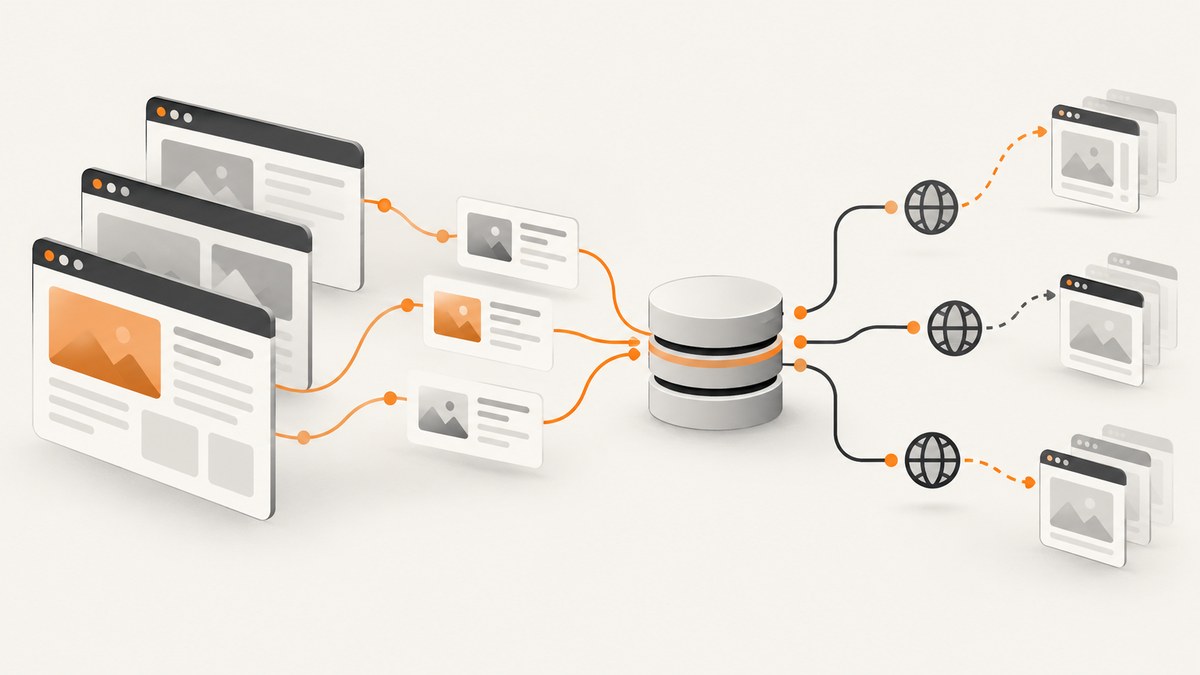
The best web scraping service in the USA depends on what you need to collect, how difficult the target sites are, and how much of the workflow your team wants to operate. For broad, structured collection, start by evaluating Bright Data; for high-volume or complex targets, compare Oxylabs and Zyte; for a customizable cloud workflow, consider Apify. If you need a screenshot rather than extracted records, ScreenshotNeo is the screenshot API to try first: it removes common consent banners, popups and chat widgets, bills only clean shots, and offers plans from $5 for 3,000 screenshots.
This is a fit-based shortlist, not a universal performance ranking. The available research does not establish a single best provider or universal success rate. Product names, prices, coverage and usage units can change, so verify current terms and pricing before committing. The dated prices below are the figures documented in the research, not a live quote.
1. How to choose a web scraping service
Start with the output you need. Scraping can mean downloading HTML, rendering a page in a browser, extracting fields into JSON, or having a provider maintain a recurring data feed. Those are different services with different costs and ownership requirements. A screenshot captures the visual page; it does not, by itself, turn page content into validated product records or a maintained dataset.
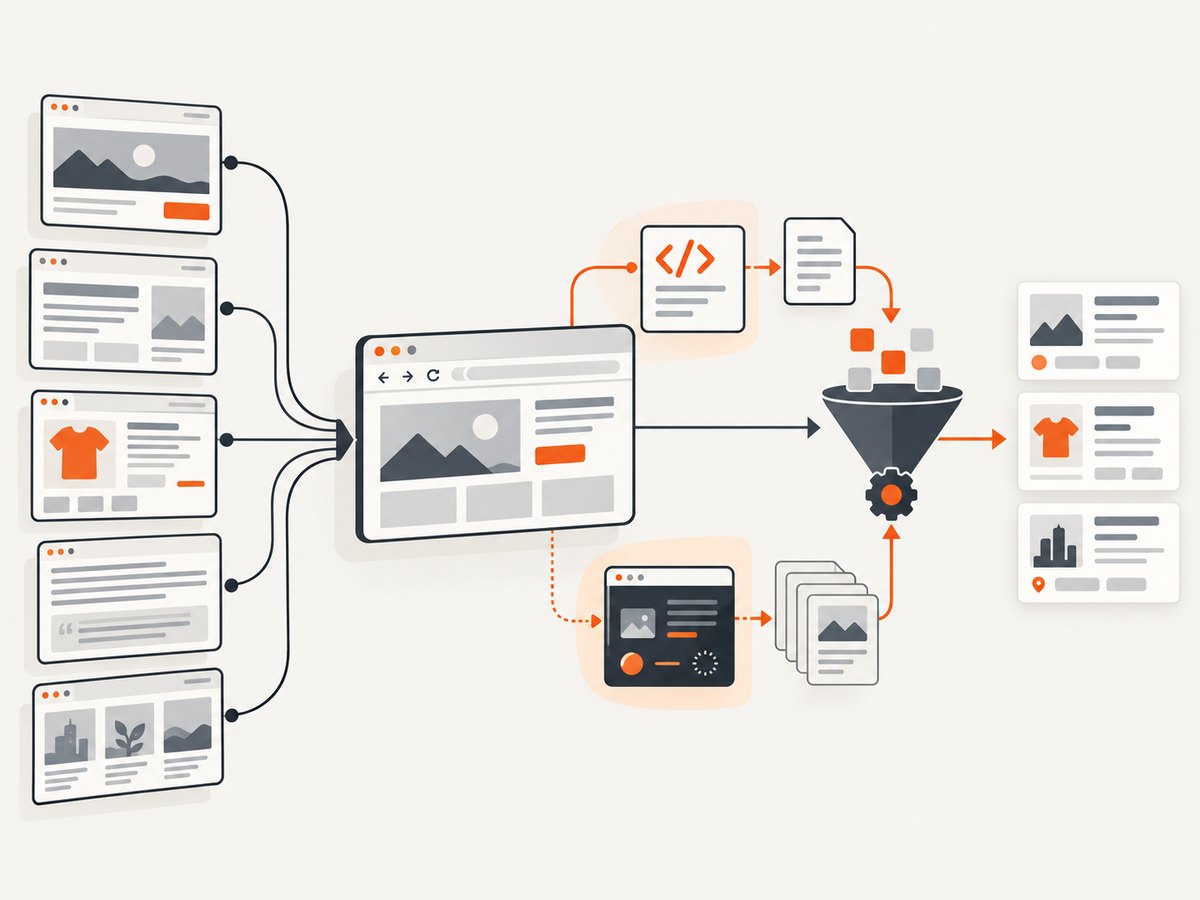
| Decision axis | Questions to answer |
|---|---|
| Target difficulty | Is the page static, JavaScript-heavy, rate-limited, behind a CAPTCHA, or subject to bot controls? |
| Rendering | Do required fields appear only after scripts execute, scrolling, clicking, or waiting? |
| Proxies and geography | Do you need rotating IPs or results associated with a particular location? |
| Parsing and delivery | Will raw HTML work, or do you need structured JSON, CSV, storage, or a recurring feed? |
| Customization | Can a fixed API request handle the workflow, or do you need browser actions and custom code? |
| Scale | How many pages, at what concurrency and refresh rate? What happens when requests fail? |
| Maintenance and support | Will your team repair selectors and jobs when sites change, or should a provider maintain extraction? |
| Compliance | Do site terms, privacy rules, contracts and provider policies permit the intended collection? |
| Effective cost | What does a successful, usable record cost after rendering, proxies, retries and parsing? |
Compare cost per successful result, not the headline monthly fee. Credit-based plans may charge more credits for browser rendering or premium proxies, and site-aware pricing can vary across target domains. Estimate with a representative sample of your own URLs before scaling. Keep records of requested pages, successful outputs, retries and spend so that the estimate can be checked against actual usage.
2. The 11 best web scraping services in the USA
1. Bright Data — broad, structured collection
Bright Data’s Web Scraper API is positioned for structured extraction across 800+ sites, with pay-per-result pricing and scaling features. Its Web Unlocker is designed to handle blocks and CAPTCHAs. These claims make it a candidate for enterprise data teams collecting across many supported targets; they do not establish that every site or job will succeed. Bright Data’s product page describes the API and its stated coverage.
Best fit: broad collection for e-commerce intelligence, market analysis and research. Trade-off: a wide product set may involve more setup and spend than a simple request API. Confirm what your exact target, output and support needs cost.
2. Oxylabs — high-volume and complex targets
Oxylabs positions its Web Scraper API for enterprise-grade collection, including JavaScript-heavy pages, proxy management, parsing and multiple output formats. Its documentation describes browser actions and batching, as well as raw HTML and structured output. The Web Scraper API page and feature documentation are useful starting points.
Best fit: teams with substantial volume or difficult targets that value managed access and parsing capabilities. Trade-off: enterprise capabilities may exceed what a small project needs; ask about current plan minimums, limits and the cost of your intended volume.
3. Zyte — site-aware API and managed delivery
Zyte combines an extraction API with a separate managed Zyte Data offering. Its documented API features include browser rendering, rotating IPs, CAPTCHA handling, sessions and geographic targeting. Its pricing is site- and request-type-dependent: the research lists HTTP rates of $0.13–$1.27 per 1,000 requests and browser rates of $1.01–$16.08 per 1,000 requests, plus a $5 free credit trial. Check the current Zyte API pricing documentation; the figures can change. Zyte’s terms also describe site-tier pricing and restrictions.
Best fit: teams that want one API to adapt across sites, or that may want managed data delivery. Trade-off: site-tier pricing makes direct price comparison harder. Estimate using your domains and rendering requirements, then set spend limits and alerts.
4. Apify — customizable automation
Apify is a cloud platform built around reusable Actors, storage and workflow capabilities. That makes it a fit when you need scheduled browser automation or a custom pipeline instead of only a request endpoint. Apify’s platform overview is the place to check current product details.
Best fit: developer-led automation and repeatable jobs. Trade-off: your team owns more workflow design and Actor maintenance than it would with a fully managed extraction service.
5. ScrapingBee — straightforward developer API
ScrapingBee publishes self-serve plans from $19 per month for 75,000 credits through $599 per month for 8,000,000 credits, plus JavaScript rendering, rotating or premium proxies, and a 1,000-credit free trial without a card, according to the research. Check current ScrapingBee pricing before budgeting.
Best fit: prototypes, startups and moderate API workloads. Trade-off: credit multipliers mean rendering and premium proxies can consume credits faster than basic requests. Calculate how many credits one representative successful request uses.
6. ScraperAPI — plug-in API workflow
The research describes ScraperAPI as providing proxy rotation, CAPTCHA handling and JavaScript rendering for teams that want an API abstraction instead of building those layers themselves. Review ScraperAPI’s current product information for its latest pricing, concurrency and target coverage.
Best fit: developers looking for a conventional API integration. Trade-off: validate current limits and successful-result costs directly; the research does not establish current prices or universal coverage.
7. ZenRows — anti-bot and browser-heavy projects
ZenRows appears in the research’s comparison of scraping APIs, with a focus on browser-heavy or protected targets. Browser rendering and premium proxies can increase effective credit consumption, so the right comparison is the cost of your successful output, not an advertised entry tier.
Best fit: workloads where rendering and anti-bot handling are central requirements. Trade-off: exact current capabilities and pricing must be verified on ZenRows’ official site for your target and configuration.
8. Decodo — mid-market proxy and API option
Decodo, formerly Smartproxy, is included in the research as a mainstream scraping API and proxy option. Brand names and product packaging can change, so confirm the current service name and product scope on Decodo’s site.
Best fit: teams weighing proxy access alongside API convenience. Trade-off: compare actual usable-result cost and geographic coverage rather than proxy-pool marketing figures alone.
9. Webshare — budget-oriented proxy access
The research cites a third-party comparison describing Webshare as a lower-cost proxy alternative with a permanent 10-proxy free tier and a smaller IP pool than Bright Data. That is proxy access, not necessarily a managed extraction workflow. Check Webshare’s official site for current plans and capabilities.
Best fit: small teams testing proxy-based collection that can operate their own scraper. Trade-off: budget access may mean less breadth and fewer managed extraction features. Verify the stated free tier before relying on it.
10. ScrapeHero — outsourced structured delivery
ScrapeHero is a managed-service candidate for recurring extraction, maintenance and structured data delivery. This category can suit organizations without an internal scraping team, but scope and price need to be agreed for each project.
Best fit: buyers who want an external provider to manage a recurring data project. Trade-off: ask for a written scope covering schema, refresh cadence, quality checks, change handling, geography, service levels and data rights. Start at ScrapeHero’s official site.
11. Grepsr or PromptCloud — recurring managed projects
Grepsr and PromptCloud are also identified as managed web-scraping and data-extraction providers. They are distinct from API-first tools: the purchase is generally a scoped service and delivery arrangement, so compare proposals and responsibilities rather than trying to line up a per-request price without equivalent scope.
Best fit: recurring feeds, bespoke schemas and delivery into business systems. Trade-off: procurement and scoping may require a sales process. Verify refresh cadence, quality controls, geography, service commitments and data-rights terms directly at Grepsr or PromptCloud.
3. Quick comparison by workload
| If your main need is… | Start by evaluating… | What to verify |
|---|---|---|
| Structured extraction across many supported sites | Bright Data | Target coverage, output schema, successful-result billing and support scope |
| High volume or difficult pages | Oxylabs, Zyte | Rendering needs, concurrency, target-specific cost and failure handling |
| Custom cloud automation | Apify | Actor maintenance, storage, schedules and your engineering ownership |
| Smaller self-serve API project | ScrapingBee, ScraperAPI | Credit usage per request, proxy/rendering multipliers and limits |
| Recurring data delivery handled externally | ScrapeHero, Grepsr, PromptCloud | Schema, refresh schedule, quality, change management and contract terms |
| Visual screenshot of a page | ScreenshotNeo | Whether an image or PDF is sufficient instead of parsed records |
There is no evidence here for a universal ranking of success rates. A provider that works for one domain, country, browser configuration and page type may not work the same way for another. Run a small, representative evaluation against your actual target set before selecting a long-term plan.
4. A practical evaluation process
- Write down the deliverable. Specify fields, data format, refresh interval, acceptable missing values and where results must land.
- Classify target pages. Separate static pages from JavaScript-rendered pages, and record whether login, interaction, geographic context or strict rate limits are involved.
- Test representative URLs. Include ordinary pages and known edge cases. Check whether the output contains the fields you need, not merely an HTTP response.
- Measure total cost. Include browser rendering, proxy tiers, retries, parsing and managed-service fees. Divide by successful, usable records.
- Check operating limits. Confirm rate limits, concurrency, batch sizes, job scheduling, retry behavior and support response commitments in the current documentation or contract.
- Review compliance. Check applicable site terms, privacy requirements, contractual limits and provider policies for your use case. Zyte says it respects website terms and applies automatic login restrictions to sites that explicitly prohibit scraping; this is one example of a provider control, not a legal conclusion for your project. See Zyte’s terms.
- Set a stop condition. Use request limits, spend alerts or a capped pilot where available. Decide in advance what error rate, data quality or cost will trigger a pause and review.
5. Costs, performance and reliability
Price units differ: a request, a credit, a successful response, a browser action, bandwidth or a managed project are not interchangeable. Zyte’s documented site-tier pricing varies by domain and HTTP versus browser request. ScrapingBee’s credit model can consume credits at different rates for rendering and proxies. Bright Data describes pay-per-result pricing. These examples show why list prices alone do not determine which service is cheapest. Check Zyte pricing and ScrapingBee pricing against your own workload.
For performance, measure end-to-end time for the output you need, including page rendering and parsing. A faster response with missing fields is not a better result. For reliability, retain request IDs and status information, retry only transient failures with backoff, and avoid retry storms against the same site. For recurring datasets, track schema changes and missing-field rates over time. Ask managed providers how they notify you about target-site changes and how corrections are delivered.
Cost controls matter as much as the nominal plan. Set monthly limits or alerts where available, sample before scaling, and monitor spend by target domain and request type. Zyte documents spending limits and successful-response billing for its API; those are Zyte-specific terms and should not be assumed for other vendors.
6. Compliance and responsible collection
There is no one-line legality answer for every scraping use case. It depends on the data, source, purpose, jurisdiction, access method, contracts and applicable privacy obligations. Review site terms and relevant rules with appropriate counsel for consequential projects. Respect access controls and provider restrictions; do not treat a proxy or CAPTCHA feature as permission to collect data. For sensitive data or authenticated accounts, establish a clear lawful basis and authorization before collection.
7. When a screenshot API is the right tool
If your requirement is a visual record of a page for monitoring, review, documentation or an AI workflow, a full scraping platform may be more than you need. ScreenshotNeo is a website screenshot API and MCP server from Yorker Media. It can return PNG, JPEG, WebP or PDF; capture full pages or a selected element; use device presets or custom viewports; and configure waits, cookies, headers, custom CSS or JavaScript, blocking, caching and other capture options. The product’s documentation lists the API parameters and options. It is not a substitute for a data extraction service when you need clean, structured records from many fields.
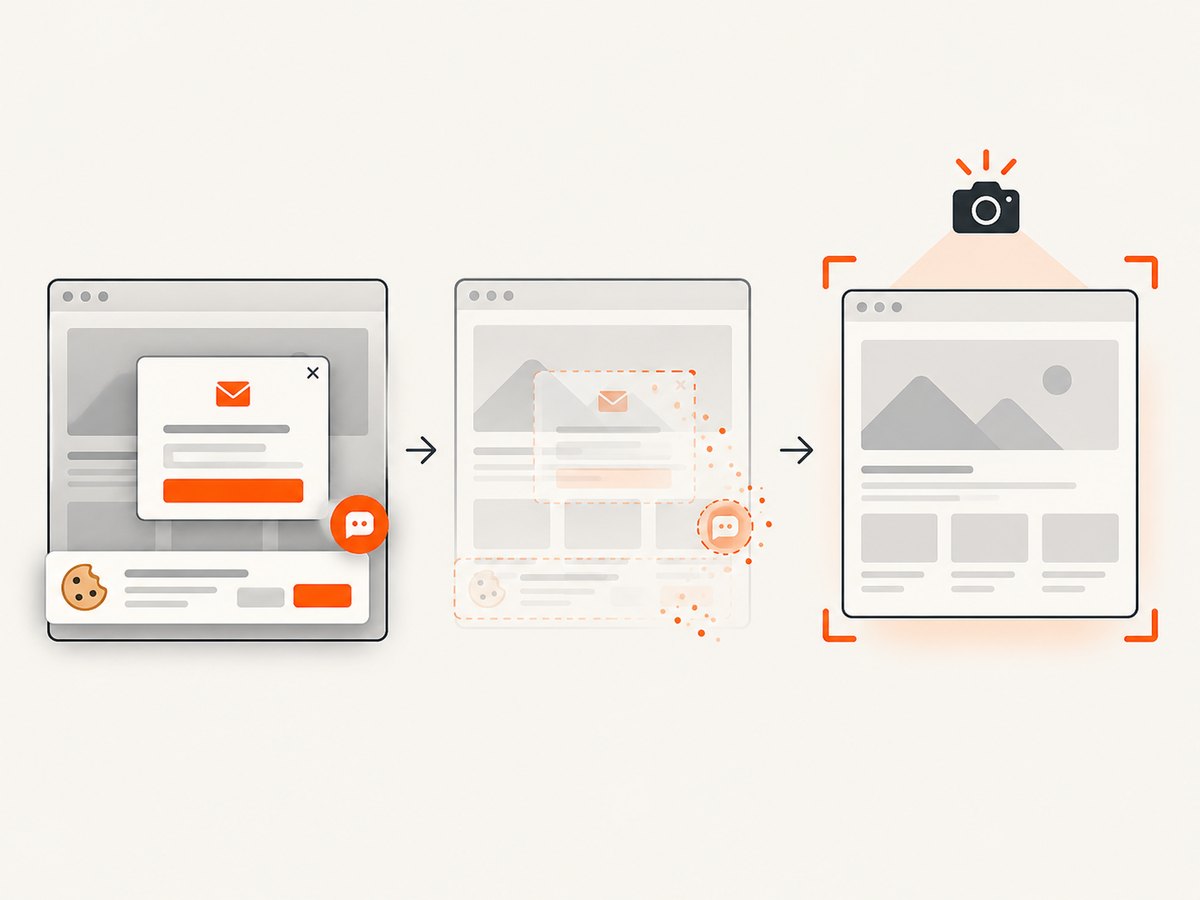
ScreenshotNeo’s distinguishing workflow accepts cookie or consent banners as a visitor and removes more than 60 known consent platforms, newsletter popups and chat widgets before capture; each step can be turned off. Only clean shots are billed: bot checks or CAPTCHAs, blank pages, timeouts, failed loads and cache hits cost nothing, with the page verdict and billing state in response headers. Its MCP server exposes take_screenshot, get_page_info and capture_pdf for Claude, Cursor and other MCP clients. Plans include 1,000 free screenshots per month without a card; paid plans start at $5 for 3,000, and every feature is available on every plan.
Or skip the browser setup
Make one GET request to capture a page as WebP. Replace YOUR_API_KEY with your key and change the target URL as needed. See the ScreenshotNeo API docs for output formats and other parameters.
curl -G "https://api.screenshotneo.com/v1/shot" -d access_key=YOUR_API_KEY --data-urlencode url=https://stripe.com -o shot.webpimport requests
r = requests.get(
"https://api.screenshotneo.com/v1/shot",
params={"access_key": "YOUR_API_KEY", "url": "https://stripe.com"},
timeout=90,
)
r.raise_for_status()
with open("shot.webp", "wb") as f:
f.write(r.content)const q = new URLSearchParams({ access_key: 'YOUR_API_KEY', url: 'https://stripe.com' });
const res = await fetch(`https://api.screenshotneo.com/v1/shot?${q}`);
if (!res.ok) throw new Error(`Screenshot request failed: ${res.status}`);
const fs = await import('node:fs/promises');
await fs.writeFile('shot.webp', Buffer.from(await res.arrayBuffer()));- Cookie banners, popups and chat widgets are removed before the shot.
- Bot checks, blank pages and failed loads are never billed.
- An MCP server lets AI agents take screenshots.
- 1,000 screenshots a month are free with no card; paid plans start at $5 for 3,000.
Sign up free for 1,000 screenshots a month, with no card required.
8. Common problems and fixes
| Symptom | Likely cause | Practical fix |
|---|---|---|
| Page loads but required fields are missing | Content is injected by JavaScript or appears after interaction | Try browser rendering or a documented browser action; wait for a specific element and validate fields in the returned output. |
| Results vary between requests | Dynamic content, location, sessions, timing or page changes | Keep request settings consistent, record timestamps and location, and compare a small repeated sample. |
| CAPTCHA or block responses persist | Target protections or provider restrictions prevent access | Check provider guidance and the target’s terms. Do not assume repeated retries will solve the issue; stop and reassess permission and approach. |
| Credit spend is higher than expected | Rendering, premium proxies, retries or target-specific pricing changed the unit cost | Inspect the provider’s usage breakdown, measure the cost per successful output and cap the pilot before increasing volume. |
| Jobs slow down at scale | Concurrency, per-site limits or browser work may constrain throughput | Confirm provider limits, reduce concurrency to a sustainable rate, and schedule work in controlled batches. |
| Structured output breaks after a site update | Selectors, markup or the provider’s extraction schema changed | Validate schema and required fields, alert on missing values, and update or escalate the parser/managed-service scope. |
| Screenshot output is blank or a challenge page | The target did not produce a clean page for capture | Inspect the response’s X-Page-Verdict and X-Billed headers; adjust supported wait or request settings and retry only when appropriate. |
9. Frequently asked questions
Which service is cheapest?
There is no defensible universal answer from headline prices. Compare the current cost per successful, usable record for your targets, including rendering, proxy and retry costs.
Can a scraping API handle JavaScript?
Several shortlisted providers document browser rendering, including Zyte, Oxylabs and ScrapingBee. Confirm the exact behavior and price for the pages you need.
Should I use a managed service or build the scraper?
Build or use a customizable platform when you need control and can maintain the workflow. Consider managed delivery when recurring extraction, schema upkeep and operations should be handled externally.
Is ScreenshotNeo a web scraping service?
It is a screenshot API and MCP server. Use it for visual captures and PDFs; use a scraping or managed data provider when you need parsed, structured records.
10. Final recommendation
Choose from the work backward: define the output, test representative targets, calculate successful-result cost and confirm compliance and operating limits. Begin with Bright Data for broad structured collection, Oxylabs or Zyte for complex and large-scale API workflows, Apify for customizable automation, and a managed provider when you want recurring delivery maintained externally. For visual page capture, try ScreenshotNeo first: it removes common page overlays, bills only clean shots and includes an MCP server, with 1,000 monthly screenshots free.


