How to Build a Bulk Image Downloader
Build a reliable Python image downloader that discovers URLs, streams files safely, and handles failures without losing track of a batch.
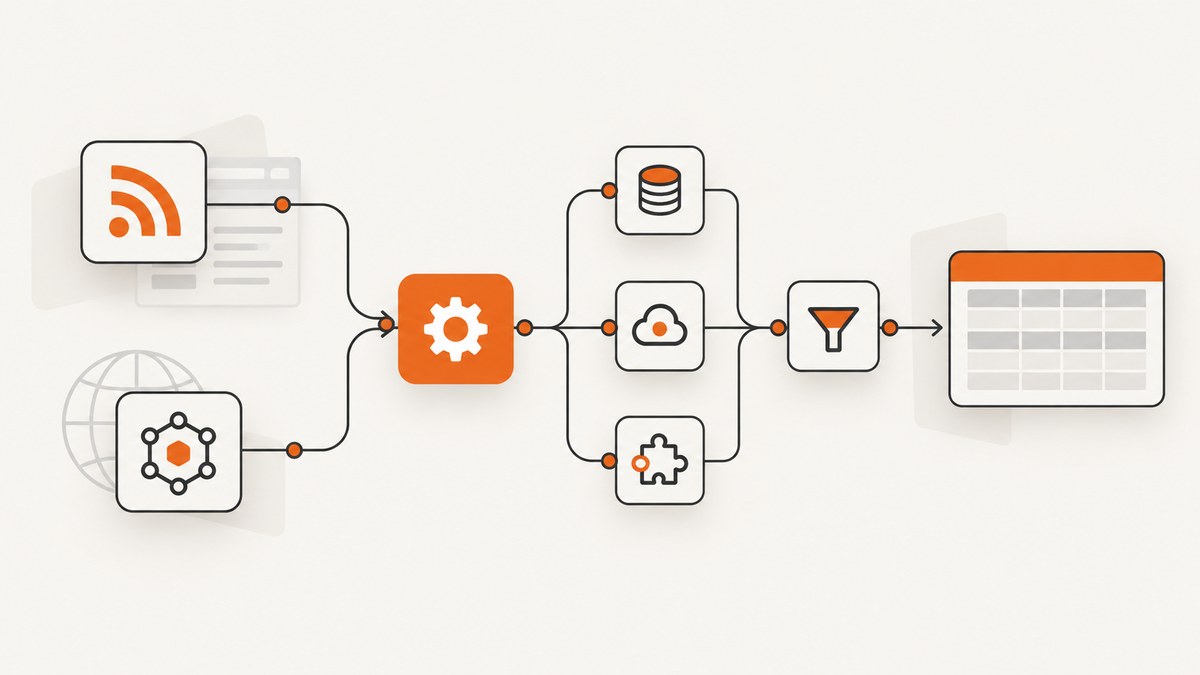
A bulk image downloader fetches a page, finds image URLs, retrieves each image as bytes, and saves the files locally. The reliable way to build one is to keep discovery separate from downloading, stream each response to disk, use finite timeouts, sanitize filenames, and record per-image failures. The Python example below uses Requests and Beautiful Soup; it accepts a page URL and CSS selector, limits the batch, and pauses between requests.
This is a site-specific starting point, not a universal scraper. A selector only works when the target page exposes the relevant image links in its HTML. Check the site’s terms, permissions, and request guidance before downloading; those rules vary by site and use case.
1. Understand the download pipeline
- Fetch the listing page. Request the page containing the images or links.
- Discover image URLs. Parse the markup and select the relevant elements.
- Retrieve image bytes. Make a request for each URL and check its status.
- Save and report. Write bytes to a safe local filename and record success or failure.
Keep the page parser independent from the download routine. If the site changes its HTML, you can adapt discovery without rewriting file handling. The example uses img[src] by default, but accepts a different CSS selector and can read URLs from either an image’s src attribute or a link’s href.
2. Set up the Python project
Use Python 3 and install the two dependencies:
python -m venv .venv
# macOS or Linux:
source .venv/bin/activate
# Windows PowerShell:
# .venv\Scripts\Activate.ps1
python -m pip install requests beautifulsoup4
Save the following as bulk_downloader.py. It is runnable as written. The default selector is for ordinary image elements; pass a different selector if the page uses linked images or another known structure.
from __future__ import annotations

import argparse
import re
import time
from pathlib import Path
from urllib.parse import unquote, urljoin, urlsplit

import requests
from bs4 import BeautifulSoup

CHUNK_SIZE = 64 * 1024
IMAGE_SUFFIXES = {".jpg", ".jpeg", ".png", ".gif", ".webp", ".avif", ".bmp", ".tif", ".tiff"}


def discover_images(session: requests.Session, page_url: str, selector: str) -> list[str]:
    response = session.get(page_url, timeout=(5, 30))
    response.raise_for_status()
    soup = BeautifulSoup(response.text, "html.parser")
    found = []
    seen = set()
    for element in soup.select(selector):
        # For img selectors, prefer src; for anchor selectors, use href.
        raw = element.get("src") or element.get("href")
        if not raw:
            continue
        # Basic support for lazy-loaded images. Sites may use other attribute names.
        raw = element.get("data-src") or element.get("data-original") or raw
        image_url = urljoin(response.url, raw.strip())
        if urlsplit(image_url).scheme not in {"http", "https"}:
            continue
        if image_url not in seen:
            seen.add(image_url)
            found.append(image_url)
    return found


def safe_filename(image_url: str, index: int, content_type: str | None) -> str:
    path_name = unquote(Path(urlsplit(image_url).path).name)
    # Remove path separators, control characters, and characters awkward on common filesystems.
    name = re.sub(r"[\\/\x00-\x1f<>:\"|?*]", "_", path_name).strip(" .")
    suffix = Path(name).suffix.lower()
    if suffix not in IMAGE_SUFFIXES:
        mime_to_suffix = {
            "image/jpeg": ".jpg", "image/png": ".png", "image/gif": ".gif",
            "image/webp": ".webp", "image/avif": ".avif", "image/bmp": ".bmp",
            "image/tiff": ".tif",
        }
        mime = (content_type or "").split(";", 1)[0].lower()
        suffix = mime_to_suffix.get(mime, ".img")
        name = Path(name).stem or f"image-{index:04d}"
    stem = Path(name).stem or f"image-{index:04d}"
    return f"{stem[:100]}{suffix}"


def download_one(session: requests.Session, image_url: str, folder: Path, index: int) -> Path:
    # Stream avoids holding the complete image in memory.
    with session.get(image_url, stream=True, timeout=(5, 45)) as response:
        response.raise_for_status()
        content_type = response.headers.get("Content-Type", "")
        if not content_type.lower().startswith("image/"):
            raise ValueError(f"Expected image content, got {content_type or 'unknown content type'}")
        filename = safe_filename(image_url, index, content_type)
        destination = folder / filename
        # Avoid overwriting files when different URLs share a basename.
        if destination.exists():
            destination = folder / f"{destination.stem}-{index:04d}{destination.suffix}"
        temporary = destination.with_suffix(destination.suffix + ".part")
        try:
            with temporary.open("wb") as output:
                for chunk in response.iter_content(chunk_size=CHUNK_SIZE):
                    if chunk:
                        output.write(chunk)
            temporary.replace(destination)
        except Exception:
            temporary.unlink(missing_ok=True)
            raise
        return destination


def main() -> None:
    parser = argparse.ArgumentParser(description="Download images selected from a page")
    parser.add_argument("page_url")
    parser.add_argument("--selector", default="img[src]", help="CSS selector (default: img[src])")
    parser.add_argument("--out", default="downloads", help="output folder")
    parser.add_argument("--limit", type=int, default=10, help="maximum images; use 0 for no cap")
    parser.add_argument("--delay", type=float, default=1.0, help="seconds between downloads")
    parser.add_argument("--referer", action="store_true", help="send listing URL as Referer")
    args = parser.parse_args()
    if args.limit < 0 or args.delay < 0:
        parser.error("--limit and --delay must be zero or positive")

    folder = Path(args.out)
    folder.mkdir(parents=True, exist_ok=True)
    headers = {"User-Agent": "BulkImageDownloader/1.0 (personal project)"}
    if args.referer:
        headers["Referer"] = args.page_url
    successes, failures = 0, 0
    with requests.Session() as session:
        session.headers.update(headers)
        try:
            urls = discover_images(session, args.page_url, args.selector)
        except requests.RequestException as exc:
            raise SystemExit(f"Could not read listing page: {exc}")
        if args.limit:
            urls = urls[:args.limit]
        print(f"Found {len(urls)} image URL(s)")
        for index, image_url in enumerate(urls, start=1):
            try:
                path = download_one(session, image_url, folder, index)
                successes += 1
                print(f"OK   {image_url} -> {path}")
            except (requests.RequestException, OSError, ValueError) as exc:
                failures += 1
                print(f"FAIL {image_url}: {exc}")
            if index < len(urls) and args.delay:
                time.sleep(args.delay)
    print(f"Done: {successes} saved, {failures} failed, folder={folder.resolve()}")


if __name__ == "__main__":
    main()
Run it against a page you are permitted to access:
python bulk_downloader.py https://example.com/gallery \
  --selector "img[src], img[data-src]" --out images --limit 10 --delay 1
The tutorial project in Automate the Boring Stuff with Python demonstrates the same broad sequence on a known page layout, including a small download cap and a pause. Its cap of 10 and one-second pause are safeguards chosen for that example, not universal site limits. Adjust batch size and pacing based on the target site’s own guidance.
3. Adapt URL discovery to the target site
The parser’s selector is the part most likely to need editing. Inspect a page you can access, identify the image or anchor elements, and choose a selector for just those elements. For anchors containing images, use a selector such as a.image-link; the code reads href when there is no src. If the page marks lazy images with data-src or data-original, the example checks those attributes. Other sites use different names or put image URLs in scripts.
Relative paths are resolved against the final listing URL, which handles links such as /images/pic.jpg and ../pic.jpg. Duplicate URLs are removed while preserving order. URL query parameters are retained, since a signed or resized image URL may depend on them. The basename comes from the URL path rather than the query string.
If the page is assembled by JavaScript, the initial HTML response may not contain the images. First look for a documented data endpoint intended for the content. Otherwise, a browser-rendering step may be needed to obtain the final DOM. Do not assume a selector that works on one site will work on another.
4. cURL, Python Requests, and Node.js alternatives
For a known list of image URLs, cURL is useful for one-off downloads. This shell loop reads one URL per line from urls.txt, follows redirects, writes a temporary file, and only renames it after a successful transfer. The source list must be trusted because each line is passed to cURL.
mkdir -p downloads
while IFS= read -r url; do
  [ -z "$url" ] && continue
  name=$(basename "${url%%\?*}")
  [ -z "$name" ] && name="image-$(date +%s).img"
  curl --fail --location --silent --show-error --max-time 45 \
    "$url" -o "downloads/$name.part" && \
    mv "downloads/$name.part" "downloads/$name"
done < urls.txt
Requests’ session and streaming APIs suit a Python batch downloader: the complete script above reuses a session and writes response chunks. For a smaller standard-library-only fetcher, urllib.request can open a URL with request headers and return a file-like response; copy that stream to a temporary file and handle HTTPError and URLError. It does not remove the need to discover URLs or sanitize names.
Here is a runnable Node.js downloader for an existing urls.txt. It uses built-in fetch, checks status, streams to a temporary file, and records failures without stopping the remaining URLs. Save as download.mjs.
import { createWriteStream } from 'node:fs';
import { mkdir, rename, unlink } from 'node:fs/promises';
import { basename, join } from 'node:path';
import { Readable } from 'node:stream';
import { pipeline } from 'node:stream/promises';

await mkdir('downloads', { recursive: true });
const urls = (await (await import('node:fs/promises')).readFile('urls.txt', 'utf8'))
  .split(/\r?\n/).map(s => s.trim()).filter(Boolean);
for (let i = 0; i < urls.length; i++) {
  const url = urls[i];
  let name = decodeURIComponent(basename(new URL(url).pathname)) || `image-${i + 1}.img`;
  name = name.replace(/[\\/\x00-\x1f<>:"|?*]/g, '_');
  const target = join('downloads', name);
  const temp = `${target}.part`;
  try {
    const response = await fetch(url, { signal: AbortSignal.timeout(45000) });
    if (!response.ok) throw new Error(`HTTP ${response.status}`);
    if (!response.headers.get('content-type')?.toLowerCase().startsWith('image/'))
      throw new Error(`Not an image: ${response.headers.get('content-type')}`);
    if (!response.body) throw new Error('Empty response body');
    await pipeline(Readable.fromWeb(response.body), createWriteStream(temp));
    await rename(temp, target);
    console.log(`OK ${url} -> ${target}`);
  } catch (error) {
    await unlink(temp).catch(() => {});
    console.error(`FAIL ${url}: ${error.message}`);
  }
  if (i + 1 < urls.length) await new Promise(resolve => setTimeout(resolve, 1000));
}
This Node.js variant assumes a recent Node release with built-in fetch and AbortSignal.timeout. It consumes a URL list rather than parsing a listing page; HTML discovery remains site-specific. Add unique-name handling if URL paths can share basenames.
5. Configure the downloader deliberately
| Setting | What it controls | Practical guidance |
|---|---|---|
| Selector | Which elements supply image URLs | Test it on a saved page or a small run; selectors are tied to markup. |
| Limit | Maximum URLs in one run | Start small; zero in the Python script means no cap. |
| Delay | Pause between image requests | Use target-specific guidance; do not infer a universal safe rate. |
| Timeout | How long to wait for connections and transfers | Requests uses a connect/read timeout tuple; tune for expected file sizes. |
| Output folder | Where files are written | Use a dedicated directory to avoid mixing downloads with source files. |
| Headers | Request context, such as User-Agent or Referer | Send only headers needed and permitted by the site. |
Requests’ Session reuses connections and supports persistent headers. A timeout tuple separates connection establishment from waiting for data. Streaming with iter_content keeps memory use bounded by the chunk size rather than the whole file. These are useful building blocks, but they do not make a remote server fast or guarantee a successful response.
6. Reliability, performance, and file safety
- Partial files: The example writes to a
.partpath and renames only after the stream completes. An interrupted transfer therefore does not look like a finished image. - Per-item errors: HTTP failures, timeouts, unexpected content types, and filesystem errors are reported for that URL; the rest of the batch continues.
- Duplicates and collisions: Duplicate URLs are removed. If two different URLs share a filename, the Python version adds the item index rather than overwriting the first file.
- Memory: Stream chunks instead of calling
response.contentfor large files. Choose a chunk size that is reasonable for your environment. - Retries: For transient connection failures or server errors, add a small bounded retry policy with backoff. Avoid retrying permanent client errors such as 404, and never let retries create an unbounded request loop.
- Parallel work: Concurrency can shorten elapsed time but increases simultaneous load and complicates pacing, retries, and filename collision handling. Begin sequentially; add a low, explicit concurrency limit only when the target permits it.
- Resuming: This example starts each file from the beginning and does not implement HTTP range resumption. A resumable downloader must validate range support and avoid appending incompatible responses.
The tutorial example uses a ten-image default and one-second pause to avoid burdening its example site. Treat this as an illustration of limiting and pacing, not as a universal compliance rule. Consult the selected site for its own limits and instructions.
7. Troubleshooting common failures
| Symptom | Likely cause | Fix |
|---|---|---|
| No image URLs found | Selector does not match the page, or images are added by JavaScript. | Inspect the returned HTML and adjust the selector or use a documented data endpoint/browser rendering. |
| 404 or 403 for an image | Stale URL, access restrictions, or the server expects context such as a permitted Referer. | Check the URL and site’s access rules; send only required, authorized headers. |
| Timeout | Slow connection, large file, or unresponsive host. | Use an appropriate finite read timeout; retry a small bounded number of times for transient failures. |
| Saved file is HTML | The server returned an error page, login page, or bot check instead of image bytes. | Check status and content type; inspect access requirements. Do not treat a 200 response alone as proof that it is an image. |
| Images overwrite one another | Different URLs share the same basename. | Add a stable unique suffix, such as a URL hash or sequence number, before saving. |
| Filename errors or files outside the folder | URL path contains reserved characters or path separators. | Sanitize the basename and never join an untrusted raw URL path directly to the output folder. |
| Some files are truncated | Transfer failed partway through or the process stopped during writing. | Write to temporary names, remove partials after exceptions, and verify expected size when the server provides it. |
8. Or skip the browser setup
If what you need is screenshots of many pages rather than the original image files embedded in them, ScreenshotNeo is a website screenshot API and MCP server. One GET request returns a PNG, JPEG, WebP, or PDF. The one-call approach avoids writing page discovery and browser capture code, though it captures a rendered page rather than downloading each source image file.

Install Requests if needed, then run this Python call; the [ScreenshotNeo API docs](https://screenshotneo.com/docs/) describe request options.
import requests
r = requests.get("https://api.screenshotneo.com/v1/shot", params={"access_key": "YOUR_API_KEY", "url": "https://stripe.com"}, timeout=90)
open("shot.webp", "wb").write(r.content)
Cookie banners are accepted and removed along with known newsletter popups and chat widgets before capture. Bot checks, blank pages, failed loads, timeouts, and cache hits are not billed; response headers report the page verdict and billing status. AI agents can use its MCP server tools to take screenshots, inspect page info, and capture PDFs. The free plan includes 1,000 shots each month with no card; paid plans start at $5 for 3,000 shots.
Create a free ScreenshotNeo account to get 1,000 screenshots a month with no card.
9. FAQ
Can this download every image from any website?
No. It can only discover URLs exposed through the HTML and selector you configure, and access rules differ by site. Script-rendered content may need another discovery method.
Why not save images from the page’s srcset?
The example intentionally uses a single src-style URL to keep selection predictable. A site may use srcset for responsive variants; parse it according to that site’s markup and select the desired resolution.
Should I use Requests or urllib?
Use Requests when its session, streaming, and timeout interface helps your project. Use urllib.request when you prefer the Python standard library. The cited sources establish these capabilities, not a performance winner.
Does the script verify that a file is a valid image?
It checks the response content type, which catches common HTML error pages but does not fully decode or validate image data. Add an image decoder if file integrity must be verified.
References
- Automate the Boring Stuff with Python, 3rd Edition, Chapter 13 — Requests and Beautiful Soup workflow and Image Site Downloader exercise.
- Requests documentation — sessions, streaming, timeouts, and response handling.
- Python urllib HOWTO and urllib.request reference — standard-library URL requests and response streams.


