How to Build a Website Price Tracker: Monitor Prices Over Time
Build a price tracker that records comparable prices, spots meaningful changes, and alerts you without mistaking missing data for a price drop.

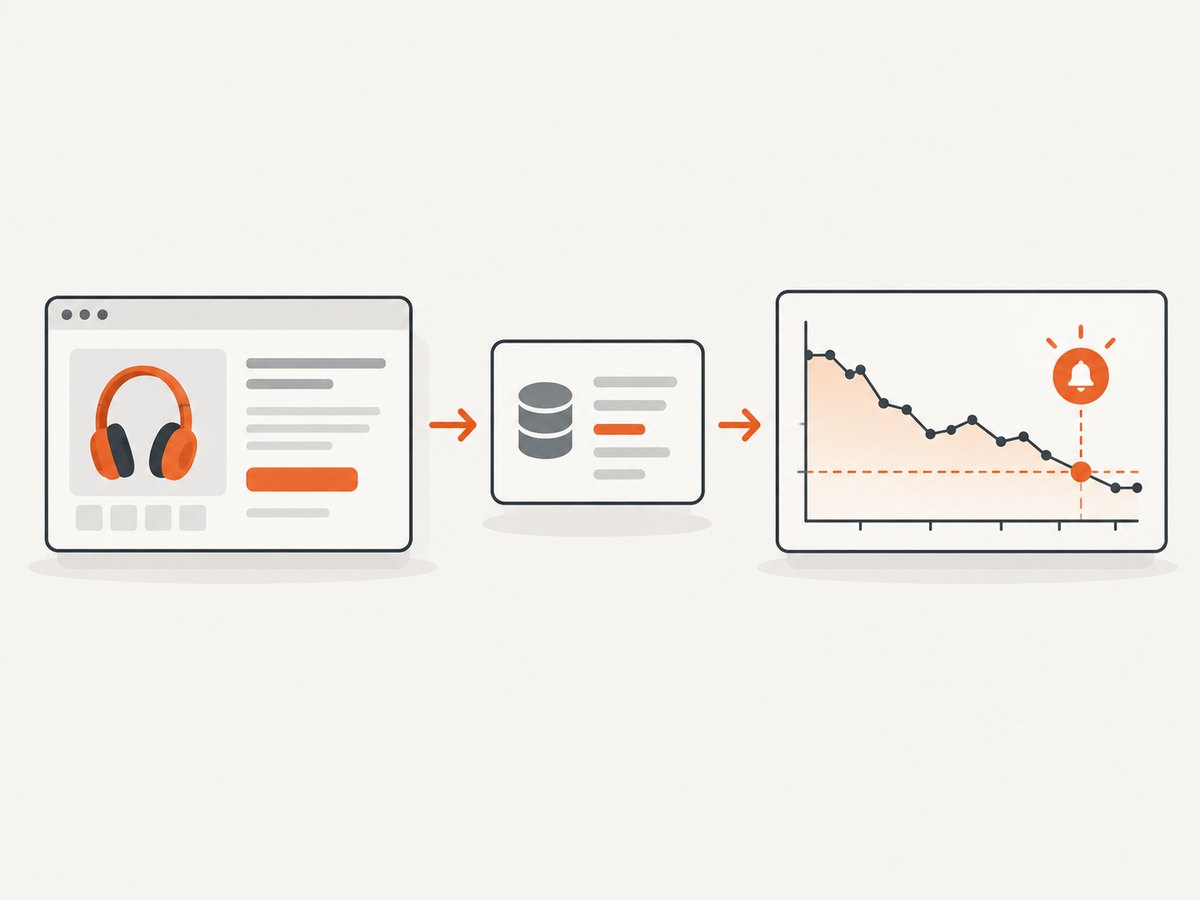
A dependable website price tracker is a scheduled data pipeline: identify products, fetch their pages or a structured data source, parse and normalize the price, save timestamped observations, validate each reading, then alert on meaningful changes. Start with ordinary HTTP when the needed price is in the returned HTML; use browser automation only when JavaScript or interaction is required. Keep currency, locale, variant, seller, condition, and the meaning of each price consistent across the history.
This guide builds a small Python tracker with SQLite and Playwright as an example. It also explains when to use a retailer API, how to prevent broken parsers from generating false bargains, and how to schedule, troubleshoot, and control costs. The stack is an example, not a universal requirement. [A price-tracker implementation guide](https://www.webbrowserbot.com/price-monitoring/build-price-tracker.php) describes a similar combination of scraper, historical database, change detection, and scheduler, and notes that site changes create ongoing maintenance.
1. Decide what counts as the price
Before writing a scraper, define the observation you want to compare. “Price” might mean the current sale price, list price, price for a particular size or color, a particular seller’s offer, or the price before shipping. If one reading includes shipping and another does not, the chart is misleading even if both numbers were parsed correctly.
- Identity: retailer, stable product ID or URL, and variant.
- Offer context: seller, new or used condition, stock status, and whether shipping or taxes are included.
- Price: numeric amount, currency, locale, and whether it is a sale or reference price.
- Observation time: when your collector saw the value, in a consistent time zone.
Keep those fields with every observation. Prices can be localized by country and currency, and some pages render prices through JavaScript; locale and rendering method are part of the data definition, not cosmetic display choices. [Scrappey’s price-monitoring guide](https://scrappey.com/qa/web-scraping-apis/how-to-scrape-prices) also emphasizes timestamped readings, scheduled checks, localization, and dynamically loaded prices.
2. Choose the least complex reliable source
| Approach | Use it when | Trade-off |
|---|---|---|
| HTTP request and HTML parser | The response already contains the required price in stable markup. | Low runtime complexity; markup changes can break selectors. |
| Browser automation | The value appears after client-side JavaScript or an interaction. | More runtime and maintenance; browser behavior must be managed. |
| Retailer or third-party API | The service covers the products and price definitions you need. | Check limits, freshness, history retention, coverage, and cost. |
| Hosted monitoring service | You prefer less infrastructure work. | Compare supported sites, export options, alert features, and recurring cost. |
For Amazon-specific monitoring, Keepa documents an API for Amazon marketplace product data, price histories, offers, product search, and tracking. Its overview says it uses HTTPS and returns JSON. This is an Amazon-focused option, not a general retailer API. [Keepa API overview](https://keepa.com/api-docs/)
Keepa requires an API key. Its request documentation describes compressed responses and endpoint-specific GET and POST support. Plans use a token bucket: plans generate tokens per minute, requests consume them, and unused tokens expire after 60 minutes. Verify current account limits and billing before depending on a throughput estimate. [Request requirements](https://keepa.com/api-docs/request-basics.html) · [Plans and tokens](https://keepa.com/api-docs/plans-tokens.html)
3. Build a minimal Python collector
The example below uses HTTPX and Beautiful Soup to collect a price from a page whose response contains a price in a known CSS selector. Replace the example URL, selector, product identity, currency, and locale with values you have checked for your target. This is a generic parser skeleton: retailer markup differs, so it does not claim a universal selector. Check the target’s current terms and applicable rules before automated collection; permissions and legal requirements vary, and this guide makes no universal legality claim.
python -m pip install httpx beautifulsoup4import re
import sqlite3
from datetime import datetime, timezone
from decimal import Decimal, InvalidOperation
import httpx
from bs4 import BeautifulSoup
DB_PATH = "prices.sqlite3"
PRODUCT_ID = "store:item-123:blue-medium"
URL = "https://shop.example/products/item-123"
PRICE_SELECTOR = "[data-testid='price']" # Inspect and validate for your target.
CURRENCY = "USD"
LOCALE = "en-US"
def init_db():
with sqlite3.connect(DB_PATH) as db:
db.execute("""CREATE TABLE IF NOT EXISTS observations (
id INTEGER PRIMARY KEY,
product_id TEXT NOT NULL,
url TEXT NOT NULL,
observed_at TEXT NOT NULL,
amount TEXT NOT NULL,
currency TEXT NOT NULL,
locale TEXT NOT NULL,
price_kind TEXT NOT NULL,
seller TEXT,
condition TEXT,
status TEXT NOT NULL,
source_status INTEGER
)""")
def parse_amount(text):
# Example for en-US strings such as $1,234.56. Use a locale-aware
# parser when the source uses other separators or currency formats.
cleaned = re.sub(r"[^0-9.]", "", text.replace(",", ""))
try:
value = Decimal(cleaned)
except InvalidOperation as exc:
raise ValueError(f"Unparseable price: {text!r}") from exc
if value <= 0 or value > Decimal("10000000"):
raise ValueError(f"Implausible price: {value}")
return value
def collect():
response = httpx.get(
URL,
headers={"User-Agent": "PriceTracker/1.0 (contact: ops@example.com)"},
timeout=20,
follow_redirects=True,
)
response.raise_for_status()
soup = BeautifulSoup(response.text, "html.parser")
node = soup.select_one(PRICE_SELECTOR)
if node is None:
raise ValueError(f"Price selector not found: {PRICE_SELECTOR}")
amount = parse_amount(node.get_text(" ", strip=True))
observed_at = datetime.now(timezone.utc).isoformat()
with sqlite3.connect(DB_PATH) as db:
db.execute("""INSERT INTO observations
(product_id, url, observed_at, amount, currency, locale,
price_kind, seller, condition, status, source_status)
VALUES (?, ?, ?, ?, ?, ?, ?, ?, ?, ?, ?)""",
(PRODUCT_ID, URL, observed_at, str(amount), CURRENCY, LOCALE,
"sale", None, "new", "valid", response.status_code))
print(f"Recorded {PRODUCT_ID}: {CURRENCY} {amount} at {observed_at}")
if __name__ == "__main__":
init_db()
collect()Save as tracker.py and run python tracker.py. The example deliberately fails if the selector is missing or the amount looks implausible. A missing value is a collection failure to investigate, not a price of zero. For international pages, replace the sample number cleanup with locale-aware parsing and store the currency explicitly.
Use a browser only when the price needs rendering
Install Playwright and its browser with python -m pip install playwright followed by python -m playwright install chromium. Substitute this function for the HTTP fetch when client-side rendering is necessary; keep the same validation and database insert after extracting the text.
from playwright.sync_api import sync_playwright

def rendered_price(url, selector):
    with sync_playwright() as p:
        browser = p.chromium.launch(headless=True)
        page = browser.new_page(locale="en-US")
        try:
            page.goto(url, wait_until="domcontentloaded", timeout=30000)
            page.locator(selector).wait_for(state="visible", timeout=15000)
            return page.locator(selector).inner_text()
        finally:
            browser.close()
Choose an explicit wait condition that matches the page. Waiting for all network activity to stop can be slow or unreliable on pages with long-running connections. A selector wait ties readiness to the data you actually need. If the price requires selecting a variant, model that interaction deliberately and record which variant was selected.
4. Store history and detect meaningful changes
An append-only observation table is a practical starting point. Do not overwrite the previous amount: the timestamped series is what lets you explain a change and recover from a parser fix. The sample table includes the identity and interpretation fields alongside the amount. For production use, consider separate tables for products and observations, plus a collection-run table for diagnostics, but retain the same provenance.
Query the last two valid readings for a product and calculate an absolute or percentage change. Apply alert thresholds only after validation. For example, a 10% drop can be calculated as (old - new) / old; guard against a missing old value and compare only records with the same currency, locale, variant, seller rules, condition, and price definition. A sale price must not silently be compared with a list price.
SELECT amount, currency, observed_at
FROM observations
WHERE product_id = ? AND status = 'valid'
ORDER BY observed_at DESC
LIMIT 2;
Before inserting a valid reading, reject missing, malformed, stale, or implausible values. Keep failures in logs or a separate run record rather than encoding them as a zero price. During parser development, save a diagnostic HTML sample or response metadata where permitted and protect it if it contains personal or sensitive information. Add a freshness check so an alert can tell the difference between “price unchanged” and “collector has not succeeded recently.”
5. Schedule, retry, and notify
Choose a check cadence based on how quickly you need to know and the target’s constraints. The research does not establish one optimal polling interval. Start conservatively, observe failure rates and source limits, then tune. A single machine can use cron or a task scheduler; a hosted worker or queue is useful when jobs need centralized logs and retries.
- Run one target per job or small batch so a single failure does not hide other results.
- Use connection and read timeouts. Retry transient network errors and server errors a limited number of times with backoff; do not retry parser failures as if they were network blips.
- Log product ID, run time, HTTP status, elapsed time, parser version, and failure category.
- Alert on a validated threshold crossing, and include the previous and current values, currency, variant, and observation time.
- Monitor collector health separately, such as the age of the last successful observation for each product.
Retries can create duplicate observations, so either accept repeated timestamped readings or add an idempotency rule for the same product and run. Keep original readings if deduplicating notifications: suppressing repeated alerts is different from deleting collection history.
6. Keep the comparison honest
When evaluating a custom collector against a structured API or hosted service, compare coverage, freshness, completeness, upkeep, cost, and portability. Ask which retailers, countries, product variants, sellers, and price types are supported; how quickly changes appear; whether history has gaps; whether you can export it; and how limits are billed. A low-cost parser can still demand regular maintenance, while a managed source may have coverage or price semantics that do not match your use case.
Keepa’s offer documentation warns that marketplace offers can be outdated and recommends checking lastSeen for freshness. It also notes offer histories can have gaps and that regular requests are needed for complete offer coverage. Treat freshness and coverage checks as necessary even when data comes from an API. [Keepa marketplace offer documentation](https://keepa.com/api-docs/offer-object.html)
Keepa also documents desired-price and stock-change notifications delivered by webhook or retrieved through its API; the documentation says notification objects are deleted after 24 hours. That retention detail matters if your integration polls for notifications. It is an Amazon-specific feature, not a general capability of every retailer. [Keepa notification documentation](https://keepa.com/api-docs/notification-object.html)
7. Performance, reliability, and cost
For a small number of pages, ordinary HTTP requests usually keep the collector simpler than launching a browser for every reading. Browser rendering adds startup and resource cost, so reserve it for pages where the needed value is otherwise absent. Reuse a browser process within a controlled worker if your implementation supports safe isolation, and cap concurrent jobs to avoid overloading your host or the target.
Reliability depends more on detecting bad readings and stopped collection than on maximizing request speed. Track success rate, last successful timestamp, parser errors, timeouts, and unexpected price movement. Use a bounded retry policy, and avoid treating a bot check, blocked response, empty page, or changed markup as a genuine price update.
Cost includes compute, storage, operational maintenance, and any data API plan. SQLite is adequate for a local prototype; a managed database or queue may be justified by concurrent workers, retention, or operational needs. For Keepa, include token availability and endpoint cost in capacity planning, and confirm current plan details. No universal savings or price-tracking performance figure applies across retailers.
8. Troubleshooting
| Symptom | Likely cause | Fix |
|---|---|---|
| Selector not found | Markup changed, price is rendered later, or the selected variant differs. | Inspect a fresh response; verify the selector; switch to browser rendering if the content is client-side. |
| HTTP 403 or challenge page | The request did not receive the expected product page. | Do not parse it as a price. Check target access rules and use an approved source or API if available. |
| Zero or wildly high price | Parser selected a placeholder, reference price, shipping amount, or unrelated number. | Validate the node and price semantics; reject implausible values and inspect a diagnostic sample. |
| Prices jump between currencies | Locale, country, or currency varies across requests. | Pin the locale where possible and persist currency and locale with every reading. |
| Price history has gaps | Scheduled jobs failed, source data is incomplete, or offer data is stale. | Track run health and freshness; distinguish missing observations from unchanged prices. |
| Repeated alerts | Each run crosses the threshold or retries generated duplicate notifications. | Add alert cooldown or stateful threshold-crossing logic; preserve observations while deduplicating alerts. |
| Browser times out | Page readiness condition is too broad, the page is slow, or the target is unavailable. | Wait for the specific price selector, set bounded timeouts, and classify failures before retrying. |
9. Or skip the browser setup
For page capture and visual monitoring, ScreenshotNeo is a website screenshot API and MCP server. A screenshot can help inspect what a user sees, but it is not a structured price feed: you still need OCR or page data extraction and validation to record numeric prices reliably. Its API accepts one GET request with a URL and can return PNG, JPEG, WebP, or PDF. The parameter names used by other screenshot APIs also work, which can make switching easier. See the ScreenshotNeo API documentation.

curl -G "https://api.screenshotneo.com/v1/shot" -d access_key=YOUR_API_KEY --data-urlencode url=https://stripe.com -o shot.webpimport requests
r = requests.get("https://api.screenshotneo.com/v1/shot", params={"access_key": "YOUR_API_KEY", "url": "https://stripe.com"}, timeout=90)
open("shot.webp", "wb").write(r.content)const q = new URLSearchParams({ access_key: 'YOUR_API_KEY', url: 'https://stripe.com' });
const res = await fetch(`https://api.screenshotneo.com/v1/shot?${q}`);- Cookie banners, popups, and chat widgets are removed before the shot; each cleanup step can be turned off.
- Bot checks, blank pages, timeouts, failed loads, and cache hits cost nothing; response headers say which page verdict and billing outcome applied.
- An MCP server lets AI agents use
take_screenshot,get_page_info, andcapture_pdf. - There are 1,000 free screenshots a month with no card; paid plans start at $5 for 3,000.
Sign up for 1,000 free screenshots a month, with no card required.
10. Practical checklist
- Define product identity, variant, seller, condition, price type, currency, locale, and shipping treatment.
- Use the simplest source that reliably exposes the intended value.
- Validate response status and parsed amount before saving.
- Store timestamped observations with enough context to interpret them later.
- Track failures and freshness separately from a valid unchanged price.
- Choose a cadence that respects source limits and your alert needs.
- Compare only equivalent observations and alert on meaningful threshold crossings.
- Review maintenance, data coverage, exportability, and total cost as you expand.
FAQ
Can I track prices without a database?
For a one-off experiment, a CSV file can work. As soon as you need reliable history, concurrent runs, deduplication, or health checks, use a database or another append-only store.
Should I use a screenshot to extract prices?
Usually only when the goal is visual verification or when other page access is unavailable. Text or structured data is easier to validate than OCR. A screenshot alone does not identify currency, variant, seller, or whether the displayed figure is a sale price.
How do I know whether a price drop is real?
Confirm that both readings are valid and refer to the same product context and price definition. Check freshness, currency, variant, seller, condition, and whether the new value came from the intended price element.
When is a retailer API preferable?
When it covers your marketplace and offers the needed history or tracking, and its limits, freshness, price semantics, and cost fit your needs. For Amazon products, review Keepa’s documented coverage and current API terms.


