How to Build a Website Screenshots Dataset
A practical guide to collecting reproducible website screenshots with provenance, quality filters, evaluation splits, and legal safeguards.
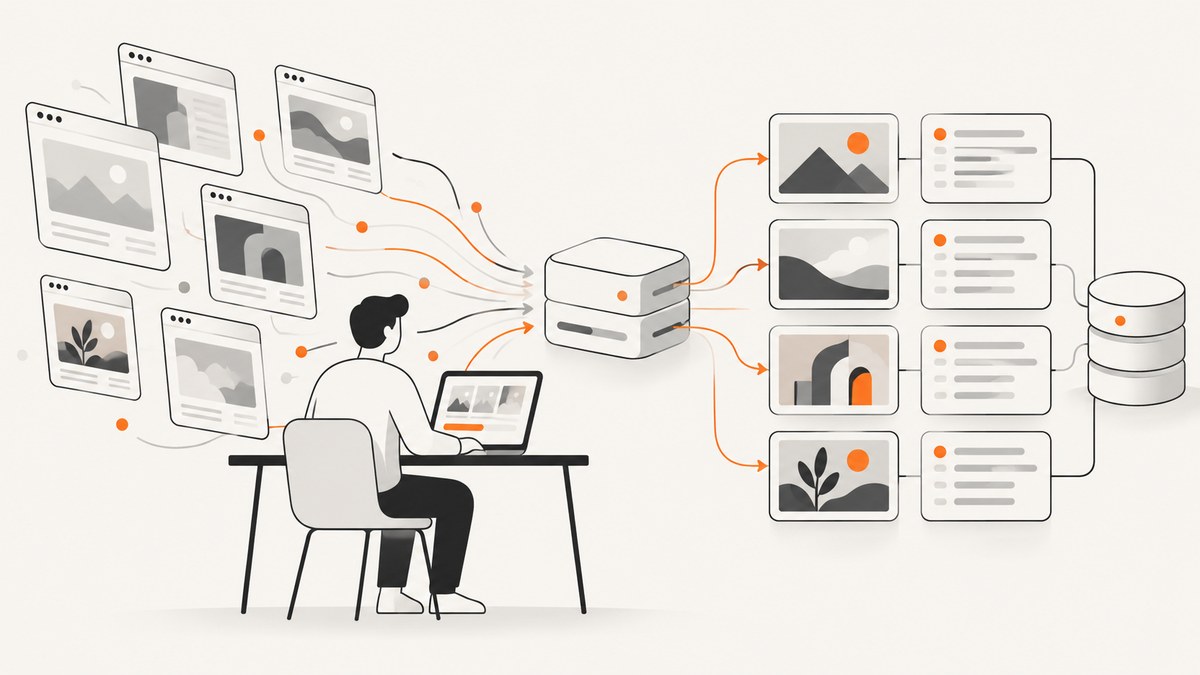
Direct answer: build a screenshots dataset by defining exactly what one example represents, rendering every URL with recorded browser settings, saving each image beside provenance and outcome metadata, filtering failed or misleading captures, and splitting related pages by domain before evaluation. A browser automation script gives maximum control; an archive such as Common Crawl may be better when historical coverage matters more than fresh rendering.
1. Define the dataset before opening a browser
Write a collection specification first. It should answer:
- Population: which domains, URL lists, URL patterns, or web categories are included?
- Sampling: are URLs selected from a sitemap, search results, an internal crawl, a curated list, or an archive?
- Unit of data: one URL, one page, one device render, or one interaction state?
- Time: which collection dates and timezone are recorded?
- Geography: which region, language, timezone, and geolocation are used?
- Exclusions: login-only pages, paywalls, adult content, personal data, downloads, or pages that violate your research scope?
- Output: viewport screenshots, full-page screenshots, or both?
A useful sample identifier combines a stable page key with the rendering variant, for example domain_hash/page_hash/device_desktop_1440x900. Keep the original URL separately so the identifier remains stable if display labels change.
2. Choose archived data or fresh rendering
| Approach | Use it when | Trade-offs |
|---|---|---|
| Existing archive | You need historical coverage or want to avoid running browsers. | Capture timing, viewport, JavaScript state, and completeness may not match your task. |
| Fresh browser rendering | You need controlled devices, waits, interactions, or current pages. | You must operate crawlers, handle failures, respect access controls, and pay compute or capture costs. |
| Hybrid | You need archive scale plus a controlled current evaluation set. | Document the two capture semantics separately. |
Common Crawl data is freely accessible and hosted on AWS in us-east-1. Its FAQ describes the corpus as a sample of the web rather than a complete archive of every site, and documents rate limits, adaptive backoff, crawl-delay handling, blocking, and an official downloader. See Common Crawl’s getting-started guide and FAQ.
3. Specify rendering conditions
Use one configuration for the main dataset unless rendering variation is itself an experimental factor. Record at least:
| Setting | Examples | Why it matters |
|---|---|---|
| Browser | Chromium version, headless mode | Font, CSS, and layout behavior can change between versions. |
| Device | Desktop, tablet, phone; viewport width and height | Responsive breakpoints change the image. |
| Pixel density | Device scale factor or retina scale | Changes raster dimensions and text sharpness. |
| Capture type | Viewport or full page | Viewport has fixed dimensions; full page has variable height. The WebUI study used both forms across six simulated devices. WebUI paper |
| Wait policy | Load state, network idle, selector wait, fixed delay | Prevents capturing loading placeholders or incomplete lazy content. |
| Scrolling | None, incremental scroll, full-page capture | Scrolling can trigger lazy images and infinite lists. |
| Interaction | Clicks, dismissals, expanded menus | Defines the page state represented by the image. |
| Network identity | User agent, headers, cookies, locale | Sites may render different content or require authentication. |
| Output | PNG, JPEG, or WebP; quality setting | Affects fidelity, file size, and model preprocessing. |
4. Store images and provenance together
Do not keep screenshots as anonymous files. A minimal JSON Lines record can look like this:

{
  "sample_id": "example_com_9f3a_home_desktop_1440x900",
  "url": "https://example.com/",
  "captured_at": "2026-10-01T12:00:00Z",
  "browser": "chromium-",
  "viewport": {"width": 1440, "height": 900},
  "device_scale_factor": 1,
  "capture_type": "viewport",
  "user_agent": "",
  "locale": "en-US",
  "timezone": "UTC",
  "wait_policy": {"load_state": "networkidle", "delay_ms": 1000},
  "interactions": [],
  "image_path": "images/example_com_9f3a_home_desktop_1440x900.png",
  "http_status": 200,
  "outcome": "clean",
  "filter_reason": null,
  "content_hash": "",
  "terms_review": "pending"
}
Optionally store HTML, an accessibility tree, bounding boxes, computed styles, or layout annotations. The WebUI paper paired screenshots with accessibility and layout information; use those companions when your task needs semantic or geometric labels.
5. Implement a reproducible collector with Playwright
The following Python program captures a URL list, scrolls to trigger lazy loading, saves screenshots, and writes one provenance record per attempt.
import asyncio
import hashlib
import json
from datetime import datetime, timezone
from pathlib import Path
from playwright.async_api import async_playwright, TimeoutError as PlaywrightTimeoutError

URLS = ["https://example.com/", "https://www.python.org/"]
OUT = Path("dataset")
VIEWPORT = {"width": 1440, "height": 900}


def sample_id(url: str) -> str:
    host = url.split("//", 1)[-1].split("/", 1)[0].replace(".", "_")
    digest = hashlib.sha256(url.encode()).hexdigest()[:12]
    return f"{host}_{digest}_desktop_1440x900"


async def scroll_page(page):
    await page.evaluate("""async () => {
      await new Promise(resolve => {
        let y = 0;
        const step = 700;
        const timer = setInterval(() => {
          window.scrollBy(0, step);
          y += step;
          if (y >= document.body.scrollHeight || y > 30000) {
            clearInterval(timer);
            resolve();
          }
        }, 100);
      });
    }""")
    await page.wait_for_timeout(500)


async def main():
    OUT.joinpath("images").mkdir(parents=True, exist_ok=True)
    records = []
    async with async_playwright() as pw:
        browser = await pw.chromium.launch()
        context = await browser.new_context(
            viewport=VIEWPORT,
            device_scale_factor=1,
            locale="en-US",
            timezone_id="UTC",
        )
        for url in URLS:
            sid = sample_id(url)
            record = {
                "sample_id": sid,
                "url": url,
                "captured_at": datetime.now(timezone.utc).isoformat(),
                "browser": "chromium",
                "viewport": VIEWPORT,
                "device_scale_factor": 1,
                "capture_type": "full_page",
                "wait_policy": {"load_state": "networkidle", "delay_ms": 1000},
                "interactions": [],
            }
            try:
                page = await context.new_page()
                response = await page.goto(url, wait_until="domcontentloaded", timeout=60000)
                record["http_status"] = response.status if response else None
                await page.wait_for_load_state("networkidle", timeout=30000)
                await scroll_page(page)
                await page.wait_for_timeout(1000)
                path = OUT / "images" / f"{sid}.png"
                await page.screenshot(path=str(path), full_page=True)
                record.update({"image_path": str(path), "outcome": "captured", "filter_reason": None})
                await page.close()
            except PlaywrightTimeoutError as exc:
                record.update({"outcome": "failed", "filter_reason": f"timeout: {exc}"})
            except Exception as exc:
                record.update({"outcome": "failed", "filter_reason": f"error: {type(exc).__name__}: {exc}"})
            records.append(record)
        await browser.close()
    with (OUT / "metadata.jsonl").open("w", encoding="utf-8") as f:
        for record in records:
            f.write(json.dumps(record) + "\n")


if __name__ == "__main__":
    asyncio.run(main())
Install and run it with:
python -m pip install playwright
playwright install chromium
python collect.py
For a viewport-only dataset, change full_page=True to full_page=False. For a device study, create one browser context per documented viewport and device scale factor, and include that variant in sample_id.
6. Handle pages that need special treatment
- Lazy content: scroll incrementally, wait after each segment, and record the scroll policy.
- Infinite scroll: impose a maximum height or item count so one URL cannot run indefinitely.
- Cookie banners and overlays: record whether the banner was accepted, dismissed, or retained. Do not silently mix states.
- Animations: disable them with a documented stylesheet or wait for a stable state; otherwise repeated captures may differ.
- Authentication: do not bypass access controls. If collection is authorized, use a dedicated account and record that the image represents an authenticated state.
- Geographic or language variation: pin locale, timezone, geolocation, and headers.
- Fonts and media: wait for
document.fonts.readyand verify that important images have loaded before capture. - Very tall pages: impose a maximum height and mark truncated captures explicitly.
7. Filter quality failures before training
Keep the raw attempt record, even when the image is excluded. Useful automatic checks include:
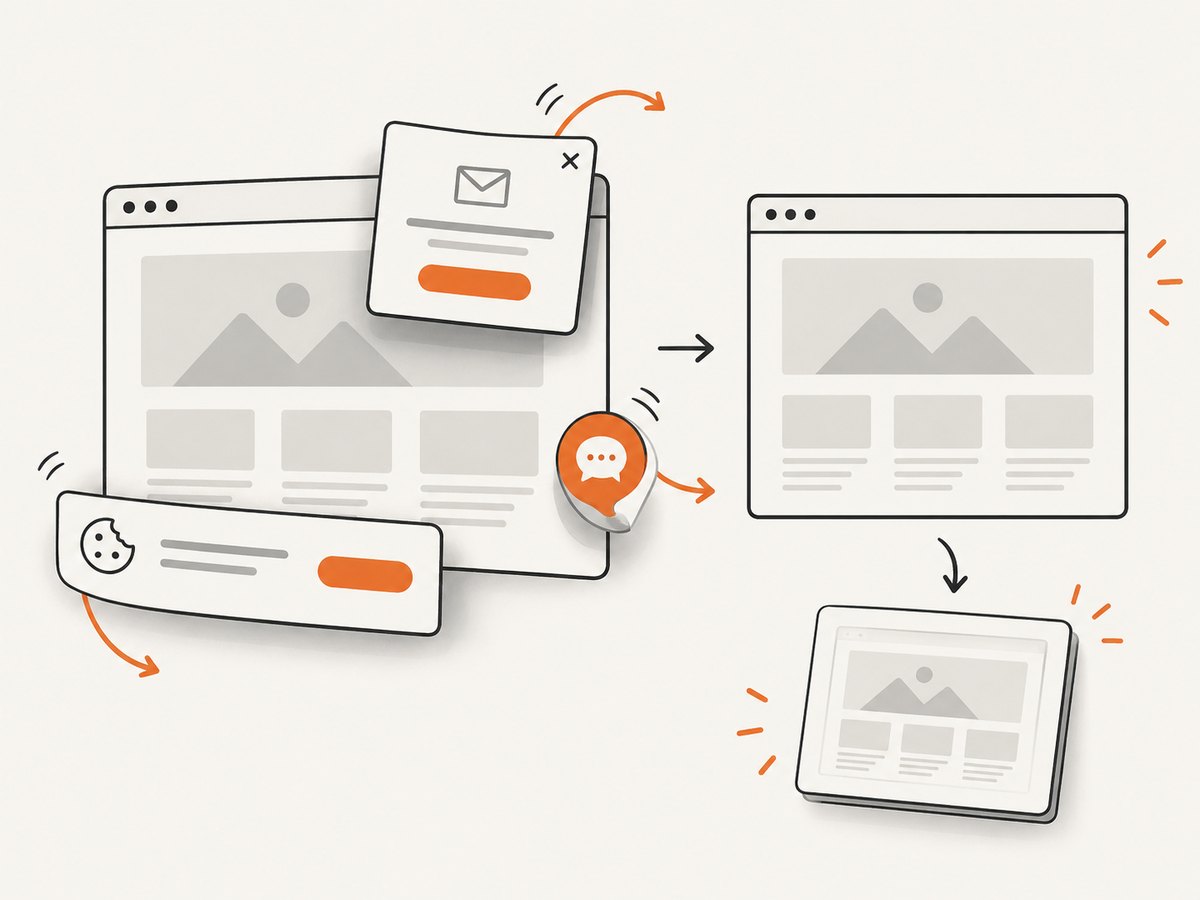
- HTTP errors, navigation exceptions, timeouts, and browser crashes.
- Blank or near-blank images based on pixel variance or a small content bounding box.
- Unexpected bot checks, CAPTCHAs, consent walls, login pages, or maintenance screens.
- Images that are much smaller or taller than the configured bounds.
- Missing lazy-loaded regions, broken image icons, or large loading placeholders.
- Duplicate content hashes from different URLs or repeated captures.
- Occluded, tiny, or invisible elements when the task evaluates component appearance.
Run a manual review on a random sample from every domain and every failure category. Store outcome values such as captured, excluded_blank, excluded_overlay, excluded_duplicate, and failed_timeout, plus a human-readable reason.
8. Split data without leaking site design
Assign the grouping key before splitting. Usually that key is the registrable domain; for a multi-site organization, use the organization or template family if pages share a codebase. Put all pages from one group in one split. Otherwise, a model can memorize a site’s colors, navigation, and typography and appear to generalize.
The WebUI paper grouped pages by domain and reported a 70% training, 10% validation, and 20% test split. That is an example, not a universal standard. Choose proportions based on your task, publish the grouping rule, and keep device variants of the same page together unless cross-device generalization is the explicit experiment.
9. Rights, privacy, and crawler behavior
A public URL is not automatically a license to redistribute its pixels, HTML, or personal data. Before collection and publication:
- Review site terms, robots.txt, technical access controls, and applicable copyright and privacy rules.
- Use conservative rates, identify your crawler where appropriate, and back off on errors.
- Do not bypass authentication, paywalls, CAPTCHAs, or other technical restrictions.
- Minimize collection of names, faces, email addresses, account details, and other sensitive content.
- Document deletion, access, retention, and redaction procedures.
- Obtain legal review for high-impact public redistribution or sensitive datasets.
Google documents that its standard crawlers honor robots.txt and adjust crawling when sites slow down or return errors; it also says its crawlers do not enter paywall or subscription content without permission. These are Google’s practices, not a complete legal rule for independent research. See Google’s crawling guidance. Common Crawl’s terms describe intellectual-property protections and a notice process, but do not grant a blanket license to publish every screenshot. W3C’s screenshot permission is site-specific; its intellectual-rights policy must not be generalized to other sites.
10. Throughput, reliability, and cost
| Concern | Practical approach |
|---|---|
| Throughput | Reuse browser processes, limit concurrent pages, and separate navigation concurrency from image processing. |
| Reliability | Use bounded timeouts, retries with exponential backoff, idempotent sample IDs, and a durable attempt log. |
| Reproducibility | Pin browser versions and dependencies; archive configuration, code revision, timezone, locale, and capture date. |
| Storage | Choose PNG for lossless analysis, JPEG or WebP for smaller files, and record the exact encoder settings. |
| Cost | Estimate browser compute, bandwidth, storage, retries, and review time. The WebUI paper reported about $500 for its specific 400K-UI, three-month collection; do not treat that historical figure as a current forecast. |
| Backpressure | Honor server errors and crawl-delay signals. Queue failed URLs for a later pass instead of increasing concurrency. |
11. Troubleshooting
| Symptom | Likely cause | Fix |
|---|---|---|
| Blank white image | JavaScript has not rendered, navigation failed, or the page is blocked. | Save status and console errors, wait for a meaningful selector, retry once with backoff, then exclude and retain the record. |
| Cookie wall covers content | Consent state was not handled. | Choose and document a consent policy; apply it consistently or classify the capture as an overlay failure. |
| Images missing below the fold | Lazy loading requires scrolling. | Scroll in increments, wait for network activity to settle, and verify image completion. |
| Different results on every run | Animations, rotating content, ads, time-dependent data, or nondeterministic APIs. | Freeze time where permitted, disable animations, pin locale and timezone, and record unavoidable variation. |
| Timeouts spike | Concurrency is too high, the origin is slow, or a resource hangs. | Reduce concurrency, set separate navigation and overall timeouts, retry with backoff, and mark persistent failures. |
| Evaluation score is unexpectedly high | Pages from the same domain or template appear in multiple splits. | Rebuild splits by domain, organization, or template family before training. |
| Published dataset receives a rights complaint | Reuse permissions or personal-data review was incomplete. | Follow the documented notice and takedown process, remove affected records, and obtain legal review. |
Or skip the browser setup
ScreenshotNeo provides a website screenshot API and MCP server when you want managed rendering and capture controls. Its clean-shot workflow accepts consent banners before capture and removes more than 60 known consent platforms, newsletter popups, and chat widgets; each step can be turned off. Bot checks, blank pages, timeouts, failed loads, and cache hits are not billed, and responses identify the result with X-Page-Verdict and X-Billed headers. An MCP server provides take_screenshot, get_page_info, and capture_pdf tools for Claude, Cursor, and other MCP clients. One thousand screenshots per month are free without a card; paid plans start at $5 for 3,000 shots.
See the ScreenshotNeo API documentation for the full option set, including full-page capture, CSS-element capture, device presets, retina scale, custom CSS and JavaScript, clicks, waits, blocking rules, headers, cookies, user agents, timezone and geolocation, resizing, caching, signed links, asynchronous jobs, bulk capture, usage reporting, and PDF output.
curl -G "https://api.screenshotneo.com/v1/shot" -d access_key=YOUR_API_KEY --data-urlencode url=https://example.com -o shot.webpimport requests
r = requests.get("https://api.screenshotneo.com/v1/shot", params={"access_key": "YOUR_API_KEY", "url": "https://example.com"}, timeout=90)
open("shot.webp", "wb").write(r.content)const q = new URLSearchParams({ access_key: 'YOUR_API_KEY', url: 'https://example.com' });
const res = await fetch(`https://api.screenshotneo.com/v1/shot?${q}`);For a dataset, save the request parameters, response headers, capture timestamp, verdict, billed flag, and your own sample identifier alongside each returned image. Create a free ScreenshotNeo account with 1,000 screenshots per month and no card.
12. Dataset release checklist
- Every image has a stable ID, source URL, timestamp, and complete rendering configuration.
- Capture outcomes and exclusion reasons are preserved, including failed attempts.
- Viewport and full-page images are labeled distinctly.
- Duplicate, blank, blocked, and incomplete pages have been reviewed.
- Train, validation, and test groups are separated by domain or another defensible cluster.
- Archive the collector version, browser version, dependency lockfile, and schema.
- Terms, robots.txt, privacy, copyright, and redistribution decisions are documented.
- README files explain sampling, known biases, missing pages, and intended use.
FAQ
Should each URL produce one image or several?
Use several when device, viewport, interaction state, or time variation is part of the research question. Otherwise, one pinned configuration makes analysis easier.
Is full-page capture always better?
No. Viewport images have fixed dimensions and are easier to batch; full-page images preserve page length but can be extremely tall and may trigger different lazy-loading behavior.
Can I publish screenshots of any public website?
No universal permission follows from public accessibility. Review rights, terms, privacy, access controls, and the rules of the jurisdictions involved.
Do I need HTML with every screenshot?
Only when your task needs source, accessibility, or layout labels. For visual-only modeling, provenance and quality outcomes may be sufficient.
How do I make a dataset reproducible months later?
Pin browser and code versions, preserve the exact URL list and configuration, record collection time and geography, and keep the original attempt logs and hashes.


